# WhisperLive
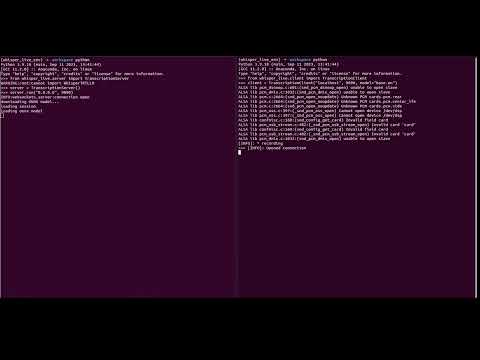
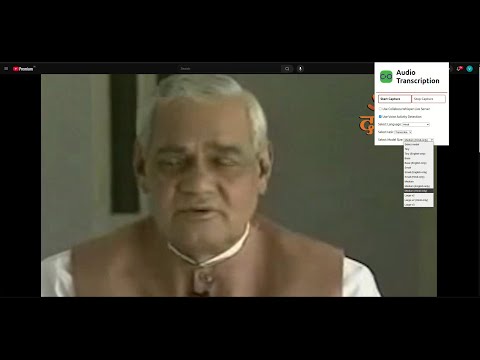
A nearly-live implementation of OpenAI's Whisper.
This project is a real-time transcription application that uses the OpenAI Whisper model
to convert speech input into text output. It can be used to transcribe both live audio
input from microphone and pre-recorded audio files.
- [Installation](#installation)
- [Getting Started](#getting-started)
- [Running the Server](#running-the-server)
- [Running the Client](#running-the-client)
- [Advanced Features](#advanced-features)
- [Word-Level Timestamps](#word-level-timestamps)
- [Custom Vocabulary / Hotwords](#custom-vocabulary--hotwords)
- [Speaker Diarization](#speaker-diarization)
- [Batch Inference](#batch-inference)
- [Raw PCM Input](#raw-pcm-input)
- [Streaming Client (Manual Audio Chunking)](#streaming-client-manual-audio-chunking)
- [Browser Extensions](#browser-extensions)
- [Whisper Live Server in Docker](#whisper-live-server-in-docker)
- [Troubleshooting](#troubleshooting)
- [Future Work](#future-work)
- [Blog Posts](#blog-posts)
- [Contact](#contact)
- [Citations](#citations)
## Installation
- Install PortAudio (required system dependency for microphone input via PyAudio)
```bash
bash scripts/setup.sh
```
On Debian/Ubuntu this installs `portaudio19-dev`, on Fedora `portaudio-devel`, on macOS it uses Homebrew (`portaudio`).
- Install 3.12 venv (on Fedora `sudo dnf install -y python3.12 python3.12-pip`)
```bash
python3.12 -m venv whisper_env
source whisper_env/bin/activate
```
- Install whisper-live from pip
```bash
pip install whisper-live
```
### OpenAI REST interface
#### Server
```bash
python3 run_server.py --port 9090 --backend faster_whisper --max_clients 4 --max_connection_time 600 --enable_rest --cors-origins="http://localhost:8080,http://127.0.0.1:8080"
```
#### Client
```bash
python3 client_openai.py $AUDIO_FILE
```
### Setting up NVIDIA/TensorRT-LLM for TensorRT backend
- Please follow [TensorRT_whisper readme](https://github.com/collabora/WhisperLive/blob/main/TensorRT_whisper.md) for setup of [NVIDIA/TensorRT-LLM](https://github.com/NVIDIA/TensorRT-LLM) and for building Whisper-TensorRT engine.
## Getting Started
The server supports 3 backends `faster_whisper`, `tensorrt` and `openvino`. If running `tensorrt` backend follow [TensorRT_whisper readme](https://github.com/collabora/WhisperLive/blob/main/TensorRT_whisper.md)
### Running the Server
- [Faster Whisper](https://github.com/SYSTRAN/faster-whisper) backend
```bash
python3 run_server.py --port 9090 \
--backend faster_whisper \
--max_clients 4 \
--max_connection_time 600
# running with custom model and cache_dir to save auto-converted ctranslate2 models
python3 run_server.py --port 9090 \
--backend faster_whisper \
--max_clients 4 \
--max_connection_time 600 \
-fw "/path/to/custom/faster/whisper/model" \
-c ~/.cache/whisper-live/
```
- TensorRT backend. Currently, we recommend to only use the docker setup for TensorRT. Follow [TensorRT_whisper readme](https://github.com/collabora/WhisperLive/blob/main/TensorRT_whisper.md) which works as expected. Make sure to build your TensorRT Engines before running the server with TensorRT backend.
```bash
# Run English only model
python3 run_server.py -p 9090 \
-b tensorrt \
-trt /home/TensorRT-LLM/examples/whisper/whisper_small_en \
--max_clients 4 \
--max_connection_time 600
# Run Multilingual model
python3 run_server.py -p 9090 \
-b tensorrt \
-trt /home/TensorRT-LLM/examples/whisper/whisper_small \
-m \
--max_clients 4 \
--max_connection_time 600
```
> **Note:** The TensorRT backend uses a C++ session by default. If you experience issues (e.g. repeated `CrossAttentionMask` warnings or crashes), add the `--trt_py_session` flag to use the Python session instead.
- Use `--max_clients` option to restrict the number of clients the server should allow. Defaults to 4.
- Use `--max_connection_time` options to limit connection time for a client in seconds. Defaults to 600.
- WhisperLive now supports the [OpenVINO](https://github.com/openvinotoolkit/openvino) backend for efficient inference on Intel CPUs, iGPU and dGPUs. Currently, we tested the models uploaded to [huggingface by OpenVINO](https://huggingface.co/OpenVINO?search_models=whisper).
- > **Docker Recommended:** Running WhisperLive with OpenVINO inside Docker automatically enables GPU support (iGPU/dGPU) without requiring additional host setup.
- > **Native (non-Docker) Use:** If you prefer running outside Docker, ensure the Intel drivers and OpenVINO runtime are installed and properly configured on your system. Refer to the documentation for [installing OpenVINO](https://docs.openvino.ai/2025/get-started/install-openvino.html?PACKAGE=OPENVINO_BASE&VERSION=v_2025_0_0&OP_SYSTEM=LINUX&DISTRIBUTION=PIP#).
```
python3 run_server.py -p 9090 -b openvino
```
### Setting up AMD ROCm for faster_whisper backend
- Please follow [ROCm_whisper readme](https://github.com/collabora/WhisperLive/blob/main/ROCm_whisper.md) for setup of AMD ROCm GPU support with the CTranslate2 ROCm wheel.
#### Controlling OpenMP Threads
To control the number of threads used by OpenMP, you can set the `OMP_NUM_THREADS` environment variable. This is useful for managing CPU resources and ensuring consistent performance. If not specified, `OMP_NUM_THREADS` is set to `1` by default. You can change this by using the `--omp_num_threads` argument:
```bash
python3 run_server.py --port 9090 \
--backend faster_whisper \
--omp_num_threads 4
```
#### Single model mode
By default, when running the server without specifying a model, the server will instantiate a new whisper model for every client connection. This has the advantage, that the server can use different model sizes, based on the client's requested model size. On the other hand, it also means you have to wait for the model to be loaded upon client connection and you will have increased (V)RAM usage.
When serving a custom TensorRT model using the `-trt` or a custom faster_whisper model using the `-fw` option, the server will instead only instantiate the custom model once and then reuse it for all client connections.
If you don't want this, set `--no_single_model`.
### Running the Client
Use the below command to run the client:
```bash
python3 run_client.py --files
```
This will connect to the localhost server running on port 9090 by default. Use flags `--server` and `--port` to use different configurations. The above command will transcribe audio file provided with `--files` flag.
Here are the details of client instance implemented in `run_client.py` script:
- `lang`: Language of the input audio, applicable only if using a multilingual model.
- `translate`: If set to `True` then translate from any language to `en`.
- `model`: Whisper model size.
- `use_vad`: Whether to use `Voice Activity Detection` on the server.
- `save_output_recording`: Set to True to save the microphone input as a `.wav` file during live transcription. This option is helpful for recording sessions for later playback or analysis. Defaults to `False`.
- `output_recording_filename`: Specifies the `.wav` file path where the microphone input will be saved if `save_output_recording` is set to `True`.
- `mute_audio_playback`: Whether to mute audio playback when transcribing an audio file. Defaults to False.
- `enable_translation`: Start translation thread on the server (from any to any).
- `target_language`: Server translation thread's target translation language.
```python
from whisper_live.client import TranscriptionClient
client = TranscriptionClient(
"localhost",
9090,
lang="en",
translate=False,
model="small", # also support hf_model => `Systran/faster-whisper-small`
use_vad=False,
save_output_recording=True, # Only used for microphone input, False by Default
output_recording_filename="./output_recording.wav", # Only used for microphone input
mute_audio_playback=False, # Only used for file input, False by Default
enable_translation=True,
target_language="hi",
initial_prompt=None, # Add context for the model, e.g. 'Jane Doe context'
)
```
It connects to the server running on localhost at port 9090. Using a multilingual model, language for the transcription will be automatically detected. You can also use the language option to specify the target language for the transcription, in this case, English ("en"). The translate option should be set to `True` if we want to translate from the source language to English and `False` if we want to transcribe in the source language.
- Transcribe an audio file:
```python
client("tests/jfk.wav")
```
- To transcribe from microphone:
```python
client()
```
- To transcribe from a RTSP stream:
```python
client(rtsp_url="rtsp://admin:admin@192.168.0.1/rtsp")
```
- To transcribe from a HLS stream:
```python
client(hls_url="http://as-hls-ww-live.akamaized.net/pool_904/live/ww/bbc_1xtra/bbc_1xtra.isml/bbc_1xtra-audio%3d96000.norewind.m3u8")
```
## Advanced Features
#### Word-Level Timestamps
Enable per-word timing and confidence scores in transcription segments:
```python
client = TranscriptionClient(
"localhost", 9090,
word_timestamps=True,
)
```
When enabled, each segment in the WebSocket response includes a `words` array:
```json
{
"segments": [{
"start": "0.000", "end": "2.500", "text": "Hello world",
"words": [
{"word": "Hello", "start": "0.000", "end": "0.800", "probability": 0.95},
{"word": " world", "start": "0.900", "end": "2.500", "probability": 0.88}
]
}]
}
```
#### Custom Vocabulary / Hotwords
Boost recognition of specific terms (product names, acronyms, domain jargon):
```python
client = TranscriptionClient(
"localhost", 9090,
hotwords="WhisperLive,TensorRT,OpenVINO",
)
```
The `hotwords` parameter is a comma-separated string passed directly to faster-whisper's keyword boosting. Also available in the REST API via the `hotwords` form field.
#### Speaker Diarization
Real-time speaker identification using pyannote.audio embeddings (optional dependency):
```bash
pip install pyannote.audio
```
```python
client = TranscriptionClient(
"localhost", 9090,
enable_diarization=True,
max_speakers=4,
)
```
When enabled, completed segments include a `speaker` field:
```json
{"start": "0.000", "end": "2.500", "text": "Hello", "speaker": "SPEAKER_00", "completed": true}
```
Diarization uses online cosine-similarity clustering of speaker embeddings. If `pyannote.audio` is not installed, the server logs a warning and continues without diarization.
The OpenAI-compatible REST endpoint also accepts `known_speaker_names` and uploaded `known_speaker_references` multipart fields. When speaker fields are supplied with `response_format="verbose_json"`, segments include a `speaker` field.
#### Batch Inference
Batch multiple client sessions into single GPU calls for higher throughput:
```bash
python3 run_server.py --port 9090 --backend faster_whisper \
--batch_inference --batch_max_size 8 --batch_window_ms 50
```
#### Raw PCM Input
Accept raw PCM int16 audio from clients (useful for embedded devices):
```bash
python3 run_server.py --port 9090 --backend faster_whisper --raw_pcm_input
```
Audio is automatically normalized to float32 range [-1.0, 1.0]. Clients can also set `audio_format` in the initial websocket options to `float32` (default), `int16`, or `uint8`.
## Streaming Client (manual audio streaming from any source)
`StreamingTranscriptionClient` lets you push raw PCM audio bytes from any source — a live microphone capture loop, a network stream, an audio pipeline — and receive transcripts via callbacks as speech is detected. Unlike `TranscriptionClient`, it does not manage audio capture internally; you control when and how audio is fed.
A runnable example that reads from an audio file and streams the chunks is at [`examples/manual_audio_chunking.py`](examples/manual_audio_chunking.py):
```bash
python examples/manual_audio_chunking.py --file assets/jfk.flac
```
Example usage:
```python
from whisper_live.client import StreamingTranscriptionClient
client = StreamingTranscriptionClient(
"localhost", 9090,
lang="en",
model="small",
on_session_started=lambda: print("Server ready"),
on_partial_transcript=lambda text, segs: print(f"… {text}", end="\r"),
on_committed_transcript=lambda text, segs: print(f"✓ {text}"),
on_error=lambda e: print(f"Error: {e}"),
on_close=lambda: print("Closed"),
)
with client:
for chunk in my_audio_source: # any cadence, any chunk size
client.send(chunk, pcm_format="int16")
```
Audio must be **mono, 16 kHz PCM**. Two formats are accepted:
| `pcm_format` | Description |
|---|---|
| `"int16"` (default for raw microphone data) | 16-bit signed integers, normalized internally |
| `"float32"` | 32-bit floats in `[-1, 1]`, passed through directly |
NumPy arrays can be sent with `send_array()`:
```python
import numpy as np
samples = np.frombuffer(raw_bytes, dtype=np.int16)
client.send_array(samples)
```
**Callbacks**
| Callback | Signature | When fired |
|---|---|---|
| `on_session_started` | `() -> None` | Server handshake complete, ready to receive audio |
| `on_partial_transcript` | `(text, segments) -> None` | In-progress segment updated |
| `on_committed_transcript` | `(text, segments) -> None` | Segment finalized |
| `on_translation` | `(text, segments) -> None` | Translated segment ready (requires `enable_translation=True`) |
| `on_error` | `(error) -> None` | WebSocket error |
| `on_close` | `() -> None` | Connection closed |
## Browser Extensions
- Run the server with your desired backend as shown [here](https://github.com/collabora/WhisperLive?tab=readme-ov-file#running-the-server).
- Transcribe audio directly from your browser using our Chrome or Firefox extensions. Refer to [Audio-Transcription-Chrome](https://github.com/collabora/whisper-live/tree/main/Audio-Transcription-Chrome#readme) and https://github.com/collabora/WhisperLive/blob/main/TensorRT_whisper.md
## iOS Client
Use WhisperLive on iOS with our native iOS client.
Refer to [`ios-client`](https://github.com/collabora/WhisperLive/tree/main/Audio-Transcription-iOS) and [`ios-client/README.md`](https://github.com/collabora/WhisperLive/blob/main/Audio-Transcription-iOS/README.md) for setup and usage instructions.
## Whisper Live Server in Docker
- GPU
- Faster-Whisper
```bash
docker run -it --gpus all -p 9090:9090 ghcr.io/collabora/whisperlive-gpu:latest
```
- TensorRT. Refer to [TensorRT_whisper readme](https://github.com/collabora/WhisperLive/blob/main/TensorRT_whisper.md) for setup and more tensorrt backend configurations.
```bash
docker build . -f docker/Dockerfile.tensorrt -t whisperlive-tensorrt
docker run -p 9090:9090 --runtime=nvidia --gpus all --entrypoint /bin/bash -it whisperlive-tensorrt
# Build small.en engine
bash build_whisper_tensorrt.sh /app/TensorRT-LLM-examples small.en # float16
bash build_whisper_tensorrt.sh /app/TensorRT-LLM-examples small.en int8 # int8 weight only quantization
bash build_whisper_tensorrt.sh /app/TensorRT-LLM-examples small.en int4 # int4 weight only quantization
# Run server with small.en (pick one engine)
python3 run_server.py --port 9090 \
--backend tensorrt \
--trt_model_path "/app/TensorRT-LLM-examples/whisper/whisper_small_en_float16"
# or int8 / int4:
# --trt_model_path "/app/TensorRT-LLM-examples/whisper/whisper_small_en_int8"
# --trt_model_path "/app/TensorRT-LLM-examples/whisper/whisper_small_en_int4"
```
- OpenVINO
```
docker run -it --device=/dev/dri -p 9090:9090 ghcr.io/collabora/whisperlive-openvino
```
- AMD ROCm (faster-whisper on AMD GPU via CTranslate2 ROCm wheel)
```bash
docker build -f docker/Dockerfile.rocm -t whisperlive-rocm .
docker run --rm -it --device=/dev/kfd --device=/dev/dri \
--group-add "$(getent group video | cut -d: -f3)" \
--group-add "$(getent group render | cut -d: -f3)" \
-p 9090:9090 whisperlive-rocm
```
- CPU
- Faster-whisper
```bash
docker run -it -p 9090:9090 ghcr.io/collabora/whisperlive-cpu:latest
```
## Troubleshooting
#### macOS OpenMP runtime conflict
On macOS, especially on Intel Macs, `faster_whisper`/`ctranslate2` can conflict with OpenMP runtimes loaded by other Python packages. If the server aborts with a duplicate OpenMP runtime error, run the server with `KMP_DUPLICATE_LIB_OK=TRUE`:
```bash
KMP_DUPLICATE_LIB_OK=TRUE python3 run_server.py --port 9090 \
--backend faster_whisper \
--max_clients 4 \
--max_connection_time 600 \
--no_single_model
```
This workaround is intended for local development and testing. For production deployments, prefer using a clean environment that loads only one OpenMP runtime.
## Future Work
- [x] Add translation to other languages on top of transcription.
## Blog Posts
- [Transforming speech technology with WhisperLive](https://www.collabora.com/news-and-blog/blog/2024/05/28/transforming-speech-technology-with-whisperlive/)
- [WhisperFusion: Ultra-low latency conversations with an AI chatbot](https://www.collabora.com/news-and-blog/news-and-events/whisperfusion-ultra-low-latency-conversations-with-an-ai-chatbot.html) powered by WhisperLive
- [Breaking language barriers 2.0: Moving closer towards fully reliable, production-ready Hindi ASR](https://www.collabora.com/news-and-blog/news-and-events/breaking-language-barriers-20-moving-closer-production-ready-hindi-asr.html) which is used in WhisperLive for hindi.
## Contact
We are available to help you with both Open Source and proprietary AI projects. You can reach us via the Collabora website or [vineet.suryan@collabora.com](mailto:vineet.suryan@collabora.com) and [marcus.edel@collabora.com](mailto:marcus.edel@collabora.com).
## Citations
```bibtex
@article{Whisper
title = {Robust Speech Recognition via Large-Scale Weak Supervision},
url = {https://arxiv.org/abs/2212.04356},
author = {Radford, Alec and Kim, Jong Wook and Xu, Tao and Brockman, Greg and McLeavey, Christine and Sutskever, Ilya},
publisher = {arXiv},
year = {2022},
}
```
```bibtex
@misc{Silero VAD,
author = {Silero Team},
title = {Silero VAD: pre-trained enterprise-grade Voice Activity Detector (VAD), Number Detector and Language Classifier},
year = {2021},
publisher = {GitHub},
journal = {GitHub repository},
howpublished = {\url{https://github.com/snakers4/silero-vad}},
email = {hello@silero.ai}
}