# gke-sandboxes
Give each cloud agent its own Linux sandbox, in your own Google Cloud project. A sandbox runs commands and keeps files. Put it to sleep while the user is away, and open the same ID later to get the files back.
A 2 vCPU / 4 GB sandbox costs about **1.9¢ for each hour it is awake**, cluster overhead included. Daytona and E2B list 16.6¢ for the same hour. A sleeping sandbox costs only its storage.
## Set it up
Paste this into Claude Code, Cursor, Codex or another coding agent:
```text
Set up gke-sandboxes in my Google Cloud project. Follow these instructions step by step:
https://raw.githubusercontent.com/comp-work/gke-sandboxes/main/skills/setup-gke-sandboxes/SKILL.md
```
The agent deploys the cluster with Terraform, runs the verifier, and shows you how to connect your backend. Or [deploy it by hand](docs/deploy.md).
Then use it from your backend, on Node.js 22+ or Bun:
```sh
npm install @getenergy/gke-sandboxes
```
```ts
import { GkeSandboxes, KubernetesApi } from '@getenergy/gke-sandboxes';
const sandboxes = new GkeSandboxes(new KubernetesApi(clusterUrl, getGoogleAccessToken), {
namespace: 'sandboxes',
serviceAccount: 'sandbox',
image: 'docker.io/library/debian:bookworm-slim',
});
// Creates the sandbox, returns the running one, or wakes it from its snapshot.
const { sandbox } = await sandboxes.acquire('session-42', AbortSignal.timeout(300_000));
const { exitCode, result } = await sandbox.process.executeCommand('echo hello');
await sandboxes.sleep(sandbox.id);
```
[Full client guide](docs/client.md)
## Features
- **Snapshot and fork.** Keep a snapshot and start new sandboxes from it.
- **Sleep and wake.** A sleeping sandbox is a snapshot in Cloud Storage and uses no CPU or memory. Opening its ID wakes it with its files.
- **Idle sandboxes sleep on their own.** A sweeper puts a sandbox to sleep after five minutes without use.
- **Isolated.** Each sandbox is its own gVisor pod, with incoming traffic blocked and no access to your cloud credentials.
- **Your image.** Use any container image with a POSIX shell.
- **Commands and files.** Run commands with timeouts and streamed output. Upload and download files. A backend on the cluster's network can send them straight to the sandbox, several times faster than through the Kubernetes API.
- **Memory guard.** A runaway program is ended before it takes the whole sandbox down.
- **Warm pool.** Keep a few sandboxes ready so a new session starts in under half a second, under your own id, even when many start at once.
- **Preview links.** An example proxy serves a sandbox’s web server through signed links that expire.
- **Hooks.** Callbacks report every operation’s timing and failures to your own logging.
[Client guide](docs/client.md) · [Operating limits](docs/limits.md)
## How it compares
Costs are for one sandbox at 2 vCPU and 4 GB. Managed providers are at list prices for compute and storage only. Timings used 4 vCPU and 8 GB.
#### Cost while awake
Every bar in the chart above prices the same mostly idle sandbox, at the 0.076 vCPU that Energy’s running sandboxes averaged, about 4% of 2 vCPU. Daytona, E2B and Fly.io charge for the full size while it runs. Vercel charges for the CPU in use and all of the memory. Modal charges for what is used above a default reservation of 0.25 vCPU and 128 MiB. The GKE figure is a whole cluster bill divided by its sandboxes: 520 awake at 56 to a machine, with two spare machines, node disks, system nodes, the cluster fee and snapshot storage. It needs that scale. A small cluster still pays for its minimum machines. Over a 730-hour month awake, 1.9¢ an hour is $14.22. Packed tighter on C4D machines, the GKE compute estimate falls to about $7.80 a month, or 1.1¢ an hour.
The 2 vCPU and 4 GB is a size on some bars and a ceiling on others. For Daytona, E2B, Fly.io and Vercel it is the size the sandbox is created with. For Modal and GKE it is the most a sandbox may use: Modal reserves 0.25 vCPU and 128 MiB by default, and gke-sandboxes reserves 0.25 vCPU and 1 GiB. A Modal sandbox that reserves the full size costs 23.8¢ an hour.
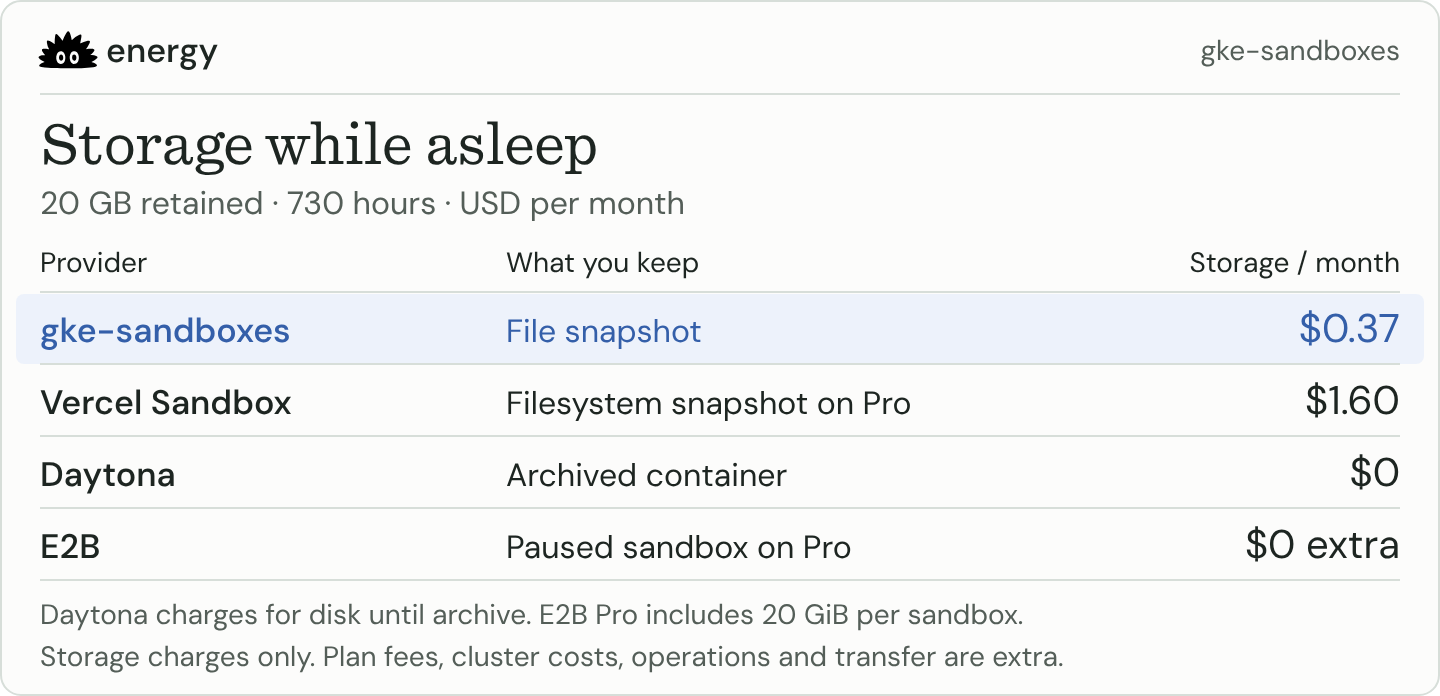
#### Cost while asleep
A sleeping sandbox is a snapshot in Cloud Storage. Machines you keep running still appear on your bill.
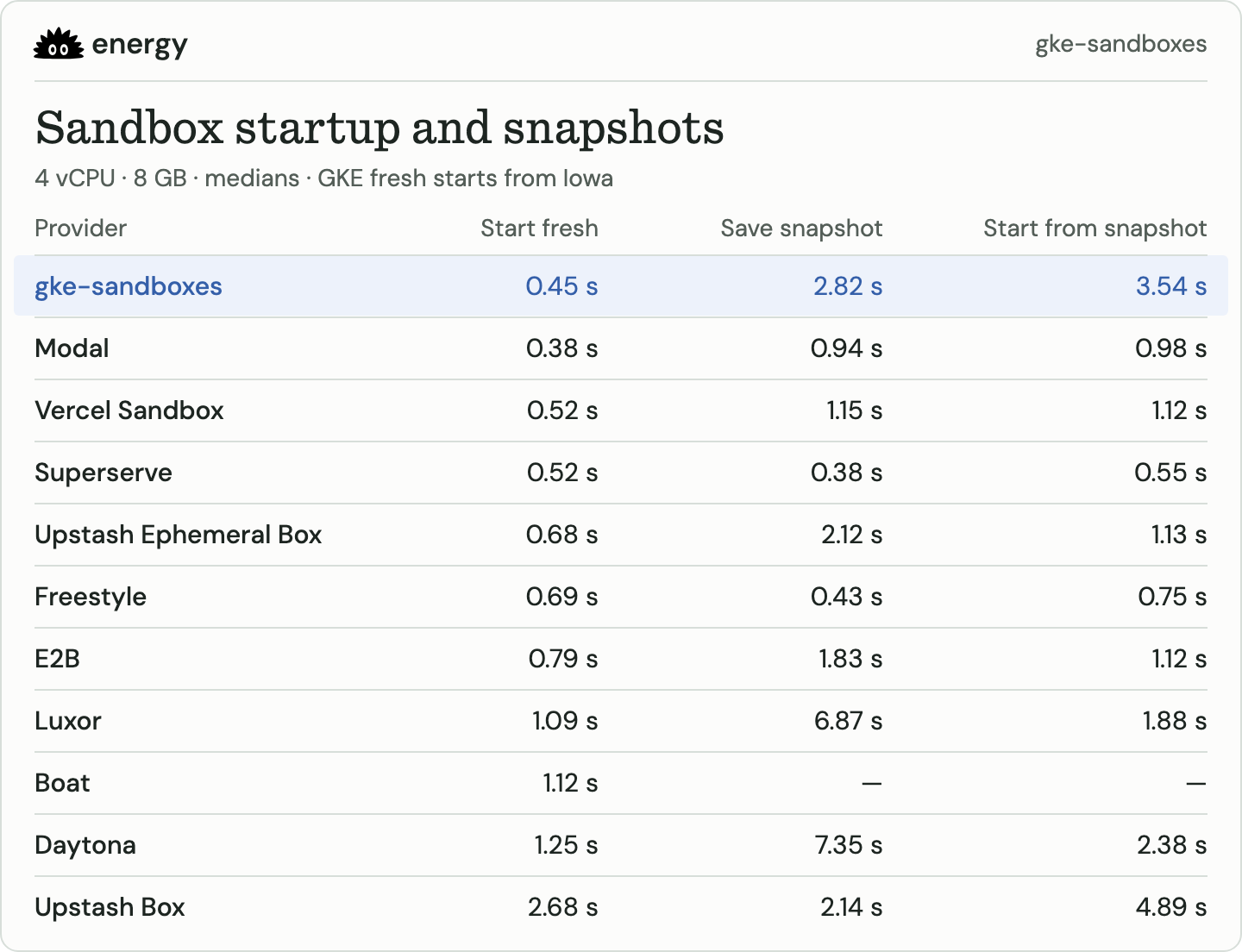
#### Start and wake
Medians. The GKE start time is with two sandboxes kept ready; without one it is about 2.7 s. The other providers were timed by Sandbox Bench from a different region, so read the rows as neighbors, not a ranking. GKE wakes slower than most, and slower still with many files: about 6.5 s at 25,000 files.
#### Speed once running
Building Better Auth took 67 s on a C4D machine with one sandbox, and 81 s on a machine packed with 95 idle ones. We have no build timings for the managed providers.
#### What sleep keeps
gke-sandboxes restores files, not running processes. E2B can keep memory through sleep.
#### When a managed provider fits better
The trade is that you run the cluster: capacity, upgrades and recovery are yours. A managed provider is the better choice if you need only a handful of sandboxes, running processes that survive sleep, GPUs, or a VM kernel per sandbox.
[Full comparison, with sources and method](docs/comparison.md)

 #### Start and wake
Medians. The GKE start time is with two sandboxes kept ready; without one it is about 2.7 s. The other providers were timed by Sandbox Bench from a different region, so read the rows as neighbors, not a ranking. GKE wakes slower than most, and slower still with many files: about 6.5 s at 25,000 files.
 #### Speed once running
Building Better Auth took 67 s on a C4D machine with one sandbox, and 81 s on a machine packed with 95 idle ones. We have no build timings for the managed providers.
#### What sleep keeps
gke-sandboxes restores files, not running processes. E2B can keep memory through sleep.
#### When a managed provider fits better
The trade is that you run the cluster: capacity, upgrades and recovery are yours. A managed provider is the better choice if you need only a handful of sandboxes, running processes that survive sleep, GPUs, or a VM kernel per sandbox.
[Full comparison, with sources and method](docs/comparison.md)