# Sleepless Agent
**A 24/7 AgentOS that works while you sleep**
[](https://context-machine-lab.github.io/sleepless-agent/)
[](https://deepwiki.com/context-machine-lab/sleepless-agent)
[](./assets/wechat.png)
[](https://discord.gg/74my3Wkn)
Have Claude Code Pro but not using it at night? Transform it into an AgentOS that handles your ideas and tasks while you sleep. This is a 24/7 AI assistant daemon powered by Claude Code CLI and Python Agent SDK that processes both random thoughts and serious tasks via Slack with isolated workspaces.
## 📰 News
- **[2025-10-26]** 🎉 Initial release v0.1.0 - Full AgentOS with multi-agent workflow support
- **[2025-10-25]** 🚀 Added task auto-generation with configurable strategies
- **[2025-10-24]** 🔧 Integrated Git management with automatic PR creation
- **[2025-10-23]** 📊 Implemented isolated workspaces for parallel task execution
- **[2025-10-22]** 💡 Added Claude Code Python Agent SDK integration
## 🎬 Demo
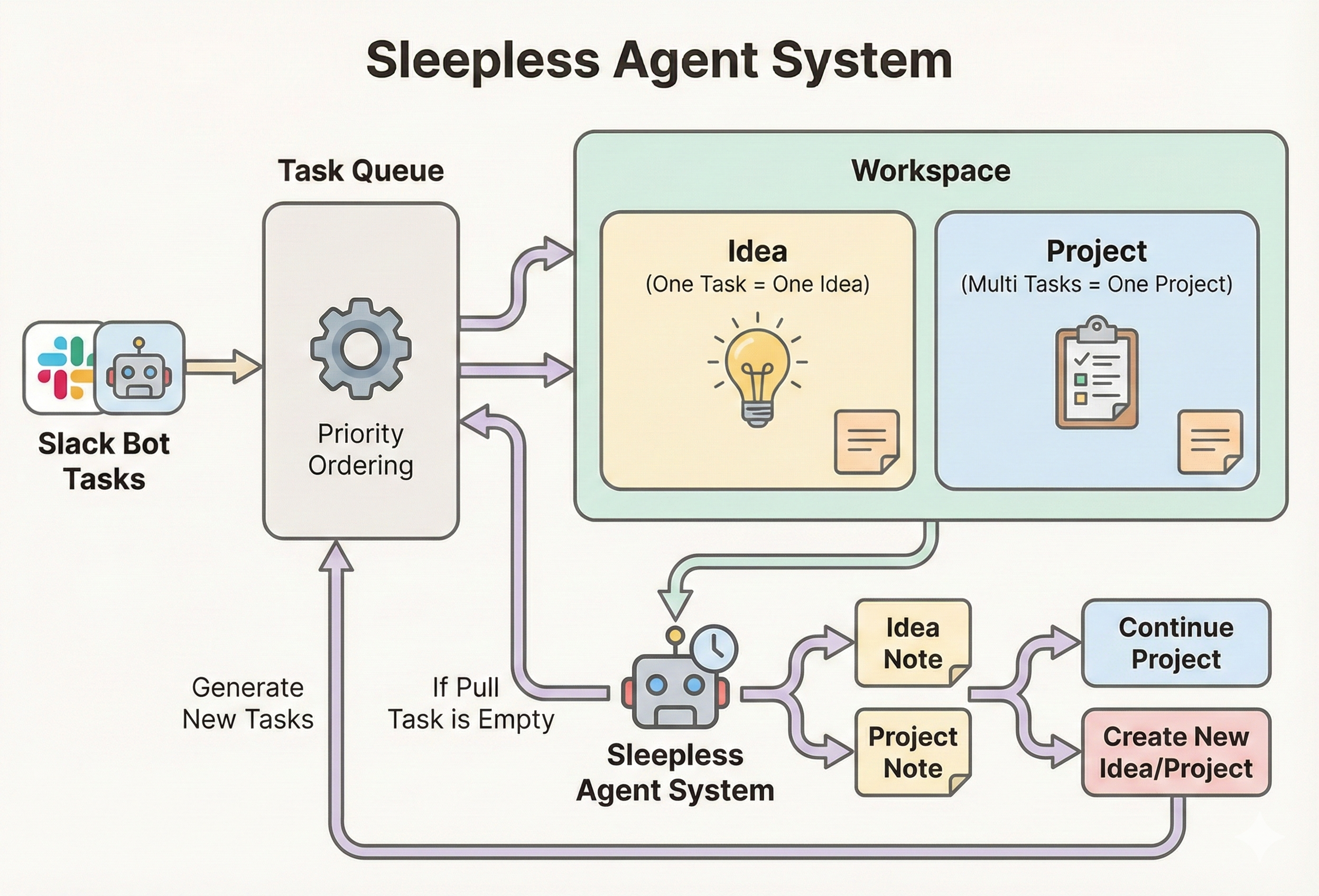
System architecture showing task flow from Slack to workspace execution
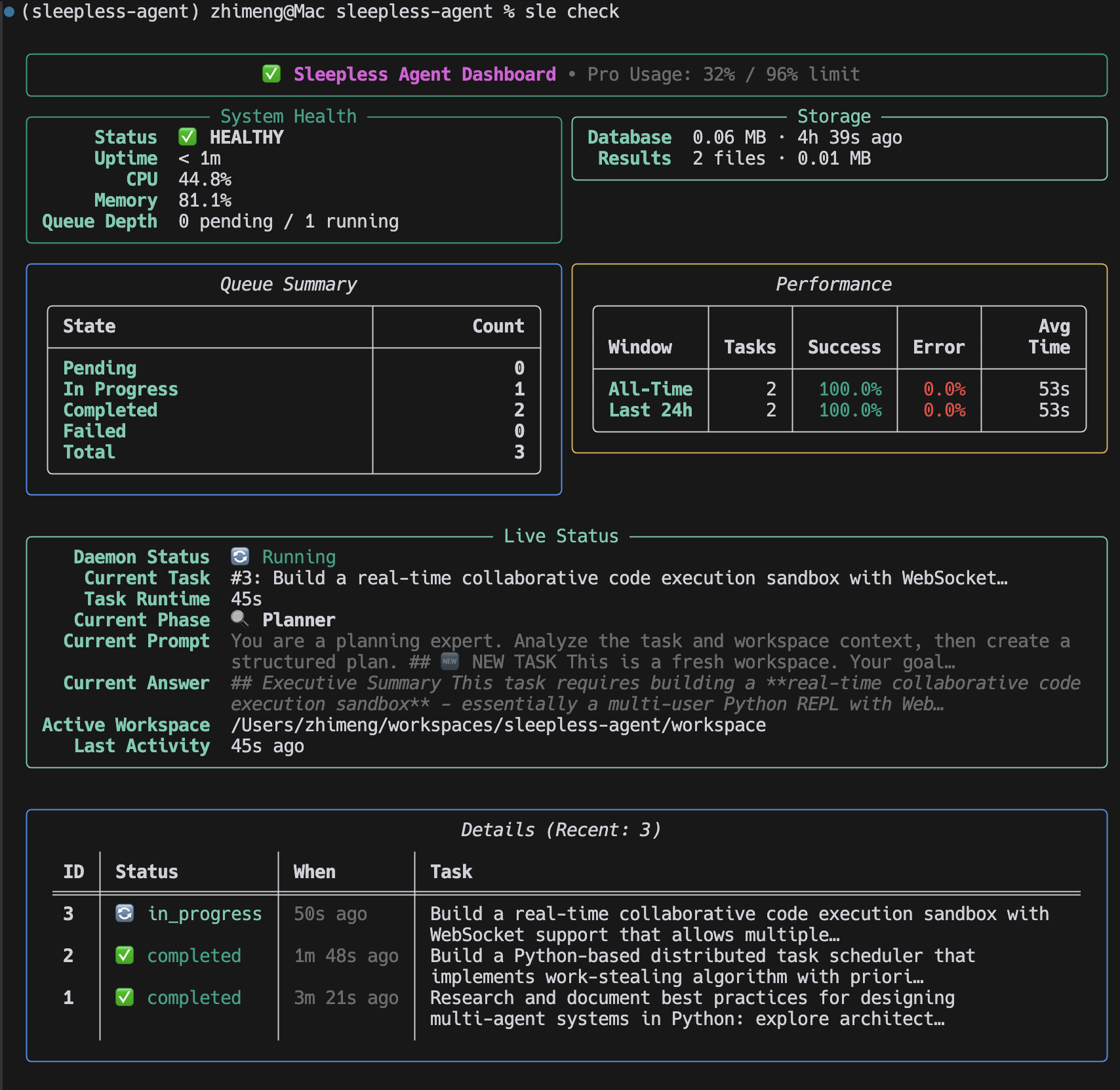
Sleepless Agent CLI in action - managing tasks, checking status, and generating reports
### Quick Example
```bash
# Start the daemon
$ sle daemon
2025-10-26 03:30:12 | INFO | Sleepless Agent starting...
2025-10-26 03:30:12 | INFO | Slack bot connected
# Submit a task via Slack
/think Implement OAuth2 authentication -p backend
# Check status
$ sle check
╭─────────────────── System Status ───────────────────╮
│ 🟢 Daemon: Running │
│ 📊 Queue: 3 pending, 1 in_progress │
│ 💻 Usage: 45% (Day threshold: 95%) │
│ 🔄 Last task: "Implement OAuth2..." (in progress) │
╰─────────────────────────────────────────────────────╯
# View results
$ sle report 42
Task #42: ✅ Completed
Branch: feature/backend-42
PR: https://github.com/user/repo/pull/123
```
## ✨ Features
- 🤖 **Continuous Operation**: Runs 24/7 daemon, always ready for new tasks
- 💬 **Slack Integration**: Submit tasks via Slack commands
- 💭 **Interactive Chat Mode**: Real-time conversational sessions with Claude in Slack threads
- 🎯 **Hybrid Autonomy**: Auto-applies random thoughts, requires review for serious tasks
- ⚡ **Smart Scheduling**: Optimizes task execution based on priorities
- 📊 **Task Queue**: SQLite-backed persistent task management
- 🔌 **Claude Code SDK**: Uses Python Agent SDK to interface with Claude Code CLI
- 🏗️ **Isolated Workspaces**: Each task gets its own workspace for true parallelism
- 📝 **Result Storage**: All outputs saved with metadata for future reference
## ⚙️ Prerequisites
- Python 3.11+
- Claude Code CLI installed (`npm install -g @anthropic-ai/claude-code`)
- Git (for auto-commits)
- gh CLI (optional, for PR automation)
- Slack workspace admin access (**optional** — the `sle` CLI works without Slack)
> 💡 **Slack is optional.** You can run all `sle` CLI commands without configuring Slack. Slack integration adds a convenient real-time interface for submitting tasks and checking status, but every feature is also available via the CLI.
## 🚀 Quick Start
### 1. Install
```bash
pip install sleepless-agent
```
Or for development:
```bash
git clone
cd sleepless-agent
python -m venv venv
source venv/bin/activate # or venv\Scripts\activate on Windows
pip install -e .
```
> ⚠️ **Windows / WSL tip:** After `pip install`, the `sle` command might not be found if Python's `Scripts` directory is not on your `PATH`. See [Troubleshooting: `sle` not found](#windows--wsl-sle-command-not-found) below.
### 2. Authenticate Claude Code (Required)
```bash
# Install the Claude Code CLI (requires Node.js)
npm install -g @anthropic-ai/claude-code
# Log in once (opens a browser)
claude login
# Verify
claude --version
```
### 3. (Optional) Start without Slack
Slack integration is **not required**. You can use the `sle` CLI directly:
```bash
# Start the daemon (no Slack needed)
sle daemon
# Queue a task
sle think "Research async Python patterns"
# Check status
sle check
```
If you want Slack integration, continue with the setup below.
### 4. Setup Slack App
Visit https://api.slack.com/apps and create a new app:
**Basic Information**
- Choose "From scratch"
- Name: "Sleepless Agent"
- Pick your workspace
**Enable Socket Mode**
- Settings > Socket Mode > Toggle ON
- Generate app token (starts with `xapp-`)
**Create Slash Commands**
Settings > Slash Commands > Create New Command:
- `/think` - Capture thought or task (use `-p project-name` for serious tasks)
- `/chat` - Start interactive chat mode with Claude
- `/check` - Check queue status
- `/usage` - Show Claude Code Pro plan usage
- `/cancel` - Cancel task or project
- `/report` - Show reports or task details
- `/trash` - Manage trash (list, restore, empty)
**OAuth Scopes**
Features > OAuth & Permissions > Bot Token Scopes:
- `chat:write`
- `commands`
- `app_mentions:read`
- `channels:history` (for chat mode)
- `groups:history` (for chat mode in private channels)
- `reactions:write` (for chat mode indicators)
**Event Subscriptions** (for Chat Mode)
Features > Event Subscriptions > Enable Events > Subscribe to bot events:
- `message.channels`
- `message.groups`
**Install App**
- Install to workspace
- Get bot token (starts with `xoxb-`)
### 5. Configure Environment
```bash
cp .env.example .env
nano .env # Edit with your tokens
```
Set:
- `SLACK_BOT_TOKEN` - xoxb-... token
- `SLACK_APP_TOKEN` - xapp-... token
(Claude API key no longer needed - uses Claude Code CLI)
### 6. Run
```bash
sle daemon
```
You should see startup logs similar to:
```
2025-10-24 23:30:12 | INFO | sleepless_agent.interfaces.bot.start:50 Slack bot started and listening for events
2025-10-24 23:30:12 | INFO | sleepless_agent.runtime.daemon.run:178 Sleepless Agent starting...
```
Logs are rendered with Rich for readability; set `SLEEPLESS_LOG_LEVEL=DEBUG` to increase verbosity.
## 🖥️ Windows / WSL: `sle` Command Not Found
If `sle` is not recognised after `pip install` on Windows or WSL, the Python `Scripts` directory is likely not on your `PATH`.
**Windows (PowerShell / CMD)**
```powershell
# Find where pip installed the script
python -m site --user-scripts
# Add that directory to PATH permanently (PowerShell)
$scriptsDir = python -m site --user-scripts
[Environment]::SetEnvironmentVariable("PATH", "$env:PATH;$scriptsDir", "User")
# Or run sle directly with python -m
python -m sleepless_agent.interfaces.cli --help
```
**WSL (Ubuntu / Debian)**
```bash
# Add the local bin directory to PATH
echo 'export PATH="$HOME/.local/bin:$PATH"' >> ~/.bashrc
source ~/.bashrc
# Verify
sle --version
```
**System-wide pip install (not recommended)**
If you used `sudo pip install`, the script will be in `/usr/local/bin` which is normally already in PATH. However, prefer using a virtual environment or `pip install --user`.
**Virtual environment (recommended)**
Using a virtual environment avoids PATH issues on all platforms:
```bash
python -m venv venv
# Windows:
venv\Scripts\activate
# macOS / Linux / WSL:
source venv/bin/activate
pip install sleepless-agent
sle --version # always works inside the venv
```
## 💬 Slack Commands
All Slack commands align with the CLI commands for consistency:
### 📋 Task Management
| Command | Purpose | Example |
|---------|---------|---------|
| `/think` | Capture random thought | `/think Explore async ideas` |
| `/think -p ` | Add serious task to project | `/think Add OAuth2 support -p backend` |
| `/check` | Show system status | `/check` |
| `/usage` | Show Claude Code Pro usage | `/usage` |
| `/cancel` | Cancel task or project | `/cancel 5` or `/cancel my-app` |
### 💭 Interactive Chat Mode
Start a real-time conversation with Claude in a dedicated Slack thread:
| Command | Purpose | Example |
|---------|---------|---------|
| `/chat ` | Start chat mode for a project | `/chat my-backend` |
| `/chat end` | End current chat session | `/chat end` |
| `/chat status` | Check active session status | `/chat status` |
| `/chat help` | Show chat mode help | `/chat help` |
**Chat Mode Features:**
- 🧵 Dedicated thread for each session
- 💬 Full conversation history maintained
- 🔄 Real-time processing indicator
- 📁 Claude can read/write/edit files in project workspace
- ⏱️ Auto-timeout after 30 minutes of inactivity
- Type `exit` in thread to end session
> 💡 **Note**: When you run `/chat `, a new thread is created. All your prompts must be sent **inside this thread** - Claude only responds to messages within the chat thread, not in the main channel.
### 📊 Reporting & Trash
| Command | Purpose | Example |
|---------|---------|---------|
| `/report` | Today's report, task details, date/project report, or list all | `/report`, `/report 42`, `/report 2025-10-22`, `/report my-app`, `/report --list` |
| `/trash` | List, restore, or empty trash | `/trash list`, `/trash restore my-app`, `/trash empty` |
## ⌨️ Command Line Interface
Install the project (or run within the repo) and use the bundled CLI:
```bash
python -m sleepless_agent.interfaces.cli think "Ship release checklist" -p my-app
# or, after installing the package:
sle check
```
The CLI mirrors the Slack slash commands:
| Command | Purpose | Example |
|---------|---------|---------|
| `think ` | Capture a random thought | `think "Explore async patterns"` |
| `think -p ` | Queue a serious task to project | `think "Build onboarding flow" -p backend` |
| `check` | Show system health, queue, and performance metrics | `check` |
| `usage` | Show Claude Code Pro plan usage | `usage` |
| `report [identifier]` | Show task details, daily reports, or project summaries (`--list` for all reports) | `report 7` |
| `cancel ` | Move a task or project to trash | `cancel 9` or `cancel my-app` |
| `trash [subcommand] [identifier]` | Manage trash (list, restore, empty) | `trash restore my-app` |
Override storage locations when needed:
```bash
sle --db-path ./tmp/tasks.db --results-path ./tmp/results check
```
## 🏗️ Architecture
```
Slack Bot
↓
Slack Commands → Task Queue (SQLite)
↓
Agent Daemon (Event Loop)
↓
Claude Executor (Claude Code CLI)
↓
Result Manager (Storage + Git)
```
### Components
- **daemon.py**: Main event loop, task orchestration
- **bot.py**: Slack interface, command parsing
- **task_queue.py**: Task CRUD, priority scheduling
- **claude_code_executor.py**: Python Agent SDK wrapper with isolated workspace management
- **results.py**: Result storage, file management
- **models.py**: SQLAlchemy models for Task, Result
- **config.yaml**: Configuration defaults
- **git_manager.py**: Git automation (commits, PRs)
- **monitor.py**: Health checks and metrics
## 📁 File Structure
```
sleepless-agent/
├── src/sleepless_agent/
│ ├── __init__.py
│ ├── daemon.py # Main event loop
│ ├── bot.py # Slack interface
│ ├── task_queue.py # Task management
│ ├── claude_code_executor.py # Claude CLI wrapper
│ ├── scheduler.py # Smart scheduling
│ ├── git_manager.py # Git automation
│ ├── monitor.py # Health & metrics
│ ├── models.py # Database models
│ ├── results.py # Result storage
│ └── config.yaml # Config defaults
├── workspace/ # All persistent data and task workspaces
│ ├── data/ # Persistent storage
│ │ ├── tasks.db # SQLite database
│ │ ├── results/ # Task output files
│ │ ├── reports/ # Daily markdown reports
│ │ ├── agent.log # Application logs
│ │ └── metrics.jsonl # Performance metrics
│ ├── tasks/ # Task workspaces (task_1/, task_2/, etc.)
│ ├── projects/ # Project workspaces
│ └── trash/ # Soft-deleted projects
├── .env # Secrets (not tracked)
├── pyproject.toml # Python package metadata & dependencies
├── README.md # This file
└── docs/ # Additional documentation
```
## ⚙️ Configuration
Runtime settings come from environment variables loaded via `.env` (see `.env.example`). Update those values or export them in your shell to tune agent behavior.
### Usage Management
The agent automatically monitors Claude Code usage and intelligently manages task execution based on configurable thresholds.
**How it works:**
1. **Usage Monitoring** - Every task checks usage via `claude /usage` command
2. **Time-based Thresholds** - Different thresholds for day and night operations
3. **Smart Scheduling** - Automatically pauses task generation when threshold is reached
4. **Automatic Resume** - Tasks resume when usage resets
**Time-Based Configuration (configurable in `config.yaml`):**
- **Nighttime (1 AM - 9 AM by default):** 96% threshold - agent works aggressively while you sleep
- **Daytime (9 AM - 1 AM by default):** 95% threshold - preserves capacity for your manual usage
- Configure via: `claude_code.threshold_day`, `claude_code.threshold_night`
- Time ranges via: `claude_code.night_start_hour`, `claude_code.night_end_hour`
**Visibility:**
- Dashboard: Shows usage percentage in `sle check`
- Logs: Each usage check logs current usage with applicable threshold
- Config: All thresholds and time ranges adjustable in `config.yaml`
**Behavior at threshold:**
- ⏸️ New task generation pauses at threshold
- ✅ Running tasks complete normally
- 📋 Pending tasks wait in queue
- ⏱️ Automatic resume when usage resets
### Git Management
The agent integrates deeply with Git for automatic version control and collaboration:
**Remote Repository Configuration (`config.yaml`):**
- `git.use_remote_repo`: Enable/disable remote repository integration
- `git.remote_repo_url`: Your remote repository URL (e.g., `git@github.com:username/repo.git`)
- `git.auto_create_repo`: Automatically create repository if it doesn't exist
**Git Workflow:**
- **Random Thoughts**: Auto-commits to `thought-ideas` branch
- **Serious Tasks (-p flag)**: Creates feature branches (`feature/-`) and opens PRs
- **Automatic Commits**: Each task completion triggers a commit with descriptive messages
- **PR Creation**: Serious tasks automatically create pull requests for review
**Important:** Update `git.remote_repo_url` in `config.yaml` before running the agent!
### Multi-Agent Workflow
The agent employs a sophisticated multi-agent architecture for complex task processing:
**Agent Types (`config.yaml`):**
- **Planner Agent**: Analyzes tasks and creates execution plans (max 3 turns by default)
- **Worker Agent**: Executes the planned tasks (max 3 turns by default)
- **Evaluator Agent**: Reviews and validates completed work (max 3 turns by default)
**Configuration:**
```yaml
multi_agent_workflow:
planner:
enabled: true
max_turns: 3
worker:
enabled: true
max_turns: 3
evaluator:
enabled: true
max_turns: 3
```
Each agent can be independently enabled/disabled and configured with different turn limits to control execution depth.
### Task Auto-Generation
The agent can automatically generate tasks to keep itself productive during idle time:
**Generation Strategies (`config.yaml`):**
- **refine_focused (45% weight)**: Focuses on completing or improving existing work
- **balanced (35% weight)**: Mix of refinements and new tasks based on workspace state
- **new_friendly (20% weight)**: Prioritizes creating innovative new projects
**Task Types:**
- **[NEW]**: Creates a new task in an isolated workspace (`workspace/tasks//`)
- **[REFINE:#]**: Improves specific existing task (reuses task workspace)
- **[REFINE]**: General refinement of workspace projects
**Workspace Constraints:**
- Each task executes in its own isolated directory
- Tasks only access their workspace and `workspace/shared/`
- System directories (`workspace/data/`) are protected
- REFINE tasks reuse existing workspaces for continuity
## 🔧 Environment Variables
```bash
# Required
SLACK_BOT_TOKEN=xoxb-...
SLACK_APP_TOKEN=xapp-...
```
**Note:** Most configuration is done via `config.yaml`. Environment variables are primarily for secrets and deployment-specific settings.
## 📝 Task Types
The agent intelligently processes different task types:
1. **Random Thoughts** - Auto-commits to `thought-ideas` branch
```
/think Research async patterns in Rust
/think What's the best way to implement caching?
```
2. **Serious Tasks** - Creates feature branch and PR, requires review (use `-p` flag)
```
/think -p backend Add authentication to user service
/think -p payments Refactor payment processing module
```
## 📊 Monitoring
### Slack Commands
```
/check # System status and performance stats
/report --list # Available reports
```
## 🚢 Deployment
### Linux (systemd)
```bash
make install-service
sudo systemctl start sleepless-agent
```
### macOS (launchd)
```bash
make install-launchd
launchctl list | grep sleepless
```
## 💡 Example Workflows
### Daily Brainstorm
```
/think Research new Rust async libraries
/think Compare Python web frameworks
/think Ideas for improving API performance
/check
```
### Production Fix
```
/think Fix authentication bug in login endpoint -p backend
/report # Get the PR link
# Review and merge PR
```
### Code Audit
```
/think Security audit of user service -p backend
/think Performance analysis of payment module -p payments
```
## ⚡ Performance Tips
1. **Use thoughts to fill idle time** - Maximizes usage
2. **Batch serious tasks** - Reduces context switching
3. **Monitor usage** - Watch scheduler logs for usage patterns
4. **Review git history** - Check `thought-ideas` branch regularly
5. **Check metrics** - Run `sle check` to track performance
## 📦 Releases
- Latest stable: **0.1.0** – published on [PyPI](https://pypi.org/project/sleepless-agent/0.1.0/)
- Install or upgrade with `pip install -U sleepless-agent`
- Release notes tracked via GitHub Releases (tag `v0.1.0` onward)
## 📚 Documentation
For more detailed information and guides:
- **[Full Documentation](https://context-machine-lab.github.io/sleepless-agent/)** - Complete documentation site
- **[DeepWiki](https://deepwiki.com/context-machine-lab/sleepless-agent)** - Interactive knowledge base
- **[Installation Guide](docs/installation.md)** - Detailed setup instructions
- **[Quick Start](docs/quickstart.md)** - Get up and running quickly
- **[FAQ](docs/faq.md)** - Frequently asked questions
- **[Troubleshooting](docs/troubleshooting.md)** - Common issues and solutions
## 🗺️ Roadmap
- [ ] **Advanced Scheduling** - Priority queue with time-based and dependency scheduling
- [ ] **Daily Report** - Daily report of the agent's work
## 🙏 Acknowledgements
We are deeply grateful to the open-source community and the projects that make Sleepless Agent possible:
- **[Claude Code CLI](https://github.com/anthropics/claude-code)** - For providing the powerful foundation for AI-assisted development and the Python Agent SDK that enables seamless integration
- **[Slack Bolt](https://github.com/slackapi/bolt-python)** - For reliable real-time messaging and command handling that powers our Slack integration
- **[SQLAlchemy](https://www.sqlalchemy.org/)** - For robust data persistence and elegant ORM that manages our task queue
- **[Rich](https://github.com/Textualize/rich)** - For beautiful terminal rendering that makes logs and outputs visually appealing
- **[GitPython](https://github.com/gitpython-developers/GitPython)** - For comprehensive Git operations that enable our automated version control workflows
## 🤝 Contributing
We welcome contributions! Sleepless Agent is designed to be a community resource for 24/7 AI development automation.
Please see our [Contributing Guidelines](CONTRIBUTING.md) for:
- Development setup and environment configuration
- Code style and testing requirements
- How to submit pull requests
- Community guidelines and code of conduct
Feel free to:
- 🐛 [Report bugs](https://github.com/context-machine-lab/sleepless-agent/issues/new?labels=bug)
- 💡 [Suggest features](https://github.com/context-machine-lab/sleepless-agent/issues/new?labels=enhancement)
- 💬 [Ask questions](https://github.com/context-machine-lab/sleepless-agent/discussions)
- 🔧 [Submit pull requests](https://github.com/context-machine-lab/sleepless-agent/pulls)
## 📖 Citation
If you use Sleepless Agent in your research or projects, please cite:
```bibtex
@software{sleepless_agent_2025,
title = {Sleepless Agent: A 24/7 AgentOS for Continuous Development},
author = {Zhimeng Guo, Hangfan Zhang, Siyuan Xu, Huaisheng Zhu, Teng Xiao, Minhao Cheng},
year = {2025},
publisher = {GitHub},
journal = {GitHub repository},
url = {https://github.com/context-machine-lab/sleepless-agent}
}
```
## 📄 License
Released under the [MIT License](LICENSE)
## 🔧 Development
Tested Sleepless Agent integration on 2025-12-15.