Scout Agent logo # Scout Agent **The AI agent that actually operates your Windows apps — real clicks, real keystrokes, real memory.** [English](README.md) · [简体中文](README.zh-CN.md) [![Python](https://img.shields.io/badge/Python-3.11+-blue.svg)](https://www.python.org/) [![License](https://img.shields.io/badge/License-Apache--2.0-green.svg)](LICENSE) [![Version](https://img.shields.io/badge/Version-1.0.0.6-orange.svg)](VERSION) *Persistent Memory · Desktop Control · Multi-Channel · Security-First*
--- ## 🖱️ It Really Has Hands — One Sentence, and Scout Drives Your Windows
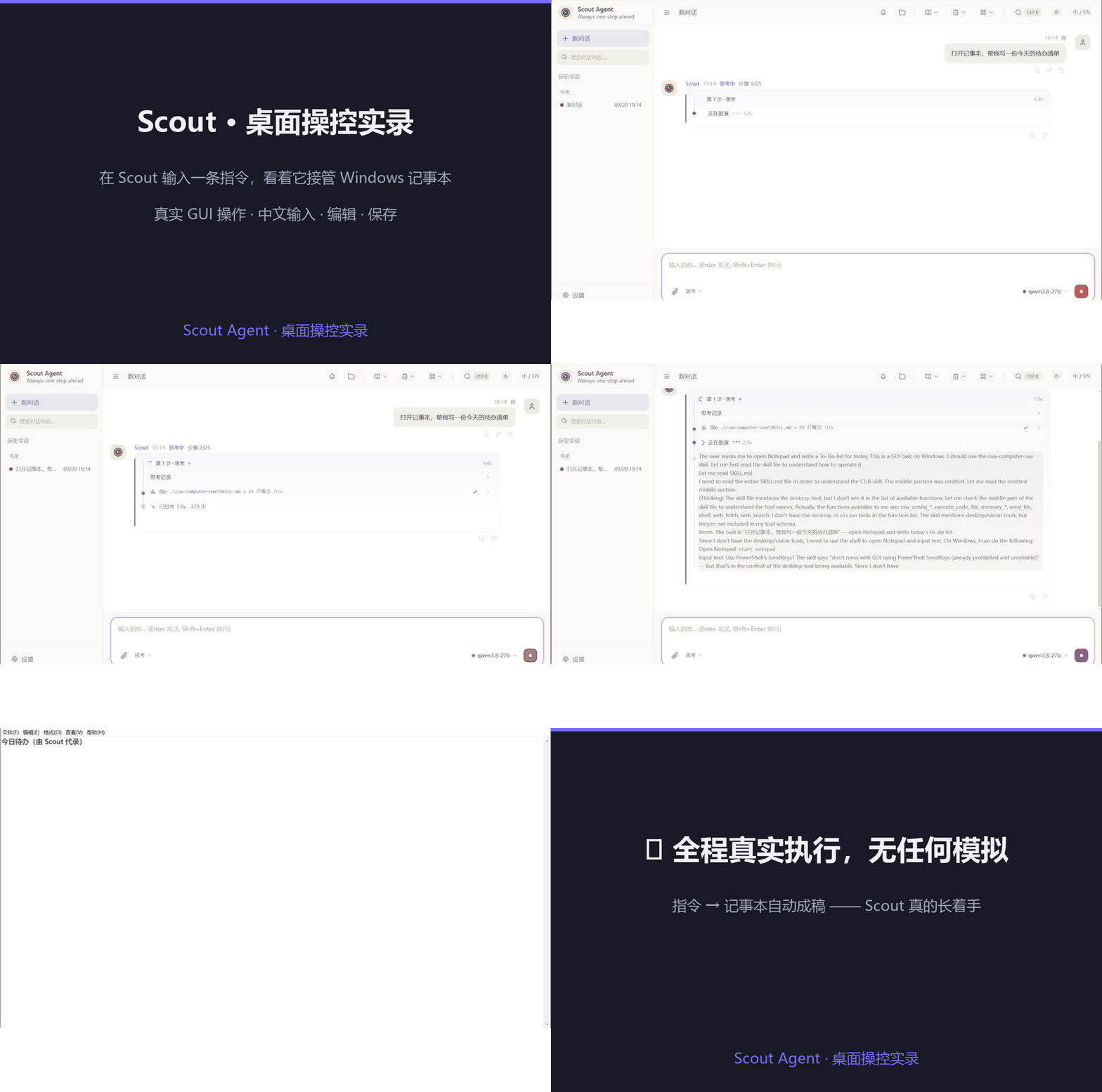
Scout takes over Windows Notepad — live recording Uncut screen recording · 21 s · zero simulation. One line typed into Scout — it thinks, opens Notepad, types the whole to-do list in Chinese, then reports back “done”.
▶ Watch the HD MP4
**What you just watched, beat by beat:** | ⏱️ | Scene | What Scout actually did | |:---:|---|---| | 0–3 s | 🗣️ *“打开记事本,帮我写一份今天的待办清单”* | A plain-language instruction typed into Scout — no script, no macro, no API | | 3–9 s | 🧠 ReAct reasoning | Breaks the task down, picks the `desktop` tool, decides to launch Notepad | | 9–18 s | 🖱️ Real GUI control | Notepad opens, focus lands in the editing area, and the Chinese to-do list is typed **line by line with real keystrokes** (IME-friendly) | | 18–21 s | ✅ *“已完成,记事本已打开,清单已写好”* | Selects all to show the result, then reports completion in the chat | **Why it matters:** most “agents” stop at generating text. Scout ships a built-in `desktop` tool that runs **real mouse clicks, real keystrokes and real screenshots**, plus **11 battle-tested skill packs** in `skills-library/` — send a WeChat message, look someone up on Feishu, drive a browser, fill an Excel sheet. You say it; it happens on your real desktop, on your real apps. > 🔒 Everything runs locally: the recording above was made on the author’s own Windows box, with no cloud desktop and no screen-sharing service involved. --- ## 📖 Table of Contents - [Introduction](#introduction) - [Scout in 60 Seconds](#demo) - [It Really Has Hands — Live Desktop Control](#desktop-control) - [Why Scout Agent?](#why-scout-agent) - [UI Preview](#ui-preview) - [Features](#features) - [Signature Features, Deep-Dive](#signature-deep-dive) - [Quick Start](#quick-start) - [Configuration](#configuration) - [Command Line](#cli) - [Security](#security) - [Development](#development) - [Testing](#testing) - [Project Structure](#project-structure) - [License](#license) --- ## 🔍 Introduction Scout Agent is an intelligent personal assistant AI agent with persistent memory, tool calling, and multi-channel access. It grows with you by remembering your preferences, automating tasks, and connecting to the platforms you use every day. --- ## ⚡ Scout in 60 Seconds (live recording — nothing simulated)
🖥️ Brand-new Web UI · one-minute tour
Scout UI tour
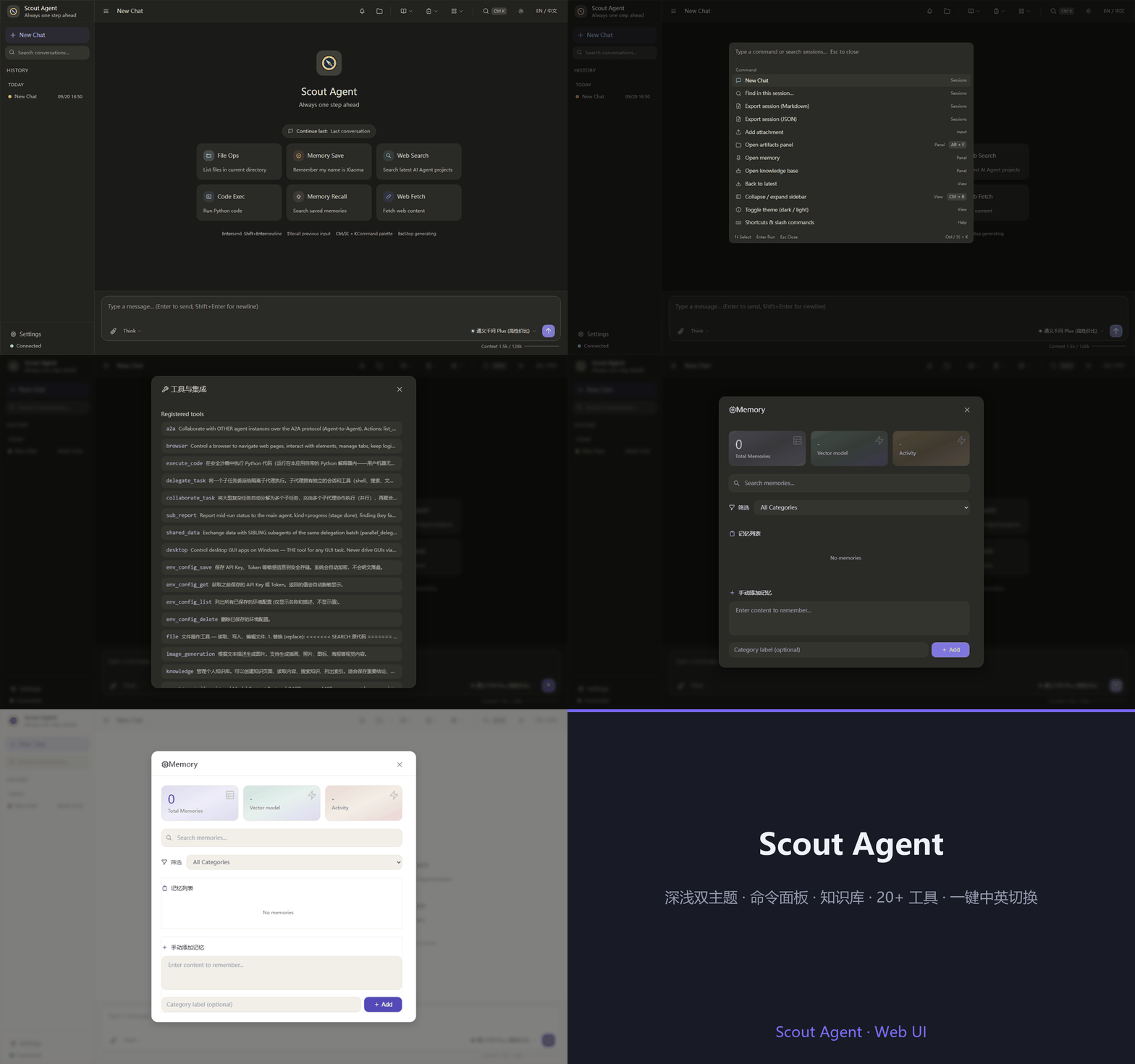
Command palette Ctrl K → Knowledge → 20+ tools → Memory → Settings → light/dark in one click
▶ HD MP4
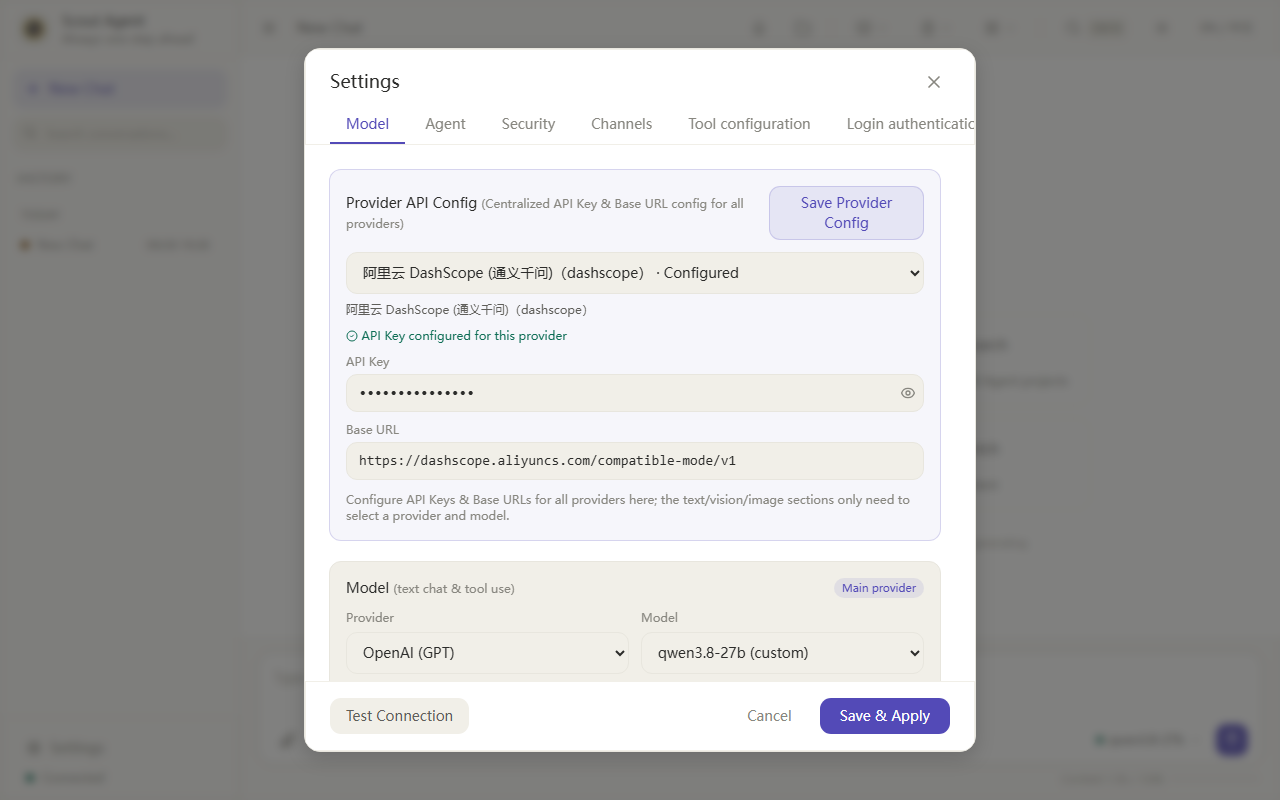
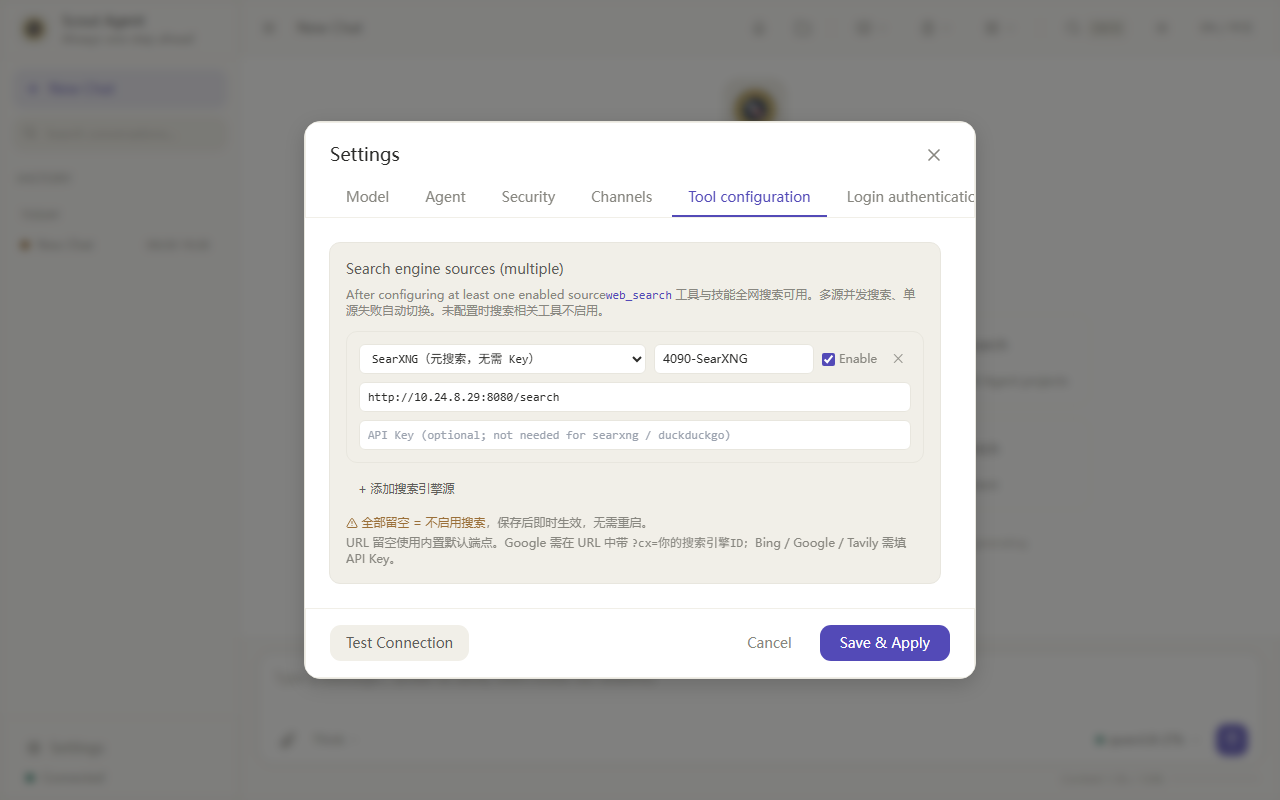
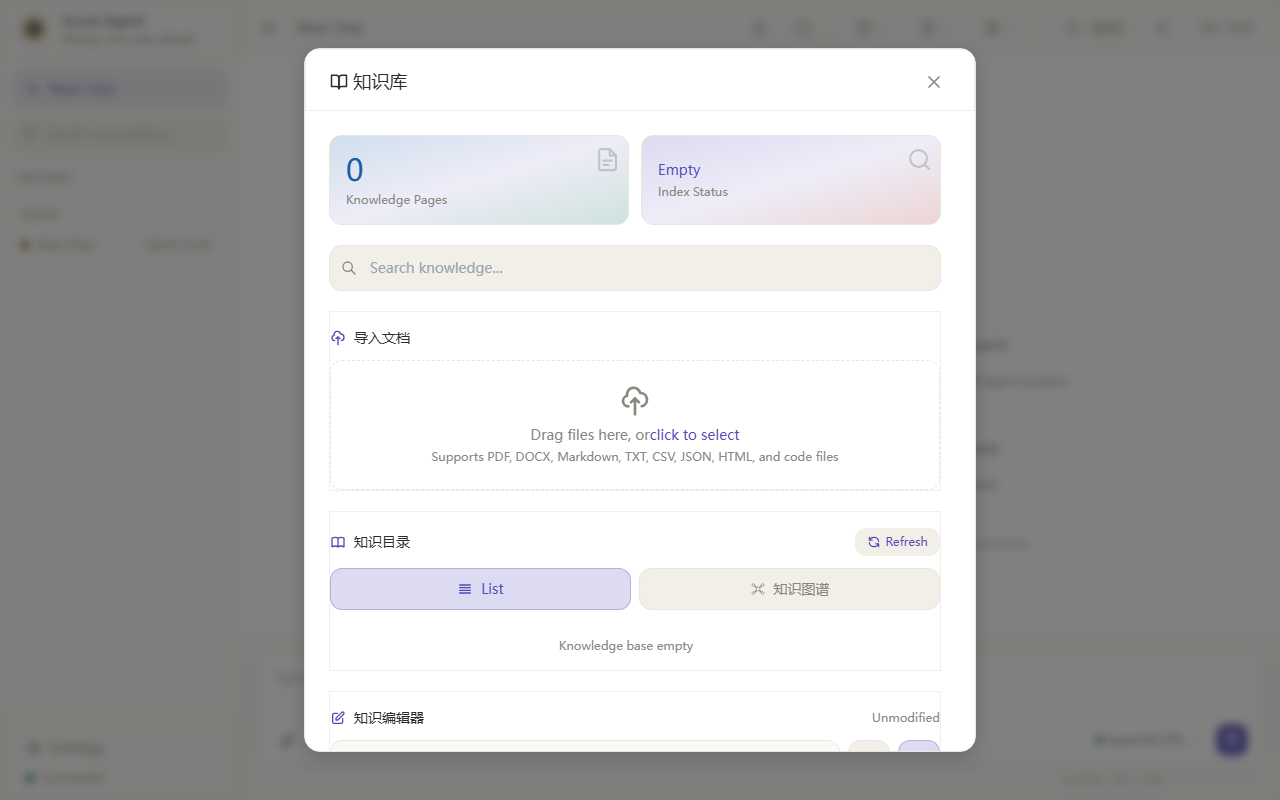
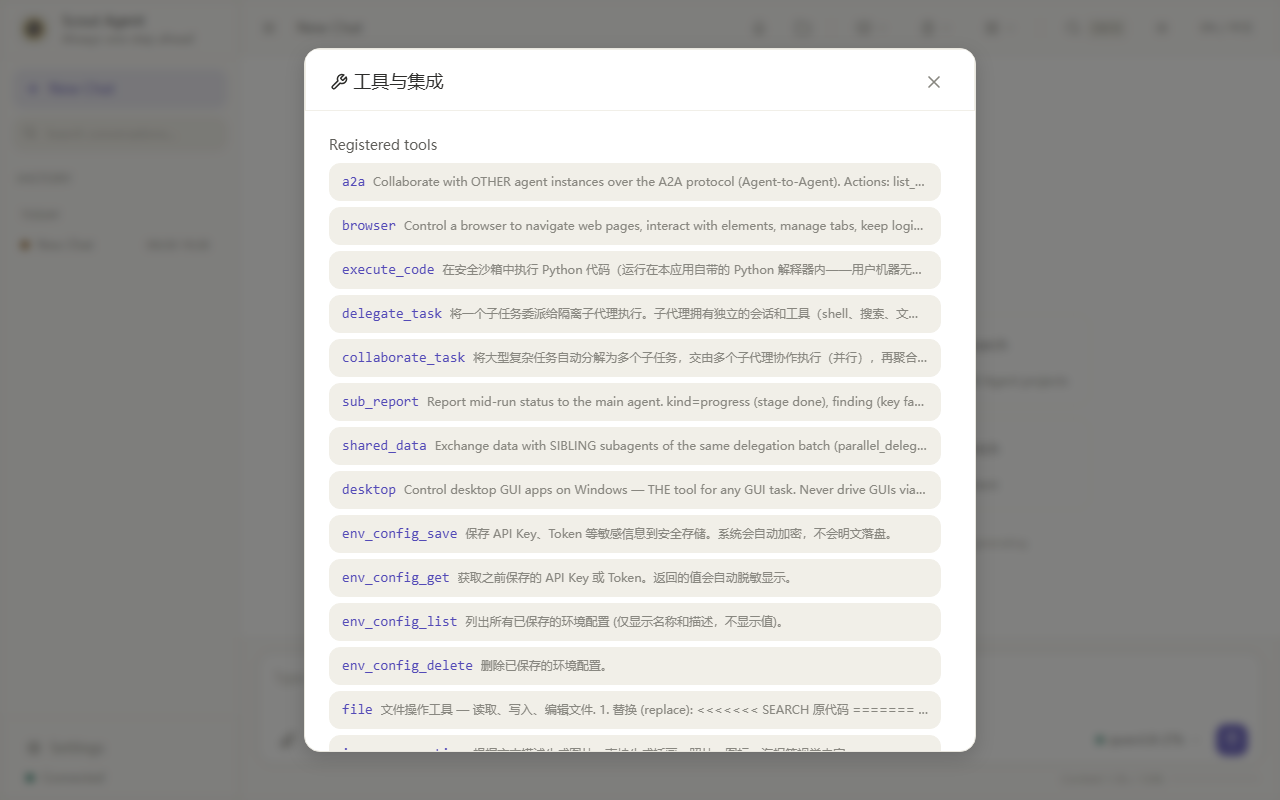
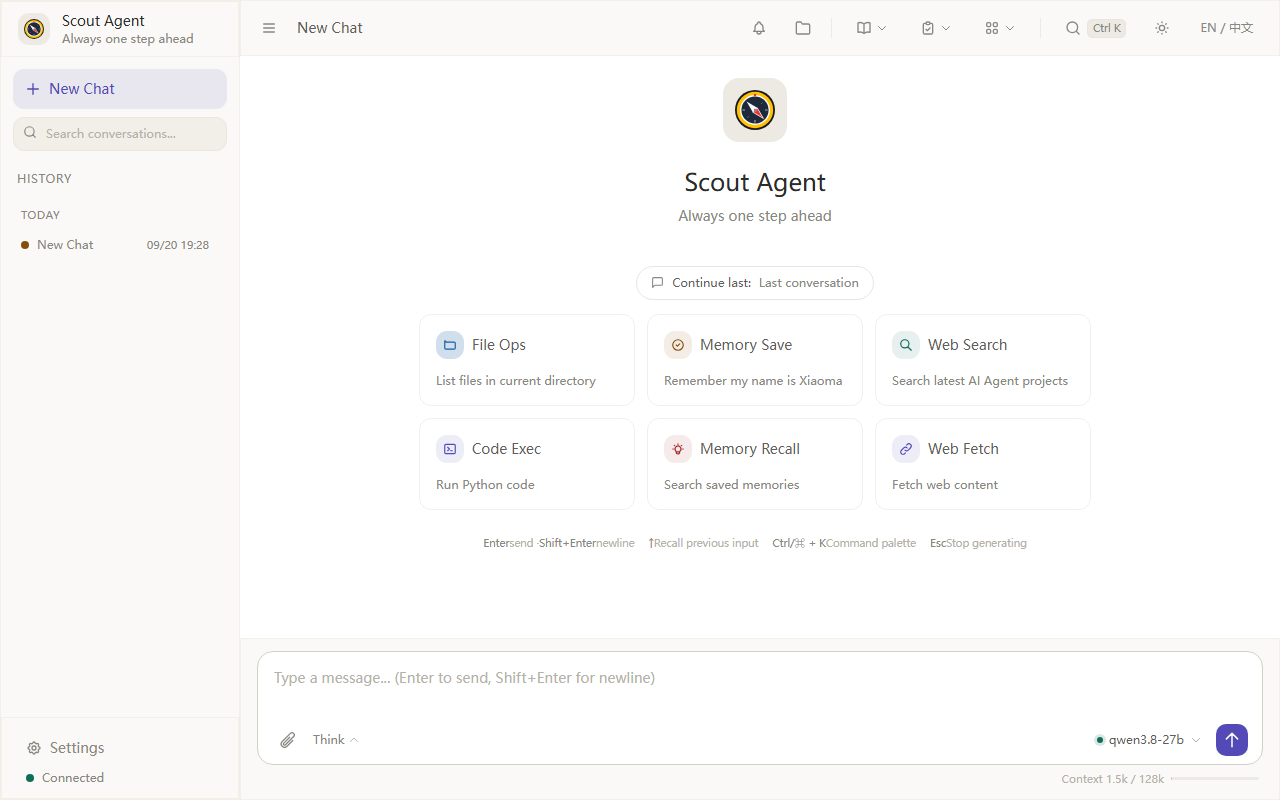
| 🧰 **20+** built-in tools | 🌐 **12+** chat channels | 🖱️ **11** battle-tested desktop skills | 🧩 **5** swappable core components | |:---:|:---:|:---:|:---:| --- ## ⭐ Why Scout Agent? Most AI assistants are **stateless helpers** — every conversation starts from scratch. Scout is built to be different: an **agent that compounds** — the longer you use it, the more it knows about you, and the smarter it gets at doing your work. | # | Differentiator | What it means for you | |---|---|---| | 1 | 🧬 **Self-evolving** | When a task fails, Scout reflects and fixes itself; successful fixes are **automatically distilled into reusable Skills** and stored in a semantic skill library — the next time a similar problem appears, it solves it instantly. You don't install skills, you *grow* them. | | 2 | 🧠 **Engineered long-term memory** | Key memories are auto-extracted, deduplicated, and reassembled across sessions using **importance × time-decay + history `` compression** — it genuinely remembers yesterday's context, not just today's chat window. | | 3 | 🚀 **Thinker/Executor dual-model** | A "slow thinker" breaks down hard problems while a fast executor does the work — deep reasoning when it matters, speed when it doesn't. | | 4 | 🌐 **Talk to it from anywhere** | 12+ channels: Feishu, WeChat (personal / Official Account / WeCom / customer service / group bot), Telegram, DingTalk, Discord, Slack, QQ… plus Web UI (installable as a PWA). Your assistant travels with your IM habits, not the other way around. | | 5 | 🖱 **It actually has hands** | A built-in `desktop` tool performs real clicks, typing and screenshots to operate **any local app for you** — send a WeChat message, find someone on Feishu, drive a browser, fill an Excel sheet. Ships with 11 real-tested skill packs (`skills-library/`): say "message XX" and it really does. | | 6 | 🤝 **Agent-to-Agent (A2A)** | Implements the Google A2A protocol — other agents can delegate tasks to Scout, and Scout to them. Ready for the multi-agent future instead of being an island. | | 7 | 🔒 **Security-first by design** | Docker sandbox execution, dangerous-command blacklist (`rm -rf /`, fork bombs…), shell-injection & XSS protection, optional JWT auth, encrypted key storage. Letting an agent run code is scary — Scout makes it boring. | | 8 | ⚡ **Zero-friction start** | Windows portable build: unzip → double-click → done (no Python, no install, no registry). Or `pip install` the repo and run. Data lives beside the program and follows you across machines. | **Where it shines:** a personal copilot that runs your recurring chores (scheduled + event-driven automation), answers from your private knowledge base, and reports back through your team's IM — all while keeping your keys, memory and code private on your own hardware. > 👉 Want the full catalog? See the [Features](#features) table below, or jump straight to [Quick Start](#quick-start). --- ## 🖼 UI Preview A freshly redesigned, modern interface (light/dark themes, 1280px-aligned chat + input, `Ctrl K` command palette, one-click EN/中文 toggle):
Main Chat
Settings · Model
Settings · Tools
Knowledge Base · Import
Plugins · 20+ Tool Registry
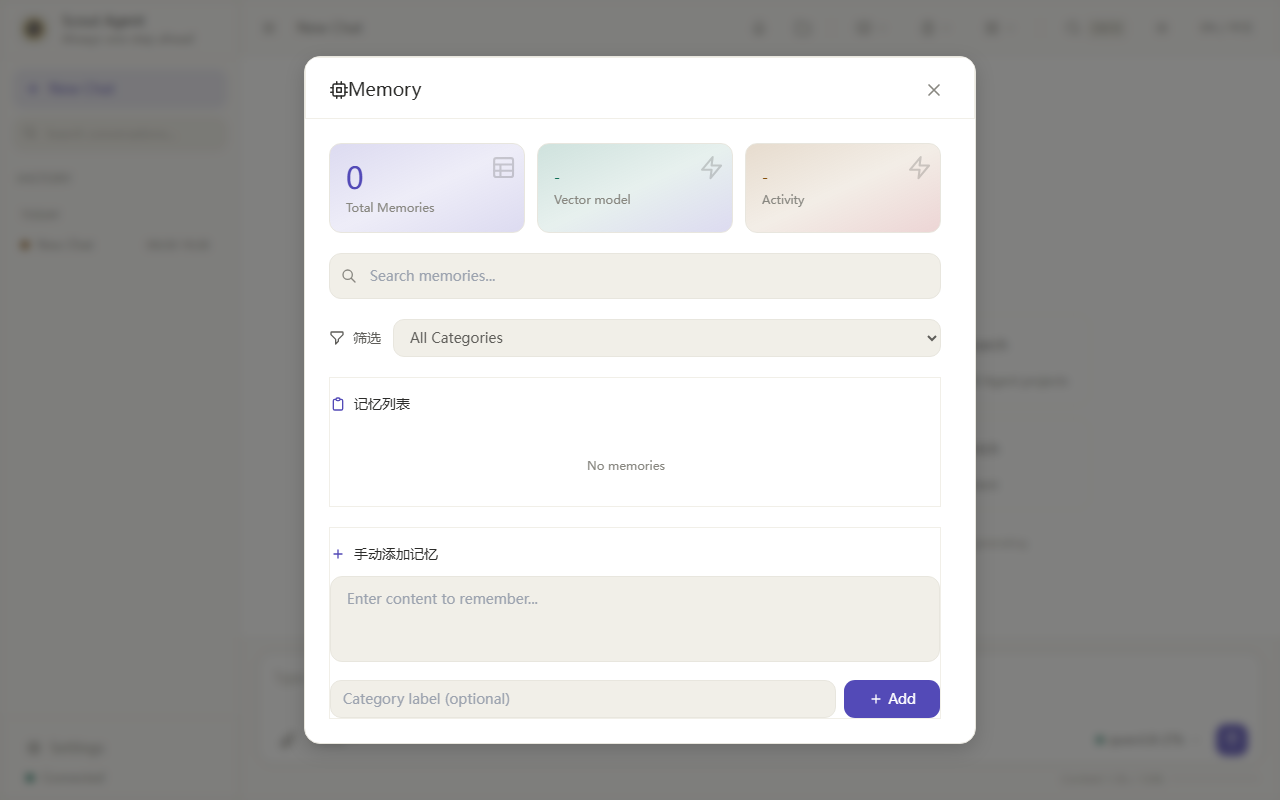
Memory
📋 All feature screenshots (15) #### Settings — Agent Configure reply language, run mode (ReAct single-agent loop or Multi-Agent delegation), system prompt, deep thinking and other parameters. ![Settings — Agent](docs/images/settings-agent-en.png) #### Settings — Security Visual configuration of dangerous command detection (`rm -rf /`, `dd if=`, `mkfs`, `curl | sh` and 13 more patterns), auto-approve toggle, Docker sandbox isolation — keeps the Agent in a restricted environment. ![Settings — Security](docs/images/settings-security-en.png) #### Settings — Channels Feishu, WeChat, WeChat Official Account, WeCom, WeCom Group Bot, WeChat Customer Service, Personal WeChat, Telegram, DingTalk, Discord, Slack, QQ — 12+ platforms; chat with Scout from any of them. ![Settings — Channels](docs/images/settings-channels-en.png) #### Settings — Auth Optional JWT login password protection for the Web UI and APIs. ![Settings — Auth](docs/images/settings-auth-en.png) #### Model · Embedding Configure the embedding model (remote API / built-in hash / pure-text); memory and knowledge retrieval switch instantly. ![Model · Embedding](docs/images/settings-model-embedding-en.png) #### Goals Turn long-running work into a trackable goal list with live status, followed up across sessions. ![Goals](docs/images/goals-en.png) #### Plugin Builder Describe the plugin you want and the AI generates complete plugin code; you can also search existing Skills/plugins on the web first. ![Plugin Builder](docs/images/plugin-builder-en.png) #### Automation Event triggers, run history, unattended policy and cron tasks — let Scout react to EventBus events or run tasks on a schedule. ![Automation](docs/images/automation-en.png) #### Observability Aggregate recent session timelines, success rates and token consumption per trace to quickly locate anomalies. ![Observability](docs/images/observe-en.png) #### Model Monitoring Token consumption and model-call statistics; costs at a glance. ![Model Monitoring](docs/images/monitor-usage-en.png) #### System Monitoring Real-time CPU, memory, disk, network, Agent runtime status and historical curves. ![System Monitoring](docs/images/monitor-system-en.png) #### Multi-Agent Mode Multiple collaborating agents split one task; the UI shows each agent's role and output live. ![Multi-Agent Mode](docs/images/runtime-multi-agent-en.png) #### ReAct Reflection + Security Block The ReAct reasoning trace is visible in real time, and dangerous commands are intercepted by the security layer before they run. ![ReAct Reflection + Security Block](docs/images/runtime-security-block-en.png) #### Events Browse the EventBus event stream (types, sources, payload summaries); plugins and automation both hook into this bus. ![Events](docs/images/events-en.png) #### Notification Center Centrally manage push rules (minimum severity, dedupe window), per-type toggles (task failure / task done / scheduled / system / reminder), IM channel targets and push history — with a one-click "send test notification" to verify the whole path. ![Notification Center](docs/images/notify-en.png)
--- ## ✨ Features | Feature | Description | |---------|-------------| | 🧬 **Self-Evolving Skills** | Self-healing loop: on failure the Agent reflects & fixes itself; successful repairs are auto-distilled into reusable Skills (`error-pattern → solution`, LLM-generalized) and stored in a semantic skill library for instant reuse | | 🤝 **A2A Interop** | Google A2A protocol (AgentCard / task send-receive) — delegate work to and from other agents over HTTP | | 🧠 **Persistent Memory** | Auto-saves conversation context and user preferences; pure-text retrieval by default, optional API-based vector search | | 🔧 **Tool Calling** | 20+ built-in tools: file editing, safe shell, code execution, web search, memory recall, scheduler, MCP, and a `desktop` GUI-automation tool that operates local apps (WeChat/Feishu/browsers/Office/UWP — real clicks, typing, screenshots) with 11 tested skill packs in `skills-library/` | | 🌐 **Multi-Channel** | Connect to Feishu, WeChat, Telegram, Discord, Slack, DingTalk, QQ and more (12+ platforms) | | 🤖 **Multi-Agent** | ReAct single-agent loop or Multi-Agent delegation architecture | | 🚀 **Dual-Model** | Thinker/executor model architecture with deep thinking toggle | | 🔒 **Security-First** | Sandbox execution, dangerous command blocking, XSS protection, optional authentication | | 📊 **Usage Monitoring** | Token consumption and model call statistics | | 🎙 **Voice** | ASR + TTS voice interaction support | | 🧩 **Plugin System** | EventBus-based plugin extension + SPI for replacing core components (LLM/storage) | | 📚 **Knowledge Base** | Multi-format document parsing with graph visualization | | 🔄 **Test Feedback Loop** | Auto-runs pytest on code failures, feeds structured failure stacks back for self-correction | | 🗂 **Pluggable Agent Loop** | ReAct (default) or DAG plan-execute loop, switchable per conversation | | 📜 **Tool Contracts** | Annotation-derived schemas, runtime arg validation, unified error codes | | 🐚 **Persistent Shell** | Long-lived bash sessions preserving cwd/env/background jobs across calls | | 🖥 **PTY Terminal** | Pseudo-terminal interaction: vim/top etc., key injection + explicit interrupt + window resize | | 📊 **eval Benchmark** | `python -m scout.eval`: isolated evaluation + unbiased Pass@1/3/5 estimates (DSBench-aligned) | | 🧠 **Memory Engineering** | Cross-session key-memory extraction (LLM structured/heuristic fallback + dedup), cross-session context assembly (memory × importance × time decay + history `` injection) | | 🧩 **Plugin SPI (all types)** | llm/storage/cache/session/memory five core components can be declaratively replaced | | 📱 **PWA Desktop** | Web UI installable as a standalone app (manifest + Service Worker + icons), offline instant launch | | 💰 **Cost Visibility** | LLM cost estimation (cache-hit discount pricing), `scout doctor` summarizes hit rate and savings | | 🪟 **Windows Portable** | `desktop/build.bat` one-click packaging, no install/no registry (WinForms + WebView2 + PyInstaller); user data lives in `%APPDATA%\Scout` — survives app-folder overwrites on upgrade | --- ## 🔬 Signature Features, Deep-Dive The 5 mechanisms below are what make Scout different from a plain chatbot — the real answer to "why does it get better over time?". ### 🧬 1. Self-Evolving Skill Loop A normal assistant simply fails; Scout turns failures into experience: > Task failed → the Agent reflects and pinpoints the error → fixes and re-runs → on success the fix is distilled into a reusable Skill (`error-pattern → solution`, LLM-generalized & deduplicated) → stored in a semantic skill library → the next time the same class of problem appears, it is solved instantly - The skill library **grows out of your own usage history** — you don't install skills, you cultivate them; - Self-distilled skills live in the same library as manually-installed and web-downloaded ones — view, disable or delete them anytime in **Knowledge Base / Skills**. ### 🧠 2. Engineered Long-Term Memory Where other assistants cram everything into a context window, Scout treats memory as an engineering problem: - **Extract**: key information (preferences, conventions, task progress) is recognized and persisted automatically, with dedup; - **Reassemble**: across sessions, context is built as **memory × importance × time-decay + history `` injection** — old memories fade naturally, important ones stay sharp; - **Compress**: long histories roll into summaries automatically, so the window never overflows. Net effect: after days, machine switches or restarts, it still remembers where you left off and how you like things done. ### 🚀 3. Two Execution Modes × Dual-Model Routing - **ReAct mode** (default, `agent_mode: react`): a single agent loops "think → call tool → observe → think again", with `deep_thinking` to reason before acting — the live reasoning trace is visible in the UI; - **Multi-Agent mode** (`agent_mode: multi_agent`): multiple collaborating agents split a complex task — each agent's role and output is shown live; - **Dual-model routing**: set `SCOUT_THINKER_MODEL` (slow thinker, plans) and `SCOUT_EXECUTOR_MODEL` (fast executor, high-frequency tool calls) in `.env` — each model works where it earns its keep. ### 🧩 4. Skill + Plugin Ecosystem: 3 Sources × 5 SPI Extension Points - **Skills (reusable capability packs)** come from three sources: built-in, installed from the web, and **self-distilled** from healing runs (see #1); - **Plugin SPI** exposes five replaceable layers — `llm / storage / cache / session / memory` — each can be swapped for your own implementation; - **20+ built-in tools**: file editing, safe shell, code execution, web search, memory recall, scheduler, MCP, **desktop GUI automation (real clicks/typing/screenshots on local apps — tested on WeChat/Feishu/browsers/Office/UWP; ships with the `skills-library/` skill packs)** and more, granted on demand; - **AI Plugin Builder**: describe what you need in natural language on the Plugins page and the AI generates a conformant plugin — no hand-written code. ### 🤝 5. Agent-to-Agent Interop (A2A, Google A2A protocol) - Publish / receive tasks from other A2A agents over HTTP; a built-in AgentCard endpoint lets other agents discover and call it; - **Private / LAN targets are blocked by default** (SSRF protection) — only allowed when you explicitly set `a2a_allow_private`. --- ## 🚀 Quick Start ### 🪟 Windows Users: Just Run It — No Python Needed Don't want to set up Python? Use the **portable green build** — double-click and go: 1. Download the **Windows portable build** from **GitHub Releases**: [v1.0.0.6](https://github.com/core-power/Scout-Agent/releases/tag/v1.0.0.6) — direct link: [scout-agent-1.0.0.6-win-x64.zip](https://github.com/core-power/Scout-Agent/releases/download/v1.0.0.6/scout-agent-1.0.0.6-win-x64.zip) (check [all releases](https://github.com/core-power/Scout-Agent/releases) for newer versions). 2. Unzip it, then copy the **whole folder** to any Windows 10/11 machine — no installation, no registry, no admin rights. 3. Open the unzipped folder and double-click **`ScoutDesktop\ScoutAgent.exe`** — the chat window opens instantly. 4. On first use, open **Settings** and paste your LLM API key (dashscope / DeepSeek / OpenAI / any OpenAI-compatible endpoint). The program folder can be copied to any Windows 10/11 PC as a whole. User data (sessions / memories / settings / API keys) lives in `%APPDATA%\Scout` (e.g. `C:\Users\\AppData\Roaming\Scout`), separate from the program folder — so overwriting the app on upgrade never loses your config. Legacy data locations (drive-root `.scout`, `data/` beside the exe) are migrated automatically on first launch; to move to another PC, copy the program folder **plus** `%APPDATA%\Scout`. #### 🔄 Upgrading the portable build 1. Check the [Releases](https://github.com/core-power/Scout-Agent/releases) page — when a newer version is out, download the newest `scout-agent-*-win-x64.zip`. 2. **Quit `ScoutDesktop\ScoutAgent.exe`** (click "Yes" when asked to exit). 3. Extract the new zip and **overwrite the old folder** with the new files (copy & replace works fine). 4. Double-click `ScoutDesktop\ScoutAgent.exe` again — your data and settings are untouched, no migration needed. > All your chat history, API key and settings live in `%APPDATA%\Scout` (the Windows user-data directory), **not** inside the app folder — so overwriting the app folder never touches your data; legacy dirs (drive-root `.scout` / `data/` beside the exe) are migrated automatically on first launch. > The Windows build is distributed **via GitHub Releases only** — the exe is **not** committed to this repository, keeping the repo lightweight. Want to build it yourself? Run `desktop\build.bat` on Windows (needs Python 3.11+) — it packages everything into `dist\ScoutDesktop\` automatically. > > Every release also ships **auto-generated source archives** (`Source code (zip)` / `Source code (tar.gz)`) — developers can grab those and follow the [Installation](#installation) section below. ### Prerequisites | Platform | Requirements | |---|---| | All | Python 3.11+, git, network access to an LLM API (≥4GB RAM recommended) | | Windows | PowerShell 5.1+ for the one-click script — or just use the portable build above (no Python at all) | | Production / HA | (Optional) Docker + docker compose (auto-starts PostgreSQL / Redis / NATS) | ### Option 1: Run from Source (all platforms; development / deep customization) > Want to skip the manual env setup? Jump straight to [Option 3: one-click script](#option-3-one-click-script). **① Get the code** ```bash git clone https://github.com/core-power/scout-agent.git cd scout-agent ``` **② Create a virtual environment & install dependencies** ```powershell # —— Windows (PowerShell) —— python -m venv .venv .\.venv\Scripts\Activate.ps1 # if blocked: Set-ExecutionPolicy -Scope Process Bypass first # —— Linux / macOS —— # python3 -m venv .venv && source .venv/bin/activate pip install --upgrade pip pip install -r requirements.txt # all Python dependencies pip install -e . # optional: register the `scout` command ``` **③ Configure & fill in your API key** (details in the [Configuration](#configuration) section) ```powershell copy .env.example .env # Windows; Linux/macOS: cp .env.example .env notepad .env # at minimum: SCOUT_LLM_PROVIDER / SCOUT_LLM_MODEL / SCOUT_LLM_API_KEY ``` > Python dependencies live in the venv; user config, sessions and memories live in the data directory (Windows default: `%APPDATA%\Scout`; Linux/macOS default: `.scout/` under the project root; override with `SCOUT_DATA_DIR`). ### Option 2: Docker Deployment (production — full infrastructure in one command) The repo ships `Dockerfile` + `docker-compose.yml` (PostgreSQL + Redis + NATS HA stack): ```bash git clone https://github.com/core-power/scout-agent.git && cd scout-agent copy .env.example .env # Windows; Linux/macOS: cp .env.example .env # Fill your API key in .env (compose reads OPENAI_API_KEY / LLM_MODEL etc. — see docker-compose.yml) docker compose up -d --build ``` - App listens on `http://localhost:8848` (health check: `GET /health`); data lives in Docker volumes (`docker compose down` keeps your data); - Quick single-container trial (no PG/Redis/NATS): `docker build -t scout . && docker run -p 8848:8848 scout` ### Option 3: One-Click Script (Linux/macOS `install.sh` · Windows `install.ps1`) Automatically: detect/install Python 3.11+ → create venv → install deps → generate `.env` with guided API-key entry → register the `scout` command: ```bash # Linux / macOS bash install.sh # Windows (PowerShell) powershell -ExecutionPolicy Bypass -File install.ps1 ``` ### Start the Service ```bash # Web UI (default port 8848) — any of these equivalents python -m scout.cli --web # source / venv bash run.sh --web # Linux/macOS script (Windows: run.bat --web) scout start # if `scout` registered: daemon start # Terminal chat mode python -m scout.cli # or: bash run.sh / run.bat # Custom port / host python -m scout.cli --web --port 9000 ``` > First launch auto-creates `config.json` in the data directory. If the service won't start, run `scout doctor` for a full environment check (Python / deps / port / API key). More daemon commands (`stop` / `restart` / `status` / `logs`) live in the Command Line section. ### Access the UI Open your browser at: `http://localhost:8848` --- ## ⚙️ Configuration Copy `.env.example` to `.env` and configure your own API key. **Never commit your `.env` or `config.json` file** — they contain secrets. ```ini # .env / .env.example SCOUT_LLM_API_KEY=your-api-key-here SCOUT_LLM_MODEL=qwen3.7-plus SCOUT_LLM_PROVIDER=dashscope SCOUT_LLM_BASE_URL=https://dashscope.aliyuncs.com/compatible-mode/v1 SCOUT_LLM_TEMPERATURE=0.7 SCOUT_LLM_MAX_TOKENS=4096 # Optional: multi-model routing # SCOUT_THINKER_MODEL=qwen3.7-plus # SCOUT_EXECUTOR_MODEL=qwen3.7-flash # Optional: embedding (leave empty for pure-text retrieval) # provider: api (remote API, needs key) | hash (built-in) | empty = pure-text (default) # SCOUT_EMBEDDING_PROVIDER=api # SCOUT_EMBEDDING_API_KEY= # SCOUT_EMBEDDING_API_BASE_URL= # SCOUT_EMBEDDING_API_MODEL=qwen3.7-text-embedding # Optional: search engine (SearXNG instance URL) # Leave empty to disable web_search tool & skill web search # SCOUT_SEARCH_ENGINE=http://localhost:8080/search # Multiple search engine sources (SearXNG / Bing / Google / Tavily / DuckDuckGo / custom) # can be configured in the Web UI: Settings → Tools → Search engine sources. # Data directory # Default (Windows): %APPDATA%\Scout (survives app overwrites; legacy dirs auto-migrated) # Default (Linux/macOS): /.scout # SCOUT_DATA_DIR= # override data directory # SCOUT_CONFIG_DIR= # separate config dir if needed # Security # SCOUT_AUTO_APPROVE=true # SCOUT_SANDBOX_MODE=off # Gateway port # SCOUT_GATEWAY_PORT=8848 ``` #### Which config entry point should I use? | Entry | Location | Best for | How to edit | |---|---|---|---| | `.env` | Project root (**never commit to git**) | API keys, dual-model routing, embedding / search / data-dir overrides | Text editor; **restart required** | | `config.json` | Data directory (default `.scout/config.json`) | Model, agent behavior, port, auth, search sources… | **Web UI → Settings**, saved immediately; template: repo-root `config.example.json` (auto-created on first run) | Read order at startup: **`.env` (`SCOUT_*` vars) takes precedence over `config.json`**. The **only required** settings live in `.env` — the LLM trio, without which chat is impossible: ```ini SCOUT_LLM_PROVIDER=dashscope # provider: dashscope/deepseek/zhipu/moonshot/volcano/openai/claude/gemini/openrouter/compatible SCOUT_LLM_MODEL=qwen3.7-plus # model name (latest per provider: see header comments in .env.example) SCOUT_LLM_API_KEY=sk-xxx # your key ``` Everything else is optional. For anything you'd rather manage visually (multi-provider keys, dual models, port, auth, search-engine sources…) just open **Web UI → Settings** — it writes `config.json` for you, no file editing needed. #### `config.json` quick reference (same source as Web UI → Settings) | Key | Default | Meaning | |---|---|---| | `provider` / `model` / `base_url` / `api_key` | per template | Main model (any OpenAI-compatible endpoint) | | `provider_keys` | `{}` | Multi-provider keys, e.g. `{"deepseek":"sk-…","openai":"sk-…"}` — switch provider in one click in the UI | | `provider_base_urls` | `{}` | Custom endpoint per provider | | `deep_thinking` | `true` | Reason before acting | | `agent_mode` | `react` | `react` (single-agent reflection loop) / `multi_agent` (multi-agent collaboration) | | `web_host` / `web_port` | `127.0.0.1` / `8848` | Web bind address & port (public access: change host + enable auth) | | `auth_enabled` | `false` | Require login on the Web UI (recommended when exposed publicly) | | `language` | `auto` | `auto` (follow user) / `zh` / `en` | | `max_turns` / `temperature` | `30` / `0.7` | Max reasoning steps per turn / sampling temperature | | `sandbox_mode` / `auto_approve` | `off` / `true` | Sandbox strength (`off`/`non-main`/`all`) / auto-approve tool runs | | `a2a_allow_private` | `false` | Allow A2A private/LAN targets (blocked by default — SSRF protection) | | `cors_origins` | `[]` | Allowed cross-origin hosts | | `search_engine` | `""` | Legacy single SearXNG URL (kept for compatibility) | | `search_engines` | `[]` | **Multiple search-engine sources (new, recommended)** — below | #### Search-engine sources (no web results? check this first) `web_search` and skill web search need at least one **reachable** engine source. Use the new `search_engines` list; each entry: ```jsonc { "search_engines": [ { "name": "My SearXNG", "type": "searxng", "url": "http://192.168.1.10:8080/search", "api_key": "", "enabled": true }, { "name": "Tavily", "type": "tavily", "url": "", "api_key": "tvly-xxxx", "enabled": true } ] } ``` - `type` supports SearXNG / Bing / Google / Tavily / DuckDuckGo / custom etc.; `api_key` is encrypted on disk; - **Recommended**: Web UI → Settings → Tools → Search-engine sources — add / order / enable sources visually; changes take effect immediately (no restart); - Web search only returns stable results once a **publicly reachable** engine is configured (or a system proxy is available); leaving it empty disables search tools; - `.env`'s `SCOUT_SEARCH_ENGINE` is only one legacy `searxng` source — the new code **prefers `search_engines`**. ### Supported Models The Web UI settings page ships a built-in model catalog for each provider (with capability tags and release dates, newest first); it is also available via `GET /api/config/providers`. Popular latest models: | Provider | Chat Models (latest) | Vision | Embedding | Image | |---|---|---|---|---| | **DashScope** (Alibaba) | `qwen3.8-max` (flagship·2026-07), `qwen3.7-plus` (multimodal·recommended), `qwen3.7-flash`, `qwen3.6-plus`, `deepseek-v4-pro`/`deepseek-v4-flash`, `kimi/kimi-k3`, `glm-5.2`, `MiniMax/MiniMax-M3` | `qwen3.7-plus`, `qwen3.6-plus`, `qwen-vl-max` | `qwen3.7-text-embedding` (newest), `qwen3-text-embedding-4b` (1024d), `text-embedding-v5/v4/v3` | `qwen-image-3.0-pro` (newest), `qwen-image-2.0-pro`, `wan2.7-image-pro`, `qwen-image-max` | | **DeepSeek** | `deepseek-chat` (V4·2026-05), `deepseek-reasoner` (R1), `deepseek-v3.1`, `deepseek-r1-distill-*` | — | — | — | | **Zhipu BigModel** | `glm-5.2` (flagship·2026-04), `glm-5-plus`, `glm-5-flash` (free), `glm-5`, `glm-4-plus`, `glm-4-long` | `glm-4v-plus`, `glm-4v` | `embedding-3` (2048d), `embedding-2` | `cogview-4`, `cogview-3-plus`, `cogview-3-flash` (free) | | **Moonshot (Kimi)** | `kimi-k3` (flagship·2026-01), `kimi-k2-thinking`, `kimi-k2`, `moonshot-v1-128k/256k` | — | `embedding-1` (1024d) | — | | **Volcengine (Doubao)** | `doubao-1.5-pro-32k/256k`, `doubao-1.5-lite-32k`, `doubao-vision-pro` | `doubao-1.5-vision-pro-32k`, `doubao-vision-pro` | `doubao-embedding-large-text` (1024d·newest) | — | | **OpenAI** | `gpt-4.1` (multimodal·newest), `gpt-4.1-mini`, `o3` (reasoning), `o4-mini`, `gpt-4o`, `gpt-4o-mini` | `gpt-4.1`, `gpt-4o`, `gpt-4o-mini` | `text-embedding-3-large` (3072d), `text-embedding-3-small` | `gpt-image-1`, `dall-e-3` | | **Anthropic Claude** | `claude-opus-4-20250514` (strongest), `claude-sonnet-4-20250514` (recommended) | `claude-sonnet-4-20250514`, `claude-opus-4-20250514` | — | — | | **Google Gemini** | `gemini-2.5-pro` (flagship·reasoning·2M ctx), `gemini-2.5-flash`, `gemini-2.0-flash` | `gemini-2.5-pro`, `gemini-2.5-flash` | `gemini-embedding-001` (3072d) | — | | **OpenRouter** (aggregator) | `anthropic/claude-sonnet-4`, `openai/gpt-4.1`, `google/gemini-2.5-pro`, `qwen/qwen3-235b-a22b`, `deepseek/deepseek-chat`, `google/gemini-2.0-flash-exp:free` | see respective models | `openai/text-embedding-3-large/small` | — | > Besides the providers above, any OpenAI-compatible endpoint (`provider=compatible` + custom `base_url`) works, including self-hosted vLLM / Ollama / PAI-EAS deployments. > The authoritative model list is the live catalog in the Web UI settings page; code lives in `scout/adapters/web.py` at `/api/config/providers`. --- ## 💻 Command Line ### Environment Check ```bash scout doctor ``` One-shot check of environment, config, dependencies and runtime state (including embedding hints), with fix suggestions when problems are found. ### API Key Management (encrypted storage) Daemon/Web mode does not rely on plaintext `.env`; use `scout key` to store keys encrypted in keyring / encrypted file: ```bash scout key --add # encrypt-save and activate this provider scout key --add --no-activate # save without activating scout key --activate # switch the currently active provider scout key --list # list saved key providers (never leaks plaintext) ``` ### Daemon / Service Management Run the Web service in the background with automatic PID and log management (nohup.out): ```bash scout start # start Web service in background (port 8848, configurable) scout stop # graceful stop (WAL checkpoint + database backup) scout restart # restart scout status # show running status scout logs # tail live logs scout update # pull latest code and update dependencies scout version # show version ``` > ⚠️ **Never `pkill -f scout.cli`** — it bypasses the WAL checkpoint and safe database backup, which may lose unflushed data. Use `scout stop`. ### One-click Scripts | Script | Purpose | |------|------| | `bash install.sh` | One-click install: detects Python 3.11+, creates venv/Conda, installs deps, generates `.env` and guides API key entry, registers the `scout` command | | `bash update.sh` | One-click update: graceful stop → backup `.env` → pull code → update deps → restart | | `bash run.sh --web` | Convenient web launch (auto-activates env and loads `.env`) | | `bash run.sh` | Terminal chat mode | | `bash version.sh info` | Version management: `info / check / bump / set / history` | | `bash run_tests.sh` | Run all tests | --- --- ## 🔒 Security Scout Agent takes security seriously: - 🛡 **Sandbox execution**: Docker-isolated command execution (optional) - ⛔ **Dangerous command blocking**: blacklist for `rm -rf /`, fork bombs, etc. - 🔒 **Shell injection protection**: whitelist + metacharacter blocking - 🧹 **XSS protection**: DOMPurify sanitization for rendered content - 🔑 **Optional authentication**: JWT-based auth for web APIs (enabled via the login auth toggle in settings) - 📁 **File access control**: downloads restricted to workspace - 🔐 **Secret storage**: API keys stored in keyring or encrypted files > 💡 **Windows sandbox note**: sandboxing requires Docker Desktop (WSL2 backend). When Docker is unavailable, execution falls back to local (with a warning log) — set `SCOUT_SANDBOX_REQUIRE_DOCKER=1` to hard-fail instead of silently degrading. The Web UI shows a confirmation dialog when you enable sandbox (no network / limited resources / slightly slower responses inside containers). --- ## 🧑‍💻 Development ### Project Structure ``` scout-agent/ ├── scout/ # Core code │ ├── adapters/ # Platform adapters (Feishu/WeChat/TG/Discord… 12+ channels) │ ├── a2a/ # Agent-to-Agent protocol (Google A2A: AgentCard / task send-receive) │ ├── automation/ # Automation center (event triggers / cron / unattended policy) │ ├── bus/ # Event bus (EventBus / NATS JetStream) │ ├── config/ # Config & path management (config.json I/O, api_key encryption) │ ├── context/ # Cross-session context assembly (memory×importance×decay+summary) │ ├── core/ # Core types / tool-contract annotations / unified error codes │ ├── engine/ # Agent engine (ReAct loop / self-healing / skill synthesis & search) │ ├── eval/ # Eval benchmark (isolated runs + Pass@1/3/5) │ ├── gateway/ # Web gateway & routing │ ├── infra/ # Infrastructure (health checks etc.) │ ├── llm/ # Unified LLM provider access │ ├── memory/ # Memory storage & retrieval (text / vector) │ ├── multiagent/ # Multi-agent delegation │ ├── notify/ # Notification center (push rules / IM delivery) │ ├── planner/ # Task planning (DAG plan-execute) │ ├── plugins/ # Plugin system + SPI (llm/storage/cache/session/memory) │ ├── scheduler/ # Cron scheduling │ ├── security/ # Security layer (Docker sandbox / dangerous commands / key encryption / A2A SSRF guard) │ ├── session/ # Session management │ ├── skills/ # Skill library (install/discover/vector retrieval) │ ├── storage/ # Storage backends (SQLite/PostgreSQL/Redis) │ ├── tools/ # Tool implementations │ │ └── builtin/ # 20+ built-in tools (files/shell/code-exec/search/MCP/browser/desktop GUI automation…) │ ├── voice/ # Voice (ASR/TTS) │ ├── web/ # Web UI (FastAPI server + static pages) │ ├── cli.py # CLI entry │ ├── manager.py # Daemon management (start/stop/restart/status/logs) │ └── doctor.py # Environment check (scout doctor) ├── desktop/ # Windows desktop build (launcher + PyInstaller) ├── tools/ # Build & generator scripts (build_windows_portable.py etc.) ├── tests/ # Tests (unit/integration) ├── plugins/ # Example plugins ├── skills-library/ # 11 real-tested skill packs (GUI automation/WeChat/Feishu/Office/UWP… — copy into the data dir to install) ├── examples/ # Examples ├── docs/ # Docs & UI screenshots ├── install.sh / install.ps1 # One-click install (Linux·macOS / Windows) ├── run.sh / run.bat # Convenient launchers (--web / terminal chat) ├── update.sh # One-click update (safe-stop → backup → pull → restart) ├── version.sh # Version management ├── run_tests.sh # Test script ├── Dockerfile / docker-compose.yml # Docker deployment (+PostgreSQL/Redis/NATS) ├── config.example.json # config.json template ├── QUICKSTART.md # Quick-start guide ├── CONTRIBUTING.md # Contributing guide └── THIRD_PARTY_NOTICES # Third-party notices ``` ### Adding a New Tool 1. Create a new directory under `scout/tools/builtin/` 2. Implement a tool class inheriting `ToolDefinition` 3. Register the tool in `__init__.py` 4. Add tests in `tests/unit/` ### Adding a New Platform 1. Create an adapter under `scout/adapters/platforms/` 2. Implement the `ChannelAdapter` interface 3. Register in `channel_manager.py` 4. Add a config form in the web UI --- ## 🧪 Testing ```bash # Run all tests pytest tests/unit tests/integration -v # Run unit tests only pytest tests/unit -v # Run a specific file pytest tests/unit/test_tools.py -v # Use the test script ./run_tests.sh ``` --- ## 📄 License **Apache-2.0** — See [LICENSE](LICENSE) for details. ---