# zeek2es.py
This Python application translates [Zeek's](https://zeek.org/) ASCII TSV and JSON
logs into [ElasticSearch's bulk load JSON format](https://www.elastic.co/guide/en/elasticsearch/reference/current/getting-started.html#add-multiple-documents).
## Table of Contents:
- [Introduction](#introduction)
- [Installation](#installation)
- [Elastic v8.0+](#elastic80)
- [Docker](#docker)
- [Upgrading zeek2es](#upgradingzeek2es)
- [ES Ingest Pipeline](#esingestpipeline)
- [Filtering Data](#filteringdata)
- [Python Filters](#pythonfilters)
- [Filter on Keys](#filteronkeys)
- [Command Line Examples](#commandlineexamples)
- [Command Line Options](#commandlineoptions)
- [Requirements](#requirements)
- [Notes](#notes)
- [Humio](#humio)
- [JSON Log Input](#jsonloginput)
- [Data Streams](#datastreams)
- [Helper Scripts](#helperscripts)
- [Cython](#cython)
## Introduction
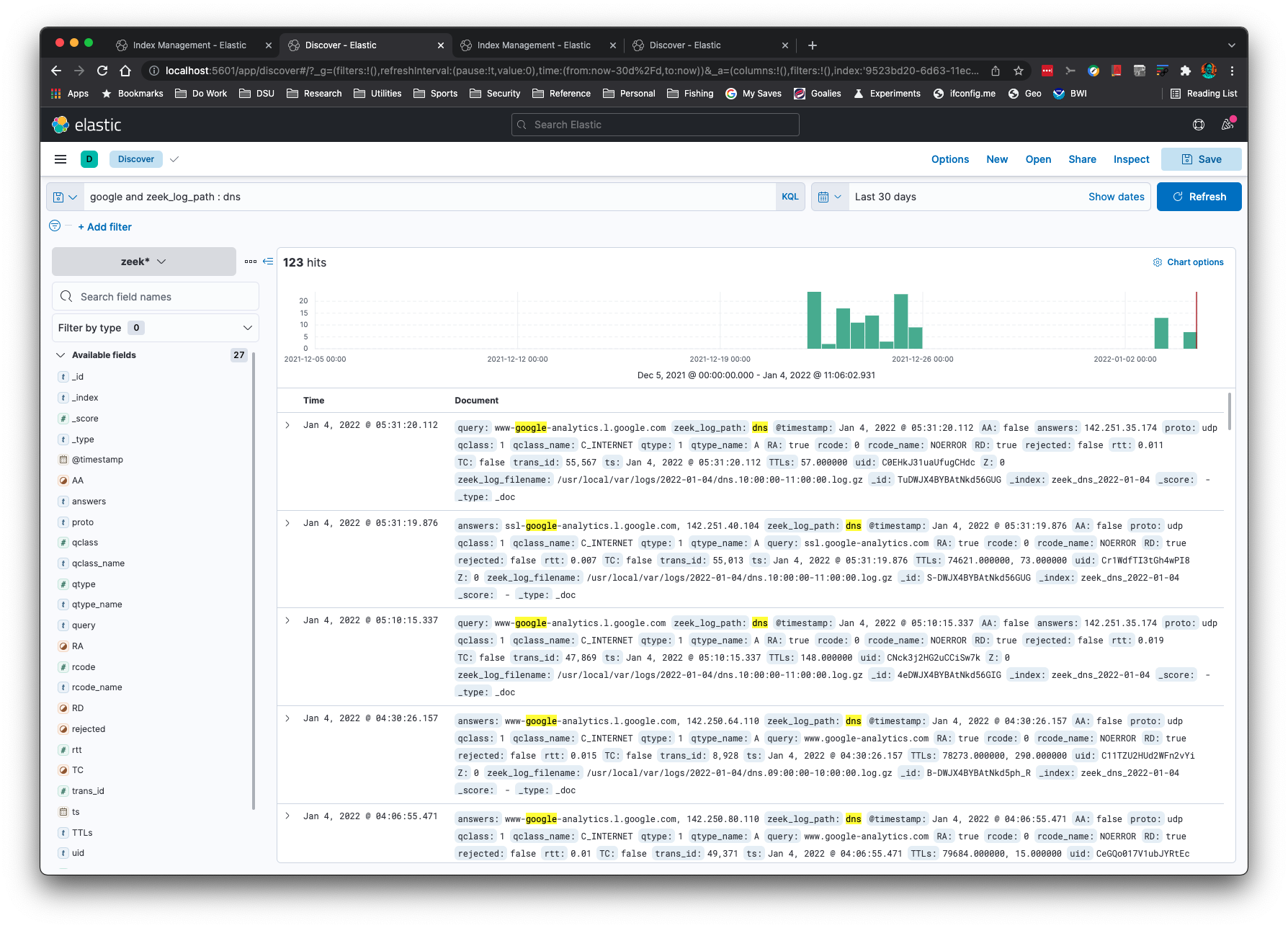
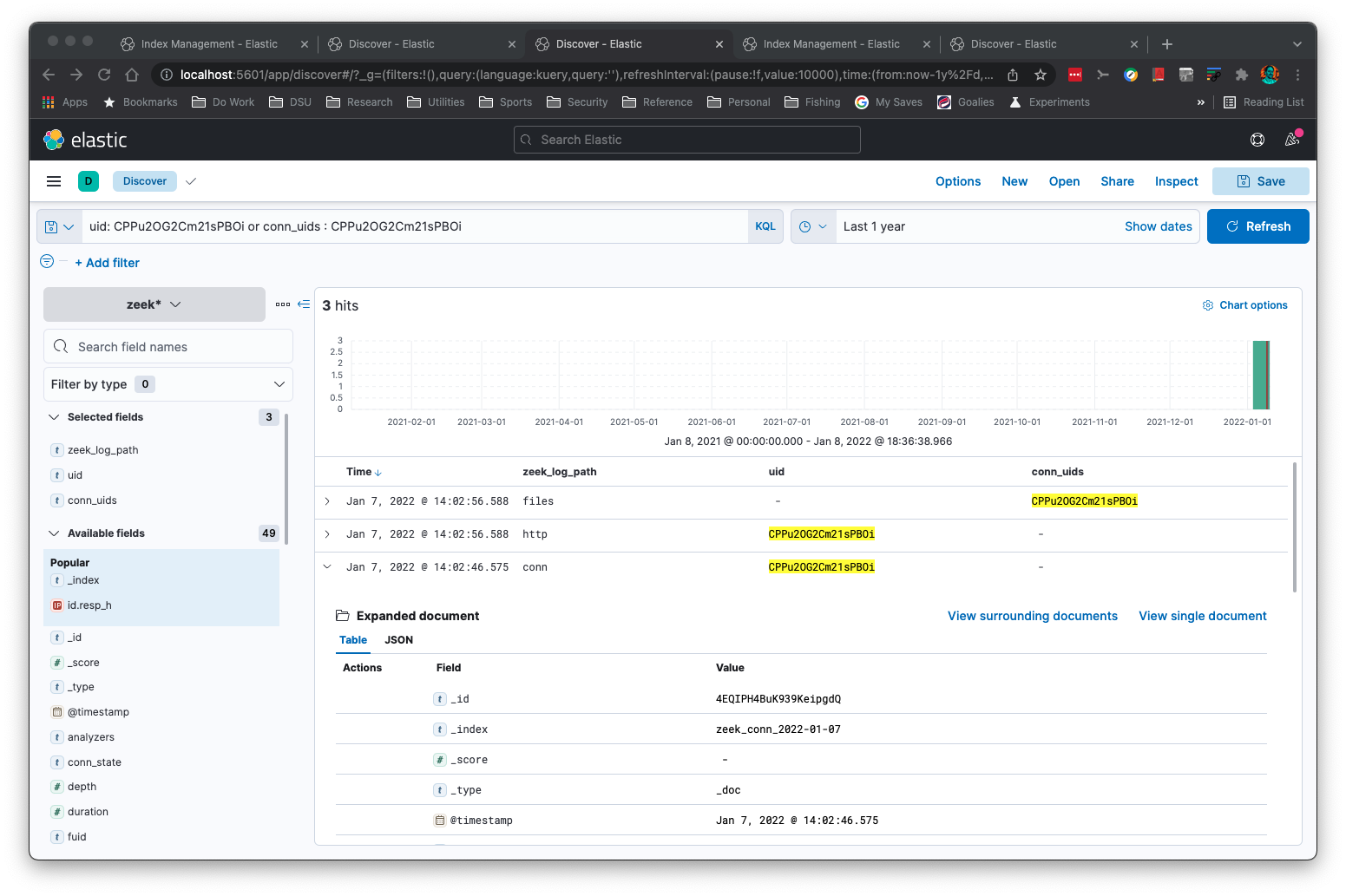
Want to see multiple Zeek logs for the same connection ID (uid)
or file ID (fuid)? Here are the hits from files.log, http.log, and
conn.log for a single uid:
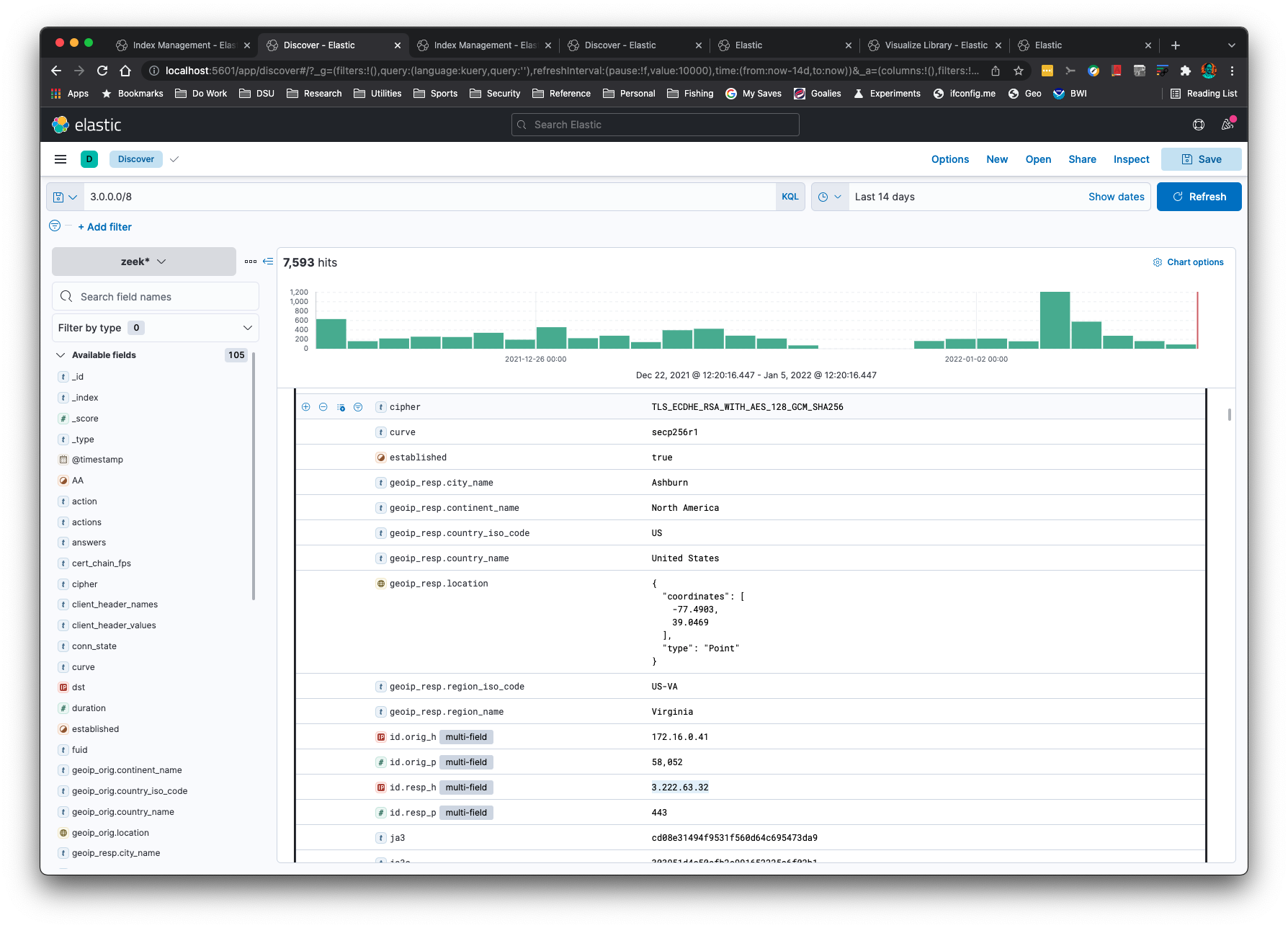
You can perform subnet searching on Zeek's 'addr' type:
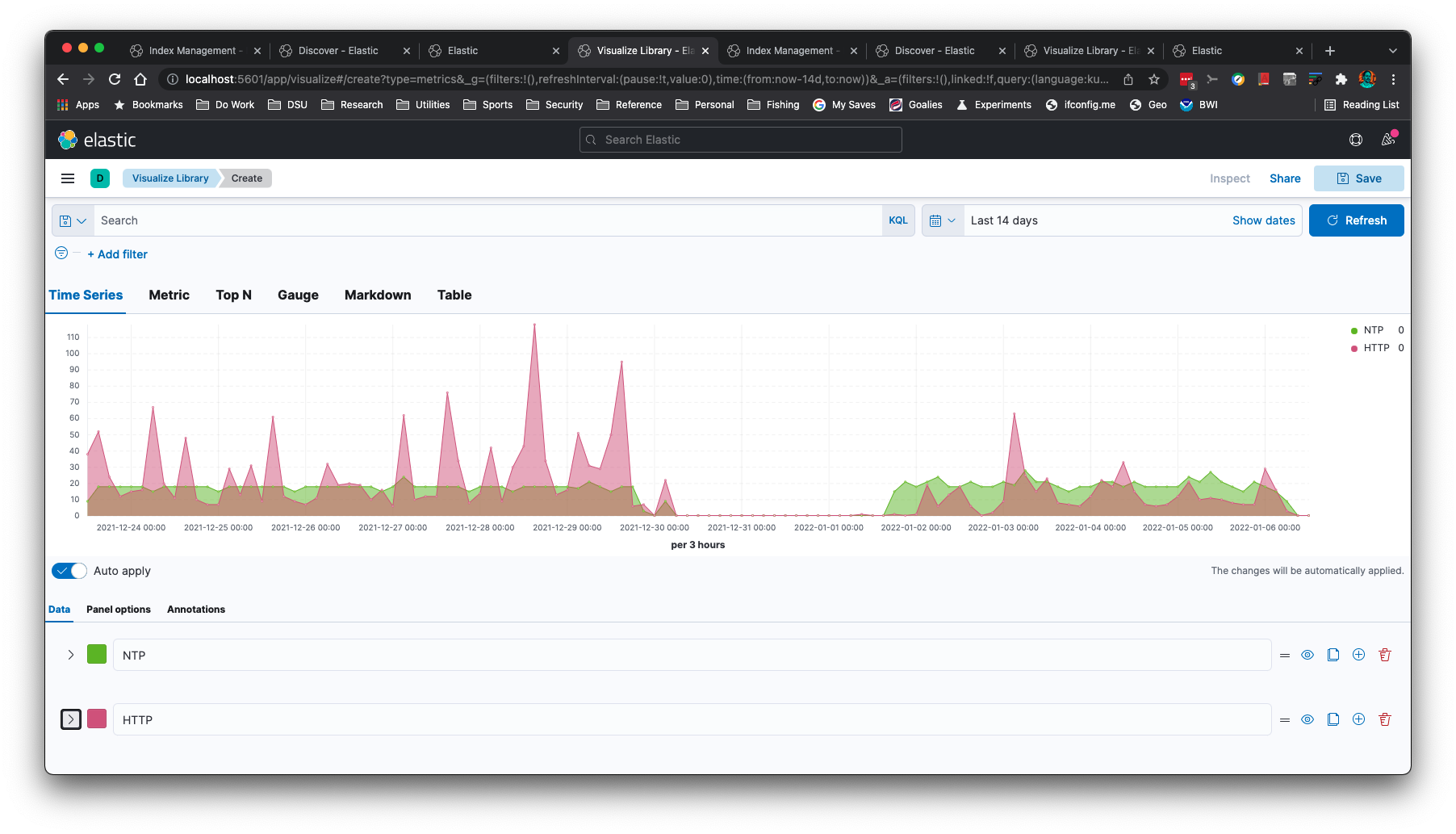
You can create time series graphs, such as this NTP and HTTP graph:
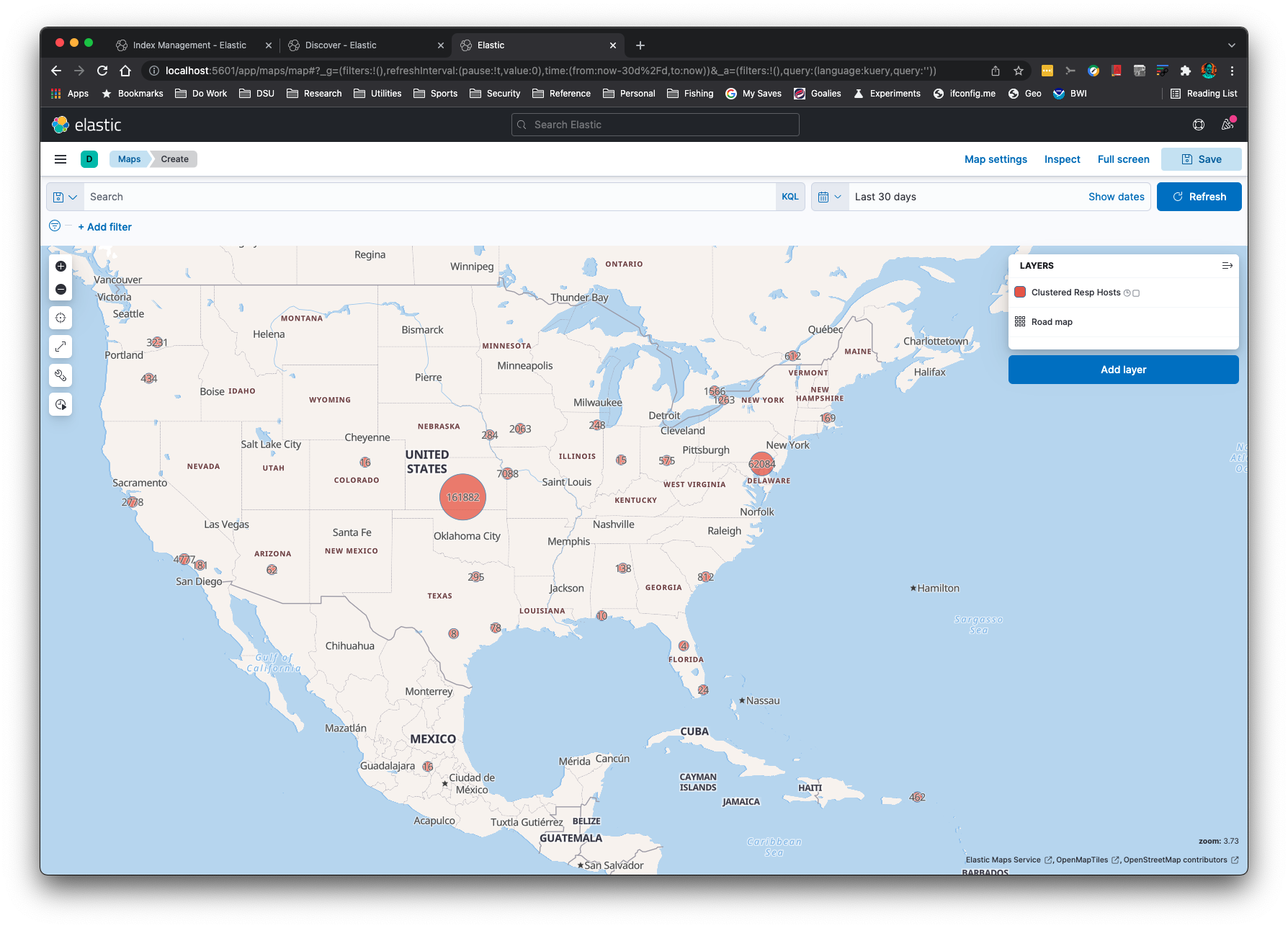
IP Addresses can be Geolocated with the `-g` command line option:
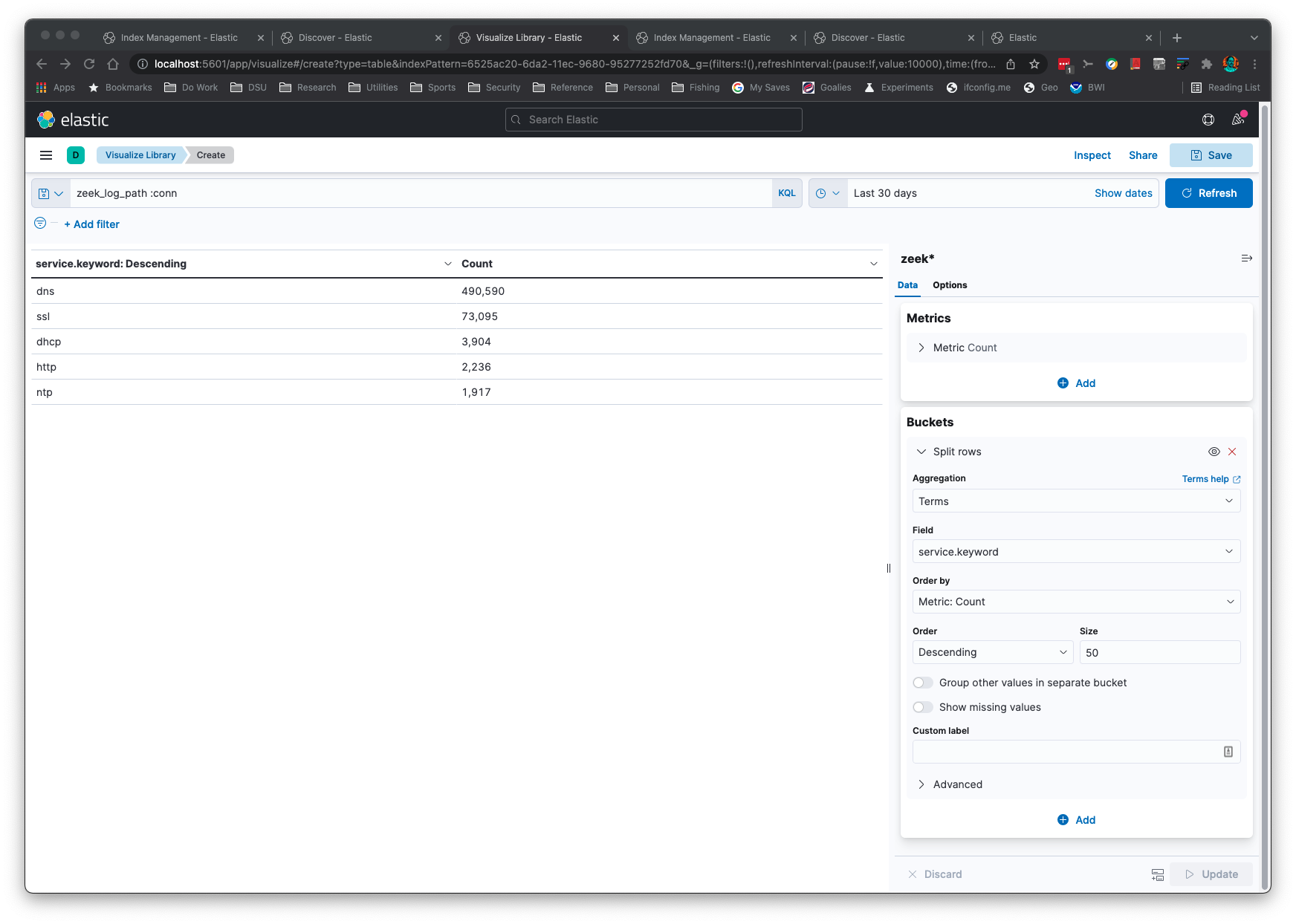
Aggregations are simple and quick:
This application will "just work" when Zeek log formats change. The logic reads
the field names and associated types to set up the mappings correctly in
ElasticSearch.
This application will recognize gzip or uncompressed logs. This application assumes
you have ElasticSearch set up on your localhost at the default port.
If you do not have ElasticSearch you can output the JSON to stdout with the `-s -b` command line options
to process with the [jq application](https://stedolan.github.io/jq).
You can add a keyword subfield to text fields with the `-k` command line option. This is useful
for aggregations in Kibana.
If Python is already on your system, there is nothing additional for you to copy over
to your machine than [Elasticsearch, Kibana](https://www.elastic.co/start), and [zeek2es.py](zeek2es.py)
if you already have the [requests](https://docs.python-requests.org/en/latest/) library installed.
## Installation
Assuming you meet the [requirements](#requirements), there is none. You just
copy [zeek2es.py](zeek2es.py) to your host and run it with Python. Once Zeek
logs have been imported with automatic index name generation (meaning, you did not supply the `-i` option)
you will find your indices named "zeek_`zeeklogname`_`date`", where `zeeklogname` is a log name like `conn`
and the `date` is in `YYYY-MM-DD` format. Set your Kibana index pattern to match `zeek*` in this case. If
you named your index with the `-i` option, you will need to create a Kibana index pattern that
matches your naming scheme.
If you are upgrading zeek2es, please see [the section on upgrading zeek2es](#upgradingzeek2es).
### Elastic v8.0+
If you are using Elastic v8.0+, it has security enabled by default. This adds a requirement of a username
and password, plus HTTPS.
If you want to be able to delete indices/data streams with wildcards (as examples in this readme show),
edit `elasticsearch.yml` with the following line:
```
action.destructive_requires_name: false
```
You will also need to change the curl commands in this readme to contain `-k -u elastic:`
where the `elastic` user's password is set with a command like the following:
```
./bin/elasticsearch-reset-password -u elastic -i
```
You can use `zeek2es.py` with the `--user` and `--passwd` command line options to specify your
credentials to ES. You can also supply these options via the extra command line arguments for the helper
scripts.
### Docker
Probably the easiest way to use this code is through Docker. All of the files are in the `docker` directory.
First, you will want to edit the lines with `CHANGEME!!!` in the `.env` file to fit your environment.
You will also need to edit the Elastic password in `docker/zeek2es/entrypoint.sh` to match. It can be found after the `--passwd` option.
Next, you can change directory into the `docker` directory and type the following commands to bring
up a zeek2es and Elasticsearch cluster:
```
docker-compose build
dockr-compose up
```
Now you can put logs in the `VOLUME_MOUNT/data/logs` directory (`VOLUME_MOUNT` you set in the `.env` file).
When logs are CREATED in this directory, zeek2es will begin processing them and pushing them into Elasticsearch.
You can then login to https://localhost:5601 with the username and password you set up in the `.env` file.
By default there is a self signed certificate, but you can change that if you edit the docker compose files. Once inside
Kibana you will go to Stack Management->Data Views and create a data view for `logs*` with the timestamp `@timestamp`.
Now you will be able to go to Discover and start searching your logs! Your data is persistent in the `VOLUME_MOUNT/data` directory you set.
If you would like to remove all data, just `rm -rf VOLUME_MOUNT/data`, substituting the directory you set into that remove command.
The next time you start your cluster it will be brand new for more data.
## Upgrading zeek2es
Most upgrades should be as simple as copying the newer [zeek2es.py](zeek2es.py) over
the old one. In some cases, the ES ingest pipeline required for the `-g` command line option
might change during an upgrade. Therefore, it is strongly recommend you delete
your [ingest pipeline](#esingestpipeline) before you run a new version of zeek2es.py.
### ES Ingest Pipeline
If you need to [delete the "zeekgeoip" ES ingest pipeline](https://www.elastic.co/guide/en/elasticsearch/reference/current/delete-pipeline-api.html)
used to geolocate IP addresses with the `-g` command line option, you can either do it graphically
through Kibana's Stack Management->Ingest Pipelines or this command will do it for you:
```
curl -X DELETE "localhost:9200/_ingest/pipeline/zeekgeoip?pretty"
```
This command is strongly recommended whenever updating your copy of zeek2es.py.
## Filtering Data
### Python Filters
zeek2es provides filtering capabilities for your Zeek logs before they are stored in ElasticSearch. This
functionality can be enabled with the `-a` or `-f` options. The filters are constructed from Python
lambda functions, where the input is a Python dictionary representing the output. You can add a
filter to only store connection logs where the `service` field is populated using the `-f` option with
this lambda filter file:
```
lambda x: 'service' in x and len(x['service']) > 0
```
Or maybe you'd like to filter for connections that have at least 1,024 bytes, with at least 1 byte coming from
the destination:
```
lambda x: 'orig_ip_bytes' in x and 'resp_ip_bytes' in x and x['orig_ip_bytes'] + x['resp_ip_bytes'] > 1024 and x['resp_ip_bytes'] > 0
```
Simpler lambda filters can be provided on the command line via the `-a` option. This filter will only store
connection log entries where the originator IP address is part of the `192.0.0.0/8` network:
```
python zeek2es.py conn.log.gz -a "lambda x: 'id.orig_h' in x and ipaddress.ip_address(x['id.orig_h']) in ipaddress.ip_network('192.0.0.0/8')"
```
For power users, the `-f` option will allow you to define a full function (instead of Python's lambda functions) so you can write functions that
span multiple lines.
### Filter on Keys
In some instances you might want to pull data from one log that depends on another. An
example would be finding all `ssl.log` rows that have a `uid` matching previously
indexed rows from `conn.log`, or vice versa. You can filter by importing your
`conn.log` files with the `-o uid uid.txt` command line. This will log all uids that were
indexed to a file named `uid.txt`. Then, when you import your `ssl.log` files you will provide
the `-e uid uid.txt` command line. This will only import SSL rows
containing `uid` values that are in `uid.txt`, previously built from our import of `conn.log`.
## Command Line Examples
```
python zeek2es.py your_zeek_log.gz -i your_es_index_name
```
This script can be run in parallel on all connection logs, 10 at a time, with the following command:
```
find /some/dir -name “conn*.log.gz” | parallel -j 10 python zeek2es.py {1} :::: -
```
If you would like to automatically import all conn.log files as they are created in a directory, the following
[fswatch](https://emcrisostomo.github.io/fswatch/) command will do that for you:
```
fswatch -m poll_monitor --event Created -r /data/logs/zeek/ | awk '/^.*\/conn.*\.log\.gz$/' | parallel -j 5 python ~/zeek2es.py {} -g -d :::: -
```
If you have the jq command installed you can perform searches across all your logs for a common
field like connection uid, even without ElasticSearch:
```
find /usr/local/var/logs -name "*.log.gz" -exec python ~/Source/zeek2es/zeek2es.py {} -s -b -z \; | jq -c '. | select(.uid=="CLbPij1vThLvQ2qDKh")'
```
You can use much more complex jq queries than this if you are familiar with jq.
If you want to remove all of your Zeek data from ElasticSearch, this command will do it for you:
```
curl -X DELETE http://localhost:9200/zeek*
```
Since the indices have the date appended to them, you could
delete Dec 31, 2021 with the following command:
```
curl -X DELETE http://localhost:9200/zeek_*_2021-12-31
```
You could delete all conn.log entries with this command:
```
curl -X DELETE http://localhost:9200/zeek_conn_*
```
## Command Line Options
```
$ python zeek2es.py -h
usage: zeek2es.py [-h] [-i ESINDEX] [-u ESURL] [--user USER] [--passwd PASSWD]
[-l LINES] [-n NAME] [-k KEYWORDS [KEYWORDS ...]]
[-a LAMBDAFILTER] [-f FILTERFILE]
[-y OUTPUTFIELDS [OUTPUTFIELDS ...]] [-d DATASTREAM]
[--compress] [-o fieldname filename] [-e fieldname filename]
[-g] [-p SPLITFIELDS [SPLITFIELDS ...]] [-j] [-r] [-t] [-s]
[-b] [--humio HUMIO HUMIO] [-c] [-w] [-z]
filename
Process Zeek ASCII logs into ElasticSearch.
positional arguments:
filename The Zeek log in *.log or *.gz format. Include the full path.
optional arguments:
-h, --help show this help message and exit
-i ESINDEX, --esindex ESINDEX
The Elasticsearch index/data stream name.
-u ESURL, --esurl ESURL
The Elasticsearch URL. Use ending slash. Use https for Elastic v8+. (default: http://localhost:9200)
--user USER The Elasticsearch user. (default: disabled)
--passwd PASSWD The Elasticsearch password. Note this will put your password in this shell history file. (default: disabled)
-l LINES, --lines LINES
Lines to buffer for RESTful operations. (default: 10,000)
-n NAME, --name NAME The name of the system to add to the index for uniqueness. (default: empty string)
-k KEYWORDS [KEYWORDS ...], --keywords KEYWORDS [KEYWORDS ...]
A list of text fields to add a keyword subfield. (default: service)
-a LAMBDAFILTER, --lambdafilter LAMBDAFILTER
A Python lambda function, when eval'd will filter your output JSON dict. (default: empty string)
-f FILTERFILE, --filterfile FILTERFILE
A Python function file, when eval'd will filter your output JSON dict. (default: empty string)
-y OUTPUTFIELDS [OUTPUTFIELDS ...], --outputfields OUTPUTFIELDS [OUTPUTFIELDS ...]
A list of fields to keep for the output. Must include ts. (default: empty string)
-d DATASTREAM, --datastream DATASTREAM
Instead of an index, use a data stream that will rollover at this many GB.
Recommended is 50 or less. (default: 0 - disabled)
--compress If a datastream is used, enable best compression.
-o fieldname filename, --logkey fieldname filename
A field to log to a file. Example: uid uid.txt.
Will append to the file! Delete file before running if appending is undesired.
This option can be called more than once. (default: empty - disabled)
-e fieldname filename, --filterkeys fieldname filename
A field to filter with keys from a file. Example: uid uid.txt. (default: empty string - disabled)
-g, --ingestion Use the ingestion pipeline to do things like geolocate IPs and split services. Takes longer, but worth it.
-p SPLITFIELDS [SPLITFIELDS ...], --splitfields SPLITFIELDS [SPLITFIELDS ...]
A list of additional fields to split with the ingestion pipeline, if enabled.
(default: empty string - disabled)
-j, --jsonlogs Assume input logs are JSON.
-r, --origtime Keep the numerical time format, not milliseconds as ES needs.
-t, --timestamp Keep the time in timestamp format.
-s, --stdout Print JSON to stdout instead of sending to Elasticsearch directly.
-b, --nobulk Remove the ES bulk JSON header. Requires --stdout.
--humio HUMIO HUMIO First argument is the Humio URL, the second argument is the ingest token.
-c, --cython Use Cython execution by loading the local zeek2es.so file through an import.
Run python setup.py build_ext --inplace first to make your zeek2es.so file!
-w, --hashdates Use hashes instead of dates for the index name.
-z, --supresswarnings
Supress any type of warning. Die stoically and silently.
To delete indices:
curl -X DELETE http://localhost:9200/zeek*?pretty
To delete data streams:
curl -X DELETE http://localhost:9200/_data_stream/zeek*?pretty
To delete index templates:
curl -X DELETE http://localhost:9200/_index_template/zeek*?pretty
To delete the lifecycle policy:
curl -X DELETE http://localhost:9200/_ilm/policy/zeek-lifecycle-policy?pretty
You will need to add -k -u elastic_user:password if you are using Elastic v8+.
```
## Requirements
- A Unix-like environment (MacOs works!)
- Python
- [requests](https://docs.python-requests.org/en/latest/) Python library installed, such as with with `pip`.
## Notes
### Humio
To import your data into Humio you will need to set up a repository with the `corelight-json` parser. Obtain
the ingest token for the repository and you can import your data with a command such as:
```
python3 zeek2es.py -s -b --humio http://localhost:8080 b005bf74-1ed3-4871-904f-9460a4687202 http.log
```
The URL should be in the format of: `http://yourserver:8080`, as the rest of the path is added by the
`zeek2es.py` script automatically for you.
### JSON Log Input
Since Zeek JSON logs do not have type information like the ASCII TSV versions, only limited type information
can be provided to ElasticSearch. You will notice this most for Zeek "addr" log fields that
are not id$orig_h and id$resp_h, since the type information is not available to translate the field into
ElasticSearch's "ip" type. Since address fields will not be of type "ip", you will not be able to use
subnet searches, for example, like you could for the TSV logs. Saving Zeek logs in ASCII TSV
format provides for greater long term flexibility.
### Data Streams
You can use data streams instead of indices for large logs with the `-d` command line option. This
option creates index templates beginning with `zeek_`. It also creates a lifecycle policy
named `zeek-lifecycle-policy`. If you would like to delete all of your data streams, lifecycle policies,
and index templates, these commands will do it for you:
```
curl -X DELETE http://localhost:9200/_data_stream/zeek*?pretty
curl -X DELETE http://localhost:9200/_index_template/zeek*?pretty
curl -X DELETE http://localhost:9200/_ilm/policy/zeek-lifecycle-policy?pretty
```
### Helper Scripts
There are two scripts that will help you make your logs into data streams such as `logs-zeek-conn`.
The first script is [process_logs_as_datastream.sh](process_logs_as_datastream.sh) and given
a list of logs and directories, will import them as such. The second script
is [process_log.sh](process_log.sh), and it can be used to import logs
one at a time. This script can also be used to monitor logs created in a directory with
[fswatch](https://emcrisostomo.github.io/fswatch/). Both scripts have example command lines
if you run them without any parameters.
```
$ ./process_logs_as_datastream.sh
Usage: ./process_logs_as_datastream.sh NJOBS "ADDITIONAL_ARGS_TO_ZEEK2ES" "LIST_OF_LOGS_DELIMITED_BY_SPACES" DIR1 DIR2 ...
Example:
time ./process_logs_as_datastream.sh 16 "" "amqp bgp conn dce_rpc dhcp dns dpd files ftp http ipsec irc kerberos modbus modbus_register_change mount mqtt mysql nfs notice ntlm ntp ospf portmap radius reporter rdp rfb rip ripng sip smb_cmd smb_files smb_mapping smtp snmp socks ssh ssl stun syslog tunnel vpn weird wireguard x509" /usr/local/var/logs
```
```
$ ./process_log.sh
Usage: ./process_log.sh LOGFILENAME "ADDITIONAL_ARGS_TO_ZEEK2ES"
Example:
fswatch -m poll_monitor --event Created -r /data/logs/zeek | awk '/^.*\/(conn|dns|http)\..*\.log\.gz$/' | parallel -j 16 ./process_log.sh {} "" :::: -
```
You will need to edit these scripts and command lines according to your environment.
Any files having a name of a log such as `conn_filter.txt` in the `lambda_filter_file_dir`, by default your home directory, will be applied as a lambda
filter file to the corresponding log input. This allows you to set up all of your filters in one directory and import multiple log files with
that set of filters in one command with [process_logs_as_datastream.sh](process_logs_as_datastream.sh).
The following lines should delete all Zeek data in ElasticSearch no matter if you use indices or
data streams, or these helper scripts:
```
curl -X DELETE http://localhost:9200/zeek*?pretty
curl -X DELETE http://localhost:9200/_data_stream/zeek*?pretty
curl -X DELETE http://localhost:9200/_data_stream/logs-zeek*?pretty
curl -X DELETE http://localhost:9200/_index_template/zeek*?pretty
curl -X DELETE http://localhost:9200/_index_template/logs-zeek*?pretty
curl -X DELETE http://localhost:9200/_ilm/policy/zeek-lifecycle-policy?pretty
```
... or if using Elastic v8+ ...
```
curl -X DELETE -k -u elastic:password https://localhost:9200/zeek*?pretty
curl -X DELETE -k -u elastic:password https://localhost:9200/_data_stream/zeek*?pretty
curl -X DELETE -k -u elastic:password https://localhost:9200/_data_stream/logs-zeek*?pretty
curl -X DELETE -k -u elastic:password https://localhost:9200/_index_template/zeek*?pretty
curl -X DELETE -k -u elastic:password https://localhost:9200/_index_template/logs-zeek*?pretty
curl -X DELETE -k -u elastic:password https://localhost:9200/_ilm/policy/zeek-lifecycle-policy?pretty
```
But to be able to do this in v8+ you will need to configure Elastic as described
in the section [Elastic v8.0+](#elastic80).
### Cython
If you'd like to try [Cython](https://cython.org/), you must run `python setup.py build_ext --inplace`
first to generate your compiled file. You must do this every time you update zeek2es!