# MicroTx Workflows: Chatbot/RAG Examples




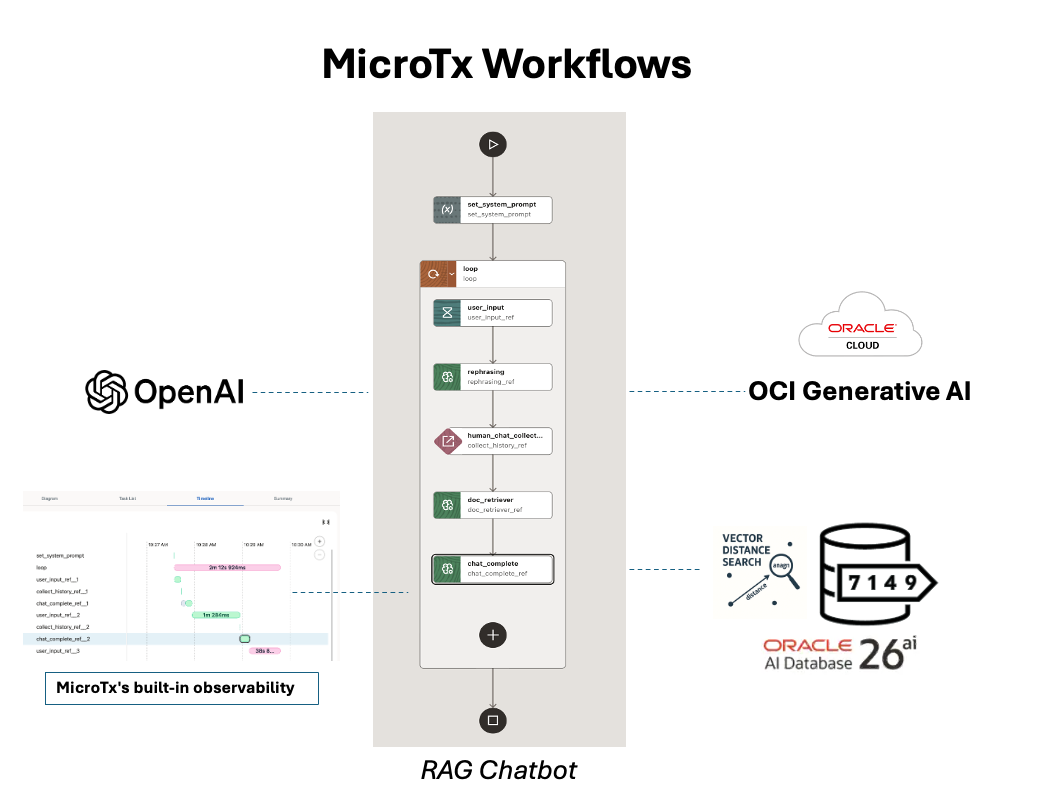
**Oracle MicroTx Workflows** is an enterprise-grade durable workflow orchestration platform built on the proven **Conductor** architecture. It combines durable execution, visual workflow design, AI agent orchestration, and transaction-aware coordination to help organizations build reliable long-running business and AI workflows.
In this tutorial, I'll show examples on how to use the new **Oracle MicroTx Workflows** to visually design a classic **RAG-pattern chatbot** taking control of all the conversation steps, leveraging the **Oracle AI Database 26ai** as **vectore store** and **OCI Generative AI LLMs** or **OpenAI**. You'll see how to build a client that starts the conversation, and how the **built-in observability** capability lets you monitor and fine-tune the resources used.
📌 I'm also flagging a more compact approach for chatbot development that MicroTx provides: the **Conversational Chat Agent** you'll find documented **[here](https://docs.oracle.com/en/database/oracle/transaction-manager-for-microservices/26.1/aiwfg/conversational-agent-chat.html)**.
For a full example, take a look here: **[here](https://github.com/oracle-samples/microtx-samples/tree/main/workflow/RAG-ingestion-retrieval-workflows/conversational-agent-chat-ui)**.
## Set up the platform
For a quick, free development installation:
- From [Oracle Container Registry](https://container-registry.oracle.com/), download and install an `Oracle AI Database 26ai Free Container` using Docker or Podman.
- Download `Oracle Transaction Manager for Microservices Free` from [here](https://www.oracle.com/database/technologies/transaction-manager-for-microservices-downloads.html).
- Follow the instructions [here](https://github.com/oracle-samples/microtx-samples/tree/main/docs/quickstart) to run the MicroTx platform locally on your laptop.
- Check the installation in a browser by opening the console at: `http://127.0.0.1/consoleui/`.
## Install the workflows
We'll prepare the resources consumed by the workflows, and then we'll upload the workflows.
### Connector setup
Under Connectors, set up the resources listed in this section.
#### Database
To let the Kubernetes instance access your local Oracle Database Free instance installed with Docker or Podman, create a Database Profile like this:
- **Name**: `oracle-database`
- **URL**: `jdbc:oracle:thin:@//host.minikube.internal:1521/FREEPDB1`
Set `Username`/`Password` according to an existing user that is already defined. Use the `Test` button to check the connection before `Save`.
If you have another kind of instance, change these settings as needed.
#### LLM Definitions
##### OpenAI
Create an OpenAI connection:
- **Name**: `openai-dev`
- **Model Provider**: `OPENAI`
- **Models**: `gpt-5.4-mini, text-embedding-3-large`
- **API Key**: ``
- **Base URL**: `https://api.openai.com`
Use the `Test` button to check the connection before `Save`.
##### Oracle Cloud Infrastructure Generative AI
First, set:
- **Name**: `oci_llm_profiles`
It is straightforward to set the other connector parameters if you have already set up your OCI CLI by following the instructions **[here](https://docs.oracle.com/en-us/iaas/Content/API/Concepts/sdkconfig.htm)**.
In `~/.oci/config`, you'll find:
- **User ID**
- **Fingerprint**
- **API Key**: get the link and copy the `.pem` file content, from `-----BEGIN PRIVATE KEY-----` to `-----END PRIVATE KEY-----`, including these two fixed labels.
From the OCI console, get:
- **Compartment ID**
- **Tenant ID**
If you choose:
- **Serving Mode**: `ONDEMAND`
you can choose one of the models listed **[here](https://docs.oracle.com/en-us/iaas/Content/generative-ai/model-endpoint-regions.htm)** according to the `Region` you prefer, such as **google.gemini-2.5-pro**, **meta.llama-3.3-70b-instruct**, **openai.gpt-oss-120b**, **cohere.embed-multilingual-v3.0**, and many more.
Example:
- **Models (comma separated)**: `google.gemini-2.5-pro, meta.llama-3.3-70b-instruct, openai.gpt-oss-120b, cohere.embed-multilingual-v3.0`
- **Region**: `eu-frankfurt-1`
- **Serving Mode**: `DEDICATED`
set the private LLM you have provisioned.
Use the `Test` button to check the connection before `Save`.
### Simple Chatbot
- Import [`llm_chat_human_in_loop.json`](llm_chat_human_in_loop.json) as a new workflow from the `Workflow Builder` menu. This is version **1**.
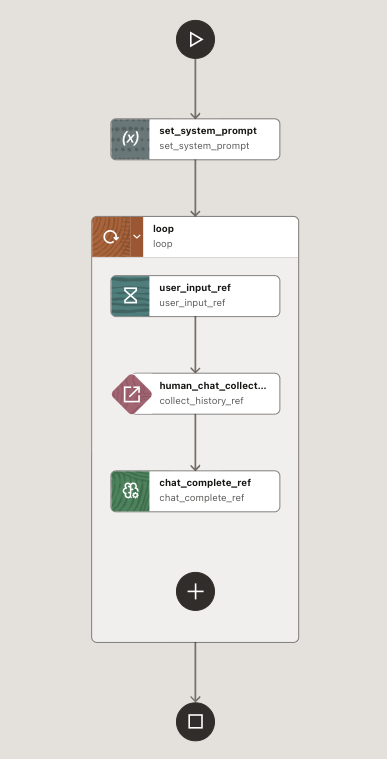
It does not require any extra configuration to run.
### RAG Chatbot
- In **Connectors**/**Storage**, import the file `get-started-java-development.pdf` from [here](https://docs.oracle.com/en/database/oracle/oracle-database/26/tdpjd/get-started-java-development.pdf).
- Import [`RAG_ingest_data.json`](RAG_ingest_data.json) to create a vector table and ingest the knowledge base:
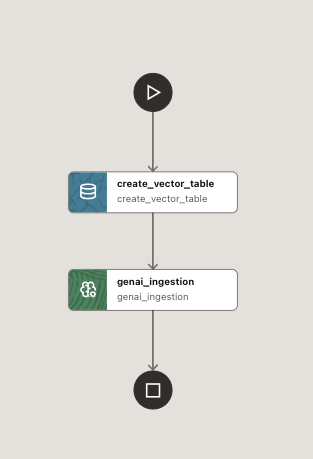
- Run `RAG_ingest_data` once to create the vector store that will support the RAG-based chatbot. This creates a standard vectors table with the document chunks and their vector embeddings.
- From **Agentic AI**/**Prompt Template**, create a prompt template named `rewrite` using [this file](rewrite.txt). This supports the GenAI Task that rewrites the question before it is used to retrieve chunks through similarity search.
- Finally, import workflow version **2**, which you can find in [`llm_chat_human_in_loop_rag.json`](llm_chat_human_in_loop_rag.json):
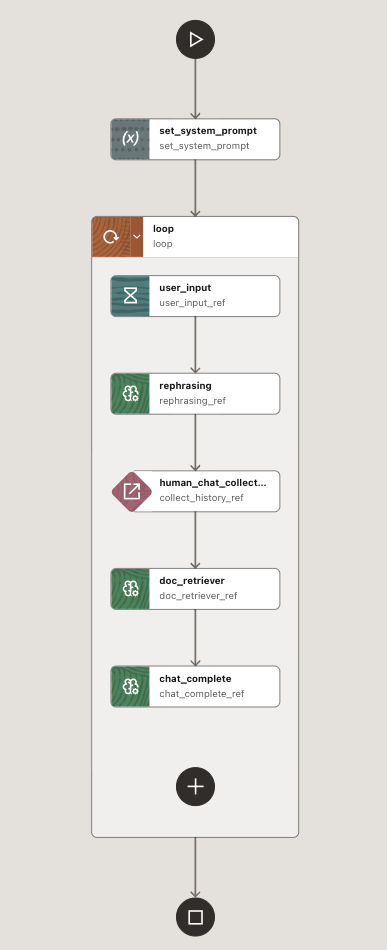
With this step, the RAG workflow setup is complete.
**NOTICE**:
Due to a GUI bug, if you want to manually change the `human_chat_collect_history` task definition, the `history` parameter must be set as an **Object/Array** type and placed directly in the JSON:
```
"history": "${collect_history_ref.output.result}",
```
In general, if you have an **Object/Array** type parameter, set the value in the workflow JSON file.
## Chatbot client
### Set up the environment to run the chat client
- Prepare the Python environment:
```shell
python3 -m venv .venv
source .venv/bin/activate
python -m ensurepip --upgrade
python -m pip install --upgrade pip
python -m pip install conductor-python
```
- Set the standard endpoint for engine communication, which is slightly different from the standard Conductor URL:
```shell
CONDUCTOR_SERVER_URL=http://127.0.0.1/workflow-server/api
```
- Download the [llm_chat_human_in_loop.py](./llm_chat_human_in_loop.py).
### Run with OpenAI models
- To run a simple chatbot on OpenAI, execute:
```
source .venv/bin/activate
export CONDUCTOR_SERVER_URL=http://localhost/workflow-server/api
python llm_chat_human_in_loop.py
```
- Execution example:
```
(.venv) cdebari@cdebari-mac test-blog-microtx % python llm_chat_human_in_loop.py
(start_workflow_request: 'StartWorkflowRequest') -> 'str'
2026-06-18 17:38:05,847 [41149] conductor.client.automator.task_handler INFO TaskHandler initialized
2026-06-18 17:38:05,847 [41149] conductor.client.automator.task_handler INFO Starting worker processes...
2026-06-18 17:38:05,851 [41149] conductor.client.automator.task_handler INFO Started 1 TaskRunner process(es)
2026-06-18 17:38:05,852 [41149] conductor.client.automator.task_handler INFO TaskHandler monitor started (restart_on_failure=True, interval=5.0s)
2026-06-18 17:38:05,853 [41149] conductor.client.automator.task_handler INFO Started all processes
2026-06-18 17:38:05,861 [41149] conductor.client.automator.task_runner INFO Conductor Worker[name=human_chat_collect_history, pid=41153, status=active, poll_interval=100ms, thread_count=1, poll_timeout=100ms, lease_extend=false, register_task_def=false]
Started: 9bc7612b-9c02-495b-a8fa-a6391d7cb3c9
Interactive science chat (type 'quit' to exit)
==================================================
Workflow details: http://localhost/workflow-server/api/workflow/9bc7612b-9c02-495b-a8fa-a6391d7cb3c9
You: Who is George Washington?
Assistant: George Washington was the first President of the United States, serving from 1789 to 1797. He was also a key leader in the American Revolutionary War and is often called the “Father of His Country” for his role in helping the United States become independent.
You: when he was born?
Assistant: George Washington was born on February 22, 1732.
You: exit
Ending conversation.
Full conversation: http://localhost/workflow-server/api/workflow/9bc7612b-9c02-495b-a8fa-a6391d7cb3c9
Conversation History: [
{
"role": "system",
"message": "You are a helpful assistant that knows about science. Answer questions clearly and concisely. If you don't know something, say so. Stay on topic."
},
{
"role": "user",
"message": "Who is George Washington?"
},
{
"role": "assistant",
"message": "George Washington was the first President of the United States, serving from 1789 to 1797. He was also a key leader in the American Revolutionary War and is often called the \u201cFather of His Country\u201d for his role in helping the United States become independent."
},
{
"role": "user",
"message": "when he was born?"
},
{
"role": "assistant",
"message": "George Washington was born on February 22, 1732."
}
]
2026-06-18 17:38:45,210 [41149] conductor.client.automator.task_handler INFO Stopped worker processes..
```
As you can see, the full execution log is available at `http://localhost/workflow-server/api/workflow/9bc7612b-9c02-495b-a8fa-a6391d7cb3c9`.
- To run a RAG chatbot, execute:
```
source .venv/bin/activate
export CONDUCTOR_SERVER_URL=http://localhost/workflow-server/api
python llm_chat_human_in_loop_rag.py
```
- Execution example:
```
(conductor) cdebari@cdebari-mac conductor-examples % python llm_chat_human_in_loop_rag.py
(start_workflow_request: 'StartWorkflowRequest') -> 'str'
2026-02-17 19:49:30,823 [49330] conductor.client.automator.task_handler INFO TaskHandler initialized
2026-02-17 19:49:30,823 [49330] conductor.client.automator.task_handler INFO Starting worker processes...
task runner process Process-2 started
2026-02-17 19:49:30,827 [49330] conductor.client.automator.task_handler INFO Started 1 TaskRunner process(es)
2026-02-17 19:49:30,827 [49330] conductor.client.automator.task_handler INFO Started all processes
2026-02-17 19:49:30,826 [49330] conductor.client.automator.task_runner INFO Conductor Worker[name=human_chat_collect_history, pid=49334, status=active, poll_interval=100ms, thread_count=1, poll_timeout=100ms, lease_extend=false, register_task_def=false]
Started: 63685d43-a8ad-41b1-b288-b993f87c9775
Interactive science chat (type 'quit' to exit)
==================================================
Workflow details: http://localhost/workflow-server/api/workflow/63685d43-a8ad-41b1-b288-b993f87c9775
You: which database can be used?
Assistant: Oracle Database can be used.
You: which version?
Assistant: You can use Oracle Autonomous Database or Oracle Database Free.
You: any kind of IDE could be used?
Assistant: You can use an integrated development environment (IDE) to develop your application, and this guide specifically uses IntelliJ IDEA community version. Other IDEs may also work, but the documentation focuses on IntelliJ.
You: quit
Ending conversation.
Full conversation log: http://localhost/workflow-server/api/workflow/63685d43-a8ad-41b1-b288-b993f87c9775
Conversation History: [
{
"role": "system",
"message": "You are a helpful assistant that knows about documentation provided. Answer questions clearly and concisely. If you don't know something, say so. Stay on topic."
},
{
"role": "user",
"message": {
"response": "Which type of database can be used?"
}
},
{
"role": "assistant",
"message": "Oracle Database can be used."
},
{
"role": "user",
"message": {
"response": "Which version of the database can be used?"
}
},
{
"role": "assistant",
"message": "You can use Oracle Autonomous Database or Oracle Database Free."
},
{
"role": "user",
"message": {
"response": "Can any type of IDE be used?"
}
}
]
2026-02-17 19:50:27,897 [49330] conductor.client.automator.task_handler INFO Stopped worker processes...
```
As you can see, the rephrasing makes the question more meaningful because it is rewritten according to the conversation history.
### Run with OCI models
1. Change the ingest workflow in the following places:
- RAG_ingest_data/create_vector_table/SQL Statement: `CREATE TABLE "JAVA_VECTORS"` to `CREATE TABLE "JAVA_VECTORS_OCI"`
- RAG_ingest_data/genai_ingestion:
- **Embedding Profile Name**: `oci_llm_profiles`
- **Embedding Model**: `cohere.embed-multilingual-v3.0`
- **Table Name**: `java_vectors_oci`
2. Run RAG_ingest_data
3. In `llm_chat_human_in_loop`, version **1**, change:
- llm_chat_human_in_loop/chat_complete_ref:
- **LLM Profile**: `oci_llm_profiles`
- **Model Name**: `google.gemini-2.5-pro`, for example
4. In `llm_chat_human_in_loop`, version **2**, change:
- llm_chat_human_in_loop/rephrasing:
- **LLM Profile**: `oci_llm_profiles`
- **Model Name**: `google.gemini-2.5-pro`, for example
- llm_chat_human_in_loop/doc_retriever:
- **LLM Profile**: `oci_llm_profiles`
- **Model Name**: `google.gemini-2.5-pro`, for example
- **Embedding Profile Name**: `oci_llm_profiles`
- **Embedding Model: `cohere.embed-multilingual-v3.0`
- **Table Name**: `java_vectors_oci`
- llm_chat_human_in_loop/chat_complete:
- **LLM Profile**: `oci_llm_profiles`
- **Model Name**: `google.gemini-2.5-pro`, for example
5. Run the two clients as before.
### Use the built-in observability
From the left menu, under `Executions`, you can pick one of the workflows started by a client conversation:

This gives you access to the full workflow logs, including a chart with a `Timeline` like this:
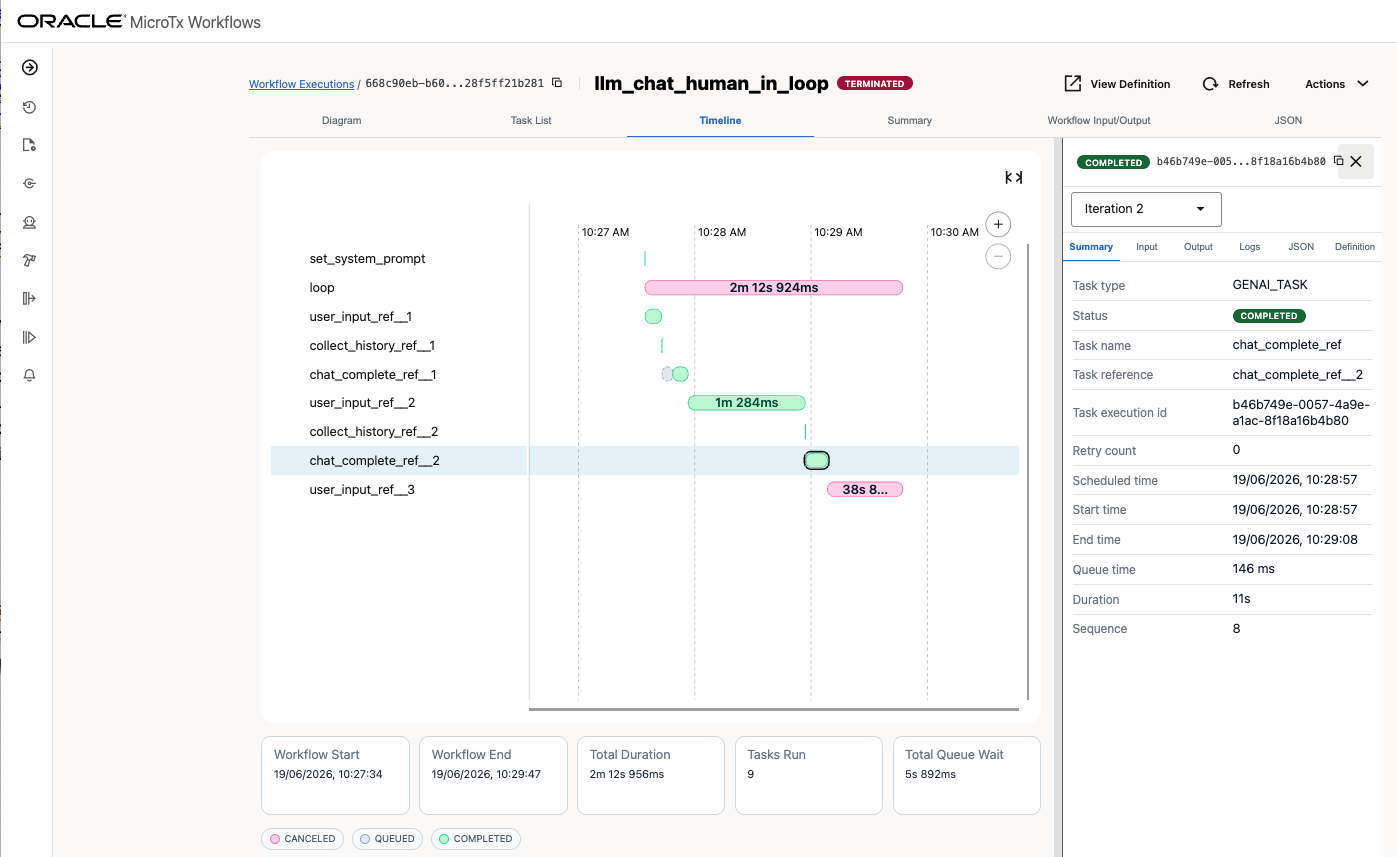
You can use it to evaluate bottlenecks and fix them.
## Disclaimer
*The views expressed in this paper are my own and do not necessarily reflect the views of Oracle.*