# MicroTx Workflows: Simple Custom Workers




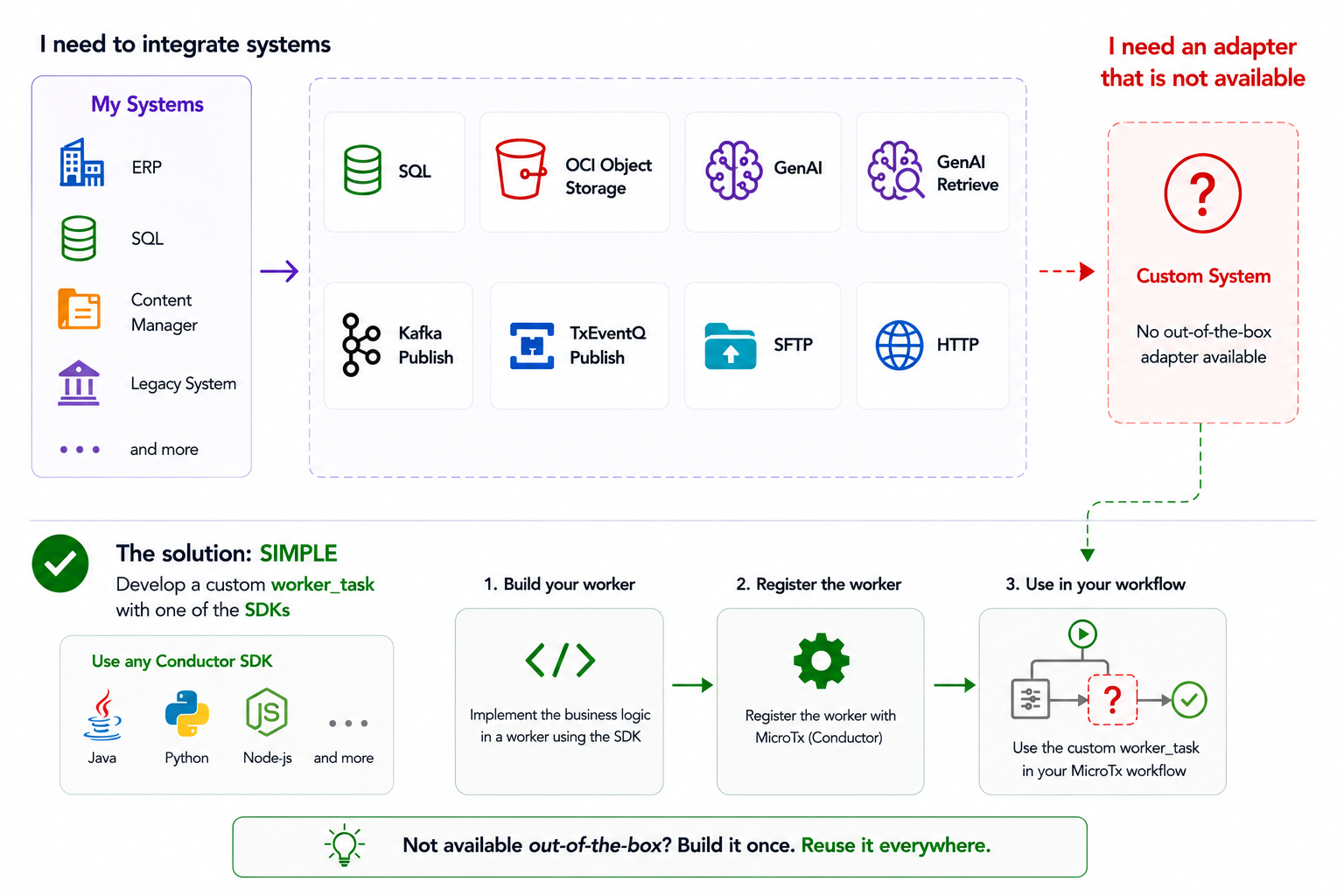
**Oracle MicroTx Workflows** is an enterprise-grade durable workflow orchestration platform built on the proven **Conductor** architecture. It combines durable execution, visual workflow design, AI agent orchestration, and transaction-aware coordination to help organizations build reliable long-running business and AI workflows.
In this tutorial, I'll show how to adapt the basic Python worker example from the [Python SDK](https://github.com/conductor-oss/python-sdk) to the MicroTx Workflow platform and create a worker process for a `SIMPLE` task type defined in the workflow.
A second example shows how to integrate an external database resource, SQLite in this case; you can adapt it for databases other than the Oracle Database or PostgreSQL connectors currently supported in MicroTx.
## Set up the platform
For a quick, free development installation:
- From [Oracle Container Registry](https://container-registry.oracle.com/), download and install an `Oracle AI Database 26ai Free Container` using Docker or Podman.
- Download `Oracle Transaction Manager for Microservices Free` from [here](https://www.oracle.com/database/technologies/transaction-manager-for-microservices-downloads.html).
- Follow the instructions [here](https://github.com/oracle-samples/microtx-samples/tree/main/docs/quickstart) to run the MicroTx platform locally on your laptop.
- Check the installation in a browser by opening the console at: `http://127.0.0.1/consoleui/`.
## Set up the environment
- Prepare the Python environment:
```shell
python3 -m venv .venv
source .venv/bin/activate
python -m ensurepip --upgrade
python -m pip install --upgrade pip
python -m pip install conductor-python
```
- Set the standard endpoint for engine communication, which is slightly different from the standard Conductor URL:
```shell
CONDUCTOR_SERVER_URL=http://127.0.0.1/workflow-server/api
```
## Install the example workflow
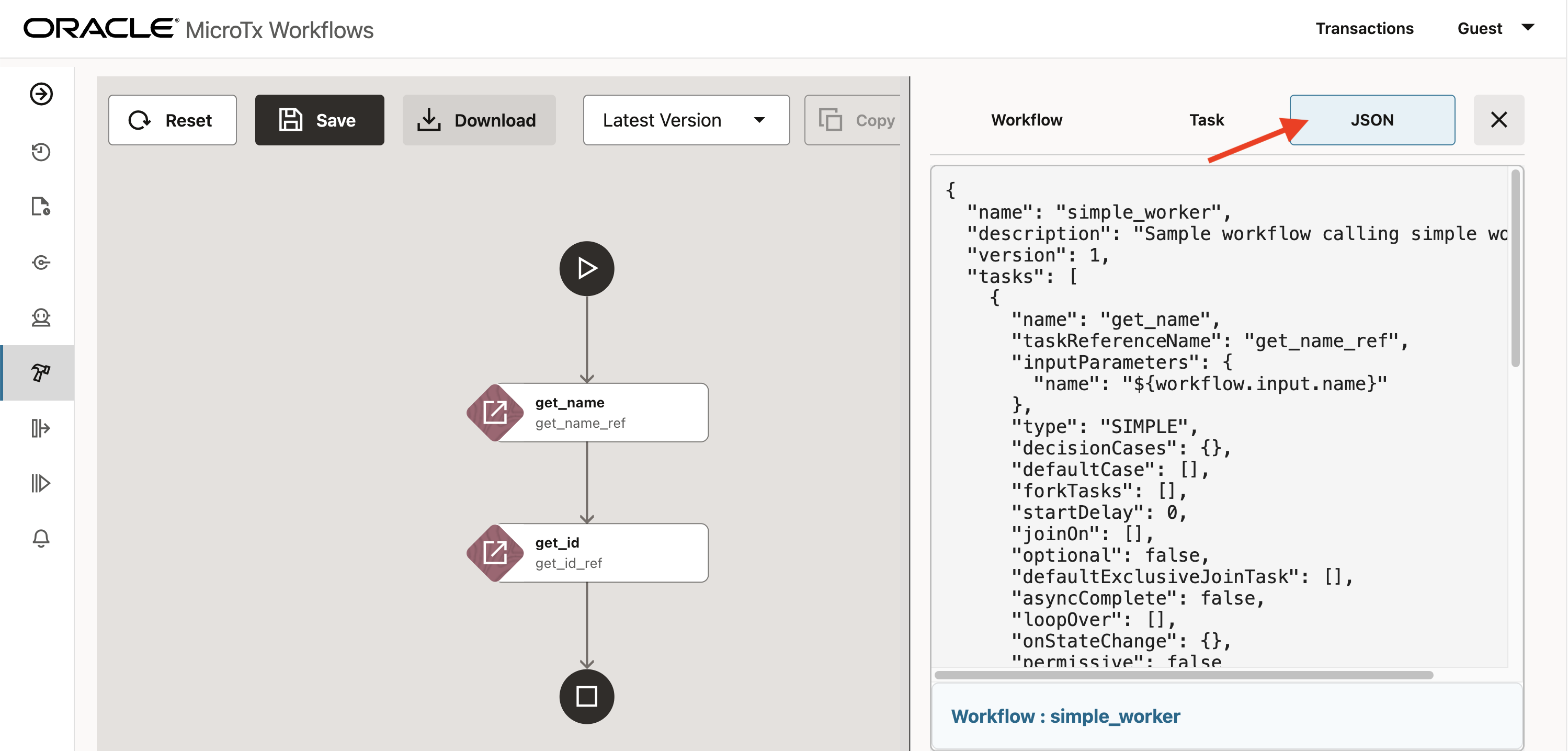
- Create a new workflow from `simple_worker.json`:
```json
{
"name": "simple_worker",
"description": "Sample workflow calling simple workers",
"version": 1,
"tasks": [
{
"name": "get_name",
"taskReferenceName": "get_name_ref",
"inputParameters": {
"name": "${workflow.input.name}"
},
"type": "SIMPLE",
"decisionCases": {},
"defaultCase": [],
"forkTasks": [],
"startDelay": 0,
"joinOn": [],
"optional": false,
"defaultExclusiveJoinTask": [],
"asyncComplete": false,
"loopOver": [],
"onStateChange": {},
"permissive": false
},
{
"name": "get_id",
"taskReferenceName": "get_id_ref",
"inputParameters": {
"id": "${workflow.input.name}"
},
"type": "SIMPLE",
"decisionCases": {},
"defaultCase": [],
"forkTasks": [],
"startDelay": 0,
"joinOn": [],
"optional": false,
"defaultExclusiveJoinTask": [],
"asyncComplete": false,
"loopOver": [],
"onStateChange": {},
"permissive": false
}
],
"inputParameters": [],
"outputParameters": {},
"schemaVersion": 2,
"restartable": true,
"workflowStatusListenerEnabled": false,
"timeoutPolicy": "TIME_OUT_WF",
"timeoutSeconds": 60,
"variables": {},
"inputTemplate": {},
"enforceSchema": true,
"metadata": {}
}
```
- In the MicroTx console, import the JSON file content as a new process from the `Workflow Builder` menu:
## Develop the workers
- The actual workers are in `workers_collection.py`: **get_name** and **get_id**, which are defined in the workflow as `SIMPLE` task types:
```python
from conductor.client.worker.worker_task import worker_task
@worker_task(task_definition_name='get_name')
def get_name(name: str) -> str:
return f'Hello {name}'
@worker_task(task_definition_name='get_id')
def get_id(id: str) -> str:
return f'id: {id}'
```
- The worker wrapper, `helloworld.py`:
```python
from conductor.client.automator.task_handler import TaskHandler
from conductor.client.configuration.configuration import Configuration
from conductor.client.workflow.executor.workflow_executor import WorkflowExecutor
# Import the defined simple workers
from workers_collection import get_name, get_id
def main():
# The workers connect to this MicroTx Workflows endpoint: http:///workflow-server/api
api_config = Configuration()
workflow_executor = WorkflowExecutor(configuration=api_config)
# Start polling
task_handler = TaskHandler(configuration=api_config)
task_handler.start_processes()
if __name__ == '__main__':
main()
```
### Execution
- To start the worker, activate the environment and set the endpoint:
```sh
source .venv/bin/activate
export CONDUCTOR_SERVER_URL=http://127.0.0.1/workflow-server/api
python helloworld.py
```
If it works, you should see:
```sh
[oracle@microtx-workflowengine:~/custom_client]$ python helloworld.py
2026-02-12 14:35:26,548 [2409475] conductor.client.automator.task_handler INFO TaskHandler initialized
2026-02-12 14:35:26,548 [2409475] conductor.client.automator.task_handler INFO Starting worker processes...
task runner process Process-2 started
2026-02-12 14:35:26,551 [2409475] conductor.client.automator.task_runner INFO Conductor Worker[name=get_name, pid=2409477, status=active, poll_interval=100ms, thread_count=1, poll_timeout=100ms, lease_extend=false, register_task_def=false]
task runner process Process-3 started
2026-02-12 14:35:26,555 [2409475] conductor.client.automator.task_handler INFO Started 2 TaskRunner process(es)
2026-02-12 14:35:26,556 [2409475] conductor.client.automator.task_runner INFO Conductor Worker[name=get_id, pid=2409478, status=active, poll_interval=100ms, thread_count=1, poll_timeout=100ms, lease_extend=false, register_task_def=false]
2026-02-12 14:35:26,556 [2409475] conductor.client.automator.task_handler INFO Started all processes
```
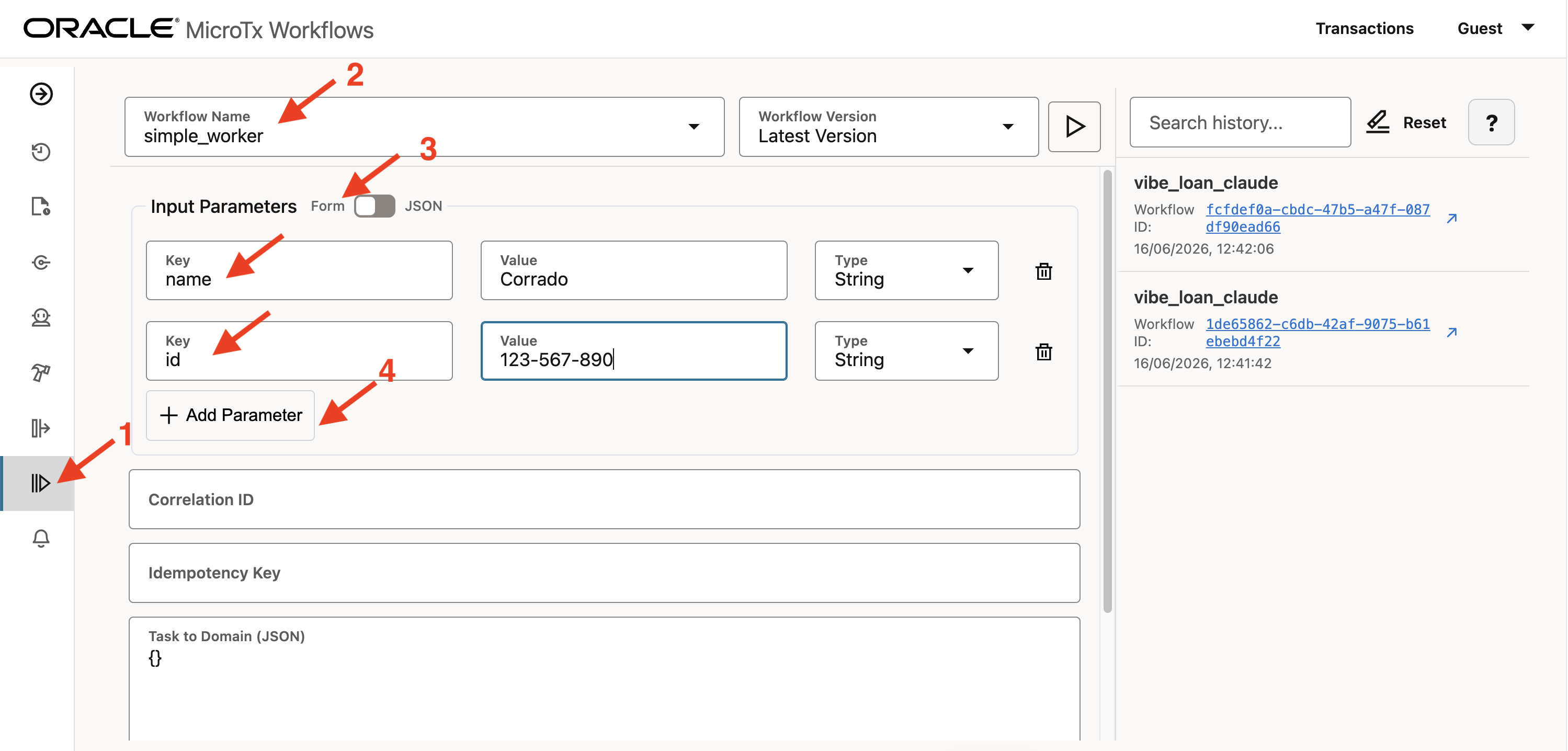
- To start the workflow, go to **Workbench**, look for **Workflow name**: `simple_worker`, and set the inputs:
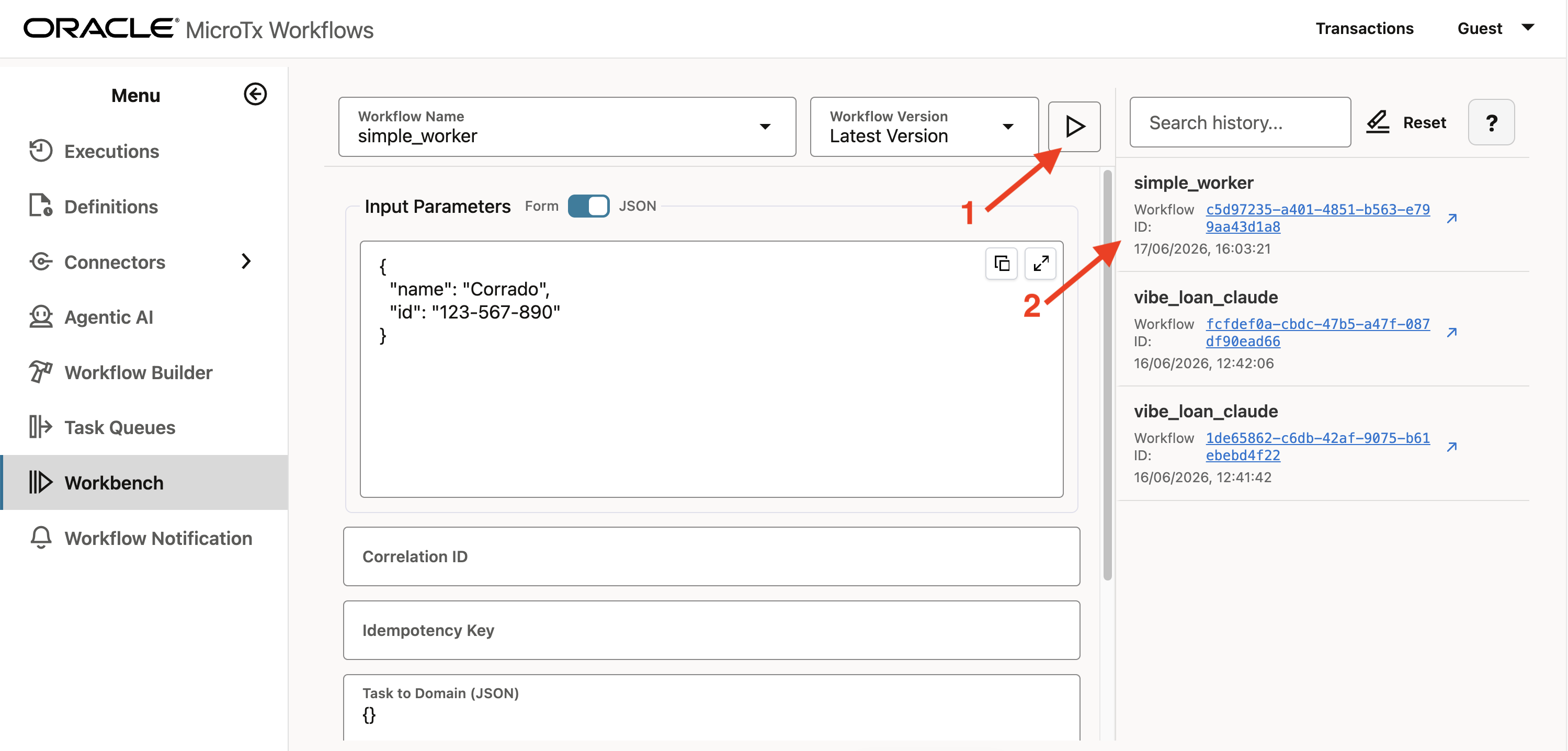
- Start the process:
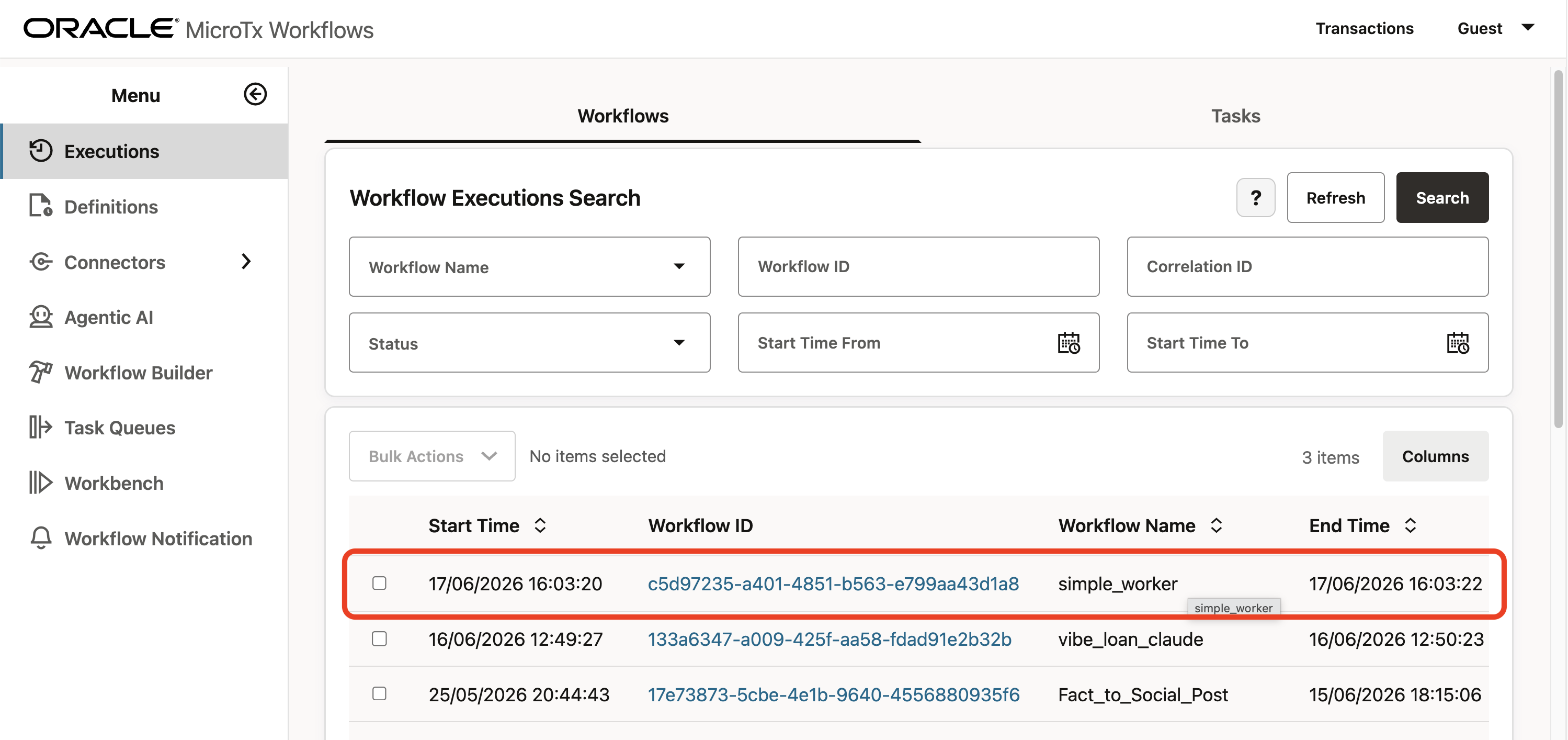
- Review the logs from the `Executions` menu:
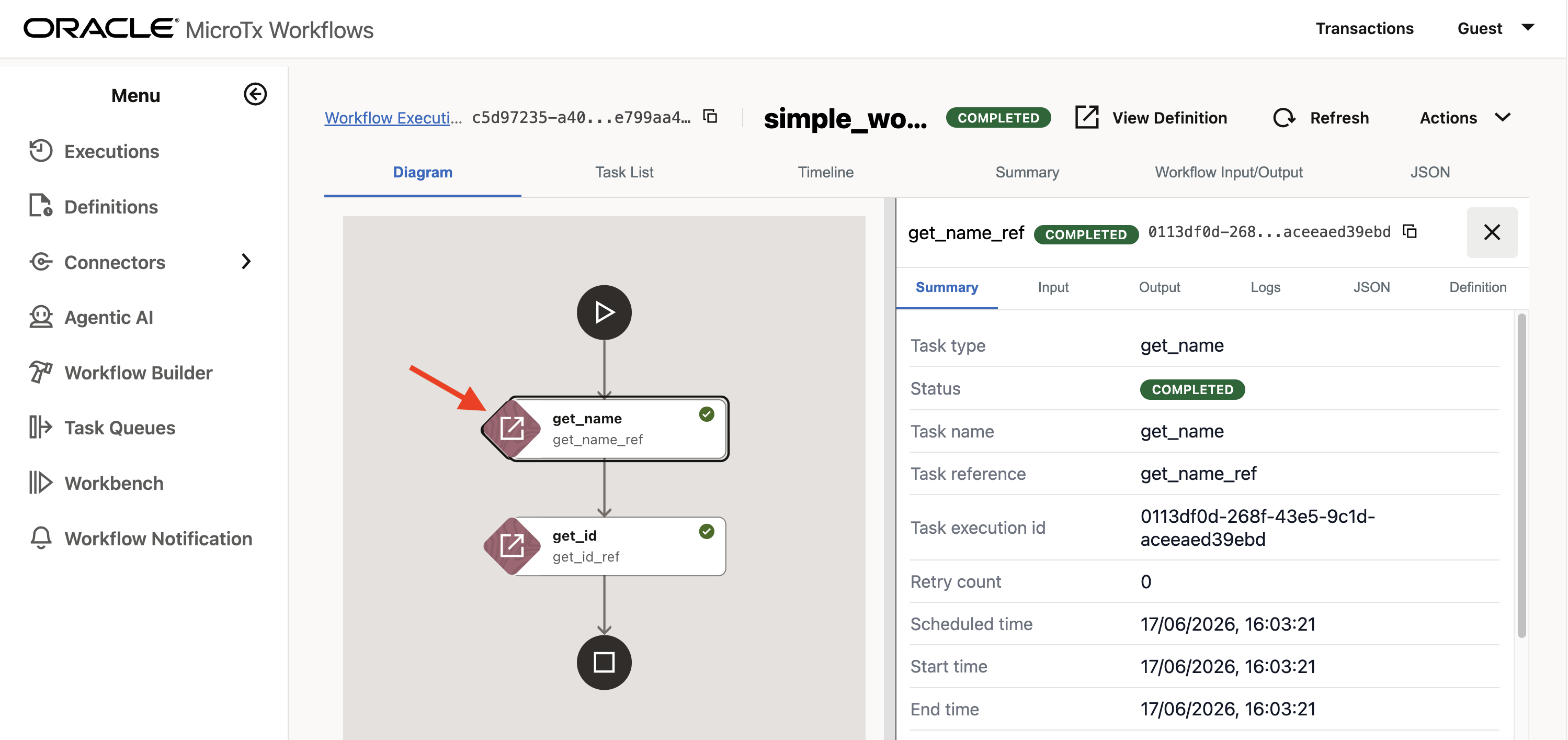
- Click to see the details of each executed task and the overall input/output:
## SQL adapter example
Let's build a more interesting worker that can integrate a database resource other than Oracle or PostgreSQL.
- Create a new workflow from `simple_worker_2.json`:
```json
{
"name": "simple_worker",
"description": "Sample workflow calling simple workers",
"version": 2,
"tasks": [
{
"name": "query_sqlite",
"taskReferenceName": "query_sqlite_ref",
"inputParameters": {
"connection_string": "fake_people.db",
"query": "${workflow.input.query}"
},
"type": "SIMPLE",
"decisionCases": {},
"defaultCase": [],
"forkTasks": [],
"startDelay": 0,
"joinOn": [],
"optional": false,
"defaultExclusiveJoinTask": [],
"asyncComplete": false,
"loopOver": [],
"onStateChange": {},
"permissive": false
}
],
"inputParameters": [],
"outputParameters": {},
"schemaVersion": 2,
"restartable": true,
"workflowStatusListenerEnabled": false,
"timeoutPolicy": "TIME_OUT_WF",
"timeoutSeconds": 60,
"variables": {},
"inputTemplate": {},
"enforceSchema": true,
"metadata": {}
}
```
- In the MicroTx console, import the JSON file content as a new process from the `Workflow Builder` menu. Once saved, both versions of **simple_worker** will be available, because the JSON file sets:
```json
"version": 2,
```
### Develop the worker
- The actual worker, `sqlite_query.py`, has:
- The **execute_sqlite_query()** function, with two parameters: **connection_string** and **query**
- The **create_fake_database()** function, which creates an example database:
```python
import sqlite3
import logging
import os
from conductor.client.worker.worker_task import worker_task
logging.basicConfig(level=logging.INFO)
logger = logging.getLogger(__name__)
# Create database and insert fake data
def create_fake_database():
if os.path.exists('fake_people.db'):
return # Database already exists, skip creation
conn = sqlite3.connect('fake_people.db')
cursor = conn.cursor()
# Create table
cursor.execute('''CREATE TABLE IF NOT EXISTS people (
name TEXT,
surname TEXT,
birth_date TEXT,
zip_code TEXT
)''')
# Insert fake data
fake_data = [
('John', 'Doe', '1990-01-01', '12345'),
('Jane', 'Smith', '1985-05-15', '67890'),
('Bob', 'Johnson', '1992-03-20', '11111'),
('Alice', 'Williams', '1988-12-10', '22222'),
('Charlie', 'Brown', '1995-07-04', '33333')
]
cursor.executemany('INSERT INTO people VALUES (?, ?, ?, ?)', fake_data)
conn.commit()
conn.close()
@worker_task(task_definition_name='query_sqlite')
def execute_sqlite_query(connection_string:str, query:str):
"""
Executes a SQLite SELECT query on the specified database and returns the results.
Args:
connection_string (str): The SQLite database file path or connection string.
query (str): The SQL SELECT query to execute.
Returns:
list[dict]: Query results as native Python data for JSON serialization by MicroTx.
"""
try:
db_path = os.path.join(os.getcwd(), connection_string)
logger.info("SQLite connection_string received: %r", connection_string)
logger.info("SQLite current working directory: %s", os.getcwd())
logger.info("SQLite resolved database path: %s", db_path)
conn = sqlite3.connect(db_path)
cursor = conn.cursor()
logger.info("Executing SQLite query: %s", query)
cursor.execute(query)
results = cursor.fetchall()
columns = [desc[0] for desc in cursor.description]
data = [dict(zip(columns, row)) for row in results]
conn.close()
return data
except Exception as e:
return {"error": str(e)}
```
- The worker wrapper, `sqlite_tool.py`, creates the database at startup and exposes the worker:
```python
from conductor.client.automator.task_handler import TaskHandler
from conductor.client.configuration.configuration import Configuration
from conductor.client.workflow.executor.workflow_executor import WorkflowExecutor
from sqlite_query import create_fake_database, execute_sqlite_query
def main():
# The workers connect to this MicroTx Workflows endpoint: http:///workflow-server/api
api_config = Configuration()
workflow_executor = WorkflowExecutor(configuration=api_config)
# Start polling
task_handler = TaskHandler(configuration=api_config)
task_handler.start_processes()
if __name__ == '__main__':
create_fake_database()
main()
```
### Execution
- To start the worker, as usual:
```sh
source .venv/bin/activate
export CONDUCTOR_SERVER_URL=http://127.0.0.1/workflow-server/api
python sqlite_tool.py
```
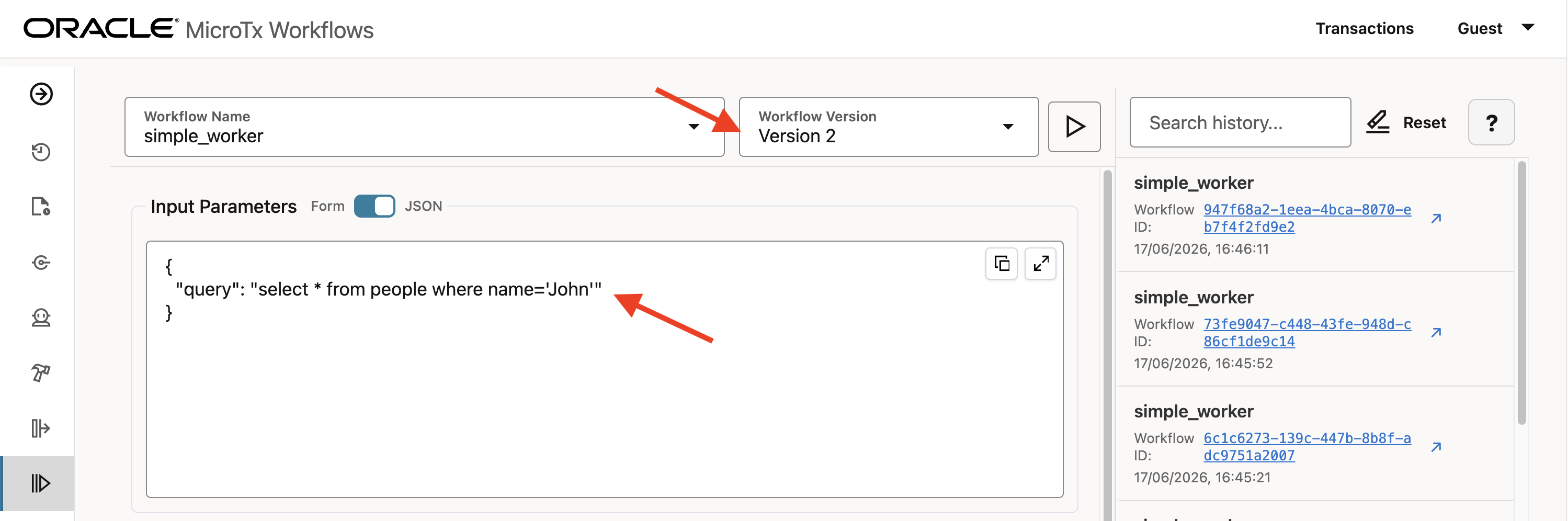
- In the `Workbench`, select **simple_worker**, choose version **2**, and run it, setting an input variable:
```"query":"select * from people where name='John'"```
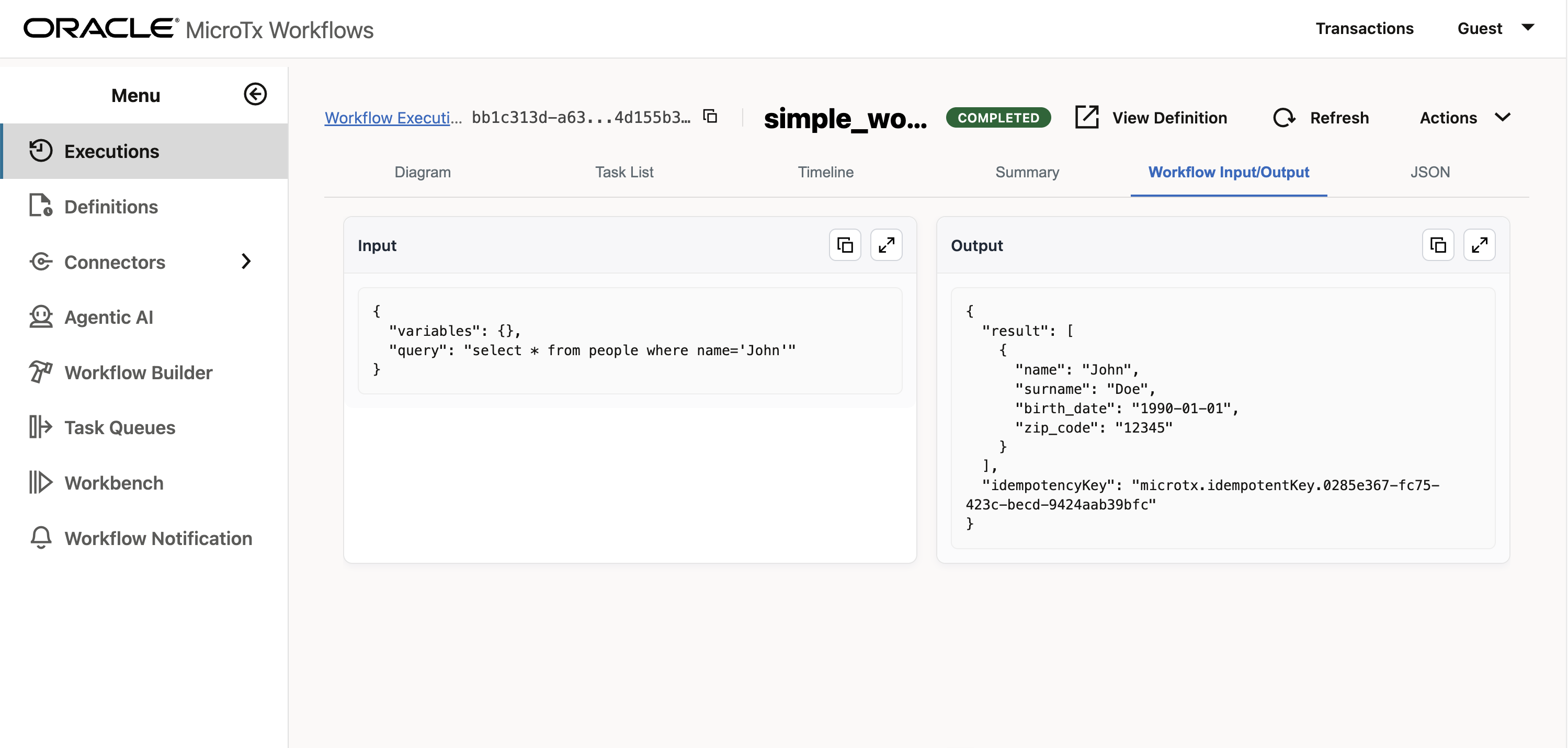
- You should see the expected output:
### Additional checks
- If you want to check if any tasks are in the queue:
```sh
curl -X GET http://127.0.0.1/workflow-server/api/tasks/poll/batch/get_name
```
- If you want to browse the REST API list in a browser:
```sh
http://127.0.0.1/workflow-server/swagger-ui/index.html#/metadata-resource/getAll
```
## Disclaimer
*The views expressed in this paper are my own and do not necessarily reflect the views of Oracle.*