
MoePeek
A lightweight, native macOS menu bar translator. Select text, get translation.
English | 中文





## Features
**Translation Modes**
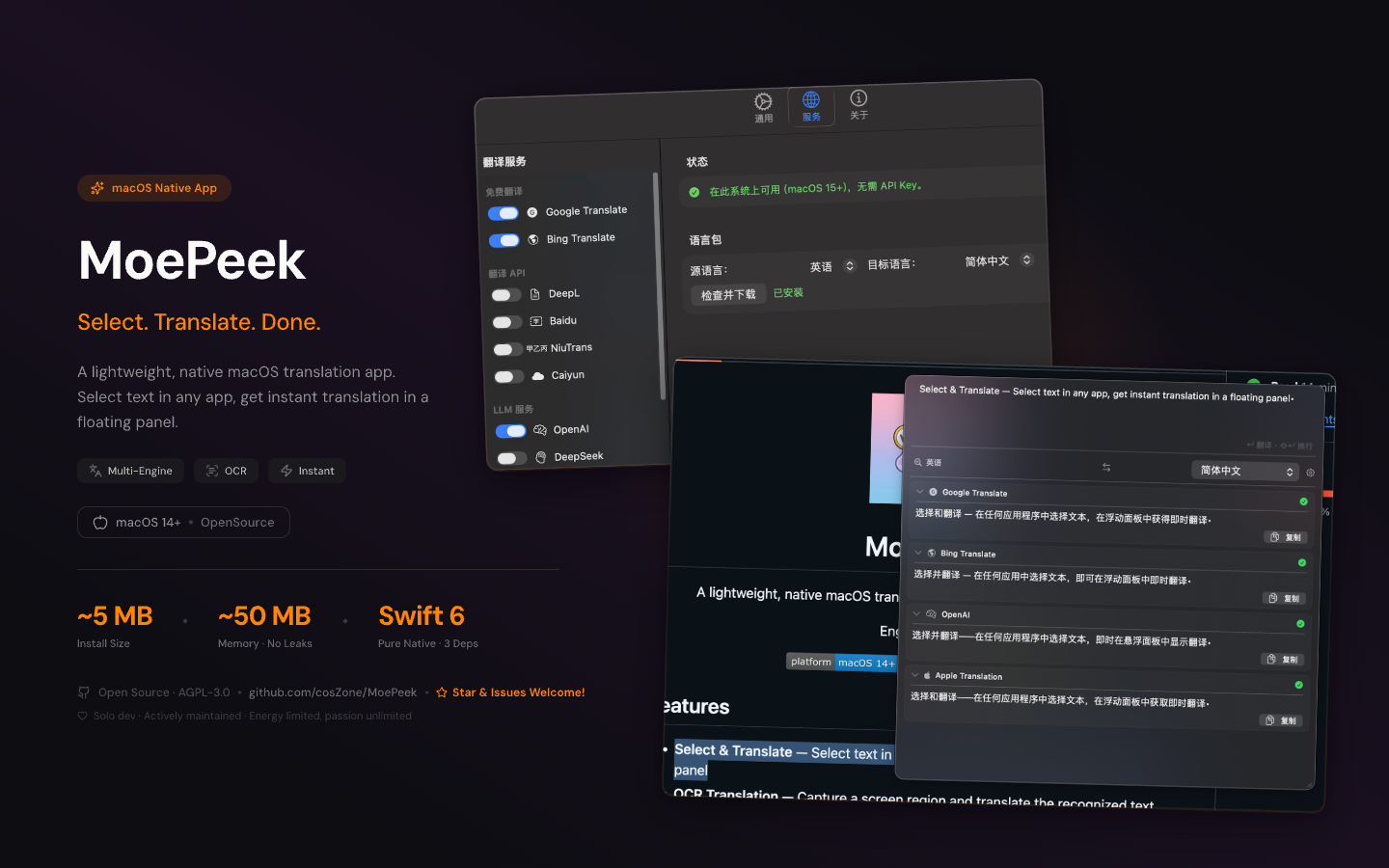
- **Select & Translate**: Select text in any app, get instant translation in a floating panel
- **OCR Screenshot**: Capture a screen region and translate the recognized text
- **Clipboard Translation**: Translate whatever's on your clipboard
- **Manual Input**: Type or paste text to translate on demand
**Built-in Translation Services**
| Free | API | LLM | System |
|------|-----|-----|--------|
| Google Translate | DeepL | OpenAI | Apple Translation |
| Bing Translate | Baidu | Anthropic | *(macOS 15+, on-device)* |
| Youdao Translate | NiuTrans | DeepSeek | |
| | Caiyun | OpenRouter | |
| | DeepLX | 智谱 GLM | |
| | | Ollama (local) | |
| | | LM Studio (local) | |
**And More**
- Smart language detection across 14 languages, auto-flips translation direction
- Text-to-speech playback for translated text using Apple's built-in speech synthesis
- Non-activating floating panels that never steal focus from your current app
- 3-tier text grabbing: Accessibility API → AppleScript → Clipboard fallback
- Fully customizable keyboard shortcuts
- Built-in auto-updater via Sparkle
## Why MoePeek
- **~5 MB app size**: Pure Swift 6, only 3 dependencies. No Electron, no WebView.
- **~50 MB background memory**: Systematic memory leak prevention for long-running sessions.
- **Privacy-friendly**: Apple Translation runs entirely on-device.
- **Open source**: AGPL-3.0 licensed. Issues and feedback welcome.
## Limitations & Alternatives
MoePeek is a personal, **AI vibe-coded** side project. It works well for my own use cases, but it's not designed to be a polished, production-grade tool — there are plenty of edge cases in text selection and window handling that commercial tools have spent years ironing out, and MoePeek likely misses many of them.
If you need a more robust solution, these apps are excellent:
- **[Clicknow](https://clicknow.ai/)** — feature-rich, actively maintained selection translator
- **[PopClip](https://www.popclip.app/)** — the gold standard for macOS text selection actions, with a rich extension ecosystem
## Installation
Download the latest `.dmg` or `.zip` from [GitHub Releases](https://github.com/cosZone/MoePeek/releases) and drag `MoePeek.app` into `/Applications`.
## Usage
On first launch, MoePeek walks you through an onboarding flow to grant the required permissions:
- **Accessibility**: Needed to grab selected text via the Accessibility API
- **Screen Recording**: Needed for OCR screenshot translation
### Default Shortcuts
| Action | Shortcut |
|--------|----------|
| Translate Selection | `⌥ D` |
| OCR Screenshot | `⌥ S` |
| Manual Input | `⌥ A` |
| Clipboard Translation | `⌥ V` |
All shortcuts can be customized in **Settings → General**.
### PopClip Integration
If you use [PopClip](https://www.popclip.app/), you can translate selected text with a single click from the PopClip bar.
**Install the extension:**
1. Make sure MoePeek is installed and running.
2. Download [`MoePeek.popclipext.zip`](https://github.com/cosZone/MoePeek/releases/latest/download/MoePeek.popclipext.zip) from the latest release and unzip it.
3. Remove the quarantine attribute so macOS allows the extension to load:
```bash
xattr -dr com.apple.quarantine /path/to/MoePeek.popclipext
```
4. Double-click `MoePeek.popclipext` — PopClip will install it automatically.
5. Select any text in any app → click the **MoePeek** icon in the PopClip bar.
> **Note:** If PopClip shows an error, also make sure MoePeek.app itself has been un-quarantined — see the [FAQ below](#moepeekapp-is-damaged-and-cant-be-opened). ([Related issue](https://github.com/cosZone/MoePeek/issues/9#issuecomment-4167992729))
## FAQ
### "MoePeek.app is damaged and can't be opened"
The app is not notarized with Apple, so macOS Gatekeeper may block it. This does not mean the file is corrupted. To fix:
1. Open **Terminal**
2. Run:
```bash
sudo xattr -r -d com.apple.quarantine /Applications/MoePeek.app
```
Then launch the app as usual.
### Onboarding screen doesn't appear / want to re-trigger onboarding
Reset all user preferences to restore the first-launch state:
```bash
defaults delete com.nahida.MoePeek
```
Then relaunch the app.
## Contributing
Issues and PRs are welcome! A few things to know:
- I work a day job, so I may not respond immediately — I typically batch-process issues and PRs on weekends.
- Feel free to fork and build your own version. Per the AGPL-3.0 license, derivative works **must also be open source**.
## Acknowledgements
MoePeek was inspired by [Easydict](https://github.com/tisfeng/Easydict) and [Bob](https://github.com/ripperhe/Bob). Thank you for paving the way.
Built with:
- [KeyboardShortcuts](https://github.com/sindresorhus/KeyboardShortcuts) by Sindre Sorhus
- [Defaults](https://github.com/sindresorhus/Defaults) by Sindre Sorhus
- [Sparkle](https://sparkle-project.org/) for auto-updates
## Contributors
 ## Sponsor
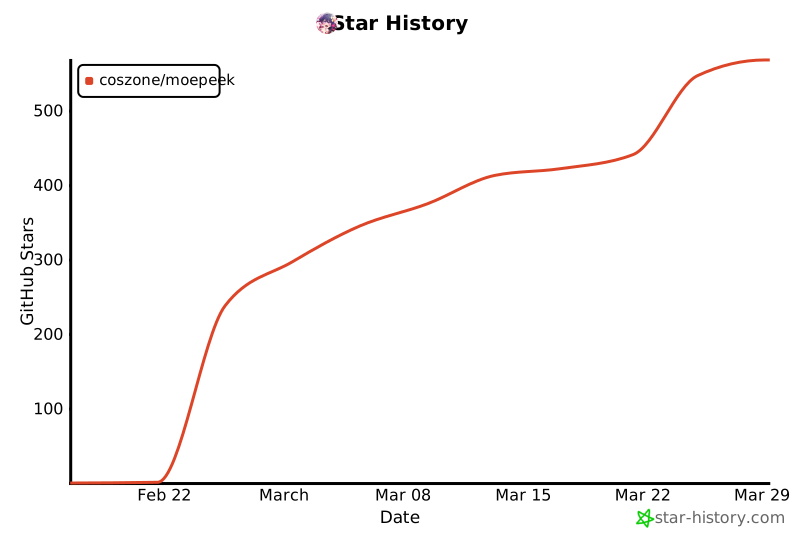
 ## Star History
[](https://www.star-history.com/#cosZone/MoePeek&type=date&legend=top-left)
## License
[AGPL-3.0](LICENSE)
## Star History
[](https://www.star-history.com/#cosZone/MoePeek&type=date&legend=top-left)
## License
[AGPL-3.0](LICENSE)