# Flutter ChatGPT API
This package is a Flutter/Dart API around [ChatGPT](https://openai.com/blog/chatgpt) by [OpenAI](https://openai.com).
This package requires a valid session token from ChatGPT to access its unofficial REST API.
This version have been updated to use Puppeteer to log in to ChatGPT and extract the Cloudflare cf_clearance cookie and OpenAI session token. 🔥 Thanks to [Node.js ChatGPT API](https://github.com/transitive-bullshit/chatgpt-api) (unofficial)
- [Demo](#demo)
- [Installation](#installation)
- [Usage](#usage)
- [SessionToken and ClearanceToken](#sessiontoken)
- [License](#license)
:warning: Be Careful!
- Your `user-agent` and `IP address` **must match** from the real browser window you're logged in with to the one you're using for `ChatGPTAPI`.
- This means that you currently can't log in with your laptop and then run the bot on a server or proxy somewhere.
- Please check `defaultHeaders`
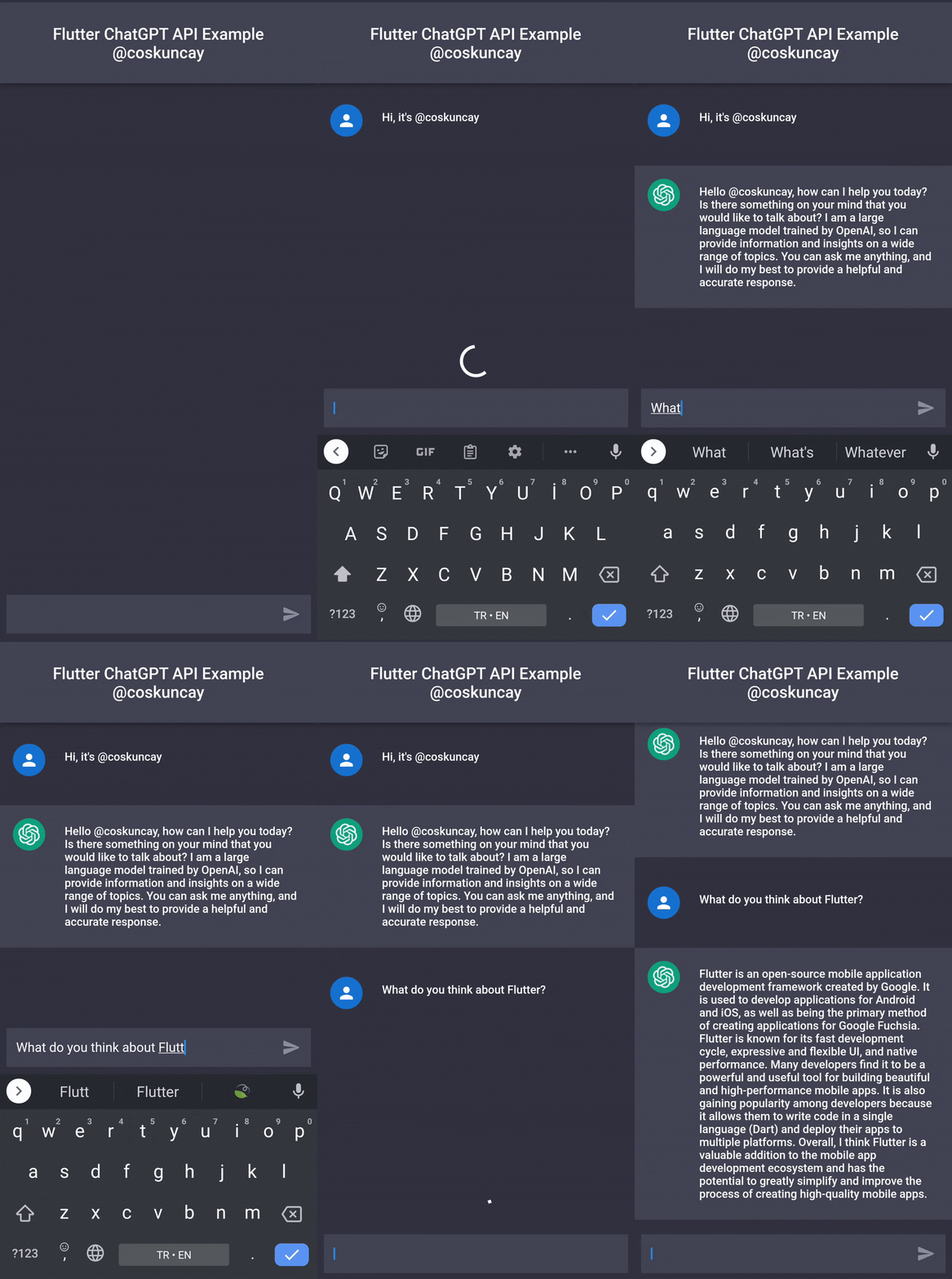
## Demo
 ## Installation
```
dependencies:
flutter_chatgpt_api: ^1.0.0
```
## Usage
```dart
import 'package:flutter_chatgpt_api/flutter_chatgpt_api.dart';
_api = ChatGPTApi(
sessionToken: SESSION_TOKEN,
clearanceToken: CLEARANCE_TOKEN,
);
setState(() {
_messages.add(
ChatMessage(
text: _textController.text,
chatMessageType: ChatMessageType.user,
),
);
isLoading = true;
});
var newMessage = await _api.sendMessage(
input,
conversationId: _conversationId,
parentMessageId: _parentMessageId,
);
setState(() {
_conversationId = newMessage.conversationId;
_parentMessageId = newMessage.messageId;
isLoading = false;
_messages.add(
ChatMessage(
text: newMessage.message,
chatMessageType: ChatMessageType.bot,
),
);
});
```
## SessionToken
To get a session token:
1. Go to https://chat.openai.com/chat and log in or sign up.
2. Open dev tools.
3. Open `Application` > `Cookies` (`Storage` > `Cookies`)

4. Create these files and add your session token to run the tests and example respectively:
Copy the value for __Secure-next-auth.session-token and save it to your environment.`example/lib/session_token.dart`
Copy the value for cf_clearance and save it to your environment.
`example/lib/clearance_token.dart`
Should look something like this:
```dart
const SESSION_TOKEN = '__Secure-next-auth.session-token from https://chat.openai.com/chat';
```
```dart
const CLEARANCE_TOKEN = 'cf_clearance token from https://chat.openai.com/chat';
```
## Credit
- Huge thanks to Travis Fischer for creating [Node.js ChatGPT API](https://github.com/transitive-bullshit/chatgpt-api) (unofficial) 💪
- Inspired by this [ChatGPT API Dart](https://github.com/MisterJimson/chatgpt_api_dart) by [Jason Rai](https://github.com/MisterJimson) ✨
## License
[MIT](https://choosealicense.com/licenses/mit/) Copyright (c) 2022, [Emre Coşkunçay](https://github.com/coskuncay)
If you found this project interesting, please consider supporting my open source work by [sponsoring me](https://github.com/sponsors/coskuncay) or following me on twitter
## Installation
```
dependencies:
flutter_chatgpt_api: ^1.0.0
```
## Usage
```dart
import 'package:flutter_chatgpt_api/flutter_chatgpt_api.dart';
_api = ChatGPTApi(
sessionToken: SESSION_TOKEN,
clearanceToken: CLEARANCE_TOKEN,
);
setState(() {
_messages.add(
ChatMessage(
text: _textController.text,
chatMessageType: ChatMessageType.user,
),
);
isLoading = true;
});
var newMessage = await _api.sendMessage(
input,
conversationId: _conversationId,
parentMessageId: _parentMessageId,
);
setState(() {
_conversationId = newMessage.conversationId;
_parentMessageId = newMessage.messageId;
isLoading = false;
_messages.add(
ChatMessage(
text: newMessage.message,
chatMessageType: ChatMessageType.bot,
),
);
});
```
## SessionToken
To get a session token:
1. Go to https://chat.openai.com/chat and log in or sign up.
2. Open dev tools.
3. Open `Application` > `Cookies` (`Storage` > `Cookies`)

4. Create these files and add your session token to run the tests and example respectively:
Copy the value for __Secure-next-auth.session-token and save it to your environment.`example/lib/session_token.dart`
Copy the value for cf_clearance and save it to your environment.
`example/lib/clearance_token.dart`
Should look something like this:
```dart
const SESSION_TOKEN = '__Secure-next-auth.session-token from https://chat.openai.com/chat';
```
```dart
const CLEARANCE_TOKEN = 'cf_clearance token from https://chat.openai.com/chat';
```
## Credit
- Huge thanks to Travis Fischer for creating [Node.js ChatGPT API](https://github.com/transitive-bullshit/chatgpt-api) (unofficial) 💪
- Inspired by this [ChatGPT API Dart](https://github.com/MisterJimson/chatgpt_api_dart) by [Jason Rai](https://github.com/MisterJimson) ✨
## License
[MIT](https://choosealicense.com/licenses/mit/) Copyright (c) 2022, [Emre Coşkunçay](https://github.com/coskuncay)
If you found this project interesting, please consider supporting my open source work by [sponsoring me](https://github.com/sponsors/coskuncay) or following me on twitter 