# VAC Debugger Usage
- [Props](#props)
- [name](#name)
- [data](#data)
- [hidden](#hidden)
- [trace](#trace)
- [listTrace](#listtrace)
- [maxWidth, maxHeight](#maxwidth-maxheight)
- [useList](#uselist)
- [useEach](#useeach)
- [useName](#usename)
- [useValue, useDefaultValue](#usevalue-usedefaultvalue)
- [on~ (Property prefixed with `on`)](#on-property-prefixed-with-on)
- [customEvent](#customevent)
- [Components](#components)
- [VACList](#vaclist)
- [VACInput](#vacinput)
- [Functions](#functions)
- [withPreset](#withpreset)
## Props
Prop names follow the rules below.
- `use~`: Props to use for list elements or input elements in `VAC Debugger`
- `on~`: Event callback to use for input elements in `VAC Debugger`
- etc: Props for `VAC Debugger`
### name
> [type] string
Set `VAC Debugger` name.
```jsx
```

If `VAC Debugger` has other properties and `name` is omitted, `name area` is not exposed.
```jsx
```

### data
> [type] any
`Props Object` of component.
```jsx
```

If props has callback functions, each button that calls the callback function is created.
```jsx
console.log("delete!!") }}
/>
```

```jsx
console.log("delete!!"),
}}
/>
```

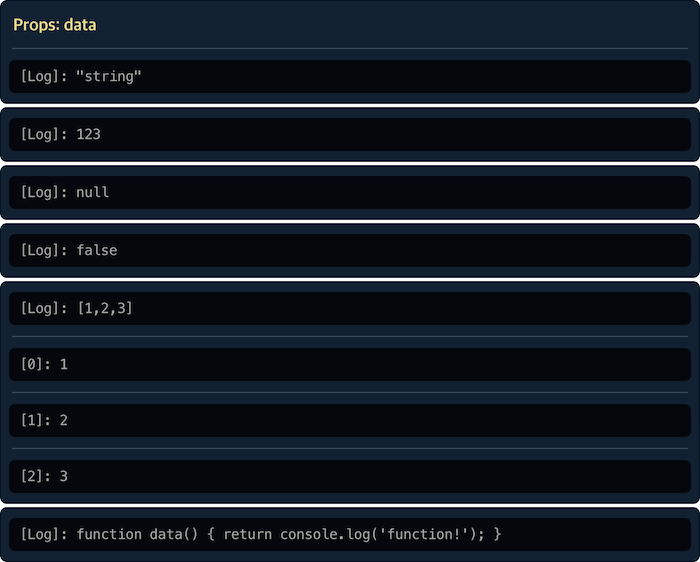
If the type of `data` is not object, it is output to log.
```jsx
console.log('function!')} />
```
### hidden
> [type] boolean
Prevent rendering.
```jsx
// or
```
### trace
> [type] string, [version] ^0.1.0
Props to show in `props area`. If there is more than one prop, separate them with commas or spaces.
```jsx
```

### listTrace
> [type] string, [version] ^0.1.0
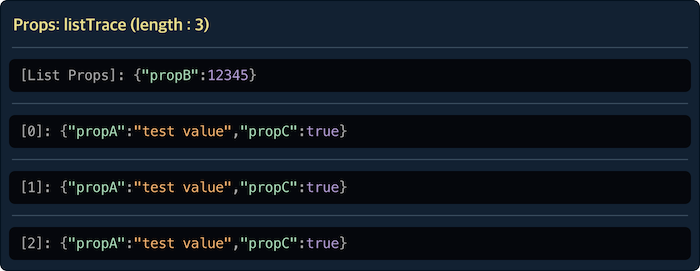
Item props of list to show in `list area`. If there is more than one prop, separate them with commas or spaces.
```jsx
```
### maxWidth, maxHeight
> [type] number | string
Set max width and max height.
If height is larger than max height, scrolling is activated.
```jsx
// or
```
### useList
> [type] string
Property name of array to be displayed as `list area`. If `useList` is used, the `list area` is exposed.
```jsx
console.log("delete 1"),
},
{
value: "test value 2",
onDelete: (event) => console.log("delete 2"),
},
{
value: "test value 3",
onDelete: (event) => console.log("delete 3"),
},
],
}}
/>
```
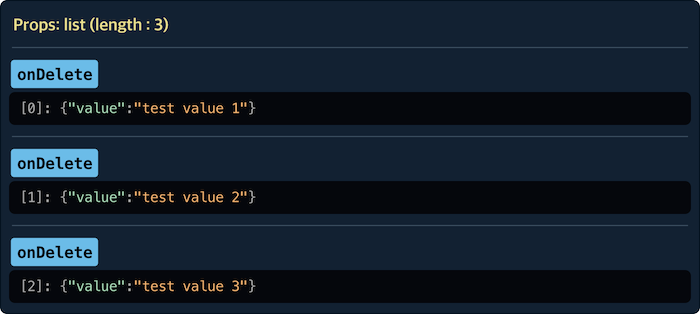
Without `useList`:

> If property is function type, it is excluded from output.
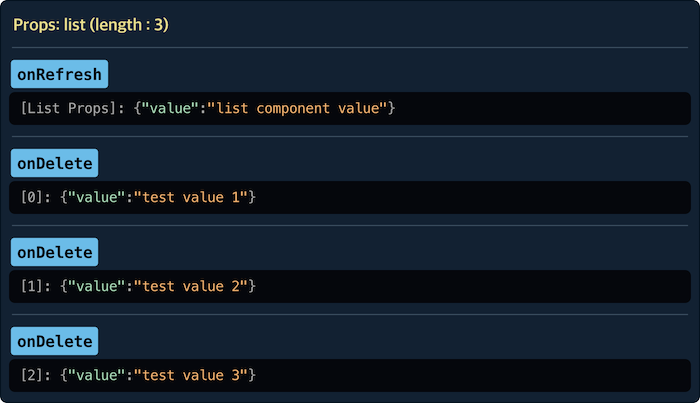
Props other than the property used in the `useList` are displayed in `props area`.
```jsx
console.log("refresh list"),
// List
exampleList: [
{
value: "test value 1",
onDelete: (event) => console.log("delete 1"),
},
{
value: "test value 2",
onDelete: (event) => console.log("delete 2"),
},
{
value: "test value 3",
onDelete: (event) => console.log("delete 3"),
},
],
}}
/>
```
### useEach
> [type] string
Property name of callback function that returns new props for each list item by using element of `list`.
```jsx
({
label: data.value,
onCheck: (event) => console.log("check", index, data),
}),
// Raw list
exampleList: [
{
value: "test value 1",
},
{
value: "test value 2",
},
{
value: "test value 3",
},
],
}}
/>
```
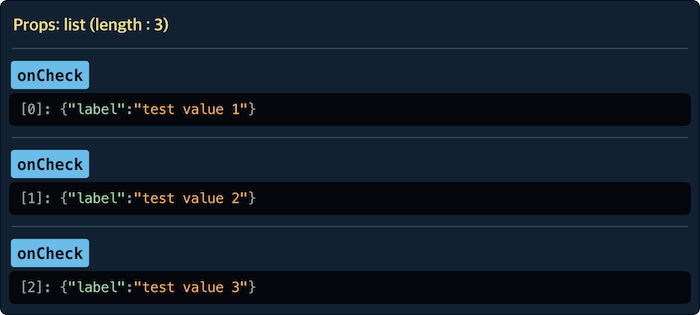
`VAC Debugger` assumes `VAC` creates props of each item component in list using the callback specified in `useEach`.
So the relevant processing must be implemented in `VAC`.
```jsx
// VAC
const ViewComponent = ({ list, each }) => (
);
```
> Use [`react-loop-item`](https://www.npmjs.com/package/react-loop-item#each-optional) to help develop this feature in `VAC`.
### useName
> [type] string, [version] ^0.3.0
Set the 'name' property of the form element(textarea, buttons).
```jsx
{
// Output: testInput - {event.target.value}
console.log(event.target.name, "-", event.target.value);
},
}}
/>
```
### useValue, useDefaultValue
> [type] string
Property name to be used for `value` and `defaultValue` of textarea element. If target of `useValue` or `useDefaultValue` is valid, `textarea` is exposed.
```jsx
```

> Do not use `useValue` and `useDefaultValue` together.
`React` should use `value` with `onChange`.
```jsx
console.log(event.target.value),
}}
/>
```
How to access `textarea` value :
```jsx
const InputUI = () => {
// Value state
const [value, setValue] = useState("default value");
// View(VAC) component props object
const propsObject = {
value,
onChange: (event) => setValue(event.target.value),
onSend: (event) => console.log(value),
};
return (
// VAC debugger
// Real VAC
//
);
};
```
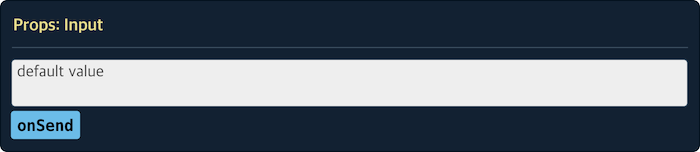
> `VAC` is a stateless component.
### on~ (Property prefixed with `on`)
> [type] string
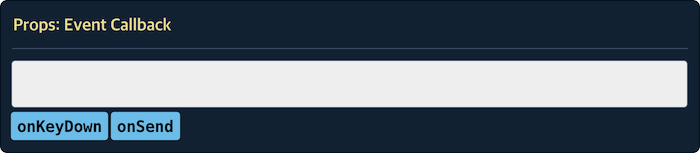
Property name to be used for event callback function of textarea. Therefore, the property name must be valid as `textarea` props.
If target of the props is valid, `textarea` is exposed.
```jsx
console.log("change!"),
onKeyUp: (event) => console.log("key up!"),
// Not used as props of textarea
onKeyDown: (event) => console.log("key down!"),
onSend: (event) => console.log("send!"),
}}
/>
```
### customEvent
> [type] { [key:string]: Function }
Enter handler that virtually implements the function inside component.
```jsx
callback(data.value + 1),
}}
data={{
value: 1,
increase: (result) => console.log(result),
onDecrease: (event) => console.log("decrease!"),
}}
/>
```

How is it different from event?
```jsx
// Real component
// Event
// CustomEvent
```
> When developing `VAC`, it is not recommended to use `customEvent` to avoid being dependent on certain function. This is because the parent component of `VAC` uses the `customEvent` to define functions inside the `VAC`.
## Components
### VACList
List preset.
- `useList` : "list"
- `useEach` : "each"
```jsx
import { VAC, VACList } from "react-vac";
// Same
```
### VACInput
Input preset.
- `useName` : "name"
- `useValue` : "value"
- `useDefaultValue` : "defaultValue"
- `onChange` : "onChange"
- `onFocus` : "onFocus"
- `onBlur` : "onBlur"
- `onSelect` : "onSelect"
- `onKeyDown` : "onKeyDown"
- `onKeyUp` : "onKeyUp"
- `onKeyPress` : "onKeyPress"
```jsx
import { VAC, VACInput } from "react-vac";
// Same
```
## Functions
### withPreset
> [type] (string, VACProps) => VAC, [version] ^1.2.0
Returns a `VAC debugger` with preset `props`.
```js
import { withPreset } from "react-vac";
// withPreset("preset name", {preset props})
const VACBasicList = withPreset("@BasicList", {
useList: "datas", // List prop name
useEach: "getProp", // Each prop name
maxWith: 600, // Max width
});
const BasicList = () => {
// Preset vac
const listViewProps = {
datas: [{ title: "first title" }, { title: "second title" }],
getProps: (data, index) => ({ idx: index, value: title }),
};
return (
<>
{/*
*/}
);
// Real component
// return ;
};
```
> The default supported `VACList` and `VACInput` are also created in the same way.