# Excalidraw
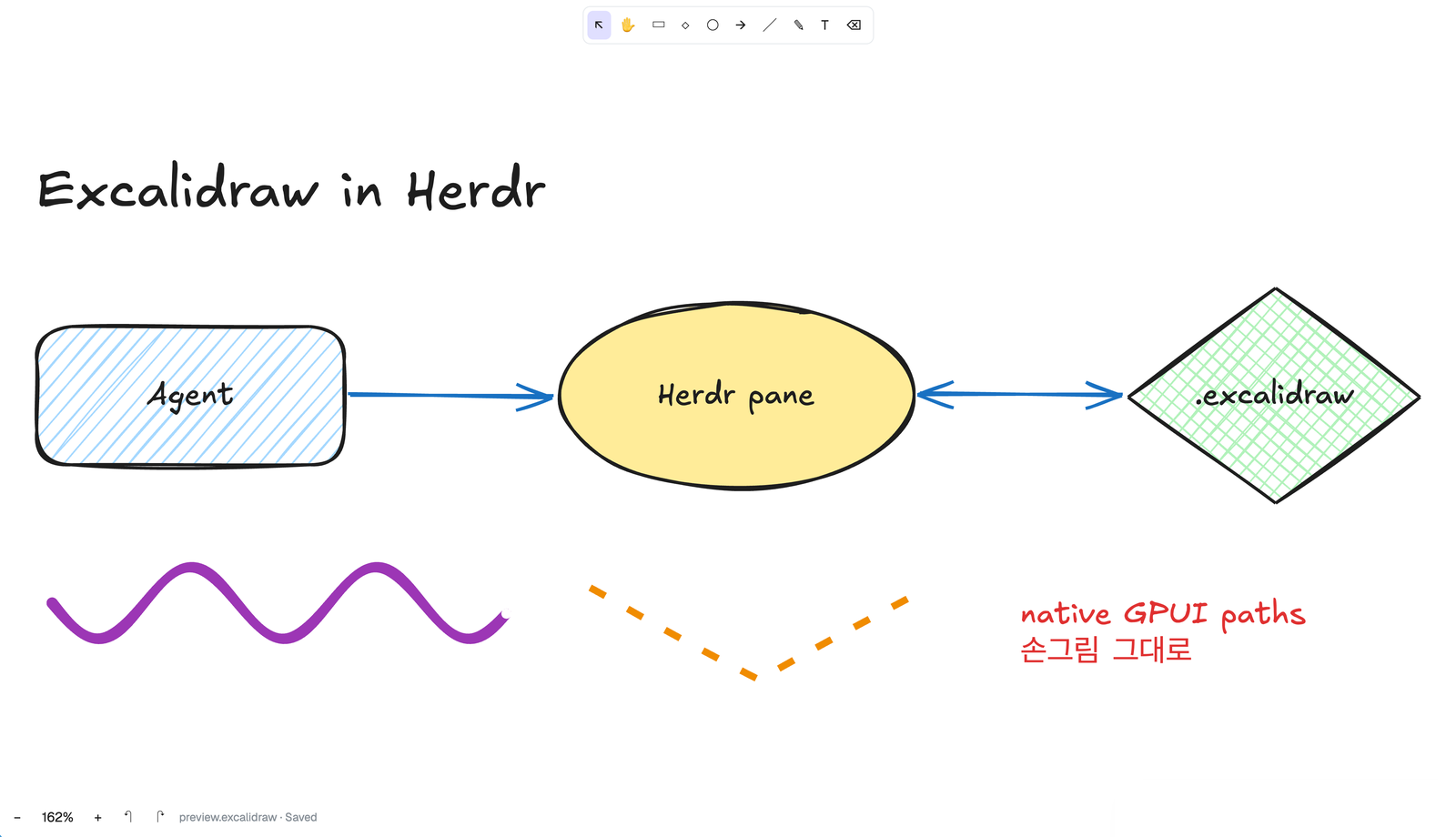
An Excalidraw editor in a Herdr pane: open a `.excalidraw` file beside your terminals, see it
drawn the way Excalidraw draws it (the same hand-drawn shapes, from Excalidraw's own
`@excalidraw/element`), draw and edit, and it saves back to the file. When the file changes on
disk (another editor, an agent, `git checkout`), the pane reloads it.
## What you see
- **A launcher**, on ⌘⇧E (`mod.open:excalidraw`): a popup dropped 40px from the top,
560px wide, as tall as its content (at most 70% of the window), in Herdr's theme like its
“Go to…” picker: `popover` background, 18px padding, 10px gaps, 13px text. A header “Open a
drawing” (15px semibold, `foreground`) with “Esc” (11px, `muted`) at the right; the folder
(11px, `muted`, `~` for home); the folder's `.excalidraw` files as 32px rows (7px radius,
`hover` background when selected or hovered) with a `dim` “◇”, the name without the
extension, and an 11px `muted` “new tab” at the right; up to 320px of rows, then scrolling.
Under a 1px `input` line, two action rows: “+ New drawing” and “… Choose folder”. With no
drawings, a `muted` “No drawings in this folder yet.” row stands in for the list. The folder
is the focused terminal's, else another terminal's in the tab, else home.
- **An editor pane**, opened from the launcher, or with `pane.split {direction, mod:
"excalidraw", props: {file}}` / `tab.new {mod: "excalidraw", props: {file}}` (`file`
absolute, `~/` works). A pane opened without a file shows the same list in place, titled
“Open a drawing in this pane”, on the theme's `background`, without “new tab”. Nothing is
added to a layout: `mod.json` is `{ "place": "none", "title": "Excalidraw", "overlay":
{ "kind": "popup", "at": "top", "offset": 40, "width": 560, "height": 0.7 } }`.
- The drawing's own canvas color (`appState.viewBackgroundColor`, white by default) fills the
pane. Shapes are Excalidraw's: rough outlines, hachure / cross-hatch / solid fills, dashed and
dotted strokes, rounded corners, arrows with arrowheads, free-draw strokes with pressure
taper, text in Excalifont (bundled in `fonts/`), images, frames as dashed gray boxes with
their name. Rotated shapes draw rotated; rotated text and images draw unrotated.
- A toolbar centered 8px from the top: a white card (1px `#e9ecef` border, 8px radius, 4px
padding, 2px gaps) with ten 34×30px buttons (6px radius), each an 18px monochrome line icon
from the mod's `icons/` (select pointer, hand, rectangle, diamond, circle, arrow, line, pencil,
T, eraser) with a tooltip “ — ”. The active tool's button is `#e0dfff` with a
`#6965db` icon; hover is `#f1f0ff`. While text is edited the T button is the active one.
- On an empty drawing, centered gray `#868e96` text: “Pick a tool above, then drag on the
canvas” (16px) over “R rectangle · O ellipse · A arrow · P draw · T text — double-click
anywhere to write” (12px); it goes as soon as anything is drawn.
- A style panel, 60px from the top and 8px from the left, while a drawing tool is active or
something is selected, headed “Style” (12px semibold) with a `#868e96` “Hide” at the right.
Hidden, it is a small outlined “Style ▸” chip in the same place; the choice is kept in the
copy's `localStorage` (`panelCollapsed`). The panel is
a white card (10px padding, 10px gaps, 8px radius) with rows, each an
11px `#868e96` label over its options: Stroke (five 20px swatches `#1e1e1e #e03131 #2f9e44
#1971c2 #f08c00`), Background (transparent shown as `∅`, `#ffc9c9 #b2f2bb #a5d8ff #ffec99`),
Fill (`▤ ▦ ■`), Stroke width (1, 2, 4), Stroke style (solid, dashed, dotted), Sloppiness (0,
1, 2), and Font size (S 16, M 20, L 28, XL 36) when text is involved. The current value has
a 2px `#6965db` border or the selected background.
- A status row 8px from the bottom-left, 12px `#868e96`: `−`, the zoom percent, `+`, `↶`,
`↷`, `Open…`, then `file name · Saved | Unsaved | Saving… | New file | Save failed: …`, or
`file name · Editing text · Esc to finish` while text is being edited.
- Selection: a 1.5px `#6965db` outline 6px outside each selected element, a dashed one around
several. The selection box is `#6965db` over a `#6965db1f` fill. The eraser outlines what it
will remove with dashed `#e03131`. Text being edited sits in a 1px `#6965db` frame (4px radius,
`#6965db0d` fill); a label's frame is as wide as its text (growing while typing) and centred in
its shape, where the label will sit.
- The toolbar, panel and status row use that fixed light palette, not Herdr's theme: they
float on the drawing's canvas, which is light.
## How it behaves
Choosing a drawing:
- In the launcher, a click on a row (or ↑/↓ and Enter) opens it with `pane.split {direction:
"right", pane: , mod, props: {file}}` and closes
the launcher; “new tab” opens it with `tab.new {name: , mod, props: {file}}`. With
no focused pane it opens in a new tab. ↑/↓ wrap and also reach the two action rows; Escape
closes.
- “New drawing” writes an empty drawing as `drawing.excalidraw`, else `drawing-2…`, in the
listed folder (never overwriting) and opens it the same way. “Choose folder” asks with the
system folder picker and lists that folder.
- In a pane's own list, choosing opens the drawing in that pane and stores its path in the
copy's `localStorage` (`file`), so the pane reopens it after a restart; Escape returns to
the drawing it showed, if any. `Open…` in the status row saves, then shows that list.
| Tool | Key | Does |
|---|---|---|
| Select | `v` `1` | click selects (a group selects whole; text in a shape selects the shape; a click that hits nothing inside an unfilled rectangle, diamond or ellipse selects the smallest such shape around it), shift-click toggles, drag on empty canvas box-selects, drag a selection to move it, double-click text or inside a rectangle/diamond/ellipse to edit its label (the shape gets one if it has none), double-click empty canvas for new text |
| Hand | `h`, hold `space` | drag pans; the middle button pans with any tool |
| Rectangle, diamond, ellipse | `r` `2`, `d` `3`, `o` `4` | drag from a corner; shift makes it square |
| Arrow, line | `a` `5`, `l` `6` | drag start to end; an arrow end dropped on or in a shape binds to it and snaps 4px off its outline |
| Draw | `p` `7` | freehand; the tool stays on |
| Text | `t` `8` | click places a text box; `escape`, `cmd-enter` or a click outside finishes; empty text is removed |
| Eraser | `e` `0` | click or drag over elements; they go on release |
- After drawing a shape, line or arrow the new element is selected and the tool returns to
Select. Tiny drags (under 3 units) draw nothing.
- `backspace`/`delete` deletes the selection (with text inside shapes; arrows attached to
deleted shapes come loose). Arrow keys nudge by 1 (shift: 10). `enter` edits the selected
text or the selected shape's text. `escape` clears the selection and returns to Select.
`cmd-a` selects everything. `cmd-z` undoes, `cmd-shift-z` and `cmd-y` redo (100 steps).
- Moving shapes drags the text inside them and keeps attached arrows attached. Moving an arrow
without the shapes it is attached to detaches it.
- The panel sets the style of the selection (one undo step) and of what you draw next.
- Scroll pans, shift-scroll pans sideways. `cmd`/`ctrl`-scroll zooms about the pointer
(`exp(-dy × 0.01)` per event, 10%–3000%). `+`/`−` zoom by 1.2 about the center; the percent
button and `shift-0` return to 100%; `shift-1` fits the drawing (80px side margin, 120px
vertical).
- Saving: 400ms after the last change, once no drag or text edit is in progress, the whole
file is written with `writeTextFile(path, text, lastText)`. A file that doesn't exist opens
empty and is created on the first change. Saved files keep every element, `appState` and
`files` they had; deleted elements are left out.
- The pane watches the file's folder. A change from elsewhere reloads the drawing; if there
were unsaved changes a warning notification says so, and undo brings them back. A save that
finds the file changed loads the file's version the same way. An unreadable change posts a
warning and keeps the drawing.
- Herdr's own zoom is read every 200ms; the drawing redraws at the new zoom.
## Built from
- **One mod**, `mods/excalidraw/`: `main.js` (one esbuild bundle), `mod.json`,
`fonts/Excalifont-Regular.ttf` with `fonts/OFL.txt`, `icons/.svg` (24×24 strokes,
drawn with `svg()` from `mods/excalidraw/icons`, so the folder keeps that name), and license
files. No `layouts/`.
- **A `keys.json` snippet**, merged into the person's keys (both sections, so it works while a
terminal has focus):
```json
{ "global": { "cmd-shift-e": "mod.open:excalidraw" }, "terminal": { "cmd-shift-e": "mod.open:excalidraw" } }
```
- **Source** (`src/`), bundled by `build.mjs` (esbuild, ESM, platform neutral, `gpui-kit`,
`gpui-base`, `herdr`, `buffer`, `fs/promises` external):
- `main.js`: the pane `View`, in three states: the list (launcher or in-pane), loading/error,
and the editor. Static drawing in retained child views
(`cx.new(Layer, {idx})`, re-described only after a change), one live child view for what
is being drawn or dragged plus selection outlines, and the toolbar, panel and status row in
the root. Pointer handlers on a full-size canvas `div`; the drawing sits in a child `div`
offset by the scroll. Keys on the root (`track_focus`, `on_key_down`); the text editor is a
`Textarea` inside a `key_context("ExcalidrawTextEditor")` wrapper that ends editing on an
`excalidraw_end_edit` action bound to `escape` with `cx.bind_keys`.
- `geometry.js`: element → `ShapeCache.generateElementShape` (roughjs sets) →
`PathBuilder` (`move_to`, `line_to`, `cubic_bezier_to`, `dash_array`), free-draw through
`getFreeDrawSvgPath` and an SVG `M L Q T C Z` reader, rotation about the element center,
opacity folded into `#rrggbbaa`. Elements are batched in z-order into non-overlapping
groups (≤ 200) whose paths merge per style, and batches into layers of ≤ 40,000 path
commands with their bounds; only layers near the view are mounted.
- `document.js`: reading with defaults for fields older files lack (`strokeSharpness` →
`roundness` and the like), writing through `clearElementsForExport` and
`syncInvalidIndices`, snapshot undo.
- `shim.js` (prepended): `self`, `navigator`, `document.createElement`, `Path2D` keeping its
SVG string, and `setTimeout`/`clearTimeout` as a queue the pane drains every 200ms.
- **Excalidraw packages**: `@excalidraw/element`, `@excalidraw/common`, `@excalidraw/math` at
`0.18.0-f0063e113` — `Scene`, `newElement`/`newArrowElement`/`newLinearElement`/
`newFreeDrawElement`/`newTextElement`, `hitElementItself`, `hitElementBoundingBox`,
`getElementBounds`, `getCommonBounds`, `getHoveredElementForBinding`,
`bindOrUnbindLinearElement`, `updateBoundElements`, `fixBindingsAfterDeletion`,
`getBoundTextElement`, `redrawTextBoundingBox`, `refreshTextDimensions`,
`setCustomTextMetricsProvider`.
- **Herdr functions**: `props` (`file`, `overlay`), `settings` (zoom), `theme` (the list and
the loading/error message), `focused`, `panes`, `run` (`pane.split`, `tab.new`), `closeOverlay`,
`pickFolder`, `readTextFile`, `writeTextFile`, `watchFolder`, `notify`, `home`, `appHome`;
`fs/promises` `readdir`/`exists`/`mkdir`/`writeFile`; `localStorage`.
`picker.js` is the list: folder listing, new-drawing names, keys, the rows; it reads
`theme()` because it sits on Herdr's UI, while the editor's toolbar, panel and status row keep
the fixed light palette of the canvas they float on.
- **What it touches**: no network, no `exec`, no `hc`. It lists folders you open the launcher
in or choose, creates new drawings there, reads and writes the drawing it shows, watches
that drawing's folder, and writes the drawing's embedded images (decoded from their data
URLs) to `~/.config/herdr-app/data/herdr-excalidraw/` so `image()` can show them.
- **Helper**: `bin/herdr-excalidraw [--right|--down|--tab] FILE` resolves the path and runs
`herdr-app do pane.split` / `tab.new` with the props.
## Watch out
- QuickJS has no `RegExp.$1`; roughjs's SVG path tokenizer (bundled inside
`@excalidraw/element`) uses it, and rounded rectangles, diamonds and arrows then fail to draw.
`build.mjs` replaces that one function at build time and fails the build if the pattern is
missing or any `RegExp.$` remains.
- `@excalidraw/element` imports `@excalidraw/math/ellipse`, which that package exports for
types only; alias it to `@excalidraw/math`.
- Herdr refuses `setTimeout` and `Function("return this")()`; `Scene` throttles with lodash,
which needs both a `setTimeout` and a global `self`.
- Units: paths and pointer `local_position` are in GPUI pixels; `div` positions and text sizes
are layout pixels (GPUI ÷ Herdr zoom). One scene unit is one layout pixel at 100%.
`on_size_change` reports GPUI pixels.
- `line_height(n)` with a bare number is a multiple of the font size; pass `"25px"`.
- GPUI fills cancel where loops of one path overlap. roughjs fills an ellipse as two nearly
identical loops, so each loop of a solid fill needs its own path.
- One render has an execution deadline: a single path of ~3,000 hatched shapes is interrupted,
so keep layers bounded. Notifying the root re-describes every mounted layer: draw live
changes in their own retained view.
- `TextareaState.focus()` before the textarea is mounted leaves keys with the canvas, where
letters switch tools. Focus it on the next frame.
- Herdr owns `cmd-=`, `cmd--` and `cmd-0` (its own zoom). Shift+1 and Shift+0 reach the pane as
`!` and `)` with shift already consumed.
- There is no text measuring API: text boxes come from an estimate (0.55 em per Latin glyph,
1 em for CJK and Hangul), so selection boxes around text are approximate. Excalifont has no
Hangul; it falls back to a system font. Mod fonts load at Herdr start or on a look change.
- With a Korean input method on, a tool shortcut letter can stay in the composition and land
at the end of the next text typed.
- Not built: resize and rotate handles, multi-point line editing, elbow arrows, adding images,
libraries, export. Those elements still draw and round-trip.
## Done when
- `herdr-app check mods/excalidraw` passes.
- In a terminal whose folder has two drawings, ⌘⇧E shows both; Enter opens the
first beside the terminal; “new tab” on the second opens it in a new tab named after it; “New
drawing” creates `drawing.excalidraw` and opens it empty. ⌘⇧E from an editor pane
lists the same folder.
- `pane.split` with the mod and no props shows the list in the pane; Enter opens the first
drawing there; `Open…` then ↓ Enter switches that pane to the second.
- A drawing with a rounded hachure rectangle holding centered text, an arrow bound to a
cross-hatched ellipse, a rotated solid diamond, a dashed thick line, a free-draw stroke and
two-line text with Hangul opens drawn like Excalidraw: fills present (a solid ellipse is
filled, not hollow), text inside its shape, nothing dashed-gray except frames.
- Click a shape, `backspace`: it and its text leave the file within a second; `cmd-z` brings
both back to the file.
- Dragging with the rectangle tool adds a rectangle of the dragged size to the file; the
draw tool adds a free-draw element; an arrow dragged from one shape into another is saved
with `startBinding` and `endBinding` and ends just outside both outlines.
- Text tool, click, type, `escape`: the text is in the file. Selecting text and `enter`,
typing, `escape` edits it in the file.
- Selecting a shape and a stroke swatch changes its `strokeColor` in the file. The eraser
removes what it is clicked on.
- Double-clicking inside an unfilled rectangle, typing and Escape saves the text with the
rectangle as its `containerId`; dragging from inside that rectangle moves both. A click inside
an unfilled ellipse selects it.
- Editing the file from outside redraws the pane within a second.
- `+` zooms 1.2× about the canvas center, the percent button and `shift-0` return to 100%,
`shift-1` fits the drawing, scrolling pans.