components:
schemas:
ResponseDetail:
properties:
logid:
title: 本次请求的日志 ID。如果遇到异常报错场景,且反复重试仍然报错,可以根据此 logid 及错误码联系扣子团队获取帮助。详细说明可参考[获取帮助和技术支持](https://www.coze.cn/docs/guides/help_and_support)。
type: string
x-coze-example: 20241210152726467C48D89D6DB2****
required:
- logid
type: object
x-coze-order:
- logid
Emotion:
enum:
- happy
- sad
- angry
- surprised
- fear
- hate
- excited
- coldness
- neutral
title: |-
设置多情感音色的情感类型,仅当 `voice_id` 为多情感音色时才支持设置情感类型。不同音色支持的情感范围不同,可以通过[系统音色列表](https://www.coze.cn/open/docs/dev_how_to_guides/sys_voice)查看各音色支持的情感。默认为空。枚举值如下:
* `happy`:开心。
* `sad`:悲伤。
* `angry`:愤怒。
* `surprised`:惊讶。
* `fear`:恐惧。
* `hate`:厌恶。
* `excited`:兴奋。
* `coldness`:冷漠。
* `neutral`:中性。
type: string
x-coze-enum-names:
- EmotionHappy
- EmotionSad
- EmotionAngry
- EmotionSurprised
- EmotionFear
- EmotionHate
- EmotionExcited
- EmotionColdness
- EmotionNeutral
EmotionInfo:
properties:
display_name:
title: 音色支持的情感类型的中文显示名称,用于直观展示情感类型。
type: string
x-coze-example: 开心
emotion:
title: |-
音色支持的情感类型标识符,仅当音色为多情感音色时返回。枚举值如下:
* `happy`:开心。
* `sad`:悲伤。
* `angry`:愤怒。
* `surprised`:惊讶。
* `fear`:恐惧。
* `hate`:厌恶。
* `excited`:兴奋。
* `coldness`:冷漠。
* `neutral`:中性。
type: string
x-coze-example: happy
emotion_scale_interval:
$ref: '#/components/schemas/Interval'
type: object
Interval:
properties:
default:
format: double
title: 情感强度的默认值。
type: number
x-coze-example: 4
max:
format: double
title: 情感强度的最大值。
type: number
x-coze-example: 5
min:
format: double
title: 情感强度的最小值。
type: number
x-coze-example: 1
type: object
OpenAPIVoiceData:
properties:
available_training_times:
description: 剩余训练次数
format: i32
title: 当前音色还可训练的次数。包括首次复刻音色在内,每个自定义音色最多被训练 10 次。
type: integer
x-coze-example: 6
create_time:
description: 创建时间unix时间戳
format: i32
title: 音色的创建时间,格式为 11 位的 Unixtime 时间戳。
type: integer
x-coze-example: 1.72968651e+09
is_system_voice:
description: 是否系统音色
format: bool
title: |-
标识当前音色是否为系统预置音色。
* `true`:系统预置音色。
* `false`:用户自定义音色。
type: boolean
x-coze-example: "false"
language_code:
description: 语言代号
title: 此音色的语种代号。
type: string
x-coze-example: zh
language_name:
description: 语言名
title: 此音色的语种名称。
type: string
x-coze-example: 中文
model_type:
description: 模型类型
title: |-
音色模型的类型,枚举值:
* big:大模型
* small:小模型
type: string
x-coze-example: big
name:
description: 音色名
title: 音色的名称。
type: string
x-coze-example: 开朗大男孩
preview_audio:
description: 音色预览音频
title: 此音色的预览音频。通常是一个公开可访问的网络地址。
type: string
x-coze-example: https://lf3-appstore-sign.oceancloudapi.com/ocean-cloud-tos/VolcanoUserVoice/xxxxxx.mp3?lk3s=da27ec82&x-expires=1730277357&x-signature=xu2O6Gp5RvTyJOawqjAfsJZvifc%3D
preview_text:
description: 音色预览文本
title: 此音色预览音频对应的文案。
type: string
x-coze-example: 你好呀
state:
$ref: '#/components/schemas/OpenAPIVoiceState'
support_emotions:
description: 支持的情感列表
format: list
items:
$ref: '#/components/schemas/EmotionInfo'
title: 音色支持的情感类型列表,仅当音色为多情感音色时返回。
type: array
x-coze-example: '[{"emotion":"happy","display_name":"开心","emotion_scale_interval":{"max":5,"min":1,"default":4}},{"emotion":"sad","display_name":"悲伤","emotion_scale_interval":{"max":5,"min":1,"default":3}}]'
update_time:
description: 更新时间unix时间戳
format: i32
title: 音色的更新时间,格式为 11 位的 Unixtime 时间戳。
type: integer
x-coze-example: 1.72968651e+09
voice_id:
description: 唯一音色代号
title: 音色的 ID。
type: string
x-coze-example: 734829333445931****
type: object
OpenAPIVoiceState:
enum:
- init
- cloned
- all
type: string
x-coze-enum-names:
- VoiceStateInit
- VoiceStateCloned
- VoiceStateAll
AudioSpeechData:
properties:
ContentDuration:
description: 音频时长,单位秒, 精确到毫秒
format: double
type: number
content:
description: 语音的二进制
format: binary
type: string
type: object
x-coze-order:
- content
- ContentDuration
AudioTranscriptionsData:
properties:
text:
description: 语音对应的文本
title: 语音文件对应的文本内容。
type: string
x-coze-example: 你好
type: object
ListVoiceData:
properties:
has_more:
format: bool
title: |-
标识是否还有未返回的音色数据。
* `true` :当前返回的音色列表未包含所有符合条件的音色。
* `false`:表示已返回所有符合条件的音色数据。
type: boolean
x-coze-example: "false"
voice_list:
format: list
items:
$ref: '#/components/schemas/OpenAPIVoiceData'
title: 音色列表详情。
type: array
x-coze-example: 参见响应参数
type: object
UserConfig:
properties:
enums:
format: list
items:
$ref: '#/components/schemas/UserConfigEnum'
title: 设备信息的数组,可以批量添加该渠道中的所有设备。
type: array
x-coze-example: '[{"label":"设备123","value":"1237824***"}]'
key:
title: 参数的键值,需要与提供给商务经理的 `key` 保持一致,用于标识设备配置信息的具体类型。
type: string
x-coze-example: device_id
required:
- key
- enums
type: object
UserConfigEnum:
properties:
label:
title: 设备的显示名称,用于在用户界面中标识设备,方便用户识别和管理。
type: string
x-coze-example: 智能音箱-客厅
value:
title: 设备的 ID。
type: string
x-coze-example: 51237824***
required:
- label
- value
type: object
PublishStatus:
enum:
- all
- published_online
- published_draft
- unpublished_draft
title: "应用的发布状态,用于筛选不同发布状态的应用。枚举值如下:\n- all:所有状态。\n- published_online :(默认值)已发布的正式版。
\n- published_draft :已发布但当前为草稿状态。\n- unpublished_draft :从未发布过。"
type: string
x-coze-enum-names:
- PublishStatusALL
- PublishStatusPublishedOnline
- PublishStatusPublishedDraft
- PublishStatusUnpublishedDraft
CaptionType:
enum:
- 0
- 1
format: int
title: "图片知识库的标注方式:\n* 0:(默认)系统自动标注描述信息\n* 1:手工标注。上传图片后需要再次调用 API [更新知识库图片描述](https://www.coze.cn/open/docs/developer_guides/update_image_caption)来手动设置标注。\n在空的知识库中首次上传图片时,需要手工设置
`caption_type` 参数的值,否则会报错。 "
type: integer
x-coze-enum-names:
- Auto
- Manual
ChunkStrategy:
properties:
caption_type:
$ref: '#/components/schemas/CaptionType'
chunk_type:
$ref: '#/components/schemas/ChunkType'
max_tokens:
format: i64
title: |-
最大分段长度,取值范围为 100~2000。
在 chunk\_type=1 时必选。
type: integer
x-coze-example: 800
remove_extra_spaces:
format: bool
title: |-
是否自动过滤连续的空格、换行符和制表符。取值包括:
- true:自动过滤
- false:(默认)不自动过滤
在 chunk\_type=1 时生效。
type: boolean
x-coze-example: "true"
remove_urls_emails:
format: bool
title: |-
是否自动过滤所有 URL 和电子邮箱地址。取值包括:
- true:自动过滤
- false:(默认)不自动过滤
在 chunk\_type=1 时生效。
type: boolean
x-coze-example: "true"
separator:
title: |-
分段标识符。
在 chunk\_type=1 时必选。
type: string
x-coze-example: '#'
type: object
x-coze-order:
- chunk_type
- separator
- max_tokens
- remove_extra_spaces
- remove_urls_emails
- caption_type
- content_schema
ChunkType:
enum:
- 0
- 1
format: int
title: |-
分段设置。取值包括:
0: 自动分段与清洗。采用扣子预置规则进行数据分段与处理。
1: 自定义。此时需要通过 separator、max_tokens、remove_extra_spaces 和 remove_urls_emails 分段规则细节。
type: integer
x-coze-enum-names:
- DefaultChunk
- CustomChunk
- LevelChunk
ColumnType:
enum:
- 0
- 1
- 2
- 3
- 4
- 5
- 6
format: int
type: integer
x-coze-enum-names:
- Unknown
- Text
- Number
- Date
- Float
- Boolean
- Image
ContentSchema:
enum:
- 0
- 1
format: int
type: integer
x-coze-enum-names:
- DefaultSchema
- LinkReaderSchema
CrawlContent:
properties:
content:
description: 抓取到的完整信息
format: list
items:
additionalProperties:
type: string
format: map
type: object
type: array
headers:
description: 表头
format: list
items:
type: string
type: array
marks:
additionalProperties:
type: string
description: 抓取信息的 XPATH
format: map
type: object
pagination:
$ref: '#/components/schemas/Pagination'
sub_marks:
additionalProperties:
additionalProperties:
type: string
format: map
type: object
description: 子页面抓取信息的 XPATH, key 对应于 marks 中的 key
format: map
type: object
tags:
description: 存储标记的类型,类型是 Array<'text' | 'image' | 'link'>,与 headers 一一对应
format: list
items:
type: string
type: array
title:
description: 标题
type: string
url:
description: 抓取页面的 URL
type: string
type: object
CreateDatasetOpenApiData:
properties:
dataset_id:
title: 创建的知识库的id
type: string
x-coze-example: 744632974166804****
type: object
Dataset:
properties:
all_file_size:
description: 所有文件大小
format: i64
title: 知识库中已存文件的总大小。
type: integer
x-coze-example: 0
avatar_url:
title: 知识库创建者的头像 url。
type: string
x-coze-example: https://p6-passport.byteacctimg.com/img/user-avatar/assets/e7b19241fb224cea967****.png~300x300.image
bot_used_count:
description: 使用Bot数
format: i32
title: 知识库已绑定的智能体数量。
type: integer
x-coze-example: 0
can_edit:
description: 是否可以编辑
format: bool
title: 当前用户是否为该知识库的所有者。
type: boolean
x-coze-example: "true"
chunk_strategy:
$ref: '#/components/schemas/ChunkStrategy'
create_time:
description: 创建时间,秒级时间戳
format: i32
title: 知识库创建时间,秒级时间戳。
type: integer
x-coze-example: 1.733817948e+09
creator_id:
description: 创建者ID
title: 知识库创建者的扣子 ID。
type: string
x-coze-example: 217526895615****
creator_name:
title: 知识库创建者的用户名。
type: string
x-coze-example: your name
dataset_id:
title: 知识库 ID。
type: string
x-coze-example: 744668935865830****
dataset_type:
$ref: '#/components/schemas/DatasetType'
description:
title: 知识库描述信息。
type: string
x-coze-example: description
doc_count:
description: 文档数量
format: i32
title: 知识库中的文件数量。
type: integer
x-coze-example: 2
failed_file_list:
description: 处理失败的文件
format: list
items:
type: string
title: 处理失败的文件列表。
type: array
x-coze-example: '["8f6a939c9aad434fa81624556abf8a62~****.png","9k7a939c9aad434fa81624556abf8a62~****.png"]'
file_list:
description: 文件列表
format: list
items:
type: string
title: 知识库中的文件列表。
type: array
x-coze-example: '["8f6a939c9aad434fa81624556abf8a62~****.png","9k7a939c9aad434fa81624556abf8a62~****.png"]'
format_type:
$ref: '#/components/schemas/FormatType'
hit_count:
description: 命中次数
format: i32
title: 知识库命中总次数。
type: integer
x-coze-example: 0
icon_uri:
title: 知识库图标的 uri。
type: string
x-coze-example: FileBizType.BIZ_DATASET_ICON/217526895615****.jpg
icon_url:
title: 知识库图标的 URL。
type: string
x-coze-example: https://lf3-appstore-sign.oceancloudapi.com/ocean-cloud-tos/FileBizType.BIZ_DATASET_ICON/217526895615****.jpg?lk3s=5ec9c6e9&x-expires=1733821937&x-signature=U6X%2BhLXnRk8%2FHr1xP7wiMJ3IE****
name:
description: 数据集名称
title: 知识库名称。
type: string
x-coze-example: openapi
processing_file_id_list:
description: 处理中的文件ID列表
format: list
items:
format: i64
type: string
title: 处理中的文件 ID。
type: array
x-coze-example: '["744779282568390****"]'
processing_file_list:
description: 处理中的文件名称列表,兼容老逻辑
format: list
items:
type: string
title: 处理中的文件名。
type: array
x-coze-example: '["8f6a939c9aad434fa81624556abf8a62~****.png","9k7a939c9aad434fa81624556abf8a62~****.png"]'
slice_count:
description: 分段数量
format: i32
title: 知识库分段总数。
type: integer
x-coze-example: 1
space_id:
description: 空间ID
title: 知识库所在空间的空间 ID。
type: string
x-coze-example: 731121948439879****
status:
$ref: '#/components/schemas/DatasetStatus'
storage_config:
$ref: '#/components/schemas/StorageConfig'
update_time:
description: 更新时间,秒级时间戳
format: i32
title: 知识库的更新时间,秒级时间戳。
type: integer
x-coze-example: 1.733817948e+09
type: object
DatasetStatus:
enum:
- 0
- 1
- 2
- 3
- 9
format: int
type: integer
x-coze-enum-names:
- DatasetProcessing
- DatasetReady
- DatasetDeleted
- DatasetForbid
- DatasetFailed
DatasetType:
enum:
- 0
- 1
format: int
type: integer
x-coze-enum-names:
- Coze
- Volcano
DocumentBase:
properties:
caption:
description: 图片类型,人工标注时的图片描述,目前只支持openapi调用
title: 当知识库类型为图片类型时,通过该字段设置图片描述。
type: string
x-coze-example: 可爱的
name:
title: 文件名称。
type: string
x-coze-example: Coze.pdf
source_info:
$ref: '#/components/schemas/SourceInfo'
update_rule:
$ref: '#/components/schemas/UpdateRule'
required:
- name
- source_info
type: object
x-coze-order:
- name
- source_info
- update_rule
- table_meta
- table_sheet
DocumentInfo:
properties:
char_count:
description: 字符数
format: i32
title: 文件内容的总字符数量。
type: integer
x-coze-example: 4
chunk_strategy:
$ref: '#/components/schemas/ChunkStrategy'
create_time:
description: 创建时间
format: i32
title: 文件的上传时间,格式为 10 位的 Unixtime 时间戳。
type: integer
x-coze-example: 1.719907964e+09
document_id:
title: 文件的 ID。
type: string
x-coze-example: 738694205603010****
format_type:
$ref: '#/components/schemas/FormatType'
hit_count:
description: 命中次数
format: i32
title: 被对话命中的次数。
type: integer
x-coze-example: 0
name:
title: 文件的名称。
type: string
x-coze-example: Coze.pdf
size:
description: 文件大小 字节数
format: i32
title: 文件的大小,单位为字节。
type: integer
x-coze-example: 14164
slice_count:
description: 包含分段数量
format: i32
title: 文件的分段数量。
type: integer
x-coze-example: 1
source_type:
$ref: '#/components/schemas/DocumentSource'
status:
$ref: '#/components/schemas/DocumentStatus'
tos_uri:
description: 文件链接
title: 上传的本地文档的唯一标识。
type: string
x-coze-example: FileBizType.BIZ_BOT_DATASET/847077809337655_1727579972975689529_0ytrdq****.docx
type:
description: 文件后缀 csv, pdf 等
title: 本地文件格式,即文件后缀,例如 txt。格式支持 pdf、txt、doc、docx 类型。
type: string
x-coze-example: pdf
update_interval:
description: 更新间隔
format: i32
title: 在线网页自动更新的频率。单位为小时。
type: integer
x-coze-example: 0
update_time:
description: 更新时间
format: i32
title: 文件的最近一次修改时间,格式为 10 位的 Unixtime 时间戳。
type: integer
x-coze-example: 1.719907969e+09
update_type:
$ref: '#/components/schemas/UpdateType'
type: object
x-coze-order:
- char_count
- chunk_strategy
- create_time
- document_id
- format_type
- hit_count
- name
- size
- slice_count
- source_type
- status
- type
- update_interval
- update_time
- update_type
- tos_uri
- web_url
- space_id
- creator_id
- imagex_uri
- table_meta
- is_disconnect
- bot_used_count
- source_file_id
- status_descript
- editable_update_rule
- editable_append_content
DocumentProgress:
properties:
document_id:
title: 文件的 ID。
type: string
x-coze-example: 744667080521909***
document_name:
title: 文件名称。
type: string
x-coze-example: test
progress:
format: i32
title: 文件上传的进度。单位为百分比。
type: integer
x-coze-example: 100
remaining_time:
format: i64
title: 预期剩余时间,单位为秒。
type: integer
x-coze-example: 0
size:
format: i64
title: 文件的大小,单位为字节。
type: integer
x-coze-example: 171340
status:
$ref: '#/components/schemas/DocumentStatus'
status_descript:
description: 状态的详细描述;如果切片失败,返回失败信息
title: |-
失败状态的详细描述,例如切片失败时返回失败信息。
仅文档处理失败时会返回此参数。
type: string
type:
title: 本地文件格式,即文件后缀,例如 txt。格式支持 pdf、txt、doc、docx 类型。
type: string
x-coze-example: jpg
update_interval:
description: 更新间隔
format: i32
title: 在线网页自动更新的频率。单位为小时。
type: integer
x-coze-example: 0
update_type:
$ref: '#/components/schemas/UpdateType'
url:
title: 文件地址。
type: string
x-coze-example: https://lf3-appstore-sign.oceancloudapi.com/ocean-cloud-tos/FileBizType.BIZ_BOT_DATASET/217526895615***.jpg?lk3s=5ec9c6e9&x-expires=1733819246&x-signature=G9VVp2ObiCwUourS7rv44YLdh****
type: object
DocumentSource:
enum:
- 0
- 1
- 5
format: int
title: |-
文件的上传方式。支持设置为
0: 本地文件上传。
1: 表示上传在线网页。
5: 通过[上传文件](https://www.coze.cn/open/docs/developer_guides/upload_files)上传图片
type: integer
x-coze-enum-names:
- Document
- Web
- Custom
- ThirdParty
- FrontCrawl
- OpenApi
- Notion
- GoogleDrive
- FeishuWeb
- LarkWeb
- WeChat
DocumentStatus:
enum:
- 0
- 1
- 2
- 3
- 4
- 5
- 9
- 1000
format: int
title: "文件的上传方式。取值包括:\n- 0:上传本地文件。\n- 1:上传在线网页。 "
type: integer
x-coze-enum-names:
- Processing
- Enable
- Disable
- Deleted
- Resegment
- Refreshing
- Failed
- AuditFailed
FilterStrategy:
properties:
filter_box_position:
description: 过滤框位置
format: list
items:
format: double
type: number
type: array
filter_page:
description: 过滤页数
format: list
items:
format: i32
type: integer
type: array
type: object
FormatType:
enum:
- 0
- 1
- 2
- 3
- 4
- 5
format: int
title: |-
知识库类型。取值包括:
- 0:文本类型
- 2:图片类型
type: integer
x-coze-enum-names:
- Text
- Table
- Image
- Database
- VolcanoStructured
- VolcanoUnstructured
GetDocumentProgressOpenApiData:
properties:
data:
format: list
items:
$ref: '#/components/schemas/DocumentProgress'
title: 文件的上传进度详情。
type: array
x-coze-example: 参考返回示例
type: object
IndexStrategy:
properties:
hierarchical_indexing:
description: 是否开启分层索引
format: bool
type: boolean
keyword_indexing:
description: 是否开启关键词索引(默认为true)
format: bool
type: boolean
model:
description: 向量模型
type: string
vector_indexing:
description: 是否开启向量索引(默认为true)
format: bool
type: boolean
type: object
ListDatasetOpenApiData:
properties:
dataset_list:
format: list
items:
$ref: '#/components/schemas/Dataset'
title: 知识库详情。
type: array
x-coze-example: 参考请求示例部分
total_count:
format: i32
title: 空间中的知识库总数量。
type: integer
x-coze-example: 1
type: object
ListPhotoOpenApiData:
properties:
photo_infos:
format: list
items:
$ref: '#/components/schemas/PhotoInfo'
title: 图片的详细信息。
type: array
x-coze-example: 参考返回示例
total_count:
format: i32
title: 符合查询条件的图片总数量。
type: integer
x-coze-example: 1
type: object
OpenSearchConfig:
type: object
Pagination:
properties:
max_row_count:
description: 列表类型采集的最大条数
format: i32
type: string
next_page_xpath:
description: 当类型为 2 时,需要存储用户标记的下一页按钮
type: string
type:
description: 分页方式:0-不分页 1-滚动加载 2-下一页按钮
format: i32
type: string
type: object
x-coze-order:
- type
- max_row_count
- next_page_xpath
ParamSource:
enum:
- 0
- 1
format: int
type: integer
x-coze-enum-names:
- Input
- Variable
ParsingStrategy:
properties:
image_extraction:
description: 是否开启图片元素提取(精准解析时生效)
format: bool
type: boolean
image_ocr:
description: 是否开启图片OCR(精准解析时生效)
format: bool
type: boolean
parsing_type:
$ref: '#/components/schemas/ParsingType'
table_extraction:
description: 是否开启表格元素提取(精准解析时生效)
format: bool
type: boolean
type: object
ParsingType:
enum:
- 0
- 1
format: int
type: integer
x-coze-enum-names:
- FastParsing
- AccurateParsing
PhotoInfo:
properties:
caption:
description: 图片描述信息
title: 图片描述信息。
type: string
x-coze-example: 小猫
create_time:
description: 创建时间
format: i32
title: 图片的上传时间,格式为 10 位的 Unixtime 时间戳。
type: integer
x-coze-example: 1.733815232e+09
creator_id:
description: 创建人
title: 创建人的扣子 ID。
type: string
x-coze-example: 217526895615****
document_id:
title: 图片的 ID。
type: string
x-coze-example: 744667080521911****
name:
title: 图片名。
type: string
x-coze-example: test2
size:
description: 图片大小
format: i32
title: 图片大小,单位为字节。
type: integer
x-coze-example: 171340
source_type:
$ref: '#/components/schemas/DocumentSource'
status:
$ref: '#/components/schemas/DocumentStatus'
type:
description: 图片后缀 jpg, png 等
title: 文件格式,即文件后缀,例如 jpg、png。
type: string
x-coze-example: jpg
update_time:
description: 更新时间
format: i32
title: 更新时间,格式为 10 位的 Unixtime 时间戳。
type: integer
x-coze-example: 1.733817093e+09
url:
description: 图片链接
title: 图片链接。
type: string
x-coze-example: https://lf26-appstore-sign.oceancloudapi.com/ocean-cloud-tos/FileBizType.BIZ_BOT_DATASET/217526895615****.jpg?lk3s=5ec9c6e9&x-expires=1733821017&x-signature=KJbBgbcwSZYYh5Uf5gISU5HAPB****
type: object
SinkStrategy:
properties:
check_index:
description: 是否检查索引成功
format: bool
type: boolean
type: object
SourceInfo:
properties:
document_source:
$ref: '#/components/schemas/DocumentSource'
file_base64:
description: 'document_source 本地: 如果不传 tos 地址, 则需要传文件 base64, 类型文件经过 base64
后的字符串'
title: |-
本地文件的 Base64 编码。
上传本地文件时必选。
type: string
x-coze-example: 5rWL6K+V5LiA5LiL5ZOm
file_type:
description: 文件类型, 比如 pdf
title: |-
本地文件格式,即文件后缀,例如 txt。格式支持 pdf、txt、doc、docx 类型。
上传的文件类型应与知识库类型匹配,例如 txt 文件只能上传到文档类型的知识库中。
上传本地文件时必选。
type: string
x-coze-example: pdf
source_file_id:
description: |-
document_source google, notion: 三方源文件 id
document_source openapi: openapi上传的文件 id
format: i64
title: 通过[上传文件](https://www.coze.cn/docs/developer_guides/upload_files)接口获取的文件
ID。
type: string
x-coze-example: 736949598110202****
web_url:
description: 'document_source weburl: 如果不传 web_id, 则需要传 weburl'
title: |-
网页的 URL 地址。
上传在线网页时必选。
type: string
x-coze-example: https://www.coze.cn/docs/developer_guides/upload_files
type: object
x-coze-order:
- file_base64
- file_type
- web_url
- document_source
- web_id
- tos_uri
- imagex_uri
- crawl_content
- custom_content
- source_file_id
StorageConfig:
type: object
StorageLocation:
enum:
- 0
- 1
- 2
format: int
type: integer
x-coze-enum-names:
- Default
- OpenSearch
- Douyin
StorageStrategy:
required:
- storage_location
type: object
TabType:
enum:
- 1
- 2
- 3
- 4
- 5
format: int
type: integer
x-coze-enum-names:
- ListString
- String
- Integer
- Float
- Boolean
TabValue:
properties:
local_input:
description: 本地默认值
type: string
param_source:
$ref: '#/components/schemas/ParamSource'
type:
$ref: '#/components/schemas/TabType'
variable_ref:
description: 引用variable的key
type: string
type: object
TableColumn:
properties:
column_name:
description: 列名
type: string
column_type:
$ref: '#/components/schemas/ColumnType'
contains_empty_value:
format: bool
type: boolean
desc:
description: 描述
type: string
id:
description: 列 id
format: i64
type: string
is_semantic:
description: 是否为语义匹配列
format: bool
type: boolean
sequence:
description: 列原本在 excel 的序号
format: i64
type: string
type: object
x-coze-order:
- id
- desc
- sequence
- column_name
- column_type
- is_semantic
- contains_empty_value
TableSheet:
properties:
header_line_idx:
description: 用户选择的表头行数,从 0 开始编号
format: i64
type: string
sheet_id:
description: 用户选择的 sheet id
format: i64
type: string
start_line_idx:
description: 用户选择的起始行号,从 0 开始编号
format: i64
type: string
type: object
x-coze-order:
- sheet_id
- start_line_idx
- header_line_idx
UpdateRule:
properties:
update_interval:
description: 更新间隔,单位(天)
format: i32
title: 在线网页自动更新的频率。单位为小时,最小值为 24。
type: integer
x-coze-example: 1
update_type:
$ref: '#/components/schemas/UpdateType'
type: object
UpdateType:
enum:
- 0
- 1
- 2
format: int
title: |-
在线网页是否自动更新。默认不自动更新。取值包括:
0: 不自动更新
1: 自动覆盖更新
2: 自动追加更新
type: integer
x-coze-enum-names:
- NoUpdate
- Cover
- Append
VolcanoDataset:
properties:
desc:
title: 火山知识库的描述信息
type: string
format_type:
$ref: '#/components/schemas/FormatType'
id:
description: 火山侧知识库id 字符串
type: string
link:
description: 火山知识库详情链接
type: string
name:
description: 名称
type: string
status:
$ref: '#/components/schemas/VolcanoDatasetStatus'
type: object
VolcanoDatasetStatus:
enum:
- 0
- 1
format: int
type: integer
x-coze-enum-names:
- DatasetValid
- DatasetInvalid
GetVariableData:
properties:
items:
format: list
items:
$ref: '#/components/schemas/KVItem'
title: 用户变量数组。
type: array
x-coze-example: '[{ "value": "小王", "create_time": 0, "update_time": 0, "keyword":
"name" }]'
type: object
KVItem:
properties:
create_time:
format: i64
title: |-
首次设置变量值的时间。如果变量值为默认值,则 `create_time` 的值为 0。
Unixtime 时间戳格式,单位为秒。
type: integer
x-coze-example: 1.744637812e+09
keyword:
title: |-
用户变量的名称。
keyword 必须为智能体或应用中已创建并开启的用户变量,不能设置为系统变量。
type: string
x-coze-example: age
update_time:
format: i64
title: 更新时间,Unixtime 时间戳格式,单位为秒。
type: integer
x-coze-example: 1.744637812e+09
value:
title: 用户变量的值。
type: string
x-coze-example: "18"
type: object
BotMode:
enum:
- 0
- 1
format: int
type: integer
x-coze-enum-names:
- SingleMode
- MultiMode
ChatMessageContentExpand:
properties:
info:
type: string
type:
enum:
- unknown
- replaceable
- insertable
- document_ref
- knowledge_card
- embedded_multimedia
type: string
x-coze-enum-names:
- ChatMessageExpandTypeUnknown
- ChatMessageExpandTypeReplaceable
- ChatMessageExpandTypeInsertable
- ChatMessageExpandTypeDocumentRef
- ChatMessageExpandTypeKnowledgeCard
- ChatMessageExpandTypeEmbeddedMultimedia
required:
- type
type: object
ChatMessageExpandType:
enum:
- unknown
- replaceable
- insertable
- document_ref
- knowledge_card
- embedded_multimedia
type: string
x-coze-enum-names:
- ChatMessageExpandTypeUnknown
- ChatMessageExpandTypeReplaceable
- ChatMessageExpandTypeInsertable
- ChatMessageExpandTypeDocumentRef
- ChatMessageExpandTypeKnowledgeCard
- ChatMessageExpandTypeEmbeddedMultimedia
ChatV3ChatDetail:
properties:
bot_id:
title: 要进行会话聊天的智能体 ID。
type: string
x-coze-example: 737946218936519****
completed_at:
format: i32
title: 对话结束的时间。格式为 10 位的 Unixtime 时间戳,单位为秒。
type: integer
x-coze-example: 1.718609575e+09
conversation_id:
title: 会话 ID,即会话的唯一标识。
type: string
x-coze-example: 738136585609548****
created_at:
format: i32
title: 对话创建的时间。格式为 10 位的 Unixtime 时间戳,单位为秒。
type: integer
x-coze-example: 1.718609571e+09
failed_at:
format: i32
title: 对话失败的时间。格式为 10 位的 Unixtime 时间戳,单位为秒。
type: integer
x-coze-example: 1.718609571e+09
id:
title: 对话 ID,即对话的唯一标识。
type: string
x-coze-example: 738137187639794****
last_error:
$ref: '#/components/schemas/LastError'
meta_data:
additionalProperties:
type: string
format: map
title: |-
发起对话时的附加消息,用于传入使用方的自定义数据,[查看对话详情](https://www.coze.cn/open/docs/developer_guides/retrieve_chat)时也会返回此附加消息。
自定义键值对,应指定为 Map 对象格式。长度为 16 对键值对,其中键(key)的长度范围为 1~64 个字符,值(value)的长度范围为 1~512 个字符。
type: object
x-coze-example: '{"customKey1":"customValue1","customKey2":"customValue2"}'
required_action:
$ref: '#/components/schemas/RequiredAction'
section_id:
title: 上下文片段 ID。每次调用[清除上下文](https://www.coze.cn/open/docs/developer_guides/clear_conversation_context)
API 都会生成一个新的 section_id。
type: string
x-coze-example: 737946218936519****
status:
title: |-
对话的运行状态。取值为:
- created:对话已创建。
- in_progress:智能体正在处理中。
- completed:智能体已完成处理,本次对话结束。
- failed:对话失败。
- requires_action:对话中断,需要进一步处理。
- canceled:对话已取消。
type: string
x-coze-example: completed
usage:
$ref: '#/components/schemas/Usage2'
required:
- id
- conversation_id
- bot_id
- status
type: object
x-coze-order:
- id
- conversation_id
- bot_id
- status
- created_at
- completed_at
- failed_at
- meta_data
- last_error
- section_id
- required_action
- usage
ChatV3MessageDetail:
properties:
bot_id:
title: 编写此消息的智能体 ID。此参数仅在对话产生的消息中返回。
type: string
x-coze-example: 737946218936519****
chat_id:
title: Chat ID。此参数仅在对话产生的消息中返回。
type: string
x-coze-example: 747946218936519****
content:
title: |-
消息的内容,支持纯文本、多模态(文本、图片、文件混合输入)、卡片等多种类型的内容。
* 当 `role` 为 user 时,支持返回多模态内容。
* 当 `role` 为 assistant 时,只支持返回纯文本内容。
type: string
x-coze-example: '{"msg_type":"generate_answer_finish","data":"","from_module":null,"from_unit":null}'
content_type:
title: |-
消息内容的类型,取值包括:
- text:文本。
- object\_string:多模态内容,即文本和文件的组合、文本和图片的组合。
- card:卡片。此枚举值仅在接口响应中出现,不支持作为入参。
type: string
x-coze-example: text
conversation_id:
title: 此消息所在的会话 ID。
type: string
x-coze-example: 738147352534297****
created_at:
format: i64
title: 消息的创建时间,格式为 10 位的 Unixtime 时间戳,单位为秒(s)。
type: integer
x-coze-example: 1.718592898e+09
id:
title: Message ID,即消息的唯一标识。
type: string
x-coze-example: 738216762080970****
meta_data:
additionalProperties:
type: string
format: map
title: 创建消息时的附加消息,[查看消息列表](https://www.coze.cn/open/docs/developer_guides/list_message)时也会返回此附加消息。
type: object
x-coze-example: '{ "uuid": "newid1234" }'
reasoning_content:
title: |-
模型的思维链(CoT),展示模型如何将复杂问题逐步分解为多个简单步骤并推导出最终答案。仅当模型支持深度思考、且智能体开启了深度思考时返回该字段,当前支持深度思考的模型如下:
* 豆包·1.6·自动深度思考·多模态模型
* 豆包·1.6·极致速度·多模态模型
* 豆包·1.5·Pro·视觉深度思考
* 豆包·GUI·Agent模型
* DeepSeek-R1
type: string
x-coze-example: 好的,我现在需要给一个13岁的大学生提供学习建议。首先,我得考虑用户的情况……
role:
title: |-
发送这条消息的实体。取值:
- user:代表该条消息内容是用户发送的。
- assistant:代表该条消息内容是智能体发送的。
type: string
x-coze-example: assistant
section_id:
title: 上下文片段 ID。每次调用[清除上下文](https://www.coze.cn/open/docs/developer_guides/clear_conversation_context)
API 都会生成一个新的 section_id。
type: string
x-coze-example: 767946218936519****
type:
title: |-
消息类型。
* **question**:用户输入内容。
* **answer**:智能体返回给用户的消息内容,支持增量返回。如果工作流绑定了 messge 节点,可能会存在多 answer 场景,此时可以用流式返回的结束标志来判断所有 answer 完成。
* **function_call**:智能体对话过程中调用函数(function call)的中间结果。
* **tool_output**:调用工具 (function call)后返回的结果。
* **tool_response**:调用工具 (function call)后返回的结果。
* **follow_up**:如果在智能体上配置打开了用户问题建议开关,则会返回推荐问题相关的回复内容。
* **verbose**:多 answer 场景下,服务端会返回一个 verbose 包,对应的 content 为 JSON 格式,content.msg_type =generate_answer_finish 代表全部 answer 回复完成。
仅发起对话(v3)接口支持将此参数作为入参,且:
* 如果 autoSaveHistory=true,type 支持设置为 question 或 answer。
* 如果 autoSaveHistory=false,type 支持设置为 question、answer、function_call、tool_output、tool_response。
其中,type=question 只能和 role=user 对应,即仅用户角色可以且只能发起 question 类型的消息。详细说明可参考[消息 type 说明](https://www.coze.cn/docs/developer_guides/message_type)。
type: string
x-coze-example: verbose
updated_at:
format: i64
title: 消息的更新时间,格式为 10 位的 Unixtime 时间戳,单位为秒(s)。
type: integer
x-coze-example: 1.718592898e+09
required:
- id
- conversation_id
- bot_id
- role
- type
- content
- content_type
- chat_id
type: object
x-coze-order:
- id
- conversation_id
- role
- type
- bot_id
- chat_id
- section_id
- content
- meta_data
- created_at
- updated_at
- content_type
- reasoning_content
CompletionUsage1:
properties:
reasoning_tokens:
format: i32
type: integer
type: object
InsertedAdditionalMessage:
properties:
id:
type: string
required:
- id
type: object
InterruptFunction:
properties:
arguments:
title: 方法参数。
type: string
x-coze-example: 详见响应示例
name:
title: 方法名。
type: string
x-coze-example: 详见响应示例
type: object
InterruptPlugin:
properties:
function:
$ref: '#/components/schemas/InterruptFunction'
id:
title: 上报运行结果的 ID。
type: string
x-coze-example: 738137187639794****
type:
title: |-
工具类型,枚举值包括:
* function:待执行的方法,通常是端插件。触发端插件时会返回此枚举值。
* reply_message:待回复的选项。触发工作流问答节点时会返回此枚举值。
type: string
x-coze-example: function
type: object
InterruptRequireInfo:
properties:
infos:
format: list
items:
type: string
title: 详细信息。
type: array
type: object
LastError:
properties:
code:
format: i32
title: |-
状态码。
0 代表调用成功。
type: integer
x-coze-example: 0
msg:
title: 状态信息。API 调用失败时可通过此字段查看详细错误信息。
type: string
x-coze-example: 详见响应示例
required:
- code
- msg
type: object
OnboardingMode:
enum:
- 1
- 2
- 3
format: int
type: integer
x-coze-enum-names:
- NO_NEED
- USE_MANUAL
- USE_LLM
PromptUsage:
properties:
cached_tokens:
format: i32
type: integer
type: object
RequiredAction:
properties:
submit_tool_outputs:
$ref: '#/components/schemas/SubmitToolOutputs'
type:
title: 额外操作的类型,枚举值为 submit_tool_outputs。
type: string
x-coze-example: 详见响应示例
type: object
SubmitToolOutputs:
properties:
tool_calls:
format: list
items:
$ref: '#/components/schemas/InterruptPlugin'
title: 具体上报信息详情。
type: array
x-coze-example: 详见响应示例
type: object
SuggestedQuestionsShowMode:
enum:
- 0
- 1
format: int
type: integer
x-coze-enum-names:
- Random
- All
TimeCost1:
properties:
total_duration_ms:
description: ms
format: i32
type: integer
type: object
Usage2:
properties:
input_count:
format: i32
title: input 部分消耗的 Token 总数。
type: integer
x-coze-example: \
output_count:
format: i32
title: output 部分消耗的 Token 总数。
type: integer
x-coze-example: \
token_count:
format: i32
title: 本次对话消耗的 Token 总数,包括 input 和 output 部分的消耗。
type: integer
x-coze-example: \
type: object
CompletionUsage:
properties:
reasoning_tokens:
format: i32
type: integer
type: object
ConversationData:
properties:
connector_id:
title: |-
该会话在哪个渠道创建。目前支持如下渠道:
* API:1024
* ChatSDK:999
* 自定义渠道:自定义渠道 ID。自定义渠道 ID 的获取方式如下:在扣子左下角单击头像,在**账号设置** > **发布渠道** > **企业自定义渠道管理**页面查看渠道 ID。
type: string
x-coze-example: "1024"
created_at:
format: i64
title: 会话创建的时间。格式为 10 位的 Unixtime 时间戳,单位为秒。
type: integer
x-coze-example: 1.718289297e+09
creator_id:
title: 会话创建者的扣子 UID,用于标识创建该会话的用户。
type: string
x-coze-example: 247877439325****
id:
title: Conversation ID,即会话的唯一标识。
type: string
x-coze-example: 737999610479815****
last_section_id:
title: 会话中最新的一个上下文片段 ID。
type: string
x-coze-example: "7495664347616952360"
meta_data:
additionalProperties:
type: string
format: map
title: |-
附加信息,通常用于封装一些业务相关的字段。[查看会话信息](https://www.coze.cn/open/docs/developer_guides/retrieve_conversation)时,扣子会透传此附加信息,[查看消息列表](https://www.coze.cn/open/docs/developer_guides/list_message)时不会返回该附加信息。
自定义键值对,应指定为 Map 对象格式。长度为 16 对键值对,其中键(key)的长度范围为 1~64 个字符,值(value)的长度范围为 1~512 个字符。
type: object
x-coze-example: '{ "uuid": "newid1234" }'
name:
title: 会话的名称,用于标识和区分不同的会话。
type: string
x-coze-example: 推荐杭州美食
updated_at:
format: i64
title: 会话的最后更新时间,格式为 10 位的 Unix 时间戳,单位为秒。
type: integer
x-coze-example: 1.718289297e+09
type: object
x-coze-order:
- id
- name
- meta_data
- creator_id
- created_at
- updated_at
- last_section_id
- connector_id
- account_id
EnterMessage1:
properties:
content:
description: 内容
title: |-
消息的内容,支持纯文本、多模态(文本、图片、文件混合输入)、卡片等多种类型的内容。
* content_type 为 object_string 时,content 为 **object_string object** 数组序列化之后的 JSON String,详细说明可参考 **object_string object。**
* 当 content_type **=** text 时,content 为普通文本,例如 `"content" :"Hello!"`。
type: string
x-coze-example: '[{"type":"text","text":"你好,这是我的图片"},{"type":"image","file_id":"145657573***"}]'
content_type:
description: text/card/object_string
enum:
- text
- object_string
title: |-
消息内容的类型,支持设置为:
* text:文本。
* object_string:多模态内容,即文本和文件的组合、文本和图片的组合。
* card:卡片。此枚举值仅在接口响应中出现,不支持作为入参。
content 不为空时,此参数为必选。
type: string
x-coze-example: text
meta_data:
additionalProperties:
type: string
format: map
title: |-
创建消息时的附加消息,获取消息时也会返回此附加消息。
自定义键值对,应指定为 Map 对象格式。长度为 16 对键值对,其中键(key)的长度范围为 1~64 个字符,值(value)的长度范围为 1~512 个字符。
content 不为空时,此参数为必选。
type: object
x-coze-example: '{ "uuid": "newid1234" }'
role:
enum:
- user
- assistant
title: |-
发送这条消息的实体。取值:
* **user**:代表该条消息内容是用户发送的。
* **assistant**:代表该条消息内容是 Bot 发送的。
type: string
x-coze-example: user
type:
enum:
- question
- answer
- function_call
- tool_output
- tool_response
title: |-
消息类型。默认为 **question。**
* **question**:用户输入内容。
* **answer**:Bot 返回给用户的消息内容,支持增量返回。如果工作流绑定了消息节点,可能会存在多 answer 场景,此时可以用流式返回的结束标志来判断所有 answer 完成。
* **function_call**:Bot 对话过程中调用函数(function call)的中间结果。
* **tool_response**:调用工具 (function call)后返回的结果。
* **follow_up**:如果在 Bot 上配置打开了用户问题建议开关,则会返回推荐问题相关的回复内容。不支持在请求中作为入参。
* **verbose**:多 answer 场景下,服务端会返回一个 verbose 包,对应的 content 为 JSON 格式,`content.msg_type =generate_answer_finish` 代表全部 answer 回复完成。不支持在请求中作为入参。
仅发起会话(v3)接口支持将此参数作为入参,且:
* 如果 autoSaveHistory=true,type 支持设置为 question 或 answer。
* 如果 autoSaveHistory=false,type 支持设置为 question、answer、function_call、tool_output/tool_response。
其中,type=question 只能和 role=user 对应,即仅用户角色可以且只能发起 question 类型的消息。详细说明可参考[消息 type 说明](https://www.coze.cn/docs/developer_guides/message_type)。
type: string
x-coze-example: question
required:
- role
type: object
x-coze-order:
- role
- type
- content
- meta_data
- content_type
FeedbackType:
enum:
- like
- unlike
title: |-
对智能体或应用回复的消息提交评价,包括以下枚举值:
* `like`:点赞。
* `unlike`:点踩。
type: string
x-coze-enum-names:
- FeedbackTypeLike
- FeedbackTypeUnLike
ListConversationData:
properties:
conversations:
format: list
items:
$ref: '#/components/schemas/ConversationData'
title: 会话的详细信息。
type: array
x-coze-example: '{ "created_at": 1731575569, "id": "12345456789*****", "meta_data":
{}, }'
has_more:
format: bool
title: |-
是否还有更多会话未在本次请求中返回。
* true:还有更多未返回的会话。
* false:已返回符合筛选条件的全部会话。
type: boolean
x-coze-example: "false"
type: object
OpenMessageApi:
properties:
bot_id:
description: bot id //已TODO 所有的i64加注解str,入参和出参都要
title: 编写此消息的智能体 ID。此参数仅在对话产生的消息中返回。
type: string
x-coze-example: 747363834493437****
chat_id:
title: |-
Chat ID。此参数仅在对话产生的消息中返回。
不同的对话中,系统会生成新的`chat_id`。同一个用户在第一次对话和第二次对话时,`chat_id`不一样。
type: string
x-coze-example: 757363834493437****
content:
description: 内容
title: 消息的内容,支持纯文本、多模态(文本、图片、文件混合输入)、卡片等多种类型的内容。
type: string
x-coze-example: 早上好,今天星期几?
content_type:
enum:
- text
- object_string
title: |-
消息内容的类型,取值包括:
- text:文本。
- object\_string:多模态内容,即文本和文件的组合、文本和图片的组合。
- card:卡片。此枚举值仅在接口响应中出现,不支持作为入参。
type: string
x-coze-example: text
conversation_id:
description: conversation id
title: 此消息所在的会话 ID。
type: string
x-coze-example: 737999610479815****
created_at:
description: 创建时间
format: i64
title: 消息的创建时间,格式为 10 位的 Unixtime 时间戳,单位为秒(s)。
type: integer
x-coze-example: 1.718592898e+09
id:
description: 主键ID
title: Message ID,即消息的唯一标识。
type: string
x-coze-example: 738130009748252****
meta_data:
additionalProperties:
type: string
format: map
title: 创建消息时的附加消息,获取消息时也会返回此附加消息。
type: object
x-coze-example: '{}'
reasoning_content:
title: |-
DeepSeek-R1 模型的思维链(CoT)。模型会将复杂问题逐步分解为多个简单步骤,并按照这些步骤逐一推导出最终答案。
该参数仅在使用 DeepSeek-R1 模型时才会返回。
type: string
x-coze-example: 好的,我现在需要给一个13岁的大学生提供学习建议。首先,我得考虑用户的情况……
role:
enum:
- user
- assistant
title: |-
发送这条消息的实体。取值:
- **user**:代表该条消息内容是用户发送的。
- **assistant**:代表该条消息内容是 Bot 发送的。
type: string
x-coze-example: user
section_id:
title: 上下文片段 ID。每次清除上下文都会生成一个新的 section_id。
type: string
x-coze-example: 757363834493437****
type:
enum:
- question
- answer
- function_call
- tool_output
- tool_response
title: |-
消息类型。
* **question**:用户输入内容。
* **answer**:智能体返回给用户的消息内容,支持增量返回。如果工作流绑定了 messge 节点,可能会存在多 answer 场景,此时可以用流式返回的结束标志来判断所有 answer 完成。
* **function_call**:智能体对话过程中调用函数(function call)的中间结果。
* **tool_response**:调用工具 (function call)后返回的结果。
* **follow_up**:如果在 Bot 上配置打开了用户问题建议开关,则会返回推荐问题相关的回复内容。
* **verbose**:多 answer 场景下,服务端会返回一个 verbose 包,对应的 content 为 JSON 格式,`content.msg_type =generate_answer_finish` 代表全部 answer 回复完成。
仅发起会话(v3)接口支持将此参数作为入参,且:
* 如果 autoSaveHistory=true,type 支持设置为 question 或 answer。
* 如果 autoSaveHistory=false,type 支持设置为 question、answer、function_call、tool_output/tool_response。
其中,type=question 只能和 role=user 对应,即仅用户角色可以且只能发起 question 类型的消息。详细说明可参考[消息 type 说明](https://www.coze.cn/docs/developer_guides/message_type)。
type: string
x-coze-example: question
updated_at:
description: 更新时间 //已TODO 时间改成int
format: i64
title: 消息的更新时间,格式为 10 位的 Unixtime 时间戳,单位为秒(s)。
type: integer
x-coze-example: 1.718592898e+09
type: object
x-coze-order:
- id
- conversation_id
- bot_id
- chat_id
- meta_data
- role
- content
- content_type
- created_at
- updated_at
- type
PromptUsage1:
properties:
cached_tokens:
format: i32
type: integer
type: object
Section:
properties:
conversation_id:
title: Conversation ID,即会话的唯一标识。
type: string
x-coze-example: 737999610479815****
id:
title: |-
Session ID,即清除上下文后新创建的上下文段落(section)的唯一标识符。
每个上下文段落对应一批独立的上下文消息。每次清除上下文时,系统会新建一个上下文段落用于存储新的上下文消息。
type: string
x-coze-example: "1234567890123456789"
type: object
TimeCost:
properties:
total_duration_ms:
description: 耗时、ms
format: i32
type: integer
type: object
Usage:
properties:
input_tokens:
format: i32
type: integer
input_tokens_details:
$ref: '#/components/schemas/PromptUsage1'
output_tokens:
format: i32
type: integer
output_tokens_details:
$ref: '#/components/schemas/CompletionUsage'
token_count:
description: 总的 token 消耗
format: i32
type: integer
type: object
ApiInfo:
properties:
api_id:
description: api id
title: 工具的唯一标识。
type: string
x-coze-example: 730197029480851****
description:
description: api描述
title: 工具的描述。
type: string
x-coze-example: 搜索新闻讯息
name:
description: api名称
title: 工具的名称。
type: string
x-coze-example: getToutiaoNews
type: object
x-coze-order:
- api_id
- name
- description
BackgroundImageDetail:
properties:
canvas_position:
$ref: '#/components/schemas/CanvasPosition1'
gradient_position:
$ref: '#/components/schemas/GradientPosition1'
image_url:
title: 背景图片的 URL 地址。
type: string
x-coze-example: https://example.com/image.jpg
theme_color:
title: 背景图片的主题颜色,通常用于与图片搭配的其他元素的颜色。格式为十六进制颜色代码。
type: string
x-coze-example: '#FFFFFF'
type: object
BackgroundImageInfo1:
properties:
mobile_background_image:
$ref: '#/components/schemas/BackgroundImageDetail'
web_background_image:
$ref: '#/components/schemas/BackgroundImageDetail'
type: object
BotConfig:
properties:
character_name:
type: string
propmt:
type: string
type: object
BotInfo:
properties:
background_image_info:
$ref: '#/components/schemas/BackgroundImageInfo1'
bot_id:
description: bot id
title: 智能体的唯一标识。
type: string
x-coze-example: 73428668*****
bot_mode:
$ref: '#/components/schemas/BotMode'
create_time:
description: 创建时间
format: i64
title: 创建时间,格式为 10 位的 Unixtime 时间戳,单位为秒(s)。
type: integer
x-coze-example: 1.715689059e+09
default_user_input_type:
description: 默认用户输入类型
title: 默认的用户输入方式。
type: string
x-coze-example: text
description:
description: bot描述
title: 智能体的描述信息。
type: string
x-coze-example: 每天给我推送 AI 相关的新闻。
icon_url:
description: bot图像url
title: 智能体的头像地址。
type: string
x-coze-example: icon url
knowledge:
$ref: '#/components/schemas/CommonKnowledge'
model_info:
$ref: '#/components/schemas/ModelInfo'
name:
description: bot名称
title: 智能体的名称。
type: string
x-coze-example: 新闻
onboarding_info:
$ref: '#/components/schemas/OnboardingInfoV2'
owner_user_id:
description: owner_id
title: 智能体创建者的扣子用户 ID。
type: string
x-coze-example: 368567*****
plugin_info_list:
description: 插件信息列表
format: list
items:
$ref: '#/components/schemas/PluginInfo'
title: 智能体配置的插件。
type: array
x-coze-example: '[ { "plugin_id": "730197029480849****", "name": "头条新闻",
"description": "持续更新,了解最新的头条新闻和新闻文章。", "icon_url": "icon url", "api_info_list":
[ { "api_id": "730197029480851****", "name": "getToutiaoNews", "description":
"搜索新闻讯息" } ] } ]'
prompt_info:
$ref: '#/components/schemas/PromptInfo'
shortcut_commands:
description: 快捷指令信息列表
format: list
items:
$ref: '#/components/schemas/ShortcutCommandInfo'
title: 智能体配置的快捷指令。
type: array
x-coze-example: '[{"id":"745701083352557****","name":"示例快捷指令","command":"/sc_demo","description":"快捷指令示例","query_template":"搜索今天的新闻讯息","icon_url":"https://****","components":[{"name":"query","description":"新闻搜索关键词","type":"text","tool_parameter":"query","default_value":"","is_hide":false}],"tool":{"name":"头条新闻","type":"plugin"}}]'
update_time:
description: 更新时间
format: i64
title: 更新时间,格式为 10 位的 Unixtime 时间戳,单位为秒(s)。
type: integer
x-coze-example: 1.716388526e+09
variables:
description: 变量列表
format: list
items:
$ref: '#/components/schemas/Variable'
title: 智能体配置的变量列表。
type: array
x-coze-example: '-'
version:
description: 版本
title: 智能体最新版本的版本号。
type: string
x-coze-example: 171638852****
voice_info_list:
description: 音色配置
format: list
items:
$ref: '#/components/schemas/Voice'
title: 智能体配置的音色。
type: array
x-coze-example: '[ { "voice_id": "7468512265134800000", "language_code":
"zh" } ]'
workflow_info_list:
description: workflow信息列表
format: list
items:
$ref: '#/components/schemas/WorkflowInfo'
title: 智能体配置的工作流。
type: array
x-coze-example: '[{"id":"746049108611037****","name":"示例工作流","description":"工作流示例","icon_url":"https://****"}]'
type: object
x-coze-order:
- bot_id
- name
- description
- icon_url
- create_time
- update_time
- version
- prompt_info
- onboarding_info
- bot_mode
- plugin_info_list
- model_info
- voice_data_list
CacheType:
enum:
- closed
- prefix
type: string
x-coze-enum-names:
- CACHE_TYPE_CLOSED
- CACHE_TYPE_PREFIX
CanvasPosition1:
properties:
height:
format: double
title: 裁剪区域的高度,单位为像素(px)。此值决定了裁剪区域的垂直范围,必须为正数。
type: number
x-coze-example: 200
left:
format: double
title: 裁剪区域左侧距离画布左侧的偏移量,单位为像素(px)。值越大,裁剪区域越向右移动。
type: number
x-coze-example: 50
top:
format: double
title: |-
裁剪区域顶部距离画布顶部的偏移量,单位为像素(px)。值越大,裁剪区域越向下移动。
`top` 和 `left` 的值不能超过画布的实际尺寸
type: number
x-coze-example: 100
width:
format: double
title: 裁剪区域的宽度,单位为像素(px)。此值决定了裁剪区域的水平范围,必须为正数。
type: number
x-coze-example: 300
type: object
CommonKnowledge:
properties:
knowledge_infos:
description: 知识库信息
format: list
items:
$ref: '#/components/schemas/KnowledgeInfo'
title: |
知识库信息。
type: array
x-coze-example: '[ { "id": "738694398580390****", "name": "text" } ]'
type: object
CustomConfig:
properties:
bot_config:
$ref: '#/components/schemas/BotConfig'
model_config:
$ref: '#/components/schemas/ModelConfig'
type: object
EnterMessage2:
properties:
content:
description: 如果是非 text,需要解析 JSON
title: |-
消息的内容,支持纯文本、多模态(文本、图片、文件混合输入)、卡片等多种类型的内容。
* content_type 为 object_string 时,content 为 **object_string object** 数组序列化之后的 JSON String,详细说明可参考 **object_string object。**
* 当 content_type **=** text **** 时,content 为普通文本,例如 `"content" :"Hello!"`。
type: string
x-coze-example: '[{\"type\":\"text\",\"text\":\"你好我有一个帽衫,我想问问它好看么,你帮我看看\"},{\"type\":\"image\",\"file_id\":\"{{file_id_1}}\"},{\"type\":\"file\",\"file_id\":\"{{file_id_2}}\"},{\"type\":\"file\",\"file_url\":\"{{file_url_1}}\"}]'
content_type:
description: text, card, object_string
enum:
- text
- object_string
title: |-
消息内容的类型,content 不为空时,此参数为必选。支持设置为:
* text:文本。
* object_string:多模态内容,即文本和文件的组合、文本和图片的组合。
* card:卡片。此枚举值仅在接口响应中出现,不支持作为入参。
content 不为空时,此参数为必选。
type: string
x-coze-example: object_string
meta_data:
additionalProperties:
type: string
format: map
title: |-
创建消息时的附加消息,[查看消息列表](https://www.coze.cn/open/docs/developer_guides/list_message)时会返回此附加消息。
自定义键值对,应指定为 Map 对象格式。长度为 16 对键值对,其中键(key)的长度范围为 1~64 个字符,值(value)的长度范围为 1~512 个字符。
type: object
x-coze-example: '-'
role:
description: user / assistant
enum:
- user
- assistant
title: |-
发送这条消息的实体。取值:
* **user**:代表该条消息内容是用户发送的。
* **assistant**:代表该条消息内容是智能体发送的。
type: string
x-coze-example: user
type:
description: |-
function_call, tool_output, knowledge, answer, follow_up, verbose, (普通请求可以不填)
用户输入时可用:function_call,tool_output
不支持用户输入使用:follow_up,knowledge,verbose,answer
enum:
- question
- answer
- function_call
- tool_output
- tool_response
title: "消息类型。默认为 **question。**\n\n* **question**:用户输入内容。\n* **answer**:智能体返回给用户的消息内容,支持增量返回。如果工作流绑定了输出节点,可能会存在多
answer 场景,此时可以用流式返回的结束标志来判断所有 answer 完成。\n* **function_call**:智能体对话过程中调用函数(function
call)的中间结果。 \n* **tool_response**:调用工具 (function call)后返回的结果。\n\n\n* 如果
autoSaveHistory=true,type 支持设置为 question 或 answer。\n* 如果 autoSaveHistory=false,type
支持设置为 question、answer、function_call、tool_output/tool_response。\n\n其中,type=question
只能和 role=user 对应,即仅用户角色可以且只能发起 question 类型的消息。"
type: string
x-coze-example: question
required:
- role
- type
- content
type: object
x-coze-order:
- role
- type
- content_type
- content
- meta_data
GradientPosition1:
properties:
left:
format: double
title: 渐变效果的左侧边界位置,单位为像素(px)。此值表示渐变从画布左侧开始的位置,值越小,渐变起始点越靠近画布左侧。
type: number
x-coze-example: 0
right:
format: double
title: 渐变效果的右侧边界位置,单位为像素(px)。此值表示渐变在画布右侧结束的位置,值越大,渐变结束点越靠近画布右侧。
type: number
x-coze-example: 800
type: object
KnowledgeInfo:
properties:
id:
description: 知识库id
title: 知识库 ID。
type: string
x-coze-example: 738694398580390****
name:
description: 知识库名称
title: 知识库名称。
type: string
x-coze-example: text
type: object
ModelConfig:
properties:
model_id:
type: string
type: object
ModelInfo:
properties:
context_round:
description: 携带上下文轮数
format: i32
title: 携带上下文轮数。
type: integer
x-coze-example: 30
frequency_penalty:
description: 频率惩罚 没配置不返回
format: double
title: 重复语句惩罚。
type: number
x-coze-example: 0
max_tokens:
description: 最大回复长度
format: i32
title: 最大回复长度。
type: integer
x-coze-example: 4096
model_id:
description: 模型id
title: 模型的唯一标识。
type: string
x-coze-example: "1706077826"
model_name:
description: 模型名称
title: 模型名称。
type: string
x-coze-example: 豆包·Function call模型
presence_penalty:
description: 存在惩罚 没配置不返回
format: double
title: 重复主题惩罚。
type: number
x-coze-example: 0
response_format:
description: 输出格式 text、markdown、json
title: |-
输出格式。取值:
* text:文本。
* markdown:Markdown 格式。
* json:json 格式。
type: string
x-coze-example: text
temperature:
description: 生成随机性 没配置不返回
format: double
title: 生成随机性。
type: number
x-coze-example: 1
top_k:
description: 生成时,采样候选集的大小 没配置不返回
format: i32
title: Top K
type: integer
x-coze-example: 1
top_p:
description: top p 没配置不返回
format: double
title: Top P
type: number
x-coze-example: 1
type: object
OnboardingInfoV2:
properties:
prologue:
description: 对应 Coze Opening Dialog开场白
title: |-
智能体配置的开场白内容。
开场白中如果设置了用户名称变量`{{user_name}}`,API 场景中需要业务方自行处理,例如展示开场白时将此变量替换为业务侧的用户名称。
type: string
x-coze-example: 你好,我可以为你提供最新、最有趣的科技新闻。让我们一起探索科技的世界吧!
suggested_questions:
description: 建议问题
format: list
items:
type: string
title: 智能体配置的推荐问题列表。未开启用户问题建议时,不返回此字段。
type: array
x-coze-example: '["你能给我推荐一些最新的科技新闻吗?","你知道最近有哪些科技趋势吗?","你能告诉我如何获得更多关于科技的信息吗?"]'
type: object
x-coze-order:
- Prologue
- SuggestedQuestions
- OnboardingMode
- CustomizedOnboardingPrompt
- SuggestedQuestionsShowMode
PluginInfo:
properties:
api_info_list:
description: 插件包含的api列表
format: list
items:
$ref: '#/components/schemas/ApiInfo'
title: 插件的工具列表信息。
type: array
x-coze-example: '[ { "api_id": "730197029480851****", "name": "getToutiaoNews",
"description": "搜索新闻讯息" } ]'
description:
description: 插件描述
title: 插件描述。
type: string
x-coze-example: 持续更新,了解最新的头条新闻和新闻文章。
icon_url:
description: 插件图片url
title: 插件头像。
type: string
x-coze-example: icon url
name:
description: 插件名称
title: 插件名称。
type: string
x-coze-example: 头条新闻
plugin_id:
description: 插件id
title: 插件唯一标识。
type: string
x-coze-example: 730197029480849****
type: object
x-coze-order:
- plugin_id
- name
- icon_url
- description
- api_info_list
PrefixPromptInfo:
properties:
dynamic_prompt:
description: 不支持前缀提示词部分
type: string
prefix_prompt:
description: 前缀提示词
type: string
type: object
PromptInfo:
properties:
prompt:
description: 文本prompt
title: 智能体的人设与回复逻辑。长度为 0~ 20,000 个字符。默认为空。
type: string
x-coze-example: 你是一位经验丰富的中餐大厨,能够熟练传授各类中餐的烹饪技巧,每日为大学生厨师小白教学一道经典中餐的制作方法。
type: object
x-coze-order:
- prompt
PromptMode:
enum:
- standard
- prefix
type: string
x-coze-enum-names:
- PROMPT_MODE_STANDARD
- PROMPT_MODE_PREFIX
PublishDraftBotData:
properties:
bot_id:
title: 发布的智能体的 ID。
type: string
x-coze-example: 73428668*****
version:
title: 智能体的版本号,用于标识智能体的当前版本号。
type: string
x-coze-example: "1753871809679"
type: object
x-coze-order:
- bot_id
- version
PublishStatus1:
enum:
- published_online
- unpublished_draft
title: |-
智能体的发布状态,用于指定与已发布版本的智能体对话还是和最新草稿版本的智能体对话。默认值为 `published_online`。枚举值:
* `published_online`:已发布的线上版本。
* `unpublished_draft`:草稿版本。
type: string
x-coze-enum-names:
- PublishStatusPublishedOnline
- PublishStatusUnpublishedDraft
RegenerateParam:
properties:
chat_id:
description: 对于 openapi 来说,这个字段是必传的。但是这里为了兼容老版本,所以设置为可选
type: string
message_id:
type: string
required:
- message_id
type: object
ShortcutCommandComponent:
properties:
default_value:
description: 默认值 没配置时不返回
title: 组件的默认值。
type: string
x-coze-example: 科技新闻
description:
description: 参数描述
title: 组件的描述。
type: string
x-coze-example: 新闻搜索关键词
is_hide:
description: 是否隐藏不展示 线上bot tool类型的快捷指令不返回hide=true的component
format: bool
title: 组件是否隐藏。
type: boolean
x-coze-example: "false"
name:
description: panel参数参数名字
title: 组件的名称。
type: string
x-coze-example: query
options:
description: type为select时的可选项列表 or type为file时,支持哪些类型 image、doc、table、audio、video、zip、code、txt、ppt
format: list
items:
type: string
title: |-
type 为 select 时,options 为组件的选项列表。
type 为 file 时,options 为组件支持的文件类型。取值为:
* image:图片。
* doc:文档。
* table:表格。
* audio:音频。
* video:视频。
* zip:压缩包。
* code:代码。
* txt:TXT。
* ppt:PPT。
type: array
x-coze-example: '["image","doc"]'
tool_parameter:
description: 请求工具时,参数的key 对应tool的参数名称,没有则为不返回
title: 组件对应工具的参数名称。
type: string
x-coze-example: query
type:
description: 输入类型 text、select、file
title: |-
组件的类型。取值为:
* text:文本。
* select:选择器。
* file:上传文件。
type: string
x-coze-example: text
type: object
ShortcutCommandDetail:
properties:
command_id:
title: |-
指定对话要执行的快捷指令 ID,必须是智能体已绑定的快捷指令。
若对话无需执行快捷指令时,无需设置此参数。
你可以通过[获取智能体配置](https://www.coze.cn/open/docs/developer_guides/get_metadata)接口中的`ShortcutCommandInfo`查看快捷指令 ID。
type: string
x-coze-example: cmd_123456
parameters:
additionalProperties:
type: string
description: key=参数名 value=值 object_string object 数组序列化之后的 JSON String
format: map
title: |-
用户输入的快捷指令组件参数信息。
自定义键值对,其中键(key)为快捷指令组件的名称,值(value)为组件对应的用户输入,为 **object_string object** 数组序列化之后的 JSON String,详细说明可参考 **object_string object。**
type: object
x-coze-example: '{"param1":"[{\"type\":\"text\",\"text\":\"参数值1\"}]","param2":"[{\"type\":\"text\",\"text\":\"参数值2\"}]"}'
required:
- command_id
type: object
ShortcutCommandInfo:
properties:
agent_id:
description: multi的指令时,该指令由哪个节点执行 没配置不返回
title: 对于多 Agent 类型的智能体,此参数返回快捷指令指定回答的节点 ID。
type: string
x-coze-example: 745705134267144****
command:
description: 快捷指令
title: 快捷指令的指令名称。
type: string
x-coze-example: /sc_demo
components:
description: 组件列表(参数列表)
format: list
items:
$ref: '#/components/schemas/ShortcutCommandComponent'
title: 快捷指令的组件列表。
type: array
x-coze-example: '[{"name":"query","description":"新闻搜索关键词","type":"text","tool_parameter":"query","default_value":"","is_hide":false}]'
description:
description: 快捷指令描述
title: 快捷指令的描述。
type: string
x-coze-example: 快捷指令示例
icon_url:
description: 快捷指令icon
title: 快捷指令的图标地址。
type: string
x-coze-example: https://****
id:
description: 快捷指令id
title: 快捷指令的唯一标识。
type: string
x-coze-example: 745701083352557****
name:
description: 快捷指令按钮名称
title: 快捷指令的按钮名称。
type: string
x-coze-example: 示例快捷指令
query_template:
description: 指令query模版
title: 快捷指令的指令内容。
type: string
x-coze-example: 搜索今天的新闻讯息
tool:
$ref: '#/components/schemas/ShortcutCommandToolInfo'
type: object
ShortcutCommandToolInfo:
properties:
name:
title: 快捷指令的工具名称。
type: string
x-coze-example: 头条新闻
type:
description: tool类型 workflow plugin
title: |-
工具类型。取值为:
* workflow:工作流。
* plugin:插件。
type: string
x-coze-example: plugin
type: object
ShortcutSendType:
enum:
- query
- panel
type: string
x-coze-enum-names:
- ShortcutSendTypeQuery
- ShortcutSendTypePanel
ShortcutToolParam:
properties:
default_value:
type: string
description:
type: string
is_refer_component:
description: 是否是panel参数
format: bool
type: boolean
is_required:
format: bool
type: boolean
name:
type: string
type:
type: string
type: object
SpacePublishedBots:
properties:
bot_id:
title: 智能体的唯一标识。
type: string
x-coze-example: 737965697151719****
bot_name:
title: 智能体的名称。
type: string
x-coze-example: 图片生成文本
description:
title: 智能体的描述。
type: string
x-coze-example: 根据图片生成文本
icon_url:
title: 智能体的头像。
type: string
x-coze-example: https://lf3-appstore-sign.oceancloudapi.com/ocean-cloud-tos/FileBizType.BIZ_BOT_ICON/default_bot_icon3.png?lk3s=50ccb0c5&x-expires=1718343510&x-signature=Y2dTjqx6Oa1RtevCZPe27k4RKbs%3D
publish_time:
title: 智能体的最近一次发布时间,格式为 10 位的 Unixtime 时间戳。此 API 返回的智能体列表按照此字段降序排列。
type: string
x-coze-example: "1718212388"
type: object
x-coze-order:
- bot_id
- bot_name
- description
- icon_url
- publish_time
SpacePublishedBotsInfo:
properties:
space_bots:
format: list
items:
$ref: '#/components/schemas/SpacePublishedBots'
title: 指定空间发布到 Agent as API 渠道的智能体列表。
type: array
x-coze-example: '[ { "bot_id": "737965697151719****", "bot_name": "图片生成文本",
"description": "根据图片生成文本", "icon_url": "https://lf3-appstore-sign.oceancloudapi.com/ocean-cloud-tos/FileBizType.BIZ_BOT_ICON/default_bot_icon3.png?lk3s=50ccb0c5&x-expires=1718343510&x-signature=Y2dTjqx6Oa1RtevCZP***",
"publish_time": "1718212388" }, { "bot_id": "737946218936519****", "bot_name":
"当代毕加索", "description": "根据用户描述自动生成毕加索油画风格的图片", "icon_url": "https://lf26-appstore-sign.oceancloudapi.com/ocean-cloud-tos/FileBizType.BIZ_BOT_ICON/2667858400903179_17181861***.jpeg?lk3s=50ccb0c5&x-expires=1718343510&x-signature=2FQ6%2FHmyswKDBdeTROTO***",
"publish_time": "1718209964" } ]'
total:
format: i32
title: 智能体列表中的智能体总数。
type: integer
x-coze-example: 5
type: object
StreamMode:
enum:
- default
- extended
type: string
x-coze-enum-names:
- StreamModeDefault
- StreamModeExtended
SuggestReplyInfo:
type: object
SuggestReplyMode:
enum:
- enable
- customized
- disable
type: string
x-coze-enum-names:
- SuggestReplyModeEnable
- SuggestReplyModeCustomized
- SuggestReplyModeDisable
Tool:
properties:
api_name:
type: string
parameters:
type: string
plugin_id:
format: i64
type: integer
type: object
ToolOutput:
properties:
output:
title: |-
工具的执行结果。
如果端插件工具某个请求参数包含 Image 等文件类型,可以先调用[上传文件](https://www.coze.cn/open/docs/developer_guides/upload_files) API 获取 `file_id`,然后调用此 API 在 output 中以序列化之后的 JSON 格式传入 `file_id`。例如入参 `file` 为文件类型,文件的 `file_id` 为 `12345`,则 `output` 可以指定为 `"output": "{\"file\": \"12345\"}"`。
type: string
tool_call_id:
title: 上报运行结果的 ID。你可以在[发起对话(V3)](/docs/developer_guides/chat_v3)接口响应的 tool_calls
字段下查看此 ID。
type: string
required:
- tool_call_id
- output
type: object
Variable:
properties:
channel:
$ref: '#/components/schemas/VariableChannel'
default_value:
description: 默认值
title: 变量的默认值。
type: string
x-coze-example: '-'
description:
description: 变量描述
title: 变量描述。
type: string
x-coze-example: 姓名
enable:
description: 是否启用
format: bool
title: |-
是否启用该变量。
* true:启用该变量。
* false:未启用该变量。
type: boolean
x-coze-example: "true"
keyword:
description: 变量名
title: 变量名。
type: string
x-coze-example: name
prompt_enable:
description: 变量默认支持在Prompt中访问,取消勾选后将不支持在Prompt中访问(仅能在Workflow中访问
format: bool
title: |-
是否允许该变量被 Prompt 访问。
* true:变量支持在 Prompt 中访问。
* false:变量不支持在 Prompt 中访问,仅能在工作流中访问
type: boolean
x-coze-example: "true"
type: object
VariableChannel:
enum:
- custom
- system
- location
- feishu
- app
type: string
x-coze-enum-names:
- VariableChannelCustom
- VariableChannelSystem
- VariableChannelLocation
- VariableChannelFeishu
- VariableChannelAPP
VariableType:
enum:
- KVVariable
- ListVariable
type: string
x-coze-enum-names:
- VariableTypeKVVariable
- VariableTypeListVariable
Voice:
properties:
language_code:
description: 音色语种code
title: 此音色的语种代号。获取方法请参见[查看音色列表](https://www.coze.cn/open/docs/developer_guides/list_voices)。
type: string
x-coze-example: zh
voice_id:
description: 唯一id
title: 音色的 ID。获取方法请参见[查看音色列表](https://www.coze.cn/open/docs/developer_guides/list_voices)。
type: string
x-coze-example: "7468512265134899251"
type: object
VoiceData:
properties:
id:
description: 唯一id
type: string
language_code:
description: 音色语种code
type: string
language_name:
description: 音色语种名称
type: string
name:
description: 音色名称
type: string
preview_audio:
description: 预览音色内容
type: string
preview_text:
description: 预览文本内容
type: string
style_id:
description: 音色 style_id
type: string
type: object
WorkflowInfo:
properties:
description:
description: workflow描述
title: 工作流的描述。
type: string
x-coze-example: 工作流示例
icon_url:
description: workflow图片url
title: 工作流的头像地址。
type: string
x-coze-example: https://****
id:
description: workflow_id
title: 工作流的唯一标识。
type: string
x-coze-example: 746049108611037****
name:
description: workflow名称
title: 工作流的名称。
type: string
x-coze-example: 示例工作流
type: object
File:
properties:
bytes:
description: 文件字节数
format: i64
title: 文件的总字节数。
type: integer
x-coze-example: 152236
created_at:
description: 上传时间戳,单位s
format: i64
title: 文件的上传时间,格式为 10 位的 Unixtime 时间戳,单位为秒(s)。
type: integer
x-coze-example: 1.715847583e+09
file_name:
description: 文件名
title: 文件名称。
type: string
x-coze-example: 1120.jpeg
id:
description: 文件ID
title: 已上传的文件 ID。
type: string
x-coze-example: 736949598110202****
type: object
ListWorkspaceScope:
enum:
- joined
- all
type: string
x-coze-enum-names:
- ScopeJoined
- ScopeAll
OpenCreateSpaceRet:
properties:
id:
description: 空间id
title: 创建的工作空间的 ID。
type: string
x-coze-example: 753232939603****
type: object
OpenRemoveSpaceMemberData:
properties:
not_in_workspace_user_ids:
description: 不在空间的用户不进行处理
format: list
items:
type: string
title: 不在当前空间中的用户 ID 列表,这些用户不会被处理。
type: array
x-coze-example: '["21399947666***"]'
owner_not_support_remove_user_ids:
description: 空间所有者不进行处理
format: list
items:
type: string
title: 移除失败,该用户为空间所有者。
type: array
x-coze-example: '["2177747977***"]'
removed_success_user_ids:
description: 成功移除的成员列表
format: list
items:
type: string
title: 成功移除的成员列表。
type: array
x-coze-example: '["21399947977***"]'
type: object
OpenSpace:
properties:
admin_uids:
description: 空间管理员 id 列表
format: list
items:
type: string
title: 空间管理员的用户 ID 列表,用于标识当前空间的所有管理员。
type: array
x-coze-example: '["24787743932***","24787743932***"]'
description:
description: 空间描述
title: 空间的描述信息。
type: string
x-coze-example: 这是一个用于测试的空间。
enterprise_id:
description: 企业 id
title: |-
企业 ID。
个人账号下的工作空间,返回的企业 ID 为空。
type: string
x-coze-example: volcano_2105850***
icon_url:
description: 空间图标 url
title: 空间图标的 url 地址。
type: string
x-coze-example: https://***/obj/ocean-cloud-tos/FileBizType.BIZ_BOT_SPACE/team.png
id:
description: 空间 id
title: 空间 ID。
type: string
x-coze-example: 74876004423701****
joined_status:
$ref: '#/components/schemas/SpaceMemberJoinedStatus'
name:
description: 空间名称
title: 空间名称。
type: string
x-coze-example: test
owner_uid:
title: 空间所有者的扣子用户 ID。
type: string
x-coze-example: 24787743932***
role_type:
description: '当前用户角色, 枚举值: owner, admin, member'
title: |-
用户在空间中的角色。枚举值包括:
* owner:所有者
* admin:管理员
* member:成员
type: string
x-coze-example: member
workspace_type:
description: '工作空间类型, 枚举值: personal, team'
title: |-
空间类型。枚举值包括:
* `personal`:个人空间
* `team`:工作空间
type: string
x-coze-example: team
type: object
OpenSpaceData:
properties:
total_count:
description: 空间总数
format: i64
title: 用户加入的空间总数。
type: integer
x-coze-example: 2
workspaces:
format: list
items:
$ref: '#/components/schemas/OpenSpace'
title: 用户创建或加入的空间列表。
type: array
x-coze-example: \
type: object
OpenSpaceMember:
properties:
role_type:
$ref: '#/components/schemas/WorkspaceRoleType'
user_id:
description: 用户ID
title: 用户的扣子用户 ID。
type: string
x-coze-example: 2069720456*****
user_nickname:
description: 昵称(添加成员时不用传)
title: 用户的昵称。
type: string
x-coze-example: 小王
user_unique_name:
description: 用户名(添加成员时不用传)
title: 用户的名称。
type: string
x-coze-example: 小王
required:
- user_id
- role_type
type: object
OpenSpaceMemberListData:
properties:
items:
format: list
items:
$ref: '#/components/schemas/OpenSpaceMember'
title: 返回的成员列表。
type: array
x-coze-example: '[ { "role_type": "owner", "user_id": "2135714797***", "user_nickname":
"RootUser_210202***", "user_unique_name": "kou_testing_001", "avatar_url":
"example.com/cloudidentity.9f6***.jpg" }, { "avatar_url": "https://example.com/cloudidentity.9f6***.jpg",
"role_type": "member", "user_id": "402688082103***", "user_nickname":
"test_user_01", "user_unique_name": "user170383***6" }]'
total_count:
description: 空间成员总数
format: i64
title: 空间中的成员总数。
type: integer
x-coze-example: 5
type: object
SpaceMemberJoinedStatus:
enum:
- joined
- applied
- not_joined
type: string
x-coze-enum-names:
- SpaceMemberJoinedStatusJoined
- SpaceMemberJoinedStatusApplied
- SpaceMemberJoinedStatusNotJoined
WorkspaceRoleType:
enum:
- owner
- admin
- member
type: string
x-coze-enum-names:
- RoleTypeOwner
- RoleTypeAdmin
- RoleTypeMember
AudioConfig:
properties:
agent_message_type:
$ref: '#/components/schemas/InputMode'
is_text_to_voice_enable:
description: 文本转语音开关
format: bool
type: boolean
voice_config_map:
additionalProperties:
$ref: '#/components/schemas/VoiceConfig'
description: key为语言 "zh", "en" "ja" "es" "id" "pt"
format: map
type: object
type: object
AvatarConfig:
properties:
image_uri:
type: string
image_url:
type: string
type: object
BackgroundImageDetail1:
properties:
canvas_position:
$ref: '#/components/schemas/CanvasPosition'
gradient_position:
$ref: '#/components/schemas/GradientPosition'
image_uri:
description: 实际使用图片
type: string
image_url:
type: string
origin_image_uri:
description: 原始图片
type: string
origin_image_url:
type: string
theme_color:
type: string
type: object
BackgroundImageInfo:
properties:
mobile_background_image:
$ref: '#/components/schemas/BackgroundImageDetail1'
web_background_image:
$ref: '#/components/schemas/BackgroundImageDetail1'
type: object
CanvasPosition:
properties:
height:
format: double
type: number
left:
format: double
type: number
top:
format: double
type: number
width:
format: double
type: number
type: object
ChatFlowRole:
properties:
audio_config:
$ref: '#/components/schemas/AudioConfig'
avatar:
$ref: '#/components/schemas/AvatarConfig'
background_image_info:
$ref: '#/components/schemas/BackgroundImageInfo'
connector_id:
description: 渠道ID
type: string
description:
description: 角色描述
type: string
id:
type: string
name:
description: 角色名称
type: string
onboarding_info:
$ref: '#/components/schemas/OnboardingInfo'
project_version:
description: 项目版本
type: string
suggest_reply_info:
$ref: '#/components/schemas/SuggestReplyInfo1'
user_input_config:
$ref: '#/components/schemas/UserInputConfig'
workflow_id:
type: string
type: object
EnterMessage:
properties:
content:
description: 内容
title: |-
消息的内容,仅支持纯文本。
* 暂不支持在 `content` 中输入多模态(文本、图片、文件混合输入)、卡片等类型的内容。
* 如果需要传入图片、文件等多模态内容,你可以在 `parameters` 中传入对应的自定义参数及其值。
如果需要通过**输入节点**输入消息,可通过如下两种格式:
* JSON 格式的键值对,例如:`{"input":"北京今天的天气怎么样"}`。
* 用`\n`分隔的键值对,例如:`{key1:val1\nkey2:val2\nkey3:val3}`。
type: string
x-coze-example: 北京今天的天气怎么样
content_type:
description: text/card/object_string
title: |-
消息内容的类型。
content_type 固定为 text,表示普通文本。
指定 content 时,应同时设置 content_type。
type: string
x-coze-example: text
meta_data:
additionalProperties:
type: string
format: map
title: |-
创建消息时的附加消息,获取消息时也会返回此附加消息。
自定义键值对,应指定为 Map 对象格式。长度为 16 对键值对,其中键(key)的长度范围为 1~64 个字符,值(value)的长度范围为 1~512 个字符。
type: object
x-coze-example: '{"key1":"value1", "key2":"value2"}'
role:
title: |-
发送这条消息的实体。取值:
* **user**:代表该条消息内容是用户发送的。
* **assistant**:代表该条消息内容是模型发送的。
type: string
x-coze-example: user
type:
title: "消息类型。默认为 **question。**\n\n* **question**:用户输入内容。\n* **answer**:模型返回给用户的消息内容,支持增量返回。如果对话流绑定了输出节点,可能会存在多
answer 场景,此时可以用流式返回的结束标志来判断所有 answer 完成。\n* **function_call**:智能体对话过程中调用函数(function
call)的中间结果。 \n* **tool_response**:调用工具 (function call)后返回的结果。"
type: string
x-coze-example: question
required:
- role
type: object
GradientPosition:
properties:
left:
format: double
type: number
right:
format: double
type: number
type: object
InputMode:
enum:
- 1
- 2
format: int
type: integer
x-coze-enum-names:
- Text
- Audio
Interrupt:
properties:
data:
title: 中断控制内容,用于在工作流中断时传递控制信息。当工作流需要用户输入或执行特定操作时,通过此字段传递相关信息。
type: string
x-coze-example: '{\"content_type\":\"text\",\"content\":\"[{\\\"type\\\":\\\"string\\\",\\\"name\\\":\\\"img\\\",\\\"required\\\":true,\\\"assistType\\\":2}]\"}'
event_id:
title: 工作流中断事件 ID,调用[恢复运行工作流](https://www.coze.cn/open/docs/developer_guides/resume_workflow)
API 恢复运行时应回传此字段。
type: string
x-coze-example: 740483198820252***
required_parameters:
additionalProperties:
$ref: '#/components/schemas/OpenAPIParameter'
description: 输入参数,输入节点需要
format: map
title: 工作流中断时需要补充的参数信息,采用键值对(key-value)结构,其中 key 为输入节点对应的参数名称,value 为该参数的定义信息(包含类型、是否必填等属性)。
type: object
x-coze-example: '{ "img": { "required": true, "type": "image" } }'
type:
enum:
- 1
- 2
- 3
- 4
- 5
- 7
format: int
title: |-
工作流中断类型,调用[恢复运行工作流](https://www.coze.cn/open/docs/developer_guides/resume_workflow) API 恢复运行时应回传此字段。
枚举值:
* `1`:端插件触发中断。
* `2`:问答节点触发中断。
* `5`:输入节点触发中断。
* `7`:OAuth 插件触发中断。
type: integer
x-coze-enum-names:
- LocalPlugin
- Question
- RequireInfos
- SceneChat
- Input
- OauthPlugin
x-coze-example: "2"
type: object
InterruptType:
enum:
- 1
- 2
- 3
- 4
- 5
- 7
format: int
title: |-
工作流执行中断的类型,用于标识导致工作流中断的具体原因,你可以从[执行工作流](https://www.coze.cn/open/docs/developer_guides/workflow_run) 的响应信息中获得中断事件的中断类型。枚举值:
* `1`:端插件触发中断。
* `2`:问答节点触发中断。
* `5`:输入节点触发中断。
* `7`:OAuth 插件触发中断。
type: integer
x-coze-enum-names:
- LocalPlugin
- Question
- RequireInfos
- SceneChat
- Input
- OauthPlugin
NodeExecuteStatus:
properties:
batch_index:
format: i64
title: |-
当前节点在批处理节点中的执行次数。
第一次执行时值为 `0`。
仅当节点为批处理节点,且未嵌套子工作流时,才会返回该参数。
type: integer
x-coze-example: 3
is_finish:
format: bool
title: 工作流中的节点是否已经运行结束。
type: boolean
x-coze-example: "true"
loop_index:
format: i64
title: |-
当前节点在循环节点中的循环次数。
第一次循环时值为 `0`。
仅当节点为循环节点,且未嵌套子工作流时,才会返回该参数。
type: integer
x-coze-example: 2
node_execute_uuid:
title: 节点每次执行的 ID,用于追踪和识别工作流中特定节点的单次执行情况。
type: string
x-coze-example: 78923456777*****
node_id:
title: 工作流中的节点 ID。
type: string
x-coze-example: node_123
sub_execute_id:
title: 子工作流执行的 ID。
type: string
x-coze-example: 743104097880585****
update_time:
format: i64
title: 工作流上次运行的时间,采用 Unix 时间戳格式,单位为秒。
type: integer
x-coze-example: 1.730174063e+09
type: object
OnboardingInfo:
properties:
display_all_suggestions:
description: 是否显示所有建议问题
format: bool
type: boolean
prologue:
description: markdown 格式
type: string
suggested_questions:
description: 问题列表
format: list
items:
type: string
type: array
type: object
OpenAPIEndReturnType:
enum:
- return_variables
- use_answer_content
type: string
x-coze-enum-names:
- ReturnVariables
- UseAnswerContent
OpenAPIListVersionData:
properties:
has_more:
format: bool
title: |-
标识当前返回的版本列表是否还有更多数据未返回。
* `true` :还有更多未返回的回调应用。
* `false`:已返回所有数据。
type: boolean
x-coze-example: "false"
items:
format: list
items:
$ref: '#/components/schemas/OpenAPIVersionMetaInfo'
title: 工作流的历史版本列表。
type: array
x-coze-example: \
next_page_token:
title: 翻页标识,表示下一页的起始位置。当 `has_more` 为 `true` 时,表示还有更多数据未返回,可以通过此令牌获取下一页数据。首次请求不填或置空,后续翻页需使用上一次返回的
`next_page_token`。
type: string
x-coze-example: 73505836754923***
type: object
OpenAPIParamType:
enum:
- string
- integer
- number
- boolean
- time
- object
- array
- file
- default
- image
- svg
- audio
- video
- voice
- doc
- ppt
- excel
- txt
- code
- zip
type: string
x-coze-enum-names:
- String
- Integer
- Number
- Boolean
- Time
- Object
- Array
- File
- Default
- Image
- SVG
- Audio
- Video
- Voice
- Doc
- PPT
- Excel
- Txt
- Code
- Zip
OpenAPIParameter:
properties:
default_value:
description: 是否所有的都可以用这个
title: 该参数配置的默认值。
type: string
x-coze-example: '-'
description:
title: 该参数的描述信息。
type: string
x-coze-example: 上传的图片。
items:
$ref: '#/components/schemas/OpenAPIParameter'
properties:
additionalProperties:
$ref: '#/components/schemas/OpenAPIParameter'
description: Object类型下的子类型
format: map
title: 当参数类型为 `object`时,该字段用于定义对象类型的子参数信息,采用键值对(key-value)结构,其中 key 为子参数的名称,value
为该子参数的定义信息(包含类型、是否必填等属性)。
type: object
x-coze-example: '{ "arr_obj_num": { "required": false, "type": "number"
} }'
required:
description: 是否必填
format: bool
title: |-
标识输入参数是否为必填项。
* `true`:该参数为必填项。
* `false`:该参数为可选项。
type: boolean
x-coze-example: "true"
type:
description: 参数类型,来源于OpenAPIParamType
enum:
- string
- integer
- number
- boolean
- time
- object
- array
- file
- default
- image
- svg
- audio
- video
- voice
- doc
- ppt
- excel
- txt
- code
- zip
title: 该参数的类型。
type: string
x-coze-enum-names:
- String
- Integer
- Number
- Boolean
- Time
- Object
- Array
- File
- Default
- Image
- SVG
- Audio
- Video
- Voice
- Doc
- PPT
- Excel
- Txt
- Code
- Zip
x-coze-example: string
type: object
x-coze-order:
- type
- items
- properties
- required
- description
- default_value
OpenAPIUserInfo:
properties:
id:
title: 工作流操作者的扣子用户 ID。
type: string
x-coze-example: 2478774393***
name:
title: 工作流操作者的扣子用户名。
type: string
x-coze-example: user41833***
type: object
OpenAPIVersionMetaInfo:
properties:
created_at:
format: json
title: 工作流的创建时间,以 Unix 时间戳表示,单位为秒。
type: string
x-coze-example: "1700000000"
creator:
$ref: '#/components/schemas/OpenAPIUserInfo'
description:
title: 工作流的描述。
type: string
x-coze-example: 工作流测试
input:
$ref: '#/components/schemas/OpenAPIWorkflowInput'
output:
$ref: '#/components/schemas/OpenAPIWorkflowOutput'
updated_at:
format: json
title: 工作流的最后更新时间,以 Unix 时间戳表示,单位为秒。
type: string
x-coze-example: "1701234567"
version:
title: 工作流的版本号,用于标识工作流的不同版本。
type: string
x-coze-example: v0.0.2
workflow_id:
format: json
title: 工作流 ID。
type: string
x-coze-example: 73505836754923***
type: object
OpenAPIWorkflowBasic:
properties:
app_id:
title: 工作流关联的应用 ID。若工作流未关联任何应用,则该字段值为 `0`。
type: string
x-coze-example: 744208683**
created_at:
title: 工作流的创建时间,以 Unix 时间戳表示,单位为秒。
type: string
x-coze-example: "1752060786"
creator:
$ref: '#/components/schemas/OpenAPIUserInfo'
description:
title: 工作流的描述。
type: string
x-coze-example: 生成音乐的工作流
icon_url:
title: 工作流图标的 URL 地址。
type: string
x-coze-example: https://example.com/icon/workflow_123.png
updated_at:
title: 工作流的最后更新时间,以 Unix 时间戳表示,单位为秒。
type: string
x-coze-example: "1752060827"
workflow_id:
title: 工作流 ID。
type: string
x-coze-example: 73505836754923***
workflow_name:
title: 工作流名称。
type: string
x-coze-example: workflow_example
type: object
OpenAPIWorkflowInput:
properties:
parameters:
additionalProperties:
$ref: '#/components/schemas/OpenAPIParameter'
description: 输入参数
format: map
title: 开始节点的输入参数结构体。
type: object
x-coze-example: '{ "CONVERSATION_NAME": { "required": false, "description":
"", "default_value": "", "type": "string" }}'
type: object
OpenAPIWorkflowList:
properties:
has_more:
format: bool
title: |-
标识当前返回的工作流列表是否还有更多数据未返回。
* `true` :还有更多未返回的回调应用。
* `false`:已返回所有数据。
type: boolean
x-coze-example: "false"
items:
format: list
items:
$ref: '#/components/schemas/OpenAPIWorkflowBasic'
title: 工作流的基础信息。
type: array
x-coze-example: '[{"app_id":"744208683**","creator":{"id":"2478774393***","name":"user41833***"},"icon_url":"https://example.com/icon/workflow_123.png","created_at":"1700000000","updated_at":"1701234567","description":"工作流测试","workflow_id":"73505836754923***","workflow_name":"workflow_example"}]'
required:
- items
- has_more
type: object
OpenAPIWorkflowMode:
enum:
- workflow
- chatflow
type: string
x-coze-enum-names:
- workflow
- chatflow
OpenAPIWorkflowOutput:
properties:
content:
description: 返回文本时的输出内容,如{{output}}
title: 工作流结束节点返回文本时,智能体回复内容的结构。仅当 `terminate_plan` 为 `use_answer_content`
时会返回。
type: string
x-coze-example: 数量为{{arr_obj_num}}
parameters:
additionalProperties:
$ref: '#/components/schemas/OpenAPIParameter'
description: 输出参数
format: map
title: '工作流结束节点输出变量的数组。以键值对形式存储,格式为` { "变量名称": { "type": "变量类型" } }`。'
type: object
x-coze-example: '{ "output": { "type": "string" } }'
terminate_plan:
$ref: '#/components/schemas/OpenAPIEndReturnType'
type: object
SendVoiceMode:
enum:
- 1
- 2
format: int
type: integer
x-coze-enum-names:
- Text
- Audio
SuggestReplyInfo1:
properties:
customized_suggest_prompt:
description: 用户自定义建议问题
type: string
suggest_reply_mode:
description: 对应 Coze Auto-Suggestion建议问题模型
enum:
- 0
- 1
- 2
format: int
type: integer
x-coze-enum-names:
- Disable
- System
- Custom
type: object
SuggestReplyInfoMode:
enum:
- 0
- 1
- 2
format: int
type: integer
x-coze-enum-names:
- Disable
- System
- Custom
Usage1:
properties:
input_count:
format: i32
title: 输入内容所消耗的 Token 数,包含对话上下文、系统提示词、用户当前输入等所有输入类的 Token 消耗。
type: integer
x-coze-example: 50
output_count:
format: i32
title: 大模型输出的内容所消耗的 Token 数。
type: integer
x-coze-example: 100
token_count:
format: i32
title: 本次 API 调用消耗的 Token 总量,包括输入和输出两部分的消耗。
type: integer
x-coze-example: 150
type: object
x-coze-order:
- input_count
- output_count
- token_count
UserInputConfig:
properties:
default_input_mode:
$ref: '#/components/schemas/InputMode'
send_voice_mode:
$ref: '#/components/schemas/SendVoiceMode'
type: object
VoiceConfig:
properties:
voice_emotion:
description: 音色情感
type: string
voice_emotion_scale:
description: 音色情感值
format: double
type: number
voice_id:
description: 音色ID
type: string
voice_name:
type: string
voice_scene:
description: 音色场景,如多情感
type: string
type: object
WorkflowExecuteHistory:
properties:
bot_id:
description: 执行工作流时指定的 Bot ID。返回 0 表示未指定智能体 ID。
format: i64
title: 执行工作流时指定的 Agent ID。返回 0 表示未指定智能体 ID。
type: string
x-coze-example: 75049216555930****
connector_id:
description: 智能体的发布渠道 ID,默认仅显示 Agent as API 渠道,渠道 ID 为 1024。
format: i64
title: 智能体的发布渠道 ID,默认仅显示 Agent as API 渠道,渠道 ID 为 1024。
type: string
x-coze-example: "1024"
connector_uid:
description: 用户 ID,执行工作流时通过 ext 字段指定的 user_id。如果未指定,则返回 Token 申请人的扣子 ID。
title: 用户 ID,执行工作流时通过 ext 字段指定的 user_id。如果未指定,则返回 Token 申请人的扣子 ID。
type: string
x-coze-example: "123"
create_time:
description: 工作流运行开始时间,Unixtime 时间戳格式,单位为秒。
format: i64
title: 工作流运行开始时间,Unixtime 时间戳格式,单位为秒。
type: integer
x-coze-example: 1.730174063e+09
debug_url:
description: 工作流试运行调试页面。访问此页面可查看每个工作流节点的运行结果、输入输出等信息。
title: |-
工作流试运行调试页面。访问此页面可查看每个工作流节点的运行结果、输入输出等信息。
debug_url 的访问有效期为 7 天,过期后将无法访问。
type: string
x-coze-example: https://www.coze.cn/work_flow?execute_id=743104097880585****&space_id=730976060439760****&workflow_id=742963539464539****
error_code:
description: 执行失败调用状态码。0 表示调用成功。其他值表示调用失败。你可以通过 error_message 字段判断详细的错误原因。
title: 执行失败调用状态码。0 表示调用成功。其他值表示调用失败。你可以通过 error_message 字段判断详细的错误原因。
type: string
x-coze-example: '""'
error_message:
description: 状态信息。为 API 调用失败时可通过此字段查看详细错误信息。
title: 状态信息。API 调用失败时可通过此字段查看详细错误信息。
type: string
x-coze-example: '""'
execute_id:
description: 执行 ID。
format: i64
title: 工作流执行 ID。
type: string
x-coze-example: 743104097880585****
execute_status:
description: 执行状态。Success:执行成功。Running:执行中。Fail:执行失败。
title: |-
执行状态。
* Success:执行成功。
* Running:执行中。
* Fail:执行失败。
type: string
x-coze-example: Success
interrupt_data:
$ref: '#/components/schemas/Interrupt'
is_output_trimmed:
description: 工作流的输出是否因为过大被清理。true:已清理。false:未清理。
format: bool
title: |-
标识工作流的输出内容是否因过大而不完整。
* `true`:输出内容因过大被截断。
* `false`:输出内容完整。
type: boolean
x-coze-example: "false"
logid:
description: 工作流异步运行的 Log ID。如果工作流执行异常,可以联系服务团队通过 Log ID 排查问题。
title: 本次请求的日志 ID。如果遇到异常报错场景,且反复重试仍然报错,可以根据此 logid 及错误码联系扣子团队获取帮助。详细说明可参考[获取帮助和技术支持](https://www.coze.cn/docs/guides/help_and_support)。
type: string
x-coze-example: 20241210152726467C48D89D6DB2****
node_execute_status:
additionalProperties:
$ref: '#/components/schemas/NodeExecuteStatus'
format: map
title: |-
输出节点的运行情况。字段的格式为:`key:node_status,value:map[node_title]*nodeExecuteStatus{}`。
`key`为节点的名称,如果节点运行了多次,则会随机生成节点名称。
当输出节点的输出内容超过 1MB 时,调用本 API 会导致返回内容不完整,建议通过[查询工作流节点的输出](https://www.coze.cn/open/docs/developer_guides/get_node_execute_history_response) API 逐一查询各节点的输出内容。
type: object
x-coze-example: \
output:
description: 工作流的输出,通常为 JSON 序列化字符串,也有可能是非 JSON 结构的字符串。
title: |-
工作流的输出,通常为 JSON 序列化字符串,也有可能是非 JSON 结构的字符串。
工作流输出的内容包括:
* 输出节点的输出。
* 结束节点的输出。在扣子代码中,结束节点的输出是通过键(key)`Output` 来标识。
工作流输出的结构如下所示:
```JSON
{
"Output": "结束节点的输出内容",
"输出节点_1": "输出节点_1的输出内容",
"输出节点_2": "输出节点_2的输出内容"
}
```
type: string
x-coze-example: '{\"Output\":\"{\\\"content_type\\\":1,\\\"data\\\":\\\"来找姐姐有什么事呀\\\",\\\"original_result\\\":null,\\\"type_for_model\\\":2}\"}'
run_mode:
description: 工作流的运行方式:0:同步运行。1:流式运行。2:异步运行。
enum:
- 0
- 1
- 2
format: int
title: |-
工作流的运行方式:
* 0:同步运行。
* 1:流式运行。
* 2:异步运行。
type: integer
x-coze-enum-names:
- Sync
- Stream
- Async
x-coze-example: "0"
update_time:
description: 工作流的恢复运行时间,Unixtime 时间戳格式,单位为秒。
format: i64
title: 工作流的恢复运行时间,Unixtime 时间戳格式,单位为秒。
type: integer
x-coze-example: 1.730174063e+09
usage:
$ref: '#/components/schemas/Usage1'
type: object
x-coze-order:
- execute_id
- execute_status
- bot_id
- connector_id
- connector_uid
- run_mode
- output
- create_time
- update_time
- node_execute_status
- error_code
- debug_url
- usage
- is_output_trimmed
- log_id
- error_msg
- logid
- error_message
- interrupt_data
WorkflowInfo1:
properties:
input:
$ref: '#/components/schemas/OpenAPIWorkflowInput'
output:
$ref: '#/components/schemas/OpenAPIWorkflowOutput'
workflow_detail:
$ref: '#/components/schemas/OpenAPIWorkflowBasic'
type: object
WorkflowNodeExecuteHistory:
properties:
is_finish:
format: bool
title: |-
节点是否执行完成。
* `true` 表示执行已完成。
* `false`表示执行未完成。
type: boolean
x-coze-example: "true"
node_output:
description: 执行成功
title: 节点的执行结果输出信息。
type: string
x-coze-example: \
type: object
WorkflowRunMode:
enum:
- 0
- 1
- 2
format: int
type: integer
x-coze-enum-names:
- Sync
- Stream
- Async
EnterpriseMemberRole:
enum:
- enterprise_admin
- enterprise_member
title: |-
设置成员在企业中的角色,枚举值:
* `enterprise_admin`:企业管理员。
* `enterprise_member`:企业普通成员。
type: string
x-coze-enum-names:
- EnterpriseMemberRoleEnterpriseAdmin
- EnterpriseMemberRoleEnterpriseMember
ListOrganizationPeopleData:
properties:
items:
format: list
items:
$ref: '#/components/schemas/OrganizationPeople'
title: 组织成员列表。
type: array
x-coze-example: '[{"user_id":"41147914833****","is_valid":true,"avatar_url":"https://example.com/avatar/41147914833****.jpg","created_at":1715000000,"people_type":"employee","user_nickname":"John","user_unique_name":"John_123","organization_role_type":"organization_admin"}]'
total_count:
format: i64
title: 组织中的成员数量。
type: integer
x-coze-example: 100
type: object
OrganizationPeople:
properties:
avatar_url:
title: 用户头像的 URL 地址。
type: string
x-coze-example: https://example.com/avatar/41147914833****.jpg
created_at:
format: i64
title: 用户加入组织的时间戳,格式为 10 位的 Unix 时间戳,单位为秒。
type: integer
x-coze-example: 1.715e+09
is_valid:
format: bool
title: |-
标识该组织成员账号状态是否正常。
* `true`:账号状态正常,可正常使用。
* `false`:该成员的火山账号已被删除,不可使用。
type: boolean
x-coze-example: "true"
organization_role_type:
enum:
- organization_super_admin
- organization_admin
- organization_member
- organization_guest
title: |-
组织成员在组织中的角色类型,枚举值:
* `organization_super_admin`:组织超级管理员。
* `organization_admin`:组织管理员。
* `organization_member`:组织成员。
* `organization_guest`:访客。
type: string
x-coze-enum-names:
- OrganizationRoleTypeSuperAdmin
- OrganizationRoleTypeAdmin
- OrganizationRoleTypeMember
- OrganizationRoleTypeGuest
x-coze-example: organization_admin
people_type:
enum:
- employee
- guest
title: |-
组织成员在企业中的身份类型,枚举值:
* `employee`:企业员工。
* `guest`:访客。
type: string
x-coze-enum-names:
- PeopleTypeEmployee
- PeopleTypeGuest
x-coze-example: employee
user_id:
title: 扣子用户的 UID。
type: string
x-coze-example: 41147914833****
user_nickname:
title: 用户昵称。
type: string
x-coze-example: John
user_unique_name:
title: 扣子用户名。
type: string
x-coze-example: user5916927***
type: object
OrganizationRoleType:
enum:
- organization_super_admin
- organization_admin
- organization_member
- organization_guest
title: |-
设置用户在组织中的角色,枚举值:
* `organization_super_admin`:组织超级管理员。
* `organization_admin`:组织管理员。
* `organization_member`:组织成员。
type: string
x-coze-enum-names:
- OrganizationRoleTypeSuperAdmin
- OrganizationRoleTypeAdmin
- OrganizationRoleTypeMember
- OrganizationRoleTypeGuest
PeopleType:
enum:
- employee
- guest
type: string
x-coze-enum-names:
- PeopleTypeEmployee
- PeopleTypeGuest
ApiAppOpenV2:
properties:
app_type:
$ref: '#/components/schemas/AppTypeOpen'
callback_url:
title: 回调地址。后续该回调应用订阅的所有回调,均会在触发时向该回调地址发送回调数据。
type: string
x-coze-example: https://example.com/api/callback
connector_id:
title: 自定义的渠道 ID。仅渠道回调应用会返回该参数。
type: string
x-coze-example: 1056899***
id:
title: 回调应用的 ID。
type: string
x-coze-example: "7512045450401153075"
name:
title: 回调应用的名称。
type: string
x-coze-example: 智能客服机器人回调
verify_token:
title: |-
扣子开发平台会为每个回调应用自动生成一个 Token,不支持手动修改或删除。
当扣子开发平台推送回调时,会携带 Token 签发的签名,用于验证推送的回调是否属于扣子推送的合法回调。开发者验证签名的具体操作请参见[接收并处理回调](https://www.coze.cn/open/docs/dev_how_to_guides/receive_handle_callbacks)。
type: string
x-coze-example: OYDacMzM3WyOWV3Dtj2bHRMymzxP****
required:
- id
- app_type
- verify_token
type: object
x-coze-order:
- id
- name
- app_type
- callback_url
- connector_id
- verify_token
AppTypeOpen:
enum:
- normal
- connector
title: |-
回调应用的类型。枚举值如下:
* `normal`:普通回调应用。
* `connector`:渠道回调应用。
type: string
x-coze-enum-names:
- API_APP_TYPE_NORMAL
- API_APP_TYPE_CONNECTOR
BotSimpleInfo:
properties:
description:
title: 智能体的描述
type: string
x-coze-example: 语音伴侣
icon_url:
title: 智能体图标的 URL。
type: string
x-coze-example: https://example.com/agent1***.png
id:
title: 智能体的 ID。
type: string
x-coze-example: 7493066380997****
is_published:
format: bool
title: |-
智能体是否已发布。
* `true` 表示已发布。
* `false` 表示未发布。
type: boolean
x-coze-example: "true"
name:
title: 智能体的名称。
type: string
x-coze-example: 语音伴侣
owner_user_id:
title: 智能体创建者的扣子用户 ID。
type: string
x-coze-example: 23423423****
published_at:
description: 发布态返回publish_time
format: i64
title: |-
智能体的最近一次发布时间。以 Unix 时间戳格式表示。单位为秒。
仅当智能体已发布时返回该值。如果智能体是未发布过的草稿版本,则该参数的值为空。
type: integer
x-coze-example: 1.718289297e+09
updated_at:
description: 草稿返回update_time
format: i64
title: 智能体的最近一次更新时间。以 Unix 时间戳格式表示。单位为秒。
type: integer
x-coze-example: 1.718289297e+09
type: object
FolderSimpleInfo:
properties:
creator_user_id:
title: 创建该文件夹的扣子用户 UID,用于标识文件夹的创建者。
type: string
x-coze-example: 24787743932***
description:
title: 文件夹的描述信息,用于提供关于文件夹的额外说明或备注。
type: string
x-coze-example: 存放2023年项目相关文档
folder_type:
$ref: '#/components/schemas/FolderType'
id:
title: 文件夹 ID。
type: string
x-coze-example: 1752316125533542***
name:
title: 文件夹的名称,用于标识和区分不同的文件夹。
type: string
x-coze-example: 项目文档
parent_folder_id:
title: 当前文件夹的父文件夹 ID,用于标识文件夹的层级关系。如果该字段为空,则表示当前文件夹为根文件夹。
type: string
x-coze-example: 1234567890***
workspace_id:
title: 文件夹所属的工作空间的 Space ID。Space ID 是空间的唯一标识。
type: string
x-coze-example: 5123945629***
type: object
FolderType:
enum:
- development
- library
type: string
x-coze-enum-names:
- FolderTypeDevelopment
- FolderTypeLibrary
x-coze-example: development
GetApiAppListOpenRespData:
properties:
has_more:
description: 是否还有更多数据
format: bool
title: |-
标识当前返回的回调应用列表是否还有更多数据未返回。
* `true` :还有更多未返回的回调应用。
* `false`:已返回所有数据。
type: boolean
x-coze-example: true
items:
format: list
items:
$ref: '#/components/schemas/ApiAppOpenV2'
title: 回调应用列表,包含每个回调应用的详细信息。
type: array
x-coze-example: '[{"id":"74876004423701****","name":"智能客服机器人回调","app_type":"normal","callback_url":"https://example.com/api/callback","verify_token":"OYDacMzM3WyOWV3Dtj2bHRMymzxP****"}]'
next_page_token:
description: 分页 token, 第一页传空,下一页通过上一个返回的 next_page_token
title: 分页 token,用于获取下一页数据。第一页请求时传空,后续请求通过上一个响应返回的 `next_page_token`获取下一页数据。
type: string
x-coze-example: "1752492196"
type: object
OpenCopyTaskInfoData:
properties:
entity_type:
$ref: '#/components/schemas/TaskEntityType'
failed_reasons:
description: 失败原因汇总
format: list
items:
$ref: '#/components/schemas/TaskFailedReason'
title: 当资源复制任务失败时,该字段汇总所有失败的具体原因。每个失败原因包含资源 ID、名称、类型及详细错误描述。
type: array
x-coze-example: \
source_entity_id:
title: 源资源 ID。
type: string
x-coze-example: 7530938808750080***
target_entity_id:
title: 复制后的资源 ID。
type: string
x-coze-example: 7530938808750067***
target_workspace_id:
title: 资源复制后的目标工作空间 ID,表示资源被复制到的工作空间标识。
type: string
x-coze-example: 74982048832804***
task_id:
title: 资源复制的任务 ID。
type: string
x-coze-example: 123e456700***
task_status:
$ref: '#/components/schemas/TaskStatus'
type: object
OpenDuplicateDraftEntityData:
properties:
copied_entity_id:
description: 直接任务完成的会返回复制后实体ID
title: 同工作空间复制智能体时,API 会直接返回复制后的智能体 ID。
type: string
x-coze-example: 75309388087500****
task_id:
description: 需要异步执行的会返回TaskID,用户轮训taskInfo接口查询
title: "当资源复制任务为异步执行时,API 返回的任务 ID,你可以根据该 `task_id`,通过[查询资源复制的结果](https://www.coze.cn/open/docs/developer_guides/query_resource_copy_execution_result)
\ API 查询执行结果。 \n以下场景中 API 为异步执行:\n\n* 同工作空间复制扣子应用、工作流。\n* 跨工作空间复制智能体、扣子应用、工作流。"
type: string
x-coze-example: 123e456700***
type: object
OpenGetBotData:
properties:
items:
format: list
items:
$ref: '#/components/schemas/BotSimpleInfo'
title: 返回的智能体列表。
type: array
x-coze-example: '[ { "id": "751614225987***", "is_published": false, "updated_at":
1749994622, "owner_user_id": "32902037***", "name": "***", "description":
"***", "icon_url": "https://example.com/FileBizType.BIZ_BOT_ICON/***"
} ]'
total:
format: i64
title: 返回的智能体的数量。
type: integer
x-coze-example: 2
type: object
OpenGetSpaceFolderData:
properties:
has_more:
format: bool
title: |-
标识当前返回的文件夹列表是否还有更多数据未返回。
* `true` :还有更多未返回的文件夹。
* `false`:已返回所有数据。
type: boolean
x-coze-example: true
items:
format: list
items:
$ref: '#/components/schemas/FolderSimpleInfo'
title: 查询的父文件夹下的文件夹列表,仅展示下一层级文件夹信息,不包含更深层级的子文件夹的信息。
type: array
x-coze-example: \
total_count:
format: i64
title: 当前查询条件下第一层级的文件夹总数,不包含更深层级的子文件夹。
type: integer
x-coze-example: 10
type: object
TaskEntityType:
enum:
- app
- bot
- workflow
- plugin
- imageflow
- ui
- knowledge
- database
- variable
- trigger
- prompt
- shortcut
title: |-
待复制资源的类型。枚举值:
* `app`:扣子应用。
* `bot`:智能体。
* `workflow`:工作流。
type: string
x-coze-enum-names:
- TaskEntityTypeApp
- TaskEntityTypeBot
- TaskEntityTypeWorkflow
- TaskEntityTypePlugin
- TaskEntityTypeImageFlow
- TaskEntityTypeUI
- TaskEntityTypeKnowledge
- TaskEntityTypeDatabase
- TaskEntityTypeVariable
- TaskEntityTypeTrigger
- TaskEntityTypePrompt
- TaskEntityTypeShortcut
x-coze-example: bot
TaskFailedReason:
properties:
entity_id:
description: 实体id
title: 在资源复制任务失败时,标识具体失败的资源 ID。
type: string
x-coze-example: 7530938808750080***
entity_name:
description: 实体名称
title: 资源的名称。
type: string
x-coze-example: 单词学习助手
entity_type:
$ref: '#/components/schemas/TaskEntityType'
failed_reason:
description: 失败原因
title: 资源复制任务失败的具体原因描述,API 调用失败时可通过此字段查看详细错误信息。
type: string
x-coze-example: 资源配额不足,无法完成复制
type: object
TaskStatus:
enum:
- in_progress
- successful
- failed
type: string
x-coze-enum-names:
- TaskStatusProcessing
- TaskStatusSuccess
- TaskStatusFailed
properties_audio:
description: 音频格式支持:wav、mp3、ogg、m4a、aac、pcm,其中pcm仅支持24k 单通道目前限制单文件上传最大10MB,每次最多上传1个音频文件
properties:
audio_bytes:
description: max 10M 二进制音频字节
format: binary
type: string
format:
description: 音频格式,pcm、m4a必传,其余可选
type: string
type: object
x-coze-example: '-'
x-coze-order:
- format
- audio_bytes
properties_benefit_info:
properties:
active_mode:
title: |-
激活模式,当前仅支持设置为 `absolute_time` 模式,即绝对时间。
该模式下,权益生效时间由 `started_at` 和 `ended_at` 两个时间确定。
type: string
x-coze-example: absolute_time
benefit_type:
title: "权益配额类型,枚举值:\n\n* `resource_point`:资源点配额。\n* `voice_unified_duration_system`:\n\n语音通话时长配额(系统音色)。\n\n*
`voice_unified_duration_custom`:\n\n语音通话时长配额(复刻音色)。\n\n* 增购 **AI 智能通话许可(系统音色)**的企业,配置的
`voice_unified_duration_system` 才生效,购买语音通话时长的详细步骤请参见[音视频费用](https://docs.coze.cn/coze_pro/asr_tts_fee)。\n*
增购 **AI 智能通话许可(复刻音色)**的企业,配置的 \n\n`voice_unified_duration_custom` 才生效。\n\n*
未增购 AI 智能通话许可的企业,仅支持配置 \n\n`resource_point`。"
type: string
x-coze-example: resource_point
ended_at:
format: i64
title: 该条配额规则的生效截止时间,Unixtime 时间戳格式,单位为秒。过期后,该条配额规则会失效。
type: integer
x-coze-example: 2.53402300799e+11
limit:
format: i64
title: |-
可用的额度。
* 如果权益配额类型为 `resource_point`,可用额度的单位为资源点。
* 如果权益配额类型为`voice_unified_duration_system`或`voice_unified_duration_custom`,可用额度的单位为秒。
type: integer
x-coze-example: 100
started_at:
format: i64
title: 该条配额规则的生效起始时间,Unixtime 时间戳格式,单位为秒。
type: integer
x-coze-example: 1.7539968e+09
status:
title: |-
设备权益的当前状态,枚举值:
* `valid`:正常使用。
* `frozen`:已冻结。
type: string
x-coze-example: valid
trigger_time:
format: i64
title: |-
权益配额重置周期的频率:
* 当 `trigger_unit` 为 `never` 时,`trigger_time` 的值为 1,且无意义。
* 当 `trigger_unit` 为 `minute`、`hour` 或 `day` 时,`trigger_time` 表示具体的刷新频率,例如:`trigger_unit=day` 且 `trigger_time = 1`,表示每日刷新配额。
type: integer
x-coze-example: 1
trigger_unit:
title: |-
权益可用额度的重置周期,即额度按指定时间间隔恢复或重新计算。枚举值:
* `never`:(默认)不重置额度,适用于设置累计可用额度上限。
* `minute`:以分钟为周期重置额度。
* `hour`:以小时为周期重置额度。
* `day`:以天为周期重置额度。
type: string
x-coze-example: day
required:
- benefit_type
- active_mode
- started_at
- ended_at
- limit
title: 权益额度。
type: object
x-coze-example: '{ "benefit_type": "resource_point", "active_mode": "absolute_time",
"started_at": 1741708800, "ended_at": 253402300799, "limit": 100, "status":
"valid" }'
x-coze-order:
- limit
- benefit_type
- active_mode
- started_at
- ended_at
- status
- trigger_unit
- trigger_time
properties_collaborators_items:
properties:
user_id:
title: |-
协作者的扣子用户 UID。你只能添加对应工作空间中的成员作为协作者。
在扣子编程平台左下角单击头像,选择**账号设置**,查看账号的 UID。
type: string
x-coze-example: 411479148551****
required:
- user_id
type: object
x-coze-order:
- user_id
properties_config:
description: 可选参数,room 的配置
properties:
audio_config:
$ref: '#/components/schemas/properties_config_properties_audio_config'
prologue_content:
description: 自定义开场白
title: 自定义开场白。
type: string
x-coze-example: \
prologue_delay_duration_ms:
description: 在进房后等待多长时间播放开场白,默认是500ms,[0, 5000]
format: i32
title: |-
在进房后等待多长时间播放开场白,单位:ms。
默认为 500ms,取值范围为 0~5000。
type: integer
x-coze-example: 100
room_mode:
description: 房间模式
enum:
- default
- s2s
- podcast
- translate
format: int
title: |-
房间模式,默认值为 `default`。枚举值:
* `default`:对话模式。
* `podcast`:播客模式。
type: string
x-coze-enum-names:
- RoomModeDefault
- RoomModeS2S
- RoomModePodcast
- RoomModeTranslate
x-coze-example: default
turn_detection:
$ref: '#/components/schemas/properties_config_properties_turn_detection'
video_config:
$ref: '#/components/schemas/properties_config_properties_video_config'
title: 房间内的音视频参数配置。
type: object
x-coze-example: '-'
x-coze-order:
- room_mode
- audio_config
- video_config
- turn_detection
- prologue_content
- translate_config
- prologue_delay_duration_ms
properties_config_properties_audio_config:
description: 房间音频配置
properties:
codec:
description: 房间音频编码格式,AACLC / G711A / OPUS / G722
title: |-
房间音频编码格式,支持设置为:
* AACLC:AAC-LC 编码格式。
* G711A:G711A 编码格式。
* OPUS:(默认)Opus 编码格式。
* G722:G.722 编码格式。
type: string
x-coze-example: OPUS
title: 房间音频配置。
type: object
x-coze-example: \
x-coze-order:
- codec
properties_config_properties_translate_config:
description: 同传配置,仅在房间模式为同传时生效
properties:
from:
description: 翻译源语言
title: 翻译的源语言,仅在房间模式为 `translate`时生效。
type: string
x-coze-example: en-US
to:
description: 翻译目标语言
title: 翻译的目标语言,仅在房间模式为 `translate`时生效。
type: string
x-coze-example: zh-CN
title: 同传配置,仅在房间模式为 `translate`时生效。包含翻译的源语言和目标语言设置。
type: object
x-coze-example: '{"to":"zh-CN","from":"en-US"}'
x-coze-order:
- to
- from
properties_config_properties_turn_detection:
description: 语音检测配置
properties:
type:
description: 语音检测类型,支持 server_vad / client_vad / client_interrupt,默认 server_vad
enum:
- server_vad
- client_vad
- client_interrupt
- semantic_vad
title: |-
语音检测类型,用于控制语音交互的检测方式,默认值为 `server_vad`。枚举值:
* `server_vad`:自由对话模式,扣子编程云端通过语音活动检测(VAD)自动判断语音的开始和结束,实现无缝的自然对话体验。
* `client_interrupt`:按键说话模式,由客户端控制语音的开始与结束,需配合 Realtime 上行事件 `input_audio_buffer.start` 和 `input_audio_buffer.complete`使用。
* `semantic_vad`:采用语义判停的自由对话模式(**此功能仅对企业旗舰版用户开放**),由服务端识别语义来判断是否停止说话。
type: string
x-coze-enum-names:
- TurnDetectionTypeServerVad
- TurnDetectionTypeClientVad
- TurnDetectionTypeClientInterrupt
- TurnDetectionTypeSemanticVad
x-coze-example: server_vad
title: 语音检测配置,用于控制语音交互的检测方式。
type: object
x-coze-example: '{"type":"server_vad"}'
x-coze-order:
- type
properties_config_properties_video_config:
description: 房间视频配置
properties:
codec:
description: 房间视频编码格式,H264 / BYTEVC1
title: |-
房间视频编码格式,支持设置为:
* H264:(默认)H264 编码格式。
* BYTEVC1:火山引擎自研的视频编码格式。
type: string
x-coze-example: H264
stream_video_type:
description: '房间视频流类型, 支持 main/screen, main: 主流。包括:「由摄像头/麦克风通过内部采集机制,采集到的流。」和「通过自定义采集,采集到的流。」,screen:屏幕流'
title: |-
房间视频流类型, 支持 main 和 screen。
* main:主流,包括通过摄像头/麦克风的内部采集机制获取的流,以及通过自定义采集方式获取的流。
* screen:屏幕流,用于屏幕共享或屏幕录制的视频流。
type: string
x-coze-example: main
video_frame_expire_duration:
description: 视频帧过期时间,单位为s,默认值是1,[1, 10]
format: i32
title: |-
用户开始说话前,抽取多少秒画面。主要是兼容连贯动作的场景。用于帮模型理解用户没开始说话前在做什么。
单位为秒,默认值为 `1`,取值范围为 1~10。
type: integer
x-coze-example: 5
video_frame_rate:
description: 视频抽帧速率,默认值是1,[1, 24]
format: i32
title: |-
每秒抽帧数,在视频通话过程中,摄像头/屏幕共享捕捉画面的频率。捕捉到的画面会作为视觉模型的输入。
默认值为 `1`,取值范围为 1~24。
type: integer
x-coze-example: 15
title: 房间视频配置。
type: object
x-coze-example: \
x-coze-order:
- codec
- video_frame_rate
- stream_video_type
- video_frame_expire_duration
properties_data:
properties:
basic_info:
$ref: '#/components/schemas/properties_data_properties_basic_info'
benefit_info:
format: list
items:
$ref: '#/components/schemas/properties_data_properties_benefit_info_items'
title: 权益额度,包含用户当前享有的各项权益详情,如默认的权益、扩容权益及实际生效的权益等。
type: array
x-coze-example: '[{"basic":{"status":"valid","item_info":{"used":100,"total":1000,"end_at":1735689600,"start_at":1735689600,"strategy":"by_quota"}},"extra":[{"status":"valid","item_info":{"used":50,"total":500,"end_at":1735689600,"start_at":1735689600,"strategy":"by_quota"}}],"effective":{"status":"valid","item_info":{"used":200,"total":2000,"end_at":1735689600,"start_at":1735689600,"strategy":"by_quota"}},"resource_id":"plugin","benefit_type":"resource_point"}]'
title: 用户订阅的套餐类型和权益额度的详细信息。
type: object
x-coze-example: \
x-coze-order:
- basic_info
- benefit_info
properties_data_properties_basic_info:
properties:
user_level:
enum:
- free
- v1_pro_instance
- pro_personal
- team
- enterprise
title: |-
用户订阅的扣子套餐类型,枚举值:
* `free`:个人免费版。
* `pro_personal`:个人付费版。
* `team`:企业标准版。
* `enterprise`:企业旗舰版。
type: string
x-coze-enum-names:
- Free
- V1ProInstance
- ProPersonal
- Team
- Enterprise
x-coze-example: enterprise
title: 用户订阅的扣子套餐类型。
type: object
x-coze-example: '{"user_level":"enterprise"}'
x-coze-order:
- user_level
properties_data_properties_benefit_info:
properties:
active_mode:
title: |-
激活模式,当前仅支持设置为 `absolute_time` 模式,即绝对时间。
该模式下,权益生效时间由 `started_at` 和 `ended_at` 两个时间确定。
type: string
x-coze-example: absolute_time
benefit_id:
title: 权益配额的 ID。
type: string
x-coze-example: "123"
benefit_type:
title: "权益配额类型,枚举值:\n\n* `resource_point`:资源点配额。\n* `voice_unified_duration_system`:\n\n语音通话时长配额(系统音色)。\n\n*
`voice_unified_duration_custom`:\n\n语音通话时长配额(复刻音色)。\n\n* 增购 **AI 智能通话许可(系统音色)**的企业,配置的
`voice_unified_duration_system` 才生效,购买语音通话时长的详细步骤请参见[音视频费用](https://docs.coze.cn/coze_pro/asr_tts_fee)。\n*
增购 **AI 智能通话许可(复刻音色)**的企业,配置的 \n\n`voice_unified_duration_custom` 才生效。\n\n*
未增购 AI 智能通话许可的企业,仅支持配置 \n\n`resource_point`。"
type: string
x-coze-example: resource_point
ended_at:
format: i64
title: 该条配额规则的生效截止时间,Unixtime 时间戳格式,单位为秒。过期后,该条配额规则会失效。
type: integer
x-coze-example: 2.53402300799e+11
entity_id:
title: "该权益配额对哪个实体 ID 生效。仅在 `entity_type` 为 `single_device`或 \n`single_custom_consumer`
时,会返回对应的实体 ID。"
type: string
x-coze-example: SN12345*********
entity_type:
title: |-
权益配额的生效范围,枚举值:
* `enterprise_all_devices`:权益配额对企业下的所有设备生效。
* `enterprise_all_custom_consumers`:权益配额对企业下所有自定义维度的实体生效。若某设备在设备信息中未上报 custom_consumers,则该设备无法生效权益配额。
* `single_device`:权益配额对单个设备生效。
* `single_custom_consumer`:权益配额对单个自定义维度的实体生效。
type: string
x-coze-example: enterprise_all_devices
limit:
format: i64
title: |-
可用的额度。
* 如果权益配额类型为 `resource_point`,可用额度的单位为资源点。
* 如果权益配额类型为`voice_unified_duration_system`或`voice_unified_duration_custom`,可用额度的单位为秒。
type: integer
x-coze-example: 100
started_at:
format: i64
title: 该条配额规则的生效起始时间,Unixtime 时间戳格式,单位为秒。
type: integer
x-coze-example: 1.7539968e+09
status:
title: |-
设备权益的当前状态,枚举值:
* `valid`:正常使用。
* `frozen`:已冻结。
type: string
x-coze-example: valid
trigger_time:
format: i64
title: |-
权益配额重置周期的频率:
* 当 `trigger_unit` 为 `never` 时,`trigger_time` 的值为 1,且无意义。
* 当 `trigger_unit` 为 `minute`、`hour` 或 `day` 时,`trigger_time` 表示具体的刷新频率,例如:`trigger_unit=day` 且 `trigger_time = 1`,表示每日刷新配额。
type: integer
x-coze-example: 1
trigger_unit:
title: |-
权益可用额度的重置周期,即额度按指定时间间隔恢复或重新计算。枚举值:
* `never`:(默认)不重置额度,适用于设置累计可用额度上限。
* `minute`:以分钟为周期重置额度。
* `hour`:以小时为周期重置额度。
* `day`:以天为周期重置额度。
type: string
x-coze-example: day
title: 权益额度。
type: object
x-coze-example: '-'
x-coze-order:
- limit
- benefit_type
- active_mode
- started_at
- ended_at
- entity_id
- status
- benefit_id
- entity_type
- trigger_unit
- trigger_time
properties_data_properties_benefit_info_items:
properties:
basic:
$ref: '#/components/schemas/properties_data_properties_benefit_info_items_properties_basic'
benefit_type:
enum:
- api_run_qps
- call_tool_limit
title: |-
权益配额类型,枚举值:
* `api_run_qps`:扩容管理页面中扩容的 API QPS。
* `call_tool_limit`:通过 MCP 方式调用付费插件的次数限制。
type: string
x-coze-enum-names:
- APIRunQPS
- CallToolLimit
x-coze-example: resource_point
effective:
$ref: '#/components/schemas/properties_data_properties_benefit_info_items_properties_effective'
extra:
description: 扩容值,不一定有
format: list
items:
$ref: '#/components/schemas/properties_data_properties_benefit_info_items_properties_extra_items'
title: 资源扩容新增的权益额度。如果未购买扩容服务,则该值为空。
type: array
x-coze-example: '[{"status":"valid","item_info":{"used":50,"total":500,"end_at":1735689600,"start_at":1735689600,"strategy":"by_quota"}]'
resource_id:
title: |-
当前权益对应的资源 ID。当前仅如下 API 类型支持扩容。枚举值:
* `plugin`:插件相关 API 的 QPS 限制。对应的 API 包括[调用插件工具](https://docs.coze.cn/developer_guides/call_plugin_tool)、[询插件详情](https://docs.coze.cn/developer_guides/get_plugin)。
* `chat`:对话相关 API 的 QPS 限制。对应的 API 包括:[发起对话](https://docs.coze.cn/developer_guides/chat_v3)、[查看对话详情](https://docs.coze.cn/developer_guides/retrieve_chat)、[查看对话消息详情](https://docs.coze.cn/developer_guides/list_chat_messages)。
* `workflow`:工作流相关 API 的 QPS 限制。对应的 API 包括:[执行工作流](https://docs.coze.cn/developer_guides/workflow_run) 、[执行工作流(流式响应)](https://docs.coze.cn/developer_guides/workflow_stream_run) 、[执行对话流](https://docs.coze.cn/developer_guides/workflow_chat) 、[查询工作流异步执行结果](https://docs.coze.cn/developer_guides/workflow_history) 、[查询输出节点的执行结果](https://docs.coze.cn/developer_guides/get_node_execute_history_response) 。
type: string
x-coze-example: 753754678968821***
type: object
x-coze-order:
- basic
- extra
- effective
- resource_id
- benefit_type
properties_data_properties_benefit_info_items_properties_basic:
description: 基础值
properties:
item_info:
$ref: '#/components/schemas/properties_data_properties_benefit_info_items_properties_basic_properties_item_info'
status:
enum:
- valid
- frozen
- cancel
- pending
- invalid
- auditing
- expired
title: |-
权益状态,表示当前权益的使用状态。枚举值:
* `valid`:正常使用。
* `frozen`:冻结使用。
* `cancel`:取消。
* `pending`:待生效。
* `invalid`:不可用。
* `auditing`:审核中。
* `expired`:已过期。
type: string
x-coze-enum-names:
- Valid
- Frozen
- Cancel
- Pending
- Invalid
- Auditing
- Expired
x-coze-example: valid
title: 默认的权益信息,包含权益的状态、用量及权益配额 ID。
type: object
x-coze-example: '{"status":"valid","item_info":{"used":100,"total":1000,"end_at":1735689600,"start_at":1735689600,"strategy":"by_quota"}}'
x-coze-order:
- status
- item_info
properties_data_properties_benefit_info_items_properties_basic_properties_item_info:
properties:
end_at:
description: 结束时间,单位秒
format: i64
title: 权益的结束生效时间,以 Unix 时间戳格式表示,单位为秒。
type: integer
x-coze-example: 1.7356896e+09
start_at:
description: 开始时间,单位秒
format: i64
title: 权益的开始生效时间,以 Unix 时间戳格式表示,单位为秒。
type: integer
x-coze-example: 1.7356896e+09
strategy:
description: 资源使用策略
enum:
- unlimit
- forbidden
- by_quota
title: |-
资源使用策略,表示当前权益的资源使用方式。枚举值:
* `unlimit`:不限制用量。
* `forbidden`:不支持调用,该套餐不支持该权益。
* `by_quota`:按额度限制使用。
type: string
x-coze-enum-names:
- UnLimit
- Forbidden
- ByQuota
x-coze-example: by_quota
total:
description: 当 Strategy == ByQuota 时, 表示用量上限
format: double
title: |-
* 当 `strategy` 为 `ByQuota` 时,表示当前权益的用量上限。
* 当 `strategy` 为 `unlimit` 或 `forbidden` 时,该值为 1。
type: number
x-coze-example: 1000
used:
description: 当 Strategy == ByQuota 时, 表示已使用量, 若权益无相关用量数据则返回 0
format: double
title: 当 `strategy` 为 `ByQuota` 时,表示当前权益的已使用量。若权益无相关用量数据则返回 `0`。
type: number
x-coze-example: 100
title: 当前权益的使用量、总量、生效时间及资源使用策略。
type: object
x-coze-example: '{"used":100,"total":1000,"end_at":1735689600,"start_at":1735689600,"strategy":"by_quota"}'
x-coze-order:
- used
- total
- end_at
- start_at
- strategy
properties_data_properties_benefit_info_items_properties_effective:
description: 实际生效总量
properties:
item_info:
$ref: '#/components/schemas/properties_data_properties_benefit_info_items_properties_effective_properties_item_info'
status:
enum:
- valid
- frozen
- cancel
- pending
- invalid
- auditing
- expired
title: |-
权益状态,表示当前权益的使用状态。枚举值:
* `valid`:正常使用。
* `frozen`:冻结使用。
* `cancel`:取消。
* `pending`:待生效。
* `invalid`:不可用。
* `auditing`:审核中。
* `expired`:已过期。
type: string
x-coze-enum-names:
- Valid
- Frozen
- Cancel
- Pending
- Invalid
- Auditing
- Expired
x-coze-example: valid
title: 当前实际生效的权益额度。
type: object
x-coze-example: '{"status":"valid","item_info":{"used":200,"total":2000,"end_at":1735689600,"start_at":1735689600,"strategy":"by_quota"}}'
x-coze-order:
- status
- item_info
properties_data_properties_benefit_info_items_properties_effective_properties_item_info:
properties:
end_at:
description: 结束时间,单位秒
format: i64
title: 权益的结束生效时间,以 Unix 时间戳格式表示,单位为秒。
type: integer
x-coze-example: 1.7356896e+09
start_at:
description: 开始时间,单位秒
format: i64
title: 权益的开始生效时间,以 Unix 时间戳格式表示,单位为秒。
type: integer
x-coze-example: 1.7356896e+09
strategy:
description: 资源使用策略
enum:
- unlimit
- forbidden
- by_quota
title: |-
资源使用策略,表示当前权益的资源使用方式。枚举值:
* `unlimit`:不限制用量。
* `forbidden`:不支持调用,该套餐不支持该权益。
* `by_quota`:按额度限制使用。
type: string
x-coze-enum-names:
- UnLimit
- Forbidden
- ByQuota
x-coze-example: by_quota
total:
description: 当 Strategy == ByQuota 时, 表示用量上限
format: double
title: |-
* 当 `strategy` 为 `ByQuota` 时,表示当前权益的用量上限。
* 当 `strategy` 为 `unlimit` 或 `forbidden` 时,该值为 1。
type: number
x-coze-example: 1000
used:
description: 当 Strategy == ByQuota 时, 表示已使用量, 若权益无相关用量数据则返回 0
format: double
title: 当 `strategy` 为 `ByQuota` 时,表示当前权益的已使用量。若权益无相关用量数据则返回 `0`。
type: number
x-coze-example: 100
title: 当前权益的使用量、总量、生效时间及资源使用策略。
type: object
x-coze-example: '{"used":100,"total":1000,"end_at":1735689600,"start_at":1735689600,"strategy":"by_quota"}'
x-coze-order:
- used
- total
- end_at
- start_at
- strategy
properties_data_properties_benefit_info_items_properties_extra_items:
properties:
item_info:
$ref: '#/components/schemas/properties_data_properties_benefit_info_items_properties_extra_items_properties_item_info'
status:
enum:
- valid
- frozen
- cancel
- pending
- invalid
- auditing
- expired
title: |-
权益状态,表示当前权益的使用状态。枚举值:
* `valid`:正常使用。
* `frozen`:冻结使用。
* `cancel`:取消。
* `pending`:待生效。
* `invalid`:不可用。
* `auditing`:审核中。
* `expired`:已过期。
type: string
x-coze-enum-names:
- Valid
- Frozen
- Cancel
- Pending
- Invalid
- Auditing
- Expired
x-coze-example: valid
type: object
x-coze-order:
- status
- item_info
properties_data_properties_benefit_info_items_properties_extra_items_properties_item_info:
properties:
end_at:
description: 结束时间,单位秒
format: i64
title: 权益的结束生效时间,以 Unix 时间戳格式表示,单位为秒。
type: integer
x-coze-example: 1.7356896e+09
start_at:
description: 开始时间,单位秒
format: i64
title: 权益的开始生效时间,以 Unix 时间戳格式表示,单位为秒。
type: integer
x-coze-example: 1.7356896e+09
strategy:
description: 资源使用策略
enum:
- unlimit
- forbidden
- by_quota
title: |-
资源使用策略,表示当前权益的资源使用方式。枚举值:
* `unlimit`:不限制用量。
* `forbidden`:不支持调用,该套餐不支持该权益。
* `by_quota`:按额度限制使用。
type: string
x-coze-enum-names:
- UnLimit
- Forbidden
- ByQuota
x-coze-example: by_quota
total:
description: 当 Strategy == ByQuota 时, 表示用量上限
format: double
title: |-
* 当 `strategy` 为 `ByQuota` 时,表示当前权益的用量上限。
* 当 `strategy` 为 `unlimit` 或 `forbidden` 时,该值为 1。
type: number
x-coze-example: 1000
used:
description: 当 Strategy == ByQuota 时, 表示已使用量, 若权益无相关用量数据则返回 0
format: double
title: 当 `strategy` 为 `ByQuota` 时,表示当前权益的已使用量。若权益无相关用量数据则返回 `0`。
type: number
x-coze-example: 100
title: 当前权益的使用量、总量、生效时间及资源使用策略。
type: object
x-coze-example: '{"used":100,"total":1000,"end_at":1735689600,"start_at":1735689600,"strategy":"by_quota"}'
x-coze-order:
- used
- total
- end_at
- start_at
- strategy
properties_data_properties_benefit_infos_items:
properties:
active_mode:
title: |-
激活模式,当前仅支持设置为 `absolute_time` 模式,即绝对时间。
该模式下,权益生效时间由 `started_at` 和 `ended_at` 两个时间确定。
type: string
x-coze-example: absolute_time
benefit_type:
title: "权益配额类型,枚举值:\n\n* `resource_point`:资源点配额。\n* `voice_unified_duration_system`:\n\n语音通话时长配额(系统音色)。\n\n*
`voice_unified_duration_custom`:\n\n语音通话时长配额(复刻音色)。\n\n* 增购 **AI 智能通话许可(系统音色)**的企业,配置的
`voice_unified_duration_system` 才生效,购买语音通话时长的详细步骤请参见[音视频费用](https://docs.coze.cn/coze_pro/asr_tts_fee)。\n*
增购 **AI 智能通话许可(复刻音色)**的企业,配置的 \n\n`voice_unified_duration_custom` 才生效。\n\n*
未增购 AI 智能通话许可的企业,仅支持配置 \n\n`resource_point`。"
type: string
x-coze-example: resource_point
ended_at:
format: i64
title: 该条配额规则的生效截止时间,Unixtime 时间戳格式,单位为秒。过期后,该条配额规则会失效。
type: integer
x-coze-example: 2.53402300799e+11
entity_id:
title: "该权益配额对哪个实体 ID 生效。仅在 `entity_type` 为 `single_device`或 \n`single_custom_consumer`
时,会返回对应的实体 ID。"
type: string
x-coze-example: SN12345*********
entity_type:
title: |-
权益配额的生效范围,枚举值:
* `enterprise_all_devices`:权益配额对企业下的所有设备生效。
* `enterprise_all_custom_consumers`:权益配额对企业下所有自定义维度的实体生效。若某设备在设备信息中未上报 custom_consumers,则该设备无法生效权益配额。
* `single_device`:权益配额对单个设备生效。
* `single_custom_consumer`:权益配额对单个自定义维度的实体生效。
type: string
x-coze-example: enterprise_all_devices
limit:
format: i64
title: |-
可用的额度。
* 如果权益配额类型为 `resource_point`,可用额度的单位为资源点。
* 如果权益配额类型为`voice_unified_duration_system`或`voice_unified_duration_custom`,可用额度的单位为秒。
type: integer
x-coze-example: 100
started_at:
format: i64
title: 该条配额规则的生效起始时间,Unixtime 时间戳格式,单位为秒。
type: integer
x-coze-example: 1.7539968e+09
status:
title: |-
设备权益的当前状态,枚举值:
* `valid`:正常使用。
* `frozen`:已冻结。
type: string
x-coze-example: valid
trigger_time:
format: i64
title: |-
权益配额重置周期的频率:
* 当 `trigger_unit` 为 `never` 时,`trigger_time` 的值为 1,且无意义。
* 当 `trigger_unit` 为 `minute`、`hour` 或 `day` 时,`trigger_time` 表示具体的刷新频率,例如:`trigger_unit=day` 且 `trigger_time = 1`,表示每日刷新配额。
type: integer
x-coze-example: 1
trigger_unit:
title: |-
权益可用额度的重置周期,即额度按指定时间间隔恢复或重新计算。枚举值:
* `never`:(默认)不重置额度,适用于设置累计可用额度上限。
* `minute`:以分钟为周期重置额度。
* `hour`:以小时为周期重置额度。
* `day`:以天为周期重置额度。
type: string
x-coze-example: day
type: object
x-coze-order:
- limit
- benefit_type
- active_mode
- started_at
- ended_at
- entity_id
- status
- entity_type
- trigger_unit
- trigger_time
properties_data_properties_items_items:
properties:
description:
title: 智能体的描述。
type: string
x-coze-example: 语音伴侣
folder_id:
title: 智能体所属的文件夹 ID。
type: string
x-coze-example: 75231612553354***
icon_url:
title: 智能体图标的 URL。
type: string
x-coze-example: https://example.com/agent1***.png
id:
title: 智能体的 ID。
type: string
x-coze-example: 7493066380997****
is_published:
format: bool
title: |-
智能体是否已发布。
* `true` 表示已发布。
* `false` 表示未发布。
type: boolean
x-coze-example: "true"
name:
title: 智能体的名称。
type: string
x-coze-example: 语音伴侣
owner_user_id:
title: 智能体创建者的扣子用户 ID。
type: string
x-coze-example: 23423423****
published_at:
description: 发布态返回publish_time
format: i64
title: |-
智能体的最近一次发布时间。以 Unix 时间戳格式表示。单位为秒。
仅当智能体已发布时返回该值。如果智能体是未发布过的草稿版本,则该参数的值为空。
type: integer
x-coze-example: 1.718289297e+09
updated_at:
description: 草稿返回update_time
format: i64
title: 智能体的最近一次更新时间。以 Unix 时间戳格式表示。单位为秒。
type: integer
x-coze-example: 1.718289297e+09
type: object
x-coze-order:
- id
- name
- icon_url
- folder_id
- updated_at
- description
- is_published
- published_at
- owner_user_id
properties_data_properties_items_items_properties_creator:
properties:
id:
title: 版本创建者的扣子用户 ID。
type: string
x-coze-example: 24787743932***
name:
description: 昵称
title: 版本创建者的扣子用户名。
type: string
x-coze-example: Susan
title: 版本的创建者信息,包含创建者的用户 ID 和用户名。
type: object
x-coze-example: '{"id":"24787743932***","name":"Susan"}'
x-coze-order:
- id
- name
properties_data_properties_task_infos_items:
properties:
created_at:
description: 创建时间,Unix 时间戳
format: i64
title: 任务的创建时间,Unix 时间戳,单位为秒。
type: integer
x-coze-example: 1.743213605e+09
ended_at:
description: 结束时间,Unix 时间戳
format: i64
title: 账单上的截止时间。
type: integer
x-coze-example: 1.7430912e+09
expires_at:
description: 过期时间,Unix 时间戳
format: i64
title: 任务的过期时间,默认账单将保留 7 天,超过此时间后,无法再下载账单文件。Unix 时间戳,单位为秒。
type: integer
x-coze-example: 1.7431776e+09
file_urls:
format: list
items:
type: string
title: |-
账单导出文件的链接列表,任务完成后,可通过这些链接下载账单文件。
如果账单中的数据量过大,扣子编程会将数据拆分为多个文件,每个文件最多包含 50 万行数据。
账单文件中的字段说明请参见[账单推送回调事件](https://docs.coze.cn/developer_guides/billing_callback_message)。
type: array
x-coze-example: '["https://example.com/bill_1.csv", "https://example.com/bill_2.csv"]'
started_at:
description: 开始时间,Unix 时间戳
format: i64
title: 账单上的起始时间。
type: integer
x-coze-example: 1.7430048e+09
status:
title: |-
任务当前状态:
* init:任务初始化中。
* running:账单数据生成中。
* succeed:账单已生成,可下载导出文件。
* failed:任务执行失败,可结合 msg 字段查看失败原因。
type: string
x-coze-example: running
task_id:
title: 账单导出任务的唯一标识 ID,用于后续查询任务状态或获取导出文件。
type: string
x-coze-example: "123"
type: object
x-coze-order:
- status
- task_id
- ended_at
- file_urls
- created_at
- expires_at
- started_at
properties_detail:
properties:
logid:
title: 本次请求的日志 ID。如果遇到异常报错场景,且反复重试仍然报错,可以根据此 logid 及错误码联系扣子团队获取帮助。详细说明可参考[获取帮助和技术支持](https://docs.coze.cn/guides/help_and_support)。
type: string
x-coze-example: 20241210152726467C48D89D6DB2****
required:
- logid
title: 包含本次请求的日志信息,用于问题排查和技术支持。
type: object
x-coze-example: '{"logid":"20241210152726467C48D89D6DB2****"}'
x-coze-order:
- logid
properties_ext:
additionalProperties:
type: string
description: 用于指定一些额外的字段,非必要可不填写
format: map
title: |-
用于指定一些额外的字段,以 Map[String][String] 格式传入。例如某些插件会隐式用到的经纬度等字段。
目前仅支持以下字段:
* latitude:String 类型,表示纬度。
* longitude:String 类型,表示经度。
* user_id:String 类型,表示用户 ID。
type: object
x-coze-example: '{"latitude": "39.9042", "longitude": "116.4074"}'
x-coze-order: []
properties_interrupt_data:
description: content type为interrupt时传输,中断协议
properties:
data:
title: 中断控制内容,用于在工作流中断时传递控制信息。当工作流需要用户输入或执行特定操作时,通过此字段传递相关信息。
type: string
x-coze-example: '{\"content_type\":\"text\",\"content\":\"[{\\\"type\\\":\\\"string\\\",\\\"name\\\":\\\"img\\\",\\\"required\\\":true,\\\"assistType\\\":2}]\"}'
event_id:
title: 工作流中断事件 ID,调用[恢复运行工作流](https://docs.coze.cn/developer_guides/resume_workflow)
API 恢复运行时应回传此字段。
type: string
x-coze-example: 740483198820252***
required_parameters:
$ref: '#/components/schemas/properties_interrupt_data_properties_required_parameters'
type:
enum:
- 1
- 2
- 3
- 4
- 5
- 7
format: int
title: |-
工作流中断类型,调用[恢复运行工作流](https://docs.coze.cn/developer_guides/resume_workflow) API 恢复运行时应回传此字段。
枚举值:
* `6`:端插件触发中断。
* `2`:问答节点触发中断。
* `5`:输入节点触发中断。
* `7`:OAuth 插件触发中断。
type: integer
x-coze-enum-names:
- LocalPlugin
- Question
- RequireInfos
- SceneChat
- Input
- OauthPlugin
x-coze-example: 2
title: 中断事件的详细信息,包含中断控制内容、中断类型和事件 ID 等信息。
type: object
x-coze-example: '{"data":"{\"content_type\":\"text\",\"content\":\"请输入您的姓名\"}","type":2,"event_id":"740483198820252***","required_parameters":{"name":{"type":"string","required":true}}}'
x-coze-order:
- data
- type
- event_id
- required_parameters
properties_interrupt_data_properties_required_parameters:
additionalProperties:
$ref: '#/components/schemas/properties_interrupt_data_properties_required_parameters_additionalProperties'
description: 输入参数,输入节点需要
format: map
title: 工作流中断时需要补充的参数信息,采用键值对(key-value)结构,其中 key 为输入节点对应的参数名称,value 为该参数的定义信息(包含类型、是否必填等属性)。
type: object
x-coze-example: '{ "img": { "required": true, "type": "image" } }'
properties_interrupt_data_properties_required_parameters_additionalProperties:
properties:
default_value:
description: 是否所有的都可以用这个
title: 该参数配置的默认值。
type: string
x-coze-example: '-'
description:
title: 该参数的描述信息。
type: string
x-coze-example: 上传的图片。
items:
description: Array类型子类型
title: 当参数类型为 `array` 时,该字段用于定义数组元素的子类型。
type: object
x-coze-example: '{"type":"image"}'
properties:
$ref: '#/components/schemas/properties_interrupt_data_properties_required_parameters_additionalProperties_properties_properties'
required:
description: 是否必填
format: bool
title: |-
标识输入参数是否为必填项。
* `true`:该参数为必填项。
* `false`:该参数为可选项。
type: boolean
x-coze-example: "true"
type:
description: 参数类型,来源于OpenAPIParamType
enum:
- string
- integer
- number
- boolean
- time
- object
- array
- file
- default
- image
- svg
- audio
- video
- voice
- doc
- ppt
- excel
- txt
- code
- zip
title: 该参数的类型。
type: string
x-coze-enum-names:
- String
- Integer
- Number
- Boolean
- Time
- Object
- Array
- File
- Default
- Image
- SVG
- Audio
- Video
- Voice
- Doc
- PPT
- Excel
- Txt
- Code
- Zip
x-coze-example: string
type: object
x-coze-order:
- type
- items
- properties
- required
- description
- default_value
properties_interrupt_data_properties_required_parameters_additionalProperties_properties_properties:
additionalProperties:
type: object
description: Object类型下的子类型
format: map
title: 当参数类型为 `object`时,该字段用于定义对象类型的子参数信息,采用键值对(key-value)结构,其中 key 为子参数的名称,value
为该子参数的定义信息(包含类型、是否必填等属性)。
type: object
x-coze-example: '{ "arr_obj_num": { "required": false, "type": "number" } }'
properties_knowledge:
properties:
auto_call:
description: 自动调用 or 按需调用
format: bool
title: |-
是否自动调用知识库。取值包括:
* **true:(默认)自动调用**。每一轮对话都会调用知识库,使用召回的内容辅助生成回复。
* **false:按需调用**。根据实际需要来调用知识库,使用召回内容辅助生成回复。此时,需要在左侧的人设与回复逻辑区域明确写清楚在什么情况下调用哪个知识库进行回复。
type: boolean
x-coze-example: "true"
dataset_ids:
description: 更新知识库列表 全量覆盖更新
format: list
items:
type: string
title: |-
智能体绑定的知识库 ID。
在扣子编程中打开指定知识库页面,页面 URL 中 `knowledge` 参数后的数字就是知识库 ID。例如 `https://www.coze.cn/space/736142423532160****/knowledge/738509371792341****`,知识库 ID 为 `738509371792341****`。
* 最多绑定 150 个知识库。
* 不支持通过 API 绑定火山知识库,只能绑定扣子知识库。
type: array
x-coze-example: '["738509371792341****"]'
search_strategy:
description: 搜索策略
enum:
- 0
- 1
- 20
format: int
title: |-
知识库搜索策略。取值包括:
* **0**:(默认)语义搜索。像人类一样去理解词与词,句与句之间的关系。
* **1**:混合搜索。结合全文检索和语义检索的优势,并对结果进行综合排序召回相关的内容片段。
* **20**:全文搜索。基于关键词进行全文检索。
type: integer
x-coze-enum-names:
- SemanticSearch
- HybridSearch
- FullTextSearch
x-coze-example: 1
title: "智能体的知识库配置。\n\n* 最多绑定 150 个知识库。 \n* 不支持通过 API 绑定火山知识库,只能绑定扣子知识库。"
type: object
x-coze-example: '{ "dataset_ids": [ "738509371792341****" ], "auto_call": true,
"search_strategy": 1 } }'
x-coze-order:
- dataset_ids
- auto_call
- search_strategy
properties_media_config:
properties:
is_voice_call_closed:
description: 是否关闭语音通话,true:关闭 false:开启 默认为false
format: bool
title: |-
是否关闭智能体的语音通话功能。
* `true`:关闭语音通话。
* `false`:开启语音通话(默认)。
type: boolean
x-coze-example: "false"
title: 配置智能体的语音通话功能是否开启。
type: object
x-coze-example: '{"is_voice_call_closed":false}'
x-coze-order:
- is_voice_call_closed
properties_model_info_config:
properties:
api_mode:
description: 模型的API协议
enum:
- chat_api
- responses_api
title: |-
模型的 API 协议类型,用于指定智能体与模型交互时使用的 API 协议。枚举值:
* `chat_api`(默认值):智能体需要在请求时带上对话历史作为上下文。适用于日常闲聊、基础咨询、简单文本生成等轻量化需求。
* `responses_api`:模型新推出的 API,不仅延续了 Chat API 的易用性,还原生支持高效的上下文管理和前缀缓存。适用于需要多步推理等复杂任务链处理的场景。
仅部分模型支持`responses_api`协议,具体支持的模型请参见[模型能力差异](https://docs.coze.cn/developer_guides/model_api_param_support)。
type: string
x-coze-enum-names:
- API_MODE_CHAT_API
- API_MODE_RESPONSES_API
x-coze-example: chat_api
cache_type:
description: 缓存配置
enum:
- closed
- prefix
title: |-
为模型开启或关闭前缀缓存。开启前缀缓存后,扣子编程将自动缓存公共前缀内容,后续调用模型时无需重复发送,从而加快模型的响应速度并降低使用成本。具体用法请参见[前缀缓存](https://docs.coze.cn/guides/llm#8b3b9036)。枚举值:
* `closed`(默认值):关闭前缀缓存。
* `prefix`:开启前缀缓存。
* **套餐限制**:仅扣子个人付费版、企业版(企业标准版、企业旗舰版)支持开启上下文前缀缓存。
* **模型限制**:仅部分模型支持该参数,具体支持的模型请参见[模型能力差异](https://docs.coze.cn/developer_guides/model_api_param_support)。
* **其他限制**:该参数仅适用于 Context API 协议,Responses API 协议的前缀缓存需要通过` parameters` 参数进行配置。
type: string
x-coze-enum-names:
- CACHE_TYPE_CLOSED
- CACHE_TYPE_PREFIX
x-coze-example: closed
context_round:
description: 携带上下文轮数
format: i32
title: 携带上下文轮数。
type: integer
x-coze-example: 30
frequency_penalty:
description: 频率惩罚
format: double
title: 重复语句惩罚。
type: number
x-coze-example: 0
max_tokens:
description: 最大回复长度
format: i32
title: 最大回复长度。
type: integer
x-coze-example: 4096
model_id:
description: 模型id
title: |-
智能体绑定的模型 ID。
在工作空间的模型管理页面中单击指定模型,模型详情页面 URL 中 `model` 参数后的数字就是模型 ID。例如`https://www.coze.cn/space/7288****/model/1716****`,模型 ID 为 `1716****`。
type: string
x-coze-example: "1706077826"
parameters:
$ref: '#/components/schemas/properties_model_info_config_properties_parameters'
presence_penalty:
description: 存在惩罚
format: double
title: 重复主题惩罚。
type: number
x-coze-example: 0
response_format:
description: 输出格式 text、markdown、json
title: |-
输出格式。取值:
* text:文本。
* markdown:Markdown格式。
* json:JSON 格式。
type: string
x-coze-example: text
sp_anti_leak:
description: sp拼接防泄露指令
format: bool
title: |-
是否启用 SP 拼接防泄露指令,开启后,当用户尝试获取或复述系统内部的规则、提示词或其他敏感内容时,智能体将礼貌地拒绝用户的请求,确保机密信息不被泄露。
* true:开启系统提示词防泄漏。
* false:(默认值)关闭系统提示词防泄漏。
type: boolean
x-coze-example: "true"
sp_current_time:
description: sp拼接当前时间
format: bool
title: |-
是否在 SP 中包含当前时间信息。
* true:智能体在与用户对话时能实时获取并提供准确的时间信息。
* false:(默认值)在系统提示词中不会拼接当前时间信息。
type: boolean
x-coze-example: "true"
temperature:
description: 生成随机性
format: double
title: |-
生成随机性。
部分模型不支持该参数,具体支持的模型请参见[模型能力差异](https://docs.coze.cn/developer_guides/model_api_param_support)。
type: number
x-coze-example: 1
top_k:
description: 生成时,采样候选集的大小
format: i32
title: 生成文本时,采样候选集的大小。该参数控制模型在生成每个词时考虑的候选词数量,值越小生成的文本越保守和确定,值越大生成的文本越多样和随机。
type: integer
x-coze-example: 50
top_p:
description: top p
format: double
title: |-
Top P,即累计概率。该参数控制模型在生成文本时的采样策略,值越小生成的文本越保守和确定,值越大生成的文本越多样和随机。
部分模型不支持该参数,具体支持的模型请参见[模型能力差异](https://docs.coze.cn/developer_guides/model_api_param_support)。
type: number
x-coze-example: 1
required:
- model_id
title: |-
智能体的模型配置,用于指定智能体使用的模型及其相关参数。
模型支持的配置参数及取值范围、默认值各不相同,可在扣子编程中查看具体模型的参数及取值范围。
type: object
x-coze-example: '{ "model_id": "1706077826" }'
x-coze-order:
- model_id
- top_k
- top_p
- max_tokens
- temperature
- sp_anti_leak
- context_round
- response_format
- sp_current_time
- presence_penalty
- frequency_penalty
- cache_type
- api_mode
- parameters
properties_model_info_config_properties_parameters:
additionalProperties:
type: string
description: 模型个性化配置参数
format: map
title: "你可以通过该参数配置模型深度思考和`responses_api`的上下文管理相关配置。\n\n* **深度思考**:开发者可以设置开启或关闭深度思考,从而灵活控制模型在交互过程中的
Token 消耗。\n \n 仅部分模型支持深度思考开关,具体支持的模型请参见[模型能力差异](https://docs.coze.cn/developer_guides/model_api_param_support)。\n
\ \n 深度思考` thinking_type` 的值可以设置为:\n * `enabled`:开启深度思考。智能体在与用户对话时会先输出一段思维链内容,通过逐步拆解问题、梳理逻辑,提升最终输出答案的准确性。但该模式会因额外的推理步骤消耗更多
Token。\n \n 开启深度思考后:\n \n * 模型不支持 Function Call,即工具调用。\n
\ * 智能体不能使用插件、触发器、变量、数据库、文件盒子、不能添加工作流和对话流。\n * 不支持使用插件和工作流相关的快捷指令。\n
\ \n * `disabled`:关闭深度思考。智能体将直接生成最终答案,不再经过额外的思维链推理过程,可有效降低 Token 消耗,提升响应速度。\n
\ * `auto`:启用自动模式后,模型会根据对话内容的复杂度,自动判断是否启用深度思考。\n* **上下文管理**:当 api_mode 为
`responses_api`时,支持配置前缀缓存、存储和存储时长。\n \n 仅部分模型支持前缀缓存,具体支持的模型请参见[模型能力差异](https://docs.coze.cn/developer_guides/model_api_param_support)。\n
\ \n 上下文管理的具体参数如下:\n * `caching.type`:你可以设置为 `enabled` 或`disabled`,开启或关闭前缀缓存。默认为
`disabled`。前缀缓存的具体用法请参考[前缀缓存](https://docs.coze.cn/guides/llm#8b3b9036)。\n
\ * `store`:你可以设置为 `true `或 `false`,开启或关闭存储功能。开启后将自动存储输入、输出字段的消息,不存储思维链中的消息。默认为
`true `。**若需使用前缀缓存功能,需开启存储功能。**\n * `caching_expire_time`:设置上下文缓存和存储的有效时长,单位:秒。最大为
259200 秒(3天)。默认值:259200。"
type: object
x-coze-example: |-
深度思考示例:
{"thinking_type": "disabled"}
上下文管理示例:
{"caching":{"type":"disabled"},"store":true,"caching_expire_time":259200}
properties_onboarding_info:
properties:
prologue:
description: 开场白
title: |-
智能体的开场白。长度为 0~ 300 个字符。默认无开场白。
开场白中如果设置了用户名称变量`{{user_name}}`,API 场景中需要业务方自行处理,例如展示开场白时将此变量替换为业务侧的用户名称。
type: string
x-coze-example: 欢迎你,学徒,今天想学一道什么样的菜?
suggested_questions:
description: 建议问题
format: list
items:
type: string
title: 智能体的开场白预置问题。每个问题长度为 0~ 50 个字符,问题数量无限制。默认无开场白预置问题。
type: array
x-coze-example: '["川菜,我想吃辣的","广东菜,来点鲜的","随机教我一道菜"]'
title: 智能体的开场白相关设置。
type: object
x-coze-example: '{ "prologue": "欢迎你,学徒,今天想学一道什么样的菜?", "suggested_questions":
[ "川菜,我想吃辣的", "广东菜,来点鲜的", "随机教我一道菜" ] }'
x-coze-order:
- prologue
- suggested_questions
properties_organization_people_items:
properties:
organization_role_type:
enum:
- organization_super_admin
- organization_admin
- organization_member
- organization_guest
title: |-
设置用户在组织中的角色,枚举值:
* `organization_super_admin`:组织超级管理员。
* `organization_admin`:组织管理员。
* `organization_member`:组织成员。
* `organization_guest`:访客。
type: string
x-coze-enum-names:
- OrganizationRoleTypeSuperAdmin
- OrganizationRoleTypeAdmin
- OrganizationRoleTypeMember
- OrganizationRoleTypeGuest
x-coze-example: organization_admin
user_id:
title: |-
需要添加至组织的扣子用户的 UID。
你可以调用火山引擎的 [ListCozeUser-成员列表](https://api.volcengine.com/api-docs/view?serviceCode=coze&version=2025-06-01&action=ListCozeUser) API,其中 `CozeUserId` 的值即为扣子用户的 UID。
type: string
x-coze-example: 41135614833****
required:
- user_id
- organization_role_type
type: object
x-coze-order:
- user_id
- organization_role_type
properties_plugin_id_list:
properties:
id_list:
format: list
items:
$ref: '#/components/schemas/properties_plugin_id_list_properties_id_list_items'
title: 智能体的插件列表配置。
type: array
x-coze-example: '{ "id_list": [ { "plugin_id": "731198934927553****", "api_id":
"735057536617362****" } ] }'
title: 智能体的插件配置列表,用于绑定插件及其工具。
type: object
x-coze-example: '{"id_list":[{"plugin_id":"731198934927553****","api_id":"735057536617362****"}]}'
x-coze-order:
- id_list
properties_plugin_id_list_properties_id_list_items:
properties:
api_id:
title: |-
智能体绑定的插件工具 ID。
在扣子编程中,打开资源库页面,选择目标插件,单击插件下的任意工具,页面 URL 中 tool 参数后的数字是插件工具 ID。例如 `https://www.coze.cn/space/731762895654132****/plugin/735057533610021****/tool/735057536617362****`,插件工具 ID 为 `735057536617362****`。
type: string
x-coze-example: 735057536617362****
plugin_id:
title: |-
智能体绑定的插件 ID。
在扣子编程中,打开资源库页面,选择目标插件,页面 URL 中 plugin 参数后的数字是插件 ID。例如
`https://www.coze.cn/space/728826510807216****/plugin/731198934927553****`,插件 ID 为 `731198934927553****`。
type: string
x-coze-example: 731198934927553****
required:
- plugin_id
- api_id
type: object
x-coze-order:
- api_id
- plugin_id
properties_prompt_info:
properties:
prefix_prompt_info:
$ref: '#/components/schemas/properties_prompt_info_properties_prefix_prompt_info'
prompt:
description: 文本prompt
title: |-
智能体的人设与回复逻辑。长度为 0~ 20,000 个字符。默认为空。
开启前缀缓存后,不支持通过 `prompt` 参数设置提示词,需要通过 `prefix_prompt_info` 参数设置提示词。
type: string
x-coze-example: 你是一位经验丰富的中餐大厨,能够熟练传授各类中餐的烹饪技巧,每日为大学生厨师小白教学一道经典中餐的制作方法。
prompt_mode:
description: 提示词模式
enum:
- standard
- prefix
title: |-
提示词模式,用于指定智能体的人设与回复逻辑的配置方式。枚举值:
* `standard`(默认值):标准模式。未开启前缀缓存时使用该模式。
* `prefix`:前缀缓存模式,提示词会分为缓存提示词和非缓存提示词两部分。开启前缀缓存后需要设置为该模式。
type: string
x-coze-enum-names:
- PROMPT_MODE_STANDARD
- PROMPT_MODE_PREFIX
x-coze-example: standard
title: 智能体的人设与回复逻辑。
type: object
x-coze-example: '{ "prompt": "你是一位经验丰富的中餐大厨,能够熟练传授各类中餐的烹饪技巧,每日为大学生厨师小白教学一道经典中餐的制作方法。"
}'
x-coze-order:
- prompt
- prompt_mode
- prefix_prompt_info
properties_prompt_info_properties_prefix_prompt_info:
description: 前缀提示词模式下的prompt内容
properties:
dynamic_prompt:
description: 不支持前缀提示词部分
title: 非缓存提示词,动态变化的个性化信息,仅针对当前请求生效。
type: string
x-coze-example: \
prefix_prompt:
description: 前缀提示词
title: 缓存提示词,大量重复出现的固定规则、模板框架或背景信息,用于指引大模型输出格式与风格。扣子编程会将其缓存并复用,大模型无需重新解析这部分固定信息。
type: string
x-coze-example: \
title: 通过 `cache_type` 或 `parameters.caching.type`开启前缀缓存后,你需要通过该参数设置**缓存提示词**(`prefix_prompt`)和
**非缓存提示词**(`dynamic_prompt`)。不支持通过 `prompt` 参数设置提示词。
type: object
x-coze-example: \
x-coze-order:
- prefix_prompt
- dynamic_prompt
properties_suggest_reply_info:
properties:
customized_prompt:
description: custom 模式下的自定义 prompt
title: 关于用户问题建议的 Prompt。当 `reply_mode` 设置为 `customized`时,需要设置提示词内容。智能体会根据该提示词生成用户问题建议。
type: string
x-coze-example: 问题应该与你最后一轮的回复紧密相关,可以引发进一步的讨论。
reply_mode:
description: 回复模式
enum:
- enable
- customized
- disable
title: |-
配置智能体回复后,是否提供用户问题建议。枚举值:
* `enable`:在智能体回复后,提供最多 3 条用户问题建议。
* `disable`:在每次智能体回复后,不会提供任何用户问题建议。
* `customized`:开启用户问题建议,并根据用户自定义的 Prompt 提供用户问题建议。你需要在 `customized_prompt` 参数中设置关于用户问题建议的 Prompt。
type: string
x-coze-enum-names:
- SuggestReplyModeEnable
- SuggestReplyModeCustomized
- SuggestReplyModeDisable
x-coze-example: enable
title: 配置智能体回复后的用户问题建议功能。
type: object
x-coze-example: '{"reply_mode":"enable"}'
x-coze-order:
- reply_mode
- customized_prompt
properties_usage:
description: 资源使用情况
properties:
input_count:
format: i32
title: 输入内容所消耗的 Token 数,包含对话上下文、系统提示词、用户当前输入等所有输入类的 Token 消耗。
type: integer
x-coze-example: 50
output_count:
format: i32
title: 大模型输出的内容所消耗的 Token 数。
type: integer
x-coze-example: 100
token_count:
format: i32
title: 本次 API 调用消耗的 Token 总量,包括输入和输出两部分的消耗。
type: integer
x-coze-example: 150
title: |-
资源使用情况,包含本次 API 调用消耗的 Token 数量等信息。
此处大模型返回的消耗 Token 仅供参考,以[火山引擎账单](https://console.volcengine.com/finance/bill/detail)实际为准。
type: object
x-coze-example: '{"input_count":50,"token_count":150,"output_count":100}'
x-coze-order:
- input_count
- output_count
- token_count
properties_users_items:
properties:
role:
enum:
- enterprise_admin
- enterprise_member
title: |-
成员在企业中的角色,枚举值:
* `enterprise_admin`:企业管理员。
* `enterprise_member`:企业普通成员。
type: string
x-coze-enum-names:
- EnterpriseMemberRoleEnterpriseAdmin
- EnterpriseMemberRoleEnterpriseMember
x-coze-example: enterprise_member
user_id:
title: |-
需要添加至企业的扣子用户 UID。
你可以调用火山引擎的 [ListCozeUser-成员列表](https://api.volcengine.com/api-docs/view?serviceCode=coze&version=2025-06-01&action=ListCozeUser) API,查看 `CozeUserId` 的值即为扣子用户 UID。
type: string
x-coze-example: 247877439325****
required:
- role
- user_id
type: object
x-coze-order:
- role
- user_id
properties_workflow_id_list:
properties:
ids:
format: list
items:
$ref: '#/components/schemas/properties_workflow_id_list_properties_ids_items'
title: 智能体的工作流列表配置。
type: array
x-coze-example: '[ { "id": "746049108611037****" }]'
title: 智能体绑定的工作流 ID 列表,用于配置智能体的工作流。
type: object
x-coze-example: '{"ids": [{"id": "746049108611037****"}]}'
x-coze-order:
- ids
properties_workflow_id_list_properties_ids_items:
properties:
id:
title: |-
智能体绑定的工作流 ID。
进入工作流的编排页面,在页面 URL 中,`workflow` 参数后的数字就是工作流 ID。例如 `https://www.coze.com/work_flow?space_id=42463***&workflow_id=73505836754923***`,工作流 ID 为 `73505836754923***`。
type: string
x-coze-example: 746049108611037****
required:
- id
type: object
x-coze-order:
- id
securitySchemes:
token:
description: 扣子 API 通过访问令牌进行 API 请求的鉴权。生成方式可以参考[鉴权方式](https://www.coze.cn/docs/developer_guides/authentication)
scheme: bearer
type: http
info:
title: Coze OpenAPI
version: "6"
openapi: 3.0.3
paths:
/chat_sdk:
post:
description: '{"0":{"ops":[{"attributes":{"tags":"Q1RfVq"},"insert":"扣子"},{"insert":"Chat
SDK 是一个 JavaScript 库,集成了"},{"attributes":{"tags":"Q1RfVq"},"insert":"扣子"},{"insert":"
OpenAPI 的对话、文件上传等能力,便于开发者高效、便捷、快速地搭建一个聊天应用。集成"},{"attributes":{"tags":"Q1RfVq"},"insert":"扣子"},{"insert":"
Chat SDK 之后,用户可通过网页悬浮窗方式与 AI 应用。\n"}],"zoneId":"0","zoneType":"Z"}}'
operationId: ChatSDK
requestBody:
content:
application/json:
schema:
properties:
auth:
properties:
onRefreshToken:
title: type为 token 时必填。token 中设置的访问密钥失效时,使用新密钥。建议按需设置。
type: string
x-coze-example: pat_zxzSAzxawer234zASNElEglZxcmWJ5ouCcq12gsAAsqJGALlq7hcOqMcPFV3wEVDiqjrg****
token:
title: |-
type 为 token 时,该参数必填。指定使用的访问密钥。
* 调试场景可以直接使用准备工作中添加的访问密钥,快速体验 Chat SDK 的效果。
* 正式上线时建议通过 OAuth 实现鉴权逻辑,并将获取的 OAuth 访问密钥填写在此处。
type: string
x-coze-example: pat_zxzSAzxawer234zASNElEglZxcmWJ5ouCcq12gsAAsqJGALlq7hcOqMcPFV3wEVDiqjrg****
type:
title: 可指定为 token,通过访问密钥鉴权,支持的访问密钥包括 PAT 和 OAuth 访问密钥。关于访问密钥的详细说明可参考[鉴权方式概述](https://docs.coze.cn/developer_guides/authentication)。
type: string
x-coze-example: token
required:
- type
title: |-
表示鉴权方式。当未配置此参数时表示不鉴权。
为了账号安全,建议配置鉴权,请将 `auth.type` 设置为 token,在 `token` 参数中指定相应的访问密钥,并通过 `onRefreshToken` 监听获取新的密钥,当 `token` 中设置的访问密钥失效时,Chat SDK 能够自动重新获取新的密钥。
type: object
x-coze-example: '-'
x-coze-order:
- type
- token
- onRefreshToken
config:
properties:
appInfo:
properties:
appId:
title: AI 应用的 ID。 在扣子应用中打开工作流或对话流,URL 中 **project-ide**
参数之后的字符串就是 appId。
type: string
x-coze-example: 740849137970****
parameters:
title: |-
给自定义参数赋值并传给对话流。
如果在对话流的开始节点设置了自定义输入参数,你可以通过 `parameters` 参数指定自定义参数的名称和值,ChatSDK 会将自定义参数的值传递给对话流。具体用法和示例代码可参考[为自定义参数赋值](https://docs.coze.cn/tutorial/variable)。
type: object
x-apihub-orders: []
x-coze-example: '{ user_name: ''John'' }'
workflowId:
title: 工作流或对话流的 ID。 在扣子应用中打开工作流或对话流,URL 中 **workflow** 参数之后的字符串就是
workflowId。
type: string
x-coze-example: 74942278093816***
required:
- appId
- workflowId
title: "扣子应用的详细信息。 \n\n确保该应用已经发布为 Chat SDK。"
type: object
x-apihub-orders:
- appId
- workflowId
- parameters
x-coze-example: '{"appId":"740849137970****","workflowId":"74942278093816***"}'
bot_id:
title: 智能体的 ID。在智能体编排页面的 URL 中,查看 **bot** 关键词之后的字符串就是智能体 ID。例如`https://www.coze.cnwww.coze.com/space/341****/bot/73428668*****`,智能体ID
为 `73428668*****`。
type: string
x-coze-example: 73428668*****
botInfo:
properties:
parameters:
title: |-
给自定义参数赋值并传给对话流。
如果在对话流的开始节点设置了自定义输入参数,你可以通过 `parameters` 参数指定自定义参数的名称和值,ChatSDK 会将自定义参数的值传递给对话流。具体用法和示例代码可参考[为自定义参数赋值](https://docs.coze.cn/tutorial/variable)。
type: object
x-apihub-orders: []
x-coze-example: '{ user_name: ''John'' }'
title: 智能体的配置信息,用于给自定义参数赋值并传给对话流。
type: object
x-apihub-orders:
- parameters
x-coze-example: '{ parameters: { user_name: ''John'' } }'
isIframe:
title: |-
是否使用 iframe方式来打开聊天框,默认为 false。
* true:使用 iframe 打开聊天框。
* false(推荐):非 iframe 方式打开聊天框。通过该方式可以规避小程序中 webview 的域名限制。
Chat SDK 1.2.0-beta.3 及以上版本支持该参数。
type: boolean
x-coze-example: "false"
type:
enum:
- bot
- app
title: "Chat SDK 调用的对象。 \n\n* 在调用智能体时,该参数保持默认值 **bot**。\n* 集成扣子应用时,应设置为
**app**,表示通过 Chat SDK 调用扣子应用。"
type: string
x-coze-example: bot
required:
- type
- bot_id
- appInfo
title: 表示智能体的配置信息。
type: object
x-coze-example: '-'
x-coze-order:
- type
- bot_id
- isIframe
- appInfo
- botInfo
ui:
properties:
asstBtn:
properties:
isNeed:
title: |-
是否在页面右下角展示悬浮球。默认展示,用户点击悬浮球后将弹出聊天窗口。
* true:(默认)展示悬浮球。
* false:不展示悬浮球。若设置为不展示悬浮球,开发者需要通过以下方法控制聊天框的展示或隐藏效果。
* 显示聊天框:cozeWebSDK.showChatBot()
* 隐藏聊天框:cozeWebSDK.hideChatBot()

type: boolean
x-coze-example: "true"
title: asstBtn 参数用于控制是否在页面右下角展示悬浮球。默认展示,用户点击悬浮球后将弹出聊天窗口。
type: object
x-apihub-orders:
- isNeed
x-coze-example: '{ isNeed: false, }'
base:
properties:
icon:
title: "应用图标,必须是一个可访问的公开 URL 地址。如果不设置,则使用默认扣子图标。 \n\n扣子企业版支持将
icon 修改为自定义的品牌 Logo,扣子团队版和个人版不支持自定义品牌。"
type: string
x-coze-example: https://example.com/icon.png
lang:
title: "系统语言,例如工具提示信息的语言。 \n\n* en:(默认)英语 \n* zh-CN:中文"
type: string
x-coze-example: zh-CN
layout:
title: "聊天框窗口的布局风格,支持设置为: \n\n* mobile:移动端风格,聊天框窗口铺满移动设备全屏。\n*
pc:PC 端风格,聊天框窗口位于页面右下角。\n\n未设置此参数时,系统会自动识别设备,设置相应的布局风格。"
x-coze-example: pc
zIndex:
title: 开发者自行控制,用于调整聊天框的页面层级。详细信息可参考[MDN-zIndex](https://developer.mozilla.org/zh-CN/docs/Web/CSS/z-index)。
type: number
x-coze-example: 1000
title: base 参数用于添加聊天窗口的整体 UI 效果,包括应用图标、页面展示模式、语言属性等。
type: object
x-apihub-orders:
- icon
- layout
- lang
- zIndex
x-coze-example: '{"icon":"https://example.com/icon.png","lang":"zh-CN","layout":"pc","zIndex":1000}'
chatBot:
properties:
el:
title: |-
设置聊天框放置位置的容器(Element)。
* 开发者应自行设置聊天框高度、宽度,聊天框会占满整个元素空间。
* Chat SDK 会自动控制聊天框的显示隐藏,但是对于宿主的 element 元素不会做控制,开发者按需在 onHide、onShow 回调时机中来控制宿主元素的显示隐藏。
type: string
x-coze-example: undefined
feedback:
properties:
feedbackPanel:
description: 点踩自定义框显示
properties:
placeholder:
title: 反馈输入框内的占位文本,提示用户输入内容例如:`请详细描述您的问题...`。
type: string
x-coze-example: 请详细描述您的问题...
tags:
items:
properties:
isNeedDetail:
title: |-
用户选择此标签后,是否强制要求填写详细描述。
* `true`:用户选择标签后必须填写详细反馈才能提交,对于需要更多上下文的问题,例如`其他`标签,建议设为 `true`。
* `false`:(默认值)用户可仅选择标签不填写详情。
type: boolean
x-coze-example: "false"
label:
title: 标签的文本内容,例如:`内容有误`、`不够详细`等。
type: string
x-coze-example: 内容有误
type: object
x-apihub-orders:
- label
- isNeedDetail
title: 预设的反馈标签列表,用户可快速选择问题类型。最多添加 `10` 个标签,每个标签最多包含
`30`个字符。
type: array
x-coze-example: '[{"label":"信息不正确","isNeedDetail":false},{"label":"涉及敏感信息","isNeedDetail":true}]'
title:
title: 反馈卡片顶部的引导文本,用于解释反馈目的,例如:`您对这个回答有什么看法?请告诉我们`。
type: string
x-coze-example: 您对这个回答有什么看法?请告诉我们
title: 配置当用户反馈不满意时显示的反馈卡片内容,包括标题、占位符和预设标签列表。仅当 `isNeedFeedback`
为 `true`时生效。
type: object
x-apihub-orders:
- title
- placeholder
- tags
x-coze-example: '{"title":"您对这个回答有什么看法?请告诉我们","placeholder":"请详细描述您的问题...","tags":[{"label":"信息不正确","isNeedDetail":false},{"label":"涉及敏感信息","isNeedDetail":true}]}'
isNeedFeedback:
description: 是否显示 点赞、点踩按钮
title: |-
聊天界面中是否显示用户反馈(点赞 / 点踩)按钮。
* `true`:显示反馈按钮,用户可对智能体的回答进行评价。
* `false`:(默认值)隐藏反馈按钮,禁用评价功能。
type: boolean
x-coze-example: "true"
required:
- feedbackPanel
title: 用于配置用户对智能体的回答进行评价(点赞/点踩)的功能。可以设置是否启用反馈功能,以及反馈卡片的标题、占位符和标签选项等。
type: object
x-apihub-orders:
- isNeedFeedback
- feedbackPanel
x-coze-example: '{"isNeedFeedback":true,"feedbackPanel":{"title":"您对这个回答有什么看法?请告诉我们","placeholder":"填写评论","tags":[{"label":"信息不正确"},{"label":"涉及敏感信息","isNeedDetail":true}]}}'
isNeedAddNewConversation:
title: |-
设置是否在聊天框中显示新增会话功能。
* true:聊天框右上角将显示创建会话按钮,单击后即可创建新的会话。
* false:(默认值)聊天框右上角不显示创建会话按钮。
type: boolean
x-coze-example: "true"
isNeedAudio:
title: |-
设置聊天框中是否允许语音输入。
* true:支持用户通过语音输入。
* false:仅支持打字输入,不支持语音输入。
默认值:
* 非 Iframe 模式(聊天框集成在主页面中): 默认值为 `true`。
* ifreme 模式(聊天框作为独立窗口嵌入主页面): 默认值为 `false`。

type: boolean
x-coze-example: "true"
isNeedFunctionCallMessage:
title: |-
设置是否在聊天框中显示插件工具调用的信息。
* true:(默认值)聊天框中将显示调用的插件工具。
* false:聊天框中不显示插件工具调用的信息。
type: boolean
x-coze-example: "true"
isNeedQuote:
title: |-
设置是否支持对智能体或应用回复的消息进行追问。
* true:支持对消息进行追问。
* false:(默认值)不支持追问功能。
type: boolean
x-coze-example: "true"
title:
title: 聊天框的标题,若未配置,使用默认名称 `Coze Bot`。
type: string
x-coze-example: Kids' Playmate | Snowy
uploadable:
title: |-
是否开启聊天框的上传能力。
* true:(默认)聊天框支持上传文件。选择此选项时,应确认模型具备处理文件或图片的能力,例如使用的是多模态模型,或添加了多模态插件。
* false:聊天框不支持上传文件。
type: boolean
x-coze-example: "true"
width:
title: "PC 端窗口的宽度,单位为 px,默认为 460。 \n建议综合考虑各种尺寸的屏幕,设置一个合适的宽度。
\n此配置仅在 PC 端且未设置 el 参数时生效。"
type: number
x-coze-example: 800
title: chatBot 参数用于控制聊天框的 UI 和基础能力,包括标题、大小、位置等基本属性,还可以指定是否支持在聊天框中上传文件。此参数同时提供多个回调方法,用于同步聊天框显示、隐藏等事件通知。
type: object
x-apihub-orders:
- title
- uploadable
- width
- el
- isNeedAudio
- isNeedFunctionCallMessage
- feedback
- isNeedAddNewConversation
- isNeedQuote
x-coze-example: '-'
conversations:
properties:
isNeed:
title: |-
是否启用会话列表功能。
* true:启用会话列表功能。
* false:(默认)不启用会话列表功能。
type: boolean
x-coze-example: "true"
title: 用于控制是否在聊天界面中启用会话列表功能。启用后,用户可以在不同会话之间切换。默认不启用。
type: object
x-apihub-orders:
- isNeed
x-coze-example: '{"isNeed":true}'
footer:
properties:
expressionText:
title: |-
底部显示的文案信息。支持添加以下格式的内容:
* 纯文本:直接输入文本信息。
* 链接:通过双大括号({{***}} )设置链接。双大括号中的字段会被替换 linkvars中的内容替换掉。仅支持设置一个链接。
type: string
x-coze-example: Powered by {{name}}&{{name1}}
isShow:
title: |-
是否展示底部文案模块。
* true:展示。此时需要通过 expressionText 和 linkvars 设置具体文案和超链接。
* false:不展示。expressionText 和 linkvars 设置不生效。

type: boolean
x-coze-example: "true"
linkvars:
title: |-
底部文案中的链接文案与链接地址。
替换规则:**name**与"**{{***}}**"中的字段保持对应关系,同时用 a 标签替换掉该文本,**text** 为 a 标签的文案,**link** 为跳转的链接地址。
type: object
x-apihub-orders: []
x-coze-example: '{ name: { text: ''A'', link: ''https://www.test1.com''
}, name1: { text: ''B'', link: ''https://www.test2.com''
} } } } }'
required:
- Field21
title: 聊天框底部会展示对话服务的提供方信息,默认为`Powered by coze. AI-generated
content for reference only.`。开发者通过 footer 参数隐藏此文案或改为其他文案,支持在文案中设置超链接。
type: object
x-apihub-orders:
- isShow
- expressionText
- linkvars
x-coze-example: '-'
header:
properties:
isNeedClose:
title: |-
是否展示右上角的关闭页面按钮。默认为 true,表示展示。

type: boolean
x-coze-example: "true"
isShow:
title: |-
是否展示顶部标题栏(不包括关闭按钮)。默认为 true,表示展示。

type: boolean
x-coze-example: "true"
title: 聊天框顶部默认展示智能体名称、icon、及关闭按钮。你可以通过 header 参数配置是否展示顶部标题栏和关闭按钮。
type: object
x-apihub-orders:
- isShow
- isNeedClose
x-coze-example: '{ isShow: true, isNeedClose: true, }'
title: 用于配置聊天界面的用户界面参数,包括基础设置、头部显示、底部文案、悬浮球按钮和聊天框的具体配置。
type: object
x-coze-example: '-'
x-coze-order:
- base
- header
- asstBtn
- footer
- chatBot
- conversations
userInfo:
properties:
id:
title: |-
用户的 ID,也就是用户在你的网站或应用中的账号 ID。未指定 ID 时,Chat SDK 会根据用户使用的设备随机分配一个用户 ID。
你可以在**工作空间** > **发布管理**页面,单击对应的智能体、应用或工作流,在**日志**页面查看不同用户 ID 的对话记录。详细说明可参考[消息日志](https://docs.coze.cn/guides/queries)。
type: string
x-coze-example: "12345"
nickname:
title: 用户的昵称。
type: string
x-coze-example: John
url:
title: 用户头像的 URL 地址,必须是一个可公开访问的地址。
type: string
x-coze-example: https://lf-coze-web-cdn.coze.cn/obj/coze-web-cn/obric/coze/favicon.1970.png
required:
- nickname
- url
title: 表示用户的个人信息,包括用户 ID、头像 URL 和昵称。
type: object
x-coze-example: '{"id":"12345","url":"https://lf-coze-web-cdn.coze.cn/obj/coze-web-cn/obric/coze/favicon.1970.png","nickname":"John"}'
x-coze-order:
- id
- url
- nickname
required:
- config
- userInfo
- ui
type: object
x-coze-order:
- config
- auth
- userInfo
- ui
responses:
"200":
content:
application/json:
schema:
type: object
x-coze-order: []
description: ""
summary: websdk
x-coze-websdk-code-sample:
- files:
- content: "\n\n \n \n
\ \n \n
\ \n \n \n
\ \n \n"
file_name: index.html
- content: |-
new CozeWebSDK.WebChatClient({
/**
* Agent or app settings
* for agent
* @param config.bot_id - Agent ID.
* for app
* @param config.type - To integrate a Coze app, you must set the value to app.
* @param config.isIframe - Whether to use the iframe method to open the chat box
* @param config.appInfo.appId - AI app ID.
* @param config.appInfo.workflowId - Workflow or chatflow ID.
*/
config: {
type: {{# if config.type}}'{{config.type}}'{{else}}'bot'{{/if}},
bot_id: '{{config.bot_id}}',
{{# if config.isIframe}}
isIframe: {{config.isIframe}},
{{/if}}
{{# if config.appInfo}}
appInfo: {
appId: '{{config.appInfo.appId}}',
workflowId: '{{config.appInfo.workflowId}}'{{# if config.appInfo.parameters}},
parameters: {{{json config.appInfo.parameters}}},
{{/if}}
},
{{/if}}
{{#if config.botInfo}}
botInfo: {
{{# if config.botInfo.parameters}}
parameters: {{{json config.botInfo.parameters}}},
{{/if}}
},
{{/if}}
},
/**
* The auth property is used to configure the authentication method.
* @param type - Authentication method, default type is 'unauth', which means no authentication is required; it is recommended to set it to 'token', which means authentication is done through PAT (Personal Access Token) or OAuth.
* @param token - When the type is set to 'token', you need to configure the PAT (Personal Access Token) or OAuth access key.
* @param onRefreshToken - When the access key expires, a new key can be set as needed.
*/
auth: {
type: {{# if auth.type}}'{{auth.type}}'{{else}}'token'{{/if}},
token: '{{auth.token}}',
onRefreshToken: {{# if auth.onRefreshToken}}{{{auth.onRefreshToken}}}{{else}}async () => 'token'{{/if}}
},
{{# if userInfo}}
/**
* The userInfo parameter is used to set the display of agent user information in the chat box.
* @param userInfo.id - ID of the agent user.
* @param userInfo.url - URL address of the user's avatar.
* @param userInfo.nickname - Nickname of the agent user.
*/
userInfo: {
{{# if userInfo.id}}
id: '{{userInfo.id}}',
{{/if}}
{{# if userInfo.url}}
url: '{{userInfo.url}}',
{{/if}}
{{# if userInfo.nickname}}
nickname: '{{userInfo.nickname}}',
{{/if}}
},
{{/if}}
ui: {
{{# if ui.base}}
/**
* The ui.base parameter is used to add the overall UI effect of the chat window.
* @param base.icon - Application icon URL.
* @param base.layout - Layout style of the agent chat box window, which can be set as 'pc' or'mobile'.
* @param base.lang - System language of the agent, which can be set as 'en' or 'zh-CN'.
* @param base.zIndex - The z-index of the chat box.
*/
base: {
{{# if ui.base.icon}}
icon: '{{ui.base.icon}}',
{{/if}}
{{# if ui.base.layout}}
layout: '{{ui.base.layout}}',
{{/if}}
{{# if ui.base.lang}}
lang: '{{ui.base.lang}}',
{{/if}}
{{# if ui.base.zIndex}}
zIndex: {{ui.base.zIndex}}
{{/if}}
},
{{/if}}
{{# if ui.header}}
/**
* Controls whether to display the top title bar and the close button
* @param header.isShow - Whether to display the top title bar.
* @param header.isNeedClose - Whether to display the close button.
*/
header: {
{{# if ui.header.isShow}}
isShow: {{ui.header.isShow}},
{{/if}}
{{# if ui.header.isNeedClose}}
isNeedClose: {{ui.header.isNeedClose}},
{{/if}}
},
{{/if}}
{{# if ui.asstBtn}}
/**
* Controls whether to display the floating ball at the bottom right corner of the page.
*/
asstBtn: {
isNeed: {{ui.asstBtn.isNeed}}
},
{{/if}}
{{# if ui.footer}}
/**
* The ui.footer parameter is used to add the footer of the chat window.
* @param footer.isShow - Whether to display the bottom copy module.
* @param footer.expressionText - The text information displayed at the bottom.
* @param footer.linkvars - The link copy and link address in the footer.
*/
footer: {
{{# if ui.footer.isShow}}
isShow: {{ui.footer.isShow}},
{{/if}}
{{# if ui.footer.expressionText}}
expressionText: '{{ui.footer.expressionText}}',
{{/if}}
{{# if ui.footer.linkvars}}
linkvars: {{{json ui.footer.linkvars}}}
{{/if}}
},
{{/if}}
{{# if ui.conversations}}
conversations: {
{{# if ui.conversations.isNeed}}
isNeed: {{ui.conversations.isNeed}},
{{/if}}
},
{{/if}}
{{# if ui.chatBot}}
/**
* Control the UI and basic capabilities of the chat box.
* @param chatBot.title - The title of the chatbox
* @param chatBot.uploadable - Whether file uploading is supported.
* @param chatBot.width - The width of the agent window on PC is measured in px, default is 460.
* @param chatBot.el - Container for setting the placement of the chat box (Element).
*/
chatBot: {
{{# if ui.chatBot.title}}
title: '{{ui.chatBot.title}}',
{{/if}}
{{# if ui.chatBot.uploadable}}
uploadable: {{ui.chatBot.uploadable}},
{{/if}}
{{# if ui.chatBot.width}}
width: {{ui.chatBot.width}},
{{/if}}
{{# if ui.chatBot.isNeedAudio}}
isNeedAudio: {{ui.chatBot.isNeedAudio}},
{{/if}}
{{# if ui.chatBot.isNeedFunctionCallMessage}}
isNeedFunctionCallMessage: {{ui.chatBot.isNeedFunctionCallMessage}},
{{/if}}
{{# if ui.chatBot.isNeedAddNewConversation}}
isNeedAddNewConversation: {{ui.chatBot.isNeedAddNewConversation}},
{{/if}}
{{# if ui.chatBot.isNeedQuote}}
isNeedQuote: {{ui.chatBot.isNeedQuote}},
{{/if}}
{{# if ui.chatBot.feedback}}
feedback: {
{{# if ui.chatBot.feedback.isNeedFeedback}}
isNeedFeedback: {{ui.chatBot.feedback.isNeedFeedback}},
{{/if}}
{{# if ui.chatBot.feedback.feedbackPanel}}
feedbackPanel: {
{{# if ui.chatBot.feedback.feedbackPanel.title}}
title: '{{ui.chatBot.feedback.feedbackPanel.title}}',
{{/if}}
{{# if ui.chatBot.feedback.feedbackPanel.placeholder}}
placeholder: '{{ui.chatBot.feedback.feedbackPanel.placeholder}}',
{{/if}}
{{# if ui.chatBot.feedback.feedbackPanel.tags}}
tags: [
{{# each ui.chatBot.feedback.feedbackPanel.tags}}
{
{{# if this.label}}
label: '{{this.label}}',
{{/if}}
{{# if this.isNeedDetail}}
isNeedDetail: {{this.isNeedDetail}},
{{/if}}
},
{{/each}}
],
{{/if}}
},
{{/if}}
},
{{/if}}
},
{{/if}}
},
});
file_name: index.js
- content: |-
html, body {
height: 100%;
margin: 0;
}
file_name: main.css
version: 1.2.0-beta.20
/open_api/knowledge/document/create:
post:
description: '{"0":{"ops":[{"insert":"调用此 API 向指定的扣子知识库上传文件。\n"},{"attributes":{"anchor":"98341a4b","heading":"h2","lmkr":"1"},"insert":"*"},{"insert":"接口说明\n"},{"attributes":{"list":"bullet1","lmkr":"1"},"insert":"*"},{"insert":"通过此
API,你可以向文本或图片知识库中上传文件。\n"},{"attributes":{"list":"bullet1","lmkr":"1"},"insert":"*"},{"insert":"本
API 仅适用于扣子知识库的文件上传操作,不适用于火山知识库上传文件。火山知识库上传文件请参见"},{"attributes":{"hyperlink":"{\"href\":\"https://www.volcengine.com/docs/84313/1254624\",\"linkId\":\"nwIG0qd6lI\",\"newTab\":true}"},"insert":"火山知识库上传文件"},{"insert":"。\n"},{"attributes":{"list":"bullet1","lmkr":"1"},"insert":"*"},{"insert":"上传图片到图片知识库时,可以通过
"},{"attributes":{"inlineCode":"true"},"insert":"caption_type"},{"insert":"
参数设置系统标注或手动标注,如果选择手动标注,还需要调用 "},{"attributes":{"hyperlink":"{\"href\":\"https://www.coze.cn/open/docs/developer_guides/update_image_caption\",\"linkId\":\"9Ojvpm5hi4\",\"newTab\":true}"},"insert":"更新知识库图片描述"},{"insert":"
API 手动设置标注。\n"},{"attributes":{"list":"bullet1","lmkr":"1"},"insert":"*"},{"insert":"支持的上传方式如下:\n"},{"attributes":{"aceTable":"rsd6pf4e7jlkkueamsg0chhrkfh0zw61ct
csm4bl1h543fs3ryuzg34hqvffm53wo9t9"},"insert":"*"},{"insert":"\n"},{"attributes":{"anchor":"bb27a01d","heading":"h2","lmkr":"1"},"insert":"*"},{"insert":"注意事项\n"},{"attributes":{"lmkr":"1","list":"bullet1","start":"1","origin-start":"1"},"insert":"*"},{"insert":"每次最多可上传
10 个文件。\n"},{"attributes":{"lmkr":"1","list":"bullet1","start":"1","origin-start":"1"},"insert":"*"},{"insert":"必须上传和知识库类型匹配的文件,例如
txt 等文档类型的文件只能上传到文档知识库中,不可上传到表格知识库中。\n"},{"attributes":{"lmkr":"1","list":"bullet1","start":"1","origin-start":"1"},"insert":"*"},{"insert":"每个请求只能选择一种上传方式,不支持同时上传在线网页和本地文档。\n"},{"attributes":{"lmkr":"1","list":"bullet1","start":"1","origin-start":"1"},"insert":"*"},{"insert":"仅知识库的所有者可以向知识库中上传文件。\n"}],"zoneId":"0","zoneType":"Z"},"rsd6pf4e7jlkkueamsg0chhrkfh0zw61ct":{"ops":[{"attributes":{"rowHeight":"41","colWidth":"100"},"insert":{"id":"r1helnjg5ek6ynpvfw4bf7s8sb35f3lq95"}},{"attributes":{"colWidth":"100"},"insert":{"id":"r195snj5ys7r4vvhjk9ek5iyojb4yuuhmn"}},{"insert":{"id":"r11sgc7qsefsh0ggohc2e1ycjy166iy47a"}},{"insert":{"id":"r17vnaj3nbkh0wohs7ry98y6psjfjzeoiw"}}],"zoneId":"rsd6pf4e7jlkkueamsg0chhrkfh0zw61ct","zoneType":"R"},"csm4bl1h543fs3ryuzg34hqvffm53wo9t9":{"ops":[{"attributes":{"colWidth":"198"},"insert":{"id":"c1ggle7q1kc516kdso15r2l0um5inia397"}},{"attributes":{"colWidth":"224"},"insert":{"id":"c10dwdgufunpaigjtn587mu134w8mw228y"}},{"attributes":{"colWidth":"232"},"insert":{"id":"c16l59p6ekstr1h83yfn5qyeyphqtohi94"}}],"zoneId":"csm4bl1h543fs3ryuzg34hqvffm53wo9t9","zoneType":"C"},"xr1helnjg5ek6ynpvfw4bf7s8sb35f3lq95xc1ggle7q1kc516kdso15r2l0um5inia397":{"ops":[{"attributes":{"bold":"true"},"insert":"上传方式"},{"insert":"\n"}],"zoneId":"xr1helnjg5ek6ynpvfw4bf7s8sb35f3lq95xc1ggle7q1kc516kdso15r2l0um5inia397","zoneType":"Z"},"xr1helnjg5ek6ynpvfw4bf7s8sb35f3lq95xc10dwdgufunpaigjtn587mu134w8mw228y":{"ops":[{"attributes":{"bold":"true"},"insert":"文本知识库"},{"insert":"\n"}],"zoneId":"xr1helnjg5ek6ynpvfw4bf7s8sb35f3lq95xc10dwdgufunpaigjtn587mu134w8mw228y","zoneType":"Z"},"xr1helnjg5ek6ynpvfw4bf7s8sb35f3lq95xc16l59p6ekstr1h83yfn5qyeyphqtohi94":{"ops":[{"attributes":{"bold":"true"},"insert":"图片知识库"},{"insert":"\n"}],"zoneId":"xr1helnjg5ek6ynpvfw4bf7s8sb35f3lq95xc16l59p6ekstr1h83yfn5qyeyphqtohi94","zoneType":"Z"},"xr195snj5ys7r4vvhjk9ek5iyojb4yuuhmnxc1ggle7q1kc516kdso15r2l0um5inia397":{"ops":[{"insert":"通过
Base 64 上传本地文件\n"}],"zoneId":"xr195snj5ys7r4vvhjk9ek5iyojb4yuuhmnxc1ggle7q1kc516kdso15r2l0um5inia397","zoneType":"Z"},"xr195snj5ys7r4vvhjk9ek5iyojb4yuuhmnxc10dwdgufunpaigjtn587mu134w8mw228y":{"ops":[{"insert":"✅\n"},{"attributes":{"lmkr":"1"},"insert":"*"},{"insert":"格式支持
pdf、txt、doc、docx 类型。\n"}],"zoneId":"xr195snj5ys7r4vvhjk9ek5iyojb4yuuhmnxc10dwdgufunpaigjtn587mu134w8mw228y","zoneType":"Z"},"xr195snj5ys7r4vvhjk9ek5iyojb4yuuhmnxc16l59p6ekstr1h83yfn5qyeyphqtohi94":{"ops":[{"insert":"❌\n"}],"zoneId":"xr195snj5ys7r4vvhjk9ek5iyojb4yuuhmnxc16l59p6ekstr1h83yfn5qyeyphqtohi94","zoneType":"Z"},"xr11sgc7qsefsh0ggohc2e1ycjy166iy47axc1ggle7q1kc516kdso15r2l0um5inia397":{"ops":[{"insert":"上传在线网页\n"}],"zoneId":"xr11sgc7qsefsh0ggohc2e1ycjy166iy47axc1ggle7q1kc516kdso15r2l0um5inia397","zoneType":"Z"},"xr11sgc7qsefsh0ggohc2e1ycjy166iy47axc10dwdgufunpaigjtn587mu134w8mw228y":{"ops":[{"insert":"✅\n"}],"zoneId":"xr11sgc7qsefsh0ggohc2e1ycjy166iy47axc10dwdgufunpaigjtn587mu134w8mw228y","zoneType":"Z"},"xr11sgc7qsefsh0ggohc2e1ycjy166iy47axc16l59p6ekstr1h83yfn5qyeyphqtohi94":{"ops":[{"insert":"❌\n"}],"zoneId":"xr11sgc7qsefsh0ggohc2e1ycjy166iy47axc16l59p6ekstr1h83yfn5qyeyphqtohi94","zoneType":"Z"},"xr17vnaj3nbkh0wohs7ry98y6psjfjzeoiwxc1ggle7q1kc516kdso15r2l0um5inia397":{"ops":[{"insert":"通过
"},{"attributes":{"hyperlink":"{\"href\":\"https://www.coze.cn/docs/developer_guides/upload_files\",\"linkId\":\"i84iZctMyc\",\"newTab\":true}"},"insert":"上传文件"},{"insert":"
上传\n"}],"zoneId":"xr17vnaj3nbkh0wohs7ry98y6psjfjzeoiwxc1ggle7q1kc516kdso15r2l0um5inia397","zoneType":"Z"},"xr17vnaj3nbkh0wohs7ry98y6psjfjzeoiwxc10dwdgufunpaigjtn587mu134w8mw228y":{"ops":[{"insert":"❌\n"}],"zoneId":"xr17vnaj3nbkh0wohs7ry98y6psjfjzeoiwxc10dwdgufunpaigjtn587mu134w8mw228y","zoneType":"Z"},"xr17vnaj3nbkh0wohs7ry98y6psjfjzeoiwxc16l59p6ekstr1h83yfn5qyeyphqtohi94":{"ops":[{"insert":"✅\n"}],"zoneId":"xr17vnaj3nbkh0wohs7ry98y6psjfjzeoiwxc16l59p6ekstr1h83yfn5qyeyphqtohi94","zoneType":"Z"}}'
operationId: CreateDocumentOpenAPI
parameters:
- in: header
name: Agw-Js-Conv
required: true
schema:
enum:
- str
type: string
requestBody:
content:
application/json:
schema:
properties:
chunk_strategy:
$ref: '#/components/schemas/ChunkStrategy'
dataset_id:
format: i64
title: |-
扣子知识库 ID。
在扣子平台中打开指定知识库页面,页面 URL 中 `knowledge` 参数后的数字就是知识库 ID。例如 `https://www.coze.cn/space/736142423532160****/knowledge/738509371792341****`,知识库 ID 为 `738509371792341****`。
type: string
x-coze-example: 736356924530694****
x-coze-select-resource-type: dataset
document_bases:
description: 表格类型一次只能创建一个待创建的文档信息
format: list
items:
$ref: '#/components/schemas/DocumentBase'
title: |-
待上传文件的元数据信息。数组最大长度为 10,即每次最多上传 10 个文件。
支持的上传方式如下:
* 文本知识库:
* 通过 Base64 上传本地文件。
* 上传在线网页。
* 图片知识库:通过[上传文件](https://www.coze.cn/docs/developer_guides/upload_files)API 获取的 file_id 上传图片。
type: array
x-coze-example: '[ { "name": "Coze.pdf", "source_info": { "file_base64":
"5rWL6K+V5LiA5LiL5ZOm", "file_type": "pdf" } } ]'
format_type:
$ref: '#/components/schemas/FormatType'
required:
- dataset_id
- document_bases
- chunk_strategy
- format_type
type: object
x-coze-order:
- dataset_id
- document_bases
- chunk_strategy
- format_type
- sink_strategy
- is_append
- parsing_strategy
- index_strategy
- storage_strategy
responses:
"200":
content:
application/json:
schema:
properties:
code:
description: 调用状态码。0 表示调用成功,其他值表示调用失败,你可以通过 msg 字段判断详细的错误原因。
format: i64
title: |-
状态码。
0 代表调用成功。
type: integer
x-coze-example: 0
detail:
$ref: '#/components/schemas/ResponseDetail'
document_infos:
format: list
items:
$ref: '#/components/schemas/DocumentInfo'
title: 已上传文件的基本信息。
type: array
x-coze-example: '-'
msg:
description: |-
状态信息。API 调用失败时可通过此字段查看详细错误信息。
状态码为 0 时,msg 默认为空。
title: |-
状态信息。API 调用失败时可通过此字段查看详细错误信息。
状态码为 0 时,msg 默认为空。
type: string
x-coze-example: '""'
type: object
x-coze-order:
- document_infos
- code
- msg
- detail
description: ""
summary: 创建知识库文件
x-coze-doc-id: 667d024bd9449602e88475b1
/open_api/knowledge/document/delete:
post:
description: |-
调用此接口删除扣子知识库中的文本、图片、表格等文件,支持批量删除。
* 仅知识库的所有者可以删除知识库文件。
* 知识库分为扣子知识库和火山知识库,该 API 仅用于删除扣子知识库中的文件,不支持删除火山知识库中的文件,如果需要删除火山知识库中的文件,请参见[删除火山知识库文件](https://www.volcengine.com/docs/84313/1254608)。
operationId: DeleteDocumentAPI
parameters:
- in: header
name: Agw-Js-Conv
required: true
schema:
enum:
- str
type: string
requestBody:
content:
application/json:
schema:
properties:
document_ids:
format: list
items:
format: i64
type: string
title: 待删除的知识库文件列表。数组最大长度为 100,即一次性最多可删除 100 个文件。
type: array
x-coze-example: '["123"]'
required:
- document_ids
type: object
x-coze-order:
- document_ids
responses:
"200":
content:
application/json:
schema:
properties:
code:
description: 调用状态码。0 表示调用成功,其他值表示调用失败,你可以通过 msg 字段判断详细的错误原因。
format: i64
title: |-
状态码。
0 代表调用成功。
type: integer
x-coze-example: 0
detail:
$ref: '#/components/schemas/ResponseDetail'
msg:
description: 状态信息。API 调用失败时可通过此字段查看详细错误信息。
title: 状态信息。API 调用失败时可通过此字段查看详细错误信息。
type: string
x-coze-example: '"Success"'
type: object
x-coze-order:
- code
- msg
- detail
description: ""
summary: 删除知识库文件
x-coze-doc-id: 667e7769d7f18e02ec044e39
/open_api/knowledge/document/list:
post:
description: '{"0":{"ops":[{"insert":"调用接口查看指定扣子知识库的文件列表,即文档、表格或图像列表。\n"},{"attributes":{"lmkr":"1"},"insert":"*"},{"attributes":{"zoneId":"RjvcRFKukW","zoneType":"Z","type":"tip","title":"说明","border":"#bacefd","background":"#f0f4ff","highlight-block-v2":"true"},"insert":"
"},{"insert":"\n"}],"zoneId":"0","zoneType":"Z"},"RjvcRFKukW":{"ops":[{"insert":"仅支持通过本
API 查看扣子知识库中的文件列表,不支持查看火山知识库中的文件列表。查看火山知识库中的文件列表请参见"},{"attributes":{"hyperlink":"{\"href\":\"https://www.volcengine.com/docs/84313/1254621\",\"linkId\":\"4DILQISw2H\",\"newTab\":true}"},"insert":"查看火山知识库的文件列表"},{"insert":"。\n"}],"zoneId":"RjvcRFKukW","zoneType":"Z"}}'
operationId: ListDocumentOpenAPI
parameters:
- in: header
name: Agw-Js-Conv
required: true
schema:
enum:
- str
type: string
requestBody:
content:
application/json:
schema:
properties:
dataset_id:
format: i64
title: |-
待查看文件的扣子知识库 ID。
仅支持扣子知识库,不支持火山知识库。
在扣子平台中打开指定知识库页面,页面 URL 中 `knowledge` 参数后的数字就是知识库 ID。例如 `https://www.coze.cn/space/736142423532160****/knowledge/738509371792341****`,知识库 ID 为 `738509371792341****`。
type: string
x-coze-example: 75034727177617***
x-coze-select-resource-type: dataset
page:
format: i32
title: 分页查询时的页码。默认为 1,即从第一页数据开始返回。
type: integer
x-coze-example: 1
size:
format: i32
title: 分页大小。默认为 10,即每页返回 10 条数据。
type: integer
x-coze-example: 20
required:
- dataset_id
type: object
x-coze-order:
- dataset_id
- page
- size
- document_ids
- keyword
responses:
"200":
content:
application/json:
schema:
properties:
code:
description: 调用状态码。0 表示调用成功,其他值表示调用失败,你可以通过 msg 字段判断详细的错误原因。
format: i64
title: |-
状态码。
0 代表调用成功。
type: integer
x-coze-example: 0
detail:
$ref: '#/components/schemas/ResponseDetail'
document_infos:
format: list
items:
$ref: '#/components/schemas/DocumentInfo'
title: 知识库文件列表。详细说明可参考 [DocumentInfo object](https://www.coze.cn/docs/developer_guides/list_knowledge_files#e638fe05)。
type: array
x-coze-example: '[ ]'
msg:
description: 状态信息。API 调用失败时可通过此字段查看详细错误信息。
title: 状态信息。API 调用失败时可通过此字段查看详细错误信息。
type: string
x-coze-example: '""'
total:
format: i32
title: 指定知识库中的文件总数。
type: integer
x-coze-example: 20
type: object
x-coze-order:
- code
- msg
- document_infos
- total
description: ""
summary: 查看知识库文件列表
x-coze-doc-id: 667e77c5d7f18e02ec044fd1
/uibuilder:
post:
description: '{"0":{"ops":[{"insert":"扣子 Web SDK 是一个功能强大的 JavaScript 库,能够将应用中的用户界面打包发布到
Web SDK,方便开发者将其无缝嵌入到各类业务系统中\n"}],"zoneId":"0","zoneType":"Z"}}'
operationId: uibuilder
requestBody:
content:
application/json:
schema:
properties:
appId:
title: 扣子应用的 ID。在扣子应用编排页面的 URL 中, project-ide 参数之后的字符串就是 appId。
type: string
x-coze-example: 740849137970326****
container:
title: |-
指定网页中承载 Web SDK 所有交互内容的元素的 CSS 选择器,Web SDK 会将其所有交互内容渲染至该元素内部。
例如:Web SDK 的安装代码中定义了承载元素 ``,则 `container` 的值为 `#app`。
type: string
x-coze-example: '#app'
token:
title: 访问密钥。
type: string
x-coze-example: pat_zxzSAzxawer234zASNElEglZxcm***
ui:
properties:
className:
example: my-client
title: |-
为 Web SDK 渲染到页面中的 iframe 元素指定一个 CSS 类名,开发者可以通过这个类名,自定义样式。
不配置时,iframe 使用 Web SDK 的默认样式。
例如,以下为自定义样式的 CSS 示例代码,则 ` className` 的值为 `my-client`。
```CSS
/* 自定义 iframe 样式 */
.my-client {
width: 100%; /* 宽度占满容器 */
height: 600px; /* 固定高度 */
border: none; /* 去掉边框 */
border-radius: 8px; /* 圆角 */
box-shadow: 0 2px 10px rgba(0,0,0,0.1); /* 阴影效果 */
}
```
type: string
title: 自定义该 iframe 的显示样式,实现与页面整体风格的适配。
type: object
x-coze-order:
- className
userInfo:
properties:
id:
example: user_123456
title: 用户的 ID,即用户在你的网站或应用中的账号 ID。未指定时,Web SDK 会自动为用户分配一个用户 ID。
type: string
nickname:
example: 小明
title: 用户的昵称,将在应用界面中显示,用于区分不同的对话用户。
type: string
url:
example: https://example.com/avatars/user123.png
title: 用户头像的 URL 地址,必须是一个可公开访问的地址。SDK 会通过该地址加载并显示用户头像。
type: string
title: 配置和扣子应用对话的用户的信息,包含用户头像、昵称和用户 ID,用于在应用交互中标识用户。
type: object
x-coze-order:
- id
- nickname
- url
required:
- appId
- token
type: object
x-coze-order:
- appId
- token
- container
- ui
- userInfo
responses:
"200":
content:
application/json:
schema:
type: object
x-coze-order: []
description: ""
summary: uibuilder
x-coze-websdk-code-sample:
- files:
- content: "\n\n \n \n
\ \n \n
\ \n \n \n \n
\ \n \n "
file_name: index.html
- content: "new CozeWebSDK.AppWebSDK({\n token: '{{token}}',\n appId: '{{appId}}',\n
\ container: {{# if container}}'{{container}}'{{else}}'#app'{{/if}},\n
\ {{# if userInfo}}\n userInfo: {\n {{# if userInfo.id}}\n id:
'{{userInfo.id}}',\n {{/if}}\n {{# if userInfo.url}}\n url: '{{userInfo.url}}',\n
\ {{/if}}\n {{# if userInfo.nickname}}\n nickname: '{{userInfo.nickname}}',\n
\ {{/if}}\n },\n {{/if}}\n {{# if ui}}\n ui: {\n className: '{{ui.className}}',\n
\ }\n {{/if}} \n});"
file_name: index.js
- content: |-
html, body {
height: 100%;
margin: 0;
}
file_name: main.css
version: 0.1.1-beta.1
/v1/api_apps:
post:
description: '{"0":{"ops":[{"insert":"本 API 用于创建回调应用,支持创建普通回调应用和渠道回调应用。订阅扣子编程回调功能时需要创建回调应用。\n"},{"attributes":{"anchor":"c9eedd03","lmkr":"1","heading":"h2"},"insert":"*"},{"insert":"接口说明\n"},{"attributes":{"hyperlink":"{\"href\":\"https://docs.coze.cn/dev_how_to_guides/add_callback\",\"linkId\":\"UX5fAx4fb2\",\"newTab\":true}"},"insert":"订阅回调"},{"insert":"功能支持开发者通过配置回调应用实时获取扣子编程的事件通知。当"},{"attributes":{"bold":"true"},"insert":"智能体发布"},{"insert":"、"},{"attributes":{"bold":"true"},"insert":"智能体删除"},{"insert":"、"},{"attributes":{"bold":"true"},"insert":"账单生成"},{"insert":"等关键业务事件被触发时,扣子编程将向开发者指定的服务器地址发送回调消息。\n"},{"attributes":{"lmkr":"1","text-indent":"true"},"insert":"*"},{"insert":"回调分为普通回调和渠道回调,具体说明如下:\n"},{"attributes":{"list":"bullet1","lmkr":"1"},"insert":"*"},{"insert":"普通回调应用:开发者在扣子编程中创建回调应用,用于接收扣子编程触发的事件通知。当订阅的事件被触发时,扣子编程会向该回调地址推送回调消息。\n"},{"attributes":{"lmkr":"1","list":"bullet1"},"insert":"*"},{"insert":"渠道回调应用:当渠道入驻扣子编程后,开发者可以在该渠道中创建回调应用,用于接收该渠道中触发的事件通知。当订阅的事件被触发时,扣子编程会向渠道指定的回调地址推送回调消息。\n"},{"attributes":{"anchor":"9d5a797a","heading":"h2","lmkr":"1"},"insert":"*"},{"insert":"接口限制\n"},{"attributes":{"list":"bullet1","lmkr":"1"},"insert":"*"},{"insert":"扣子个人版中,任何用户均可以创建普通回调应用。仅渠道创建者支持创建对应渠道的回调应用,统一接收该渠道中的回调消息。\n"},{"attributes":{"lmkr":"1","list":"bullet1"},"insert":"*"},{"insert":"扣子企业版(企业标准版、企业旗舰版)中,仅超级管理员和管理员可创建回调应用。\n"}],"zoneId":"0","zoneType":"Z"}}'
operationId: CreateApiAppOpen
requestBody:
content:
application/json:
schema:
properties:
app_type:
description: 必填
enum:
- normal
- connector
title: |-
回调应用的类型。枚举值如下:
* `normal`:普通回调应用。
* `connector`:渠道回调应用。
type: string
x-coze-enum-names:
- API_APP_TYPE_NORMAL
- API_APP_TYPE_CONNECTOR
x-coze-example: normal
connector_id:
description: app_type=connector 时必传
title: |-
渠道的 ID,当 `app_type` 为 `connector`时需要传入该值。
渠道 ID 的获取方式如下:在扣子编程左下角单击头像,在**账号设置** > **发布渠道** > **企业自定义渠道管理**页面查看渠道 ID。
type: string
x-coze-example: 1056899***
name:
description: 回调应用的名称, app_type=normal 时必传
title: |-
回调应用的名称,当 `app_type` 为 `normal`时需要传入该值。最多 128 个字符。
当 `app_type` 为 `connector`时无需填写,扣子编程默认使用渠道名称作为渠道回调应用的名称。
type: string
x-coze-example: 订单回调应用
required:
- app_type
type: object
x-coze-order:
- app_type
- name
- connector_id
responses:
"200":
content:
application/json:
schema:
properties:
code:
description: 调用状态码。0 表示调用成功,其他值表示调用失败,你可以通过 msg 字段判断详细的错误原因。
format: i64
title: 调用状态码。0 表示调用成功,其他值表示调用失败,你可以通过 msg 字段判断详细的错误原因。
type: integer
x-coze-example: 0
data:
$ref: '#/components/schemas/properties_data'
detail:
$ref: '#/components/schemas/properties_detail'
msg:
description: |-
状态信息。API 调用失败时可通过此字段查看详细错误信息。
状态码为 0 时,msg 默认为空。
title: |-
状态信息。API 调用失败时可通过此字段查看详细错误信息。
状态码为 0 时,msg 默认为空。
type: string
x-coze-example: '""'
type: object
x-coze-order:
- code
- msg
- data
- detail
description: ""
summary: 创建回调应用
x-coze-doc-id: 6870c1d243ef7c051ee1eea2
/v1/api_apps/{api_app_id}:
put:
description: '{"0":{"ops":[{"insert":"修改回调应用的名称和回调地址。\n"},{"attributes":{"anchor":"949284f6","heading":"h2","lmkr":"1"},"insert":"*"},{"insert":"接口限制\n"},{"attributes":{"list":"bullet1","lmkr":"1"},"insert":"*"},{"insert":"扣子个人版中,仅支持修改本人创建的回调应用。\n"},{"attributes":{"list":"bullet1","lmkr":"1"},"insert":"*"},{"insert":"扣子企业版中,仅超级管理员和管理员可修改回调应用。\n"}],"zoneId":"0","zoneType":"Z"}}'
operationId: UpdateApiAppOpen
parameters:
- description: 待修改的回调应用的 ID。你可以通过[查询回调应用列表](https://docs.coze.cn/developer_guides/list_callback_app)
API 获取回调应用的 ID。
in: path
name: api_app_id
required: true
schema:
type: string
x-coze-example: 752688153695671****
requestBody:
content:
application/json:
schema:
properties:
callback_url:
title: |-
修改后的回调地址,用于接收扣子编程发送的事件通知。
扣子编程会向该地址发送包含 `challenge` 的 POST 请求进行校验,服务器需在 3 秒内原样返回 `challenge` 值以验证地址有效性。详情请参考[订阅回调](https://docs.coze.cn/dev_how_to_guides/add_callback)。
type: string
x-coze-example: https://api.example.com/callback/updated
name:
title: 修改后的回调应用名称,用于标识修改后的回调应用身份或用途。
type: string
x-coze-example: 智能客服回调应用
type: object
x-coze-order:
- name
- callback_url
responses:
"200":
content:
application/json:
schema:
properties:
code:
description: 调用状态码。0 表示调用成功,其他值表示调用失败,你可以通过 msg 字段判断详细的错误原因。
format: i64
title: 调用状态码。0 表示调用成功,其他值表示调用失败,你可以通过 msg 字段判断详细的错误原因。
type: integer
x-coze-example: 0
detail:
$ref: '#/components/schemas/properties_detail'
msg:
description: |-
状态信息。API 调用失败时可通过此字段查看详细错误信息。
状态码为 0 时,msg 默认为空。
title: |-
状态信息。API 调用失败时可通过此字段查看详细错误信息。
状态码为 0 时,msg 默认为空。
type: string
x-coze-example: '""'
type: object
x-coze-order:
- code
- msg
- detail
description: ""
summary: 修改回调应用
x-coze-doc-id: 6870c1f0c44b010525d12ceb
/v1/api_apps/{api_app_id}/events:
post:
description: '{"0":{"ops":[{"insert":"订阅回调事件。\n"},{"attributes":{"anchor":"7ade3f98","heading":"h2","lmkr":"1"},"insert":"*"},{"insert":"接口描述\n"},{"attributes":{"lmkr":"1"},"insert":"*"},{"insert":"扣子当前支持的回调事件和使用限制请参考"},{"attributes":{"hyperlink":"{\"href\":\"https://www.coze.cn/open/docs/dev_how_to_guides/add_callback#e63c85cc\",\"linkId\":\"ifXNuKa0nw\",\"newTab\":true}"},"insert":"回调事件"},{"insert":"。\n"}],"zoneId":"0","zoneType":"Z"}}'
operationId: SubscribeApiAppEventOpen
parameters:
- description: 回调应用的 ID。你可以通过[查询回调应用列表](https://www.coze.cn/open/docs/developer_guides/list_callback_app)
API 获取回调应用的 ID。
in: path
name: api_app_id
required: true
schema:
type: string
requestBody:
content:
application/json:
schema:
properties:
event_types:
format: list
items:
type: string
title: |-
待订阅的回调事件列表,目前支持的事件类型包括:
* `bot.published`:智能体发布事件。
* `bot.deleted`:智能体删除事件。
* `benefit.usage`:账单推送回调。
type: array
x-coze-example: '["bot.published"]'
required:
- event_types
type: object
x-coze-order:
- event_types
responses:
"200":
content:
application/json:
schema:
properties:
code:
description: 调用状态码。0 表示调用成功,其他值表示调用失败,你可以通过 msg 字段判断详细的错误原因。
format: i64
type: integer
x-coze-example: 0
detail:
$ref: '#/components/schemas/ResponseDetail'
msg:
description: 状态信息。API 调用失败时可通过此字段查看详细错误信息。
type: string
x-coze-example: Success
type: object
x-coze-order:
- code
- msg
- detail
description: ""
summary: 订阅回调事件
x-coze-doc-id: 6870cc25fc812d0539a5694e
/v1/apps:
get:
description: '{"0":{"ops":[{"insert":"查看指定工作空间的应用列表。\n"},{"attributes":{"anchor":"6438c6a8","heading":"h2","lmkr":"1"},"insert":"*"},{"insert":"接口描述\n"},{"attributes":{"lmkr":"1"},"insert":"*"},{"insert":"查看指定工作空间的应用列表,包含草稿状态的应用和已发布的应用。\n"},{"attributes":{"list":"bullet1","lmkr":"1"},"insert":"*"},{"insert":"扣子个人版中,你只能查询你作为工作空间所有者的应用。\n"},{"attributes":{"list":"bullet1","lmkr":"1"},"insert":"*"},{"insert":"扣子企业版中,你可以查看指定工作空间下的所有应用。\n"}],"zoneId":"0","zoneType":"Z"}}'
operationId: OpenGetProjectList
parameters:
- description: |-
应用所在的工作空间的 Space ID。Space ID 是工作空间的唯一标识。
进入指定空间,空间页面 URL 中 `w` 参数后的数字就是 工作空间 ID。例如`https://code.coze.cn/w/75814654762959***/projects`,工作空间 ID 为 `75814654762959***`。
in: query
name: workspace_id
required: true
schema:
type: string
x-coze-example: 75123945629***
x-coze-select-resource-type: space
- description: "应用的发布状态,用于筛选不同发布状态的应用。枚举值如下: \n\n* all :所有状态。 \n* published_online
:(默认值)已发布的正式版。 \n* published_draft :已发布但当前为草稿状态。 \n* unpublished_draft :从未发布过。"
in: query
name: publish_status
schema:
enum:
- all
- published_online
- published_draft
- unpublished_draft
type: string
x-apihub-enum-names:
- PublishStatusALL
- PublishStatusPublishedOnline
- PublishStatusPublishedDraft
- PublishStatusUnpublishedDraft
x-coze-example: all
- description: |-
渠道 ID,仅在 `publish_status` 为 `published_online` 或 `published_draft` 时需要设置。用于筛选该渠道下已发布的应用,包括已发布的线上正式版本和已发布的草稿版本。
默认值为 1024,即默认获取 API 发布渠道下的最新版本。
扣子编程的渠道 ID 包括:
* 1024:API 渠道。
* 999:Chat SDK。
* 10000122:扣子商店。
* 10000113:微信客服。
* 10000120:微信服务号。
* 10000121:微信订阅号。
* 10000126:抖音小程序。
* 10000127:微信小程序。
* 10000011:飞书。
* 998:WebSDK。
* 自定义渠道 ID。自定义渠道 ID 的获取方式如下:在扣子编程左下角单击头像,在**账号设置** > **发布渠道** > **企业自定义渠道管理**页面查看渠道 ID。
in: query
name: connector_id
schema:
type: string
x-coze-example: "1024"
- description: 分页查询时的页码。默认为 1,即返回第一页数据。
in: query
name: page_num
schema:
type: integer
x-coze-example: 1
- description: 分页大小。默认为 20,即每页返回 20 条数据。
in: query
name: page_size
schema:
type: integer
x-coze-example: 20
responses:
"200":
content:
application/json:
schema:
properties:
code:
description: 调用状态码。0 表示调用成功,其他值表示调用失败,你可以通过 msg 字段判断详细的错误原因。
format: i64
title: 调用状态码。0 表示调用成功,其他值表示调用失败,你可以通过 msg 字段判断详细的错误原因。
type: integer
x-coze-example: 0
data:
$ref: '#/components/schemas/properties_data'
detail:
$ref: '#/components/schemas/properties_detail'
msg:
description: |-
状态信息。API 调用失败时可通过此字段查看详细错误信息。
状态码为 0 时,msg 默认为空。
title: |-
状态信息。API 调用失败时可通过此字段查看详细错误信息。
状态码为 0 时,msg 默认为空。
type: string
x-coze-example: '""'
type: object
x-coze-order:
- data
- code
- msg
- detail
description: ""
summary: 查看应用列表
x-coze-doc-id: 684fcfd3eb45fb0520887ea7
/v1/apps/{app_id}/collaborators:
post:
description: '{"0":{"ops":[{"insert":"添加低代码应用的协作者。\n"},{"attributes":{"anchor":"e2571006","lmkr":"1","heading":"h2"},"insert":"*"},{"insert":"接口限制\n"},{"attributes":{"lmkr":"1","list":"bullet1"},"insert":"*"},{"insert":"套餐限制:扣子企业版(企业标准版、企业旗舰版)。\n"},{"attributes":{"lmkr":"1","list":"bullet1"},"insert":"*"},{"insert":"每次请求只能添加一位协作者。如需添加多位,请依次发送请求。\n"},{"attributes":{"lmkr":"1","list":"bullet1"},"insert":"*"},{"insert":"协作者只能是该工作空间的成员。\n"},{"attributes":{"lmkr":"1","list":"bullet1","description":"文档标题"},"insert":"*"},{"insert":"不支持渠道类型
OAuth 应用。使用 OAuth JWT 应用和服务访问令牌时,只需要有对应权限点即可。其余认证方式,只有"},{"attributes":{"bold":"true"},"insert":"应用的所有者和协作者"},{"insert":"能添加协作者。\n"},{"attributes":{"lmkr":"1","list":"bullet1"},"insert":"*"},{"insert":"主账号内的所有子账号共享同一
API 的流控额度,单个 API 的流控限制为 5 QPS。\n"}],"zoneId":"0","zoneType":"Z"}}'
operationId: OpenAPIAddAppCollaborator
parameters:
- description: |-
低代码应用的 ID。
进入应用编排页面,页面 URL 中 `project-ide` 参数后的数字就是应用 ID。例如`https://www.coze.cn/space/7532329396037500982/project-ide/7535386114057***`,应用 ID 为 `7535386114057***`。
in: path
name: app_id
required: true
schema:
type: string
x-coze-example: 75353861140****
requestBody:
content:
application/json:
schema:
properties:
collaborators:
format: list
items:
$ref: '#/components/schemas/properties_collaborators_items'
title: 低代码应用的协作者列表。单次最多添加 `1`个协作者。
type: array
x-coze-example: '[{"user_id":"411479148551****"}]'
required:
- collaborators
type: object
x-coze-order:
- collaborators
responses:
"200":
content:
application/json:
schema:
properties:
code:
description: 调用状态码。0 表示调用成功,其他值表示调用失败,你可以通过 msg 字段判断详细的错误原因。
format: i64
title: 调用状态码。0 表示调用成功,其他值表示调用失败,你可以通过 msg 字段判断详细的错误原因。
type: integer
x-coze-example: 0
detail:
$ref: '#/components/schemas/properties_detail'
msg:
description: |-
状态信息。API 调用失败时可通过此字段查看详细错误信息。
状态码为 0 时,msg 默认为空。
title: |-
状态信息。API 调用失败时可通过此字段查看详细错误信息。
状态码为 0 时,msg 默认为空。
type: string
x-coze-example: '""'
type: object
x-coze-order:
- code
- msg
- detail
description: ""
summary: 添加应用协作者
x-coze-doc-id: 68aeed23a9e74a0514d60b7c
/v1/apps/{app_id}/collaborators/{user_id}:
delete:
description: '{"0":{"ops":[{"insert":"删除扣子应用的协作者。\n"},{"attributes":{"lmkr":"1"},"insert":"*"},{"insert":"删除协作者时,扣子会将该协作者创建的工作流、插件等资源转移给应用的所有者。\n"},{"attributes":{"anchor":"3dc926e4","heading":"h2","lmkr":"1"},"insert":"*"},{"insert":"接口限制\n"},{"attributes":{"list":"bullet1","lmkr":"1"},"insert":"*"},{"insert":"主账号内的所有子账号共享同一
API 的流控额度,单个 API 的流控限制为 5 QPS。\n"},{"attributes":{"list":"bullet1","lmkr":"1"},"insert":"*"},{"insert":"每次请求只能删除一位协作者。如需删除多位,请依次发送请求。\n"},{"attributes":{"lmkr":"1","list":"bullet1"},"insert":"*"},{"insert":"使用个人访问令牌时,只有应用的所有者和协作者有权删除。使用
OAuth 应用和服务访问令牌时,只需要有对应权限点即可。\n"}],"zoneId":"0","zoneType":"Z"}}'
operationId: OpenAPIRemoveAppCollaborator
parameters:
- description: |-
待删除协作者的扣子应用的 ID。
进入扣子应用编排页面,页面 URL 中 `project-ide` 参数后的数字就是应用 ID。例如`https://www.coze.cn/space/7532329396037500982/project-ide/7535386114057***`,应用 ID 为 `7535386114057***`。
in: path
name: app_id
required: true
schema:
type: string
- description: |-
待删除协作者的扣子用户 UID。
在扣子平台左下角单击头像,选择**账号设置**,查看账号的 UID。
in: path
name: user_id
required: true
schema:
type: string
requestBody:
content:
application/json:
schema:
type: object
responses:
"200":
content:
application/json:
schema:
properties:
code:
description: 调用状态码。0 表示调用成功,其他值表示调用失败,你可以通过 msg 字段判断详细的错误原因。
format: i64
title: 调用状态码。0 表示调用成功,其他值表示调用失败,你可以通过 msg 字段判断详细的错误原因。
type: integer
x-coze-example: 0
detail:
$ref: '#/components/schemas/ResponseDetail'
msg:
description: 状态信息。API 调用失败时可通过此字段查看详细错误信息。
title: 状态信息。API 调用失败时可通过此字段查看详细错误信息。
type: string
x-coze-example: Success
type: object
x-coze-order:
- code
- msg
- detail
description: ""
summary: 删除应用协作者
x-coze-doc-id: 68aeed44a9e74a0514d60c32
/v1/audio/rooms:
post:
description: '{"0":{"ops":[{"insert":"创建房间,并将智能体加入房间。\n"},{"attributes":{"heading":"h2","anchor":"bc27564a","lmkr":"1"},"insert":"*"},{"insert":"接口描述\n"},{"attributes":{"lmkr":"1"},"insert":"*"},{"attributes":{"zoneId":"s3JUqU6ETU","zoneType":"Z","type":"warning","title":"注意","border":"#fed4a4","background":"#fff5eb","highlight-block-v2":"true"},"insert":"
"},{"insert":"\n"},{"attributes":{"lmkr":"1"},"insert":"*"},{"insert":"扣子智能语音功能通过
RTC 技术实现用户和智能体的实时语音通话。在 RTC 领域中,房间是一个虚拟的概念,类似逻辑上的分组,同一个房间内的用户才能互相接收和交换音视频数据、实现音视频通话。\n"},{"attributes":{"lmkr":"1"},"insert":"*"},{"insert":"此
API 用于创建一个房间,并将智能体加入房间,然后才能调用 RTC SDK 和智能体开始语音通话。\n"}],"zoneId":"0","zoneType":"Z"},"s3JUqU6ETU":{"ops":[{"attributes":{"list":"bullet1","lmkr":"1"},"insert":"*"},{"insert":"调用创建房间
API 之后,智能体随即加入房间并开始计费,包括智能体的"},{"attributes":{"bold":"true"},"insert":"对话式
Al-音频费用"},{"insert":"和"},{"attributes":{"bold":"true"},"insert":"语音通话费用"},{"insert":",具体费用详情请参考"},{"attributes":{"hyperlink":"{\"href\":\"https://docs.coze.cn/coze_pro/asr_tts_fee#f4e51f74\",\"linkId\":\"mxSwtZlTiE\",\"newTab\":true}"},"insert":"音视频费用"},{"insert":"。"},{"attributes":{"bold":"true"},"insert":"为避免不必要的费用产生,请在调用接口前仔细了解费用详情,并合理控制创建房间接口的调用频率。"},{"insert":"\n"},{"attributes":{"lmkr":"1","list":"bullet1"},"insert":"*"},{"insert":"用户未加入房间与智能体进行对话时,智能体会在房间等待用户
3 分钟,这期间会产生 3 分钟的最低费用。\n"}],"zoneId":"s3JUqU6ETU","zoneType":"Z"}}'
operationId: PublicCreateRoom
requestBody:
content:
application/json:
schema:
properties:
bot_id:
description: 必选参数,Bot id
title: |-
智能体 ID。
进入智能体的开发页面,开发页面 URL 中 bot 参数后的数字就是智能体 ID。例如`https://www.coze.com/space/341****/bot/73428668*****`,bot ID 为`73428668*****`。
type: string
x-coze-example: 73428668*****
x-coze-select-resource-type: bot
config:
$ref: '#/components/schemas/properties_config'
conversation_id:
description: 可选参数, conversation_id,不传会默认创建一个,见【创建会话】接口
title: |-
会话 ID。后续调用发起对话 API 产生的消息记录都会保存在此对话中。
调用[创建会话](https://docs.coze.cn/developer_guides/create_conversation) API 可以创建一个会话。若未指定会话 ID,扣子编程会默认创建一个新的会话。
type: string
x-coze-example: 734829333445931****
uid:
description: 可选参数,标识当前与智能体的用户,由使用方自行定义、生成与维护。uid 用于标识对话中的不同用户,不同的
uid,其对话的数据库等对话记忆数据互相隔离。如果不需要用户数据隔离,可以不传此参数。
title: 标识当前与智能体对话的用户,由使用方自行定义、生成与维护。uid 用于标识对话中的不同用户,不同的 uid,其对话的数据库等对话记忆数据互相隔离。如果不需要用户数据隔离,可以不传此参数。
type: string
x-coze-example: uid_123
voice_id:
description: 可选参数,音色 id,不传默认为 xxxy音色
title: |-
智能体使用的音色 ID,默认为`柔美女友`音色。
你可以通过[查看音色列表](https://docs.coze.cn/developer_guides/list_voices) API 获取音色 ID。
type: string
x-coze-example: 734829333445931****
x-coze-select-resource-type: voice
required:
- bot_id
type: object
x-coze-order:
- bot_id
- conversation_id
- voice_id
- config
- uid
responses:
"200":
content:
application/json:
schema:
properties:
code:
description: 调用状态码。0 表示调用成功,其他值表示调用失败,你可以通过 msg 字段判断详细的错误原因。
format: i64
title: |-
状态码。
`0`代表调用成功。
type: integer
x-coze-example: 0
data:
$ref: '#/components/schemas/properties_data'
detail:
$ref: '#/components/schemas/properties_detail'
msg:
description: |-
状态信息。API 调用失败时可通过此字段查看详细错误信息。
状态码为 0 时,msg 默认为空。
title: |-
状态信息。API 调用失败时可通过此字段查看详细错误信息。
状态码为 0 时,msg 默认为空。
type: string
x-coze-example: '""'
type: object
x-coze-order:
- code
- data
- msg
- detail
description: ""
summary: 创建房间
x-coze-doc-id: 676aae0ff9e9380303a82128
/v1/audio/speech:
post:
description: '{"0":{"ops":[{"insert":"将指定文本合成为音频文件。\n"},{"attributes":{"anchor":"677ab7d5","heading":"h2","lmkr":"1"},"insert":"*"},{"insert":"接口描述\n"},{"attributes":{"lmkr":"1"},"insert":"*"},{"insert":"此
API 用于将指定文本内容合成为自然流畅的音频,同步返回合成的音频文件,适用于有声书合成、智能客服语音、音视频配音等场景。合成音频文件之前,可以先调用"},{"attributes":{"hyperlink":"{\"href\":\"https://www.coze.cn/open/docs/developer_guides/list_voices\",\"linkId\":\"ZEUd6rdOvN\"}"},"insert":"查看音色列表"},{"insert":"
API,查看所有可用音色。\n"},{"attributes":{"lmkr":"1"},"insert":"*"},{"attributes":{"zoneId":"KCecIryVWB","zoneType":"Z","type":"warning","title":"注意","border":"#fed4a4","background":"#fff5eb","highlight-block-v2":"true"},"insert":"
"},{"insert":"\n"}],"zoneId":"0","zoneType":"Z"},"KCecIryVWB":{"ops":[{"insert":"调用语音合成
API 会产生"},{"attributes":{"bold":"true"},"insert":"语音合成费用"},{"insert":",具体费用详情请参考"},{"attributes":{"hyperlink":"{\"href\":\"https://www.coze.cn/open/docs/coze_pro/asr_tts_fee#b7ced22d\",\"linkId\":\"CEZbHqqDri\",\"newTab\":true}"},"insert":"音视频费用"},{"insert":"。\n"}],"zoneId":"KCecIryVWB","zoneType":"Z"}}'
operationId: PublicAudioSpeech
requestBody:
content:
application/json:
schema:
properties:
context_texts:
description: 语音合成辅助信息
title: |-
语音合成的辅助信息,用于控制合成语音的整体情绪(如悲伤、生气)、方言(如四川话、北京话)、语气(如撒娇、暧昧、吵架、夹子音)、语速(快慢)及音调(高低)等。
默认为空。
* 仅当 `voice_id` 为豆包语音合成大模型 2.0 音色时才支持该参数,具体音色列表请参见[系统音色列表](https://www.coze.cn/open/docs/dev_how_to_guides/sys_voice)。
* 更多关于豆包语音合成 2.0 的 `context_texts` 示例和效果可参考[语音指令-示例库](https://www.volcengine.com/docs/6561/1871062?lang=zh#_1-2-%F0%9F%92%A1%E8%AF%AD%E9%9F%B3%E6%8C%87%E4%BB%A4-%E7%A4%BA%E4%BE%8B%E5%BA%93)。
type: string
x-coze-example: 用低沉沙哑的语气、带着沧桑与绝望地说
emotion:
description: 情感,可选值 [none,happy,angry,sad,neutral],默认 none
enum:
- happy
- sad
- angry
- surprised
- fear
- hate
- excited
- coldness
- neutral
title: |-
设置多情感音色的情感类型,仅当 `voice_id` 为多情感音色时才支持设置情感类型。不同音色支持的情感范围不同,可以通过[系统音色列表](https://www.coze.cn/open/docs/dev_how_to_guides/sys_voice)查看各音色支持的情感。默认为空。枚举值如下:
* `happy`:开心。
* `sad`:悲伤。
* `angry`:愤怒。
* `surprised`:惊讶。
* `fear`:恐惧。
* `hate`:厌恶。
* `excited`:兴奋。
* `coldness`:冷漠。
* `neutral`:中性。
type: string
x-coze-enum-names:
- EmotionHappy
- EmotionSad
- EmotionAngry
- EmotionSurprised
- EmotionFear
- EmotionHate
- EmotionExcited
- EmotionColdness
- EmotionNeutral
x-coze-example: happy
emotion_scale:
description: 情绪值,[1,5],默认 4
format: double
title: |-
情感值用于量化情感的强度。数值越高,情感表达越强烈,例如: “开心” 的情感值 5 比 1 更显兴奋。
取值范围:1.0~5.0,默认值:4.0。
type: number
x-coze-example: 3
input:
description: 必选,合成语音的文本,长度限制 1024 字节(UTF-8编码)。
title: 合成语音的文本,经由 UTF-8 编码。长度限制为 1024 字节。
type: string
x-coze-example: 今天天气怎么样
loudness_rate:
description: 音量,[-50,100],默认 0
format: i32
title: |-
音频输出音量的增益或衰减比例,以百分比形式表示。取值范围为 `-50` ~ `100`,默认值为 0,表示原始音量。
* 负值表示衰减:`-50` 表示音量降低 50%(即 0.5 倍)。
* 正值表示增益:`100`表示音量提升 100%(即 2 倍)。
type: integer
x-coze-example: 30
response_format:
description: 音频编码格式,wav / pcm / ogg_opus / mp3,默认为 mp3
enum:
- mp3
- wav
- pcm
- ogg_opus
title: |-
音频文件的编码格式,支持设置为:
* wav:返回二进制 wav 音频。
* pcm:返回二进制 pcm 音频。
* ogg_opus:返回多段含 opus 压缩分片音频。
* mp3:(默认)返回二进制 mp3 音频。
type: string
x-coze-example: mp3
sample_rate:
description: 采样率,可选值 [8000,16000,22050,24000,32000,44100,48000],默认
24000
format: i32
title: |-
音频采样率,单位为 Hz。
* 8000:8k
* 16000:16k
* 22050:22.05k
* 24000:(默认)24k
* 32000:32k
* 44100:44.1k
* 48000:48k
type: integer
x-coze-example: 24000
speed:
description: 语速,[0.2,3],默认为1,通常保留一位小数即可
format: double
title: |-
语速,大模型音色的取值范围为 0.5~2,小模型音色的取值范围为 0.2~3,通常保留一位小数即可。
其中 0.2 表示 0.2 倍速,3 表示 3 倍速。默认为 1,表示 1 倍速。
type: number
x-coze-example: 1
voice_id:
description: 必选,音色id
title: |-
音频文件使用的音色 ID。
调用[查看音色列表](https://www.coze.cn/open/docs/developer_guides/list_voices) API,可查看所有可用音色。
type: string
x-coze-example: 742894********
x-coze-select-resource-type: voice
required:
- input
- voice_id
type: object
x-coze-order:
- input
- voice_id
- emotion
- emotion_scale
- response_format
- speed
- sample_rate
- loudness_rate
- context_texts
responses:
"200":
content:
application/json:
schema:
properties:
data:
$ref: '#/components/schemas/AudioSpeechData'
type: object
x-coze-order:
- data
description: ""
summary: 语音合成
x-coze-doc-id: 676aae20af9098030ffd4552
/v1/audio/transcriptions:
post:
description: '{"0":{"ops":[{"insert":"将音频文件转录为文本。\n"},{"attributes":{"anchor":"be23719f","lmkr":"1","heading":"h2"},"insert":"*"},{"insert":"接口描述\n"},{"attributes":{"lmkr":"1"},"insert":"*"},{"insert":"此
API 用于将指定音频文件转录为文本。\n"},{"attributes":{"lmkr":"1"},"insert":"*"},{"attributes":{"zoneId":"x4xWyDX0dW","zoneType":"Z","type":"warning","title":"注意","border":"#fed4a4","background":"#fff5eb","highlight-block-v2":"true"},"insert":"
"},{"insert":"\n"},{"attributes":{"lmkr":"1"},"insert":"*"},{"insert":"语音文件的具体限制如下:\n"},{"attributes":{"aceTable":"rsaz3aujktbark4q0n5mcl19it13pjr5nd
cstwhi7s9g55zzhf3dkmsu3llge1jpfmdh"},"insert":"*"},{"insert":"\n"},{"attributes":{"zoneId":"xMnnYIBhOG","zoneType":"Z","type":"tip","title":"说明","border":"#bacefd","background":"#f0f4ff","highlight-block-v2":"true"},"insert":"
"},{"insert":"\n"}],"zoneId":"0","zoneType":"Z"},"x4xWyDX0dW":{"ops":[{"insert":"调用语音识别
API 会产生"},{"attributes":{"bold":"true"},"insert":"语音识别费用"},{"insert":",具体费用详情请参考"},{"attributes":{"hyperlink":"{\"href\":\"https://www.coze.cn/open/docs/coze_pro/asr_tts_fee#d4ab71d9\",\"linkId\":\"XgGO5Oid8O\",\"newTab\":true}"},"insert":"音视频费用"},{"insert":"。\n"}],"zoneId":"x4xWyDX0dW","zoneType":"Z"},"rsaz3aujktbark4q0n5mcl19it13pjr5nd":{"ops":[{"attributes":{"colWidth":"100"},"insert":{"id":"r1gv0diy056deo5u873mcy1ewpju9gkmvn"}},{"attributes":{"rowHeight":"41","colWidth":"100"},"insert":{"id":"r1ivmnay4ygvf86q92qsgzajlt0kp1ur85"}},{"attributes":{"colWidth":"100","rowHeight":"40"},"insert":{"id":"r1eaudhza0s7t3oe0tsopelm9n5mq66vcm"}}],"zoneId":"rsaz3aujktbark4q0n5mcl19it13pjr5nd","zoneType":"R"},"cstwhi7s9g55zzhf3dkmsu3llge1jpfmdh":{"ops":[{"attributes":{"colWidth":"151"},"insert":{"id":"c1m1wojhwkam09ehofvmdy4pg0lcbhnzob"}},{"attributes":{"colWidth":"752"},"insert":{"id":"c10lug6nb45li27qbvjdu2fq20u107pde0"}}],"zoneId":"cstwhi7s9g55zzhf3dkmsu3llge1jpfmdh","zoneType":"C"},"xr1gv0diy056deo5u873mcy1ewpju9gkmvnxc1m1wojhwkam09ehofvmdy4pg0lcbhnzob":{"ops":[{"attributes":{"bold":"true"},"insert":"限制"},{"insert":"\n"}],"zoneId":"xr1gv0diy056deo5u873mcy1ewpju9gkmvnxc1m1wojhwkam09ehofvmdy4pg0lcbhnzob","zoneType":"Z"},"xr1gv0diy056deo5u873mcy1ewpju9gkmvnxc10lug6nb45li27qbvjdu2fq20u107pde0":{"ops":[{"attributes":{"bold":"true"},"insert":"说明"},{"insert":"\n"}],"zoneId":"xr1gv0diy056deo5u873mcy1ewpju9gkmvnxc10lug6nb45li27qbvjdu2fq20u107pde0","zoneType":"Z"},"xr1ivmnay4ygvf86q92qsgzajlt0kp1ur85xc1m1wojhwkam09ehofvmdy4pg0lcbhnzob":{"ops":[{"insert":"文件格式\n"}],"zoneId":"xr1ivmnay4ygvf86q92qsgzajlt0kp1ur85xc1m1wojhwkam09ehofvmdy4pg0lcbhnzob","zoneType":"Z"},"xr1ivmnay4ygvf86q92qsgzajlt0kp1ur85xc10lug6nb45li27qbvjdu2fq20u107pde0":{"ops":[{"insert":"支持的文件格式包括
ogg、mp3 和 wav。\n"}],"zoneId":"xr1ivmnay4ygvf86q92qsgzajlt0kp1ur85xc10lug6nb45li27qbvjdu2fq20u107pde0","zoneType":"Z"},"xr1eaudhza0s7t3oe0tsopelm9n5mq66vcmxc1m1wojhwkam09ehofvmdy4pg0lcbhnzob":{"ops":[{"insert":"文件大小\n"}],"zoneId":"xr1eaudhza0s7t3oe0tsopelm9n5mq66vcmxc1m1wojhwkam09ehofvmdy4pg0lcbhnzob","zoneType":"Z"},"xr1eaudhza0s7t3oe0tsopelm9n5mq66vcmxc10lug6nb45li27qbvjdu2fq20u107pde0":{"ops":[{"insert":"每个音频文件最大为
10 MB,并且时长需小于 30 分钟。\n"}],"zoneId":"xr1eaudhza0s7t3oe0tsopelm9n5mq66vcmxc10lug6nb45li27qbvjdu2fq20u107pde0","zoneType":"Z"},"xMnnYIBhOG":{"ops":[{"insert":"*","attributes":{"list":"bullet1","lmkr":"1"}},{"insert":"上传的音频文件的采样率和码率等参数无限制。\n"},{"attributes":{"list":"bullet1","lmkr":"1"},"insert":"*"},{"insert":"如果语音文件过大,建议调用
WebSocket 的"},{"insert":"双向流式语音识别 API","attributes":{"hyperlink":"{\"href\":\"https://www.coze.cn/open/docs/developer_guides/asr_api\",\"linkId\":\"CRfi4OuzbE\"}"}},{"insert":"
分片上传文件。\n"}],"zoneId":"xMnnYIBhOG","zoneType":"Z"}}'
operationId: PublicAudioTranscriptions
requestBody:
content:
multipart/form-data:
schema:
properties:
file:
description: 音频文件,应使用 multipart/form-data 方式上传文件。
format: binary
type: string
x-coze-file-ext:
- .mp3
- .wav
- .ogg
- .m4a
- .pcm
required:
- body
- file
type: object
responses:
"200":
content:
application/json:
schema:
properties:
code:
description: 调用状态码。0 表示调用成功,其他值表示调用失败,你可以通过 msg 字段判断详细的错误原因。
format: i64
title: |-
状态码。
`0`代表调用成功。
type: integer
x-coze-example: 0
data:
$ref: '#/components/schemas/AudioTranscriptionsData'
detail:
$ref: '#/components/schemas/ResponseDetail'
msg:
description: 状态信息。API 调用失败时可通过此字段查看详细错误信息。
title: 状态信息。API 调用失败时可通过此字段查看详细错误信息。
type: string
x-coze-example: Success
type: object
x-coze-order:
- code
- msg
- data
- detail
description: ""
summary: 语音识别
x-coze-doc-id: 67923b23076786036766ecdc
/v1/audio/voices:
get:
description: '{"0":{"ops":[{"insert":"查看可用的音色列表,包括系统预置音色和自定义音色。\n"},{"attributes":{"anchor":"c9dcf919","heading":"h2","lmkr":"1"},"insert":"*"},{"insert":"接口说明\n"},{"attributes":{"lmkr":"1"},"insert":"*"},{"insert":"调用此
API 可查看当前扣子用户可使用的音色列表,包括:\n"},{"attributes":{"list":"bullet1","lmkr":"1"},"insert":"*"},{"insert":"系统预置音色:扣子平台提供的默认音色。\n"},{"attributes":{"lmkr":"1","list":"bullet1"},"insert":"*"},{"insert":"自定义音色:当前扣子用户通过"},{"attributes":{"bold":"true"},"insert":"复刻音色"},{"insert":"
API 复刻的音色、当前账号加入的所有工作空间中其他扣子用户复刻的音色。\n"}],"zoneId":"0","zoneType":"Z"}}'
operationId: PublicListVoice
parameters:
- description: |-
查看音色列表时是否过滤掉系统音色。
* true:过滤系统音色
* false:(默认)不过滤系统音色
in: query
name: filter_system_voice
schema:
type: boolean
- description: |-
音色模型的类型,如果不填,默认都返回。可选值包括:
* big:大模型
* small:小模型
in: query
name: model_type
schema:
type: string
- description: "音色克隆状态,用于筛选特定状态的音色。可选值包括: \n\n* init:待克隆。 \n* cloned:(默认值)已克隆。
\n* all:全部。"
in: query
name: voice_state
schema:
$ref: '#/components/schemas/OpenAPIVoiceState'
- description: 查询结果分页展示时,此参数用于设置查看的页码。最小值为 1,默认为 1。
in: query
name: page_num
schema:
type: integer
- description: 查询结果分页展示时,此参数用于设置每页返回的数据量。取值范围为 1~100,默认为 100。
in: query
name: page_size
schema:
type: integer
responses:
"200":
content:
application/json:
schema:
properties:
code:
description: 调用状态码。0 表示调用成功,其他值表示调用失败,你可以通过 msg 字段判断详细的错误原因。
format: i64
title: |-
状态码。
`0`代表调用成功。
type: integer
x-coze-example: 0
data:
$ref: '#/components/schemas/ListVoiceData'
detail:
$ref: '#/components/schemas/ResponseDetail'
msg:
description: 状态信息。API 调用失败时可通过此字段查看详细错误信息。
title: 状态信息。API 调用失败时可通过此字段查看详细错误信息。
type: string
x-coze-example: Success
type: object
x-coze-order:
- code
- message
- data
description: ""
summary: 查看音色列表
x-coze-doc-id: 676aae079009c70316ca05c9
/v1/audio/voices/clone:
post:
description: '{"0":{"ops":[{"attributes":{"lmkr":"1"},"insert":"*"},{"insert":"复刻指定音频文件中人声的音色。\n"},{"attributes":{"heading":"h2","anchor":"3f525ba3","lmkr":"1"},"insert":"*"},{"insert":"接口说明\n"},{"attributes":{"lmkr":"1"},"insert":"*"},{"attributes":{"zoneId":"c5MaoBbFEq","zoneType":"Z","type":"warning","title":"注意","border":"#fed4a4","background":"#fff5eb","highlight-block-v2":"true"},"insert":"
"},{"insert":"\n"},{"attributes":{"lmkr":"1"},"insert":"*"},{"insert":"和扣子智能体进行实时的智能语音通话时,你可以选择智能体使用的音色,支持使用扣子编程提供系统内置音色,或通过"},{"attributes":{"bold":"true"},"insert":"复刻音色"},{"insert":"
API 复刻出的自定义音色。\n"},{"attributes":{"lmkr":"1"},"insert":"*"},{"insert":"此 API
用于上传音频文件复刻一个新的音色。调用此 API 时需要上传一个音频文件作为音色复刻的素材。扣子编程会自动复刻音频文件中的人声音色,并将音色保存在当前账号的音色列表中。复刻出的音色可以用于合成语音,或者在扣子编程实时通话中作为智能体的音色。\n"},{"attributes":{"zoneId":"KCcSMkPgIR","zoneType":"Z","type":"tip","title":"说明","border":"#bacefd","background":"#f0f4ff","highlight-block-v2":"true"},"insert":"
"},{"insert":"\n"},{"attributes":{"anchor":"3b2af951","heading":"h3","lmkr":"1"},"insert":"*"},{"insert":"音色复刻素材要求\n"},{"attributes":{"lmkr":"1"},"insert":"*"},{"insert":"上传的音频文件素材应符合以下要求:\n"},{"attributes":{"aceTable":"rstw9af3o030ig2p2hu6g3ika0tosyulfb
csde2erwde56jtl51i7nrq49730aq6248v"},"insert":"*"},{"insert":"\n"},{"insert":"\n"}],"zoneId":"0","zoneType":"Z"},"c5MaoBbFEq":{"ops":[{"attributes":{"lmkr":"1","list":"bullet1"},"insert":"*"},{"insert":"仅扣子企业版(企业标准版、企业旗舰版)用户可以使用音色复刻功能。\n"},{"attributes":{"lmkr":"1","list":"bullet1"},"insert":"*"},{"insert":"企业版订阅套餐中默认赠送了一个复刻音色,如需调用复刻音色
OpenAPI 复刻更多音色,请联系超级管理员或管理员购买音色复刻扩容包,具体步骤请参见"},{"insert":"购买音色复刻扩容包","attributes":{"hyperlink":"{\"href\":\"https://docs.coze.cn/dev_how_to_guides/voice_clone#b6142634\",\"linkId\":\"THjJ1cI6xD\",\"newTab\":true}"}},{"insert":"。 音色复刻涉及"},{"insert":"音色数量费用","attributes":{"bold":"true"}},{"insert":"和"},{"insert":"音色模型存储数费用","attributes":{"bold":"true"}},{"insert":",详细的费用信息可参考"},{"insert":"音视频费用","attributes":{"hyperlink":"{\"href\":\"https://docs.coze.cn/coze_pro/asr_tts_fee\",\"linkId\":\"TQj239g3FB\",\"newTab\":true}"}},{"insert":"。\n"},{"attributes":{"lmkr":"1","list":"bullet1"},"insert":"*"},{"attributes":{"bold":"true"},"insert":"调用此
API 之前请确认账户中资源点或余额充足,以免账号欠费导致服务中断"},{"insert":"。\n"}],"zoneId":"c5MaoBbFEq","zoneType":"Z"},"KCcSMkPgIR":{"ops":[{"attributes":{"lmkr":"1","list":"bullet1"},"insert":"*"},{"insert":"在工作空间中复刻的音色资源仅限于该工作空间的成员使用。即使在同一个企业中,不同工作空间复刻的音色资源是独立的,不允许跨空间使用。\n"},{"attributes":{"lmkr":"1","list":"bullet1"},"insert":"*"},{"insert":"同一个音色
ID 最多复刻 10 次。为节省音色成本,你可以调用此接口训练自己已复刻的音色,即录制一个新的音频文件重新复刻音色,训练后的音色会覆盖原音色,但音色
ID 不变。例如,购买一个音色后,你可以对这个音色重新免费复刻 9 次。\n"},{"attributes":{"lmkr":"1","list":"bullet1"},"insert":"*"},{"insert":"必须使用
multipart/form-data 方式上传音频文件。\n"}],"zoneId":"KCcSMkPgIR","zoneType":"Z"},"rstw9af3o030ig2p2hu6g3ika0tosyulfb":{"ops":[{"attributes":{"rowHeight":"41","colWidth":"100"},"insert":{"id":"r1lzjj9b0ev19m6nkkfv73ycj3jadnme7c"}},{"insert":{"id":"r16tl9w6e7gt7n3stqe62b8y8gkl0vuhzv"}},{"insert":{"id":"r1o3p4cp0fafwpqrt9zn8gt9wh6bmvsw39"}},{"insert":{"id":"r1ywgtjnwqiqmfaodl9b54tel15uf2kswo"}},{"attributes":{"rowHeight":"40"},"insert":{"id":"r1ihgfdkog6gnfgfi2hino5ttzwhp6g02k"}},{"insert":{"id":"r1b69hh28jkf2abd31147si9hjsafionni"}}],"zoneId":"rstw9af3o030ig2p2hu6g3ika0tosyulfb","zoneType":"R"},"csde2erwde56jtl51i7nrq49730aq6248v":{"ops":[{"attributes":{"colWidth":"170"},"insert":{"id":"c1kul8eniqvi40z591q2q6pcjml3i0fs3j"}},{"attributes":{"colWidth":"584"},"insert":{"id":"c13j1dgapnqywrrh86m8bkkmuemyascmgo"}}],"zoneId":"csde2erwde56jtl51i7nrq49730aq6248v","zoneType":"C"},"xr1lzjj9b0ev19m6nkkfv73ycj3jadnme7cxc1kul8eniqvi40z591q2q6pcjml3i0fs3j":{"ops":[{"attributes":{"bold":"true"},"insert":"类别"},{"insert":"\n"}],"zoneId":"xr1lzjj9b0ev19m6nkkfv73ycj3jadnme7cxc1kul8eniqvi40z591q2q6pcjml3i0fs3j","zoneType":"Z"},"xr1lzjj9b0ev19m6nkkfv73ycj3jadnme7cxc13j1dgapnqywrrh86m8bkkmuemyascmgo":{"ops":[{"attributes":{"bold":"true"},"insert":"说明"},{"insert":"\n"}],"zoneId":"xr1lzjj9b0ev19m6nkkfv73ycj3jadnme7cxc13j1dgapnqywrrh86m8bkkmuemyascmgo","zoneType":"Z"},"xr16tl9w6e7gt7n3stqe62b8y8gkl0vuhzvxc1kul8eniqvi40z591q2q6pcjml3i0fs3j":{"ops":[{"attributes":{"lmkr":"1"},"insert":"*"},{"insert":"文件格式\n"}],"zoneId":"xr16tl9w6e7gt7n3stqe62b8y8gkl0vuhzvxc1kul8eniqvi40z591q2q6pcjml3i0fs3j","zoneType":"Z"},"xr16tl9w6e7gt7n3stqe62b8y8gkl0vuhzvxc13j1dgapnqywrrh86m8bkkmuemyascmgo":{"ops":[{"insert":"wav、mp3、ogg、m4a、aac、pcm。其中
pcm 仅支持 24k 采样率,单通道。\n"}],"zoneId":"xr16tl9w6e7gt7n3stqe62b8y8gkl0vuhzvxc13j1dgapnqywrrh86m8bkkmuemyascmgo","zoneType":"Z"},"xr1o3p4cp0fafwpqrt9zn8gt9wh6bmvsw39xc1kul8eniqvi40z591q2q6pcjml3i0fs3j":{"ops":[{"attributes":{"lmkr":"1"},"insert":"*"},{"insert":"文件大小\n"}],"zoneId":"xr1o3p4cp0fafwpqrt9zn8gt9wh6bmvsw39xc1kul8eniqvi40z591q2q6pcjml3i0fs3j","zoneType":"Z"},"xr1o3p4cp0fafwpqrt9zn8gt9wh6bmvsw39xc13j1dgapnqywrrh86m8bkkmuemyascmgo":{"ops":[{"insert":"最大不超过
10MB。每次最多上传1个音频文件。\n"}],"zoneId":"xr1o3p4cp0fafwpqrt9zn8gt9wh6bmvsw39xc13j1dgapnqywrrh86m8bkkmuemyascmgo","zoneType":"Z"},"xr1ywgtjnwqiqmfaodl9b54tel15uf2kswoxc1kul8eniqvi40z591q2q6pcjml3i0fs3j":{"ops":[{"attributes":{"lmkr":"1"},"insert":"*"},{"insert":"音频时长\n"}],"zoneId":"xr1ywgtjnwqiqmfaodl9b54tel15uf2kswoxc1kul8eniqvi40z591q2q6pcjml3i0fs3j","zoneType":"Z"},"xr1ywgtjnwqiqmfaodl9b54tel15uf2kswoxc13j1dgapnqywrrh86m8bkkmuemyascmgo":{"ops":[{"insert":"建议
10s~30s。\n"}],"zoneId":"xr1ywgtjnwqiqmfaodl9b54tel15uf2kswoxc13j1dgapnqywrrh86m8bkkmuemyascmgo","zoneType":"Z"},"xr1ihgfdkog6gnfgfi2hino5ttzwhp6g02kxc1kul8eniqvi40z591q2q6pcjml3i0fs3j":{"ops":[{"insert":"语种\n"}],"zoneId":"xr1ihgfdkog6gnfgfi2hino5ttzwhp6g02kxc1kul8eniqvi40z591q2q6pcjml3i0fs3j","zoneType":"Z"},"xr1ihgfdkog6gnfgfi2hino5ttzwhp6g02kxc13j1dgapnqywrrh86m8bkkmuemyascmgo":{"ops":[{"insert":"支持中文、英文、日语、西班牙语、印度尼西亚语葡萄牙语。\n"}],"zoneId":"xr1ihgfdkog6gnfgfi2hino5ttzwhp6g02kxc13j1dgapnqywrrh86m8bkkmuemyascmgo","zoneType":"Z"},"xr1b69hh28jkf2abd31147si9hjsafionnixc1kul8eniqvi40z591q2q6pcjml3i0fs3j":{"ops":[{"insert":"文件录制\n"}],"zoneId":"xr1b69hh28jkf2abd31147si9hjsafionnixc1kul8eniqvi40z591q2q6pcjml3i0fs3j","zoneType":"Z"},"xr1b69hh28jkf2abd31147si9hjsafionnixc13j1dgapnqywrrh86m8bkkmuemyascmgo":{"ops":[{"attributes":{"lmkr":"1","list":"bullet1"},"insert":"*"},{"insert":"录制环境:选择安静的空间,建议将麦克风放置在离说话人50厘米以内的位置,尽量保持自然的发声状态,避免刻意改变声线或呢喃,这样得到的音色会更加自然。\n"},{"attributes":{"lmkr":"1","list":"bullet1"},"insert":"*"},{"insert":"音频质量:确保录音中只包含一个人的声音,说话人应保持清晰的发音和音质、稳定的音量和语速,保持姿态稳定。\n"},{"attributes":{"lmkr":"1","list":"bullet1"},"insert":"*"},{"insert":"录制内容:避免说话时韵律过于平淡,尽量让语调、节奏和强度有所变化,尽量不要尝试复刻小孩或老人的声音。\n"}],"zoneId":"xr1b69hh28jkf2abd31147si9hjsafionnixc13j1dgapnqywrrh86m8bkkmuemyascmgo","zoneType":"Z"}}'
operationId: PublicCloneVoice
requestBody:
content:
multipart/form-data:
schema:
properties:
audio:
$ref: '#/components/schemas/properties_audio'
audio_format:
description: 传入文件的音频格式,例如 pcm, m4a, mp3
type: string
file:
description: 音频文件,应使用 multipart/form-data 方式上传文件。
format: binary
type: string
x-coze-file-ext:
- .mp3
- .wav
- .ogg
- .m4a
- .pcm
language:
title: |-
音频文件中的语种,支持以下语种:
* zh:中文
* en:英文
* ja:日语
* es:西班牙语
* id:印度尼西亚语
* pt:葡萄牙语
type: string
x-coze-example: zh
preview_text:
description: 如果传入会基于该文本生成预览音频,否则使用默认的文本"你好,我是你的专属AI克隆声音,希望未来可以一起好好相处哦"
title: |-
预览音频的文案。如果成功复刻音色,扣子编程会根据此文案生成一段新音色的预览音频。
未指定文案时,使用默认文案“你好,我是你的专属AI克隆声音,希望未来可以一起好好相处哦"。
type: string
x-coze-example: 你好,我是你的专属AI克隆声音
space_id:
description: 克隆音色保存的空间,默认在个人空间
title: |-
克隆音色保存的扣子编程工作空间 ID,默认保存在当前账号的个人空间中。
获取方式:进入指定空间,空间页面 URL 中 `w` 参数后的数字就是 工作空间 ID。例如`https://code.coze.cn/w/75814654762959***/projects`,工作空间 ID 为 `75814654762959***`。
type: string
x-coze-example: 736163827687053****
x-coze-select-resource-type: space
text:
description: 可以让用户按照该文本念诵,服务会对比音频与该文本的差异。若差异过大会返回1109 WERError
title: 音频文件对应的文案。需要和音频文件中人声朗读的内容大致一致,扣子编程服务会对比音频与该文本的差异,若差异过大会报错
1109 WERError。最大长度为 1024 字节。
type: string
x-coze-example: 你好呀
voice_id:
description: 如果有,则使用此 voice_id 进行训练覆盖,否则使用新的 voice_id 进行训练
title: |-
需要训练的音色 ID,扣子编程支持重新复刻音色,也就是训练音色,训练后的音色会覆盖原有的音色。
仅在训练音色时需要指定此参数。如果复刻一个新的音色,则无需指定此参数,扣子编程会为新音色分配一个音色 ID。
type: string
x-coze-example: 734829333445931****
x-coze-select-resource-type: voice
voice_name:
description: 音色名
title: 此音色的名称,长度限制为 128 字节。
type: string
x-coze-example: 开朗大男孩
required:
- audio_format
- file
- voice_name
- file
- audio_format
type: object
responses:
"200":
content:
application/json:
schema:
properties:
code:
description: 调用状态码。0 表示调用成功,其他值表示调用失败,你可以通过 msg 字段判断详细的错误原因。
format: i64
title: |-
状态码。
`0`代表调用成功。
type: integer
x-coze-example: 0
data:
$ref: '#/components/schemas/properties_data'
detail:
$ref: '#/components/schemas/properties_detail'
msg:
description: |-
状态信息。API 调用失败时可通过此字段查看详细错误信息。
状态码为 0 时,msg 默认为空。
title: |-
状态信息。API 调用失败时可通过此字段查看详细错误信息。
状态码为 0 时,msg 默认为空。
type: string
x-coze-example: '""'
type: object
x-coze-order:
- code
- data
- msg
- detail
description: ""
summary: 复刻音色
x-coze-doc-id: 676aadf62710f0030d7af06c
/v1/bot/create:
post:
description: '{"0":{"ops":[{"insert":"创建一个新的智能体。\n"},{"insert":"创建的智能体为未发布的草稿状态,创建后可以在扣子编程智能体列表中查看智能体。调用"},{"attributes":{"hyperlink":"{\"href\":\"https://docs.coze.cn/developer_guides/publish_bot\",\"linkId\":\"06yargEEv7\"}"},"insert":"发布智能体"},{"insert":"
API 发布智能体后,才能通过"},{"attributes":{"hyperlink":"{\"href\":\"https://docs.coze.cn/developer_guides/bots_list_draft_published\",\"linkId\":\"uR4W8XpOAf\"}"},"insert":"查看智能体列表"},{"insert":"或"},{"attributes":{"hyperlink":"{\"href\":\"https://docs.coze.cn/developer_guides/get_metadata_draft_published\",\"linkId\":\"0ghPnfB7hN\"}"},"insert":"查看智能体配置"},{"insert":"
API 查看此智能体。\n"},{"insert":"通过 API 方式创建智能体时,支持为智能体设置所在空间、智能体名称和描述、头像、人设与回复逻辑及开场白。\n"}],"zoneId":"0","zoneType":"Z"}}'
operationId: CreateDraftBot
requestBody:
content:
application/json:
schema:
properties:
description:
title: 智能体的描述信息。长度为 0~ 500 个字符。默认为空。
type: string
x-coze-example: 每天教你一道菜的做法,暑假之后你将成为中餐大厨~
icon_file_id:
description: 头像文件id
title: |-
作为智能体头像的文件 ID。
* 未指定文件 ID 时,扣子编程默认为智能体指定一个头像。
* 如需使用自定义头像,应先通过[上传文件](https://docs.coze.cn/developer_guides/upload_files)接口上传本地文件,从接口响应中获取文件 ID。文件 ID 作为智能体头像时,有效期为永久有效。
type: string
x-coze-example: 73694959811****
media_config:
$ref: '#/components/schemas/properties_media_config'
model_info_config:
$ref: '#/components/schemas/properties_model_info_config'
name:
title: 智能体的名称。长度为 1~ 20 个字符。
type: string
x-coze-example: 每日学一菜
onboarding_info:
$ref: '#/components/schemas/properties_onboarding_info'
plugin_id_list:
$ref: '#/components/schemas/properties_plugin_id_list'
prompt_info:
$ref: '#/components/schemas/properties_prompt_info'
space_id:
title: |-
智能体所在的空间的 Space ID。Space ID 是空间的唯一标识。
进入指定空间,空间页面 URL 中 `w` 参数后的数字就是 Space ID。例如`https://code.coze.cn/w/75814654762959***/projects`,Space ID 为 `75814654762959***`。
type: string
x-coze-example: 75814654762959***
x-coze-select-resource-type: space
suggest_reply_info:
$ref: '#/components/schemas/properties_suggest_reply_info'
workflow_id_list:
$ref: '#/components/schemas/properties_workflow_id_list'
required:
- space_id
- name
type: object
x-coze-order:
- space_id
- name
- description
- icon_file_id
- prompt_info
- onboarding_info
- plugin_id_list
- workflow_id_list
- model_info_config
- suggest_reply_info
- media_config
responses:
"200":
content:
application/json:
schema:
properties:
code:
description: 调用状态码。0 表示调用成功,其他值表示调用失败,你可以通过 msg 字段判断详细的错误原因。
format: i64
title: |-
调用状态码。
* 0 表示调用成功。
* 其他值表示调用失败。你可以通过 msg 字段判断详细的错误原因。
type: integer
x-coze-example: 0
data:
$ref: '#/components/schemas/properties_data'
detail:
$ref: '#/components/schemas/properties_detail'
msg:
description: |-
状态信息。API 调用失败时可通过此字段查看详细错误信息。
状态码为 0 时,msg 默认为空。
title: |-
状态信息。API 调用失败时可通过此字段查看详细错误信息。
状态码为 0 时,msg 默认为空。
type: string
x-coze-example: '""'
required:
- code
- msg
- data
type: object
x-coze-order:
- code
- msg
- data
- detail
description: ""
summary: 创建智能体
x-coze-doc-id: 66bdff13fe310e030a9924fa
/v1/bot/get_online_info:
get:
description: '{"0":{"ops":[{"insert":"获取指定智能体的配置信息,此智能体必须已发布到 Agent as API 渠道中。\n"},{"attributes":{"lmkr":"1"},"insert":"*"},{"insert":"此接口仅支持查看已发布为
API 服务的智能体。对于创建后从未发布到 API 渠道的智能体,可以在"},{"attributes":{"hyperlink":"{\"href\":\"https://www.coze.cn/\",\"linkId\":\"ydU42Zi43J\",\"newTab\":true}"},"insert":"扣子平台"},{"insert":"中查看列表及配置。\n"}],"zoneId":"0","zoneType":"Z"}}'
operationId: GetBotOnlineInfo
parameters:
- description: |-
要查看的智能体 ID。
进入智能体的 开发页面,开发页面 URL 中 `bot` 参数后的数字就是智能体 ID。例如`https://www.coze.cn/space/341****/bot/73428668*****`,bot ID 为`73428668*****`。
确保该智能体的所属空间已经生成了访问令牌。
in: query
name: bot_id
required: true
schema:
type: string
x-coze-select-resource-type: bot
responses:
"200":
content:
application/json:
schema:
properties:
code:
description: 调用状态码。0 表示调用成功,其他值表示调用失败,你可以通过 msg 字段判断详细的错误原因。
format: i64
title: |-
调用状态码。
* `0` 表示调用成功。
* 其他值表示调用失败。你可以通过 msg 字段判断详细的错误原因。
type: integer
x-coze-example: 0
data:
$ref: '#/components/schemas/BotInfo'
detail:
$ref: '#/components/schemas/ResponseDetail'
msg:
description: 状态信息。API 调用失败时可通过此字段查看详细错误信息。
title: 调用状态信息。调用失败时会返回错误详情。
type: string
x-coze-example: '""'
required:
- code
- msg
- data
type: object
x-coze-order:
- code
- msg
- data
description: ""
summary: 获取已发布智能体配置(即将下线)
x-coze-doc-id: 664de3b866981202e507b563
/v1/bot/publish:
post:
description: '{"0":{"ops":[{"insert":"将指定智能体发布到 API、Chat SDK 或者自定义渠道。\n"}],"zoneId":"0","zoneType":"Z"}}'
operationId: PublishDraftBot
requestBody:
content:
application/json:
schema:
properties:
bot_id:
title: |-
要发布的智能体 ID。
进入智能体的开发页面,开发页面 URL 中 bot 参数后的数字就是智能体 ID。例如`https://www.coze.com/space/341****/bot/73428668*****`,bot ID 为`73428668*****`。
type: string
x-coze-example: 73428668*****
x-coze-select-resource-type: bot
connector_ids:
format: list
items:
type: string
title: |-
智能体的发布渠道 ID 列表。目前支持通过此 API 将智能体发布为 API、Chat SDK 以及自定义渠道。
* API: 1024
* ChatSDK: 999
* 自定义渠道: 自定义渠道 ID。自定义渠道 ID 的获取方式如下:在扣子左下角单击头像,在**账号设置** > **发布渠道** > **企业自定义渠道管理**页面查看渠道 ID。
type: array
x-coze-example: '["1024"]'
connectors:
additionalProperties:
additionalProperties:
type: string
format: map
type: object
format: map
title: |-
智能体发布自定义渠道时,你可以通过该参数传递自定义参数给渠道。例如,设置将智能体发布到指定设备。格式:`{"渠道 ID":{"key":"value"}}`,其中 `key` 为[绑定设备 API](https://www.coze.cn/open/docs/developer_guides/bind_connector_config) 中设置的 key 值,`value` 需要经 JSON 序列化。
智能体发布自定义渠道时,需要同时发布 API 渠道。
type: object
x-coze-example: '{"7470849514748***":{"device_id":"[\"51237825***\"]"}}'
required:
- bot_id
- connector_ids
type: object
x-coze-order:
- bot_id
- connector_ids
- connectors
responses:
"200":
content:
application/json:
schema:
properties:
code:
description: 调用状态码。0 表示调用成功,其他值表示调用失败,你可以通过 msg 字段判断详细的错误原因。
format: i64
title: |-
调用状态码。
* 0 表示调用成功。
* 其他值表示调用失败。你可以通过 msg 字段判断详细的错误原因。
type: integer
x-coze-example: 0
data:
$ref: '#/components/schemas/PublishDraftBotData'
detail:
$ref: '#/components/schemas/ResponseDetail'
msg:
description: 状态信息。API 调用失败时可通过此字段查看详细错误信息。
title: 接口调用的状态信息,当调用失败时可通过此字段查看详细的错误原因。
type: string
x-coze-example: Success
required:
- code
- msg
type: object
x-coze-order:
- code
- msg
- data
- detail
description: ""
summary: 发布智能体
x-coze-doc-id: 66bdff2b6fdbee02f21e7259
/v1/bot/update:
post:
description: '{"0":{"ops":[{"insert":"更新智能体的配置。\n"},{"insert":"通过此 API 可更新通过扣子编程或
API 方式创建的所有智能体。通过 API 方式修改智能体除了智能体名称和描述、头像、人设与回复逻辑及开场白之外,还支持为智能体绑定知识库和插件。\n"},{"attributes":{"anchor":"a7f3d685","heading":"h2","lmkr":"1"},"insert":"*"},{"insert":"接口限制\n"},{"attributes":{"lmkr":"1"},"insert":"*"},{"insert":"不支持通过
API 绑定火山知识库,只能绑定扣子知识库。\n"}],"zoneId":"0","zoneType":"Z"}}'
operationId: UpdateDraftBot
requestBody:
content:
application/json:
schema:
properties:
bot_id:
title: |-
待修改配置的智能体 ID。
进入智能体的 开发页面,开发页面 URL 中 `bot` 参数后的数字就是智能体 ID。例如`https://www.coze.cn/space/341****/bot/73428668*****`,bot ID 为`73428668*****`。
type: string
x-coze-example: 73428668*****
x-coze-select-resource-type: bot
description:
title: 智能体的描述信息。长度为 0~ 500 个字符。默认为空。
type: string
x-coze-example: 每天教你一道菜的做法,暑假之后你将成为中餐大厨~
icon_file_id:
title: |-
作为智能体头像的文件 ID。
* 未指定文件 ID 时,扣子编程默认为智能体指定一个头像。
* 如需使用自定义头像,应先通过[上传文件](https://docs.coze.cn/developer_guides/upload_files)接口上传本地文件,从接口响应中获取文件 ID。文件 ID 作为智能体头像时,有效期为永久有效。
type: string
x-coze-example: 73694959811****
knowledge:
$ref: '#/components/schemas/properties_knowledge'
media_config:
$ref: '#/components/schemas/properties_media_config'
model_info_config:
$ref: '#/components/schemas/properties_model_info_config'
name:
title: 智能体的名称。长度为 1~ 20 个字符。
type: string
x-coze-example: 每日学一菜
onboarding_info:
$ref: '#/components/schemas/properties_onboarding_info'
plugin_id_list:
$ref: '#/components/schemas/properties_plugin_id_list'
prompt_info:
$ref: '#/components/schemas/properties_prompt_info'
suggest_reply_info:
$ref: '#/components/schemas/properties_suggest_reply_info'
workflow_id_list:
$ref: '#/components/schemas/properties_workflow_id_list'
required:
- bot_id
type: object
x-coze-order:
- bot_id
- name
- description
- icon_file_id
- prompt_info
- onboarding_info
- knowledge
- plugin_id_list
- workflow_id_list
- model_info_config
- suggest_reply_info
- media_config
responses:
"200":
content:
application/json:
schema:
properties:
code:
description: 调用状态码。0 表示调用成功,其他值表示调用失败,你可以通过 msg 字段判断详细的错误原因。
format: i64
title: |-
调用状态码。
* 0 表示调用成功。
* 其他值表示调用失败。你可以通过 msg 字段判断详细的错误原因。
type: integer
x-coze-example: 0
detail:
$ref: '#/components/schemas/properties_detail'
msg:
description: |-
状态信息。API 调用失败时可通过此字段查看详细错误信息。
状态码为 0 时,msg 默认为空。
title: |-
状态信息。API 调用失败时可通过此字段查看详细错误信息。
状态码为 0 时,msg 默认为空。
type: string
x-coze-example: '""'
required:
- code
- msg
type: object
x-coze-order:
- code
- msg
- detail
description: ""
summary: 更新智能体
x-coze-doc-id: 66bdff1f9393e302eb527152
/v1/bots:
get:
description: '{"0":{"ops":[{"insert":"查看指定空间的智能体列表,包含草稿状态的智能体和已发布的智能体。\n"},{"attributes":{"list":"bullet1","lmkr":"1"},"insert":"*"},{"insert":"扣子个人版中,仅支持查询作为空间所有者的智能体。\n"},{"attributes":{"list":"bullet1","lmkr":"1"},"insert":"*"},{"insert":"扣子企业版中,可以查看指定空间下的所有智能体。\n"}],"zoneId":"0","zoneType":"Z"}}'
operationId: OpenGetBotList
parameters:
- description: |-
智能体所在的工作空间的工作空间 ID。
进入指定空间,空间页面 URL 中 `w` 参数后的数字就是 工作空间 ID。例如`https://code.coze.cn/w/75814654762959***/projects`,工作空间 ID 为 `75814654762959***`。
in: query
name: workspace_id
required: true
schema:
type: string
x-coze-example: 5123945629***
x-coze-select-resource-type: space
- description: "智能体的发布状态,用于筛选不同发布状态的智能体。枚举值如下: \n\n* all :所有状态。 \n* published_online
:(默认值)已发布的正式版。 \n* published_draft :已发布但当前为草稿状态。 \n* unpublished_draft :从未发布过。"
in: query
name: publish_status
schema:
enum:
- all
- published_online
- published_draft
- unpublished_draft
type: string
x-apihub-enum-names:
- PublishStatusALL
- PublishStatusPublishedOnline
- PublishStatusPublishedDraft
- PublishStatusUnpublishedDraft
x-coze-example: all
- description: |-
渠道 ID,仅在智能体发布状态为 `published_online` 或 `published_draft` 时需要设置。用于筛选指定渠道下已发布的智能体版本,包括线上正式版本和草稿版本。默认值为 `1024`,表示获取 API 发布渠道下的最新版本。
扣子编程的渠道 ID 包括:
* 1024:API 渠道。
* 999:Chat SDK。
* 10000122:扣子商店。
* 10000113:微信客服。
* 10000120:微信服务号。
* 10000121:微信订阅号。
* 10000126:抖音小程序。
* 10000127:微信小程序。
* 10000011:飞书。
* 10000128:飞书多维表格。
* 10000117:掘金。
* 自定义渠道 ID。自定义渠道 ID 的获取方式如下:在扣子编程左下角单击头像,在**账号设置** > **发布渠道** > **企业自定义渠道管理**页面查看渠道 ID。
in: query
name: connector_id
schema:
type: string
x-coze-example: "1024"
- description: 分页查询时的页码。默认为 1,即返回第一页数据。
in: query
name: page_num
schema:
type: integer
x-coze-example: 1
- description: 分页大小。默认为 20,即每页返回 20 条数据。
in: query
name: page_size
schema:
type: integer
x-coze-example: 20
responses:
"200":
content:
application/json:
schema:
properties:
code:
description: 调用状态码。0 表示调用成功,其他值表示调用失败,你可以通过 msg 字段判断详细的错误原因。
format: i64
title: 调用状态码。0 表示调用成功,其他值表示调用失败,你可以通过 msg 字段判断详细的错误原因。
type: integer
x-coze-example: 0
data:
$ref: '#/components/schemas/properties_data'
detail:
$ref: '#/components/schemas/properties_detail'
msg:
description: |-
状态信息。API 调用失败时可通过此字段查看详细错误信息。
状态码为 0 时,msg 默认为空。
title: |-
状态信息。API 调用失败时可通过此字段查看详细错误信息。
状态码为 0 时,msg 默认为空。
type: string
x-coze-example: '""'
type: object
x-coze-order:
- data
- code
- msg
- detail
description: ""
summary: 查看智能体列表
x-coze-doc-id: 684fcf9aeb45fb0520887ca0
/v1/bots/{bot_id}:
get:
description: '{"0":{"ops":[{"insert":"查看指定智能体的配置信息,你可以查看该智能体已发布版本的配置,或当前草稿版本的配置。\n"}],"zoneId":"0","zoneType":"Z"}}'
operationId: OpenGetBotInfo
parameters:
- description: |-
根据智能体的发布状态筛选对应版本。默认值为 `true`。
* `true` :查看已发布版本的配置。
* `false` :查看当前草稿版本的配置。
in: query
name: is_published
schema:
type: boolean
- description: |-
要查看的智能体 ID。
进入智能体的开发页面,开发页面 URL 中 `bot` 参数后的数字就是智能体 ID。例如`https://www.coze.cn/space/341****/bot/73428668*****`,bot ID 为`73428668*****`。
确保该智能体的所属空间已经生成了访问令牌。
in: path
name: bot_id
required: true
schema:
type: string
x-coze-select-resource-type: bot
responses:
"200":
content:
application/json:
schema:
properties:
code:
description: 调用状态码。0 表示调用成功,其他值表示调用失败,你可以通过 msg 字段判断详细的错误原因。
format: i64
type: integer
x-coze-example: 0
data:
$ref: '#/components/schemas/BotInfo'
detail:
$ref: '#/components/schemas/ResponseDetail'
msg:
description: 状态信息。API 调用失败时可通过此字段查看详细错误信息。
type: string
x-coze-example: '"Success"'
type: object
x-coze-order:
- data
- code
- msg
- detail
description: ""
summary: 查看智能体配置
x-coze-doc-id: 68514ef5f7532204f9b99f76
/v1/bots/{bot_id}/collaboration_mode:
post:
description: '{"0":{"ops":[{"attributes":{"anchor":"7c953f3d","heading":" ","description":"文档标题","lmkr":"1"},"insert":"*"},{"insert":"开启或关闭智能体多人协作模式。\n"},{"attributes":{"lmkr":"1","description":"文档标题"},"insert":"*"},{"insert":"开启多人协作后,你才能调用"},{"attributes":{"hyperlink":"{\"href\":\"https://docs.coze.cn/developer_guides/add_bot_collaborator\",\"linkId\":\"MqdhrU6Xj0\"}"},"insert":"添加智能体的协作者"},{"insert":"
API 为智能体添加协作者。\n"},{"attributes":{"anchor":"d8374fde","heading":"h2","lmkr":"1","description":"文档标题"},"insert":"*"},{"insert":"接口限制\n"},{"attributes":{"lmkr":"1","list":"bullet1","description":"文档标题"},"insert":"*"},{"attributes":{"bold":"true"},"insert":"套餐限制"},{"insert":":扣子企业版(企业标准版、企业旗舰版)。\n"},{"attributes":{"lmkr":"1","list":"bullet1","description":"文档标题"},"insert":"*"},{"insert":"不支持渠道类型
OAuth 应用。使用 OAuth JWT 应用和服务访问令牌时,只需要有对应权限点即可。其余认证方式,只有"},{"attributes":{"bold":"true"},"insert":"智能体所有者"},{"insert":"能开启或关闭智能体的多人协作模式。\n"},{"attributes":{"lmkr":"1","list":"bullet1","description":"文档标题"},"insert":"*"},{"insert":"关闭智能体多人协作前,需要先调用"},{"attributes":{"hyperlink":"{\"href\":\"https://docs.coze.cn/developer_guides/remove_bot_collaborator\",\"linkId\":\"P95JGTCPGu\"}"},"insert":"删除智能体协作者"},{"insert":"
API 删除所有协作者。\n"}],"zoneId":"0","zoneType":"Z"}}'
operationId: OpenSwitchBotDevelopMode
parameters:
- description: |-
需要设置协作模式的智能体 ID。
进入智能体的开发页面,开发页面 URL 中 bot 参数后的数字就是智能体 ID。例如`https://www.coze.com/space/341****/bot/73428668*****`,bot ID 为`73428668*****`。
in: path
name: bot_id
required: true
schema:
type: string
x-coze-example: 73428668*****
x-coze-select-resource-type: bot
requestBody:
content:
application/json:
schema:
properties:
collaboration_mode:
enum:
- single
- collaboration
title: |-
智能体的协作模式,枚举值:
* `single`:单用户模式。
* `collaboration`:多人协作模式。
如需将智能体多人协作模式变更为单用户模式,需要先调用[删除智能体协作者](https://docs.coze.cn/developer_guides/remove_bot_collaborator) API 删除所有协作者。
type: string
x-coze-enum-names:
- CollaborationModeSingle
- CollaborationModeCollaboration
x-coze-example: collaboration
type: object
x-coze-order:
- collaboration_mode
responses:
"200":
content:
application/json:
schema:
properties:
code:
description: 调用状态码。0 表示调用成功,其他值表示调用失败,你可以通过 msg 字段判断详细的错误原因。
format: i64
type: integer
x-coze-example: 0
detail:
$ref: '#/components/schemas/properties_detail'
msg:
description: |-
状态信息。API 调用失败时可通过此字段查看详细错误信息。
状态码为 0 时,msg 默认为空。
title: |-
状态信息。API 调用失败时可通过此字段查看详细错误信息。
状态码为 0 时,msg 默认为空。
type: string
x-coze-example: '""'
type: object
x-coze-order:
- code
- msg
- detail
description: ""
summary: 开启或关闭智能体多人协作
x-coze-doc-id: 68b69386ffddda05a2997340
/v1/bots/{bot_id}/collaborators:
post:
description: '{"0":{"ops":[{"insert":"添加智能体的协作者。\n"},{"attributes":{"anchor":"2765f7bd","heading":"h2","lmkr":"1"},"insert":"*"},{"insert":"接口限制\n"},{"attributes":{"lmkr":"1","list":"bullet1"},"insert":"*"},{"insert":"套餐限制:扣子企业版(企业标准版、企业旗舰版)。\n"},{"attributes":{"lmkr":"1","list":"bullet1"},"insert":"*"},{"insert":"每次请求只能添加一位协作者。如需添加多位,请依次发送请求。\n"},{"attributes":{"lmkr":"1","list":"bullet1"},"insert":"*"},{"insert":"协作者只能是该工作空间的成员。\n"},{"attributes":{"lmkr":"1","list":"bullet1","description":"文档标题"},"insert":"*"},{"insert":"不支持渠道类型
OAuth 应用。使用 OAuth JWT 应用和服务访问令牌时,只需要有对应权限点即可。其余认证方式,只有"},{"attributes":{"bold":"true"},"insert":"智能体的所有者和协作者"},{"insert":"能添加协作者。\n"},{"attributes":{"lmkr":"1","list":"bullet1"},"insert":"*"},{"insert":"主账号内的所有子账号共享同一
API 的流控额度,单个 API 的流控限制为 5 QPS。\n"}],"zoneId":"0","zoneType":"Z"}}'
operationId: OpenAPIAddBotCollaborator
parameters:
- description: |-
需要添加协作者的智能体 ID。
进入智能体编排页面,页面 URL 中 `bot` 参数后的数字就是智能体 ID。例如`https://www.coze.cn/space/341****/bot/73428668*****`,bot ID 为`73428668*****`。
in: path
name: bot_id
required: true
schema:
type: string
x-coze-example: 737946218936519****
x-coze-select-resource-type: bot
requestBody:
content:
application/json:
schema:
properties:
collaborators:
format: list
items:
$ref: '#/components/schemas/properties_collaborators_items'
title: 智能体资源协作者列表。单次最多添加 `1`个协作者。
type: array
x-coze-example: '[{"user_id":"411479148551****"}]'
required:
- collaborators
type: object
x-coze-order:
- collaborators
responses:
"200":
content:
application/json:
schema:
properties:
code:
description: 调用状态码。0 表示调用成功,其他值表示调用失败,你可以通过 msg 字段判断详细的错误原因。
format: i64
title: 调用状态码。0 表示调用成功,其他值表示调用失败,你可以通过 msg 字段判断详细的错误原因。
type: integer
x-coze-example: 0
detail:
$ref: '#/components/schemas/properties_detail'
msg:
description: |-
状态信息。API 调用失败时可通过此字段查看详细错误信息。
状态码为 0 时,msg 默认为空。
title: |-
状态信息。API 调用失败时可通过此字段查看详细错误信息。
状态码为 0 时,msg 默认为空。
type: string
x-coze-example: '""'
type: object
x-coze-order:
- code
- msg
- detail
description: ""
summary: 添加智能体协作者
x-coze-doc-id: 68aee7bba9e74a0514d5ead2
/v1/bots/{bot_id}/collaborators/{user_id}:
delete:
description: '{"0":{"ops":[{"insert":"删除智能体的协作者。\n"},{"attributes":{"anchor":"88a46548","lmkr":"1","heading":"h2"},"insert":"*"},{"insert":"接口限制\n"},{"attributes":{"list":"bullet1","lmkr":"1"},"insert":"*"},{"insert":"每次请求只能删除一位协作者。如需删除多位,请依次发送请求。\n"},{"attributes":{"lmkr":"1","list":"bullet1"},"insert":"*"},{"insert":"使用个人访问令牌时,只有智能体的所有者和协作者有权删除。使用
OAuth 应用和服务访问令牌时,只需要有对应权限点即可。\n"},{"attributes":{"lmkr":"1","list":"bullet1"},"insert":"*"},{"insert":"主账号内的所有子账号共享同一
API 的流控额度,单个 API 的流控限制为 5 QPS。\n"}],"zoneId":"0","zoneType":"Z"}}'
operationId: OpenAPIRemoveBotCollaborator
parameters:
- description: |-
需要删除协作者的智能体 ID。
进入智能体编排页面,页面 URL 中 `bot` 参数后的数字就是智能体 ID。例如`https://www.coze.cn/space/341****/bot/73428668*****`,bot ID 为`73428668*****`。
in: path
name: bot_id
required: true
schema:
type: string
x-coze-select-resource-type: bot
- description: |-
待删除的协作者的扣子用户 UID。
在扣子平台左下角单击头像,选择**账号设置**,查看账号的 UID。
in: path
name: user_id
required: true
schema:
type: string
requestBody:
content:
application/json:
schema:
type: object
responses:
"200":
content:
application/json:
schema:
properties:
code:
description: 调用状态码。0 表示调用成功,其他值表示调用失败,你可以通过 msg 字段判断详细的错误原因。
format: i64
type: integer
x-coze-example: 0
detail:
$ref: '#/components/schemas/ResponseDetail'
msg:
description: 状态信息。API 调用失败时可通过此字段查看详细错误信息。
type: string
x-coze-example: Success
type: object
description: ""
summary: 删除智能体协作者
x-coze-doc-id: 68aeed32b479660572a283c1
/v1/bots/{bot_id}/unpublish:
post:
description: '{"0":{"ops":[{"insert":"智能体发布后,你可以调用本 API 从扣子官方渠道及自定义渠道下架智能体。\n"},{"attributes":{"anchor":"cf8d7b10","lmkr":"1","heading":"h2"},"insert":"*"},{"insert":"接口限制\n"},{"insert":"*","attributes":{"list":"bullet1","lmkr":"1"}},{"insert":"仅智能体所有者可以下架智能体。\n"},{"insert":"*","attributes":{"list":"bullet1","lmkr":"1"}},{"insert":"暂不支持调用本
API 下架豆包渠道的智能体。\n"}],"zoneId":"0","zoneType":"Z"}}'
operationId: OpenAPIUnpublishBot
parameters:
- description: 待下架的智能体的 ID。你可通过智能体开发页面 URL 中的 `bot` 参数获取智能体 ID 。例如 URL 为 `https://www.coze.com/space/341****/bot/73428668*****`
时,智能体 ID 为 `73428668*****`。
in: path
name: bot_id
required: true
schema:
type: string
x-coze-select-resource-type: bot
requestBody:
content:
application/json:
schema:
properties:
connector_id:
title: |-
待下架的渠道 ID。支持下架如下发布渠道中的智能体:
* 1024:API 渠道。
* 999:Chat SDK。
* 10000122:扣子商店。
* 10000113:微信客服。
* 10000120:微信服务号。
* 10000121:微信订阅号。
* 10000126:抖音小程序。
* 10000127:微信小程序。
* 10000011:飞书。
* 10000128:飞书多维表格。
* 10000117:掘金。
* 自定义渠道 ID。自定义渠道 ID 的获取方式如下:在扣子左下角单击头像,在**账号设置** > **发布渠道** > **企业自定义渠道管理**页面查看渠道 ID。
type: string
x-coze-example: "1024"
unpublish_reason:
title: |-
下架渠道的原因说明,用于记录或说明为何执行下架操作。最大支持 `1024`个字符。
该原因会在扣子**工作空间** > **发布管理**页面对应智能体的渠道右侧展示,建议提供清晰易懂的下架原因。

type: string
x-coze-example: 渠道合作到期,终止服务
required:
- connector_id
type: object
x-coze-order:
- connector_id
- unpublish_reason
responses:
"200":
content:
application/json:
schema:
properties:
code:
description: 调用状态码。0 表示调用成功,其他值表示调用失败,你可以通过 msg 字段判断详细的错误原因。
format: i64
type: integer
x-coze-example: 0
detail:
$ref: '#/components/schemas/ResponseDetail'
msg:
description: 状态信息。API 调用失败时可通过此字段查看详细错误信息。
type: string
x-coze-example: Success
type: object
x-coze-order:
- code
- msg
- detail
description: ""
summary: 下架智能体
x-coze-doc-id: 68819ed44dbb690538bc6c1e
/v1/bots/{bot_id}/versions:
get:
description: '{"0":{"ops":[{"attributes":{"heading":" ","anchor":"fb1c6378","description":"文档标题","lmkr":"1"},"insert":"*"},{"insert":"查看智能体版本列表。\n"},{"attributes":{"anchor":"2de8c7c4","heading":"h2","lmkr":"1","description":"文档标题"},"insert":"*"},{"insert":"接口描述\n"},{"attributes":{"lmkr":"1","description":"文档标题"},"insert":"*"},{"insert":"查询某个智能体的版本列表,支持查询已发布版本或未发布版本的版本号、版本创建者信息、创建时间等。\n"},{"attributes":{"lmkr":"1","description":"文档标题","list":"bullet1","start":"1","origin-start":"1"},"insert":"*"},{"insert":"扣子个人版中,仅支持查询作为空间所有者的智能体。
\n"},{"attributes":{"lmkr":"1","list":"bullet1","start":"1","origin-start":"1"},"insert":"*"},{"insert":"扣子企业版中,可以查看企业下的所有智能体。\n"}],"zoneId":"0","zoneType":"Z"}}'
operationId: OpenListBotVersions
parameters:
- description: 分页查询时的页码。默认为 `1`,即返回第一页数据。
in: query
name: page_num
schema:
type: integer
x-coze-example: 1
- description: 分页查询时每页返回的数据条数。默认值为 `10`,取值范围为 1~30。
in: query
name: page_size
schema:
type: integer
x-coze-example: 20
- description: |-
智能体的发布状态,根据智能体的发布状态筛选对应版本。默认值为 `published_online`。枚举值:
* `published_online`:已发布的线上版本。
* `unpublished_draft`:草稿版本。
in: query
name: publish_status
schema:
enum:
- published_online
- unpublished_draft
type: string
x-apihub-enum-names:
- BotPublishStatusPublishedOnline
- BotPublishStatusUnpublishedDraft
x-coze-example: published_online
- description: |-
渠道 ID,仅在智能体发布状态为 `published_online` 时需要设置。用于筛选指定渠道下已发布的智能体版本。默认为空,表示获取所有发布渠道下的版本列表。
扣子编程的渠道 ID 包括:
* 1024:API 渠道。
* 999:Chat SDK。
* 10000122:扣子商店。
* 10000113:微信客服。
* 10000120:微信服务号。
* 10000121:微信订阅号。
* 10000126:抖音小程序。
* 10000127:微信小程序。
* 10000011:飞书。
* 10000128:飞书多维表格。
* 10000117:掘金。
* 自定义渠道 ID。自定义渠道 ID 的获取方式如下:在扣子编程左下角单击头像,在**账号设置** > **发布渠道** > **企业自定义渠道管理**页面查看渠道 ID。
in: query
name: connector_id
schema:
type: string
x-coze-example: "1024"
- description: |-
待查询的智能体 ID。
进入智能体的开发页面,开发页面 URL 中 bot 参数后的数字就是智能体 ID。例如`https://www.coze.com/space/341****/bot/73428668*****`,bot ID 为`73428668*****`。
in: path
name: bot_id
required: true
schema:
type: string
x-coze-example: 73428668*****
x-coze-select-resource-type: bot
responses:
"200":
content:
application/json:
schema:
properties:
code:
description: 调用状态码。0 表示调用成功,其他值表示调用失败,你可以通过 msg 字段判断详细的错误原因。
format: i64
title: 调用状态码。0 表示调用成功,其他值表示调用失败,你可以通过 msg 字段判断详细的错误原因。
type: integer
x-coze-example: 0
data:
$ref: '#/components/schemas/properties_data'
detail:
$ref: '#/components/schemas/properties_detail'
msg:
description: |-
状态信息。API 调用失败时可通过此字段查看详细错误信息。
状态码为 0 时,msg 默认为空。
title: |-
状态信息。API 调用失败时可通过此字段查看详细错误信息。
状态码为 0 时,msg 默认为空。
type: string
x-coze-example: '""'
type: object
x-coze-order:
- data
- code
- msg
- detail
description: ""
summary: 查看智能体版本列表
x-coze-doc-id: 68b55fbee9b0770528793592
/v1/commerce/benefit/benefits/get:
get:
description: '{"0":{"ops":[{"insert":"查询当前账号的套餐权益信息。\n"},{"attributes":{"anchor":"9dbdec35","heading":"h2","lmkr":"1"},"insert":"*"},{"insert":"接口描述\n"},{"attributes":{"lmkr":"1"},"insert":"*"},{"insert":"你可以通过本
API 查询当前账号的以下套餐权益信息:\n"},{"attributes":{"list":"bullet1","lmkr":"1"},"insert":"*"},{"insert":"所属的套餐类型。\n"},{"attributes":{"lmkr":"1","list":"bullet1"},"insert":"*"},{"insert":"扩容管理页面中
API 扩容的信息,包括套餐默认的 API QPS、扩容新增的 API QPS 额度,以及当前实际生效的 API QPS 额度。\n"},{"attributes":{"list":"indent1","text-indent":"true","lmkr":"1"},"insert":"*"},{"attributes":{"width":"400","height":"141.13924050632912","scale":"0.3528481012658228","image":"true","isPlugin":"true","uuid":"MaMnK43a","src":"https://p9-arcosite.byteimg.com/obj/tos-cn-i-goo7wpa0wc/720efb1da1e54938ae626248aebd08c3","loadingStatus":"success"},"insert":"
"},{"insert":"\n"},{"attributes":{"lmkr":"1","list":"bullet1"},"insert":"*"},{"insert":"套餐权益内通过
MCP 方式调用付费插件的次数限制。\n"}],"zoneId":"0","zoneType":"Z"}}'
operationId: OapiGetEnterpriseBenefit
parameters:
- description: |-
权益类型列表,多个类型用逗号分隔。支持的权益类型如下:
* `api_run_qps`: API 扩容的信息,你需要在 `resource_id` 中传入待查询的 API 类型。
* `call_tool_limit`:通过 MCP 方式调用付费插件的次数限制。
默认为空,即返回订阅的套餐类型,不含额外扩容的权益。
in: query
name: benefit_type_list
schema:
format: list
items:
type: string
type: array
x-coze-example: api_run_qps,call_tool_limit
- description: |-
API 类型,当 `benefit_type_list `为 `api_run_qps`时,需要配置该参数。当前仅支持查询可扩容的 API 类型。枚举值:
* `plugin`:插件相关 API 的 QPS 限制。
* `chat`:对话相关的 API 的 QPS 限制。
* `workflow`:工作流相关的 API 的 QPS 限制。
in: query
name: resource_id
schema:
type: string
x-coze-example: plugin
responses:
"200":
content:
application/json:
schema:
properties:
code:
description: 调用状态码。0 表示调用成功,其他值表示调用失败,你可以通过 msg 字段判断详细的错误原因。
format: i64
title: 调用状态码。0 表示调用成功,其他值表示调用失败,你可以通过 msg 字段判断详细的错误原因。
type: integer
x-coze-example: 0
data:
$ref: '#/components/schemas/properties_data'
detail:
$ref: '#/components/schemas/properties_detail'
msg:
description: |-
状态信息。API 调用失败时可通过此字段查看详细错误信息。
状态码为 0 时,msg 默认为空。
title: |-
状态信息。API 调用失败时可通过此字段查看详细错误信息。
状态码为 0 时,msg 默认为空。
type: string
x-coze-example: '""'
type: object
x-coze-order:
- code
- data
- detail
- msg
description: ""
summary: 查询套餐权益
x-coze-doc-id: 68f9d37b75d6c90506a676ce
/v1/commerce/benefit/bill_tasks:
get:
description: '{"0":{"ops":[{"insert":"查询账单文件。\n"},{"attributes":{"anchor":"2d01b5db","heading":"h2","lmkr":"1"},"insert":"*"},{"insert":"接口描述\n"},{"attributes":{"lmkr":"1"},"insert":"*"},{"insert":"当你"},{"attributes":{"hyperlink":"{\"href\":\"https://docs.coze.cn/developer_guides/create_bill_task\",\"linkId\":\"pAHHSsKZtz\",\"newTab\":true}"},"insert":"导出设备账单"},{"insert":"后,可以通过本
API 查询账单文件,获取对应账单文件的 URL 链接,以便下载或查看已导出的账单数据。你可以通过账单文件"},{"attributes":{"ai-gen":"true"},"insert":"查看"},{"insert":"智能硬件"},{"attributes":{"ai-gen":"true"},"insert":"设备"},{"insert":"的用量明细,包括:语音识别
ASR 的音频时长、语音合成 TTS 的字符数、语音合成 TTS 的对话次数、RTC 通话时长、金额等信息。\n"},{"attributes":{"lmkr":"1"},"insert":"*"},{"attributes":{"zoneId":"rqWkuyzvAI","zoneType":"Z","type":"tip","title":"说明","border":"#bacefd","background":"#f0f4ff","highlight-block-v2":"true"},"insert":"
"},{"insert":"\n"},{"attributes":{"anchor":"77ca1ca6","lmkr":"1","heading":"h2"},"insert":"*"},{"insert":"接口限制\n"},{"attributes":{"list":"bullet1","lmkr":"1"},"insert":"*"},{"insert":"账单下载链接的有效期为
7 天,过期后需要调用"},{"attributes":{"hyperlink":"{\"href\":\"https://docs.coze.cn/developer_guides/create_bill_task\",\"linkId\":\"pAHHSsKZtz\",\"newTab\":true}"},"insert":"导出设备账单"},{"insert":"
API 重新导出账单。\n"},{"attributes":{"lmkr":"1","list":"bullet1"},"insert":"*"},{"insert":"只有当任务状态为
"},{"attributes":{"inlineCode":"true"},"insert":"succeed"},{"insert":" 时,才会返回账单的下载链接。\n"}],"zoneId":"0","zoneType":"Z"},"rqWkuyzvAI":{"ops":[{"attributes":{"lmkr":"1","list":"bullet1"},"insert":"*"},{"insert":"仅扣子企业旗舰版的超级管理员和管理员可以调用该
API。\n"},{"attributes":{"lmkr":"1","list":"bullet1"},"insert":"*"},{"insert":"调用此
API 之前,需要确保企业下的设备已成功上报了设备信息,设备信息的配置方法可参考"},{"attributes":{"hyperlink":"{\"href\":\"https://docs.coze.cn/dev_how_to_guides/deviceInfo\",\"linkId\":\"fUZq1jGycG\",\"newTab\":true}"},"insert":"设置设备信息"},{"insert":"。\n"}],"zoneId":"rqWkuyzvAI","zoneType":"Z"}}'
operationId: OapiListBillDownloadTask
parameters:
- description: |-
账单导出任务 ID 列表,最多填写 100 个任务 ID。
若不填写该参数,默认查询最近 7 天内创建的账单导出任务。
in: query
name: task_ids
schema:
format: list
items:
type: string
type: array
x-coze-example: '[123, 456]'
- description: 用于设置查询结果分页展示时的页码,最小值为 1,默认值为 1。
in: query
name: page_num
schema:
format: i32
type: integer
x-coze-example: 1
- description: 用于设置查询结果分页展示时每页返回的数据量,取值范围为 1 ~ 200,默认值为 20。
in: query
name: page_size
schema:
format: i32
type: integer
x-coze-example: 20
responses:
"200":
content:
application/json:
schema:
properties:
code:
description: 调用状态码。0 表示调用成功,其他值表示调用失败,你可以通过 msg 字段判断详细的错误原因。
format: i64
type: integer
x-coze-example: 0
data:
$ref: '#/components/schemas/properties_data'
detail:
$ref: '#/components/schemas/properties_detail'
msg:
description: |-
状态信息。API 调用失败时可通过此字段查看详细错误信息。
状态码为 0 时,msg 默认为空。
title: |-
状态信息。API 调用失败时可通过此字段查看详细错误信息。
状态码为 0 时,msg 默认为空。
type: string
x-coze-example: '""'
type: object
x-coze-order:
- code
- msg
- data
- detail
description: ""
summary: 查询账单文件
x-coze-doc-id: 681c5c96e5f25004fc14f5a9
/v1/commerce/benefit/limitations:
post:
description: '{"0":{"ops":[{"insert":"创建终端用户的权益额度。\n"},{"attributes":{"lmkr":"1"},"insert":"*"},{"attributes":{"zoneId":"7wTe1ltizu","zoneType":"Z","type":"tip","title":"说明","border":"#bacefd","background":"#f0f4ff","highlight-block-v2":"true"},"insert":"
"},{"insert":"\n"},{"attributes":{"anchor":"21abf79b","heading":"h2","lmkr":"1"},"insert":"*"},{"insert":"接口描述\n"},{"attributes":{"lmkr":"1"},"insert":"*"},{"insert":"你可以调用本
API 创建终端用户的权益额度,用于设置终端用户可使用的资源点或语音时长配额,以便用户在初始阶段免费体验设备功能,同时避免资源的过度使用。\n"},{"attributes":{"ol-id":"StRlNLg7","list":"bullet1","lmkr":"1"},"insert":"*"},{"insert":"生效对象:权益额度的生效对象可以设置为企业中的所有设备、所有自定义维度的实体、某个设备或某个自定义维度的实体。\n"},{"attributes":{"list":"bullet1","lmkr":"1"},"insert":"*"},{"insert":"额度类型:支持按资源点维度或语音通话时长维度设置配额,你可以为每个设备设置累计可用额度以及时间周期内的额度(例如每日
1000 资源点)。当设备在当前周期内的资源点使用达到周期上限或累计额度上限时,将无法继续使用,直至下一个周期或额度重置。例如设置每个设备累计额度为
5000 资源点,每天可用 1000 资源点。当设备 A 今天的使用资源点达到 1000 上限后,设备 A 今天将无法继续使用,需等到次日才能恢复使用,当设备
A 的累计使用资源点达到 5000 上限后,设备 A 将无法继续使用。\n"},{"attributes":{"list":"bullet1","lmkr":"1"},"insert":"*"},{"insert":"配置的优先级:若同时为单个设备和企业下所有设备配置了额度,则优先使用单个设备的额度。\n"},{"attributes":{"list":"bullet1","lmkr":"1","start":"1"},"insert":"*"},{"insert":"生效时间:通过扣子编程的"},{"attributes":{"hyperlink":"{\"href\":\"https://docs.coze.cn/dev_how_to_guides/device_usage#75617e0a\",\"linkId\":\"3ohSWZ8eA5\",\"newTab\":true}"},"insert":"管理设备配额"},{"insert":"页面设置的针对企业下所有设备和自定义维度实体的额度,默认有效期为永不过期,即
"},{"attributes":{"inlineCode":"true"},"insert":"started_at = 1970-01-01"},{"insert":"
至 "},{"attributes":{"inlineCode":"true"},"insert":"ended_at = 9999-12-31"},{"insert":"。若权益生效时间已过期,则该条配额规则会失效。\n"},{"attributes":{"list":"bullet1","lmkr":"1","start":"1"},"insert":"*"},{"insert":"未配置额度的设备:未设置权益额度的设备,将默认无限制使用资源点。\n"},{"attributes":{"anchor":"c95cf40a","heading":"h2","lmkr":"1","ol-id":"StRlNLg7","start":"1"},"insert":"*"},{"insert":"接口限制\n"},{"attributes":{"ol-id":"StRlNLg7","list":"bullet1","lmkr":"1","start":"1"},"insert":"*"},{"insert":"当权益配额的生效范围为企业下所有设备或企业下所有自定义维度的实体时,仅能创建一条累计可用额度和一条时间周期内可用额度。\n"},{"attributes":{"lmkr":"1","ol-id":"StRlNLg7","list":"bullet1","start":"1"},"insert":"*"},{"insert":"增购
"},{"attributes":{"bold":"true"},"insert":"AI 智能通话许可(系统音色)"},{"insert":"的企业,权益额度类型支持配置为"},{"attributes":{"bold":"true"},"insert":"语音通话时长配额(系统音色)"},{"insert":",否则不生效,购买语音通话时长的详细步骤请参见"},{"attributes":{"hyperlink":"{\"href\":\"https://docs.coze.cn/coze_pro/asr_tts_fee\",\"linkId\":\"7MYk0x7uCE\"}"},"insert":"音视频费用"},{"insert":"。\n"},{"attributes":{"lmkr":"1","list":"bullet1"},"insert":"*"},{"insert":"增购
"},{"attributes":{"bold":"true"},"insert":"AI 智能通话许可(复刻音色)"},{"insert":"的企业,权益额度类型支持配置为"},{"attributes":{"bold":"true"},"insert":"语音通话时长配额(复刻音色)"},{"insert":",否则不生效。\n"},{"attributes":{"lmkr":"1","list":"bullet1"},"insert":"*"},{"insert":"未增购
AI 智能通话许可的企业,权益额度类型仅支持资源点配额。\n"}],"zoneId":"0","zoneType":"Z"},"7wTe1ltizu":{"ops":[{"attributes":{"lmkr":"1","list":"bullet1"},"insert":"*"},{"attributes":{"bold":"true"},"insert":"套餐限制"},{"insert":":扣子企业旗舰版。\n"},{"attributes":{"lmkr":"1","list":"bullet1"},"insert":"*"},{"attributes":{"bold":"true"},"insert":"角色限制"},{"insert":":企业超级管理员和管理员可以调用该
API。\n"},{"attributes":{"lmkr":"1","list":"bullet1"},"insert":"*"},{"insert":"调用此
API 创建设备权益额度之前,需要确保企业下的设备已成功上报了设备信息,否则会导致权益额度对该设备无法生效,设备信息的配置方法可参考"},{"attributes":{"hyperlink":"{\"href\":\"https://docs.coze.cn/dev_how_to_guides/deviceInfo\",\"linkId\":\"fUZq1jGycG\",\"newTab\":true}"},"insert":"设置设备信息"},{"insert":"。\n"}],"zoneId":"7wTe1ltizu","zoneType":"Z"}}'
operationId: CreateBenefitLimitation
requestBody:
content:
application/json:
schema:
properties:
benefit_info:
$ref: '#/components/schemas/properties_benefit_info'
entity_id:
title: |-
该权益配额对哪个实体 ID 生效。
* `entity_type` 为 `single_device` 时,`entity_id` 需要设置为对应的 Device ID。
* `entity_type` 为 `single_custom_consumer` 时,`entity_id` 需要设置为对应的 custom consumer ID。
* `entity_type` 为其他类型时,无需填写 `entity_id`。
type: string
x-coze-example: "12345"
entity_type:
title: |-
权益配额的生效范围,枚举值:
* `enterprise_all_devices`:权益配额对企业下的所有设备生效。
* `enterprise_all_custom_consumers`:权益配额对企业下所有自定义维度的实体生效。若某设备在设备信息中未上报 custom_consumers,则该设备无法生效权益额度。
* `single_device`:权益配额对单个设备生效。
* `single_custom_consumer`:权益配额对单个自定义维度的实体生效。
type: string
x-coze-example: enterprise_all_devices
required:
- entity_type
- benefit_info
type: object
x-coze-order:
- entity_type
- entity_id
- benefit_info
responses:
"200":
content:
application/json:
schema:
properties:
code:
description: 调用状态码。0 表示调用成功,其他值表示调用失败,你可以通过 msg 字段判断详细的错误原因。
format: i64
title: 调用状态码。0 表示调用成功,其他值表示调用失败,你可以通过 msg 字段判断详细的错误原因。
type: integer
x-coze-example: 0
data:
$ref: '#/components/schemas/properties_data'
detail:
$ref: '#/components/schemas/properties_detail'
msg:
description: |-
状态信息。API 调用失败时可通过此字段查看详细错误信息。
状态码为 0 时,msg 默认为空。
title: |-
状态信息。API 调用失败时可通过此字段查看详细错误信息。
状态码为 0 时,msg 默认为空。
type: string
x-coze-example: '""'
type: object
x-coze-order:
- code
- msg
- data
- detail
description: ""
summary: 创建设备权益额度
x-coze-doc-id: 681c474a89ee6004f680ff01
/v1/connectors/{connector_id}/install:
post:
description: '{"0":{"ops":[{"insert":"为指定空间添加一个发布渠道。\n"},{"attributes":{"anchor":"6989363f","heading":"h2","lmkr":"1"},"insert":"*"},{"insert":"接口说明\n"},{"attributes":{"lmkr":"1"},"insert":"*"},{"insert":"在扣子编程中发布智能体或应用时,可发布的渠道范围与工作空间有关。每个工作空间均配置了官方默认发布渠道,例如扣子商店、豆包、API
、SDK 等。除此之外,工作空间中还可以手动添加公共渠道和企业自定义渠道,按需拓展 AI 项目的分发渠道。添加渠道后,空间中的每个开发者都可以将自己的
AI 项目发布到这些渠道中。\n"},{"attributes":{"lmkr":"1"},"insert":"*"},{"attributes":{"zoneId":"2kBs0K0Zwr","zoneType":"Z","type":"tip","title":"说明","border":"#bacefd","background":"#f0f4ff","highlight-block-v2":"true"},"insert":"
"},{"insert":"\n"}],"zoneId":"0","zoneType":"Z"},"2kBs0K0Zwr":{"ops":[{"attributes":{"lmkr":"1","list":"bullet1"},"insert":"*"},{"insert":"添加发布渠道之前,需要获取发布渠道的渠道
ID。\n"},{"attributes":{"list":"bullet2","lmkr":"1"},"insert":"*"},{"insert":"企业自定义渠道:在"},{"attributes":{"bold":"true"},"insert":"我的"},{"insert":">"},{"attributes":{"bold":"true"},"insert":"设置"},{"insert":">"},{"attributes":{"bold":"true"},"insert":"发布渠道"},{"insert":">"},{"attributes":{"bold":"true"},"insert":"我的渠道管理"},{"insert":"页面查看当前登录用户已创建的渠道列表,列表中可查看渠道
ID。企业自定义渠道入驻扣子编程的方式可参考"},{"insert":"渠道入驻","attributes":{"hyperlink":"{\"href\":\"https://docs.coze.cn/dev_how_to_guides/channel_integration_overview\",\"linkId\":\"Wg8SLot0ck\",\"newTab\":true}"}},{"insert":"文档。\n"},{"attributes":{"lmkr":"1","list":"bullet2"},"insert":"*"},{"insert":"公开渠道:联系公开平台的管理员获取渠道
ID。\n"},{"attributes":{"list":"bullet1","lmkr":"1"},"insert":"*"},{"insert":"扣子企业版(企业标准版、企业旗舰版)中,仅"},{"attributes":{"bold":"true"},"insert":"超级管理员和管理员"},{"insert":"能添加企业的公共渠道和自定义渠道,成员只能给个人空间添加公共渠道和自定义渠道。\n"}],"zoneId":"2kBs0K0Zwr","zoneType":"Z"}}'
operationId: OpenAPIInstallConnectorToWorkspace
parameters:
- description: |-
渠道 ID。
* 企业自定义渠道:在**我的**>**设置**>**发布渠道**>**我的渠道管理**页面查看当前登录用户已创建的渠道列表,列表中可查看渠道 ID。企业自定义渠道入驻扣子编程的方式可参考[渠道入驻](https://docs.coze.cn/dev_how_to_guides/channel_integration_overview)文档。
* 公开渠道:联系公开平台的管理员获取渠道 ID。
in: path
name: connector_id
required: true
schema:
type: string
x-coze-example: 745264392345******
requestBody:
content:
application/json:
schema:
properties:
workspace_id:
title: |-
需要添加新渠道的工作空间 ID。空间 ID 是空间的唯一标识。
进入指定空间,空间页面 URL 中 `w` 参数后的数字就是 工作空间 ID。例如`https://code.coze.cn/w/75814654762959***/projects`,工作空间 ID 为 `75814654762959***`。
type: string
x-coze-example: 736163827687053****
x-coze-select-resource-type: space
required:
- workspace_id
type: object
x-coze-order:
- workspace_id
responses:
"200":
content:
application/json:
schema:
properties:
code:
description: 调用状态码。0 表示调用成功,其他值表示调用失败,你可以通过 msg 字段判断详细的错误原因。
format: i64
title: "调用状态码。 \n\n* 0 表示调用成功。 \n* 其他值表示调用失败。你可以通过 msg 字段判断详细的错误原因。"
type: integer
x-coze-example: 0
detail:
$ref: '#/components/schemas/properties_detail'
msg:
description: |-
状态信息。API 调用失败时可通过此字段查看详细错误信息。
状态码为 0 时,msg 默认为空。
title: |-
状态信息。API 调用失败时可通过此字段查看详细错误信息。
状态码为 0 时,msg 默认为空。
type: string
x-coze-example: '""'
type: object
x-coze-order:
- code
- msg
- detail
description: ""
summary: 添加发布渠道
x-coze-doc-id: 677743185acf3b036978a7e3
/v1/connectors/{connector_id}/user_configs:
post:
description: '{"0":{"ops":[{"insert":"将设备与自定义渠道绑定。\n"},{"attributes":{"anchor":"64fdb87a","heading":"h2","lmkr":"1"},"insert":"*"},{"insert":"接口描述\n"},{"attributes":{"lmkr":"1","start":"1","origin-start":"1","ol-id":"spQ23ygY"},"insert":"*"},{"insert":"硬件厂商可以调用本
API 将企业内的硬件设备与企业的自定义渠道绑定,当开发者发布智能体到该自定义渠道时,在发布配置页面的设备列表中选择对应的设备,即可快速发布到对应设备。\n"},{"attributes":{"lmkr":"1","start":"1","origin-start":"1","ol-id":"spQ23ygY"},"insert":"*"},{"insert":"支持批量绑定多台设备。\n"},{"attributes":{"zoneId":"DVGaiNBO1Q","zoneType":"Z","type":"tip","title":"说明","border":"#bacefd","background":"#f0f4ff","highlight-block-v2":"true"},"insert":"
"},{"insert":"\n"}],"zoneId":"0","zoneType":"Z"},"DVGaiNBO1Q":{"ops":[{"insert":"创建自定义渠道后,默认未开启
API 绑定设备的能力,如果需要调用本 API,你需要将自定义渠道的渠道 ID 提供给扣子商务经理,申请开通渠道设备绑定的能力,并由商务经理配置设备绑定的
key。\n"}],"zoneId":"DVGaiNBO1Q","zoneType":"Z"}}'
operationId: OpenAPIBindConnectorUserConfig
parameters:
- description: |-
企业自定义渠道的渠道 ID。
自定义渠道 ID 的获取方式如下:在扣子左下角单击头像,在**账号设置** > **发布渠道** > **企业自定义渠道管理**页面查看渠道 ID。自定义渠道入驻扣子的方式可参考[渠道入驻](https://www.coze.cn/open/docs/dev_how_to_guides/channel_integration_overview)文档。
in: path
name: connector_id
required: true
schema:
type: string
requestBody:
content:
application/json:
schema:
properties:
configs:
format: list
items:
$ref: '#/components/schemas/UserConfig'
title: 设备配置信息列表。
type: array
x-coze-example: '[{"key":"device_id","enums":[{"label":"设备123","value":"1237824***"}]}]'
user_id:
title: |-
智能体开发者的扣子用户 ID,用于标识设备绑定的扣子用户。
你可以单击扣子左下角的头像,选择**账号设置**,在页面底部查看扣子用户的 UID。
type: string
x-coze-example: 4497462571***
required:
- configs
type: object
x-coze-order:
- configs
- user_id
responses:
"200":
content:
application/json:
schema:
properties:
code:
description: 调用状态码。0 表示调用成功,其他值表示调用失败,你可以通过 msg 字段判断详细的错误原因。
format: i64
title: 调用状态码。0 表示调用成功,其他值表示调用失败,你可以通过 msg 字段判断详细的错误原因。
type: integer
x-coze-example: 0
detail:
$ref: '#/components/schemas/ResponseDetail'
msg:
description: 状态信息。API 调用失败时可通过此字段查看详细错误信息。
title: 状态信息。API 调用失败时可通过此字段查看详细错误信息。
type: string
x-coze-example: Success
type: object
x-coze-order:
- code
- msg
- detail
description: ""
summary: 绑定设备
x-coze-doc-id: 68a53630b41f99053f50db62
/v1/conversation/create:
post:
description: '{"0":{"ops":[{"insert":"创建一个会话。\n"},{"attributes":{"anchor":"1cb6ef34","heading":"h2","lmkr":"1"},"insert":"*"},{"insert":"接口描述\n"},{"insert":"会话是智能体和用户之间的基于一个或多个主题的问答交互,一个会话包含一条或多条消息。创建会话时,扣子会同时在会话中创建一个空白的上下文片段,用于存储某个主题的消息。后续发起对话时,上下文片段中的消息是模型可见的消息历史。\n"},{"attributes":{"lmkr":"1"},"insert":"*"},{"insert":"你可以在创建会话时同步写入消息,或者创建会话后另外调用
"},{"attributes":{"hyperlink":"{\"href\":\"https://www.coze.cn/open/docs/developer_guides/create_message\",\"linkId\":\"hLSw6DHlqH\"}"},"insert":"创建消息
API"},{"insert":" 写入消息。消息默认写入到最新的一个上下文片段中,对话时将作为上下文传递给模型。\n"},{"attributes":{"lmkr":"1"},"insert":"*"},{"insert":"会话、对话、消息和上下文片段的概念说明,可参考"},{"attributes":{"hyperlink":"{\"href\":\"https://www.coze.cn/docs/developer_guides/coze_api_overview#4a288f73\",\"linkId\":\"M21F2iMUtU\",\"newTab\":true}"},"insert":"基础概念"},{"insert":"。\n"},{"attributes":{"lmkr":"1"},"insert":"*"},{"insert":"如果需要将不同业务侧用户的会话互相隔离,请参见"},{"attributes":{"hyperlink":"{\"href\":\"https://www.coze.cn/open/docs/developer_guides/session_isolation\",\"linkId\":\"BEUGfANcqg\",\"newTab\":true}"},"insert":"如何实现会话隔离"},{"insert":"。\n"}],"zoneId":"0","zoneType":"Z"}}'
operationId: CreateConversationApi
requestBody:
content:
application/json:
schema:
properties:
bot_id:
title: |-
会话对应的智能体 ID。
创建会话时指定智能体 ID,后续才能通过 [查看会话列表](https://www.coze.cn/open/docs/developer_guides/list_conversations) 查看指定智能体 ID 对应的会话列表。
智能体 ID,获取方法如下:
进入智能体的 开发页面,开发页面 URL 中 `bot` 参数后的数字就是智能体 ID。例如`https://www.coze.cn/space/341****/bot/73428668*****`,智能体 ID 为`73428668*****`。
type: string
x-coze-example: 730454116184516*
x-coze-select-resource-type: bot
connector_id:
title: |-
该会话在哪个渠道创建。目前支持如下渠道:
* API:(默认)1024
* ChatSDK:999
* 自定义渠道:自定义渠道 ID。自定义渠道 ID 的获取方式如下:在扣子左下角单击头像,在**账号设置** > **发布渠道** > **企业自定义渠道管理**页面查看渠道 ID。
type: string
x-coze-example: "1024"
messages:
description: 校验最多16个
format: list
items:
$ref: '#/components/schemas/EnterMessage1'
title: 会话中的消息内容。详细说明可参考 [EnterMessage object](https://www.coze.cn/docs/developer_guides/create_conversation#cde8cc95)。
type: array
x-coze-example: '[ { "role": "user", "content":"[{"type":"text","text":"你好,这是我的图片"},{"type":"image","file_id":"145657573***"}]",
"content_type":"object_string" }, { "role": "assistant", "content":
"你好我是一个bot", "content_type":"text" } ]'
meta_data:
additionalProperties:
type: string
format: map
title: |-
附加信息,通常用于封装一些业务相关的字段。[查看会话信息](https://www.coze.cn/open/docs/developer_guides/retrieve_conversation)时,扣子会透传此附加信息,[查看消息列表](https://www.coze.cn/open/docs/developer_guides/list_message)时不会返回该附加信息。
自定义键值对,应指定为 Map 对象格式。长度为 16 对键值对,其中键(key)的长度范围为 1~64 个字符,值(value)的长度范围为 1~512 个字符。
type: object
x-coze-example: '{ "uuid": "newid1234" }'
x-coze-order: []
name:
title: 会话的名称。默认为空。为了方便区分不同会话,建议设置会话名称。最多支持 100 个字符。
type: string
x-coze-example: 推荐杭州美食
type: object
x-coze-order:
- bot_id
- name
- messages
- connector_id
- meta_data
- workflow_id
- conversation_name
- app_id
- get_or_create
- draft_mode
responses:
"200":
content:
application/json:
schema:
properties:
code:
description: 调用状态码。0 表示调用成功,其他值表示调用失败,你可以通过 msg 字段判断详细的错误原因。
format: i64
title: 调用状态码。0 表示调用成功,其他值表示调用失败,你可以通过 msg 字段判断详细的错误原因。
type: integer
x-coze-example: 0
data:
$ref: '#/components/schemas/ConversationData'
detail:
$ref: '#/components/schemas/ResponseDetail'
msg:
description: 状态信息。API 调用失败时可通过此字段查看详细错误信息。
title: 状态信息。API 调用失败时可通过此字段查看详细错误信息。
type: string
x-coze-example: Success
type: object
x-coze-order:
- data
- detail
- code
- msg
description: ""
summary: 创建会话
x-coze-doc-id: 666a9ec56a555c0301ff5455
/v1/conversation/message/create:
post:
description: |-
创建一条消息,并将其添加到指定的会话中。
会话、对话和消息的概念说明,可参考[基础概念](https://www.coze.cn/docs/developer_guides/coze_api_overview#4a288f73)。
消息在服务端的保存时长为 180 天,到期后自动删除。你也可以调用[删除消息](https://www.coze.cn/docs/developer_guides/delete_message)接口,手动从会话中删除消息。
你可以通过[查看消息列表](https://www.coze.cn/open/docs/developer_guides/list_message)查询指定会话(conversation)中的所有消息。
operationId: CreateMessageApi
parameters:
- description: Conversation ID,即会话的唯一标识。你可以在[发起对话](https://www.coze.cn/docs/developer_guides/chat_v3)接口
Response 中查看 conversation_id 字段。
in: query
name: conversation_id
required: true
schema:
type: string
requestBody:
content:
application/json:
schema:
properties:
content:
description: 内容
title: 消息的内容,支持纯文本、多模态(文本、图片、文件混合输入)、卡片等多种类型的内容。
type: string
x-coze-example: 早上好,今天星期几
content_type:
enum:
- text
- object_string
title: |-
消息内容的类型,支持设置为:
* text:文本
* object_string:多模态内容,即文本和文件的组合、文本和图片的组合
type: string
x-coze-example: text
meta_data:
additionalProperties:
type: string
format: map
title: |-
创建消息时的附加消息,获取消息时也会返回此附加消息。
自定义键值对,应指定为 Map 对象格式。长度为 16 对键值对,其中键(key)的长度范围为 1~64 个字符,值(value)的长度范围为 1~512 个字符。
type: object
x-coze-example: '{"customKey1":"customValue1","customKey2":"customValue2"}'
x-coze-order: []
role:
description: 已TODO 字段打平
enum:
- user
- assistant
title: |-
发送这条消息的实体。取值:
* **user**:代表该条消息内容是用户发送的。
* **assistant**:代表该条消息内容是 Bot 发送的。
type: string
x-coze-example: user
required:
- role
- content_type
- content
type: object
x-coze-order:
- role
- content
- content_type
- meta_data
responses:
"200":
content:
application/json:
schema:
properties:
code:
description: 调用状态码。0 表示调用成功,其他值表示调用失败,你可以通过 msg 字段判断详细的错误原因。
format: i64
type: integer
x-coze-example: 0
data:
$ref: '#/components/schemas/OpenMessageApi'
detail:
$ref: '#/components/schemas/ResponseDetail'
msg:
description: 状态信息。API 调用失败时可通过此字段查看详细错误信息。
type: string
x-coze-example: '"Success"'
type: object
x-coze-order:
- data
- detail
- code
- msg
description: ""
summary: 创建消息
x-coze-doc-id: 666a9e2f3ece9b02fa3e569c
/v1/conversation/message/delete:
post:
description: '{"0":{"ops":[{"insert":"调用接口在指定会话中删除消息。\n"},{"attributes":{"lmkr":"1"},"insert":"*"},{"attributes":{"zoneId":"v6nQBLqsXK","zoneType":"Z","type":"tip","title":"说明","border":"#bacefd","background":"#f0f4ff","highlight-block-v2":"true"},"insert":"
"},{"insert":"\n"}],"zoneId":"0","zoneType":"Z"},"v6nQBLqsXK":{"ops":[{"attributes":{"list":"bullet1","lmkr":"1"},"insert":"*"},{"insert":"暂不支持批量操作,需要逐条删除。\n"},{"attributes":{"list":"bullet1","lmkr":"1"},"insert":"*"},{"insert":"删除指定
message id 对应的消息。如果消息 type=answer,会同步删除与之相关的 verbose、function_call 等中间态消息,但不支持仅删除某一条中间态消息。\n"},{"attributes":{"list":"bullet1","lmkr":"1"},"insert":"*"},{"insert":"删除消息后,无法通过"},{"attributes":{"hyperlink":"{\"href\":\"https://www.coze.cn/docs/developer_guides/list_message\",\"linkId\":\"8vaZzdw9TA\",\"newTab\":true}"},"insert":"查看消息列表"},{"insert":"或"},{"attributes":{"hyperlink":"{\"href\":\"https://www.coze.cn/docs/developer_guides/list_chat_messages\",\"linkId\":\"sSbxfg7Kwi\",\"newTab\":true}"},"insert":"查看对话消息详情"},{"insert":"接口查看已删除的这些消息。\n"}],"zoneId":"v6nQBLqsXK","zoneType":"Z"}}'
operationId: DeleteMessageApi
parameters:
- description: 待删除的消息所属的会话 ID。
in: query
name: conversation_id
required: true
schema:
type: string
- description: |-
待删除的消息 ID,你可以选择删除会话中的 question 消息和 answer 消息。
* 待删除消息必须属于 conversation_id 指定的会话。
* 仅支持删除 type=answer 或 question 的消息,不支持单独删除 function_call 等中间态消息。当删除 type=answer 的消息时,系统会同步删除与之关联的 function_call 等中间态消息。
in: query
name: message_id
required: true
schema:
type: string
requestBody:
content:
application/json:
schema:
type: object
x-coze-order: []
responses:
"200":
content:
application/json:
schema:
properties:
code:
description: 调用状态码。0 表示调用成功,其他值表示调用失败,你可以通过 msg 字段判断详细的错误原因。
format: i64
title: 调用状态码。0 表示调用成功,其他值表示调用失败,你可以通过 msg 字段判断详细的错误原因。
type: integer
x-coze-example: 0
data:
$ref: '#/components/schemas/OpenMessageApi'
detail:
$ref: '#/components/schemas/ResponseDetail'
msg:
description: |-
状态信息。API 调用失败时可通过此字段查看详细错误信息。
状态码为 0 时,msg 默认为空。
title: |-
状态信息。API 调用失败时可通过此字段查看详细错误信息。
状态码为 0 时,msg 默认为空。
type: string
x-coze-example: '""'
type: object
x-coze-order:
- data
- detail
- code
- msg
description: ""
summary: 删除消息
x-coze-doc-id: 66d08b89c3e77c030d7bee4c
/v1/conversation/message/list:
post:
description: |-
查看指定会话的消息列表。
**查看消息列表** API 与**查看对话消息详情** API 的区别在于:
* **查看消息列表** API 用于查询指定会话(conversation)中的消息记录,不仅包括开发者在会话中手动插入的每一条消息和用户发送的 Query,也包括调用**发起对话** API 得到的 type=answer 的智能体回复,但不包括 type=function_call、tool_response 和 follow-up 类型的对话中间态消息。
* **查看对话消息详情** API 通常用于非流式对话场景中,查看某次对话(chat)中 type=answer 的智能体回复及 type=function_call、tool_response 和 follow-up 类型类型的对话中间态消息。不包括用户发送的 Query。
消息在服务端的保存时长为180天,期满后,消息将自动从会话的消息记录中删除。
operationId: ListMessageApi
parameters:
- description: Conversation ID,即会话的唯一标识。可以在[发起对话](https://www.coze.cn/docs/developer_guides/chat_v3)接口
Response 中查看 conversation_id 字段。
in: query
name: conversation_id
required: true
schema:
type: string
requestBody:
content:
application/json:
schema:
properties:
after_id:
description: 后序消息游标ID 已TODO str
title: |-
查看指定位置之后的消息。
默认为 0,表示不指定位置。如需向后翻页,则指定为返回结果中的 last_id。
type: string
x-coze-example: 737363834493437****
before_id:
description: 前序消息游标ID 已TODO str
title: |-
查看指定位置之前的消息。
默认为 0,表示不指定位置。如需向前翻页,则指定为返回结果中的 first_id。
type: string
x-coze-example: 737363834493437****
chat_id:
description: 运行id
title: 筛选指定 Chat ID 中的消息列表。[发起对话](https://www.coze.cn/docs/developer_guides/chat_v3)接口
Response 中 Chat 事件的 data.id 字段即为 Chat ID。
type: string
x-coze-example: 737999610479815****
limit:
description: 每页限制条数 TODO 限制50条
format: i64
title: 每次查询返回的数据量。默认为 50,取值范围为 1~50。
type: integer
x-coze-example: 30
order:
description: 查询顺序 desc倒序 asc正序 TODO 默认倒序
enum:
- desc
- asc
title: |-
消息列表的排序方式。
* desc:(默认)按创建时间降序排序,最新的消息排序最前。
* asc:按创建时间升序排序,最早的消息排序最前。
type: string
x-coze-example: desc
type: object
x-coze-order:
- order
- chat_id
- before_id
- after_id
- limit
responses:
"200":
content:
application/json:
schema:
properties:
code:
description: 调用状态码。0 表示调用成功,其他值表示调用失败,你可以通过 msg 字段判断详细的错误原因。
format: i64
type: integer
x-coze-example: 0
data:
format: list
items:
$ref: '#/components/schemas/OpenMessageApi'
title: 消息详情。
type: array
x-coze-example: '[ { "bot_id": "", "chat_id": "", "content": "你的名字叫什么",
"content_type": "text", "conversation_id": "737363834493434****",
"created_at": 1716809829, "id": "737363834493437****", "meta_data":
{}, "role": "user", "type": "", "updated_at": "1716809829" }]'
detail:
$ref: '#/components/schemas/ResponseDetail'
first_id:
title: 返回的消息列表中,第一条消息的 Message ID。
type: string
x-coze-example: 737363834493437****
has_more:
format: bool
title: |-
是否已返回全部消息。
* true:未返回全部消息,可再次调用此接口查看其他分页。
* false:已返回全部消息。
type: boolean
x-coze-example: "true"
last_id:
title: 返回的消息列表中,最后一条消息的 Message ID。
type: string
x-coze-example: 737363834493440****
msg:
description: 状态信息。API 调用失败时可通过此字段查看详细错误信息。
type: string
x-coze-example: Success
type: object
x-coze-order:
- data
- has_more
- first_id
- last_id
- detail
- code
- msg
description: ""
summary: 查看消息列表
x-coze-doc-id: 666a9ee924248e035ed9f519
/v1/conversation/message/modify:
post:
description: 修改一条消息,支持修改消息内容、附加内容和消息类型。
operationId: ModifyMessageApi
parameters:
- description: Conversation ID,即会话的唯一标识。可以在[发起对话](https://www.coze.cn/docs/developer_guides/chat_v3)接口
Response 中查看 conversation_id 字段。
in: query
name: conversation_id
required: true
schema:
type: string
- description: Message ID,即消息的唯一标识。
in: query
name: message_id
required: true
schema:
type: string
requestBody:
content:
application/json:
schema:
properties:
content:
description: 内容
title: |-
消息的内容,支持纯文本、多模态(文本、图片、文件混合输入)、卡片等多种类型的内容。
meta_data 和 content 不能同时为空。
type: string
x-coze-example: 早上好,今天深圳天气怎么样?
content_type:
enum:
- text
- object_string
title: |-
消息内容的类型。取值包括:
* text:文本
* object_string:多模态内容,即文本和文件的组合、文本和图片的组合
传入 content 时,应同时指定 content_type。
type: string
x-coze-example: text
meta_data:
additionalProperties:
type: string
format: map
title: |-
创建消息时的附加消息,获取消息时也会返回此附加消息。
自定义键值对,应指定为 Map 对象格式。长度为 16 对键值对,其中键(key)的长度范围为 1~64 个字符,值(value)的长度范围为 1~512 个字符。
meta_data 和 content 不能同时为空。
type: object
x-coze-example: '{}'
x-coze-order: []
type: object
x-coze-order:
- content
- content_type
- meta_data
responses:
"200":
content:
application/json:
schema:
properties:
code:
description: 调用状态码。0 表示调用成功,其他值表示调用失败,你可以通过 msg 字段判断详细的错误原因。
format: i64
type: integer
x-coze-example: 0
detail:
$ref: '#/components/schemas/ResponseDetail'
message:
$ref: '#/components/schemas/OpenMessageApi'
msg:
description: 状态信息。API 调用失败时可通过此字段查看详细错误信息。
type: string
x-coze-example: '"Success"'
type: object
x-coze-order:
- message
description: ""
summary: 修改消息
x-coze-doc-id: 666a9efa6a555c0301ff559b
/v1/conversation/message/retrieve:
get:
description: 查看指定消息的详细信息。
operationId: RetrieveMessageApi
parameters:
- description: Conversation ID,即会话的唯一标识。你可以在[发起对话](https://www.coze.cn/docs/developer_guides/chat_v3)接口
Response 中查看 conversation_id 字段的值。
in: query
name: conversation_id
required: true
schema:
type: string
- description: Message ID,即消息的唯一标识。
in: query
name: message_id
required: true
schema:
type: string
responses:
"200":
content:
application/json:
schema:
properties:
code:
description: 调用状态码。0 表示调用成功,其他值表示调用失败,你可以通过 msg 字段判断详细的错误原因。
format: i64
type: integer
x-coze-example: 0
data:
$ref: '#/components/schemas/OpenMessageApi'
detail:
$ref: '#/components/schemas/ResponseDetail'
msg:
description: 状态信息。API 调用失败时可通过此字段查看详细错误信息。
type: string
x-coze-example: '"Success"'
type: object
x-coze-order:
- data
description: ""
summary: 查看消息详情
x-coze-doc-id: 666a9e472dc9b70379c421eb
/v1/conversation/retrieve:
get:
description: '{"0":{"ops":[{"attributes":{"lmkr":"1","align":"left"},"insert":"*"},{"insert":"通过会话
ID 查看会话信息。\n"},{"attributes":{"anchor":"8da2c40b","heading":"h2","lmkr":"1","align":"left"},"insert":"*"},{"insert":"接口限制\n"},{"attributes":{"lmkr":"1","align":"left"},"insert":"*"},{"insert":"仅支持查询本人创建的会话。\n"}],"zoneId":"0","zoneType":"Z"}}'
operationId: RetrieveConversationApi
parameters:
- description: Conversation ID,用于查询指定会话的详细信息。你可以在[发起对话](https://www.coze.cn/docs/developer_guides/chat_v3)接口的
Response 中通过 `conversation_id` 字段获取会话 ID。
in: query
name: conversation_id
required: true
schema:
type: string
responses:
"200":
content:
application/json:
schema:
properties:
code:
description: 调用状态码。0 表示调用成功,其他值表示调用失败,你可以通过 msg 字段判断详细的错误原因。
format: i64
title: 调用状态码。0 表示调用成功,其他值表示调用失败,你可以通过 msg 字段判断详细的错误原因。
type: integer
x-coze-example: 0
data:
$ref: '#/components/schemas/ConversationData'
detail:
$ref: '#/components/schemas/ResponseDetail'
msg:
description: 状态信息。API 调用失败时可通过此字段查看详细错误信息。
title: 状态信息。API 调用失败时可通过此字段查看详细错误信息。
type: string
x-coze-example: '"Success"'
type: object
x-coze-order:
- data
- detail
- code
- msg
description: ""
summary: 查看会话消息
x-coze-doc-id: 666a9ed20df48303234a4af6
/v1/conversations:
get:
description: '{"0":{"ops":[{"insert":"查看指定智能体的会话列表。\n"},{"attributes":{"lmkr":"1"},"insert":"*"},{"attributes":{"zoneId":"Aktz8YUb9o","zoneType":"Z","type":"tip","title":"说明","border":"#bacefd","background":"#f0f4ff","highlight-block-v2":"true"},"insert":"
"},{"insert":"\n"}],"zoneId":"0","zoneType":"Z"},"Aktz8YUb9o":{"ops":[{"attributes":{"lmkr":"1","list":"bullet1"},"insert":"*"},{"insert":"调用此
API 之前,应确认当前使用的访问密钥拥有智能体所在工作空间的权限。\n"},{"attributes":{"lmkr":"1","list":"bullet1"},"insert":"*"},{"insert":"仅支持通过此
API 查看智能体在 API 或 Chat SDK 渠道产生的会话。\n"},{"attributes":{"lmkr":"1","list":"bullet1"},"insert":"*"},{"insert":"仅支持查询本人创建的会话。\n"}],"zoneId":"Aktz8YUb9o","zoneType":"Z"}}'
operationId: ListConversationsApi
parameters:
- description: |-
智能体 ID,获取方法如下:
进入智能体的 开发页面,开发页面 URL 中 `bot` 参数后的数字就是智能体 ID。例如`https://www.coze.cn/space/341****/bot/73428668*****`,智能体 ID 为`73428668*****`。
in: query
name: bot_id
required: true
schema:
type: string
x-coze-select-resource-type: bot
- description: 页码,从 1 开始,默认为 1。
in: query
name: page_num
schema:
type: integer
- description: 每一页的数据条目个数,默认为 50,最大为 50。
in: query
name: page_size
schema:
type: integer
- description: |-
会话列表的排序方式:
* **ASC**:按创建时间升序排序,最早创建的会话排序最前。
* **DESC**:(默认)按创建时间降序排序,最近创建的会话排序最前。
in: query
name: sort_order
schema:
type: string
- description: |-
发布渠道 ID,用于筛选指定渠道的会话。仅支持查看以下渠道的会话:
* (默认)API 渠道,渠道 ID 为 1024。
* Chat SDK 渠道,渠道 ID 为 999。
in: query
name: connector_id
schema:
type: string
responses:
"200":
content:
application/json:
schema:
properties:
code:
description: 调用状态码。0 表示调用成功,其他值表示调用失败,你可以通过 msg 字段判断详细的错误原因。
format: i64
type: integer
x-coze-example: 0
data:
$ref: '#/components/schemas/ListConversationData'
detail:
$ref: '#/components/schemas/ResponseDetail'
msg:
description: 状态信息。API 调用失败时可通过此字段查看详细错误信息。
type: string
x-coze-example: Success
type: object
x-coze-order:
- code
- msg
- data
- detail
description: ""
summary: 查看会话列表
x-coze-doc-id: 67dd1378d70b2004f53610ee
/v1/conversations/{conversation_id}:
put:
description: '{"0":{"ops":[{"insert":"会话创建者可以更新指定会话的会话名,以便更好地识别和管理会话。\n"},{"attributes":{"lmkr":"1"},"insert":"*"},{"insert":"在创建会话时,扣子会默认将用户发送的第一个消息内容作为会话名称。用户也可以根据会话的实际内容或主题对会话名称进行更新,从而更直观地区分不同的会话,提升管理效率。\n"}],"zoneId":"0","zoneType":"Z"}}'
operationId: UpdateConversationApi
parameters:
- description: 待更新的会话 ID。你可以在[发起对话](https://www.coze.cn/docs/developer_guides/chat_v3)接口的
Response 中通过 `conversation_id` 字段获取会话 ID。
in: path
name: conversation_id
required: true
schema:
type: string
requestBody:
content:
application/json:
schema:
properties:
name:
title: 更新后的会话名称,最多支持 100 个字符。
type: string
x-coze-example: 推荐杭州美食
required:
- name
type: object
x-coze-order:
- name
responses:
"200":
content:
application/json:
schema:
properties:
code:
description: 调用状态码。0 表示调用成功,其他值表示调用失败,你可以通过 msg 字段判断详细的错误原因。
format: i64
title: 调用状态码。0 表示调用成功,其他值表示调用失败,你可以通过 msg 字段判断详细的错误原因。
type: integer
x-coze-example: 0
data:
$ref: '#/components/schemas/ConversationData'
detail:
$ref: '#/components/schemas/ResponseDetail'
msg:
description: 状态信息。API 调用失败时可通过此字段查看详细错误信息。
title: 状态信息。API 调用失败时可通过此字段查看详细错误信息。
type: string
x-coze-example: Success
type: object
x-coze-order:
- data
- code
- msg
- detail
description: ""
summary: 更新会话名称
x-coze-doc-id: 688b253825a0d1050bfb265e
/v1/conversations/{conversation_id}/clear:
post:
description: |-
清除指定会话中的上下文。
## 接口说明
在智能体对话场景中,上下文指模型在处理当前输入时所能参考的历史消息、对话记录,它决定了模型对当前任务的理解深度和连贯性,直接影响输出结果的准确性和相关性。多轮对话中,如果需要开启新的话题,可以调用此 API 清除上下文。清除上下文后,对话中的历史消息不会作为上下文被输入给模型,后续对话不再受之前历史消息的影响,避免信息干扰,确保对话的准确性和连贯性。
会话中的消息存储在上下文段落(section)中,每次调用此 API 清除上下文时,系统会自动删除旧的上下文段落,并创建新的上下文段落用于存储新的消息。再次发起对话时,新分区中的消息会作为新的上下文传递给模型参考。
* 清除上下文 API 只是清空模型可见的消息历史,不会实际删除会话中的消息,通过[查看消息列表](https://www.coze.cn/open/docs/developer_guides/list_message)或[查看消息详情](https://www.coze.cn/open/docs/developer_guides/retrieve_message)等 API 仍能查看到消息内容。
* 会话、对话、消息和上下文段落的术语解释请参见[基础概念](https://www.coze.cn/open/docs/developer_guides/coze_api_overview#fed4a54c)。
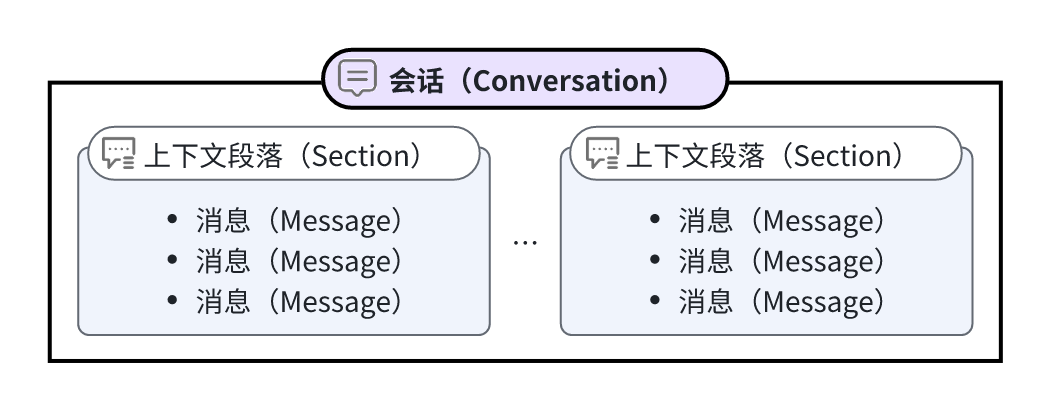
operationId: ClearConversationApi
parameters:
- description: 待清除上下文的会话 ID。你可以在[发起对话](https://www.coze.cn/docs/developer_guides/chat_v3)接口的
Response 中通过 conversation_id 字段获取会话 ID。
in: path
name: conversation_id
required: true
schema:
type: string
requestBody:
content:
application/json:
schema:
type: object
x-coze-order: []
responses:
"200":
content:
application/json:
schema:
properties:
code:
description: 调用状态码。0 表示调用成功,其他值表示调用失败,你可以通过 msg 字段判断详细的错误原因。
format: i64
title: 调用状态码。0 表示调用成功,其他值表示调用失败,你可以通过 `msg` 字段判断详细的错误原因。
type: integer
x-coze-example: 0
data:
$ref: '#/components/schemas/Section'
detail:
$ref: '#/components/schemas/ResponseDetail'
msg:
description: 状态信息。API 调用失败时可通过此字段查看详细错误信息。
type: string
x-coze-example: '"Success"'
type: object
x-coze-order:
- code
- msg
- data
- detail
description: ""
summary: 清除上下文
x-coze-doc-id: 67dd13565a76020527bc09f7
/v1/conversations/{conversation_id}/messages/{message_id}/feedback:
delete:
description: '{"0":{"ops":[{"insert":"删除指定消息的评价。\n"},{"attributes":{"anchor":"be10635a","heading":"h2","lmkr":"1"},"insert":"*"},{"insert":"接口限制\n"},{"attributes":{"lmkr":"1"},"insert":"*"},{"insert":"仅会话创建者能删除对应会话中消息的评价。\n"}],"zoneId":"0","zoneType":"Z"}}'
operationId: DeleteFeedback
parameters:
- description: Conversation ID,即会话的唯一标识。可以在[发起对话](https://www.coze.cn/docs/developer_guides/chat_v3)接口
Response 中查看 conversation_id 字段。
in: path
name: conversation_id
required: true
schema:
type: string
- description: |-
待删除评价的消息 ID。你可以通过[查看对话消息详情](https://www.coze.cn/open/docs/developer_guides/list_chat_messages) API 返回的 Response 中查看消息 ID。
* 此消息必须在 conversation_id 指定的会话中。
* 仅支持评价以下来源的文本消息:
* 通过发起对话 API 生成的 **type=answer** 类型的文本消息。
* 通过执行对话流 API 返回的文本消息。
in: path
name: message_id
required: true
schema:
type: string
requestBody:
content:
application/json:
schema:
type: object
x-coze-order: []
responses:
"200":
content:
application/json:
schema:
properties:
code:
description: 调用状态码。0 表示调用成功,其他值表示调用失败,你可以通过 msg 字段判断详细的错误原因。
format: i64
type: integer
x-coze-example: 0
detail:
$ref: '#/components/schemas/ResponseDetail'
msg:
description: 状态信息。API 调用失败时可通过此字段查看详细错误信息。
type: string
x-coze-example: Success
type: object
x-coze-order:
- detail
- code
- msg
description: ""
summary: 删除消息评价
x-coze-doc-id: 686ba4b37fd2c0051a1126f2
/v1/datasets:
get:
description: '{"0":{"ops":[{"insert":"调用此接口查看指定空间资源库下的全部知识库。\n"},{"attributes":{"lmkr":"1"},"insert":"*"},{"insert":"此接口可查看工作空间下,空间资源库中的全部知识库,包括扣子知识库和火山知识库,无论知识库是否归本人所有。\n"},{"attributes":{"lmkr":"1"},"insert":"*"},{"attributes":{"zoneId":"Nmd2TWIy1I","zoneType":"Z","type":"tip","title":"说明","border":"#bacefd","background":"#f0f4ff","highlight-block-v2":"true"},"insert":"
"},{"insert":"\n"}],"zoneId":"0","zoneType":"Z"},"Nmd2TWIy1I":{"ops":[{"attributes":{"list":"bullet1","lmkr":"1"},"insert":"*"},{"insert":"暂不支持通过
API 查看扣子应用中的知识库。\n"},{"attributes":{"lmkr":"1","list":"bullet1"},"insert":"*"},{"insert":"暂不支持通过该
API 查看火山知识库中的文件列表等详细信息。\n"}],"zoneId":"Nmd2TWIy1I","zoneType":"Z"}}'
operationId: ListDatasetOpenAPI
parameters:
- description: |-
知识库所在的空间的 Space ID。Space ID 是空间的唯一标识。
进入指定空间,空间页面 URL 中 space 参数后的数字就是 Space ID。例如`https://www.coze.cn/space/736163827687053****/library`,Space ID 为`736163827687053****`。
in: query
name: space_id
required: true
schema:
type: string
x-coze-select-resource-type: space
- description: 知识库名称,支持模糊搜索。
in: query
name: name
schema:
type: string
- description: 类型
in: query
name: format_type
schema:
$ref: '#/components/schemas/FormatType'
- description: 查询结果分页展示时,此参数用于设置查看的页码。最小值为 1,默认为 1。
in: query
name: page_num
schema:
type: integer
- description: 查询结果分页展示时,此参数用于设置每页返回的数据量。取值范围为 1~300,默认为 10。
in: query
name: page_size
schema:
type: integer
responses:
"200":
content:
application/json:
schema:
properties:
code:
description: 调用状态码。0 表示调用成功,其他值表示调用失败,你可以通过 msg 字段判断详细的错误原因。
format: i64
title: |-
状态码。
0 代表调用成功。
type: integer
x-coze-example: 4000
data:
$ref: '#/components/schemas/ListDatasetOpenApiData'
detail:
$ref: '#/components/schemas/ResponseDetail'
msg:
description: 状态信息。API 调用失败时可通过此字段查看详细错误信息。
type: string
x-coze-example: '"Success"'
type: object
x-coze-order:
- data
- code
- message
description: ""
summary: 查看知识库列表
x-coze-doc-id: 675ba4b6f1773d030e668e96
/v1/datasets/{dataset_id}:
put:
description: |-
调用此接口修改扣子知识库信息。
* 此接口会全量刷新知识库的 name、file_id 和 description 配置,如果未设置这些参数,参数将恢复默认配置。
* 知识库分为扣子知识库和火山知识库,该 API 仅用于修改扣子知识库,不支持修改火山知识库,如果需要修改火山知识库的信息,请参见[修改火山知识库信息 API 文档](https://whttps://www.volcengine.com/docs/84313/1254592)。
* 仅支持修改本人为所有者的知识库信息,包括知识库名称、图标、描述等信息。
* 如需修改知识库图标,需要先调用 API [上传文件](https://www.coze.cn/docs/developer_guides/upload_files),将图片文件上传至扣子平台。
operationId: UpdateDatasetOpenAPI
parameters:
- description: |-
知识库 ID。
在扣子平台中打开指定知识库页面,页面 URL 中 `knowledge` 参数后的数字就是知识库 ID。例如 `https://www.coze.cn/space/736142423532160****/knowledge/738509371792341****`,知识库 ID 为 `738509371792341****`。
in: path
name: dataset_id
required: true
schema:
type: string
x-coze-select-resource-type: dataset
requestBody:
content:
application/json:
schema:
properties:
description:
title: 知识库描述信息。
type: string
x-coze-example: description of knowledge
file_id:
title: 知识库图标,应传入[上传文件](https://www.coze.cn/docs/developer_guides/upload_files)接口中获取的
file_id。
type: string
x-coze-example: 744667846938145****
name:
title: 知识库名称,长度不超过 100 个字符。
type: string
x-coze-example: knowledge
required:
- name
type: object
x-coze-order:
- name
- file_id
- description
responses:
"200":
content:
application/json:
schema:
properties:
code:
description: 调用状态码。0 表示调用成功,其他值表示调用失败,你可以通过 msg 字段判断详细的错误原因。
format: i64
title: |-
状态码。
0 代表调用成功。
type: integer
x-coze-example: 4000
detail:
$ref: '#/components/schemas/ResponseDetail'
msg:
description: 状态信息。API 调用失败时可通过此字段查看详细错误信息。
type: string
x-coze-example: '"Success"'
type: object
x-coze-order:
- code
- message
description: ""
summary: 修改知识库信息
x-coze-doc-id: 675ba4dc56a9190316d7e42e
/v1/datasets/{dataset_id}/images:
get:
description: |-
调用此接口查看图片类知识库中图片的详细信息。
查看图片时,支持通过图片的标注进行筛选。
## 接口限制
此 API 仅支持查看扣子知识库中的图片详细信息,不适用于火山知识库。
operationId: ListPhotoDocumentOpenAPI
parameters:
- description: 查询结果分页展示时,此参数用于设置查看的页码。最小值为 1,默认为 1。
in: query
name: page_num
schema:
type: integer
- description: 查询结果分页展示时,此参数用于设置每页返回的数据量。取值范围为 1~299,默认为 10。
in: query
name: page_size
schema:
type: integer
- description: 对图片描述进行搜索时,搜索的关键字。
in: query
name: keyword
schema:
type: string
- description: 图片是否已设置了描述信息。
in: query
name: has_caption
schema:
type: boolean
- description: |-
知识库 ID。
在扣子平台中打开指定知识库页面,页面 URL 中 `knowledge` 参数后的数字就是知识库 ID。例如 `https://www.coze.cn/space/736142423532160****/knowledge/738509371792341****`,知识库 ID 为 `738509371792341****`。
in: path
name: dataset_id
required: true
schema:
type: string
x-coze-select-resource-type: dataset
responses:
"200":
content:
application/json:
schema:
properties:
code:
description: 调用状态码。0 表示调用成功,其他值表示调用失败,你可以通过 msg 字段判断详细的错误原因。
format: i64
title: |-
状态码。
0 代表调用成功。
type: integer
x-coze-example: 0
data:
$ref: '#/components/schemas/ListPhotoOpenApiData'
detail:
$ref: '#/components/schemas/ResponseDetail'
msg:
description: 状态信息。API 调用失败时可通过此字段查看详细错误信息。
title: 状态信息。API 调用失败时可通过此字段查看详细错误信息。
type: string
x-coze-example: /
type: object
x-coze-order:
- data
- code
- message
description: ""
summary: 查看知识库图片列表
x-coze-doc-id: 675ba5e16fb2350315031e99
/v1/datasets/{dataset_id}/process:
post:
description: '{"0":{"ops":[{"insert":"调用此接口获取扣子知识库文件的上传进度。\n"},{"attributes":{"list":"bullet1","lmkr":"1"},"insert":"*"},{"insert":"此接口支持查看所有类型知识库文件的上传进度,例如文本、图片、表格。\n"},{"attributes":{"lmkr":"1","list":"bullet1"},"insert":"*"},{"insert":"支持批量查看多个文件的进度,多个文件必须位于同一个知识库中。\n"},{"attributes":{"lmkr":"1","list":"bullet1"},"insert":"*"},{"insert":"该
API 仅支持查看扣子知识库中的文件上传进度,不支持查看火山知识库中的文件上传进度。\n"}],"zoneId":"0","zoneType":"Z"}}'
operationId: GetDocumentProgressOpenAPI
parameters:
- description: |-
扣子知识库 ID。不能填写火山知识库 ID。
在扣子编程中打开指定扣子知识库页面,页面 URL 中 `knowledge` 参数后的数字就是扣子知识库 ID。例如 `https://www.coze.cn/space/736142423532160****/knowledge/738509371792341****`,扣子知识库 ID 为 `738509371792341****`。
in: path
name: dataset_id
required: true
schema:
type: string
x-coze-example: 744258581358768****
x-coze-select-resource-type: dataset
- in: header
name: Agw-Js-Conv
required: true
schema:
enum:
- str
type: string
requestBody:
content:
application/json:
schema:
properties:
document_ids:
format: list
items:
format: i64
type: string
title: 需要获取上传进度的文件 ID 列表。
type: array
x-coze-example: '["744258581358768****", "744258581358768****"]'
required:
- document_ids
type: object
x-coze-order:
- document_ids
responses:
"200":
content:
application/json:
schema:
properties:
code:
description: 调用状态码。0 表示调用成功,其他值表示调用失败,你可以通过 msg 字段判断详细的错误原因。
format: i64
title: 调用状态码。0 表示调用成功,其他值表示调用失败,你可以通过 msg 字段判断详细的错误原因。
type: integer
x-coze-example: 0
data:
properties:
data:
default: []
format: list
items:
properties:
document_id:
default: ""
title: 文件的 ID。
type: string
x-coze-example: 744667080521909***
document_name:
default: ""
title: 文件名称。
type: string
x-coze-example: test
progress:
default: 0
format: i32
title: 文件上传的进度。单位为百分比。
type: integer
x-coze-example: 100
remaining_time:
format: i64
title: 预期剩余时间,单位为秒。
type: integer
x-coze-example: 0
size:
format: i64
title: 文件的大小,单位为字节。
type: integer
x-coze-example: 171340
status:
enum:
- 0
- 1
- 2
- 3
- 4
- 5
- 9
- 1000
format: int
title: |-
文件的处理状态。取值包括:
- 0:处理中
- 1:处理完毕
- 9:处理失败,建议重新上传
type: integer
x-apihub-enum-names:
- Processing
- Enable
- Disable
- Deleted
- Resegment
- Refreshing
- Failed
- AuditFailed
x-coze-example: 1
status_descript:
description: 状态的详细描述;如果切片失败,返回失败信息
title: |-
失败状态的详细描述,例如切片失败时返回失败信息。
仅文档处理失败时会返回此参数。
type: string
type:
title: 本地文件格式,即文件后缀,例如 txt。格式支持 pdf、txt、doc、docx 类型。
type: string
x-coze-example: jpg
update_interval:
description: 更新间隔
format: i32
title: 在线网页自动更新的频率。单位为小时。
type: integer
x-coze-example: 0
update_type:
description: 更新类型
enum:
- 0
- 1
- 2
format: int
title: |-
在线网页是否自动更新。取值包括:
- 0:不自动更新
- 1:自动更新
type: integer
x-apihub-enum-names:
- NoUpdate
- Cover
- Append
x-coze-example: 0
url:
title: 文件地址。
type: string
x-coze-example: https://example.com/ocean-cloud-tos/FileBizType.BIZ_BOT_DATASET/217526895615***.jpg?lk3s=5ec9c6e9&x-expires=1733819246&x-signature=G9VVp2ObiCwUourS7rv44YLdh****
type: object
x-apihub-orders:
- url
- size
- type
- status
- progress
- document_id
- update_type
- document_name
- remaining_time
- status_descript
- update_interval
title: 文件的上传进度详情。
type: array
x-coze-example: 参考返回示例
title: 接口返回的业务信息。
type: object
x-coze-example: 参考返回示例
x-coze-order:
- data
detail:
properties:
logid:
title: 本次请求的日志 ID。如果遇到异常报错场景,且反复重试仍然报错,可以根据此 logid 及错误码联系扣子团队获取帮助。详细说明可参考[获取帮助和技术支持](https://docs.coze.cn/guides/help_and_support)。
type: string
x-coze-example: 20241210152726467C48D89D6DB2****
required:
- logid
title: 包含请求的详细信息的对象,主要用于记录请求的日志 ID 以便于排查问题。
type: object
x-coze-example: '{"logid":"20241210152726467C48D89D6DB2****"}'
x-coze-order:
- logid
msg:
description: |-
状态信息。API 调用失败时可通过此字段查看详细错误信息。
状态码为 0 时,msg 默认为空。
title: |-
状态信息。API 调用失败时可通过此字段查看详细错误信息。
状态码为 0 时,msg 默认为空。
type: string
x-coze-example: '""'
required:
- code
- message
type: object
x-coze-order:
- data
- code
- msg
- detail
description: ""
summary: 查看知识库文件上传进度
x-coze-doc-id: 675ba5386fb23503150316a6
/v1/enterprises/{enterprise_id}/members:
post:
description: '{"0":{"ops":[{"insert":"添加员工到企业。\n"},{"attributes":{"lmkr":"1"},"insert":"*"},{"insert":"在火山引擎创建用户后,"},{"attributes":{"bold":"true"},"insert":"默认会自动将用户添加至企业"},{"insert":",若未成功添加,你可以调用本
API 将用户添加至企业。火山引擎创建用户的具体方法请参见"},{"insert":"成员管理","attributes":{"hyperlink":"{\"href\":\"https://docs.coze.cn/developer_guides/create_coze_user\",\"linkId\":\"jV1h6CJAd7\"}"}},{"insert":"。\n"},{"attributes":{"anchor":"c1f43b73","heading":"h2","lmkr":"1"},"insert":"*"},{"insert":"接口限制\n"},{"attributes":{"lmkr":"1","list":"bullet1"},"insert":"*"},{"attributes":{"bold":"true"},"insert":"套餐限制"},{"insert":":扣子企业版(企业标准版、企业旗舰版)。\n"},{"attributes":{"lmkr":"1","list":"bullet1"},"insert":"*"},{"insert":"本
API 仅支持添加员工(火山子用户),不支持添加外部成员(访客)。\n"},{"attributes":{"lmkr":"1","list":"bullet1"},"insert":"*"},{"insert":"添加成员总数不能超过企业标准版权益中的成员数量上限(100
个成员),否则会提示 777074011错误。\n"},{"attributes":{"lmkr":"1"},"insert":"*"},{"attributes":{"zoneId":"UteVasdpeJ","zoneType":"Z","type":"tip","title":"说明","border":"#bacefd","background":"#f0f4ff","highlight-block-v2":"true"},"insert":"
"},{"insert":"\n"}],"zoneId":"0","zoneType":"Z"},"UteVasdpeJ":{"ops":[{"attributes":{"list":"bullet1","lmkr":"1"},"insert":"*"},{"insert":"每次请求只能添加一位成员。如需添加多位,请依次发送请求。\n"},{"attributes":{"list":"bullet1","lmkr":"1"},"insert":"*"},{"insert":"该
API 不支持并发请求。\n"}],"zoneId":"UteVasdpeJ","zoneType":"Z"}}'
operationId: OpenAPIAddEnterpriseMember
parameters:
- description: |-
企业 ID,用于标识用户所属的企业。
你可以在组织管理 > 组织设置页面查看企业 ID。

in: path
name: enterprise_id
required: true
schema:
type: string
x-coze-example: volcano_210195***
requestBody:
content:
application/json:
schema:
properties:
users:
format: list
items:
$ref: '#/components/schemas/properties_users_items'
title: 待邀请加入企业的用户列表,单次最多添加 `1`个成员。每个成员包含用户 ID 和角色信息。
type: array
x-coze-example: '[ { "user_id": "247877439325****", "role": "enterprise_member"
} ]'
type: object
x-coze-order:
- users
responses:
"200":
content:
application/json:
schema:
properties:
code:
description: 调用状态码。0 表示调用成功,其他值表示调用失败,你可以通过 msg 字段判断详细的错误原因。
format: i64
title: 调用状态码。0 表示调用成功,其他值表示调用失败,你可以通过 msg 字段判断详细的错误原因。
type: integer
x-coze-example: 0
detail:
$ref: '#/components/schemas/properties_detail'
msg:
description: |-
状态信息。API 调用失败时可通过此字段查看详细错误信息。
状态码为 0 时,msg 默认为空。
title: |-
状态信息。API 调用失败时可通过此字段查看详细错误信息。
状态码为 0 时,msg 默认为空。
type: string
x-coze-example: '""'
type: object
x-coze-order:
- code
- msg
- detail
description: ""
summary: 添加企业成员
x-coze-doc-id: 68a469d95d9263051917bf9d
/v1/enterprises/{enterprise_id}/members/{user_id}:
put:
description: '{"0":{"ops":[{"insert":"修改企业员工的角色。\n"},{"attributes":{"lmkr":"1"},"insert":"*"},{"insert":"企业员工角色包括企业管理员和企业普通成员,你可以通过本
API 修改企业员工的角色。\n"},{"attributes":{"anchor":"5fb118b3","heading":"h2","lmkr":"1"},"insert":"*"},{"insert":"接口限制\n"},{"attributes":{"lmkr":"1"},"insert":"*"},{"insert":"不能修改访客的角色。\n"}],"zoneId":"0","zoneType":"Z"}}'
operationId: OpenAPIUpdateEnterpriseMember
parameters:
- description: |-
企业 ID,待修改的员工所属的企业。
企业 ID 的获取方法如下:
在左侧导航栏中单击**组织管理**,URL 中 `enterprise` 参数后的数字就是enterprise_id。例如,在 URL `https://www.coze.cn/enterprise/volcano_2105850***/`中,`volcano_2105850***`就是 enterprise_id。
in: path
name: enterprise_id
required: true
schema:
type: string
- description: |-
待修改员工的扣子用户 UID。
你可以调用火山引擎的 [ListCozeUser-成员列表](https://api.volcengine.com/api-docs/view?serviceCode=coze&version=2025-06-01&action=ListCozeUser) API,其中 `CozeUserId`的值即为扣子用户 UID。
in: path
name: user_id
required: true
schema:
type: string
requestBody:
content:
application/json:
schema:
properties:
role:
enum:
- enterprise_admin
- enterprise_member
title: |-
设置成员在企业中的角色,枚举值:
* `enterprise_admin`:企业管理员。
* `enterprise_member`:企业普通成员。
type: string
x-coze-enum-names:
- EnterpriseMemberRoleEnterpriseAdmin
- EnterpriseMemberRoleEnterpriseMember
x-coze-example: enterprise_member
required:
- role
type: object
x-coze-order:
- role
responses:
"200":
content:
application/json:
schema:
properties:
code:
description: 调用状态码。0 表示调用成功,其他值表示调用失败,你可以通过 msg 字段判断详细的错误原因。
format: i64
title: 调用状态码。0 表示调用成功,其他值表示调用失败,你可以通过 msg 字段判断详细的错误原因。
type: integer
x-coze-example: 0
detail:
$ref: '#/components/schemas/ResponseDetail'
msg:
description: |-
状态信息。API 调用失败时可通过此字段查看详细错误信息。
状态码为 0 时,msg 默认为空。
title: |-
状态信息。API 调用失败时可通过此字段查看详细错误信息。
状态码为 0 时,msg 默认为空。
type: string
x-coze-example: '""'
type: object
x-coze-order:
- code
- msg
- detail
description: ""
summary: 修改企业员工的角色
x-coze-doc-id: 6901dd120f86e905011f1897
/v1/enterprises/{enterprise_id}/organizations:
post:
description: '{"0":{"ops":[{"insert":"在指定的企业中创建组织。\n"},{"attributes":{"anchor":"21653605","heading":"h2","lmkr":"1"},"insert":"*"},{"insert":"接口限制\n"},{"attributes":{"list":"bullet1","lmkr":"1"},"insert":"*"},{"attributes":{"bold":"true"},"insert":"套餐限制"},{"insert":":扣子企业旗舰版。\n"},{"attributes":{"lmkr":"1","list":"bullet1"},"insert":"*"},{"attributes":{"bold":"true"},"insert":"数量限制"},{"insert":":一个企业中最多存在
20 个组织。\n"}],"zoneId":"0","zoneType":"Z"}}'
operationId: OpenAPICreateOrganization
parameters:
- description: |-
企业 ID,用于标识该组织所属的企业。
你可以在**组织管理** > **组织设置**页面查看企业 ID。

in: path
name: enterprise_id
required: true
schema:
type: string
x-coze-example: volcano_210195***
requestBody:
content:
application/json:
schema:
properties:
description:
title: 自定义组织的描述信息,最大长度为 100 个字符。默认为空。
type: string
x-coze-example: 研发部内部使用的组织
name:
title: |-
自定义组织的名称。
最大长度为 30 个字符。
type: string
x-coze-example: 研发部
super_admin_user_id:
title: |-
指定组织的超级管理员的扣子用户 UID。
你可以调用火山引擎的 [ListCozeUser-成员列表](https://api.volcengine.com/api-docs/view?serviceCode=coze&version=2025-06-01&action=ListCozeUser) API,`CozeUserId` 的值即为扣子用户 UID。
只有已加入企业的员工能被指定为组织的超级管理员。
type: string
x-coze-example: 411345614833****
required:
- name
- super_admin_user_id
type: object
x-coze-order:
- name
- super_admin_user_id
- description
responses:
"200":
content:
application/json:
schema:
properties:
code:
description: 调用状态码。0 表示调用成功,其他值表示调用失败,你可以通过 msg 字段判断详细的错误原因。
format: i64
title: 调用状态码。0 表示调用成功,其他值表示调用失败,你可以通过 msg 字段判断详细的错误原因。
type: integer
x-coze-example: 0
data:
$ref: '#/components/schemas/properties_data'
detail:
$ref: '#/components/schemas/properties_detail'
msg:
description: |-
状态信息。API 调用失败时可通过此字段查看详细错误信息。
状态码为 0 时,msg 默认为空。
title: |-
状态信息。API 调用失败时可通过此字段查看详细错误信息。
状态码为 0 时,msg 默认为空。
type: string
x-coze-example: '""'
type: object
x-coze-order:
- code
- msg
- data
- detail
description: ""
summary: 创建组织
x-coze-doc-id: 6901dccb338103052c5c3eb7
/v1/entities/copy_tasks:
post:
description: '{"0":{"ops":[{"insert":"复制智能体、扣子应用和工作流。\n"},{"attributes":{"anchor":"e8cfe53b","heading":"h2","lmkr":"1"},"insert":"*"},{"insert":"接口描述\n"},{"attributes":{"list":"bullet1","lmkr":"1"},"insert":"*"},{"insert":"本
API 支持"},{"attributes":{"bold":"true"},"insert":"同工作空间复制"},{"insert":"或"},{"attributes":{"bold":"true"},"insert":"跨工作空间复制"},{"insert":"。如果你是空间成员,你可以调用本
API 将工作空间内任意智能体、扣子应用和工作流,复制到本空间或同一企业/团队下的其他已加入的工作空间。\n"},{"attributes":{"list":"bullet1","lmkr":"1"},"insert":"*"},{"insert":"跨空间复制智能体或应用成功后,为保证正常运行,智能体和应用所使用的工作流、插件等资源也将同时复制到新空间。\n"},{"attributes":{"lmkr":"1","list":"bullet1"},"insert":"*"},{"insert":"该
API 分为同步执行和异步执行,扣子根据不同资源复制类型自动采用对应的执行方式,具体说明如下:\n"},{"attributes":{"lmkr":"1"},"insert":"*"},{"attributes":{"aceTable":"rs8vo4j1zca5dj5acmvhs504ypcaf9ii1c
cs37vpaznrjdwdkztp9gl4p3ajuavptmar"},"insert":"*"},{"insert":"\n"},{"attributes":{"anchor":"0f133891","heading":"h2","lmkr":"1"},"insert":"*"},{"insert":"接口限制\n"},{"attributes":{"list":"bullet1","lmkr":"1"},"insert":"*"},{"insert":"不支持将个人工作空间中的资源复制到企业或团队工作空间中,个人版工作空间中的资源只能复制到本空间。\n"},{"attributes":{"list":"bullet1","lmkr":"1"},"insert":"*"},{"insert":"操作者需要加入源工作空间和目标工作空间。\n"},{"attributes":{"lmkr":"1","list":"bullet1"},"insert":"*"},{"insert":"复制后的智能体或扣子应用为草稿状态。\n"}],"zoneId":"0","zoneType":"Z"},"rs8vo4j1zca5dj5acmvhs504ypcaf9ii1c":{"ops":[{"attributes":{},"insert":{"id":"r19qt9v1qzu0mg0epi4plzd2pu5j4bf6mi"}},{"attributes":{},"insert":{"id":"r1bh2obvla1g8ccpl3j8s043cd2b9kegdh"}},{"attributes":{},"insert":{"id":"r1yv6gau5df6t3ly9zb1ivylzmqrfg18ja"}}],"zoneId":"rs8vo4j1zca5dj5acmvhs504ypcaf9ii1c","zoneType":"R"},"cs37vpaznrjdwdkztp9gl4p3ajuavptmar":{"ops":[{"attributes":{"colWidth":"100"},"insert":{"id":"c1in7wpdp0r5jbiult938ogm712ufruk5t"}},{"attributes":{"colWidth":"336"},"insert":{"id":"c1veg2wg29a574pzw5k40naqrjyjqfyfvv"}},{"attributes":{"colWidth":"497"},"insert":{"id":"c1gmu2zjml0ykfyvbet45zdp68pu8hvm2d"}}],"zoneId":"cs37vpaznrjdwdkztp9gl4p3ajuavptmar","zoneType":"C"},"xr19qt9v1qzu0mg0epi4plzd2pu5j4bf6mixc1in7wpdp0r5jbiult938ogm712ufruk5t":{"ops":[{"attributes":{"bold":"true"},"insert":"执行模式"},{"insert":"\n"}],"zoneId":"xr19qt9v1qzu0mg0epi4plzd2pu5j4bf6mixc1in7wpdp0r5jbiult938ogm712ufruk5t","zoneType":"Z"},"xr19qt9v1qzu0mg0epi4plzd2pu5j4bf6mixc1veg2wg29a574pzw5k40naqrjyjqfyfvv":{"ops":[{"attributes":{"bold":"true"},"insert":"适用场景"},{"insert":"\n"}],"zoneId":"xr19qt9v1qzu0mg0epi4plzd2pu5j4bf6mixc1veg2wg29a574pzw5k40naqrjyjqfyfvv","zoneType":"Z"},"xr19qt9v1qzu0mg0epi4plzd2pu5j4bf6mixc1gmu2zjml0ykfyvbet45zdp68pu8hvm2d":{"ops":[{"attributes":{"bold":"true"},"insert":"结果返回方式"},{"insert":"\n"}],"zoneId":"xr19qt9v1qzu0mg0epi4plzd2pu5j4bf6mixc1gmu2zjml0ykfyvbet45zdp68pu8hvm2d","zoneType":"Z"},"xr1bh2obvla1g8ccpl3j8s043cd2b9kegdhxc1in7wpdp0r5jbiult938ogm712ufruk5t":{"ops":[{"insert":"同步执行\n"}],"zoneId":"xr1bh2obvla1g8ccpl3j8s043cd2b9kegdhxc1in7wpdp0r5jbiult938ogm712ufruk5t","zoneType":"Z"},"xr1bh2obvla1g8ccpl3j8s043cd2b9kegdhxc1veg2wg29a574pzw5k40naqrjyjqfyfvv":{"ops":[{"insert":"同一工作空间内复制"},{"attributes":{"bold":"true"},"insert":"智能体"},{"insert":"。\n"}],"zoneId":"xr1bh2obvla1g8ccpl3j8s043cd2b9kegdhxc1veg2wg29a574pzw5k40naqrjyjqfyfvv","zoneType":"Z"},"xr1bh2obvla1g8ccpl3j8s043cd2b9kegdhxc1gmu2zjml0ykfyvbet45zdp68pu8hvm2d":{"ops":[{"insert":"API
直接返回复制后的智能体 ID。\n"}],"zoneId":"xr1bh2obvla1g8ccpl3j8s043cd2b9kegdhxc1gmu2zjml0ykfyvbet45zdp68pu8hvm2d","zoneType":"Z"},"xr1yv6gau5df6t3ly9zb1ivylzmqrfg18jaxc1in7wpdp0r5jbiult938ogm712ufruk5t":{"ops":[{"insert":"异步执行\n"}],"zoneId":"xr1yv6gau5df6t3ly9zb1ivylzmqrfg18jaxc1in7wpdp0r5jbiult938ogm712ufruk5t","zoneType":"Z"},"xr1yv6gau5df6t3ly9zb1ivylzmqrfg18jaxc1veg2wg29a574pzw5k40naqrjyjqfyfvv":{"ops":[{"attributes":{"list":"bullet1","lmkr":"1"},"insert":"*"},{"insert":"同一工作空间内复制"},{"attributes":{"bold":"true"},"insert":"扣子应用"},{"insert":"、"},{"attributes":{"bold":"true"},"insert":"工作流"},{"insert":"。\n"},{"attributes":{"list":"bullet1","lmkr":"1"},"insert":"*"},{"insert":"跨工作空间复制"},{"attributes":{"bold":"true"},"insert":"智能体"},{"insert":"、"},{"attributes":{"bold":"true"},"insert":"扣子应用"},{"insert":"、"},{"attributes":{"bold":"true"},"insert":"工作流"},{"insert":"。\n"}],"zoneId":"xr1yv6gau5df6t3ly9zb1ivylzmqrfg18jaxc1veg2wg29a574pzw5k40naqrjyjqfyfvv","zoneType":"Z"},"xr1yv6gau5df6t3ly9zb1ivylzmqrfg18jaxc1gmu2zjml0ykfyvbet45zdp68pu8hvm2d":{"ops":[{"insert":"API
返回任务 ID("},{"attributes":{"inlineCode":"true"},"insert":"task_id"},{"insert":"),需要通过"},{"attributes":{"hyperlink":"{\"href\":\"https://www.coze.cn/open/docs/developer_guides/query_resource_copy_execution_result\",\"linkId\":\"hWFInXcZNq\"}"},"insert":"查询资源复制的结果"},{"insert":" API
查询执行结果。\n"}],"zoneId":"xr1yv6gau5df6t3ly9zb1ivylzmqrfg18jaxc1gmu2zjml0ykfyvbet45zdp68pu8hvm2d","zoneType":"Z"}}'
operationId: OpenDuplicateDraftEntity
requestBody:
content:
application/json:
schema:
properties:
entity_id:
title: |-
待复制资源的 ID,需要和 `entity_type` 配套使用。
例如,当 `entity_type` 为 `bot`时,此字段应填写智能体的 ID。
type: string
x-coze-example: 753093880875067***
entity_type:
$ref: '#/components/schemas/TaskEntityType'
to_workspace_id:
title: |-
目标工作空间 ID。默认为空,即同工作空间复制。
如果是跨工作空间复制,需要指定资源复制到哪个工作空间。只能填写本企业或团队下的工作空间。
type: string
x-coze-example: 7498204883280***
type: object
responses:
"200":
content:
application/json:
schema:
properties:
code:
description: 调用状态码。0 表示调用成功,其他值表示调用失败,你可以通过 msg 字段判断详细的错误原因。
format: i64
type: integer
x-coze-example: 0
data:
$ref: '#/components/schemas/OpenDuplicateDraftEntityData'
detail:
$ref: '#/components/schemas/ResponseDetail'
msg:
description: 状态信息。API 调用失败时可通过此字段查看详细错误信息。
type: string
x-coze-example: Success
required:
- code
- msg
type: object
description: ""
summary: 复制资源
x-coze-doc-id: 68be9579ffddda05a2ca5a1b
/v1/entities/copy_tasks/{task_id}:
get:
description: '{"0":{"ops":[{"insert":"查询资源复制的结果。\n"},{"attributes":{"anchor":"d18b55a4","heading":"h2","lmkr":"1"},"insert":"*"},{"insert":"接口说明\n"},{"attributes":{"lmkr":"1"},"insert":"*"},{"insert":"调用"},{"attributes":{"hyperlink":"{\"href\":\"https://www.coze.cn/open/docs/developer_guides/copy_resource_task\",\"linkId\":\"qGphY2RMjP\"}"},"insert":"复制资源"},{"insert":"
API 时,以下场景中 API 为异步执行,响应信息中会返回 task_id,开发者可以通过本 API 查询指定事件的执行结果。\n"},{"insert":"*","attributes":{"list":"bullet1","lmkr":"1"}},{"insert":"同工作空间复制扣子应用、工作流。\n"},{"insert":"*","attributes":{"list":"bullet1","lmkr":"1"}},{"insert":"跨工作空间复制智能体、扣子应用、工作流。\n"}],"zoneId":"0","zoneType":"Z"}}'
operationId: OpenCopyTaskInfo
parameters:
- description: 资源复制的任务 ID。调用[复制资源](https://www.coze.cn/open/docs/developer_guides/copy_resource_task)
API 时,如果 API 为异步执行,响应信息中会返回 task_id。
in: path
name: task_id
required: true
schema:
type: string
responses:
"200":
content:
application/json:
schema:
properties:
code:
description: 调用状态码。0 表示调用成功,其他值表示调用失败,你可以通过 msg 字段判断详细的错误原因。
format: i64
type: integer
x-coze-example: 0
data:
$ref: '#/components/schemas/OpenCopyTaskInfoData'
detail:
$ref: '#/components/schemas/ResponseDetail'
msg:
description: 状态信息。API 调用失败时可通过此字段查看详细错误信息。
type: string
x-coze-example: Success
required:
- code
- msg
type: object
description: ""
summary: 查询资源复制的结果
x-coze-doc-id: 68be99789ef4ce04f88295c7
/v1/files/retrieve:
get:
description: 查看已上传的文件详情。
operationId: RetrieveFileOpen
parameters:
- description: 已上传的文件 ID。
in: query
name: file_id
required: true
schema:
type: string
responses:
"200":
content:
application/json:
schema:
properties:
code:
description: 调用状态码。0 表示调用成功,其他值表示调用失败,你可以通过 msg 字段判断详细的错误原因。
format: i64
type: integer
x-coze-example: 0
data:
$ref: '#/components/schemas/File'
detail:
$ref: '#/components/schemas/ResponseDetail'
msg:
description: 状态信息。API 调用失败时可通过此字段查看详细错误信息。
type: string
x-coze-example: '"Success"'
type: object
x-coze-order:
- data
description: ""
summary: 查看文件详情
x-coze-doc-id: 666a9f13cc753102fc6dc7df
/v1/files/upload:
post:
description: '{"0":{"ops":[{"insert":"调用接口上传文件到扣子编程。\n"},{"attributes":{"anchor":"4a17eba2","heading":"h2","lmkr":"1"},"insert":"*"},{"insert":"接口说明\n"},{"attributes":{"lmkr":"1"},"insert":"*"},{"insert":"消息中无法直接使用本地文件,创建消息或对话前,需要先调用此接口上传本地文件到扣子编程。上传文件后,你可以在消息中通过指定
file_id 的方式在多模态内容中直接使用此文件。此接口上传的文件可用于"},{"attributes":{"hyperlink":"{\"href\":\"https://docs.coze.cn/developer_guides/chat_v3\",\"linkId\":\"sWhpYOLZKs\",\"newTab\":true}"},"insert":"发起对话"},{"insert":"等
API 中传入文件等多模态内容。使用方式可参考 "},{"attributes":{"hyperlink":"{\"href\":\"https://docs.coze.cn/developer_guides/chat_v3#426b92e7\",\"linkId\":\"HipDna9ICa\",\"newTab\":true}"},"insert":"object_string
object"},{"insert":" 。\n"},{"attributes":{"anchor":"f4019a6b","heading":"h3","lmkr":"1"},"insert":"*"},{"insert":"使用限制\n"},{"attributes":{"aceTable":"rsectv8fn4uf3yq22j9qfggt72t64c9ayv
cs1mq851aq0tpzkn8tqaibbi4qs7uuvnpe"},"insert":"*"},{"insert":"\n"},{"attributes":{"anchor":"e1ace7ce","lmkr":"1","heading":"h3"},"insert":"*"},{"insert":"支持的文件格式\n"},{"attributes":{"aceTable":"rs916q7d5ndps2oz5o1yvp2z8nqb9drfcq
csbk97emfhmm7myb43qkolm0vkul3kw2sf"},"insert":"*"},{"insert":"\n"},{"insert":"\n"}],"zoneId":"0","zoneType":"Z"},"rsectv8fn4uf3yq22j9qfggt72t64c9ayv":{"ops":[{"attributes":{"colWidth":"100"},"insert":{"id":"r1wy62r3stit94f89lzdvs2czz76744dlr"}},{"attributes":{"colWidth":"100"},"insert":{"id":"r1lckattw0m59vdv8dm7qhsm8jlm8m0spp"}},{"attributes":{},"insert":{"id":"r15fcffl38z9h3whp3covgncziqncikmtf"}},{"attributes":{},"insert":{"id":"r1zuusni9cfqi5yl4rrh7ncf3bm133wwws"}},{"attributes":{},"insert":{"id":"r1ruizo46r3q6ctlj4brqcqczn86fzcfq3"}},{"insert":{"id":"r1jitzwh43yc39m4dwcpehyvtym53qs3eo"}}],"zoneId":"rsectv8fn4uf3yq22j9qfggt72t64c9ayv","zoneType":"R"},"cs1mq851aq0tpzkn8tqaibbi4qs7uuvnpe":{"ops":[{"attributes":{"colWidth":"154"},"insert":{"id":"c1cvkrz7ke9jvut4bfyu0w9dilrow35u42"}},{"attributes":{"colWidth":"590"},"insert":{"id":"c1zg60rnu3iuith3fjn20zkb2133q063ej"}}],"zoneId":"cs1mq851aq0tpzkn8tqaibbi4qs7uuvnpe","zoneType":"C"},"xr1wy62r3stit94f89lzdvs2czz76744dlrxc1cvkrz7ke9jvut4bfyu0w9dilrow35u42":{"ops":[{"attributes":{"bold":"true"},"insert":"限制"},{"insert":"\n"}],"zoneId":"xr1wy62r3stit94f89lzdvs2czz76744dlrxc1cvkrz7ke9jvut4bfyu0w9dilrow35u42","zoneType":"Z"},"xr1wy62r3stit94f89lzdvs2czz76744dlrxc1zg60rnu3iuith3fjn20zkb2133q063ej":{"ops":[{"attributes":{"bold":"true"},"insert":"说明"},{"insert":"\n"}],"zoneId":"xr1wy62r3stit94f89lzdvs2czz76744dlrxc1zg60rnu3iuith3fjn20zkb2133q063ej","zoneType":"Z"},"xr1lckattw0m59vdv8dm7qhsm8jlm8m0sppxc1cvkrz7ke9jvut4bfyu0w9dilrow35u42":{"ops":[{"attributes":{"lmkr":"1"},"insert":"*"},{"insert":"文件大小\n"}],"zoneId":"xr1lckattw0m59vdv8dm7qhsm8jlm8m0sppxc1cvkrz7ke9jvut4bfyu0w9dilrow35u42","zoneType":"Z"},"xr1lckattw0m59vdv8dm7qhsm8jlm8m0sppxc1zg60rnu3iuith3fjn20zkb2133q063ej":{"ops":[{"attributes":{"lmkr":"1","align":"left"},"insert":"*"},{"insert":"该
API 允许上传的最大文件大小为 512 MB。然而,在与智能体对话时,实际可使用的文件大小取决于智能体的模型版本。\n"}],"zoneId":"xr1lckattw0m59vdv8dm7qhsm8jlm8m0sppxc1zg60rnu3iuith3fjn20zkb2133q063ej","zoneType":"Z"},"xr15fcffl38z9h3whp3covgncziqncikmtfxc1cvkrz7ke9jvut4bfyu0w9dilrow35u42":{"ops":[{"insert":"上传方式\n"}],"zoneId":"xr15fcffl38z9h3whp3covgncziqncikmtfxc1cvkrz7ke9jvut4bfyu0w9dilrow35u42","zoneType":"Z"},"xr15fcffl38z9h3whp3covgncziqncikmtfxc1zg60rnu3iuith3fjn20zkb2133q063ej":{"ops":[{"attributes":{"lmkr":"1"},"insert":"*"},{"insert":"必须使用
multipart/form-data 方式上传文件。\n"}],"zoneId":"xr15fcffl38z9h3whp3covgncziqncikmtfxc1zg60rnu3iuith3fjn20zkb2133q063ej","zoneType":"Z"},"xr1zuusni9cfqi5yl4rrh7ncf3bm133wwwsxc1cvkrz7ke9jvut4bfyu0w9dilrow35u42":{"ops":[{"insert":"有效期\n"}],"zoneId":"xr1zuusni9cfqi5yl4rrh7ncf3bm133wwwsxc1cvkrz7ke9jvut4bfyu0w9dilrow35u42","zoneType":"Z"},"xr1zuusni9cfqi5yl4rrh7ncf3bm133wwwsxc1zg60rnu3iuith3fjn20zkb2133q063ej":{"ops":[{"attributes":{"list":"bullet1","lmkr":"1"},"insert":"*"},{"insert":"普通上传的文件将保存在扣子编程服务端,有效期为
3 个月。\n"},{"attributes":{"list":"bullet1","lmkr":"1"},"insert":"*"},{"insert":"若上传的文件被用作扣子头像,则永久有效。\n"}],"zoneId":"xr1zuusni9cfqi5yl4rrh7ncf3bm133wwwsxc1zg60rnu3iuith3fjn20zkb2133q063ej","zoneType":"Z"},"xr1ruizo46r3q6ctlj4brqcqczn86fzcfq3xc1cvkrz7ke9jvut4bfyu0w9dilrow35u42":{"ops":[{"insert":"使用限制\n"}],"zoneId":"xr1ruizo46r3q6ctlj4brqcqczn86fzcfq3xc1cvkrz7ke9jvut4bfyu0w9dilrow35u42","zoneType":"Z"},"xr1ruizo46r3q6ctlj4brqcqczn86fzcfq3xc1zg60rnu3iuith3fjn20zkb2133q063ej":{"ops":[{"attributes":{"lmkr":"1","list":"bullet1"},"insert":"*"},{"insert":"上传到扣子编程的文件仅限本账号查看或使用。\n"},{"attributes":{"lmkr":"1","list":"bullet1"},"insert":"*"},{"insert":"调用此接口上传文件只能获得文件的
"},{"attributes":{"bold":"true"},"insert":"file_id"},{"insert":",如需获取文件的 URL,建议将文件上传到专业的存储工具中。\n"},{"attributes":{"lmkr":"1","list":"bullet1"},"insert":"*"},{"insert":"不支持下载已上传的文件。用户仅可在对话、工作流、端插件、RTC
和 WebSocket 中通过 "},{"attributes":{"removeLink":"true","inlineCode":"true"},"insert":"file.id"},{"insert":"
访问和使用文件。\n"}],"zoneId":"xr1ruizo46r3q6ctlj4brqcqczn86fzcfq3xc1zg60rnu3iuith3fjn20zkb2133q063ej","zoneType":"Z"},"xr1jitzwh43yc39m4dwcpehyvtym53qs3eoxc1cvkrz7ke9jvut4bfyu0w9dilrow35u42":{"ops":[{"insert":"API
流控\n"}],"zoneId":"xr1jitzwh43yc39m4dwcpehyvtym53qs3eoxc1cvkrz7ke9jvut4bfyu0w9dilrow35u42","zoneType":"Z"},"xr1jitzwh43yc39m4dwcpehyvtym53qs3eoxc1zg60rnu3iuith3fjn20zkb2133q063ej":{"ops":[{"attributes":{"list":"bullet1","lmkr":"1"},"insert":"*"},{"insert":"个人版:10
QPS。\n"},{"attributes":{"lmkr":"1","list":"bullet1"},"insert":"*"},{"insert":"企业版:20
QPS。\n"}],"zoneId":"xr1jitzwh43yc39m4dwcpehyvtym53qs3eoxc1zg60rnu3iuith3fjn20zkb2133q063ej","zoneType":"Z"},"rs916q7d5ndps2oz5o1yvp2z8nqb9drfcq":{"ops":[{"attributes":{"colWidth":"100"},"insert":{"id":"r1jeopi8ejybsetlp8unfgs730otmnlfgt"}},{"attributes":{"colWidth":"100"},"insert":{"id":"r1r9icq9w1fr7gsk59rgem75vn3sur3tu3"}},{"attributes":{},"insert":{"id":"r1aqbcg692np4zprhwdhmjiuzjzhr8z54i"}},{"attributes":{},"insert":{"id":"r1tbjfo5hgm2lduto6cnm6uf4hmv08u2p8"}},{"attributes":{},"insert":{"id":"r13070mlmwoms1bgc5gq26lmeqnyfo7h0u"}},{"attributes":{},"insert":{"id":"r1tmo7qnsb8tzboi29cpebfe11ai7dufhd"}},{"attributes":{},"insert":{"id":"r15acnhsr31mdqo8v290j22n1c3bnnlznd"}}],"zoneId":"rs916q7d5ndps2oz5o1yvp2z8nqb9drfcq","zoneType":"R"},"csbk97emfhmm7myb43qkolm0vkul3kw2sf":{"ops":[{"attributes":{"colWidth":"130"},"insert":{"id":"c1gb2mqy8sve0p2uecg0516lj9bu45ll78"}},{"attributes":{"colWidth":"627"},"insert":{"id":"c12w9bw3p8u03o233ezvzh7oeichmqzkio"}}],"zoneId":"csbk97emfhmm7myb43qkolm0vkul3kw2sf","zoneType":"C"},"xr1jeopi8ejybsetlp8unfgs730otmnlfgtxc1gb2mqy8sve0p2uecg0516lj9bu45ll78":{"ops":[{"attributes":{"bold":"true"},"insert":"文件类型"},{"insert":"\n"}],"zoneId":"xr1jeopi8ejybsetlp8unfgs730otmnlfgtxc1gb2mqy8sve0p2uecg0516lj9bu45ll78","zoneType":"Z"},"xr1jeopi8ejybsetlp8unfgs730otmnlfgtxc12w9bw3p8u03o233ezvzh7oeichmqzkio":{"ops":[{"attributes":{"bold":"true"},"insert":"支持的格式"},{"insert":"\n"}],"zoneId":"xr1jeopi8ejybsetlp8unfgs730otmnlfgtxc12w9bw3p8u03o233ezvzh7oeichmqzkio","zoneType":"Z"},"xr1r9icq9w1fr7gsk59rgem75vn3sur3tu3xc1gb2mqy8sve0p2uecg0516lj9bu45ll78":{"ops":[{"attributes":{"lmkr":"1"},"insert":"*"},{"insert":"文档\n"}],"zoneId":"xr1r9icq9w1fr7gsk59rgem75vn3sur3tu3xc1gb2mqy8sve0p2uecg0516lj9bu45ll78","zoneType":"Z"},"xr1r9icq9w1fr7gsk59rgem75vn3sur3tu3xc12w9bw3p8u03o233ezvzh7oeichmqzkio":{"ops":[{"insert":"DOC、DOCX、XLS、XLSX、PPT、PPTX、PDF、Numbers、CSV\n"}],"zoneId":"xr1r9icq9w1fr7gsk59rgem75vn3sur3tu3xc12w9bw3p8u03o233ezvzh7oeichmqzkio","zoneType":"Z"},"xr1aqbcg692np4zprhwdhmjiuzjzhr8z54ixc1gb2mqy8sve0p2uecg0516lj9bu45ll78":{"ops":[{"insert":"文本文件\n"}],"zoneId":"xr1aqbcg692np4zprhwdhmjiuzjzhr8z54ixc1gb2mqy8sve0p2uecg0516lj9bu45ll78","zoneType":"Z"},"xr1aqbcg692np4zprhwdhmjiuzjzhr8z54ixc12w9bw3p8u03o233ezvzh7oeichmqzkio":{"ops":[{"insert":"CPP、PY、JAVA、C
\n"}],"zoneId":"xr1aqbcg692np4zprhwdhmjiuzjzhr8z54ixc12w9bw3p8u03o233ezvzh7oeichmqzkio","zoneType":"Z"},"xr1tbjfo5hgm2lduto6cnm6uf4hmv08u2p8xc1gb2mqy8sve0p2uecg0516lj9bu45ll78":{"ops":[{"attributes":{"lmkr":"1"},"insert":"*"},{"insert":"图片\n"}],"zoneId":"xr1tbjfo5hgm2lduto6cnm6uf4hmv08u2p8xc1gb2mqy8sve0p2uecg0516lj9bu45ll78","zoneType":"Z"},"xr1tbjfo5hgm2lduto6cnm6uf4hmv08u2p8xc12w9bw3p8u03o233ezvzh7oeichmqzkio":{"ops":[{"insert":"JPG、JPG2、PNG、GIF、WEBP、HEIC、HEIF、BMP、PCD、TIFF\n"}],"zoneId":"xr1tbjfo5hgm2lduto6cnm6uf4hmv08u2p8xc12w9bw3p8u03o233ezvzh7oeichmqzkio","zoneType":"Z"},"xr13070mlmwoms1bgc5gq26lmeqnyfo7h0uxc1gb2mqy8sve0p2uecg0516lj9bu45ll78":{"ops":[{"attributes":{"lmkr":"1"},"insert":"*"},{"insert":"音频\n"}],"zoneId":"xr13070mlmwoms1bgc5gq26lmeqnyfo7h0uxc1gb2mqy8sve0p2uecg0516lj9bu45ll78","zoneType":"Z"},"xr13070mlmwoms1bgc5gq26lmeqnyfo7h0uxc12w9bw3p8u03o233ezvzh7oeichmqzkio":{"ops":[{"insert":"WAV、MP3、FLAC、M4A、AAC、OGG、WMA、MIDI\n"}],"zoneId":"xr13070mlmwoms1bgc5gq26lmeqnyfo7h0uxc12w9bw3p8u03o233ezvzh7oeichmqzkio","zoneType":"Z"},"xr1tmo7qnsb8tzboi29cpebfe11ai7dufhdxc1gb2mqy8sve0p2uecg0516lj9bu45ll78":{"ops":[{"insert":"视频\n"}],"zoneId":"xr1tmo7qnsb8tzboi29cpebfe11ai7dufhdxc1gb2mqy8sve0p2uecg0516lj9bu45ll78","zoneType":"Z"},"xr1tmo7qnsb8tzboi29cpebfe11ai7dufhdxc12w9bw3p8u03o233ezvzh7oeichmqzkio":{"ops":[{"insert":"MP4、AVI、MOV、3GP、3GPP、FLV、WEBM、WMV、RMVB、M4V、MKV
\n"}],"zoneId":"xr1tmo7qnsb8tzboi29cpebfe11ai7dufhdxc12w9bw3p8u03o233ezvzh7oeichmqzkio","zoneType":"Z"},"xr15acnhsr31mdqo8v290j22n1c3bnnlzndxc1gb2mqy8sve0p2uecg0516lj9bu45ll78":{"ops":[{"insert":"压缩文件\n"}],"zoneId":"xr15acnhsr31mdqo8v290j22n1c3bnnlzndxc1gb2mqy8sve0p2uecg0516lj9bu45ll78","zoneType":"Z"},"xr15acnhsr31mdqo8v290j22n1c3bnnlzndxc12w9bw3p8u03o233ezvzh7oeichmqzkio":{"ops":[{"insert":"RAR、ZIP、7Z、GZ、GZIP、BZ2\n"}],"zoneId":"xr15acnhsr31mdqo8v290j22n1c3bnnlzndxc12w9bw3p8u03o233ezvzh7oeichmqzkio","zoneType":"Z"}}'
operationId: UploadFileOpen
requestBody:
content:
multipart/form-data:
schema:
properties:
file:
description: |-
需要上传的文件
支持上传的文件格式:文档:DOC、DOCX、XLS、XLSX、PPT、PPTX、PDF、Numbers、CSV
图片:JPG、JPG2、PNG、GIF、WEBP、HEIC、HEIF、BMP、PCD、TIFF
音频:WAV、MP3、FLAC、M4A、AAC、OGG、WMA、MIDI
视频:MP4、AVI、MOV、3GP、3GPP、FLV、WEBM、WMV、RMVB、M4V、MKV
文本文件:CPP、PY、JAVA、C
压缩包:RAR、ZIP、7Z、GZ、GZIP、BZ2
文件上传大小限制:每个文件最大 512 MB。
上传到扣子的文件仅限本账号查看或使用。
通过此接口上传的文件有效期为 3 个月。
format: binary
type: string
x-coze-file-ext:
- .doc
- .docx
- .xls
- .xlsx
- .ppt
- .pptx
- .pdf
- .numbers
- .csv
- .jpg
- .jpg2
- .jpeg
- .png
- .gif
- .webp
- .heic
- .heif
- .bmp
- .pcd
- .tiff
- .wav
- .mp3
- .flac
- .m4a
- .aac
- .ogg
- .wma
- .midi
- .mp4
- .avi
- .mov
- .3gp
- .3gpp
- .flv
- .webm
- .wmv
- .rmvb
- .m4v
- .mkv
- .rar
- .zip
- .7z
- .gz
- .gzip
- .bz2
- .cpp
- .py
- .java
- .c
required:
- Data
- file
type: object
responses:
"200":
content:
application/json:
schema:
properties:
code:
description: 调用状态码。0 表示调用成功,其他值表示调用失败,你可以通过 msg 字段判断详细的错误原因。
format: i64
title: 调用状态码。0 表示调用成功,其他值表示调用失败,你可以通过 msg 字段判断详细的错误原因。
type: integer
x-coze-example: 0
data:
$ref: '#/components/schemas/properties_data'
detail:
$ref: '#/components/schemas/properties_detail'
msg:
description: |-
状态信息。API 调用失败时可通过此字段查看详细错误信息。
状态码为 0 时,msg 默认为空。
title: |-
状态信息。API 调用失败时可通过此字段查看详细错误信息。
状态码为 0 时,msg 默认为空。
type: string
x-coze-example: '""'
type: object
x-coze-order:
- data
- detail
- code
- msg
description: ""
summary: 上传文件
x-coze-doc-id: 666a9f0a62132703018851c7
/v1/folders:
get:
description: '{"0":{"ops":[{"insert":"工作空间中的用户可以查询工作空间中的文件夹列表。\n"},{"attributes":{"anchor":"6aa831bb","heading":"h2","lmkr":"1"},"insert":"*"},{"insert":"接口描述\n"},{"attributes":{"lmkr":"1"},"insert":"*"},{"insert":"你可以查询某个文件夹或工作空间根目录下的子文件夹列表。每次查询仅返回下一层级的文件夹信息,不包含更深层级的子文件夹。若需要获取更深层级的文件夹信息,你可以多次调用本
API,利用上一次查询返回的文件夹 ID 继续查询。\n"}],"zoneId":"0","zoneType":"Z"}}'
operationId: OpenGetSpaceFolder
parameters:
- description: |-
待查询文件夹列表的工作空间 ID。
进入指定工作空间,空间页面 URL 中 `space` 参数后的数字就是 Space ID。例如`https://www.coze.cn/space/736163827687053****`,Space ID 为`736163827687053****`。
in: query
name: workspace_id
required: true
schema:
type: string
x-coze-select-resource-type: space
- in: query
name: folder_type
required: true
schema:
$ref: '#/components/schemas/FolderType'
- description: |-
指定要查询的文件夹的父级文件夹 ID。当需要查看某个文件夹下的子文件夹列表时,需传入该文件夹的 ID。若不传或传入 `0`,则表示查询工作空间根目录下的文件夹。
文件夹 ID 的获取方法如下:进入指定工作空间,单击**项目开发**,单击目标文件夹,在 URL 中 `folder_id` 参数后的数字就是文件夹 ID。例如:`https://www.coze.cn/space/7487600442370***/develop?folder_id=752430442263***`,`folder_id` 为 `752430442263***`。
in: query
name: parent_folder_id
schema:
type: string
- description: 分页查询时的页码。默认为 1,即返回第一页数据。
in: query
name: page_num
schema:
type: integer
- description: 每页返回的数据条数,用于分页查询。默认值为 `20`,最大值为 `50`。
in: query
name: page_size
schema:
type: integer
responses:
"200":
content:
application/json:
schema:
properties:
code:
description: 调用状态码。0 表示调用成功,其他值表示调用失败,你可以通过 msg 字段判断详细的错误原因。
format: i64
type: integer
x-coze-example: 0
data:
$ref: '#/components/schemas/OpenGetSpaceFolderData'
detail:
$ref: '#/components/schemas/ResponseDetail'
msg:
description: 状态信息。API 调用失败时可通过此字段查看详细错误信息。
type: string
x-coze-example: Success
type: object
x-coze-order:
- data
- code
- msg
- detail
description: ""
summary: 查询文件夹列表
x-coze-doc-id: 686b833bd32fc0056624ad11
/v1/folders/{folder_id}:
get:
description: '{"0":{"ops":[{"insert":"工作空间中的用户可以查询工作空间中指定文件夹的详情,包括文件夹的名称、描述、所属工作空间、文件夹创建者的
UID等。\n"}],"zoneId":"0","zoneType":"Z"}}'
operationId: OpenGetFolderInfo
parameters:
- description: |-
文件夹 ID。你可以通过扣子页面获取文件夹 ID:
进入指定工作空间,单击**项目开发**,单击目标文件夹,在 URL 中 `folder_id` 参数后的数字就是文件夹 ID。例如:`https://www.coze.cn/space/7487600442370***/develop?folder_id=752430442263***`,`folder_id` 为 `752430442263***`。
in: path
name: folder_id
required: true
schema:
type: string
responses:
"200":
content:
application/json:
schema:
properties:
code:
description: 调用状态码。0 表示调用成功,其他值表示调用失败,你可以通过 msg 字段判断详细的错误原因。
format: i64
type: integer
x-coze-example: 0
data:
$ref: '#/components/schemas/FolderSimpleInfo'
detail:
$ref: '#/components/schemas/ResponseDetail'
msg:
description: 状态信息。API 调用失败时可通过此字段查看详细错误信息。
type: string
x-coze-example: Success
type: object
x-coze-order:
- data
- code
- msg
- detail
description: ""
summary: 查询文件夹详情
x-coze-doc-id: 686b83654cdc8d0548a1e351
/v1/organizations/{organization_id}:
put:
description: '{"0":{"ops":[{"insert":"修改指定组织的基本信息,包括组织名称和描述。\n"},{"attributes":{"anchor":"253a2615","heading":"h2","lmkr":"1"},"insert":"*"},{"insert":"接口限制\n"},{"attributes":{"list":"bullet1","lmkr":"1"},"insert":"*"},{"attributes":{"bold":"true"},"insert":"套餐限制"},{"insert":":仅扣子企业旗舰版支持。\n"},{"attributes":{"lmkr":"1","list":"bullet1"},"insert":"*"},{"insert":"组织的名称和描述需要符合内容安全规范,不得包含涉政、涉黄等违规内容,否则扣子编程会提示
4102 错误。\n"}],"zoneId":"0","zoneType":"Z"}}'
operationId: OpenAPIUpdateOrganization
parameters:
- description: "待修改组织信息的组织 ID。 \n你可以在**组织管理** > **组织设置**页面查看对应的组织 ID,或通过[查询组织列表](https://docs.coze.cn/developer_guides/list_organization)
API 查询组织 ID。\n"
in: path
name: organization_id
required: true
schema:
type: string
x-coze-example: 7559861372637***
requestBody:
content:
application/json:
schema:
properties:
description:
title: |-
修改后的组织描述。默认为空,表示不修改。
最大长度为 100 个字符。
type: string
x-coze-example: 研发部内部使用的组织
name:
title: |-
修改后的组织名称。默认为空,表示不修改。
最大长度为 30 个字符。
type: string
x-coze-example: 研发部
type: object
x-coze-order:
- name
- description
responses:
"200":
content:
application/json:
schema:
properties:
code:
description: 调用状态码。0 表示调用成功,其他值表示调用失败,你可以通过 msg 字段判断详细的错误原因。
format: i64
title: 调用状态码。0 表示调用成功,其他值表示调用失败,你可以通过 msg 字段判断详细的错误原因。
type: integer
x-coze-example: 0
detail:
$ref: '#/components/schemas/properties_detail'
msg:
description: |-
状态信息。API 调用失败时可通过此字段查看详细错误信息。
状态码为 0 时,msg 默认为空。
title: |-
状态信息。API 调用失败时可通过此字段查看详细错误信息。
状态码为 0 时,msg 默认为空。
type: string
x-coze-example: '""'
type: object
x-coze-order:
- code
- msg
- detail
description: ""
summary: 修改组织基本信息
x-coze-doc-id: 68fb3274feaf9b052812abd4
/v1/organizations/{organization_id}/members:
post:
description: '{"0":{"ops":[{"insert":"添加组织成员。\n"},{"attributes":{"anchor":"11ed8408","heading":"h2","lmkr":"1"},"insert":"*"},{"insert":"接口描述\n"},{"attributes":{"lmkr":"1"},"insert":"*"},{"insert":"用户加入企业时将自动加入默认组织。"},{"insert":"创建组织","attributes":{"hyperlink":"{\"href\":\"https://docs.coze.cn/developer_guides/add_organization_people\",\"linkId\":\"nodD3vENEW\"}"}},{"insert":"后,你可以调用本
API 将员工和访客加入对应组织。\n"},{"attributes":{"anchor":"4387678e","heading":"h2","lmkr":"1"},"insert":"*"},{"insert":"接口限制\n"},{"attributes":{"list":"bullet1","lmkr":"1"},"insert":"*"},{"attributes":{"bold":"true"},"insert":"套餐限制"},{"insert":":扣子企业版(企业标准版、企业旗舰版)。\n"},{"attributes":{"list":"bullet1","lmkr":"1"},"insert":"*"},{"insert":"用户加入组织前,需先将其添加至对应企业,具体请参见"},{"attributes":{"hyperlink":"{\"href\":\"https://docs.coze.cn/developer_guides/add_enterprise_member\",\"linkId\":\"pz7Z6Qp5gO\"}"},"insert":"添加企业成员"},{"insert":"。\n"},{"attributes":{"lmkr":"1","list":"bullet1"},"insert":"*"},{"insert":"访客加入组织后,组织角色只能是访客。\n"},{"attributes":{"lmkr":"1"},"insert":"*"},{"attributes":{"zoneId":"2TogSUFtr5","zoneType":"Z","type":"tip","title":"说明","border":"#bacefd","background":"#f0f4ff","highlight-block-v2":"true"},"insert":"
"},{"insert":"\n"}],"zoneId":"0","zoneType":"Z"},"2TogSUFtr5":{"ops":[{"attributes":{"list":"bullet1","lmkr":"1"},"insert":"*"},{"insert":"每次请求只能添加一位成员。如需添加多位,请依次发送请求。\n"},{"attributes":{"list":"bullet1","lmkr":"1"},"insert":"*"},{"insert":"该
API 不支持并发请求。\n"}],"zoneId":"2TogSUFtr5","zoneType":"Z"}}'
operationId: OpenAPIBatchAddOrganizationPeople
parameters:
- description: "需要添加组织成员的组织 ID。 \n你可以在**组织管理** > **组织设置**页面查看对应的组织 ID,或通过[查询组织列表](https://docs.coze.cn/developer_guides/list_organization)
API 查询组织 ID。\n"
in: path
name: organization_id
required: true
schema:
type: string
x-coze-example: 7490888144456***
requestBody:
content:
application/json:
schema:
properties:
organization_people:
format: list
items:
$ref: '#/components/schemas/properties_organization_people_items'
title: 待添加至组织的成员列表。
type: array
x-coze-example: '[{"user_id":"41135614833****","organization_role_type":"organization_admin"}]'
required:
- organization_people
type: object
x-coze-order:
- organization_people
responses:
"200":
content:
application/json:
schema:
properties:
code:
description: 调用状态码。0 表示调用成功,其他值表示调用失败,你可以通过 msg 字段判断详细的错误原因。
format: i64
title: 调用状态码。0 表示调用成功,其他值表示调用失败,你可以通过 msg 字段判断详细的错误原因。
type: integer
x-coze-example: 0
detail:
$ref: '#/components/schemas/properties_detail'
msg:
description: |-
状态信息。API 调用失败时可通过此字段查看详细错误信息。
状态码为 0 时,msg 默认为空。
title: |-
状态信息。API 调用失败时可通过此字段查看详细错误信息。
状态码为 0 时,msg 默认为空。
type: string
x-coze-example: '""'
type: object
x-coze-order:
- code
- msg
- detail
description: ""
summary: 添加组织成员
x-coze-doc-id: 6901dd294dd2ff04f7ceaa5b
/v1/organizations/{organization_id}/members/{user_id}:
put:
description: '{"0":{"ops":[{"insert":"修改组织成员的角色。\n"},{"attributes":{"lmkr":"1"},"insert":"*"},{"insert":"组织成员角色包括组织超级管理员、组织管理员、组织成员和访客。你可以通过本
API 修改组织成员的角色。\n"},{"attributes":{"anchor":"28ae56c4","heading":"h2","lmkr":"1"},"insert":"*"},{"insert":"接口限制\n"},{"attributes":{"list":"bullet1","lmkr":"1"},"insert":"*"},{"insert":"企业外部用户的角色只能是访客,不支持修改。\n"},{"attributes":{"lmkr":"1","list":"bullet1"},"insert":"*"},{"insert":"企业员工的角色不能设置为访客。\n"},{"attributes":{"lmkr":"1","list":"bullet1"},"insert":"*"},{"insert":"组织管理员不能将其他人设为组织超级管理员,只有组织超级管理员创建的访问令牌能设置其他人为组织超级管理员。\n"}],"zoneId":"0","zoneType":"Z"}}'
operationId: OpenAPIUpdateOrganizationPeople
parameters:
- description: "待修改组织成员的组织 ID。 \n你可以在**组织管理** > **组织设置**页面查看对应的组织 ID。\n"
in: path
name: organization_id
required: true
schema:
type: string
- description: |-
待修改角色的组织成员的 UID。
你可以调用[查询组织成员列表](https://www.coze.cn/open/docs/developer_guides/list_organization_people) API,查看组织成员的扣子用户 UID。
in: path
name: user_id
required: true
schema:
type: string
requestBody:
content:
application/json:
schema:
properties:
organization_role_type:
enum:
- organization_super_admin
- organization_admin
- organization_member
- organization_guest
title: |-
设置用户在组织中的角色,枚举值:
* `organization_super_admin`:组织超级管理员。
* `organization_admin`:组织管理员。
* `organization_member`:组织成员。
type: string
x-coze-enum-names:
- OrganizationRoleTypeSuperAdmin
- OrganizationRoleTypeAdmin
- OrganizationRoleTypeMember
- OrganizationRoleTypeGuest
x-coze-example: organization_member
required:
- organization_role_type
type: object
x-coze-order:
- organization_role_type
responses:
"200":
content:
application/json:
schema:
properties:
code:
description: 调用状态码。0 表示调用成功,其他值表示调用失败,你可以通过 msg 字段判断详细的错误原因。
format: i64
title: 调用状态码。0 表示调用成功,其他值表示调用失败,你可以通过 msg 字段判断详细的错误原因。
type: integer
x-coze-example: 0
detail:
$ref: '#/components/schemas/ResponseDetail'
msg:
description: |-
状态信息。API 调用失败时可通过此字段查看详细错误信息。
状态码为 0 时,msg 默认为空。
title: |-
状态信息。API 调用失败时可通过此字段查看详细错误信息。
状态码为 0 时,msg 默认为空。
type: string
x-coze-example: '""'
type: object
x-coze-order:
- code
- msg
- detail
description: ""
summary: 修改组织成员的角色
x-coze-doc-id: 6901dd57922904054fa42f29
/v1/space/published_bots_list:
get:
description: '{"0":{"ops":[{"insert":"查看指定空间发布到 Agent as API 渠道的智能体列表。\n"},{"attributes":{"zoneId":"w0MmatIlz8","zoneType":"Z","type":"tip","title":"说明","border":"#bacefd","background":"#f0f4ff","highlight-block-v2":"true"},"insert":"
"},{"insert":"\n"}],"zoneId":"0","zoneType":"Z"},"EeLsXPEEtQ":{"ops":[{"insert":"\n"}],"zoneId":"EeLsXPEEtQ","zoneType":"Z"},"w0MmatIlz8":{"ops":[{"insert":"此接口仅支持查看已发布为
API 服务的智能体列表。对于创建后从未发布到 API 渠道的 Bot,可以在"},{"attributes":{"hyperlink":"{\"href\":\"https://www.coze.cn/\",\"linkId\":\"YmbZl6YtEr\",\"newTab\":true}"},"insert":"扣子平台"},{"insert":"中查看列表及配置。\n"}],"zoneId":"w0MmatIlz8","zoneType":"Z"}}'
operationId: GetSpacePublishedBotsList
parameters:
- description: |-
智能体所在的空间的 Space ID。Space ID 是空间的唯一标识。
进入指定空间,空间页面 URL 中 `space` 参数后的数字就是 Space ID。例如`https://www.coze.cn/space/736163827687053****/bot`,Space ID `为736163827687053****`。
in: query
name: space_id
required: true
schema:
type: string
x-coze-select-resource-type: space
- description: 分页查询时的页码。默认为 1,即从第一页数据开始返回。
in: query
name: page_index
schema:
type: integer
- description: 分页大小。默认为 20,即每页返回 20 条数据。
in: query
name: page_size
schema:
type: integer
responses:
"200":
content:
application/json:
schema:
properties:
code:
description: 调用状态码。0 表示调用成功,其他值表示调用失败,你可以通过 msg 字段判断详细的错误原因。
format: i64
title: |-
状态码。
`0` 代表调用成功。
type: integer
x-coze-example: 0
data:
$ref: '#/components/schemas/SpacePublishedBotsInfo'
detail:
$ref: '#/components/schemas/ResponseDetail'
msg:
description: 状态信息。API 调用失败时可通过此字段查看详细错误信息。
title: 状态信息。API 调用失败时可通过此字段查看详细错误信息。
type: string
x-coze-example: '""'
required:
- code
- msg
- data
type: object
x-coze-order:
- code
- msg
- data
description: ""
summary: 查看已发布智能体列表(即将下线)
x-coze-doc-id: 6669a5003ece9b02fa3c5d88
/v1/variables:
get:
description: '{"0":{"ops":[{"insert":"获取智能体或应用中设置的用户变量的值。\n"},{"attributes":{"heading":"h2","anchor":"08a607b1","lmkr":"1"},"insert":"*"},{"insert":"接口说明\n"},{"attributes":{"lmkr":"1"},"insert":"*"},{"insert":"通过"},{"attributes":{"hyperlink":"{\"href\":\"https://www.coze.cn/open/docs/developer_guides/update_variable\",\"linkId\":\"cRHJlC3KHj\",\"newTab\":true}"},"insert":"设置用户变量的值"},{"insert":"
API 设置变量值之后,可以通过本 API 查看智能体或应用中设置的用户变量的值。调用此 API 时可以查看指定变量的值,也可以将 "},{"attributes":{"inlineCode":"true"},"insert":"keywords"},{"insert":"
指定为空,查看智能体或应用下的所有用户变量的值。如果输入的 "},{"attributes":{"inlineCode":"true"},"insert":"keywords"},{"insert":"
在智能体或应用中不存在,扣子不会报错,但返回结果中不会包含相应的用户变量。\n"},{"attributes":{"heading":"h2","anchor":"c461112a","lmkr":"1"},"insert":"*"},{"insert":"限制说明\n"},{"attributes":{"list":"bullet1","lmkr":"1"},"insert":"*"},{"insert":"仅支持获取已发布
API、ChatSDK 的智能体或应用中的用户变量的值。\n"},{"attributes":{"list":"bullet1","lmkr":"1"},"insert":"*"},{"insert":"用户变量按照
"},{"attributes":{"inlineCode":"true"},"insert":"user_id"},{"insert":" + "},{"attributes":{"inlineCode":"true"},"insert":"connector_uid"},{"insert":"
+ "},{"attributes":{"inlineCode":"true"},"insert":"connector_id"},{"insert":"
+ "},{"attributes":{"inlineCode":"true"},"insert":"bot_id"},{"insert":" 的组合进行隔离,因此在扣子开发平台站内设置的用户变量,在
API 渠道可能无法获取对应的值。不同渠道用户标识的规则存在差异,具体如下表所示。\n"},{"attributes":{"aceTable":"JSRk1iQ4lsd14FX4DayBmMRX5IYGhdx6
dAVpXnQztjlMUNLMwsdyczQXcTdnYzZg"},"insert":"*"},{"insert":"\n"}],"zoneId":"0","zoneType":"Z"},"JSRk1iQ4lsd14FX4DayBmMRX5IYGhdx6":{"ops":[{"insert":{"id":"r18374z0rpejuhgy3wyq1ulruus9hpj5rt"}},{"insert":{"id":"r1vnd9b7t8obnbrqn46u1fdo02mwduvjog"}},{"insert":{"id":"r1ksv702wjjvruhqdf3jtm0ffhddbfvl4y"}}],"zoneId":"JSRk1iQ4lsd14FX4DayBmMRX5IYGhdx6","zoneType":"R"},"dAVpXnQztjlMUNLMwsdyczQXcTdnYzZg":{"ops":[{"attributes":{"colWidth":"139"},"insert":{"id":"c1aoarz60p9obmnd2ludn12bn2k8s38el1"}},{"attributes":{"colWidth":"228"},"insert":{"id":"c1f7lnsay0j6fivdnmyd351pua2gzh50t1"}},{"insert":{"id":"c1t2barrwv58q7jquiutdy096tr2qsaokm"},"attributes":{"colWidth":"386"}}],"zoneId":"dAVpXnQztjlMUNLMwsdyczQXcTdnYzZg","zoneType":"C"},"xr18374z0rpejuhgy3wyq1ulruus9hpj5rtxc1aoarz60p9obmnd2ludn12bn2k8s38el1":{"ops":[{"attributes":{"bold":"true"},"insert":"参数"},{"insert":"\n"}],"zoneId":"xr18374z0rpejuhgy3wyq1ulruus9hpj5rtxc1aoarz60p9obmnd2ludn12bn2k8s38el1","zoneType":"Z"},"xr18374z0rpejuhgy3wyq1ulruus9hpj5rtxc1f7lnsay0j6fivdnmyd351pua2gzh50t1":{"ops":[{"attributes":{"bold":"true"},"insert":"扣子开发平台站内"},{"insert":"\n"}],"zoneId":"xr18374z0rpejuhgy3wyq1ulruus9hpj5rtxc1f7lnsay0j6fivdnmyd351pua2gzh50t1","zoneType":"Z"},"xr18374z0rpejuhgy3wyq1ulruus9hpj5rtxc1t2barrwv58q7jquiutdy096tr2qsaokm":{"ops":[{"attributes":{"bold":"true"},"insert":"API
渠道"},{"insert":"\n"}],"zoneId":"xr18374z0rpejuhgy3wyq1ulruus9hpj5rtxc1t2barrwv58q7jquiutdy096tr2qsaokm","zoneType":"Z"},"xr1vnd9b7t8obnbrqn46u1fdo02mwduvjogxc1aoarz60p9obmnd2ludn12bn2k8s38el1":{"ops":[{"attributes":{"inlineCode":"true"},"insert":"user_id
"},{"insert":"\n"}],"zoneId":"xr1vnd9b7t8obnbrqn46u1fdo02mwduvjogxc1aoarz60p9obmnd2ludn12bn2k8s38el1","zoneType":"Z"},"xr1vnd9b7t8obnbrqn46u1fdo02mwduvjogxc1f7lnsay0j6fivdnmyd351pua2gzh50t1":{"ops":[{"attributes":{"lmkr":"1","align":"left"},"insert":"*"},{"insert":"当前使用者的扣子用户
ID。\n"}],"zoneId":"xr1vnd9b7t8obnbrqn46u1fdo02mwduvjogxc1f7lnsay0j6fivdnmyd351pua2gzh50t1","zoneType":"Z"},"xr1vnd9b7t8obnbrqn46u1fdo02mwduvjogxc1t2barrwv58q7jquiutdy096tr2qsaokm":{"ops":[{"insert":"API
Token 生成者的 ID。\n"}],"zoneId":"xr1vnd9b7t8obnbrqn46u1fdo02mwduvjogxc1t2barrwv58q7jquiutdy096tr2qsaokm","zoneType":"Z"},"xr1ksv702wjjvruhqdf3jtm0ffhddbfvl4yxc1aoarz60p9obmnd2ludn12bn2k8s38el1":{"ops":[{"attributes":{"inlineCode":"true"},"insert":"connector_uid"},{"insert":"\n"}],"zoneId":"xr1ksv702wjjvruhqdf3jtm0ffhddbfvl4yxc1aoarz60p9obmnd2ludn12bn2k8s38el1","zoneType":"Z"},"xr1ksv702wjjvruhqdf3jtm0ffhddbfvl4yxc1f7lnsay0j6fivdnmyd351pua2gzh50t1":{"ops":[{"attributes":{"lmkr":"1","align":"left"},"insert":"*"},{"insert":"当前使用者的扣子用户
ID。\n"}],"zoneId":"xr1ksv702wjjvruhqdf3jtm0ffhddbfvl4yxc1f7lnsay0j6fivdnmyd351pua2gzh50t1","zoneType":"Z"},"xr1ksv702wjjvruhqdf3jtm0ffhddbfvl4yxc1t2barrwv58q7jquiutdy096tr2qsaokm":{"ops":[{"insert":"用户在"},{"attributes":{"hyperlink":"{\"href\":\"https://www.coze.cn/open/docs/developer_guides/chat_v3\",\"linkId\":\"pvPe7TWbiT\"}"},"insert":"发起对话"},{"insert":"
等 API 中输入的 "},{"attributes":{"inlineCode":"true"},"insert":"user_id"},{"insert":"。\n"}],"zoneId":"xr1ksv702wjjvruhqdf3jtm0ffhddbfvl4yxc1t2barrwv58q7jquiutdy096tr2qsaokm","zoneType":"Z"}}'
operationId: OpenGetPlaygroundVariable
parameters:
- description: |-
如果需要获取应用中设置的用户变量的值,填入对应的应用ID。
你可以通过应用的业务编排页面 URL 中获取应用 ID,也就是 URL 中 project-ide 参数后的一串字符,例如 `https://www.coze.cn/space/739174157340921****/project-ide/743996105122521****/workflow/744102227704147****` 中,应用的 ID 为 `743996105122521****`。
`app_id` 和 `bot_id` 应至少填写一个,否则会报错。
in: query
name: app_id
schema:
type: string
- description: |-
如果需要获取智能体中设置的用户变量的值,填入对应的应用ID。
你可以通过智能体的开发页面获取智能体 ID,开发页面 URL 中 bot 参数后的数字就是智能体 ID。例如`https://www.coze.com/space/341****/bot/73428668*****`,bot ID 为`73428668*****`。
in: query
name: bot_id
schema:
type: string
x-coze-select-resource-type: bot
- description: |-
智能体或应用的发布渠道 ID 列表。目前支持如下渠道:
* API:1024
* ChatSDK:999
in: query
name: connector_id
schema:
type: string
- description: 查看指定用户 ID 的变量值。用户 ID 对应[执行工作流](https://www.coze.cn/open/docs/developer_guides/workflow_run)
API 中 `ext` 字段中的 user_id。
in: query
name: connector_uid
required: true
schema:
type: string
- description: |-
变量名称,多个变量用英文逗号分隔。
当 `keywords` 为空时,将返回用户在智能体或应用下的所有用户变量的值。如果输入的 `keywords` 在智能体或应用中不存在,则返回结果中不会包含相应的用户变量。
in: query
name: keywords
schema:
format: list
items:
type: string
type: array
responses:
"200":
content:
application/json:
schema:
properties:
code:
description: 调用状态码。0 表示调用成功,其他值表示调用失败,你可以通过 msg 字段判断详细的错误原因。
format: i64
title: 调用状态码。0 表示调用成功,其他值表示调用失败,你可以通过 msg 字段判断详细的错误原因。
type: integer
x-coze-example: 0
data:
$ref: '#/components/schemas/GetVariableData'
detail:
$ref: '#/components/schemas/ResponseDetail'
msg:
description: |-
状态信息。API 调用失败时可通过此字段查看详细错误信息。
状态码为 0 时,msg 默认为空。
title: |-
状态信息。API 调用失败时可通过此字段查看详细错误信息。
状态码为 0 时,msg 默认为空。
type: string
x-coze-example: '""'
type: object
x-coze-order:
- code
- msg
- data
- detail
description: ""
summary: 获取用户变量的值
x-coze-doc-id: 68007a9b252ae20503cf943c
/v1/workflow/run:
post:
description: '{"0":{"ops":[{"insert":"执行已发布的工作流。\n"},{"attributes":{"anchor":"4dd46fdd","lmkr":"1","heading":"h2"},"insert":"*"},{"insert":"接口说明\n"},{"insert":"此接口为非流式响应模式,如果需要采用流式输出,请参考"},{"attributes":{"hyperlink":"{\"href\":\"https://docs.coze.cn/developer_guides/workflow_stream_run\",\"linkId\":\"I5nX7TTfLz\",\"newTab\":true}"},"insert":"执行工作流(流式响应)"},{"insert":"。\n"},{"attributes":{"lmkr":"1"},"insert":"*"},{"insert":"调用此接口后,你可以从响应中获得
debug_url,访问链接即可通过可视化界面查看工作流的试运行过程,其中包含每个执行节点的输入输出等详细信息,帮助你在线调试或排障。\n"},{"insert":"扣子个人付费版、企业版(企业标准版、企业旗舰版)用户调用此接口时,支持通过
"},{"insert":"is_async","attributes":{"inlineCode":"true"}},{"insert":" 参数异步运行工作流,适用于工作流执行耗时较长,导致运行超时的情况。异步运行后可通过本接口返回的
execute_id 调用"},{"attributes":{"hyperlink":"{\"href\":\"https://docs.coze.cn/developer_guides/workflow_history\",\"linkId\":\"S0HYtlEwV6\",\"newTab\":true}"},"insert":"查询工作流异步执行结果"},{"insert":"
API 获取工作流的执行结果。\n"},{"attributes":{"anchor":"02cfdb8f","heading":"h2","lmkr":"1"},"insert":"*"},{"insert":"限制说明\n"},{"attributes":{"lmkr":"1"},"insert":"*"},{"attributes":{"zoneId":"MtZgJP45vB","zoneType":"Z","type":"tip","title":"说明","border":"#bacefd","background":"#f0f4ff","highlight-block-v2":"true"},"insert":"
"},{"insert":"\n"},{"attributes":{"lmkr":"1"},"insert":"*"},{"attributes":{"aceTable":"rsqes1vmglpn0yt3z8kprejbrljsfp7m7v
cs4tir7rhc4fsk4q8kkn891v5cvcln6s05"},"insert":"*"},{"insert":"\n"},{"insert":"\n"}],"zoneId":"0","zoneType":"Z"},"MtZgJP45vB":{"ops":[{"insert":"调用此非流式响应
API 时,若 API 在 90 秒内未收到响应,将因超时而断开连接。对于执行耗时较长的工作流,建议使用"},{"attributes":{"hyperlink":"{\"href\":\"https://docs.coze.cn/developer_guides/workflow_stream_run\",\"linkId\":\"ByHPKROgup\",\"newTab\":true}"},"insert":"执行工作流(流式响应)"},{"insert":"API。\n"}],"zoneId":"MtZgJP45vB","zoneType":"Z"},"rsqes1vmglpn0yt3z8kprejbrljsfp7m7v":{"ops":[{"attributes":{"rowHeight":"27","colWidth":"100"},"insert":{"id":"r1a3vc7vhvf3hvmowetchhcmemv32o4e2u"}},{"attributes":{"rowHeight":"27","colWidth":"100"},"insert":{"id":"r1fkgo0e001oonugnpyzagwdcawt7p139j"}},{"attributes":{},"insert":{"id":"r1kzjna5g2fktqiewegmdob75au7iv2b11"}},{"attributes":{"rowHeight":"27"},"insert":{"id":"r158knzgq3j55d41sgqzad4eh2kykvqf97"}},{"attributes":{"rowHeight":"27"},"insert":{"id":"r1k6bo7rgnj7pjbopqfeljp0athb1zf9zg"}},{"attributes":{"rowHeight":"27"},"insert":{"id":"r1sqoklhkk00w1dcpn6egwi6m21d55t8av"}}],"zoneId":"rsqes1vmglpn0yt3z8kprejbrljsfp7m7v","zoneType":"R"},"cs4tir7rhc4fsk4q8kkn891v5cvcln6s05":{"ops":[{"attributes":{"colWidth":"172"},"insert":{"id":"c134hmy43lgoyn7y3bsh9lc02afo0rrgss"}},{"attributes":{"colWidth":"681"},"insert":{"id":"c10poacggkd53uona2vukohpamlivonhnb"}}],"zoneId":"cs4tir7rhc4fsk4q8kkn891v5cvcln6s05","zoneType":"C"},"xr1a3vc7vhvf3hvmowetchhcmemv32o4e2uxc134hmy43lgoyn7y3bsh9lc02afo0rrgss":{"ops":[{"attributes":{"bold":"true"},"insert":"限制项"},{"insert":"\n"}],"zoneId":"xr1a3vc7vhvf3hvmowetchhcmemv32o4e2uxc134hmy43lgoyn7y3bsh9lc02afo0rrgss","zoneType":"Z"},"xr1a3vc7vhvf3hvmowetchhcmemv32o4e2uxc10poacggkd53uona2vukohpamlivonhnb":{"ops":[{"attributes":{"bold":"true"},"insert":"说明"},{"insert":"\n"}],"zoneId":"xr1a3vc7vhvf3hvmowetchhcmemv32o4e2uxc10poacggkd53uona2vukohpamlivonhnb","zoneType":"Z"},"xr1fkgo0e001oonugnpyzagwdcawt7p139jxc134hmy43lgoyn7y3bsh9lc02afo0rrgss":{"ops":[{"insert":"工作流发布状态\n"}],"zoneId":"xr1fkgo0e001oonugnpyzagwdcawt7p139jxc134hmy43lgoyn7y3bsh9lc02afo0rrgss","zoneType":"Z"},"xr1fkgo0e001oonugnpyzagwdcawt7p139jxc10poacggkd53uona2vukohpamlivonhnb":{"ops":[{"insert":"
必须为已发布。执行未发布的工作流会返回错误码 4200。 创建并发布工作流的操作可参考"},{"attributes":{"hyperlink":"{\"href\":\"https://docs.coze.cn/guides/use_workflow\",\"linkId\":\"gL9bvuYOgt\",\"newTab\":true}"},"insert":"使用工作流"},{"insert":"。\n"}],"zoneId":"xr1fkgo0e001oonugnpyzagwdcawt7p139jxc10poacggkd53uona2vukohpamlivonhnb","zoneType":"Z"},"xr1kzjna5g2fktqiewegmdob75au7iv2b11xc134hmy43lgoyn7y3bsh9lc02afo0rrgss":{"ops":[{"insert":"节点限制\n"}],"zoneId":"xr1kzjna5g2fktqiewegmdob75au7iv2b11xc134hmy43lgoyn7y3bsh9lc02afo0rrgss","zoneType":"Z"},"xr1kzjna5g2fktqiewegmdob75au7iv2b11xc10poacggkd53uona2vukohpamlivonhnb":{"ops":[{"insert":"工作流中不能包含输出节点、开启了流式输出的结束节点。\n"}],"zoneId":"xr1kzjna5g2fktqiewegmdob75au7iv2b11xc10poacggkd53uona2vukohpamlivonhnb","zoneType":"Z"},"xr158knzgq3j55d41sgqzad4eh2kykvqf97xc134hmy43lgoyn7y3bsh9lc02afo0rrgss":{"ops":[{"insert":"关联智能体\n"}],"zoneId":"xr158knzgq3j55d41sgqzad4eh2kykvqf97xc134hmy43lgoyn7y3bsh9lc02afo0rrgss","zoneType":"Z"},"xr158knzgq3j55d41sgqzad4eh2kykvqf97xc10poacggkd53uona2vukohpamlivonhnb":{"ops":[{"attributes":{"lmkr":"1"},"insert":"*"},{"insert":"调用此
API 之前,应先在扣子平台中试运行此工作流,如果试运行时需要关联智能体,则调用此 API 执行工作流时,也需要指定智能体ID。通常情况下,执行存在数据库节点、变量节点等节点的工作流需要关联智能体。\n"}],"zoneId":"xr158knzgq3j55d41sgqzad4eh2kykvqf97xc10poacggkd53uona2vukohpamlivonhnb","zoneType":"Z"},"xr1k6bo7rgnj7pjbopqfeljp0athb1zf9zgxc134hmy43lgoyn7y3bsh9lc02afo0rrgss":{"ops":[{"insert":"请求大小上限\n"}],"zoneId":"xr1k6bo7rgnj7pjbopqfeljp0athb1zf9zgxc134hmy43lgoyn7y3bsh9lc02afo0rrgss","zoneType":"Z"},"xr1k6bo7rgnj7pjbopqfeljp0athb1zf9zgxc10poacggkd53uona2vukohpamlivonhnb":{"ops":[{"insert":"
20 MB,包括输入参数及运行期间产生的消息历史等所有相关数据。 \n"}],"zoneId":"xr1k6bo7rgnj7pjbopqfeljp0athb1zf9zgxc10poacggkd53uona2vukohpamlivonhnb","zoneType":"Z"},"xr1sqoklhkk00w1dcpn6egwi6m21d55t8avxc134hmy43lgoyn7y3bsh9lc02afo0rrgss":{"ops":[{"insert":"超时时间
\n"}],"zoneId":"xr1sqoklhkk00w1dcpn6egwi6m21d55t8avxc134hmy43lgoyn7y3bsh9lc02afo0rrgss","zoneType":"Z"},"xr1sqoklhkk00w1dcpn6egwi6m21d55t8avxc10poacggkd53uona2vukohpamlivonhnb":{"ops":[{"attributes":{"lmkr":"1","list":"bullet1"},"insert":"*"},{"insert":"未开启工作流异步运行时,工作流整体超时时间为
10 分钟,建议执行时间控制在 5 分钟以内,否则不保障执行结果的准确性。 详细说明可参考"},{"attributes":{"hyperlink":"{\"href\":\"https://docs.coze.cn/guides/workflow_limits\",\"linkId\":\"c5SNHKSLeE\",\"newTab\":true}"},"insert":"工作流使用限制"},{"insert":"。\n"},{"attributes":{"lmkr":"1","list":"bullet1"},"insert":"*"},{"insert":"开启工作流异步运行后,工作流整体超时时间为
24 小时。\n"}],"zoneId":"xr1sqoklhkk00w1dcpn6egwi6m21d55t8avxc10poacggkd53uona2vukohpamlivonhnb","zoneType":"Z"}}'
operationId: OpenAPIRunFlow
requestBody:
content:
application/json:
schema:
properties:
app_id:
description: 该工作流关联的应用的 ID
title: |-
该工作流关联的扣子应用的 ID。
进入应用开发界面,开发页面 URL 中的 `project-ide` 参数后的数字就是 AppID,例如`https://www.coze.cn/space/74421656*****/project-ide/744208683**` ,扣子应用 ID 为`744208683**`**。**
仅运行扣子应用中的工作流时,才需要设置 app_id。智能体绑定的工作流、空间资源库中的工作流无需设置 app_id。
type: string
x-coze-example: 744208683**
bot_id:
description: 需要关联的智能体 ID
title: |-
需要关联的智能体 ID。 部分工作流执行时需要指定关联的智能体,例如存在数据库节点、变量节点等节点的工作流。

进入智能体的开发页面,开发页面 URL 中 bot 参数后的数字就是智能体t ID。例如 `https://www.coze.com/space/341****/bot/73428668*****`,智能体 ID 为 `73428668*****`。
* 确保调用该接口使用的令牌开通了此智能体所在空间的权限。
* 确保该智能体已发布为 API 服务。
type: string
x-coze-example: 73428668*****
x-coze-select-resource-type: bot
connector_id:
description: 渠道 ID,比如 ui builder、template、商店等
title: |-
渠道 ID,用于配置该工作流在什么渠道执行。
当智能体或扣子应用发布到某个渠道后,可以通过该参数指定工作流在对应的渠道执行。
扣子的渠道 ID 包括:
* 1024(默认值):API 渠道。
* 999:Chat SDK。
* 998:WebSDK。
* 10000122:扣子商店。
* 10000113:微信客服。
* 10000120:微信服务号。
* 10000121:微信订阅号。
* 10000126:抖音小程序。
* 10000127:微信小程序。
* 10000011:飞书。
* 10000128:飞书多维表格。
* 10000117:掘金。
* 自定义渠道 ID。自定义渠道 ID 的获取方式如下:在扣子左下角单击头像,在**账号设置** > **发布渠道** > **企业自定义渠道管理**页面查看渠道 ID。
不同渠道的用户数据、会话记录等相互隔离,进行数据分析统计时,不支持跨渠道数据调用。
type: string
ext:
$ref: '#/components/schemas/properties_ext'
is_async:
description: 是否异步运行 (默认 false)
format: bool
title: |-
是否异步运行。异步运行后可通过本接口返回的 execute_id 调用[查询工作流异步执行结果](https://docs.coze.cn/developer_guides/workflow_history)API 获取工作流的最终执行结果。
* true:异步运行。
* false:(默认)同步运行。
异步运行的参数 is_async 仅限扣子个人付费版、企业版(企业标准版、企业旗舰版)使用,否则调用此接口会报错 6003 Workflow execution with is_async=true is a premium feature available only to Coze Professional users
type: boolean
x-coze-example: "true"
parameters:
description: 工作流开始节点的输入参数及取值 (JSON 序列化字符串)
title: |-
工作流开始节点的输入参数及取值,以 JSON 序列化字符串形式传入。你可以在指定工作流的编排页面查看输入参数列表。
如果工作流输入参数为 Image 等类型的文件,你可以传入文件 URL 或调用[上传文件](https://docs.coze.cn/developer_guides/upload_files) API 获取 file_id 后传入 file_id。示例:
* 上传文件并传入 file_id:
* 单个文件示例:`"parameters": { "image": "{\"file_id\":\"1122334455\"}" }`
* 文件数组示例:`"parameters": { "image": [ "{\"file_id\":\"1122334455\"}" ] }`。
* 传入文件 URL:`“parameters” :{"input":"请总结图片内容", "image": "https://example.com/tos-cn-i-mdko3gqilj/example.png" } `
type: object
x-coze-example: '{"image": "{\"file_id\":\"1122334455\"}","user_name":"George"}'
workflow_id:
description: required, 待执行的 Workflow ID,此工作流应已发布
title: |-
待执行的 Workflow ID,此工作流应已发布。
进入 Workflow 编排页面,在页面 URL 中,`workflow` 参数后的数字就是 Workflow ID。例如 `https://www.coze.com/work_flow?space_id=42463***&workflow_id=73505836754923***`,Workflow ID 为 `73505836754923***`。
type: string
x-coze-example: 73664689170551*****
x-coze-select-resource-type: workflow
workflow_version:
description: 资源库工作流版本,只有运行工作流为资源库内工作流时可以传值,不传默认使用最新版本
title: 工作流的版本号,仅当运行的工作流属于资源库工作流时有效。未指定版本号时默认执行最新版本的工作流。
type: string
x-coze-example: v0.0.5
required:
- workflow_id
type: object
x-coze-order:
- workflow_id
- parameters
- bot_id
- app_id
- ext
- is_async
- workflow_version
- connector_id
responses:
"200":
content:
application/json:
schema:
properties:
code:
description: 调用状态码。0 表示调用成功,其他值表示调用失败,你可以通过 msg 字段判断详细的错误原因。
format: i64
title: |-
调用状态码。
* 0 表示调用成功。
* 其他值表示调用失败。你可以通过 msg 字段判断详细的错误原因。
type: integer
x-coze-example: 0
data:
description: 同步返回字段工作流执行结果 (JSON 序列化字符串或普通字符串)
title: 工作流执行结果,通常为 JSON 序列化字符串,部分场景下可能返回非 JSON 结构的字符串。
type: string
x-coze-example: \
debug_url:
description: 工作流试运行调试页面 URL
title: |-
工作流试运行调试页面。访问此页面可查看每个工作流节点的运行结果、输入输出等信息。
debug_url 的访问有效期为 7 天,过期后将无法访问。
type: string
x-coze-example: https://www.coze.cn/work_flow?execute_id=741364789030728****&space_id=736142423532160****&workflow_id=738958910358870****
detail:
$ref: '#/components/schemas/properties_detail'
execute_id:
description: 异步返回字段异步执行的事件 ID
title: 异步执行的事件 ID。
type: string
x-coze-example: 741364789030728****
interrupt_data:
$ref: '#/components/schemas/properties_interrupt_data'
msg:
description: |-
状态信息。API 调用失败时可通过此字段查看详细错误信息。
状态码为 0 时,msg 默认为空。
title: |-
状态信息。API 调用失败时可通过此字段查看详细错误信息。
状态码为 0 时,msg 默认为空。
type: string
x-coze-example: '""'
usage:
$ref: '#/components/schemas/properties_usage'
required:
- code
type: object
x-coze-order:
- data
- execute_id
- debug_url
- usage
- msg
- code
- detail
- interrupt_data
description: ""
summary: 执行工作流
x-coze-doc-id: 666a8a0e621327030187f93e
/v1/workflow/stream_resume:
post:
description: '{"0":{"ops":[{"insert":"流式恢复运行已中断的工作流。\n"},{"attributes":{"anchor":"72087735","lmkr":"1","heading":"h2"},"insert":"*"},{"insert":"接口说明\n"},{"insert":"执行包含问答节点的工作流时,智能体会以指定问题向用户提问,并等待用户回答。此时工作流为中断状态,开发者需要调用此接口回答问题,并恢复运行工作流。如果用户的响应和智能体预期提取的信息不匹配,例如缺少必选的字段,或字段数据类型不一致,工作流会再次中断并追问。如果询问
3 次仍未收到符合预期的回复,则判定为工作流执行失败。\n"},{"attributes":{"lmkr":"1"},"insert":"*"},{"attributes":{"hyperlink":"{\"href\":\"https://www.coze.cn/open/docs/developer_guides/workflow_resume\",\"linkId\":\"7RIQlXCuBM\"}"},"insert":"恢复运行工作流(流式响应)"},{"insert":"和"},{"attributes":{"hyperlink":"{\"href\":\"https://www.coze.cn/open/docs/developer_guides/resume_workflow\",\"linkId\":\"gwYYTY5Gfa\"}"},"insert":"恢复运行工作流"},{"insert":"
的区别如下:\n"},{"attributes":{"list":"bullet1","lmkr":"1"},"insert":"*"},{"insert":"如果调用"},{"attributes":{"hyperlink":"{\"href\":\"https://www.coze.cn/docs/developer_guides/workflow_stream_run\",\"linkId\":\"xa14LowCgk\",\"newTab\":true}"},"insert":"执行工作流(流式响应)"},{"insert":"API,中断恢复时需要使用"},{"attributes":{"hyperlink":"{\"href\":\"https://www.coze.cn/open/docs/developer_guides/workflow_resume\",\"linkId\":\"THtKh3T2Jj\"}"},"insert":"恢复运行工作流(流式响应)"},{"insert":"
API,该 API 通过流式返回执行结果。\n"},{"attributes":{"lmkr":"1","list":"bullet1"},"insert":"*"},{"insert":"如果调用"},{"attributes":{"hyperlink":"{\"href\":\"https://www.coze.cn/open/docs/developer_guides/workflow_run\",\"linkId\":\"nU83ymXL6E\"}"},"insert":"执行工作流"},{"insert":"
API,中断恢复时需要使用"},{"attributes":{"hyperlink":"{\"href\":\"https://www.coze.cn/open/docs/developer_guides/resume_workflow\",\"linkId\":\"Ult0p3pfqX\"}"},"insert":"恢复运行工作流"},{"insert":" API,该
API 支持同步运行或异步运行返回执行结果。\n"},{"attributes":{"anchor":"3ab9d3c3","lmkr":"1","heading":"h2"},"insert":"*"},{"insert":"限制说明\n"},{"attributes":{"lmkr":"1","list":"bullet1","start":"1","origin-start":"1"},"insert":"*"},{"insert":"最多调用此接口恢复运行
3 次,如果第三次恢复运行时智能体仍未收到符合预期的回复,则判定为工作流执行失败。\n"},{"attributes":{"lmkr":"1","list":"bullet1","start":"1","origin-start":"1"},"insert":"*"},{"insert":"恢复运行后,index
和节点 index 都会重置。\n"},{"attributes":{"lmkr":"1","list":"bullet1","start":"1","origin-start":"1"},"insert":"*"},{"insert":"恢复运行工作流也会产生
token 消耗,且与"},{"attributes":{"hyperlink":"{\"href\":\"https://www.coze.cn/docs/developer_guides/workflow_stream_run\",\"linkId\":\"dC3l54XV5l\",\"newTab\":true}"},"insert":"执行工作流(流式响应)"},{"insert":"时消耗的
token 数量相同。\n"}],"zoneId":"0","zoneType":"Z"}}'
operationId: OpenAPIStreamResumeFlow
requestBody:
content:
application/json:
schema:
properties:
event_id:
description: 工作流执行中断事件 ID
title: 工作流执行中断事件 ID。你可以从[执行工作流(流式响应)](https://www.coze.cn/docs/developer_guides/workflow_stream_run)的响应信息中获得中断事件
ID。
type: string
x-coze-example: 74048319882025***
interrupt_type:
description: 中断类型
enum:
- 1
- 2
- 3
- 4
- 5
- 7
format: int
title: |-
工作流执行中断的类型,用于标识导致工作流中断的具体原因,你可以从[执行工作流](https://www.coze.cn/open/docs/developer_guides/workflow_run) 的响应信息中获得中断事件的中断类型。枚举值:
* `1`:端插件触发中断。
* `2`:问答节点触发中断。
* `5`:输入节点触发中断。
* `7`:OAuth 插件触发中断。
type: integer
x-coze-enum-names:
- LocalPlugin
- Question
- RequireInfos
- SceneChat
- Input
- OauthPlugin
x-coze-example: 2
resume_data:
description: 恢复执行时,用户对智能体指定问题的回复
title: |-
恢复执行时,用户对智能体指定问题的回复。
如果是问答节点导致的中断,回复中应包含问答节点中的必选参数,否则工作流会再次中断并提问。
如果要传入 Image 等类型的文件,可以调用[上传文件](https://www.coze.cn/open/docs/developer_guides/upload_files)[上传文件](/developer_guides/upload_files)API 获取 file_id,在调用此 API 时在 resume_data 中以序列化之后的 JSON 格式传入 file_id。例如 `“resume_data” : "{\"file_id\": \"1456234***\"}"`。
type: string
x-coze-example: 杭州,2024-08-20
workflow_id:
description: 待执行的 Workflow ID,此工作流应已发布
title: |-
待执行的 Workflow ID,此工作流应已发布。
进入 Workflow 编排页面,在页面 URL 中,workflow 参数后的数字就是 Workflow ID。例如 https://www.coze.com/work_flow?space_id=42463***&workflow_id=73505836754923***,Workflow ID 为 73505836754923***。
type: string
x-coze-example: 73505836754923***
x-coze-select-resource-type: workflow
required:
- event_id
- interrupt_type
- resume_data
- workflow_id
type: object
x-coze-order:
- workflow_id
- event_id
- interrupt_type
- resume_data
responses:
"200":
content:
application/json:
schema:
properties:
code:
description: 调用状态码。0 表示调用成功,其他值表示调用失败,你可以通过 msg 字段判断详细的错误原因。
format: i64
title: 调用状态码。0 表示调用成功,其他值表示调用失败,你可以通过 msg 字段判断详细的错误原因。
type: integer
x-coze-example: 0
content:
description: ContentType为Text时的返回
title: 流式输出的消息内容。
type: string
x-coze-example: 请问你想查看哪个城市、哪一天的天气呢
cost:
description: DEPRECATED
title: 预留字段,无需关注。
type: string
x-coze-example: "0"
detail:
$ref: '#/components/schemas/ResponseDetail'
error_code:
description: 错误信息
format: i64
title: "调用状态码。 \n\n* 0 表示调用成功。 \n* 其他值表示调用失败。你可以通过 error_message
字段判断详细的错误原因。"
type: integer
x-coze-example: 0
error_message:
title: 状态信息。API 调用失败时可通过此字段查看详细错误信息。
type: string
x-coze-example: '""'
event:
description: 事件类型:message,done,error
title: |-
当前流式返回的数据包事件。包括以下类型:
* Message:工作流节点输出消息,例如输出节点、结束节点的输出消息。可以在 data 中查看具体的消息内容。
* Error:报错。可以在 data 中查看 error_code 和 error_message,排查问题。
* Done:结束。表示工作流执行结束,此时 data 中包含。
* Interrupt:中断。表示工作流中断,此时 data 字段中包含具体的中断信息。
type: string
x-coze-example: Message
ext:
additionalProperties:
type: string
description: 成功时最后一条消息
format: map
title: 额外字段。
type: object
x-coze-order: []
id:
description: 绝对序号
title: 此消息在接口响应中的事件 ID。以 0 为开始。
type: string
x-coze-example: "0"
interrupt_data:
$ref: '#/components/schemas/Interrupt'
msg:
description: |-
状态信息。API 调用失败时可通过此字段查看详细错误信息。
状态码为 0 时,msg 默认为空。
title: |-
状态信息。API 调用失败时可通过此字段查看详细错误信息。
状态码为 0 时,msg 默认为空。
type: string
x-coze-example: '""'
node_is_finish:
description: 节点是否执行完成
format: bool
title: 当前消息是否为此节点的最后一个数据包。
type: boolean
x-coze-example: "true"
node_seq_id:
description: 节点信息节点中的序号
title: 此消息在节点中的消息 ID,从 0 开始计数,例如输出节点的第 5 条消息。
type: string
x-coze-example: "0"
node_title:
description: 节点名称
title: 输出消息的节点名称,例如输出节点、结束节点。
type: string
x-coze-example: End
usage:
$ref: '#/components/schemas/Usage1'
type: object
x-coze-order:
- id
- event
- node_seq_id
- node_title
- content
- node_is_finish
- interrupt_data
- ext
- cost
- error_code
- error_message
- usage
- detail
- code
- msg
description: ""
summary: 恢复运行工作流(流式响应)
x-coze-doc-id: 66c2e8d945f9c502fcc96303
/v1/workflow/stream_run:
post:
description: '{"0":{"ops":[{"insert":"执行已发布的工作流,响应方式为流式响应。 \n"},{"attributes":{"anchor":"2fef0d34","lmkr":"1","heading":"h2"},"insert":"*"},{"insert":"接口说明
\n"},{"insert":"调用 API 执行工作流时,对于支持流式输出的工作流,往往需要使用流式响应方式接收响应数据,例如实时展示工作流的输出信息、呈现打字机效果等。
\n"},{"insert":"在流式响应中,服务端不会一次性发送所有数据,而是以数据流的形式逐条发送数据给客户端,数据流中包含工作流执行过程中触发的各种事件(event),直至处理完毕或处理中断。处理结束后,服务端会通过
event: Done 事件提示工作流执行完毕。各个事件的说明可参考"},{"attributes":{"hyperlink":"{\"href\":\"https://www.coze.cn/docs/developer_guides/workflow_stream_run#970775c1\",\"linkId\":\"c77ImUSDhY\",\"newTab\":true}"},"insert":"返回结果"},{"insert":"。
\n"},{"attributes":{"zoneId":"yH60O7s0y7","zoneType":"Z","type":"tip","title":"说明","border":"#bacefd","background":"#f0f4ff","highlight-block-v2":"true"},"insert":"
"},{"insert":"\n"},{"attributes":{"anchor":"37a5ac1f","lmkr":"1","heading":"h2"},"insert":"*"},{"insert":"限制说明\n"},{"attributes":{"lmkr":"1"},"insert":"*"},{"insert":"此接口为同步接口,如果工作流整体或某些节点运行超时,Bot
可能无法提供符合预期的回复。同步执行时,工作流整体超时时间限制可参考"},{"attributes":{"hyperlink":"{\"href\":\"https://www.coze.cn/docs/guides/workflow_limits\",\"linkId\":\"jCTdLPCnbs\",\"newTab\":true}"},"insert":"工作流使用限制"},{"insert":"。
\n"},{"attributes":{"lmkr":"1"},"insert":"*"},{"attributes":{"zoneId":"kv7Sy9XJ2C","zoneType":"Z","type":"tip","title":"说明","border":"#bacefd","background":"#f0f4ff","highlight-block-v2":"true"},"insert":"
"},{"insert":"\n"}],"zoneId":"0","zoneType":"Z"},"yH60O7s0y7":{"ops":[{"insert":"目前支持流式响应的工作流节点包括"},{"attributes":{"bold":"true"},"insert":"输出节点"},{"insert":"、"},{"attributes":{"bold":"true"},"insert":"问答节点"},{"insert":"和"},{"attributes":{"bold":"true"},"insert":"开启了流式输出的结束节点"},{"insert":"。对于不包含这些节点的工作流,可以使用"},{"attributes":{"hyperlink":"{\"href\":\"https://www.coze.cn/docs/developer_guides/workflow_run\",\"linkId\":\"ohOkmqNIMy\",\"newTab\":true}"},"insert":"执行工作流"},{"insert":"接口一次性接收响应数据。
\n"}],"zoneId":"yH60O7s0y7","zoneType":"Z"},"kv7Sy9XJ2C":{"ops":[{"attributes":{"lmkr":"1","list":"bullet1"},"insert":"*"},{"insert":"通过
API 方式执行工作流前,应确认此工作流已发布,执行从未发布过的工作流时会返回错误码 4200。创建并发布工作流的操作可参考"},{"attributes":{"hyperlink":"{\"href\":\"https://www.coze.cn/docs/guides/use_workflow\",\"linkId\":\"y9NDHF6qip\",\"newTab\":true}"},"insert":"使用工作流"},{"insert":"。
\n"},{"attributes":{"lmkr":"1","list":"bullet1"},"insert":"*"},{"insert":"调用此
API 之前,应先在扣子平台中试运行此工作流。\n"},{"attributes":{"list":"bullet2","lmkr":"1"},"insert":"*"},{"insert":"如果试运行时需要关联智能体,则调用此
API 执行工作流时,也需要指定 bot_id。通常情况下,执行存在数据库节点、变量节点等节点的工作流需要关联智能体。\n"},{"attributes":{"lmkr":"1","list":"bullet2"},"insert":"*"},{"insert":"执行应用中的工作流时,需要指定
app_id。\n"},{"attributes":{"lmkr":"1","list":"bullet2"},"insert":"*"},{"insert":"请勿同时指定
bot_id 和 app_id,否则 API 会报错 4000,表示请求参数错误。\n"},{"attributes":{"lmkr":"1","list":"bullet1"},"insert":"*"},{"insert":"工作流支持的请求大小上限为
20MB,包括输入参数以及运行期间产生的消息历史等所有相关数据。\n"},{"attributes":{"lmkr":"1","list":"bullet1"},"insert":"*"},{"insert":"此接口为同步接口,如果工作流整体或某些节点运行超时,智能体可能无法提供符合预期的回复,建议将工作流的执行时间控制在
5 分钟以内。同步执行时,工作流整体超时时间限制可参考"},{"attributes":{"hyperlink":"{\"href\":\"https://www.coze.cn/open/docs/guides/workflow_limits\",\"linkId\":\"O7UYVmychs\",\"newTab\":true}"},"insert":"工作流使用限制"},{"insert":"。\n"}],"zoneId":"kv7Sy9XJ2C","zoneType":"Z"}}'
operationId: OpenAPIStreamRunFlow
requestBody:
content:
application/json:
schema:
properties:
app_id:
description: 该工作流关联的应用的 ID
title: |-
工作流所在的应用 ID。
你可以通过应用的业务编排页面 URL 中获取应用 ID,也就是 URL 中 project-ide 参数后的一串字符,例如 `https://www.coze.cncom/space/739174157340921****/project-ide/743996105122521****/workflow/744102227704147****` 中,应用的 ID 为 `743996105122521****`。
仅运行扣子应用中的工作流时,才需要设置 app_id。智能体绑定的工作流、空间资源库中的工作流无需设置 app_id。
type: string
x-coze-example: 749081945898306****
bot_id:
description: 需要关联的智能体 ID
title: |-
需要关联的智能体ID。 部分工作流执行时需要指定关联的智能体,例如存在数据库节点、变量节点等节点的工作流。

进入智能体的开发页面,开发页面 URL 中 bot 参数后的数字就是智能体ID。例如 https://www.coze.com/space/341****/bot/73428668*****,Bot ID 为 73428668*****。
* 确保调用该接口使用的令牌开通了此智能体所在空间的权限。
* 确保该智能体已发布为 API 服务。
type: string
x-coze-example: 73428668*****
x-coze-select-resource-type: bot
connector_id:
description: 渠道 ID,比如 ui builder、template、商店等
title: |-
渠道 ID,用于配置该工作流在什么渠道执行。
当智能体或扣子应用发布到某个渠道后,可以通过该参数指定工作流在对应的渠道执行。
扣子的渠道 ID 包括:
* 1024(默认值):API 渠道。
* 999:Chat SDK。
* 998:WebSDK。
* 10000122:扣子商店。
* 10000113:微信客服。
* 10000120:微信服务号。
* 10000121:微信订阅号。
* 10000126:抖音小程序。
* 10000127:微信小程序。
* 10000011:飞书。
* 10000128:飞书多维表格。
* 10000117:掘金。
* 自定义渠道 ID。自定义渠道 ID 的获取方式如下:在扣子左下角单击头像,在**账号设置** > **发布渠道** > **企业自定义渠道管理**页面查看渠道 ID。
不同渠道的用户数据、会话记录等相互隔离,进行数据分析统计时,不支持跨渠道数据调用。
type: string
x-coze-example: "1024"
ext:
additionalProperties:
type: string
description: 用于指定一些额外的字段,非必要可不填写
format: map
title: |-
用于指定一些额外的字段,以 Map[String][String] 格式传入。例如某些插件会隐式用到的经纬度等字段。
目前仅支持以下字段:
* latitude:String 类型,表示纬度。
* longitude:String 类型,表示经度。
* user_id:String 类型,表示用户 ID。
type: object
x-coze-example: '{"latitude":"116.404","longitude":"39.915","user_id":"12345"}'
x-coze-order: []
parameters:
description: 工作流开始节点的输入参数及取值 (JSON 序列化字符串)
title: |-
工作流开始节点的输入参数及取值,你可以在指定工作流的编排页面查看参数列表。
如果工作流输入参数为 Image 等类型的文件,你可以传入文件 URL 或调用[上传文件](https://www.coze.cn/open/docs/developer_guides/upload_files) API 获取 file_id 后传入 file_id。示例:
* 上传文件并传入 file_id:
* 单个文件示例:`"parameters": { "image": "{\"file_id\":\"1122334455\"}" }`
* 文件数组示例:`"parameters": { "image": [ "{\"file_id\":\"1122334455\"}" ] }`。
* 传入文件 URL:
`“parameters” :{"input":"请总结图片内容", "image": "https://example.com/tos-cn-i-mdko3gqilj/example.png" } `
type: object
x-coze-example: '{"image": "{\"file_id\":\"1122334455\"}","user_name":"George"}'
workflow_id:
description: required, 待执行的 Workflow ID,此工作流应已发布
title: |-
待执行的 Workflow ID,此工作流应已发布。
进入 Workflow 编排页面,在页面 URL 中,workflow 参数后的数字就是 Workflow ID。例如 https://www.coze.com/work_flow?space_id=42463***&workflow_id=73505836754923***,Workflow ID 为 73505836754923***。
type: string
x-coze-example: 73664689170551*****
x-coze-select-resource-type: workflow
workflow_version:
description: 资源库工作流版本,只有运行工作流为资源库内工作流时可以传值,不传默认使用最新版本
title: 工作流的版本号,仅当运行的工作流属于资源库工作流时有效。未指定版本号时默认执行最新版本的工作流。
type: string
x-coze-example: v0.0.5
required:
- workflow_id
type: object
x-coze-order:
- workflow_id
- parameters
- bot_id
- ext
- app_id
- workflow_version
- connector_id
responses:
"200":
content:
application/json:
schema:
properties:
batch_index:
description: 批量index,批量中才有值
format: i64
title: |-
当前节点在批处理节点中的执行次数。
第一次执行时值为 `0`。
仅当节点为批处理节点,且未嵌套子工作流时,才会返回该参数。
type: integer
x-coze-example: 3
code:
description: 调用状态码。0 表示调用成功,其他值表示调用失败,你可以通过 msg 字段判断详细的错误原因。
format: i64
title: 调用状态码。0 表示调用成功,其他值表示调用失败,你可以通过 msg 字段判断详细的错误原因。
type: integer
x-coze-example: 0
content:
description: ContentType为Text时的返回
title: 流式输出的消息内容。
type: string
x-coze-example: 什么小明要带一把尺子去看电影?
debug_url:
title: |-
工作流试运行调试页面。访问此页面可查看每个工作流节点的运行结果、输入输出等信息。
debug_url 的访问有效期为 7 天,过期后将无法访问。
type: string
x-coze-example: https://www.coze.cn/work_flow?execute_id=743104097880585****&space_id=730976060439760****&workflow_id=742963539464539****
detail:
$ref: '#/components/schemas/ResponseDetail'
error_code:
description: 错误信息
format: i64
title: |-
调用状态码。
* 0 表示调用成功。
* 其他值表示调用失败。你可以通过 error_message 字段判断详细的错误原因。
type: integer
x-coze-example: 0
error_message:
title: 状态信息。API 调用失败时可通过此字段查看详细错误信息。
type: string
event:
description: 事件类型:message,done,error
title: |-
当前流式返回的数据包事件。包括以下类型:
* Message:工作流节点输出消息,例如输出节点、结束节点的输出消息。可以在 data 中查看具体的消息内容。
* Error:报错。可以在 data 中查看 error_code 和 error_message,排查问题。
* Done:结束。表示工作流执行结束,此时 data 为空。
* Interrupt:中断。表示工作流中断,此时 data 字段中包含具体的中断信息。
type: string
x-coze-example: Message
ext:
additionalProperties:
type: string
description: 成功时最后一条消息
format: map
title: 额外字段。
type: object
x-coze-order: []
id:
description: 绝对序号
title: 此消息在接口响应中的事件 ID。以 0 为开始。
type: string
x-coze-example: "1"
interrupt_data:
$ref: '#/components/schemas/Interrupt'
loop_index:
description: 循环index,循环中才有值
format: i64
title: |-
当前节点在循环节点中的循环次数。
第一次循环时值为 `0`。
仅当节点为循环节点,且未嵌套子工作流时,才会返回该参数。
type: integer
x-coze-example: 2
msg:
description: |-
状态信息。API 调用失败时可通过此字段查看详细错误信息。
状态码为 0 时,msg 默认为空。
title: |-
状态信息。API 调用失败时可通过此字段查看详细错误信息。
状态码为 0 时,msg 默认为空。
type: string
x-coze-example: '""'
node_execute_uuid:
description: 节点执行uuid
title: 节点每次执行的 ID,用于追踪和识别工作流中特定节点的单次执行情况。
type: string
x-coze-example: 78923456777*****
node_id:
title: 输出消息的节点 ID。
type: string
x-coze-example: "900001"
node_is_finish:
description: 节点是否执行完成
format: bool
title: 当前消息是否为此节点的最后一个数据包。
type: boolean
x-coze-example: "true"
node_seq_id:
description: 节点信息节点中的序号
title: 此消息在节点中的消息 ID,从 0 开始计数,例如输出节点的第 5 条消息。
type: string
x-coze-example: "0"
node_title:
description: 节点名称
title: 输出消息的节点名称,例如输出节点、结束节点。
type: string
x-coze-example: Message
sub_execute_id:
description: 子执行id,只有与executeID不一样的时候才赋值(子工作流)
title: 子工作流执行的 ID。
type: string
x-coze-example: 743104097880585****
usage:
$ref: '#/components/schemas/Usage1'
type: object
x-coze-order:
- id
- event
- node_seq_id
- node_title
- content
- node_is_finish
- interrupt_data
- ext
- error_code
- error_message
- debug_url
- node_id
- loop_index
- batch_index
- node_execute_uuid
- sub_execute_id
- usage
- detail
- code
- msg
description: ""
summary: 执行工作流(流式响应)
x-coze-doc-id: 66be3f89a9958403030a2690
/v1/workflows:
get:
description: '{"0":{"ops":[{"insert":"查询指定工作空间中的工作流列表及其基本信息。\n"},{"attributes":{"lmkr":"1"},"insert":"*"},{"insert":"你可以查询某个工作空间中的所有工作流或对话流、某个应用关联的工作流或对话流。\n"}],"zoneId":"0","zoneType":"Z"}}'
operationId: OpenAPIGetWorkflowList
parameters:
- description: |-
工作空间 ID,用于指定要查询的工作空间。
进入指定空间,空间页面 URL 中 `space` 参数后的数字就是 Space ID。例如`https://www.coze.cn/space/736163827687053****`,Space ID 为`736163827687053****`。
in: query
name: workspace_id
required: true
schema:
type: string
x-coze-select-resource-type: space
- description: 查询结果分页展示时,此参数用于设置查看的页码。最小值为 1。
in: query
name: page_num
required: true
schema:
type: integer
- description: 查询结果分页展示时,此参数用于设置每页返回的数据量。取值范围为 1 ~ 30,默认为 10。
in: query
name: page_size
schema:
type: integer
- in: query
name: workflow_mode
schema:
$ref: '#/components/schemas/OpenAPIWorkflowMode'
- description: |-
扣子应用 ID,用于查询指定应用关联的工作流。默认为空,即不指定应用。
进入应用开发界面,开发页面 URL 中的 `project-ide` 参数后的数字就是 AppID,例如`https://www.coze.cn/space/74421656*****/project-ide/744208683**` ,扣子应用 ID 为`744208683**`**。**
in: query
name: app_id
schema:
type: string
- in: query
name: publish_status
schema:
$ref: '#/components/schemas/PublishStatus'
responses:
"200":
content:
application/json:
schema:
properties:
code:
description: 调用状态码。0 表示调用成功,其他值表示调用失败,你可以通过 msg 字段判断详细的错误原因。
format: i64
type: integer
x-coze-example: 0
data:
$ref: '#/components/schemas/OpenAPIWorkflowList'
detail:
$ref: '#/components/schemas/ResponseDetail'
msg:
description: 状态信息。API 调用失败时可通过此字段查看详细错误信息。
type: string
x-coze-example: Success
required:
- data
type: object
x-coze-order:
- data
- code
- msg
- detail
description: ""
summary: 查询工作流列表
x-coze-doc-id: 687dec75a1d75404ffa74ddd
/v1/workflows/{workflow_id}:
get:
description: '{"0":{"ops":[{"insert":"查询工作流的基本信息,包括工作流名称、描述、创建者信息等。\n"}],"zoneId":"0","zoneType":"Z"}}'
operationId: OpenAPIGetWorkflowInfo
parameters:
- description: |-
是否在返回结果中返回输入和输出参数的结构体。
* `true`:返回输入输出参数结构体
* `false`:不返回输入输出参数结构体
默认值为 `false`。
in: query
name: include_input_output
schema:
type: boolean
- description: |-
工作流 ID。
进入工作流编排页面,在页面 URL 中,workflow 参数后的数字就是 Workflow ID。例如 https://www.coze.com/work_flow?space_id=42463***&workflow_id=73505836754923***,Workflow ID 为 73505836754923***。
in: path
name: workflow_id
required: true
schema:
type: string
x-coze-select-resource-type: workflow
responses:
"200":
content:
application/json:
schema:
properties:
code:
description: 调用状态码。0 表示调用成功,其他值表示调用失败,你可以通过 msg 字段判断详细的错误原因。
format: i64
type: integer
x-coze-example: 0
data:
$ref: '#/components/schemas/WorkflowInfo1'
detail:
$ref: '#/components/schemas/ResponseDetail'
msg:
description: 状态信息。API 调用失败时可通过此字段查看详细错误信息。
type: string
x-coze-example: Success
type: object
x-coze-order:
- code
- msg
- data
- detail
description: ""
summary: 查询工作流基本信息
x-coze-doc-id: 687dec29386a4c04f8eee581
/v1/workflows/{workflow_id}/collaboration_mode:
post:
description: '{"0":{"ops":[{"insert":"开启或关闭工作流、对话流多人协作。\n"},{"attributes":{"lmkr":"1","description":"文档标题"},"insert":"*"},{"insert":"开启多人协作后,你才能调用"},{"attributes":{"hyperlink":"{\"href\":\"https://docs.coze.cn/developer_guides/add_workflow_collaborator\",\"linkId\":\"yvb8JbaxI6\"}"},"insert":"添加工作流的协作者"},{"insert":"
API 为工作流添加协作者。\n"},{"attributes":{"anchor":"eb5222a1","heading":"h2","lmkr":"1","description":"文档标题"},"insert":"*"},{"insert":"接口限制\n"},{"attributes":{"lmkr":"1","list":"bullet1","description":"文档标题"},"insert":"*"},{"attributes":{"bold":"true"},"insert":"套餐限制"},{"insert":":扣子企业版(企业标准版、企业旗舰版)。\n"},{"attributes":{"lmkr":"1","list":"bullet1","description":"文档标题"},"insert":"*"},{"insert":"只有资源库中的工作流和对话流支持添加多人协作,扣子应用中的工作流不支持开启多人协作模式,否则会报
4000 错误。\n"},{"attributes":{"lmkr":"1","list":"bullet1","description":"文档标题"},"insert":"*"},{"insert":"不支持渠道类型
OAuth 应用。使用 OAuth JWT 应用和服务访问令牌时,只需要有对应权限点即可。其余认证方式,只有"},{"attributes":{"bold":"true"},"insert":"工作流所有者"},{"insert":"能开启或关闭工作流的多人协作模式。\n"},{"attributes":{"lmkr":"1","list":"bullet1","description":"文档标题"},"insert":"*"},{"insert":"关闭工作流多人协作前,需要先调用"},{"attributes":{"hyperlink":"{\"href\":\"https://docs.coze.cn/developer_guides/remove_workflow_collaborator\",\"linkId\":\"y7iKM9RXOS\"}"},"insert":"删除工作流协作者"},{"insert":"
API 删除所有协作者。\n"}],"zoneId":"0","zoneType":"Z"}}'
operationId: OpenAPIToggleCollaborationMode
parameters:
- description: |-
需要设置协作模式的工作流 ID。
进入工作流编排页面,在页面 URL 中,workflow 参数后的数字就是 Workflow ID。例如 `https://www.coze.com/work_flow?space_id=42463***&workflow_id=73505836754923***`,Workflow ID 为 `73505836754923***`。
in: path
name: workflow_id
required: true
schema:
type: string
x-coze-example: 73505836754923***
x-coze-select-resource-type: workflow
requestBody:
content:
application/json:
schema:
properties:
collaboration_mode:
enum:
- single
- collaboration
title: |-
工作流的协作模式,枚举值:
* `single`:单用户模式。
* `collaboration`:多人协作模式。
如需将工作流多人协作模式变更为单用户模式,需要先调用[删除工作流协作者](https://docs.coze.cn/developer_guides/remove_workflow_collaborator) API 删除所有协作者。
type: string
x-coze-enum-names:
- CollaborationModeSingle
- CollaborationModeCollaboration
x-coze-example: collaboration
type: object
x-coze-order:
- collaboration_mode
responses:
"200":
content:
application/json:
schema:
properties:
code:
description: 调用状态码。0 表示调用成功,其他值表示调用失败,你可以通过 msg 字段判断详细的错误原因。
format: i64
title: 调用状态码。0 表示调用成功,其他值表示调用失败,你可以通过 msg 字段判断详细的错误原因。
type: integer
x-coze-example: 0
detail:
$ref: '#/components/schemas/properties_detail'
msg:
description: |-
状态信息。API 调用失败时可通过此字段查看详细错误信息。
状态码为 0 时,msg 默认为空。
title: |-
状态信息。API 调用失败时可通过此字段查看详细错误信息。
状态码为 0 时,msg 默认为空。
type: string
x-coze-example: '""'
type: object
x-coze-order:
- code
- msg
- detail
description: ""
summary: 开启或关闭工作流多人协作
x-coze-doc-id: 68b6b41b6888fd04f91a5bb8
/v1/workflows/{workflow_id}/collaborators:
post:
description: '{"0":{"ops":[{"insert":"添加工作流协作者。\n"},{"attributes":{"anchor":"fbed88b4","lmkr":"1","heading":"h2"},"insert":"*"},{"insert":"接口限制\n"},{"attributes":{"lmkr":"1","list":"bullet1"},"insert":"*"},{"insert":"套餐限制:扣子企业版(企业标准版、企业旗舰版)。\n"},{"attributes":{"lmkr":"1","list":"bullet1"},"insert":"*"},{"insert":"每次请求只能添加一位协作者。如需添加多位,请依次发送请求。\n"},{"attributes":{"lmkr":"1","list":"bullet1"},"insert":"*"},{"insert":"协作者只能是该工作空间的成员。\n"},{"attributes":{"lmkr":"1","list":"bullet1"},"insert":"*"},{"insert":"主账号内的所有子账号共享同一
API 的流控额度,单个 API 的流控限制为 5 QPS。\n"},{"attributes":{"lmkr":"1","list":"bullet1","description":"文档标题"},"insert":"*"},{"insert":"不支持渠道类型
OAuth 应用。使用 OAuth JWT 应用和服务访问令牌时,只需要有对应权限点即可。其余认证方式,只有"},{"attributes":{"bold":"true"},"insert":"工作流的所有者和协作者"},{"insert":"有权添加。\n"}],"zoneId":"0","zoneType":"Z"}}'
operationId: OpenAPIAddWorkflowCollaborator
parameters:
- description: |-
需要添加协作者的工作流 ID。
进入工作流编排页面,在页面 URL 中,`workflow` 参数后的数字就是 Workflow ID。例如 `https://www.coze.com/work_flow?space_id=42463***&workflow_id=73505836754923***`,Workflow ID 为 `73505836754923***`。
in: path
name: workflow_id
required: true
schema:
type: string
x-coze-example: 73505836754923***
x-coze-select-resource-type: workflow
requestBody:
content:
application/json:
schema:
properties:
collaborators:
format: list
items:
$ref: '#/components/schemas/properties_collaborators_items'
title: 工作流资源协作者列表。单次最多添加 `1`个协作者。
type: array
x-coze-example: '[{"user_id":"411479148551****"}]'
required:
- collaborators
type: object
x-coze-order:
- collaborators
responses:
"200":
content:
application/json:
schema:
properties:
code:
description: 调用状态码。0 表示调用成功,其他值表示调用失败,你可以通过 msg 字段判断详细的错误原因。
format: i64
title: 调用状态码。0 表示调用成功,其他值表示调用失败,你可以通过 msg 字段判断详细的错误原因。
type: integer
x-coze-example: 0
detail:
$ref: '#/components/schemas/properties_detail'
msg:
description: |-
状态信息。API 调用失败时可通过此字段查看详细错误信息。
状态码为 0 时,msg 默认为空。
title: |-
状态信息。API 调用失败时可通过此字段查看详细错误信息。
状态码为 0 时,msg 默认为空。
type: string
x-coze-example: '""'
type: object
x-coze-order:
- code
- msg
- detail
description: ""
summary: 添加工作流协作者
x-coze-doc-id: 68aeeb60c9eecf052b7cac42
/v1/workflows/{workflow_id}/collaborators/{user_id}:
delete:
description: '{"0":{"ops":[{"insert":"删除工作流协作者。\n"},{"attributes":{"anchor":"111a02ff","lmkr":"1","heading":"h2"},"insert":"*"},{"insert":"接口限制\n"},{"attributes":{"list":"bullet1","lmkr":"1"},"insert":"*"},{"insert":"每次请求只能删除一位协助者。如需删除多位,请依次发送请求。\n"},{"attributes":{"lmkr":"1","list":"bullet1"},"insert":"*"},{"insert":"主账号内的所有子账号共享同一
API 的流控额度,单个 API 的流控限制为 5 QPS。\n"},{"attributes":{"lmkr":"1","list":"bullet1"},"insert":"*"},{"insert":"使用个人访问令牌时,只有工作流的所有者和协作者有权删除。使用
OAuth 应用和服务访问令牌时,只需要有对应权限点即可。\n"}],"zoneId":"0","zoneType":"Z"}}'
operationId: OpenAPIRemoveWorkflowCollaborator
parameters:
- description: |-
需要删除协作者的工作流 ID。
进入工作流编排页面,在页面 URL 中,`workflow` 参数后的数字就是 Workflow ID。例如 `https://www.coze.com/work_flow?space_id=42463***&workflow_id=73505836754923***`,Workflow ID 为 `73505836754923***`。
in: path
name: workflow_id
required: true
schema:
type: string
x-coze-select-resource-type: workflow
- description: |-
待删除的协作者的扣子用户 UID。
在扣子平台左下角单击头像,选择**账号设置**,查看账号的 UID。
in: path
name: user_id
required: true
schema:
type: string
requestBody:
content:
application/json:
schema:
type: object
responses:
"200":
content:
application/json:
schema:
properties:
code:
description: 调用状态码。0 表示调用成功,其他值表示调用失败,你可以通过 msg 字段判断详细的错误原因。
format: i64
title: 调用状态码。0 表示调用成功,其他值表示调用失败,你可以通过 msg 字段判断详细的错误原因。
type: integer
x-coze-example: 0
detail:
$ref: '#/components/schemas/ResponseDetail'
msg:
description: 状态信息。API 调用失败时可通过此字段查看详细错误信息。
title: 状态信息。API 调用失败时可通过此字段查看详细错误信息。
type: string
x-coze-example: Success
type: object
x-coze-order:
- code
- msg
- detail
description: ""
summary: 删除工作流协作者
x-coze-doc-id: 68aeed11b479660572a282f2
/v1/workflows/{workflow_id}/run_histories/{execute_id}:
get:
description: '{"0":{"ops":[{"insert":"工作流异步运行后,查看执行结果。\n"},{"attributes":{"anchor":"382d8a84","heading":"h2","lmkr":"1"},"insert":"*"},{"insert":"接口说明\n"},{"attributes":{"lmkr":"1"},"insert":"*"},{"insert":"调用"},{"attributes":{"hyperlink":"{\"href\":\"https://www.coze.cn/open/docs/developer_guides/workflow_run\",\"linkId\":\"pzq5RT59ic\",\"newTab\":true}"},"insert":"执行工作流"},{"insert":"或"},{"attributes":{"hyperlink":"{\"href\":\"https://www.coze.cn/open/docs/developer_guides/resume_workflow\",\"linkId\":\"DWpq7HpwCu\"}"},"insert":"恢复运行工作流"},{"insert":"
API 时,如果选择异步运行工作流,响应信息中会返回 execute_id,开发者可以通过本 API 查询指定事件的执行结果。\n"},{"attributes":{"anchor":"c74dc548","lmkr":"1","heading":"h2"},"insert":"*"},{"insert":"限制说明\n"},{"attributes":{"lmkr":"1","ol-id":"4isg3TOi","list":"bullet1","start":"1","origin-start":"1"},"insert":"*"},{"insert":"本
API 的流控限制请参见 "},{"attributes":{"hyperlink":"{\"href\":\"https://www.coze.cn/open/docs/developer_guides/coze_api_overview\",\"linkId\":\"cI3Eawsei6\",\"newTab\":true}"},"insert":"API
介绍"},{"insert":"。\n"},{"attributes":{"list":"bullet1","lmkr":"1","start":"2","origin-start":"2"},"insert":"*"},{"insert":"工作流的"},{"attributes":{"bold":"true"},"insert":"输出节点"},{"insert":"的输出数据最多保存
24 小时,"},{"attributes":{"bold":"true"},"insert":"结束节点"},{"insert":"为 7 天。\n"},{"attributes":{"lmkr":"1","list":"bullet1","start":"2","origin-start":"2"},"insert":"*"},{"insert":"输出节点的输出内容超过
1MB 时,无法保证返回内容的完整性。\n"}],"zoneId":"0","zoneType":"Z"}}'
operationId: OpenAPIGetWorkflowRunHistory
parameters:
- description: |-
待执行的 Workflow ID,此工作流应已发布。
进入 Workflow 编排页面,在页面 URL 中,workflow 参数后的数字就是 Workflow ID。例如 https://www.coze.com/work_flow?space_id=42463***&workflow_id=73505836754923***,Workflow ID 为 73505836754923***。
in: path
name: workflow_id
required: true
schema:
type: string
x-coze-select-resource-type: workflow
- description: 工作流执行 ID。调用接口[执行工作流](https://www.coze.cn/docs/developer_guides/workflow_run),如果选择异步执行工作流,响应信息中会返回
execute_id。
in: path
name: execute_id
required: true
schema:
type: string
responses:
"200":
content:
application/json:
schema:
properties:
code:
description: 调用状态码。0 表示调用成功,其他值表示调用失败,你可以通过 msg 字段判断详细的错误原因。
format: i64
title: 调用状态码。0 表示调用成功,其他值表示调用失败,你可以通过 msg 字段判断详细的错误原因。
type: integer
x-coze-example: 0
data:
format: list
items:
$ref: '#/components/schemas/WorkflowExecuteHistory'
title: |-
异步工作流的执行结果。
每次只能查询一个异步事件的执行结果,所以此数组只有一个对象。
type: array
x-coze-example: \
detail:
$ref: '#/components/schemas/ResponseDetail'
msg:
description: |-
状态信息。API 调用失败时可通过此字段查看详细错误信息。
状态码为 0 时,msg 默认为空。
title: |-
状态信息。API 调用失败时可通过此字段查看详细错误信息。
状态码为 0 时,msg 默认为空。
type: string
x-coze-example: '""'
type: object
x-coze-order:
- code
- msg
- data
- detail
description: ""
summary: 查询工作流异步执行结果
x-coze-doc-id: 66c2e97f16d1c30303c9c5c6
/v1/workflows/{workflow_id}/run_histories/{execute_id}/execute_nodes/{node_execute_uuid}:
get:
description: '{"0":{"ops":[{"insert":"查询输出节点的执行结果。\n"},{"attributes":{"anchor":"bd698b7c","heading":"h2","lmkr":"1"},"insert":"*"},{"insert":"接口描述\n"},{"attributes":{"lmkr":"1"},"insert":"*"},{"insert":"通过
"},{"attributes":{"hyperlink":"{\"href\":\"https://www.coze.cn/open/docs/developer_guides/workflow_history\",\"linkId\":\"GQHoddqp0g\",\"newTab\":true}"},"insert":"查询工作流异步执行结果"},{"insert":"
API 查询工作流执行结果时,如果工作流输出节点的输出内容超过 1MB,查询工作流异步执行结果 API 无法返回完整的输出节点内容。需要调用本 API,根据工作流的执行
ID 以及"},{"attributes":{"hyperlink":"{\"href\":\"https://www.coze.cn/open/docs/developer_guides/workflow_history\",\"linkId\":\"GQHoddqp0g\",\"newTab\":true}"},"insert":"查询工作流异步执行结果"},{"insert":"
API 返回的节点执行 UUID,逐一查询每个节点的输出内容。\n"},{"attributes":{"anchor":"3df0f7dc","lmkr":"1","heading":"h2"},"insert":"*"},{"insert":"接口限制\n"},{"attributes":{"lmkr":"1","ol-id":"52EEXQDp","list":"bullet1","start":"1","origin-start":"1"},"insert":"*"},{"insert":"本
API 的流控限制请参见 "},{"insert":"API 介绍","attributes":{"hyperlink":"{\"href\":\"https://www.coze.cn/open/docs/developer_guides/coze_api_overview\",\"linkId\":\"cI3Eawsei6\",\"newTab\":true}"}},{"insert":"。\n"},{"attributes":{"list":"bullet1","lmkr":"1","start":"2","origin-start":"2"},"insert":"*"},{"insert":"输出节点的输出数据最多保存
24 小时。\n"},{"attributes":{"lmkr":"1","list":"bullet1","start":"2","origin-start":"2"},"insert":"*"},{"insert":"仅支持查询输出节点的执行结果,不支持查询结束节点的执行结果。\n"},{"attributes":{"lmkr":"1","list":"bullet1","start":"2","origin-start":"2"},"insert":"*"},{"insert":"输出节点的输出内容超过1MB
时,无法保证返回内容的完整性。\n"}],"zoneId":"0","zoneType":"Z"}}'
operationId: OpenAPIGetNodeExecuteHistory
parameters:
- description: |-
要执行的 Workflow ID,需要先完成发布 Workflow 的操作。
进入 Workflow 编排页,在页面 URL 中,workflow 参数后的数字就是 Workflow ID。例如:
https://www.coze.com/work_flow?space_id=73119690542463***&workflow_id=73505836754923*** , Workflow ID 为 73505836754923*** 。
in: path
name: workflow_id
required: true
schema:
type: string
x-coze-select-resource-type: workflow
- description: 工作流的执行 ID。调用接口[执行工作流](https://www.coze.cn/docs/developer_guides/workflow_run),如果选择异步执行工作流,响应信息中会返回
execute_id。
in: path
name: execute_id
required: true
schema:
type: string
- description: '[工作流异步执行结果](https://www.coze.cn/open/docs/developer_guides/workflow_history)
API 中返回的节点执行 uuid。'
in: path
name: node_execute_uuid
required: true
schema:
type: string
responses:
"200":
content:
application/json:
schema:
properties:
code:
description: 调用状态码。0 表示调用成功,其他值表示调用失败,你可以通过 msg 字段判断详细的错误原因。
format: i64
type: integer
x-coze-example: 0
data:
$ref: '#/components/schemas/WorkflowNodeExecuteHistory'
detail:
$ref: '#/components/schemas/ResponseDetail'
msg:
description: 状态信息。API 调用失败时可通过此字段查看详细错误信息。
type: string
x-coze-example: '"Success"'
type: object
description: ""
summary: 查询输出节点的执行结果
x-coze-doc-id: 684a851e0efadf054e057d74
/v1/workflows/{workflow_id}/versions:
get:
description: '{"0":{"ops":[{"insert":"查询工作流的版本列表。\n"},{"attributes":{"lmkr":"1"},"insert":"*"},{"insert":"你可以通过本
API 查询某个工作流的所有历史版本记录,包括版本号、版本描述、操作者和发布时间等。\n"}],"zoneId":"0","zoneType":"Z"}}'
operationId: OpenAPIListVersion
parameters:
- in: query
name: publish_status
schema:
$ref: '#/components/schemas/PublishStatus'
- description: 查询结果分页展示时,此参数用于设置每页返回的数据量。取值范围为 1 ~ 30,默认为 10。
in: query
name: page_size
schema:
type: integer
- description: 分页查询时的翻页标识,表示下一页的起始位置。默认为 `""`,即从第一页数据开始返回。如果要查询下一页,需要使用上一次返回的
`next_page_token` 作为这次请求的入参。
in: query
name: page_token
schema:
type: string
- description: |-
是否在返回结果中返回输入和输出参数的结构体。
* `true`:返回输入输出参数结构体
* `false`:不返回输入输出参数结构体
默认值为 `false`。
in: query
name: include_input_output
schema:
type: boolean
- description: |-
待查询的 Workflow ID。
进入 Workflow 编排页面,在页面 URL 中,workflow 参数后的数字就是 Workflow ID。例如 https://www.coze.com/work_flow?space_id=42463***&workflow_id=73505836754923***,Workflow ID 为 73505836754923***。
in: path
name: workflow_id
required: true
schema:
type: string
x-coze-select-resource-type: workflow
responses:
"200":
content:
application/json:
schema:
properties:
code:
description: 调用状态码。0 表示调用成功,其他值表示调用失败,你可以通过 msg 字段判断详细的错误原因。
format: i64
type: integer
x-coze-example: 0
data:
$ref: '#/components/schemas/OpenAPIListVersionData'
detail:
$ref: '#/components/schemas/ResponseDetail'
msg:
description: 状态信息。API 调用失败时可通过此字段查看详细错误信息。
type: string
x-coze-example: Success
required:
- code
- msg
type: object
x-coze-order:
- data
- code
- msg
- detail
description: ""
summary: 查询工作流的版本列表
x-coze-doc-id: 687df004b48c9605273846d5
/v1/workflows/chat:
post:
description: '{"0":{"ops":[{"insert":"执行已发布的对话流。\n"},{"attributes":{"anchor":"47cc97f2","lmkr":"1","heading":"h2"},"insert":"*"},{"insert":"接口说明\n"},{"attributes":{"lmkr":"1"},"insert":"*"},{"insert":"对话流是基于对话场景的特殊工作流,专门用于处理对话类请求。对话流通过对话的方式和用户交互,并完成复杂的业务逻辑。在应用中添加对话流,将对话中的用户指令拆分为一个个步骤节点,并为其设计用户界面,你可以搭建出适用于移动端或网页端的对话式
AI 应用,实现自动化、智能化的对话流程。关于对话流的详细说明可参考"},{"attributes":{"hyperlink":"{\"href\":\"https://www.coze.cn/open/docs/guides/workflow_and_chatflow\",\"linkId\":\"vxeF3k5Ez3\",\"newTab\":true}"},"insert":"工作流与对话流"},{"insert":"。\n"},{"attributes":{"lmkr":"1"},"insert":"*"},{"insert":"此接口为流式响应模式,允许客户端在接收到完整的数据流之前就开始处理数据,例如在对话界面实时展示回复内容,减少客户端等待模型完整回复的时间。
\n"},{"attributes":{"lmkr":"1"},"insert":"*"},{"insert":"此接口支持包括问答节点、输入节点等可能导致对话中断的节点,对话中断时只需再次调用对话流,在
additional_messages 中指定输入内容,即可继续对话。\n"},{"attributes":{"lmkr":"1"},"insert":"*"},{"attributes":{"zoneId":"CGi82W4xyz","zoneType":"Z","type":"tip","title":"说明","border":"#bacefd","background":"#f0f4ff","highlight-block-v2":"true"},"insert":"
"},{"insert":"\n"},{"insert":"此接口可用于调用空间资源库中的对话流,或扣子应用中的对话流。调用这两种对话流时,入参不同:\n"},{"attributes":{"aceTable":"rsghbrzurpu9psf8ntj79vc9aiaguihas0
cseqppv2ku111vnbmandg8fp40vzd1ya28"},"insert":"*"},{"insert":"\n"},{"attributes":{"anchor":"6bbdfc03","lmkr":"1","heading":"h2"},"insert":"*"},{"insert":"限制说明\n"},{"attributes":{"lmkr":"1","list":"bullet1"},"insert":"*"},{"insert":"通过
API 方式执行对话流前,应确认此对话流已发布,执行从未发布过的对话流时会返回错误码 4200。如果是扣子应用中的对话流,应先发布扣子应用为 API
服务;如果是空间资源库中的对话流,应先在资源库中发布对话流。\n"},{"attributes":{"list":"bullet1","lmkr":"1"},"insert":"*"},{"insert":"此接口暂不支持异步运行。\n"}],"zoneId":"0","zoneType":"Z"},"CGi82W4xyz":{"ops":[{"attributes":{"list":"bullet1","lmkr":"1"},"insert":"*"},{"insert":"如果对话流的输入中包含文件、图片等多模态内容,需要先上传多模态内容以获取文件
ID 或 URL 地址,再将其作为对话流的输入。上传方式包括:\n"},{"attributes":{"list":"bullet2","lmkr":"1"},"insert":"*"},{"insert":"调用"},{"attributes":{"hyperlink":"{\"href\":\"https://www.coze.cn/open/docs/developer_guides/upload_files\",\"linkId\":\"jdPbJl73DG\"}"},"insert":"上传文件"},{"insert":"
API,获取文件 ID,将此 ID 作为对话流的输入。 \n"},{"attributes":{"lmkr":"1","list":"bullet2"},"insert":"*"},{"insert":"上传到第三方存储工具中,并获取一个公开可访问的
URL 地址,将此 URL 作为对话流的输入。\n"},{"attributes":{"list":"bullet1","lmkr":"1"},"insert":"*"},{"insert":"调用接口后,你可以从响应的
Done 事件中获得 debug_url,访问链接即可通过可视化界面查看对话流的试运行过程,其中包含每个执行节点的输入输出等详细信息,帮助你在线调试或排障。debug_url
的访问有效期为 7 天,过期后将无法访问。\n"}],"zoneId":"CGi82W4xyz","zoneType":"Z"},"rsghbrzurpu9psf8ntj79vc9aiaguihas0":{"ops":[{"insert":{"id":"r1cqzidznbo73ytz7fq44101mcikf18h9o"}},{"attributes":{"colWidth":"100"},"insert":{"id":"r1ntjyrq69gz7634d8tbd619tnjsniboa2"}},{"attributes":{},"insert":{"id":"r1qg26390yoqyjwdtz4b103796yailbw27"}},{"attributes":{},"insert":{"id":"r19yzj0rftq9wnfp794lyak8ve9l50vhds"}},{"attributes":{},"insert":{"id":"r1gugs2w85i1mmr593vzjm9deyy2wwttu3"}}],"zoneId":"rsghbrzurpu9psf8ntj79vc9aiaguihas0","zoneType":"R"},"cseqppv2ku111vnbmandg8fp40vzd1ya28":{"ops":[{"attributes":{"mergeCellID":"ldoqco2b","colWidth":"135"},"insert":{"id":"c1phhqpudz1r15iwr45ptroi5kwa3dc2pe"}},{"attributes":{"colWidth":"165","mergeCellID":"cnkji7ge"},"insert":{"id":"c1gpbqvcvdeskm02ttguq56j2476840ppy"}},{"attributes":{"colWidth":"160","mergeCellID":"cnkji7ge"},"insert":{"id":"c15twnehe8l1z6rn6dw5hjjdobmpnac5w4"}},{"attributes":{"colWidth":"232","mergeCellID":"2gn1thkp"},"insert":{"id":"c10rgt6nbdqfd7llawn1q17ioeu5mfrwhp"}}],"zoneId":"cseqppv2ku111vnbmandg8fp40vzd1ya28","zoneType":"C"},"xr1cqzidznbo73ytz7fq44101mcikf18h9oxc1phhqpudz1r15iwr45ptroi5kwa3dc2pe":{"ops":[{"attributes":{"bold":"true"},"insert":"入参"},{"insert":"\n"}],"zoneId":"xr1cqzidznbo73ytz7fq44101mcikf18h9oxc1phhqpudz1r15iwr45ptroi5kwa3dc2pe","zoneType":"Z"},"xr1cqzidznbo73ytz7fq44101mcikf18h9oxc1gpbqvcvdeskm02ttguq56j2476840ppy":{"ops":[{"attributes":{"bold":"true"},"insert":"在智能体中执行资源库中的对话流"},{"insert":"\n"}],"zoneId":"xr1cqzidznbo73ytz7fq44101mcikf18h9oxc1gpbqvcvdeskm02ttguq56j2476840ppy","zoneType":"Z"},"xr1cqzidznbo73ytz7fq44101mcikf18h9oxc15twnehe8l1z6rn6dw5hjjdobmpnac5w4":{"ops":[{"attributes":{"bold":"true"},"insert":"在扣子应用中执行资源库中的对话流"},{"insert":"\n"}],"zoneId":"xr1cqzidznbo73ytz7fq44101mcikf18h9oxc15twnehe8l1z6rn6dw5hjjdobmpnac5w4","zoneType":"Z"},"xr1cqzidznbo73ytz7fq44101mcikf18h9oxc10rgt6nbdqfd7llawn1q17ioeu5mfrwhp":{"ops":[{"attributes":{"align":"left","lmkr":"1"},"insert":"*"},{"attributes":{"bold":"true"},"insert":"扣子应用中的对话流"},{"insert":"\n"}],"zoneId":"xr1cqzidznbo73ytz7fq44101mcikf18h9oxc10rgt6nbdqfd7llawn1q17ioeu5mfrwhp","zoneType":"Z"},"xr1ntjyrq69gz7634d8tbd619tnjsniboa2xc1phhqpudz1r15iwr45ptroi5kwa3dc2pe":{"ops":[{"insert":"workflow_id\n"}],"zoneId":"xr1ntjyrq69gz7634d8tbd619tnjsniboa2xc1phhqpudz1r15iwr45ptroi5kwa3dc2pe","zoneType":"Z"},"xr1ntjyrq69gz7634d8tbd619tnjsniboa2xc1gpbqvcvdeskm02ttguq56j2476840ppy":{"ops":[{"insert":"必选\n"}],"zoneId":"xr1ntjyrq69gz7634d8tbd619tnjsniboa2xc1gpbqvcvdeskm02ttguq56j2476840ppy","zoneType":"Z"},"xr1ntjyrq69gz7634d8tbd619tnjsniboa2xc15twnehe8l1z6rn6dw5hjjdobmpnac5w4":{"ops":[{"insert":"必选\n"}],"zoneId":"xr1ntjyrq69gz7634d8tbd619tnjsniboa2xc15twnehe8l1z6rn6dw5hjjdobmpnac5w4","zoneType":"Z"},"xr1ntjyrq69gz7634d8tbd619tnjsniboa2xc10rgt6nbdqfd7llawn1q17ioeu5mfrwhp":{"ops":[{"insert":"必选\n"}],"zoneId":"xr1ntjyrq69gz7634d8tbd619tnjsniboa2xc10rgt6nbdqfd7llawn1q17ioeu5mfrwhp","zoneType":"Z"},"xr1qg26390yoqyjwdtz4b103796yailbw27xc1phhqpudz1r15iwr45ptroi5kwa3dc2pe":{"ops":[{"insert":"app_id\n"}],"zoneId":"xr1qg26390yoqyjwdtz4b103796yailbw27xc1phhqpudz1r15iwr45ptroi5kwa3dc2pe","zoneType":"Z"},"xr1qg26390yoqyjwdtz4b103796yailbw27xc1gpbqvcvdeskm02ttguq56j2476840ppy":{"ops":[{"insert":"不传\n"}],"zoneId":"xr1qg26390yoqyjwdtz4b103796yailbw27xc1gpbqvcvdeskm02ttguq56j2476840ppy","zoneType":"Z"},"xr1qg26390yoqyjwdtz4b103796yailbw27xc15twnehe8l1z6rn6dw5hjjdobmpnac5w4":{"ops":[{"insert":"必选\n"}],"zoneId":"xr1qg26390yoqyjwdtz4b103796yailbw27xc15twnehe8l1z6rn6dw5hjjdobmpnac5w4","zoneType":"Z"},"xr1qg26390yoqyjwdtz4b103796yailbw27xc10rgt6nbdqfd7llawn1q17ioeu5mfrwhp":{"ops":[{"insert":"必选\n"}],"zoneId":"xr1qg26390yoqyjwdtz4b103796yailbw27xc10rgt6nbdqfd7llawn1q17ioeu5mfrwhp","zoneType":"Z"},"xr19yzj0rftq9wnfp794lyak8ve9l50vhdsxc1phhqpudz1r15iwr45ptroi5kwa3dc2pe":{"ops":[{"insert":"bot_id\n"}],"zoneId":"xr19yzj0rftq9wnfp794lyak8ve9l50vhdsxc1phhqpudz1r15iwr45ptroi5kwa3dc2pe","zoneType":"Z"},"xr19yzj0rftq9wnfp794lyak8ve9l50vhdsxc1gpbqvcvdeskm02ttguq56j2476840ppy":{"ops":[{"insert":"必选\n"}],"zoneId":"xr19yzj0rftq9wnfp794lyak8ve9l50vhdsxc1gpbqvcvdeskm02ttguq56j2476840ppy","zoneType":"Z"},"xr19yzj0rftq9wnfp794lyak8ve9l50vhdsxc15twnehe8l1z6rn6dw5hjjdobmpnac5w4":{"ops":[{"insert":"不传\n"}],"zoneId":"xr19yzj0rftq9wnfp794lyak8ve9l50vhdsxc15twnehe8l1z6rn6dw5hjjdobmpnac5w4","zoneType":"Z"},"xr19yzj0rftq9wnfp794lyak8ve9l50vhdsxc10rgt6nbdqfd7llawn1q17ioeu5mfrwhp":{"ops":[{"insert":"不传\n"}],"zoneId":"xr19yzj0rftq9wnfp794lyak8ve9l50vhdsxc10rgt6nbdqfd7llawn1q17ioeu5mfrwhp","zoneType":"Z"},"xr1gugs2w85i1mmr593vzjm9deyy2wwttu3xc1phhqpudz1r15iwr45ptroi5kwa3dc2pe":{"ops":[{"insert":"conversation_id\n"}],"zoneId":"xr1gugs2w85i1mmr593vzjm9deyy2wwttu3xc1phhqpudz1r15iwr45ptroi5kwa3dc2pe","zoneType":"Z"},"xr1gugs2w85i1mmr593vzjm9deyy2wwttu3xc1gpbqvcvdeskm02ttguq56j2476840ppy":{"ops":[{"insert":"可选\n"}],"zoneId":"xr1gugs2w85i1mmr593vzjm9deyy2wwttu3xc1gpbqvcvdeskm02ttguq56j2476840ppy","zoneType":"Z"},"xr1gugs2w85i1mmr593vzjm9deyy2wwttu3xc15twnehe8l1z6rn6dw5hjjdobmpnac5w4":{"ops":[{"insert":"可选\n"}],"zoneId":"xr1gugs2w85i1mmr593vzjm9deyy2wwttu3xc15twnehe8l1z6rn6dw5hjjdobmpnac5w4","zoneType":"Z"},"xr1gugs2w85i1mmr593vzjm9deyy2wwttu3xc10rgt6nbdqfd7llawn1q17ioeu5mfrwhp":{"ops":[{"insert":"可选\n"}],"zoneId":"xr1gugs2w85i1mmr593vzjm9deyy2wwttu3xc10rgt6nbdqfd7llawn1q17ioeu5mfrwhp","zoneType":"Z"}}'
operationId: OpenAPIChatFlowRun
requestBody:
content:
application/json:
schema:
properties:
additional_messages:
description: required 对话中用户问题和历史消息
format: list
items:
$ref: '#/components/schemas/EnterMessage'
title: "对话中用户问题和历史消息。数组长度限制为 50,即最多传入 50 条消息。 \n\n* 你需要通过此字段传入本次对话中用户的问题,也就是对话流的输入参数
USER_INPUT 的值。\n* 可以同时传入多条历史消息,也就是本次对话的上下文。多条消息应按对话顺序排列,最后一条消息应为
role=user 的记录,也就是本次对话中用户的问题;其他消息为历史消息。 \n\n\n对话流执行到问答节点、输入节点等节点时可能导致对话中断,此时只需再次调用对话流,在
additional_messages 中指定输入内容即可继续对话。"
type: array
x-coze-example: '[ { "role": "user", "content_type": "text", "content":
"你好" } ]'
app_id:
description: 需要关联的扣子应用 ID
title: |-
需要关联的扣子应用 ID。调用对话流时,必须指定 app_id 或 bot_id,便于模型调用智能体或应用的数据库、变量等数据处理问题。
进入应用开发界面,开发页面URL中的project-ide参数后的数字就是AppID,例如`https://www.coze.cn/space/74421656*****/project-ide/744208683**` ,扣子应用 ID 为`744208683**`**。**
运行扣子应用中的对话流时,app_id 必选。
type: string
x-coze-example: 744208683**
bot_id:
description: 需要关联的智能体 ID
title: "需要关联的智能体 ID。 调用对话流时,必须指定 app_id 或 bot_id,便于模型调用智能体或应用的数据库、变量等数据处理问题。\n进入智能体开发页面,开发页面
URL 中 `bot` 参数后的数字就是智能体 ID。例如`https://www.coze.cn/space/73428668341****/bot/73428668*****`,bot
ID 为`73428668*****`。 \n\n运行资源库中的对话流时,根据对话流执行的位置(智能体或扣子应用)选择设置
bot_id 还是 app_id。"
type: string
x-coze-example: 75049216555930****
x-coze-select-resource-type: bot
connector_id:
description: 渠道ID,比如ui builder、template、商店等
title: |-
渠道 ID,用于配置该对话流在什么渠道执行。
当智能体或扣子应用发布到某个渠道后,可以通过该参数指定工作流在对应的渠道执行。
扣子的渠道 ID 包括:
* 1024(默认值):API 渠道。
* 999:Chat SDK。
* 998:WebSDK。
* 10000122:扣子商店。
* 10000113:微信客服。
* 10000120:微信服务号。
* 10000121:微信订阅号。
* 10000126:抖音小程序。
* 10000127:微信小程序。
* 10000011:飞书。
* 10000128:飞书多维表格。
* 10000117:掘金。
* 自定义渠道 ID。自定义渠道 ID 的获取方式如下:在扣子左下角单击头像,在**账号设置** > **发布渠道** > **企业自定义渠道管理**页面查看渠道 ID。
不同渠道的用户数据、会话记录等相互隔离,进行数据分析统计时,不支持跨渠道数据调用。
type: string
x-coze-example: "1024"
conversation_id:
description: 对话流对应的会话 ID
title: |-
对话流对应的会话 ID,对话流产生的消息会保存到此对话中。会话默认为开始节点设置的 CONVERSATION_NAME,也可以通过 conversation_id 参数指定会话。
* 指定 conversation_id 时,parameters 中设置的 CONVERSATION_NAME 不生效。
* 会话的创建者必须和执行对话流的用户一致,即 API 访问令牌的创建者一致,否则无法执行对话流。
* 会话与 app_id、渠道匹配,不同渠道的会话隔离。
* 指定 bot_id 时,如果没有传入 conversation_id ,扣子会创建一个新的 conversation_id。不支持同时指定 bot_id 和 app_id。
type: string
x-coze-example: 748348012449138****
ext:
additionalProperties:
type: string
description: 用于指定一些额外的字段,例如经纬度、用户ID等
format: map
title: |-
用于指定一些额外的字段,以 Map[String][String] 格式传入。例如某些插件会隐式用到的经纬度等字段。
目前仅支持以下字段:
* latitude:String 类型,表示纬度。
* longitude:String 类型,表示经度。
* user_id:String 类型,表示用户 ID。
type: object
x-coze-example: '{"latitude":"39.9042","longitude":"116.4074","user_id":"123456789"}'
x-coze-order: []
parameters:
description: required 设置对话流输入参数中的自定义参数 (map[String]any)
title: |-
设置对话流输入参数中的自定义参数。以 JSON 序列化字符串形式传入。你可以在指定对话流的编排页面查看自定义输入参数列表。
如果对话流输入参数为 Image 等类型的文件,你可以传入文件 URL 或调用[上传文件](https://www.coze.cn/open/docs/developer_guides/upload_files) API 获取 file_id 后传入 file_id。示例:
* 上传文件并传入 file_id:
* 单个文件示例:`"parameters": { "image": "{\"file_id\":\"1122334455\"}" }`
* 文件数组示例:`"parameters": { "image": [ "{\"file_id\":\"1122334455\"}" ] }`。
* 传入文件 URL:`“parameters” :{"input":"请总结图片内容", "image": "https://example.com/tos-cn-i-mdko3gqilj/example.png" } `
* 对话流的输入参数 USER_INPUT 应在 additional_messages 中传入,在 parameters 中的 USER_INPUT 不生效。
* 如果 parameters 中未指定 CONVERSATION_NAME 或自定义输入参数,则使用参数默认值运行对话流;如果指定了这些参数,则使用指定值。
type: object
x-coze-example: '{"image": "{\"file_id\":\"1122334455\"}","user_name":"George"}'
workflow_id:
description: required 待执行的对话流 ID,此对话流应已发布
title: |-
待执行的对话流 ID,此对话流应已发布。
进入对话流编排页面,在页面 URL 中,`workflow` 参数后的数字就是 Workflow ID。例如 `https://www.coze.cn/work_flow?space_id=42463***&workflow_id=73505836754923***`,Workflow ID 为 `73505836754923***`。
type: string
x-coze-example: 73505836754923***
x-coze-select-resource-type: chatflow
workflow_version:
description: 资源库工作流版本,只有运行工作流为资源库内工作流时可以传值,不传默认使用最新版本
title: 工作流的版本号,仅当运行的工作流属于资源库工作流时有效。未指定版本号时默认执行最新版本的工作流。
type: string
x-coze-example: v0.0.5
required:
- workflow_id
- parameters
- additional_messages
type: object
x-coze-order:
- workflow_id
- additional_messages
- parameters
- app_id
- bot_id
- conversation_id
- ext
- workflow_version
- connector_id
responses:
"200":
content:
application/json:
schema:
properties:
code:
description: 调用状态码。0 表示调用成功,其他值表示调用失败,你可以通过 msg 字段判断详细的错误原因。
format: i64
title: 调用状态码。0 表示调用成功,其他值表示调用失败,你可以通过 msg 字段判断详细的错误原因。
type: integer
x-coze-example: 0
data:
description: required 消息内容 (Chat Object 或 Message Object 的 JSON
序列化字符串)
title: |-
消息内容。其中,chat 事件和 message 事件的格式不同。
* chat 事件中,data 为 **Chat** **Object**。
* message 事件中,data 为 **Message** **Object**。
type: string
detail:
$ref: '#/components/schemas/ResponseDetail'
event:
description: required 当前流式返回的数据包事件
title: "当前流式返回的数据包事件。在流式响应中,服务端不会一次性发送所有数据,而是以数据流的形式逐条发送数据给客户端,数据流中包含对话过程中触发的各种事件(event),直至处理完毕或处理中断。处理结束后,服务端会通过
conversation.message.completed 事件返回拼接后完整的模型回复信息。各个事件的说明如下: \n\n*
conversation.chat.created:创建对话的事件,表示对话开始。\n* conversation.chat.in_progress:服务端正在处理对话。\n*
conversation.message.delta:增量消息,通常是 type=answer 时的增量消息。\n* conversation.message.completed:message
已回复完成,此时流式包中带有所有 message.delta 的拼接结果,且每个消息均为 completed 状态。\n*
conversation.chat.completed:对话完成。\n* conversation.chat.failed:此事件用于标识对话失败。\n*
conversation.chat.requires_action:对话中断,需要使用方上报工具的执行结果。\n* error:流式响应过程中的错误事件,关于
code 和 msg 的详细说明,可参考错误码。\n* done:本次会话的流式返回正常结束。"
type: string
msg:
description: |-
状态信息。API 调用失败时可通过此字段查看详细错误信息。
状态码为 0 时,msg 默认为空。
title: |-
状态信息。API 调用失败时可通过此字段查看详细错误信息。
状态码为 0 时,msg 默认为空。
type: string
x-coze-example: '""'
type: object
x-coze-order:
- event
- data
- detail
- code
- msg
description: ""
summary: 执行对话流
x-coze-doc-id: 6752a3c24ababd0312cf286e
/v1/workflows/resume:
post:
description: '{"0":{"ops":[{"insert":"恢复运行工作流。\n"},{"attributes":{"anchor":"842ac83e","heading":"h2","lmkr":"1"},"insert":"*"},{"insert":"接口说明\n"},{"attributes":{"lmkr":"1"},"insert":"*"},{"insert":"当调用"},{"attributes":{"hyperlink":"{\"href\":\"https://www.coze.cn/open/docs/developer_guides/workflow_run\",\"linkId\":\"6f6CoqUUHd\"}"},"insert":"执行工作流"},{"insert":"
API 执行包含问答节点、输入节点的工作流时,智能体会以指定问题向用户提问,并等待用户回答。此时工作流为中断状态,开发者需要调用此 API 回答问题,并恢复运行工作流。如果问答节点勾选了"},{"insert":"从回复中提取字段","attributes":{"bold":"true"}},{"insert":",当用户的响应和智能体预期提取的信息不匹配,例如缺少必选的字段,或字段数据类型不一致,工作流会再次中断并追问。\n"},{"attributes":{"lmkr":"1"},"insert":"*"},{"insert":"如果"},{"attributes":{"hyperlink":"{\"href\":\"https://www.coze.cn/open/docs/developer_guides/workflow_run\",\"linkId\":\"BPbGLtCrny\"}"},"insert":"执行工作流"},{"insert":" API
为同步运行,则恢复运行工作流也为同步运行。如果"},{"attributes":{"hyperlink":"{\"href\":\"https://www.coze.cn/open/docs/developer_guides/workflow_run\",\"linkId\":\"dChke0kicF\"}"},"insert":"执行工作流"},{"insert":" API
为异步运行,则恢复运行工作流也为异步运行,你还需要调用"},{"attributes":{"hyperlink":"{\"href\":\"https://www.coze.cn/open/docs/developer_guides/workflow_history\",\"linkId\":\"UNm30zYvKE\"}"},"insert":"查询异步执行结果"},{"insert":"
API 查询执行结果。\n"},{"attributes":{"lmkr":"1"},"insert":"*"},{"attributes":{"hyperlink":"{\"href\":\"https://www.coze.cn/open/docs/developer_guides/workflow_resume\",\"linkId\":\"gRM2p506FE\"}"},"insert":"恢复运行工作流(流式响应)"},{"insert":"和"},{"attributes":{"hyperlink":"{\"href\":\"https://www.coze.cn/open/docs/developer_guides/resume_workflow\",\"linkId\":\"ZHAYDn2Ils\"}"},"insert":"恢复运行工作流"},{"insert":"
的区别如下:\n"},{"attributes":{"lmkr":"1","list":"bullet1"},"insert":"*"},{"insert":"如果调用"},{"attributes":{"hyperlink":"{\"href\":\"https://www.coze.cn/docs/developer_guides/workflow_stream_run\",\"linkId\":\"NPczb8G6jJ\",\"newTab\":true}"},"insert":"执行工作流(流式响应)"},{"insert":"API
时工作流中断,恢复时需要使用"},{"attributes":{"hyperlink":"{\"href\":\"https://www.coze.cn/open/docs/developer_guides/workflow_resume\",\"linkId\":\"M7UplYm5nn\"}"},"insert":"恢复运行工作流(流式响应)"},{"insert":"
API,该 API 通过流式返回执行结果。\n"},{"attributes":{"lmkr":"1","list":"bullet1"},"insert":"*"},{"insert":"如果调用"},{"attributes":{"hyperlink":"{\"href\":\"https://www.coze.cn/open/docs/developer_guides/workflow_run\",\"linkId\":\"WoLg8TlFAC\"}"},"insert":"执行工作流"},{"insert":"
API 时工作流中断,恢复时需要使用"},{"attributes":{"hyperlink":"{\"href\":\"https://www.coze.cn/open/docs/developer_guides/resume_workflow\",\"linkId\":\"vaT8ww0Xv8\"}"},"insert":"恢复运行工作流"},{"insert":" API,该
API 支持同步运行或异步运行返回执行结果。\n"}],"zoneId":"0","zoneType":"Z"}}'
operationId: OpenAPIResumeFlow
requestBody:
content:
application/json:
schema:
properties:
event_id:
description: 工作流执行中断事件 ID
title: 工作流执行中断事件 ID。你可以从[执行工作流](https://www.coze.cn/open/docs/developer_guides/workflow_run)
的响应信息中获得中断事件 ID。
type: string
x-coze-example: 74048319882025***
interrupt_type:
description: 中断类型
enum:
- 1
- 2
- 3
- 4
- 5
- 7
format: int
title: |-
工作流执行中断的类型,用于标识导致工作流中断的具体原因,你可以从[执行工作流](https://www.coze.cn/open/docs/developer_guides/workflow_run) 的响应信息中获得中断事件的中断类型。枚举值:
* `6`:端插件触发中断。
* `2`:问答节点触发中断。
* `5`:输入节点触发中断。
* `7`:OAuth 插件触发中断。
type: integer
x-coze-enum-names:
- LocalPlugin
- Question
- RequireInfos
- SceneChat
- Input
- OauthPlugin
x-coze-example: 2
resume_data:
description: 恢复执行时,用户对智能体指定问题的回复
title: |-
恢复执行时,用户对智能体指定问题的回复。
如果是问答节点或输入节点导致的中断,回复中应包含对应节点中的必选参数,否则工作流会再次中断并提问。
如果要传入 Image 等类型的文件,可以调用[上传文件](https://www.coze.cn/open/docs/developer_guides/upload_files)API 获取 file_id,在调用此 API 时在 resume_data 中以序列化之后的 JSON 格式传入 file_id。例如 `“resume_data” : "{\"file_id\": \"1456234***\"}"`。
type: string
x-coze-example: 杭州,2024-08-20
workflow_id:
description: 待执行的 Workflow ID,此工作流应已发布
title: |-
待执行的 Workflow ID,此工作流应已发布。
进入 Workflow 编排页面,在页面 URL 中,workflow 参数后的数字就是 Workflow ID。例如 https://www.coze.com/work_flow?space_id=42463***&workflow_id=73505836754923***,Workflow ID 为 73505836754923***。
type: string
x-coze-example: 73505836754923***
x-coze-select-resource-type: workflow
required:
- event_id
- interrupt_type
- resume_data
- workflow_id
type: object
x-coze-order:
- workflow_id
- event_id
- resume_data
- interrupt_type
responses:
"200":
content:
application/json:
schema:
properties:
code:
description: 调用状态码。0 表示调用成功,其他值表示调用失败,你可以通过 msg 字段判断详细的错误原因。
format: i64
type: integer
x-coze-example: 0
data:
description: 同步返回字段工作流执行结果 (JSON 序列化字符串或普通字符串)
title: 同步运行时返回的工作流执行结果,通常为 JSON 序列化字符串,部分场景下可能返回非 JSON 结构的字符串。
type: string
x-coze-example: '{\"output\":\"杭州当天的天气为小雨。\"}'
debug_url:
description: 工作流试运行调试页面 URL
title: |-
工作流试运行调试页面。访问此页面可查看每个工作流节点的运行结果、输入输出等信息。
debug_url 的访问有效期为 7 天,过期后将无法访问。
type: string
x-coze-example: https://www.coze.cn/work_flow?execute_id=743104097880585****&space_id=730976060439760****&workflow_id=742963539464539****
detail:
$ref: '#/components/schemas/ResponseDetail'
execute_id:
description: 异步返回字段异步执行的事件 ID
title: |-
异步运行时的事件 ID。如果[执行工作流](https://www.coze.cn/docs/developer_guides/workflow_run)为异步运行时,本 API 也为异步运行,响应信息中会返回 execute_id。
调用[查询异步执行结果](https://www.coze.cn/open/docs/developer_guides/workflow_history) API 时需要传入此 ID,查询工作流的执行状态或结果。
type: string
x-coze-example: 743104097880585****
interrupt_data:
$ref: '#/components/schemas/Interrupt'
msg:
description: |-
状态信息。API 调用失败时可通过此字段查看详细错误信息。
状态码为 0 时,msg 默认为空。
type: string
x-coze-example: '""'
usage:
$ref: '#/components/schemas/Usage1'
required:
- code
type: object
description: ""
summary: 恢复运行工作流
x-coze-doc-id: 690c3dd07a70f60547806ed0
/v1/workspaces:
post:
description: '{"0":{"ops":[{"insert":"创建工作空间。\n"}],"zoneId":"0","zoneType":"Z"}}'
operationId: OpenCreateSpace
parameters:
- description: 用于验证客户端身份的访问令牌。你可以在扣子平台中生成访问令牌,详细信息,参考[准备工作](https://www.coze.cn/docs/developer_guides/preparation)。
in: header
name: 'Authorization '
schema: {}
requestBody:
content:
application/json:
schema:
properties:
coze_account_id:
description: 组织id
title: |-
组织 ID,用于标识工作空间所属的组织。
扣子个人版中,无需设置此参数。
默认在个人账号下创建工作空间,如果需要在企业或团队的组织下创建工作空间,你需要传入组织 ID。
你可以在**组织设置**页面查看对应的组织 ID。
type: string
x-coze-example: 749088814445***
description:
description: 空间描述
title: 空间的描述信息,用于详细说明空间的用途或特点,最大长度为 2000 个字符。
type: string
x-coze-example: 文档组内部使用的工作空间。
icon_file_id:
description: 空间图标,通过上传接口https://www.coze.cn/open/docs/developer_guides/upload_files,未指定文件ID则使用默认头像
title: |-
作为空间图标的文件 ID。
* 未指定文件 ID 时,使用扣子平台默认的工作空间图标。
* 如需使用自定义图标,应先通过[上传文件](https://www.coze.cn/docs/developer_guides/upload_files) API 上传本地文件,从接口响应中获取文件 ID。文件 ID 作为空间图标时,有效期为永久有效。
type: string
x-coze-example: 73694959811****
name:
description: 空间名称
title: 自定义的空间名称,最大长度为 50 个字符。
type: string
x-coze-example: 文档组的工作空间
owner_uid:
description: 空间所有者id,不传则为当前用户
title: |-
指定空间所有者的扣子用户的 UID。
* 扣子个人版中,无需设置此参数,默认当前用户为空间所有者。
* 扣子团队版或企业版中,可以指定 `coze_account_id` 对应组织中的员工为空间所有者,未指定时默认 Token 的创建者为空间所有者。
你可以单击扣子左下角的头像,选择**账号设置**,在页面底部查看扣子用户的 UID。

type: string
x-coze-example: user_1234567890
required:
- name
- description
type: object
x-coze-order:
- name
- description
- icon_file_id
- coze_account_id
- owner_uid
responses:
"200":
content:
application/json:
schema:
properties:
code:
description: 调用状态码。0 表示调用成功,其他值表示调用失败,你可以通过 msg 字段判断详细的错误原因。
format: i64
type: integer
x-coze-example: 0
data:
$ref: '#/components/schemas/OpenCreateSpaceRet'
detail:
$ref: '#/components/schemas/ResponseDetail'
msg:
description: 状态信息。API 调用失败时可通过此字段查看详细错误信息。
type: string
x-coze-example: Success
required:
- code
- msg
type: object
x-coze-order:
- data
- code
- msg
- detail
description: ""
summary: 创建工作空间
x-coze-doc-id: 68ad256ad120ff0515961a08
/v1/workspaces/{workspace_id}:
put:
description: '{"0":{"ops":[{"insert":"修改指定工作空间的基本信息,包括空间名称和描述。\n"},{"attributes":{"anchor":"b16d77c7","heading":"h2","lmkr":"1"},"insert":"*"},{"insert":"接口限制\n"},{"attributes":{"list":"bullet1","lmkr":"1"},"insert":"*"},{"attributes":{"bold":"true"},"insert":"个人空间"},{"insert":"不支持修改空间基本信息。\n"},{"attributes":{"list":"bullet1","lmkr":"1"},"insert":"*"},{"insert":"工作空间的名称和描述需要符合内容安全规范,不得包含涉政、涉黄等违规内容,否则扣子会提示
4014 错误。\n"}],"zoneId":"0","zoneType":"Z"}}'
operationId: OpenUpdateSpace
parameters:
- description: |-
需要修改工作空间信息的工作空间 ID。
进入指定工作空间,工作空间页面 URL 中 `space` 参数后的数字就是 workspace_id。例如`https://www.coze.cn/space/736163827687053****`,workspace_id 为`736163827687053****`。
in: path
name: workspace_id
required: true
schema:
type: string
x-coze-select-resource-type: space
requestBody:
content:
application/json:
schema:
properties:
description:
title: |-
修改后的工作空间的描述。默认为空,表示不修改。
最大长度为 2000 个字符。
type: string
x-coze-example: 文档组内部使用的工作空间。
name:
title: |-
修改后的工作空间的名称。默认为空,表示不修改。
最大长度为 50 个字符。
type: string
x-coze-example: 文档组的工作空间
type: object
x-coze-order:
- name
- description
responses:
"200":
content:
application/json:
schema:
properties:
code:
description: 调用状态码。0 表示调用成功,其他值表示调用失败,你可以通过 msg 字段判断详细的错误原因。
format: i64
title: 调用状态码。0 表示调用成功,其他值表示调用失败,你可以通过 msg 字段判断详细的错误原因。
type: integer
x-coze-example: 0
detail:
$ref: '#/components/schemas/ResponseDetail'
msg:
description: |-
状态信息。API 调用失败时可通过此字段查看详细错误信息。
状态码为 0 时,msg 默认为空。
title: |-
状态信息。API 调用失败时可通过此字段查看详细错误信息。
状态码为 0 时,msg 默认为空。
type: string
x-coze-example: '""'
type: object
x-coze-order:
- code
- msg
- detail
description: ""
summary: 修改工作空间基本信息
x-coze-doc-id: 68fb375fae3d08057799f2b3
/v1/workspaces/{workspace_id}/members:
delete:
description: '{"0":{"ops":[{"insert":"批量移除空间中的用户。\n"},{"attributes":{"anchor":"3011aa0f","heading":"h2","lmkr":"1"},"insert":"*"},{"insert":"接口描述\n"},{"attributes":{"lmkr":"1"},"insert":"*"},{"insert":"调用本
API 将用户从指定的工作空间中移除。只能移除空间管理员或成员,不支持移除空间所有者。批量移除用户时,你可以在返回结果中查看移除失败的用户以及具体原因。\n"}],"zoneId":"0","zoneType":"Z"}}'
operationId: OpenRemoveSpaceMember
parameters:
- description: |-
需要移除用户的空间 ID。
进入指定空间,空间页面 URL 中 `space` 参数后的数字就是 Space ID。例如`https://www.coze.cn/space/736163827687053****`,Space ID 为`736163827687053****`。
in: path
name: workspace_id
required: true
schema:
type: string
x-coze-select-resource-type: space
requestBody:
content:
application/json:
schema:
properties:
user_ids:
description: 要移除的成员,数量最多5
format: list
items:
type: string
title: 要移除的成员,单次最多移除 5 个成员。
type: array
x-coze-example: '["206972012541****","552425858****"]'
required:
- user_ids
type: object
x-coze-order:
- user_ids
responses:
"200":
content:
application/json:
schema:
properties:
code:
description: 调用状态码。0 表示调用成功,其他值表示调用失败,你可以通过 msg 字段判断详细的错误原因。
format: i64
type: integer
x-coze-example: 0
data:
$ref: '#/components/schemas/OpenRemoveSpaceMemberData'
detail:
$ref: '#/components/schemas/ResponseDetail'
msg:
description: 状态信息。API 调用失败时可通过此字段查看详细错误信息。
type: string
x-coze-example: '"Success"'
required:
- code
- msg
type: object
x-coze-order:
- data
- code
- msg
- detail
description: ""
summary: 批量移除空间中的用户
x-coze-doc-id: 685117b948cf96054eb71e4f
/v3/chat:
post:
description: '{"0":{"ops":[{"insert":"调用此接口发起一次对话,支持添加上下文和流式响应。 \n"},{"insert":"会话、对话和消息的概念说明,可参考"},{"attributes":{"hyperlink":"{\"href\":\"https://www.coze.cn/docs/developer_guides/coze_api_overview#4a288f73\",\"linkId\":\"jvi5a5cm6O\",\"newTab\":true}"},"insert":"基础概念"},{"insert":"。
\n"},{"attributes":{"anchor":"f568d432","lmkr":"1","heading":"h2"},"insert":"*"},{"insert":"接口说明
\n"},{"insert":"发起对话接口用于向指定智能体发起一次对话,支持在对话时添加对话的上下文消息,以便智能体基于历史消息做出合理的回复。开发者可以按需选择响应方式,即流式或非流式响应,响应方式决定了开发者获取智能体回复的方式。关于获取智能体回复的详细说明可参考"},{"attributes":{"hyperlink":"{\"href\":\"https://www.coze.cn/docs/developer_guides/get_chat_response\",\"linkId\":\"1GyU2WZlc8\",\"newTab\":true}"},"insert":"通过对话接口获取智能体回复"},{"insert":"。
\n"},{"attributes":{"align":"left","lmkr":"1","list":"bullet1","start":"1","origin-start":"1"},"insert":"*"},{"attributes":{"bold":"true"},"insert":"流式响应"},{"insert":":智能体在生成回复的同时,将回复消息以数据流的形式逐条发送给客户端。处理结束后,服务端会返回一条完整的智能体回复。详细说明可参考"},{"attributes":{"hyperlink":"{\"href\":\"https://www.coze.cn/docs/developer_guides/chat_v3#AJThpr1GJe\",\"linkId\":\"82oNHtGHBO\",\"newTab\":true}"},"insert":"流式响应"},{"insert":"。
\n"},{"attributes":{"align":"left","lmkr":"1","list":"bullet1","start":"1","origin-start":"1"},"insert":"*"},{"attributes":{"bold":"true"},"insert":"非流式响应"},{"insert":":无论对话是否处理完毕,立即发送响应消息。开发者可以通过接口"},{"attributes":{"hyperlink":"{\"href\":\"https://www.coze.cn/docs/developer_guides/retrieve_chat\",\"linkId\":\"m4izZIFI2H\",\"newTab\":true}"},"insert":"查看对话详情"},{"insert":"确认本次对话处理结束后,再调用"},{"attributes":{"hyperlink":"{\"href\":\"https://www.coze.cn/docs/developer_guides/list_chat_messages\",\"linkId\":\"fwlOApLvFd\",\"newTab\":true}"},"insert":"查看对话消息详情"},{"insert":"接口查看模型回复等完整响应内容。详细说明可参考"},{"attributes":{"hyperlink":"{\"href\":\"https://www.coze.cn/docs/developer_guides/chat_v3#337f3d53\",\"linkId\":\"9ec0qe0dYv\",\"newTab\":true}"},"insert":"非流式响应"},{"insert":"。\n"},{"attributes":{"lmkr":"1","align":"left","start":"1","origin-start":"1"},"insert":"*"},{"attributes":{"bold":"true"},"insert":"创建会话"},{"insert":"
API 和"},{"attributes":{"bold":"true"},"insert":"发起对话"},{"insert":" API 的区别如下:\n"},{"attributes":{"list":"bullet1","lmkr":"1"},"insert":"*"},{"insert":"创建会话:\n"},{"attributes":{"list":"bullet2","lmkr":"1"},"insert":"*"},{"insert":"主要用于初始化一个新的会话环境。\n"},{"attributes":{"list":"bullet2","lmkr":"1"},"insert":"*"},{"insert":"一个会话是Bot和用户之间的一段问答交互,可以包含多条消息。\n"},{"attributes":{"list":"bullet2","lmkr":"1"},"insert":"*"},{"insert":"创建会话时,可以选择携带初始的消息内容。\n"},{"attributes":{"list":"bullet1","lmkr":"1"},"insert":"*"},{"insert":"发起对话:\n"},{"attributes":{"list":"bullet2","lmkr":"1"},"insert":"*"},{"insert":"用于在已经存在的会话中发起一次对话。\n"},{"attributes":{"list":"bullet2","lmkr":"1"},"insert":"*"},{"insert":"支持添加上下文和流式响应。\n"},{"attributes":{"list":"bullet2","lmkr":"1"},"insert":"*"},{"insert":"可以基于历史消息进行上下文关联,提供更符合语境的回复。\n"}],"zoneId":"0","zoneType":"Z"}}'
operationId: ChatV3
parameters:
- description: |-
标识对话发生在哪一次会话中。
会话是 Bot 和用户之间的一段问答交互。一个会话包含一条或多条消息。对话是会话中对 Bot 的一次调用,Bot 会将对话中产生的消息添加到会话中。
* 可以使用已创建的会话,会话中已存在的消息将作为上下文传递给模型。创建会话的方式可参考[创建会话](/docs/developer_guides/create_conversation)。
* 对于一问一答等不需要区分 conversation 的场合可不传该参数,系统会自动生成一个会话
一个会话中,只能有一个进行中的对话,否则调用此接口时会报错 4016。
in: query
name: conversation_id
schema:
type: string
requestBody:
content:
application/json:
schema:
properties:
additional_messages:
format: list
items:
$ref: '#/components/schemas/EnterMessage2'
title: |-
对话的附加信息。你可以通过此字段传入历史消息和本次对话中用户的问题。数组长度限制为 100,即最多传入 100 条消息。
* 若未设置 additional_messages,智能体收到的消息只有会话中已有的消息内容,其中最后一条作为本次对话的用户输入,其他内容均为本次对话的上下文。
* 若设置了 additional_messages,智能体收到的消息包括会话中已有的消息和 additional_messages 中添加的消息,其中 additional_messages 最后一条消息会作为本次对话的用户输入,其他内容均为本次对话的上下文。
消息结构可参考[EnterMessage Object](https://www.coze.cn/docs/developer_guides/chat_v3#ed7f3dc3),具体示例可参考[携带上下文](https://www.coze.cn/docs/developer_guides/chat_v3#2bb94adb)。
会话或 additional_messages 中最后一条消息应为 role=user 的记录,以免影响模型效果。
如果本次对话未指定会话或指定的会话中无消息时,必须通过此参数传入智能体用户的问题。
type: array
x-coze-example: '{ "role": "user", "content": "[{\"type\":\"text\",\"text\":\"你好我有一个帽衫,我想问问它好看么,你帮我看看\"},{\"type\":\"image\",\"file_id\":\"{{file_id_2}}\"},{\"type\":\"file\",\"file_id\":\"{{file_id_1}}\"}]",
"content_type": "object_string" }'
auto_save_history:
format: bool
title: |-
是否保存本次对话记录。
* true:(默认)会话中保存本次对话记录,包括 additional_messages 中指定的所有消息、本次对话的模型回复结果、模型执行中间结果。
* false:会话中不保存本次对话记录,后续也无法通过任何方式查看本次对话信息、消息详情。在同一个会话中再次发起对话时,本次会话也不会作为上下文传递给模型。
* 非流式响应下(stream=false),此参数必须设置为 true,即保存本次对话记录,否则无法查看对话状态和模型回复。
* 调用端插件时,此参数必须设置为 true,即保存本次对话记录,否则[提交工具执行结果](https://www.coze.cn/open/docs/developer_guides/chat_submit_tool_outputs)时会提示 5000 错误,端插件的详细 API 使用示例请参见[通过 API 使用端插件](https://www.coze.cn/open/docs/guides/use_local_plugin)。
type: boolean
x-coze-example: "true"
bot_id:
title: |-
要进行会话聊天的智能体 ID。
进入智能体的 开发页面,开发页面 URL 中 bot 参数后的数字就是智能体ID。例如`https://www.coze.cn/space/341****/bot/73428668*****`,智能体ID 为`73428668*****`。
确保当前使用的访问密钥已被授予智能体所属空间的 chat 权限。
type: string
x-coze-example: 73428668*****
x-coze-select-resource-type: bot
bot_version:
description: 指定 bot 版本;不传取最新版本;publish_status=unpublished_draft
时此参数无效
title: |-
指定智能体的版本号,用于与历史版本的智能体进行对话。默认与最新版本的智能体对话。
当 `publish_status` 设置为 `unpublished_draft`时,填写此参数会提示 4000 错误。
你可以通过[查看智能体版本列表](https://www.coze.cn/open/docs/developer_guides/list_bot_versions) API 查看智能体的版本号。
type: string
x-coze-example: 1756277832***
custom_variables:
additionalProperties:
type: string
format: map
title: |-
智能体中定义的变量。在智能体prompt 中设置变量 {{key}} 后,可以通过该参数传入变量值,同时支持 Jinja2 语法。详细说明可参考[变量示例](https://www.coze.cn/docs/developer_guides/chat_v3#6917d529)。
变量名只支持英文字母和下划线。
type: object
x-coze-example: '{ "language": "英文" }'
x-coze-order: []
enable_card:
format: bool
title: "设置问答节点返回的内容是否为卡片形式。默认为 `false`。\n\n* `true`:问答节点返回卡片形式的内容。\n
\ \n * API 渠道暂时不支持直接渲染卡片交互形式。仅在 Chat SDK 中支持呈现智能体的卡片交互。\n *
如果需要实现卡片内容展示,你可以在该 API 响应中获取卡片数据,在 Card SDK 的 `runtimeOptions.dsl`
中引用 API 返回的卡片 data 字段,通过 Card SDK 进行解析并将卡片数据转换为可视化界面,具体请参见[安装并使用
Card SDK](https://www.coze.cn/open/docs/developer_guides/card_sdk#e8eff981)。\n
\ \n* `false`:问答节点返回普通文本形式的内容。"
type: boolean
x-coze-example: "true"
extra_params:
additionalProperties:
type: string
description: 透传参数到 plugin/workflow 等下游
format: map
title: |-
附加参数,通常用于特殊场景下指定一些必要参数供模型判断,例如指定经纬度,并询问智能体此位置的天气。
自定义键值对格式,其中键(key)仅支持设置为:
* latitude:纬度,此时值(Value)为纬度值,例如 39.9800718。
* longitude:经度,此时值(Value)为经度值,例如 116.309314。
type: object
x-coze-example: '{"latitude":"39.9800718","longitude":"116.309314"}'
x-coze-order: []
meta_data:
additionalProperties:
type: string
format: map
title: |-
附加信息,通常用于封装一些业务相关的字段。[查看对话详情](https://www.coze.cn/open/docs/developer_guides/retrieve_chat)时,扣子会透传此附加信息,[查看消息列表](https://www.coze.cn/open/docs/developer_guides/list_message)时不会返回该附加信息。
自定义键值对,应指定为 Map 对象格式。长度为 16 对键值对,其中键(key)的长度范围为 1~64 个字符,值(value)的长度范围为 1~512 个字符。
type: object
x-coze-example: '{ "uuid": "newid1234" }'
x-coze-order: []
parameters:
description: key=参数名 value=值 传递给 workflows parameters 参数
title: |-
给自定义参数赋值并传给对话流。你可以根据实际业务需求,在对话流开始节点的输入参数中设置自定义参数,调用本接口发起对话时,可以通过`parameters` 参数传入自定义参数的值并传给对话流。示例代码请参见[为自定义参数赋值](https://www.coze.cn/open/docs/tutorial/variable)。
仅支持为已发布 API、ChatSDK 的单 Agent(对话流模式)的智能体设置该参数。
type: object
x-coze-example: '{"image": "{\"file_id\":\"1122334455\"}"}'
publish_status:
description: 发布状态:published_online / unpublished_draft。默认 published_online;不传等同
published_online
enum:
- published_online
- unpublished_draft
title: |-
智能体的发布状态,用于指定与已发布版本的智能体对话还是和最新草稿版本的智能体对话。默认值为 `published_online`。枚举值:
* `published_online`:已发布的线上版本。
* `unpublished_draft`:草稿版本。
type: string
x-coze-enum-names:
- PublishStatusPublishedOnline
- PublishStatusUnpublishedDraft
x-coze-example: published_online
shortcut_command:
$ref: '#/components/schemas/ShortcutCommandDetail'
stream:
format: bool
title: |-
是否启用流式返回。
* **true**:采用流式响应。 “流式响应”将模型的实时响应提供给客户端,类似打字机效果。你可以实时获取服务端返回的对话、消息事件,并在客户端中同步处理、实时展示,也可以直接在 completed 事件中获取智能体最终的回复。
* **false**:(默认)采用非流式响应。 “非流式响应”是指响应中仅包含本次对话的状态等元数据。此时应同时开启 auto_save_history,在本次对话处理结束后再查看模型回复等完整响应内容。可以参考以下业务流程:
a. 调用发起会话接口,并设置 stream = false,auto_save_history=true,表示使用非流式响应,并记录历史消息。
你需要记录会话的 Conversation ID 和 Chat ID,用于后续查看详细信息。
b. 定期轮询[查看对话详情](https://www.coze.cn/docs/developer_guides/retrieve_chat)接口,建议每次间隔 1 秒以上,直到会话状态流转为终态,即 status 为 completed、required_action、canceled 或 failed。
c. 调用[查看对话消息详情](https://www.coze.cn/docs/developer_guides/list_chat_messages)接口,查询大模型生成的最终结果。
type: boolean
x-coze-example: "true"
user_id:
title: |-
标识当前与智能体对话的用户,由使用方自行定义、生成与维护。user_id 用于标识对话中的不同用户,不同的 user_id,其对话的上下文消息、数据库等对话记忆数据互相隔离。如果不需要用户数据隔离,可将此参数固定为一个任意字符串,例如 123,abc 等。
出于数据隐私及信息安全等方面的考虑,不建议使用业务系统中定义的用户 ID。
type: string
x-coze-example: "123"
required:
- bot_id
- user_id
type: object
x-coze-order:
- bot_id
- user_id
- stream
- additional_messages
- custom_variables
- auto_save_history
- meta_data
- extra_params
- shortcut_command
- parameters
- enable_card
- publish_status
- bot_version
responses:
"200":
content:
application/json:
schema:
properties:
code:
description: 调用状态码。0 表示调用成功,其他值表示调用失败,你可以通过 msg 字段判断详细的错误原因。
format: i64
title: 调用状态码。0 表示调用成功,其他值表示调用失败,你可以通过 msg 字段判断详细的错误原因。
type: integer
x-coze-example: 0
data:
$ref: '#/components/schemas/ChatV3ChatDetail'
detail:
$ref: '#/components/schemas/ResponseDetail'
msg:
description: |-
状态信息。API 调用失败时可通过此字段查看详细错误信息。
状态码为 0 时,msg 默认为空。
title: |-
状态信息。API 调用失败时可通过此字段查看详细错误信息。
状态码为 0 时,msg 默认为空。
type: string
x-coze-example: '""'
required:
- code
- msg
type: object
x-coze-order:
- data
- code
- msg
- detail
text/event-stream:
schema:
properties:
data:
$ref: '#/components/schemas/ChatV3MessageDetail'
event:
enum:
- conversation.chat.created
- conversation.chat.in_progress
- conversation.message.delta
- conversation.audio.delta
- conversation.message.completed
- conversation.chat.completed
- conversation.chat.failed
- conversation.chat.requires_action
- error
- done
title: |-
流式响应事件,事件说明如下:
* conversation.chat.created:创建对话的事件,表示对话开始。
* conversation.chat.in_progress:服务端正在处理对话。
* conversation.message.delta:增量消息,通常是 type=answer 时的增量消息。
* conversation.message.completed:message 已回复完成,此时流式包中带有所有 message.delta 的拼接结果,且每个消息均为 completed 状态。
* conversation.chat.completed:对话完成。
* conversation.chat.failed:此事件用于标识对话失败。
* conversation.chat.requires_action:对话中断,需要使用方上报工具的执行结果。
* error:流式响应过程中的错误事件,关于 code 和 msg 的详细说明,可参考错误码。
* done:本次会话的流式返回正常结束。
type: string
x-coze-example: conversation.chat.created
type: object
description: ""
summary: 发起对话
x-coze-doc-id: 666a9dd896e74c02fad37f8f
/v3/chat/cancel:
post:
description: '{"0":{"ops":[{"insert":"调用此接口取消进行中的对话。\n"},{"insert":"调用"},{"attributes":{"hyperlink":"{\"href\":\"https://www.coze.cn/docs/developer_guides/chat_v3\",\"linkId\":\"Ozh0uO9L9t\",\"newTab\":true}"},"insert":"发起对话"},{"insert":"接口时,如果对话触发了复杂的工作流、图像流,或模型处理数据量大时,对话可能耗时较久。对话进行中时,用户无法在此会话中发起新的对话。此时可以调用此接口取消正在进行中的对话,取消后,对话转为已取消状态(status=canceled),你可以在会话中创建新的对话。\n"},{"attributes":{"anchor":"b692ec97","heading":"h2","lmkr":"1"},"insert":"*"},{"insert":"注意事项\n"},{"attributes":{"lmkr":"1","list":"bullet1","start":"1","origin-start":"1"},"insert":"*"},{"insert":"调用取消对话
API 仅切换对话状态,不会中断 chat API 的流式回复,同时根据完整回复内容来计算消耗的模型 Token。如需中断流式回复、停止打印机效果,可以在调用此
API 之后主动中断客户端连接,例如调用浏览器 Web API "},{"attributes":{"inlineCode":"true"},"insert":"AbortController"},{"insert":"。\n"},{"attributes":{"lmkr":"1","list":"bullet1","start":"1","origin-start":"1"},"insert":"*"},{"insert":"取消对话后,本轮用户的
Query 和智能体的回复不会记录为对话的上下文。\n"},{"attributes":{"lmkr":"1","list":"bullet1","start":"1","origin-start":"1"},"insert":"*"},{"insert":"不支持取消以下状态的对话。你可以通过"},{"attributes":{"hyperlink":"{\"href\":\"https://www.coze.cn/docs/developer_guides/retrieve_chat\",\"linkId\":\"hXgz4ZLQsf\",\"newTab\":true}"},"insert":"查看对话详情"},{"insert":"接口的
status 字段查看对话状态。\n"},{"attributes":{"lmkr":"1","list":"bullet2","start":"1","origin-start":"1"},"insert":"*"},{"insert":"completed:会话结束。
\n"},{"attributes":{"lmkr":"1","list":"bullet2","start":"1","origin-start":"1"},"insert":"*"},{"insert":"failed:会话失败。
\n"},{"attributes":{"lmkr":"1","list":"bullet2","start":"1","origin-start":"1"},"insert":"*"},{"insert":"requires_action:会话中断。\n"},{"attributes":{"lmkr":"1","start":"1","origin-start":"1"},"insert":"*"},{"insert":"对话过程中的状态流转:\n"},{"attributes":{"lmkr":"1"},"insert":"*"},{"attributes":{"image":"true","width":"430","height":"216","scale":"0.5023255813953489","src":"https://p9-arcosite.byteimg.com/obj/tos-cn-i-goo7wpa0wc/d7c3509b18454159ab3cfb89e7e7b222","uuid":"dOrIGLj7","tmpId":"aHxdF1it3"},"insert":"
"},{"insert":"\n"},{"insert":"\n"}],"zoneId":"0","zoneType":"Z"}}'
operationId: CancelChatApi
requestBody:
content:
application/json:
schema:
properties:
chat_id:
title: 对话 ID,即 Chat ID。可以在[发起对话](https://www.coze.cn/docs/developer_guides/chat_v3)接口
Response 中查看 id 字段,如果是流式响应,则在 Response 的 chat 事件中查看 id 字段。
type: string
x-coze-example: 7398048669188****
conversation_id:
title: 会话 ID,即 Conversation ID。可以在[发起对话](https://www.coze.cn/docs/developer_guides/chat_v3)接口
Response 中查看 conversation_id 字段。
type: string
x-coze-example: 7397787494399****
required:
- chat_id
- conversation_id
type: object
x-coze-order:
- chat_id
- conversation_id
responses:
"200":
content:
application/json:
schema:
properties:
code:
description: 调用状态码。0 表示调用成功,其他值表示调用失败,你可以通过 msg 字段判断详细的错误原因。
format: i64
title: |-
调用状态码。
* 0 表示调用成功。
* 其他值表示调用失败,你可以通过 msg 字段判断详细的错误原因。
type: integer
x-coze-example: 0
data:
$ref: '#/components/schemas/ChatV3ChatDetail'
detail:
$ref: '#/components/schemas/ResponseDetail'
msg:
description: 状态信息。API 调用失败时可通过此字段查看详细错误信息。
title: 调用状态信息。API 调用失败时可通过此字段查看详细错误信息。
type: string
x-coze-example: Success
type: object
x-coze-order:
- data
description: ""
summary: 取消进行中的对话
x-coze-doc-id: 66ac8ad6afec800300169373
/v3/chat/message/list:
get:
description: '{"0":{"ops":[{"insert":"查看指定对话中除 Query 以外的其他消息,包括模型回复、智能体执行的中间结果等消息。\n"},{"attributes":{"anchor":"9ac1522a","heading":"h2","lmkr":"1"},"insert":"*"},{"insert":"接口描述\n"},{"attributes":{"bold":"true"},"insert":"查看消息列表"},{"insert":"
API 与"},{"attributes":{"bold":"true"},"insert":"查看对话消息详情"},{"insert":" API
的区别在于:\n"},{"attributes":{"lmkr":"1","list":"bullet1","start":"1","origin-start":"1"},"insert":"*"},{"attributes":{"bold":"true"},"insert":"查看消息列表"},{"insert":"
API 用于查询指定会话(conversation)中的消息记录,不仅包括开发者在会话中手动插入的每一条消息和用户发送的 Query,也包括调用"},{"attributes":{"bold":"true"},"insert":"发起对话"},{"insert":"
API 得到的 type=answer 的智能体回复,但不包括 type=function_call、tool_response 和 follow-up
类型的对话中间态消息。\n"},{"attributes":{"lmkr":"1","list":"bullet1","start":"1","origin-start":"1"},"insert":"*"},{"attributes":{"bold":"true"},"insert":"查看对话消息详情"},{"insert":"
API 通常用于非流式对话场景中,查看某次对话(chat)中 type=answer 的智能体回复及 type=function_call、tool_response
和 follow-up 类型类型的对话中间态消息。不包括用户发送的 Query。\n"},{"attributes":{"lmkr":"1"},"insert":"*"},{"attributes":{"zoneId":"PfQgT9cfTe","zoneType":"Z","type":"tip","title":"说明","border":"#bacefd","background":"#f0f4ff","highlight-block-v2":"true"},"insert":"
"},{"insert":"\n"}],"zoneId":"0","zoneType":"Z"},"PfQgT9cfTe":{"ops":[{"insert":"调用此
API 之前,建议先以每秒最多 1 次的频率轮询 "},{"attributes":{"hyperlink":"{\"href\":\"https://www.coze.cn/docs/developer_guides/retrieve_chat\",\"linkId\":\"Zzo0n2aRpo\",\"newTab\":true}"},"insert":"查看对话详情"},{"insert":"
API 确认本轮对话已结束(status=completed),否则调用此 API 时获取到的消息内容可能不完整。\n"}],"zoneId":"PfQgT9cfTe","zoneType":"Z"}}'
operationId: ListChatMessageApi
parameters:
- description: Conversation ID,即会话的唯一标识。可以在[发起对话](https://www.coze.cn/docs/developer_guides/chat_v3)接口
Response 中查看 conversation_id 字段。
in: query
name: conversation_id
required: true
schema:
type: string
- description: Chat ID,即对话的唯一标识。可以在[发起对话](https://www.coze.cn/docs/developer_guides/chat_v3)接口
Response 中查看 id 字段,如果是流式响应,则在 Response 的 chat 事件中查看 id 字段。
in: query
name: chat_id
required: true
schema:
type: string
responses:
"200":
content:
application/json:
schema:
properties:
code:
description: 调用状态码。0 表示调用成功,其他值表示调用失败,你可以通过 msg 字段判断详细的错误原因。
format: i64
title: 调用状态码。0 表示调用成功,其他值表示调用失败,你可以通过 msg 字段判断详细的错误原因。
type: integer
x-coze-example: 0
data:
format: list
items:
$ref: '#/components/schemas/ChatV3MessageDetail'
title: 指定对话中除 Query 以外的其他消息,包括模型回复、智能体执行的中间结果等消息。
type: array
x-coze-example: '[ { "bot_id": "737946218936519****", "content":
"{\"msg_type\":\"generate_answer_finish\",\"data\":\"\",\"from_module\":null,\"from_unit\":null}",
"content_type": "text", "conversation_id": "738147352534297****",
"id": "738216762080970****", "role": "assistant", "type": "verbose"
}]'
detail:
$ref: '#/components/schemas/ResponseDetail'
msg:
description: |-
状态信息。API 调用失败时可通过此字段查看详细错误信息。
状态码为 0 时,msg 默认为空。
title: |-
状态信息。API 调用失败时可通过此字段查看详细错误信息。
状态码为 0 时,msg 默认为空。
type: string
x-coze-example: '""'
type: object
x-coze-order:
- data
- detail
- code
- msg
description: ""
summary: 查看对话消息详情
x-coze-doc-id: 666fe5621754e602f7bb3352
/v3/chat/retrieve:
get:
description: '{"0":{"ops":[{"insert":"查看对话的详细信息。\n"},{"insert":"在非流式会话场景中,调用"},{"attributes":{"hyperlink":"{\"href\":\"https://www.coze.cn/docs/developer_guides/chat_v3\",\"linkId\":\"Srm1CAE3gC\",\"newTab\":true}"},"insert":"发起对话"},{"insert":"接口后,可以先轮询此
API 确认本轮对话已结束(status=completed),再调用接口"},{"attributes":{"hyperlink":"{\"href\":\"https://www.coze.cn/docs/developer_guides/list_chat_messages\",\"linkId\":\"FZ93xQaX3Y\",\"newTab\":true}"},"insert":"查看对话消息详情"},{"insert":"查看本轮对话的模型回复。\n"},{"attributes":{"lmkr":"1"},"insert":"*"},{"attributes":{"zoneId":"SCJjubfZPl","zoneType":"Z","type":"tip","title":"说明","border":"#bacefd","background":"#f0f4ff","highlight-block-v2":"true"},"insert":"
"},{"insert":"\n"}],"zoneId":"0","zoneType":"Z"},"SCJjubfZPl":{"ops":[{"attributes":{"lmkr":"1","list":"bullet1"},"insert":"*"},{"insert":"仅在对话开启了保存历史记录(auto_save_history=true)后,可通过此接口查看对话的详细信息。\n"},{"attributes":{"lmkr":"1","list":"bullet1"},"insert":"*"},{"insert":"建议一个对话每秒轮询一次。\n"}],"zoneId":"SCJjubfZPl","zoneType":"Z"}}'
operationId: RetrieveChatOpen
parameters:
- description: Conversation ID,即会话的唯一标识。可以在[发起对话](https://www.coze.cn/docs/developer_guides/chat_v3)接口
Response 中查看 conversation_id 字段。
in: query
name: conversation_id
required: true
schema:
type: string
- description: Chat ID,即对话的唯一标识。可以在[发起对话](https://www.coze.cn/docs/developer_guides/chat_v3)接口
Response 中查看 id 字段,如果是流式响应,则在 Response 的 chat 事件中查看 id 字段。
in: query
name: chat_id
required: true
schema:
type: string
responses:
"200":
content:
application/json:
schema:
properties:
code:
description: 调用状态码。0 表示调用成功,其他值表示调用失败,你可以通过 msg 字段判断详细的错误原因。
format: i64
type: integer
x-coze-example: 0
data:
$ref: '#/components/schemas/ChatV3ChatDetail'
detail:
$ref: '#/components/schemas/ResponseDetail'
msg:
description: 状态信息。API 调用失败时可通过此字段查看详细错误信息。
type: string
x-coze-example: '"Success"'
type: object
x-coze-order:
- data
description: ""
summary: 查看对话详情
x-coze-doc-id: 666fe5571754e602f7bb3322
/v3/chat/submit_tool_outputs:
post:
description: '{"0":{"ops":[{"insert":"调用此接口提交工具执行的结果。\n"},{"attributes":{"heading":"h2","anchor":"422f2e9b","lmkr":"1"},"insert":"*"},{"insert":"接口说明\n"},{"attributes":{"lmkr":"1"},"insert":"*"},{"insert":"你可以将需要客户端执行的操作定义为插件,对话中如果触发这个插件,流式
event 响应信息会提示“conversation.chat.requires_action”,此时需要执行客户端的操作后,通过此接口提交插件执行后的结果。\n"},{"attributes":{"lmkr":"1"},"insert":"*"},{"attributes":{"zoneId":"v2D2o9fWV1","zoneType":"Z","type":"tip","title":"说明","border":"#bacefd","background":"#f0f4ff","highlight-block-v2":"true"},"insert":"
"},{"insert":"\n"}],"zoneId":"0","zoneType":"Z"},"v2D2o9fWV1":{"ops":[{"insert":"*","attributes":{"list":"bullet1","lmkr":"1"}},{"insert":"调用"},{"attributes":{"hyperlink":"{\"href\":\"https://www.coze.cn/open/docs/developer_guides/chat_v3\",\"linkId\":\"W80ifqcYZs\",\"newTab\":true}"},"insert":"发起对话"},{"insert":"
API 时,"},{"attributes":{"inlineCode":"true"},"insert":"auto_save_history"},{"insert":"
参数需要设置为 "},{"attributes":{"inlineCode":"true"},"insert":"true"},{"insert":",否则调用本
API 提交工具执行结果时会提示 5000 错误。\n"},{"attributes":{"list":"bullet1","lmkr":"1"},"insert":"*"},{"insert":"仅触发了端插件的对话需要调用此接口提交执行结果。端插件是非扣子服务端执行的插件,需要开发者自行执行任务后提交结果,通常用于
IoT 等设备控制场景。详细说明可参考"},{"attributes":{"hyperlink":"{\"href\":\"https://www.coze.cn/open/docs/guides/use_local_plugin\",\"linkId\":\"BZmIXIYmwW\",\"newTab\":true}"},"insert":"通过
API 使用端插件"},{"insert":"。\n"}],"zoneId":"v2D2o9fWV1","zoneType":"Z"}}'
operationId: SubmitToolOutputs
parameters:
- description: Conversation ID,即会话的唯一标识。可以在[发起对话](https://www.coze.cn/docs/developer_guides/chat_v3)接口
Response 中查看 conversation_id 字段。
in: query
name: conversation_id
required: true
schema:
type: string
- description: Chat ID,即对话的唯一标识。可以在[发起对话](https://www.coze.cn/docs/developer_guides/chat_v3)接口
Response 中查看 id 字段,如果是流式响应,则在 Response 的 chat 事件中查看 id 字段。
in: query
name: chat_id
required: true
schema:
type: string
requestBody:
content:
application/json:
schema:
properties:
stream:
format: bool
title: |-
是否开启流式响应。
- true:填充之前对话中的上下文,继续流式响应。
- false:(默认)非流式响应,仅回复对话的基本信息。
type: boolean
x-coze-example: "true"
tool_outputs:
format: list
items:
$ref: '#/components/schemas/ToolOutput'
title: 工具执行结果。
type: array
required:
- tool_outputs
type: object
x-coze-order:
- stream
- tool_outputs
responses:
"200":
content:
application/json:
schema:
properties:
code:
description: 调用状态码。0 表示调用成功,其他值表示调用失败,你可以通过 msg 字段判断详细的错误原因。
format: i64
type: integer
x-coze-example: 0
data:
$ref: '#/components/schemas/ChatV3ChatDetail'
detail:
$ref: '#/components/schemas/ResponseDetail'
msg:
description: 状态信息。API 调用失败时可通过此字段查看详细错误信息。
type: string
x-coze-example: '"Success"'
required:
- code
- msg
type: object
x-coze-order:
- code
- data
- msg
text/event-stream:
schema:
properties:
data:
$ref: '#/components/schemas/ChatV3MessageDetail'
event:
enum:
- conversation.chat.created
- conversation.chat.in_progress
- conversation.message.delta
- conversation.audio.delta
- conversation.message.completed
- conversation.chat.completed
- conversation.chat.failed
- conversation.chat.requires_action
- error
- done
title: |-
流式响应事件,事件说明如下:
* conversation.chat.created:创建对话的事件,表示对话开始。
* conversation.chat.in_progress:服务端正在处理对话。
* conversation.message.delta:增量消息,通常是 type=answer 时的增量消息。
* conversation.message.completed:message 已回复完成,此时流式包中带有所有 message.delta 的拼接结果,且每个消息均为 completed 状态。
* conversation.chat.completed:对话完成。
* conversation.chat.failed:此事件用于标识对话失败。
* conversation.chat.requires_action:对话中断,需要使用方上报工具的执行结果。
* error:流式响应过程中的错误事件,关于 code 和 msg 的详细说明,可参考错误码。
* done:本次会话的流式返回正常结束。
type: string
x-coze-example: conversation.chat.created
type: object
description: ""
summary: 提交工具执行结果
x-coze-doc-id: 666febcea6b4df03117b1d6c
security:
- token: []
servers:
- url: https://api.coze.cn