[Table of contents](README.md#table-of-contents)
# Konnectors workflow
## TL;DR

## Types
### Accounts
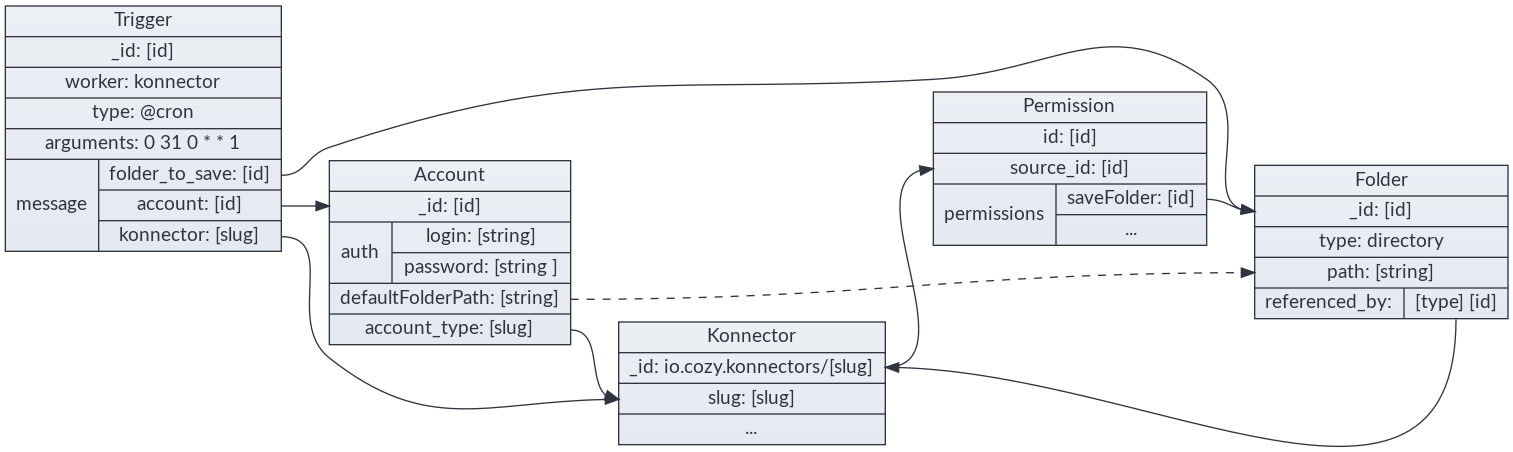
`io.cozy.accounts` contains information for an account, including those for
authentication (technically, they are encrypted by cozy-stack before being
saved in CouchDB, but we will show them as the konnectors will see them):
```json
{
"auth": {
"login": "000000000",
"password": "**********"
},
"folderPath": "/Administratif/Free Mobile",
"label": "freemobile",
"namePath": "Free Mobile"
}
```
Accounts are manipulated through the `/data/` API.
#### Decryption
The decryption of the credentials is reserved to requests coming from konnectors
and services. For services, it is only available on
`/data/io.cozy.acconts/:account-id` with an additional `include=credentials`
parameter.
#### Aggregator accounts
Some konnectors are based on an aggregator service. An aggregator is declared
in the konnector manifest and specify an `accountId` property. When Cozy-Home
detects this property, it checks if an account with this given id exists. If not,
it creates it. Every account created for a konnector based on an aggregator is
then related to this aggregator account. This relationship is called `parent`
account.
```json
{
"auth": {
"login": "000000000",
"password": "**********"
},
"folderPath": "/Administratif/Bankbank",
"label": "Bankbank",
"namePath": "Bankbank",
"relationships": {
"parent": {
"data": {
"_id": "service-aggregator-account",
"_type": "io.cozy.accounts"
}
}
}
}
```
**Note:** you can read more about the [accounts doctype
here](https://docs.cozy.io/en/cozy-doctypes/docs/io.cozy.accounts/).
### Konnectors
`io.cozy.konnectors` are installed similarly to `io.cozy.apps` (see
[doc](./konnectors.md))
### Permissions
Like client-side applications, each konnector has an associated
`io.cozy.permissions`. These permissions are those listed on the manifest of
the konnectors, and the stack will add a permission for the files on the folder
choosen by the user.
### Triggers
`io.cozy.triggers` are used to define when konnectors are launched. See
https://docs.cozy.io/en/cozy-stack/jobs/#post-jobstriggers
## Complete flow example
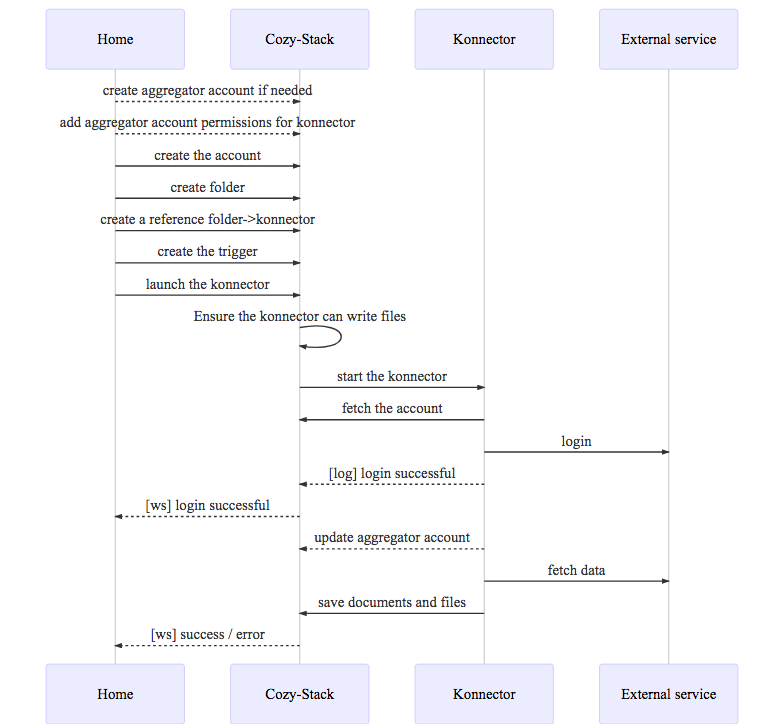
As a user, from the expenses management app, I have a clean flow to configure a
connector to retrieve my travel expenses
1 - User is in **my-expenses** and clicks on \[configure travels\]
2 - **my-expenses** triggers an intent
```javascript
cozy.intents.start("CREATE", "io.cozy.konnectors", {
category: "transport"
});
```
3 - the Store app catch the intent, fetch all available konnectors and let the
user choose
```http
GET /registry?... HTTP/1.1
```
4 - the user chooses the trainline konnector. Its manifest looks like this:
```json
{
"name": "Trainline",
"type": "konnector",
"slug": "konnector-trainline",
"description": "Konnector for trainline . com",
"source": "https://github.com/konnectors/trainlines.git@build",
"developer": {
"name": "XXX",
"url": "https://www.xxx.fr"
},
"version": "3.0.0",
"licence": "AGPL-3.0",
"fields": {
"login": {
"type": "text"
},
"password": {
"type": "password"
},
"advancedFields": {
"folderPath": {
"advanced": true,
"isRequired": false
}
}
},
"category": "transport",
"frequency": "weekly",
"permissions": {
"events": {
"description": "Connect train bill with event in your calendar",
"type": "io.cozy.events",
"verbs": ["PATCH"]
}
}
}
```
5 - the user clicks on install, and the install starts:
```http
POST /konnectors/trainline HTTP/1.1
```
6 - the Store then uses an intent to know which app can configure this konnector:
```javascript
cozy.intents.start("REDIRECT", "io.cozy.accounts", {
slug: "trainline"
});
```
7 - the Store redirects to the Home. The Home asks the user for account config
and create a folder to save the PDFs.
8 - the Home also add a Reference from the konnector to the folder to prevent
any accidental folder deletion:
```http
POST /files/123-selected-folder-id-123/relationships/referenced_by
```
```json
{
"data": [
{
"type": "io.cozy.konnectors",
"id": "io.cozy.konnectors/trainlines"
}
]
}
```
9 - then the Home can create the account:
```http
POST /data/io.cozy.accounts HTTP/1.1
```
```json
{
"account_type": "trainline",
"auth": {
"login": "xxxx",
"password": "yyyyy"
},
"folderPath": "/Administrative/Trainline"
}
```
```http
HTTP/1.1 200 OK
```
```json
{
"_id": "123-account-id-123",
"_rev": "1-asasasasa",
"account_type": "trainline",
"auth": {
"login": "xxxx"
},
"folderPath": "/Administrative/Trainline"
}
```
10 - the Home create the trigger:
```http
POST /jobs/io.cozy.triggers
```
```json
{
"data": {
"attributes": {
"type": "@cron",
"arguments": "0 0 0 0 1 1 ",
"worker": "konnector",
"message": {
"konnector": "trainline",
"account": "5165621628784562148955",
"folder_to_save": "877854878455"
}
}
}
}
```
11 - and, finally, the Home runs the konnector for the first time:
```http
POST /jobs/triggers/abc159753/launch HTTP/1.1
```
12 - the Home uses the [realtime](./realtime.md) to be informed if the
konnector fails to login or succeeds to import the PDFs.
If the user wants to use several account, the Home can setup several triggers
for the same konnector & various accounts.
## Konnector Worker specs
### Prepare the execution
The cozy-stack prepares the execution of the konnector by doing these steps:
- it checks that the konnector is not in maintenance in the registry (except
for manual execution)
- it ensures that the konnector has a folder where it can write its files,
and has the permission to write in this folder.
### Execute the konnector
Start the konnector through nsjail, passing as ENV variables:
- `COZY_URL`: the starting instance URL
- `COZY_CREDENTIALS`: security token to communicate with Cozy
- `COZY_FIELDS`: JSON-encoded message with the arguments from the trigger
- `COZY_PAYLOAD`: JSON-encoded payload from the HTTP request (@webhook trigger)
- `COZY_PARAMETERS`: JSON-encoded parameters from the konnector manifest
- `COZY_LANGUAGE`: the language field of the konnector (eg. "node" etc.)
- `COZY_LOCALE`: the locale of the user (eg. "en" etc.)
- `COZY_TIME_LIMIT`: how much time the konnector can run before being killed
- `COZY_JOB_ID`: id of the job
- `COZY_TRIGGER_ID`: id of the trigger that has created the job
- `COZY_JOB_MANUAL_EXECUTION`: whether the job was started manually (in Home) or automatically (via a cron trigger or event)
The konnector process can send events trough its stdout (newline separated JSON
object), the konnector worker pass these events to the realtime hub as
`io.cozy.jobs.events`.
- Only JSON formatted events are forwarded to the client-side through
realtime
- Otherwise formatted lines (such as node Error) will be kept in some system
logs.
Konnectors should NOT log the received account login values in production.
### Konnector error handling
The konnector can output json formated messages as stated before (the events)
and those events will be typed and formatted like this:
```javascript
{
type: "messagetype", // can be "debug", "info", "warning", "error", and "critical"
message: "message" // can be any string
}
```
If there is an error or critical message, the execution will be seen as a
failure by cozy-stack. It's also the case if the konnector reaches the timeout
or returns with a non-zero status code.
**Note:** debug and info level are not transmitted to syslog, except if the
instance is in debug mode. It would be too verbose to do otherwise.
The message can start with a known keyword that could have special meanings
for `cozy-stack` or for statistical analysis of konnector health.
Known keywords are listed in the [konnector tutorial](https://docs.cozy.io/en/tutorials/konnector/going-further/#error-handling)
When a connector throw an error of either `LOGIN_FAILED` or any error starting
with `USER_ACTION_NEEDED` (with the exception of
`USER_ACTION_NEEDED.CGU_FORM`), meaning that the user needs to execute an
action on provider's website (either changing its credentials or
acknowledging something on provider website), then `cozy-stack` will skip all
subsequent automatic executions to avoid querying the provider site and
blocking user account. Manual execution by the user will still be possible to
unlock the konnector/account when the user thinks it is now ready to be run
again.
### Account deleted
When an account is deleted, or a konnector is going to be uninstalled, the
konnector is executed with the `account_deleted` field to true, so it can clean
the account remotely.
## OAuth (and service secrets)
### Doctypes
`io.cozy.konnectors` gives their desiderata for an account
```json
{
"fields": {
"account": {
"doctype": "io.cozy.accounts",
"account_type": "maif",
"scope": "openid profile offline_access"
}
}
}
```
`io.cozy.accounts` contains authentication information for an account, as well
as the associated scope
```json
{
"name": "Mon Compte Maif",
"account_type": "maif",
"status": "connected",
"oauth": {
"access_token": "akosaksoakso",
"refresh_token": "okoakozkaozk",
"scope": "openid profile offline_access"
}
}
```
`io.cozy.account_types` contains the oauth configuration:
```json
{
"_id": "service.example",
"grant_mode": "authorization_code",
"client_id": "the registered client id",
"client_secret": "client_secret is necessary for server-flow",
"auth_endpoint": "https://service.example/auth",
"token_endpoint": "https://api.service.example/token"
}
```
`io.cozy.account_types` are not accessible to the applications: they are
injected directly in CouchDB in a global database
`secrets/io-cozy-account_types`.
### Secrets that are not OAuth
The `io.cozy.account_types` doctype can also be used for storing secrets that
are not related to OAuth. The document still need to be injected manually in
`secrets/io-cozy-account_types`:
```
{
"_id": "service.example",
"grant_mode": "secret",
"slug": "service",
"secret": "th1$_1$_th3_s3cr3t!"
}
```
**Note**: `grant_mode` must be `secret` (or `bi_webauth+secret`, or
`bi_webview+secret`, or `authorization_code+secret`), `slug` must be the slug
of the konnector, but `secret` can be a map instead of a simple string if
several secrets are needed for this service.
The secret is given to the konnector in the `COZY_PARAMETERS` env variable.
### Overloading an account type for a given context
It is possible to use a different account type for a given context, by creating
a new document with an id prefix by the context name and `/`. For example, a
different secret can be used in the `foobar` context by injecting this document
in `secrets/io-cozy-account_types`:
```
{
"_id": "foobar/service.example",
"grant_mode": "secret",
"slug": "service",
"secret": "th1$_1$_n0t_th3_s4m3_s3cr3t!"
}
```
### Reminder OAuth flow
**Service** is the website from which konnector aims to retrieve informations.
**Stack** is the cozy stack.
OAuth is divided in 3 steps:
- Client Registration: the client application (the Stack) needs to be
registered with the Service
- Obtaining & Refreshing Authorization: all the steps from `client_id` to
`access_token`, the Stack will handle those
- Using the `access_token`: ideally, the konnector should only concern itself
with this part; it receives an `access_token` and uses it.
#### Client Registration
Before beginning the Grant process, most Services require the application to be
registered with a defined `redirect_uri`.
There are a lot of options, which we will choose from when actually
implementing konnectors using them.
### Manually
Most services requires a human developer to create the client manually and
define its redirect_uri. However each instance has its own domain, so for these
services, we will need to:
**A. Register a "proxy" client**, which is a static page performing redirections
as needed, as was done for Facebook events in v2 konnectors. We will register a
well known cozy domain, like `oauth-proxy.cozy.io` and registers it with all
providers. The use and risks associated with this domain should be made clear to
the user.
**B. Register each Stack** with a redirect_uri on the main stack domain, if we
go this way, the register_uri below moves from
`bob.cozy.rocks/accounts/service/redirect` to
`oauthcallback.cozy.rocks/accounts/service/redirect` and the domain will be
prepended to the state. This is feasible at cozy scale, but requires more
knowledge and work for self-hosters.
#### Example: Google
For example, these are the steps for creating the google `account_type` for the
stack at .mycozy.cloud:
- Go to https://console.developers.google.com
- Select or Create Project (up left near the logo)
- Enable desired APIs (TBD with usages)
- Click "Credentials"
- Create credentials > Oauth Client ID > Web application
- Set redirectURI to
https://oauthcallback.mycozy.cloud/accounts/google/redirect
- Copy and paste provided Client ID and Client Secret.
Then save the data in the console
```
http PUT localhost:5984/secrets%2Fio-cozy-account_types/google
grant_mode=authorization_code
redirect_uri="https://oauthcallback.mycozy.cloud/accounts/google/redirect"
token_mode=basic
token_endpoint="https://www.googleapis.com/oauth2/v4/token"
auth_endpoint="https://accounts.google.com/o/oauth2/v2/auth"
client_id=$CLIENT_ID
client_secret=$CLIENT_SECRET
```
#### Dynamic Registration Protocol
A few services allows client to register programatically through the Dynamic
Client Registration Protocol [RFC7591](https://tools.ietf.org/html/rfc7591), we
should allow the Stack to register using this protocol when we first need to
implement a Konnector connecting to such a Service.
#### No redirect_url enforcement
A few services allows to specify arbitrary redirect_url without registering
beforehand as a client.
### Authorization Grant flows
#### webserver flow (Authorization Code Grant)
A. In the cozy app (Home) give a link
```html
```
**Notes:**
- the scope may depends on other fields being configured (checkboxes),
this will be described in json in the konnectors manifest. The format will be
determined upon implementation;
- to limit bandwidth and risk of state corruption, the cozy app should
save its state under a random key into localStorage, the key is then passed as
the state in this query;
- a third parameter, `slug`, can be added to redirect to this app instead of
the home.
B. Service lets the user login, allows or denies the scope, then redirects to
```http
https://oauthcallback.cozy.rocks/accounts/service-name/redirect?
code=AUTH_CODE_HERE&
state=1234zyx
```
C. The Stack does Server side this request:
```http
POST /oauth/access_token HTTP/1.1
Host: api.service.example
Content-Type: application/x-www-form-urlencoded
grant_type=authorization_code&
code=AUTH_CODE_HERE&
redirect_uri=https://oauthcallback.cozy.rocks/accounts/service-name/redirect&
client_id=CLIENT_ID&
client_secret=CLIENT_SECRET
```
Note: the stack will also send the `state` parameter on this request. It is not
mandatory per the OAuth 2.0 spec, and the `skip_state_on_token` option can be
used to cancel this behavior if the provider throw an error if this parameter
is present.
D. The Service responds (server side) with:
```json
{
"access_token": "ACCESS_TOKEN",
"token_type": "bearer",
"expires_in": 2592000,
"refresh_token": "REFRESH_TOKEN",
"scope": "read",
"uid": 100101,
"info": {
"name": "Claude Douillet",
"email": "claude.douillet@example.com"
}
}
```
This whole object is saved as-is into a `io.cozy.accounts` 's `extras` field.
The known fields `access_token`, `refresh_token` & `scope` will be **also**
saved on the account's `oauth` itself
E. The Stack redirect the user to the cozy app:
```http
HTTP/1.1 302 Found
Location: https://bob-home.cozy.rocks/?state=1234zyx&account=accountID
```
The Cozy app checks that the state is expected, and restores its state to the
form but whith account completed.
#### SPA flow (Implicit grant)
A. The cozy app gives a link:
```html
```
See server-flow for state rules.
B. Service lets the user login, allows or denies the scope, then redirects to
```http
https://bob-home.cozy.rocks/?access_token=ACCESS_TOKEN&state=1234zyx
```
C. The Cozy app adds the token to the `io.cozy.accounts` and save it before
starting konnector.
### Accessing data
Once we have an account, the Cozy app starts the konnector with the proper
account id. The konnector can then fetch the account and use its `access_token`
to performs a request to fetch data:
```http
POST /resource HTTP/1.1
Host: api.service.example
Authorization: Bearer ACCESS_TOKEN
```
### Refreshing token
When using the server-flow, we also get a refresh_token. It is used to get a new
access_token when it expires. However, if konnectors are responsible for
refreshing token there is a race condition risk:
```
(konnector A) GET https://api.service.com/resource TOKEN1 -> expired
(konnector B) GET https://api.service.com/resource TOKEN1 -> expired
(konnector A) POST https://api.service.com/token REFRESH_TOKEN -> TOKEN2a
(konnector B) POST https://api.service.com/token REFRESH_TOKEN -> TOKEN2b
(konnector A) GET https://api.service.com/token TOKEN2a -> invalid
```
To avoid this, the stack will be responsible to perform token refresh. A
konnector can requires the stack to refresh an account token with an HTTP
request.
```http
POST /accounts/:accountType/:accountID/refresh HTTP/1.1
Host: bob.cozy.rocks
```
If the OAuth provider rejects the refresh token, the stack returns a structured
JSON:API error that can be mapped to a reconnect flow:
```http
HTTP/1.1 401 Unauthorized
Content-Type: application/vnd.api+json
{
"errors": [
{
"status": "401",
"title": "Unauthorized",
"code": "oauth_refresh_invalid_token",
"detail": "OAuth refresh token is invalid or expired; reconnect account."
}
]
}
```
### Konnectors Marketplace Requirements
The following is a few points to be careful for in konnectors when we start
allowing non-cozy developped OAuth konnectors.
- With SPA flow, because of advanced security concerns (confused deputy
problem), cozy should validate the `access_token`. However, the way to do
that depends on the provider and cannot be described in json, it is
therefore the responsibility of the konnector itself.
### Account types security rules
- With server flow, an evil account type with proper `auth_endpoint` but bad
`token_endpoint` could retrieve a valid token as well as cozy client secret.
The reviewer of an `account_type` should make sure both these endpoints are
on domains belonging to the Service provider.
### Notes for MesInfos experiment
- MAIF konnector uses the webserver flow without redirect_uri validation
- Orange konnector uses the client-side proxy but hosted on their own servers
(/!\ redirect_uri vs redirect_url)
### Webauth
For some banks integration (Paypal, Orange Bank, Revolut…), Budget Insight has
a workflow similar to OAuth called
[Webauth](https://docs.budget-insight.com/reference/connections#webauth).
It is possible to use this workflow for konnectors by registering an account
type with the following parameter:
- `grant_mode`, with `bi_webauth` as the value (or `bi_webauth+secret` if there is also a secret)
- `redirect_uri`, with an URL like `https://oauthcallback.mycozy.cloud/accounts/paypal/redirect`
- `client_id`, with the client ID given by Budget Insight
- `auth_endpoint`, with `https://{domain}.biapi.pro/2.0/webauth` (with the correct `domain`)
- `reconnect_endpoint`, with `https://{domain}.biapi.pro/2.0/auth/webview/reconnect` (idem).
### BI Weview
A new integration of Budget Insight is available for all the proposed banks.
This is a workflow similar to OAuth called
[webview](https://docs.budget-insight.com/reference/webview)
It is possible to use this workflow for konnectors by registering an account
type with the following parameter:
- `grant_mode`, with `bi_webview+secret` as the value
- `redirect_uri`, with an URL like `https://oauthcallback.mycozy.cloud/accounts/paypal/redirect`
- `client_id`, with the client ID given by Budget Insight
- `auth_endpoint`, with `https://{domain}.biapi.pro/2.0/auth/webview/fr/connect` (with the correct `domain`)
- `manage_endpoint`, with `https://{domain}.biapi.pro/2.0/auth/webview/reconnect` (idem).
- `reconnect_endpoint`, with `https://{domain}.biapi.pro/2.0/auth/webview/reconnect` (idem).
#### Manage
The [manage webview](https://docs.budget-insight.com/reference/webview#manage-connections)
can be called with this route:
```http
GET /accounts/:accountType/:accountID/manage?code={code}&connection_id={id}&slug={slug}&state={state} HTTP/1.1
Host: jane.cozy.example
```
```http
HTTP/1.1 303 See Other
Location: https://domain.biapi.pro/2.0/auth/webview/manage
?client_id={client_id}
&code={code}
&connection_id={id}
&redirect_uri=https://oauthcallback.cozy.example/accounts/{accountType}/redirect
&state={stackState}
```
At the end of flow, the user will be redirected to
`https://jane-{slug}.cozy.example/?state={state}`.
#### Reconnect
The [reconnection webview](https://docs.budget-insight.com/guides/handle-scas-connection-states#use-our-reconnection-webview)
can be called with this route:
```http
GET /accounts/:accountType/:accountID/reconnect?code={code}&connection_id={id}&slug={slug}&state={state} HTTP/1.1
Host: jane.cozy.example
```
```http
HTTP/1.1 303 See Other
Location: https://domain.biapi.pro/2.0/auth/webview/reconnect
?client_id={client_id}
&code={code}
&connection_id={id}
&redirect_uri=https://oauthcallback.cozy.example/accounts/{accountType}/redirect
&state={stackState}
```
At the end of flow, the user will be redirected to
`https://jane-{slug}.cozy.example/?state={state}`.
## Webhook triggers
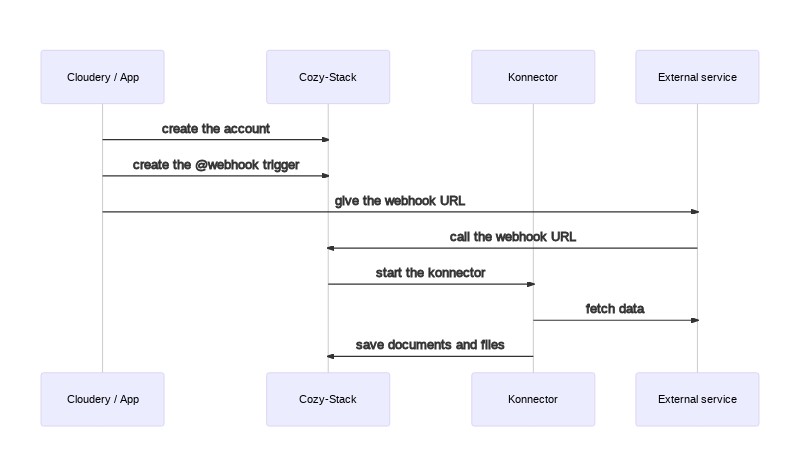
1. The cloudery (or an application) can install the konnector and create an account
2. It can also create the webhook trigger via a `POST /jobs/triggers`
Request:
```http
POST /jobs/triggers HTTP/1.1
Host: jane.cozy.example
Content-Type: application/vnd.api+json
```
```json
{
"data": {
"attributes": {
"type": "@webhook",
"worker": "konnector",
"message": {
"param_from_trigger": "foo"
}
}
}
}
```
Response:
```http
HTTP/1.1 200 OK
Content-Type: application/vnd.api+json
```
```json
{
"data": {
"type": "io.cozy.triggers",
"id": "0915b6b0-0c97-0139-5af7-543d7eb8149c",
"attributes": {
"type": "@webhook",
"worker": "konnector",
"message": {
"konnector": "mykonnector",
"param_from_trigger": "foo"
}
},
"links": {
"self": "/jobs/triggers/0915b6b0-0c97-0139-5af7-543d7eb8149c",
"webhook": "https://jane.cozy.example/jobs/webhooks/0915b6b0-0c97-0139-5af7-543d7eb8149c"
}
}
}
```
3. The cloudery can then give the webhook URL to the external service
4. When the external service has new documents to import, it can call the webhook
Request:
```http
POST /jobs/webhooks/0915b6b0-0c97-0139-5af7-543d7eb8149c HTTP/1.1
Host: jane.cozy.example
Content-Type: application/json
```
```json
{"param_from_http_body": "bar"}
```
Response:
```http
HTTP/1.1 204 No Content
```
5. The stack will put a job in its queue for the konnector
6. The stack executes the konnector with:
- `COZY_FIELDS={"param_from_trigger": "foo"}`
- `COZY_PAYLOAD={"param_from_http_body": "bar"}`
- etc.
**Note:** the environnement variables have a limit for their size defined by
the linux kernel. If the payload is too big to fit inside the env variable,
the stack will put the payload in a temporary file, and will set the
`COZY_PAYLOAD` variable to `@` + the filename of this file, like:
`COZY_PAYLOAD=@cozy_payload.json`
7. The konnector will fetch the documents from the external service and save
them in the Cozy.
Note: if the trigger has a debounce, the `COZY_PAYLOAD` will be an object with
a `payloads` array, like this:
```sh
COZY_PAYLOAD={"payloads": [{"param_from_http_body": "bar"}]}
```