# dsh-mmx
**MiniMax CLI bridge for DeepSeek Harness** — brings MiniMax CLI (`mmx`) web search and image understanding to dsh: automatic search fallback, transparent image description on send, OS-aware first-run onboarding, and automatic activation within 30 s once the CLI is ready.
> Language: [简体中文](./README.md)
## Features
1. **Web search fallback**: registers an `mmx-search` provider on `ctx.web`. Point `searchProvider` at `mmx-search` via a profile patch (or leave it unpinned and dsh auto-selects the single available provider), and the built-in `web_search` tool is transparently served by MiniMax.
2. **Transparent image understanding**: when a text-only model receives an image, the plugin runs `mmx vision describe` before the step and injects the description as a model-visible replacement — the conversation keeps showing the image while the model sees `[图片内容描述] …` text. `read_image` returns the description instead of `UNSUPPORTED_CONTENT`. Multimodal models pass through untouched unless `alwaysUseMmx: true`.
3. **First-run onboarding (OOBE)**: while mmx is missing or unauthenticated, both capabilities stay off; the settings card offers **one-click install** (paste the API key → auto `npm install -g mmx-cli` + `mmx auth login` → refresh status) plus OS-aware manual guidance (Windows PowerShell / macOS / Linux Terminal). The plugin re-probes every 30 s and enables itself automatically once the CLI is ready — no restart required.
## Screenshot
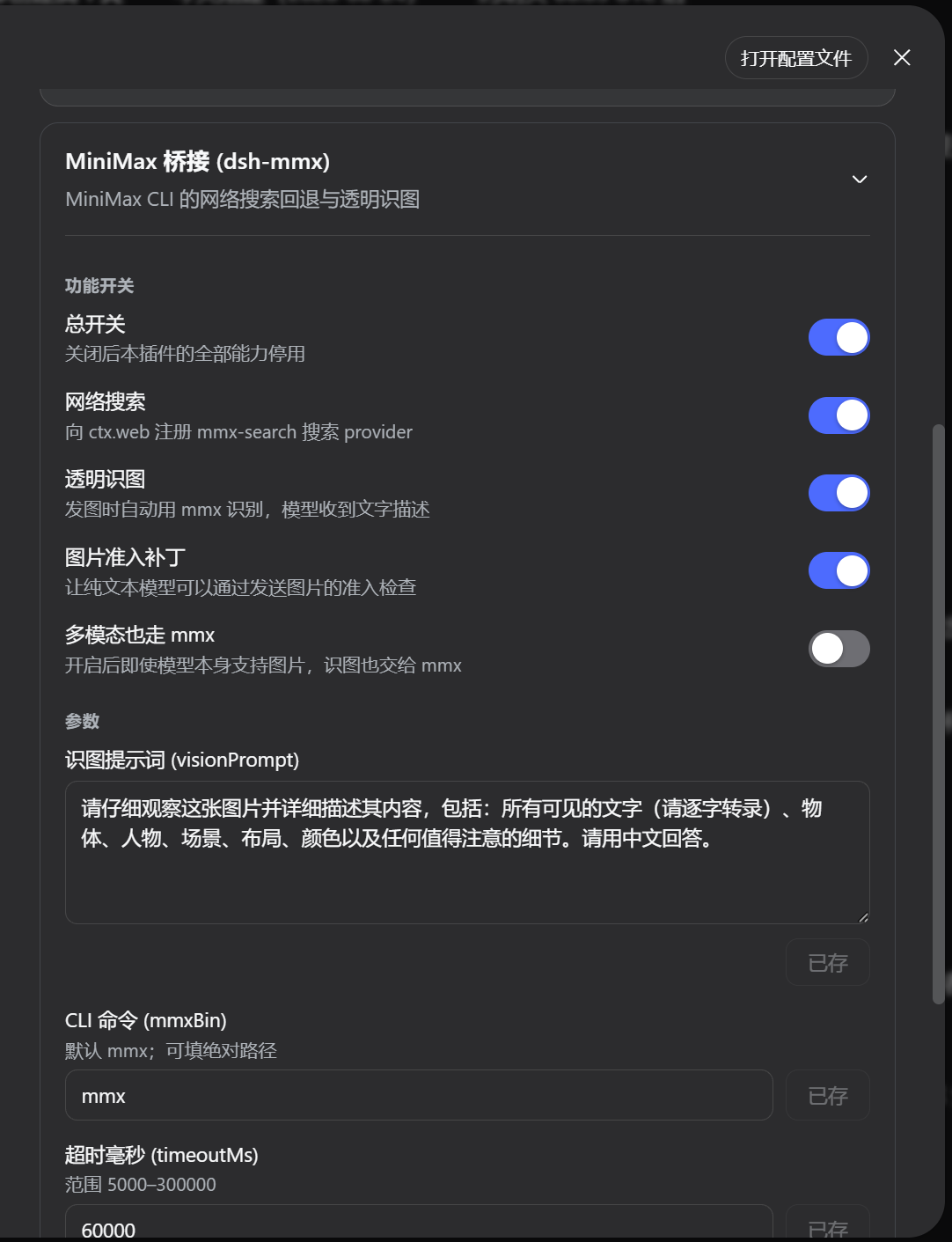
Settings → Plugins → "MiniMax 桥接 (dsh-mmx)" card:
 ## Installation
### Option 1: plugin marketplace
Search for `dsh-mmx` in the DSH Web settings marketplace and install with one click (available once the marketplace submission is approved).
### Option 2: command line
```sh
# GitHub (recommended)
dsh plugin --profile web add github:crazyma99/dsh-mmx
# npm registry
dsh plugin --profile web add dsh-mmx
# local directory
dsh plugin --profile web add file:/path/to/dsh-mmx
```
Restart dsh web afterwards.
### Prerequisites: MiniMax CLI
| OS | Shell | Commands |
|---|---|---|
| Windows | PowerShell | `npm install -g mmx-cli` → `mmx auth login --api-key ` |
| macOS | Terminal | `npm install -g mmx-cli` → `mmx auth login --api-key ` |
| Linux | Terminal | `npm install -g mmx-cli` → `mmx auth login --api-key ` |
> Requires Node.js ≥ 20. Verify with `mmx quota` (shows your TokenPlan balance).
> This plugin never reads, prints, or stores your API key — it only checks that `~/.mmx/config.json` contains one.
### Search provider pinning (important)
dsh's base bundle pins the search provider to `deepseek-official` by default. If DeepSeek search has no valid key, override it in the profile's `cordis.patch.yml`:
```yaml
- id: web
config:
searchProvider: mmx-search
```
> Switch back to `deepseek-official` once a valid DeepSeek search key exists. When no provider is pinned, dsh auto-selects the single `available()` provider.
## Configuration
Precedence: `dsh-mmx` settings namespace > `cordis.patch.yml` config row > defaults.
| Key | Default | Description |
|---|---|---|
| `enabled` | `true` | Master switch |
| `searchEnabled` | `true` | Register the mmx search provider |
| `visionEnabled` | `true` | Transparent image understanding |
| `patchAdmission` | `true` | Wrap `resolveModelInfo` to admit images (only while mmx is ready) |
| `alwaysUseMmx` | `false` | `true` = route images through mmx even for multimodal models |
| `visionPrompt` | detailed Chinese template | Prompt used for image description |
| `mmxBin` | `mmx` | CLI command name or absolute path |
| `npmBin` | `npm` | npm command used by the one-click installer |
| `timeoutMs` | `60000` | Per-call CLI timeout (5000–300000 ms) |
### Configuration surfaces
1. **Settings card**: Settings → Plugins → "MiniMax 桥接 (dsh-mmx)". Boolean switches save immediately; text/number fields save on button press. The card includes an OS-tabbed CLI install guide at the bottom.
- Requires adding `'dsh-mmx'` to dsh's `WEB_SETTINGS_NAMESPACES` allowlist (`packages/host/apiproxy/src/api-proxy.ts`, one line; re-apply after dsh upgrades).
2. **`~/.dsh/settings.yaml`** (hot-reloaded, no restart):
```yaml
dsh-mmx:
enabled: true
searchEnabled: true
visionEnabled: true
patchAdmission: true
alwaysUseMmx: false
mmxBin: mmx
timeoutMs: 60000
```
3. **Profile `cordis.patch.yml` config row** (requires restart).
## Search fallback semantics
- Unpinned provider and no valid DeepSeek search key → `mmx-search` is used automatically;
- Pinned to `mmx-search` → MiniMax always serves search (recommended);
- Both available and unpinned → dsh raises `WEB_PROVIDER_AMBIGUOUS`; pin one explicitly.
## Compatibility
- Target: DeepSeek Harness Web profile (0.1.0-rc.x).
- Zero runtime dependencies on the host side; the client bundle depends only on React (provided by the dsh client runtime).
## Privacy & security
- Images are uploaded to the MiniMax API (base64) for description; search queries are sent to the MiniMax search endpoint;
- All subprocess calls use argument-array `spawn` (no shell), with timeout and cancellation propagation;
- The API key is never read, printed, or logged; the `POST /dsh-mmx/install` endpoint enforces same-origin, a 4 KiB request-body cap, and a serialized mutation lock, forwards the key to `mmx auth login` exactly once, and never echoes it; temporary image files use mode `0600` and are deleted after use;
- Captured stdout/stderr is capped at 4 MiB to bound memory.
## Uninstall
```sh
dsh plugin --profile web remove dsh-mmx
```
Restart dsh web afterwards; remove the `dsh-mmx:` section from `settings.yaml` manually if desired.
## License
[MIT](./LICENSE)
## Installation
### Option 1: plugin marketplace
Search for `dsh-mmx` in the DSH Web settings marketplace and install with one click (available once the marketplace submission is approved).
### Option 2: command line
```sh
# GitHub (recommended)
dsh plugin --profile web add github:crazyma99/dsh-mmx
# npm registry
dsh plugin --profile web add dsh-mmx
# local directory
dsh plugin --profile web add file:/path/to/dsh-mmx
```
Restart dsh web afterwards.
### Prerequisites: MiniMax CLI
| OS | Shell | Commands |
|---|---|---|
| Windows | PowerShell | `npm install -g mmx-cli` → `mmx auth login --api-key ` |
| macOS | Terminal | `npm install -g mmx-cli` → `mmx auth login --api-key ` |
| Linux | Terminal | `npm install -g mmx-cli` → `mmx auth login --api-key ` |
> Requires Node.js ≥ 20. Verify with `mmx quota` (shows your TokenPlan balance).
> This plugin never reads, prints, or stores your API key — it only checks that `~/.mmx/config.json` contains one.
### Search provider pinning (important)
dsh's base bundle pins the search provider to `deepseek-official` by default. If DeepSeek search has no valid key, override it in the profile's `cordis.patch.yml`:
```yaml
- id: web
config:
searchProvider: mmx-search
```
> Switch back to `deepseek-official` once a valid DeepSeek search key exists. When no provider is pinned, dsh auto-selects the single `available()` provider.
## Configuration
Precedence: `dsh-mmx` settings namespace > `cordis.patch.yml` config row > defaults.
| Key | Default | Description |
|---|---|---|
| `enabled` | `true` | Master switch |
| `searchEnabled` | `true` | Register the mmx search provider |
| `visionEnabled` | `true` | Transparent image understanding |
| `patchAdmission` | `true` | Wrap `resolveModelInfo` to admit images (only while mmx is ready) |
| `alwaysUseMmx` | `false` | `true` = route images through mmx even for multimodal models |
| `visionPrompt` | detailed Chinese template | Prompt used for image description |
| `mmxBin` | `mmx` | CLI command name or absolute path |
| `npmBin` | `npm` | npm command used by the one-click installer |
| `timeoutMs` | `60000` | Per-call CLI timeout (5000–300000 ms) |
### Configuration surfaces
1. **Settings card**: Settings → Plugins → "MiniMax 桥接 (dsh-mmx)". Boolean switches save immediately; text/number fields save on button press. The card includes an OS-tabbed CLI install guide at the bottom.
- Requires adding `'dsh-mmx'` to dsh's `WEB_SETTINGS_NAMESPACES` allowlist (`packages/host/apiproxy/src/api-proxy.ts`, one line; re-apply after dsh upgrades).
2. **`~/.dsh/settings.yaml`** (hot-reloaded, no restart):
```yaml
dsh-mmx:
enabled: true
searchEnabled: true
visionEnabled: true
patchAdmission: true
alwaysUseMmx: false
mmxBin: mmx
timeoutMs: 60000
```
3. **Profile `cordis.patch.yml` config row** (requires restart).
## Search fallback semantics
- Unpinned provider and no valid DeepSeek search key → `mmx-search` is used automatically;
- Pinned to `mmx-search` → MiniMax always serves search (recommended);
- Both available and unpinned → dsh raises `WEB_PROVIDER_AMBIGUOUS`; pin one explicitly.
## Compatibility
- Target: DeepSeek Harness Web profile (0.1.0-rc.x).
- Zero runtime dependencies on the host side; the client bundle depends only on React (provided by the dsh client runtime).
## Privacy & security
- Images are uploaded to the MiniMax API (base64) for description; search queries are sent to the MiniMax search endpoint;
- All subprocess calls use argument-array `spawn` (no shell), with timeout and cancellation propagation;
- The API key is never read, printed, or logged; the `POST /dsh-mmx/install` endpoint enforces same-origin, a 4 KiB request-body cap, and a serialized mutation lock, forwards the key to `mmx auth login` exactly once, and never echoes it; temporary image files use mode `0600` and are deleted after use;
- Captured stdout/stderr is capped at 4 MiB to bound memory.
## Uninstall
```sh
dsh plugin --profile web remove dsh-mmx
```
Restart dsh web afterwards; remove the `dsh-mmx:` section from `settings.yaml` manually if desired.
## License
[MIT](./LICENSE)