Explore the building → · Architectural references · Verification report
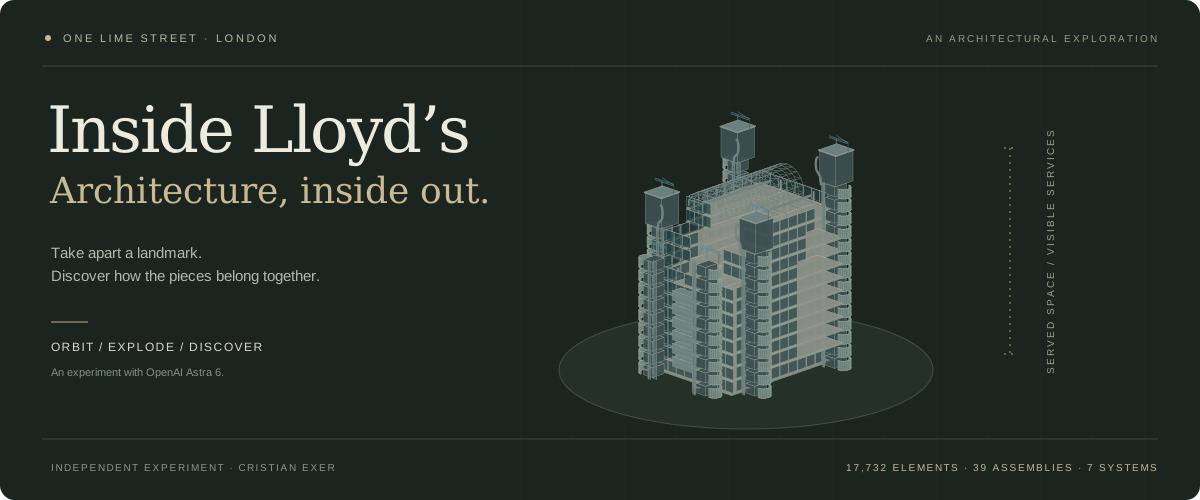
# Inside Lloyd’s **Take apart a landmark. Discover how the pieces belong together.** An interactive architectural explorer of Lloyd’s of London at One Lime Street: orbit the building, separate its external services, reveal the atrium, and inspect the parts that make its inside-out architecture so distinctive. ## Why I made this I started this as an experiment with **OpenAI Astra 6**. I was trying the capabilities of the latest frontier model available to me in Codex and wanted to see how far I could take a detailed, interactive 3D experience. Since I work at **Beazley**, a major participant in the Lloyd’s of London insurance market, this building felt like a fun subject to explore. The idea was simple: could a collection of architectural references become a tool that lets you take the building apart and understand how it works? This is the result: a personal exploration of architecture, code and AI-assisted creation. It is independent of Beazley and Lloyd’s. For context on Beazley’s participation in the market, see [Beazley’s trading overview](https://investor.relations.beazley.com/en-us/broker-centre/trading-with-beazley/). ## What you can discover | View | What happens | | ----------------------- | ------------------------------------------------------------------------------------------------------------------------------------------------------------------------ | | **Exterior → Exploded** | The vault lifts in sections, façades pull away, stairs and services separate, and galleries spread. Optional connection guides link pieces to their assembled positions. | | **Cutaway** | A movable section reveals the atrium and trading floors, with warm section faces on closed solid geometry. | | **Floors** | Choose a level and hide the floors above, or retain them as a faint ghost for context. | | **Building anatomy** | Search 17,732 addressable elements; inspect, frame, isolate, hide or explore a related system. | | **Guided tour** | Six short stops introduce the architectural ideas and return the model to its assembled form. | | **Inside the market** | A fictional placement journey explains the relationship between clients, brokers and underwriters. | The model includes six service-tower groups, D-shaped stair casings, porthole service pods, meeting-room pods, exposed risers, plant rooms, maintenance cranes, the vaulted atrium, galleries, escalators, underwriting boxes, the Rostrum and Bell, and an interpreted street-level setting with entrances and air intakes. **Entirely in the browser.** React · TypeScript · Vite · Three.js · React Three Fiber · Drei · Zustand. No backend, login, runtime AI, API key or remote media service is required. Astra was used during creation; the deployed app does not call a model. ## Run locally Node.js **22.16 or later** recommended. Package versions are pinned and the npm lockfile is included. ```sh npm ci npm run dev ``` Open the local address printed by Vite, normally `http://localhost:5173`. ```sh npm test # Core state, model and explosion invariants npm run build # Regenerates metadata, checks TypeScript, produces dist/ npm run preview # Serve the production build ``` ## Explore - Orbit with a drag; pan with right-drag or two fingers; zoom with the wheel or a pinch. - Use **Exterior** to scrub the assembled/exploded model. Roof sections lift, façades move away, service assemblies separate and galleries spread. The camera expands its framing with the diagram. - **Cutaway** moves a vertical section through the building. **Floors** hides or ghosts levels above the chosen gallery. Both reassemble first and make explosion unavailable explicitly. - Search **Building anatomy**, expand a system and assembly, or click/tap a rendered part. The information panel provides geometry status, purpose and source links. - **Frame**, **Isolate**, **Hide**, **Related system** and **Restore all** work with component, assembly or system IDs. **Reset view** restores the model and camera together. - The six-stop guided tour is skippable. Camera presets include exterior elevations, the roof, atrium and Underwriting Room. - **Inside the market** offers a fictional placement journey and a separate explanation of organisational relationships. Select the on-scene hotspots or the equivalent panel controls. - Focus the canvas to use arrow-key orbit, `+` / `−` zoom and `Home` reset. `/` focuses search. All essential component actions are also available in the text catalogue. - Reduced motion follows the system preference and can be toggled. The text catalogue remains usable when WebGL is unavailable or its context is lost. ## Model and provenance The model is generated locally by [`src/model/building.ts`](src/model/building.ts). It contains **17,732 individually addressable elements**, **39 assemblies** and **seven systems**, rendered in instanced batches. Counts describe selectable model details, not a count of real building parts. ```sh npm run model:manifest ``` This reproduces the complete logical **Building → System → Assembly → Component** tree in `public/data/components.json` and source records in `public/data/sources.json`. Building generation also runs directly in the app; no GLB download is needed. Rendering batches do not erase the logical hierarchy or instance IDs. - [`public/asset-manifest.json`](public/asset-manifest.json): assets, attribution, licence information and rejected asset-search candidate. - [`docs/RESEARCH.md`](docs/RESEARCH.md): primary sources and modelling decisions. - [`docs/INTERACTIONS.md`](docs/INTERACTIONS.md): state, visibility, animation and rendering contracts. - [`docs/TESTING.md`](docs/TESTING.md): checks, measured performance and limitations. The exterior, footprint, orientation, service routes and dimensions are **approximate reference-based reconstructions**. Interior furniture, stair/escalator details and the Rostrum/Bell are illustrative. The model does not reproduce current box allocations or serve as a surveyed digital twin. No supplied reference photographs are redistributed. Lloyd’s is represented as an insurance marketplace, not a bank or a single insurer. ## Browser verification The repository includes reproducible Playwright checks. Start the dev server or production preview in another terminal first. The Chrome check uses the installed Google Chrome application; install Chrome if absent. ```sh npm run test:browser npx playwright install webkit node scripts/webkit-check.mjs ``` Set `TEST_URL` to test another local/deployed address. Screenshots and JSON results go to ignored `output/playwright/`. Core tests do not require a browser. A production check can use `TEST_URL=http://localhost:4173 npm run test:browser` after `npm run preview`. ## Publish with GitHub Pages The live explorer is hosted at **[lloyds.cristianexer.dev](https://lloyds.cristianexer.dev/)**. Every push to `main` runs [the Pages workflow](.github/workflows/pages.yml): install the lockfile, run the core tests, read the configured Pages address and build for its path, upload `dist/`, and deploy to the `github-pages` environment. The workflow can also be run manually from Actions. For a fork, enable **Settings → Pages → Source → GitHub Actions**. The workflow reads the Pages configuration before building: a custom domain uses `/`; a project hosted on `github.io` uses its repository subpath. No hardcoded repository path needs changing. Vite’s [static deployment guide](https://vite.dev/guide/static-deploy#github-pages) explains the base-path distinction. To reproduce the current custom-domain build locally, use `npm run build`. To check a repository-subpath deployment instead: ```sh VITE_BASE_PATH=/Lloyds-of-London-3D-building/ npm run build VITE_BASE_PATH=/Lloyds-of-London-3D-building/ npm run preview # Open http://localhost:4173/Lloyds-of-London-3D-building/ ``` ## Deploy to Vercel Import this repository into Vercel and use the **Vite** preset. `vercel.json` supplies the build command (`npm run build`) and output directory (`dist`). No environment variables or server functions are needed. Alternatively, upload `dist/` to any static web host. All runtime assets are local build outputs. The same app can be built for a root-domain host without the Pages environment variable. ## Source layout ```text src/model/ Pure procedural geometry, hierarchy, types and explosion maths src/data/ Structured public sources src/store.ts Central interaction state and visibility rules src/components/ Instanced scene, camera, panels, tour and market lesson scripts/ Metadata exporter and repeatable browser checks tests/ Core interaction and model invariants public/ Favicon, asset manifest and generated catalogue ``` `npm run format` formats source and documentation. There are no photographic textures to fetch, no CDN font requests, and no unlicensed imported building meshes. ## The animated banner The README illustration is an original SVG generated from the model itself, with a small CSS animation that separates and reassembles its components. It has no external assets or scripts and honours reduced-motion preferences. ```sh node --import tsx scripts/generate-banner.ts ``` The banner is a compact interpretation; the live explorer contains the full geometry. Reference photographs remain outside the repository. ## License [MIT](LICENSE) © 2026 Cristian Exer. Applies to this project’s original code and assets; third-party materials retain their respective rights and licenses.