Pipelight - Tiny automation pipelines.

Pipelight - Tiny automation pipelines.
Automate your most boring and repetitive tasks. ## 📦 A lightweight tool for CICD Pipelight is a [Rust](https://www.rust-lang.org/) based small(13Mb) cli tool to be used from inside a terminal. - Define pipelines using **toml, hcl, yaml, typescript**. - Trigger on events: git hooks, file changes... Checkout the [Documentation](https://pipelight.dev) for a much friendlier approach and a deeper understanding. ## Usage example  ## Define pipelines with a configuration language Fold your bash commands into an object `Pipeline{ Step{ Command }}`. Use your preferred configuration languages for your most simple pipelines. - Toml ```toml [[pipelines]] name = "test" [[pipelines.steps]] name = "build" commands = ["pnpm install", "pnpm build"] [[pipelines.triggers]] branches = ["master","dev"] actions= ["pre-push", "pre-commit"] ``` - Hcl ```hcl # A pipeline pipelines = [{ name = "test" steps = [{ name = "build" commands = ["pnpm install", "pnpm build"] }] triggers = [{ branches = ["master","dev"] actions = ["pre-push", "pre-commit"] }] }] ``` - Yaml ```yml pipelines: - name: test steps: - name: build commands: - pnpm install - pnpm build - triggers: - branches: - master - dev actions: - pre-push - pre-commit ``` ## Define pipelines with a programming language. Fold your bash commands into an object `Pipeline{ Step{ Command }}`. As long as you know javascript, you are ready to go with your favorite syntax flavor. - Javascript. Use a verbose and declarative syntax. ```js const my_pipeline = { name: "build_my_website", steps: [ { name: "clean directory", commands: ["rm -rf ./dist"], }, { name: "build", commands: ["pnpm install", "pnpm lint", "pnpm build"], }, ], }; ``` - Typescript(with Helpers). Use the provided sweet shorthands. ```ts const my_pipeline = pipeline("build website", () => [ step("clean directory", () => [`rm -rf ${build_dir}`]), step("build", () => ["pnpm install", "pnpm lint", "pnpm build"]), step("send to host", () => [`scp -r ${build_dir}`]), step("do stuffs on host", () => [ ssh("host", () => ["systemctl restart nginx"]), ]), ]); ``` ## 🤖 Automatic triggers Add automatic triggers to your pipeline. _If you want to run tests on file change or deploy to production on push to master._ ```sh # enable watcher and git hooks. pipelight enable git-hooks pipelight enable watcher ``` ```toml [[pipelines.triggers]] branches = ["master"] actions = ["pre-push"] ``` ## 🫦 Pretty and verbose logs Get the pipeline most relevant informations or dive into the steps and commands standard outputs. Get the pipeline status, event, execution time... and more. ```sh pipelight logs ```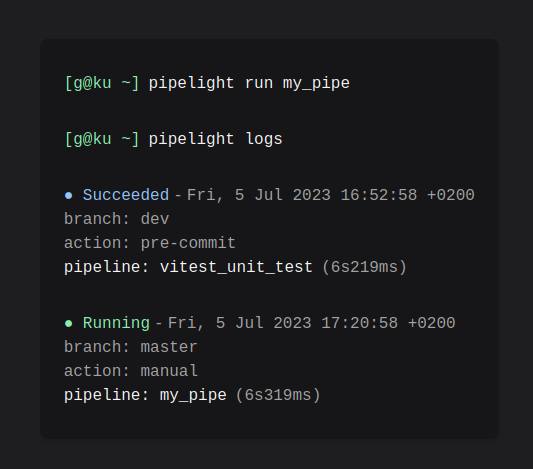 Get a tranparent outputs of every subprocesses.
```sh
pipelight logs -vvvv
```
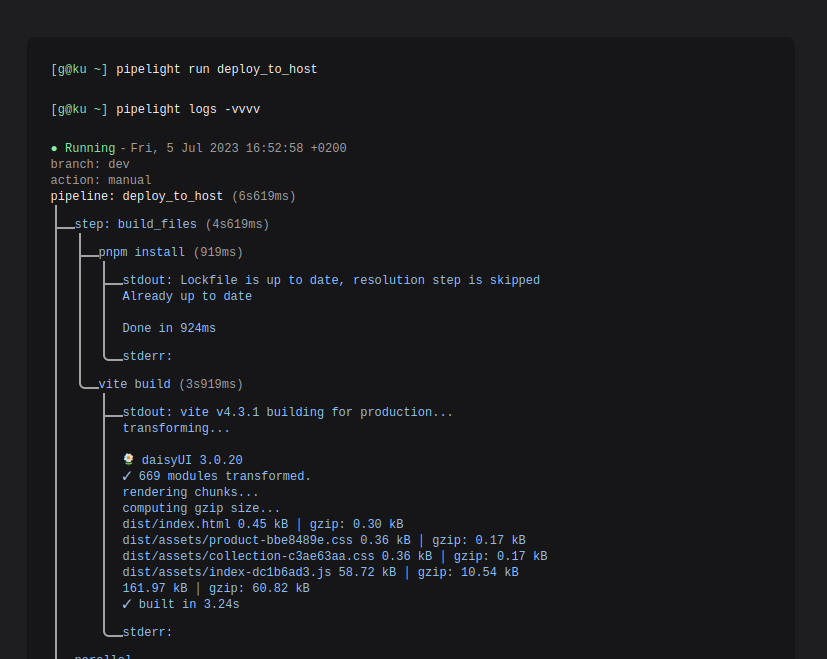
Get a tranparent outputs of every subprocesses.
```sh
pipelight logs -vvvv
```
 ## 🛠️ Install
Checkout the
[instruction guide](https://pipelight.dev/introduction/install.html) for your
favorite package manager.
## 🚀 Get started!
Create a default configuration file `pipelight.ts` in your project root
directory with:
```sh
pipelight init
```
Try the harmless default pipeline:
```sh
pipelight run
```
And explore logs:
```sh
pipelight logs -vvvv
```
## Community
Reach the community whenever you need support or software improvements. On
[discord](https://discord.gg/swNRD3Xysz) or on telegram at
[@Areskul](https://t.me/areskul) or send a mail at areskul@areskul.com.
Licensed under GNU GPLv2 Copyright (C) 2023 Areskul
## 🛠️ Install
Checkout the
[instruction guide](https://pipelight.dev/introduction/install.html) for your
favorite package manager.
## 🚀 Get started!
Create a default configuration file `pipelight.ts` in your project root
directory with:
```sh
pipelight init
```
Try the harmless default pipeline:
```sh
pipelight run
```
And explore logs:
```sh
pipelight logs -vvvv
```
## Community
Reach the community whenever you need support or software improvements. On
[discord](https://discord.gg/swNRD3Xysz) or on telegram at
[@Areskul](https://t.me/areskul) or send a mail at areskul@areskul.com.
Licensed under GNU GPLv2 Copyright (C) 2023 Areskul