[](https://github.com/cropflre/nowen-note/releases)
[](https://hub.docker.com/r/cropflre/nowen-note)
[](./LICENSE)
[](https://nodejs.org/)
[](./docker-compose.yml)
> Nowen Note is more than an editor. It is designed as user-controlled knowledge infrastructure that can run long-term on a NAS or server and remain accessible from the web, desktop, and mobile clients.
## Connect AI clients to Nowen Note
Nowen Note still includes a supported MCP Server. Claude Code, Cursor, VS Code, and other compatible AI clients can search, read, create, and update notes within the permissions granted by your account and token.
- [MCP Server installation guide](./docs/tutorials/mcp.en.md)
- [中文安装教程](./docs/tutorials/mcp.md)
- [Standalone nowen-mcp package README](./packages/nowen-mcp/README.md)
The currently supported distribution is a source build: install Node.js 20+, build `packages/nowen-mcp`, create a restricted Personal API Token in Nowen Note, and configure the absolute path to `dist/scoped-entry.js` in your client. The guide covers Windows, macOS, Linux/WSL, NAS addresses, Claude Code, Cursor, VS Code, verification, updates, and troubleshooting.
## Why Nowen Note
| | |
| --- | --- |
| **You own the data** | Self-host with Docker or a NAS. Databases, attachments, and backups stay under your control. Attachments can use S3, Cloudflare R2, or MinIO, while backups can be sent through email or WebDAV. |
| **One tree for every document** | Mix folders, rich-text notes, and Markdown notes in one hierarchy. Create documents at the root, drag and sort nodes, import files, expand or collapse the tree, inherit permissions, protect folders with passwords, and publish shared content. |
| **Switch editing formats per note** | Convert notes between rich text and Markdown while preserving major structure, code blocks, and links. Use either format for quick notes, technical documentation, or long-form writing. |
| **Built for individuals and teams** | Tags, tasks, AI, workspaces, notebook permissions, real-time collaboration, public sharing, and guest comments live in one system. |
## Core capabilities
| Module | Current capabilities |
| --- | --- |
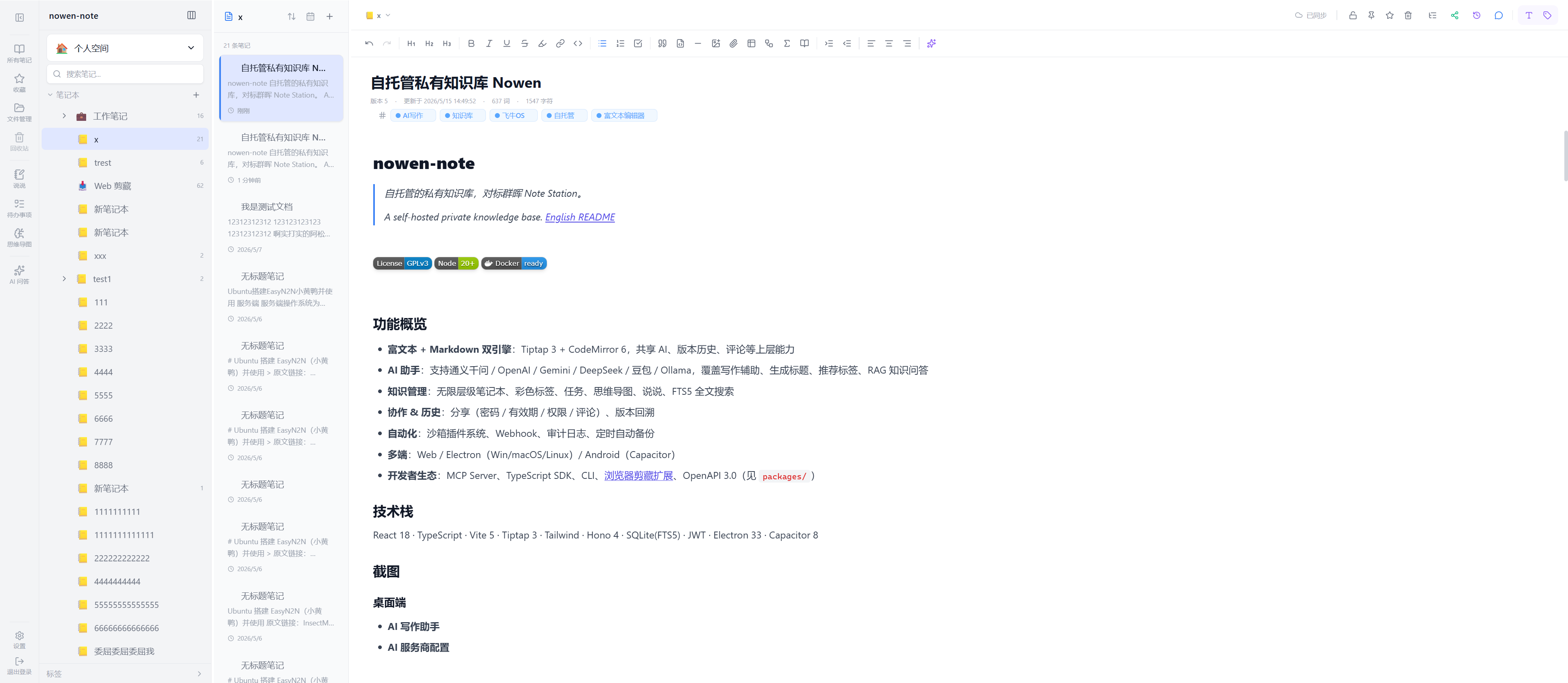
| **Unified knowledge tree** | Mixed folders, rich-text notes, and Markdown notes; root-level documents, unlimited nesting, drag sorting, a unified create menu, expand/collapse all, Markdown drag-and-drop or file import, filtering, search, note counts, trash, and shared tree views. |
| **Folder security and access control** | Set, change, and unlock folder passwords. The server issues short-lived JWT unlock tokens and reuses them during protected notebook import and export operations. |
| **Rich text and Markdown** | Tiptap 3, CodeMirror 6, per-note format conversion, live preview, split view, resizable outline, format painter, slash commands, tables, code blocks, KaTeX, Mermaid, footnotes, Callouts, media embeds, comments, and version history. |
| **Long documents and editor stability** | Complexity detection, Worker analysis, viewport rendering, windowed editing, and incremental saves. The outline can load and navigate to unloaded sections, while hidden Markdown block markers and cursor updates include recovery logic. |
| **Image editing** | Crop images and add text, freehand drawing, arrows, shapes, and mosaic effects. Existing remote images can be migrated into local attachments or object storage. |
| **Knowledge organization and search** | Colored tags, favorites, pinning, full-text search, in-document find and replace, backlinks, block references, reverse links, and a knowledge graph. |
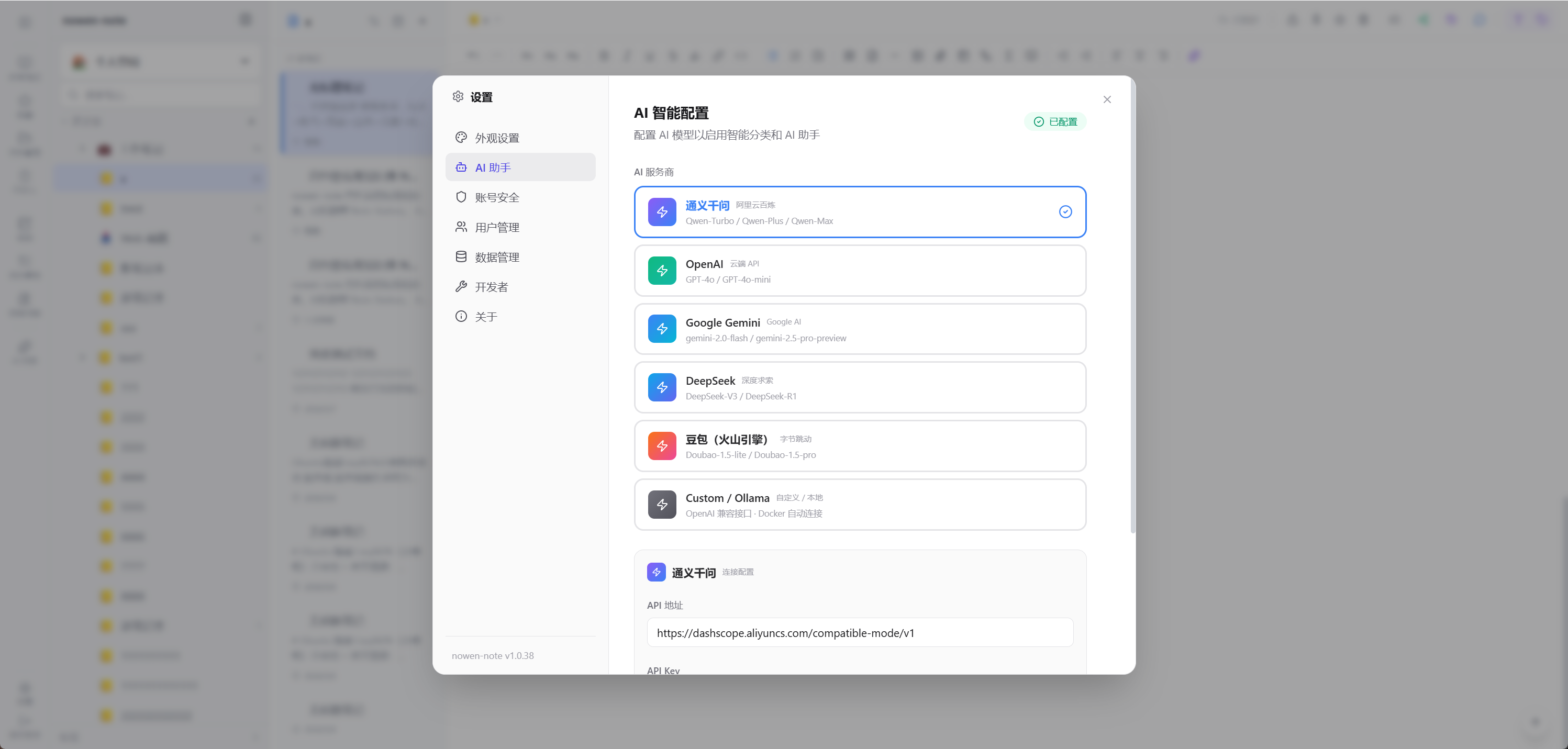
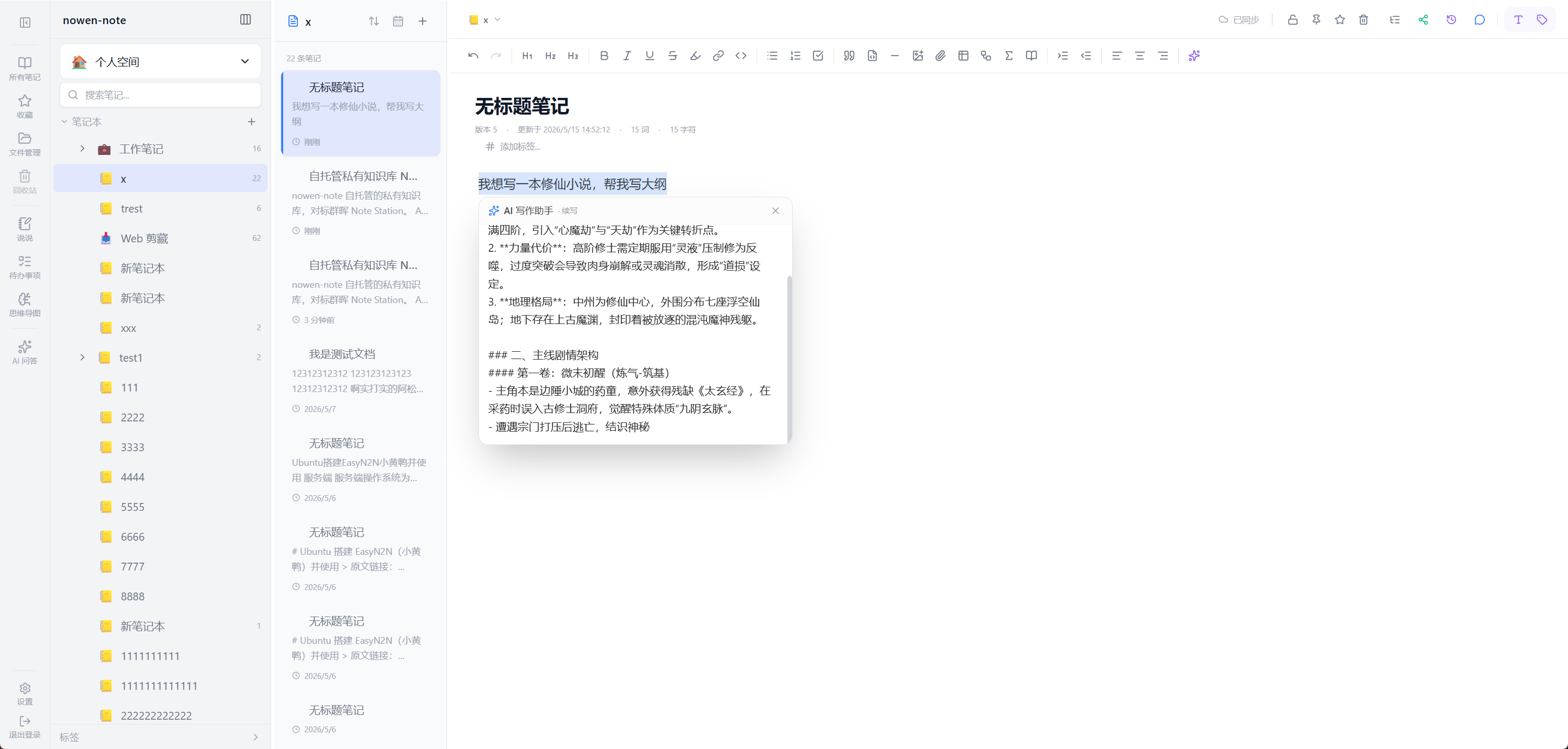
| **AI** | OpenAI-compatible APIs, Qwen, Gemini, DeepSeek, Doubao, and Ollama. Features include continuation, rewriting, translation, title and tag generation, summaries, embeddings, and RAG knowledge Q&A. |
| **Tasks and visualization** | Hierarchical tasks, lists, Kanban, calendar, Gantt/timeline, dependencies, recurrence, reminders, templates, AI task breakdown, short-post timeline, and mind maps. |
| **Collaboration, permissions, and sharing** | Yjs + WebSocket collaboration, workspaces and roles, notebook access management, directory ACLs, ownership transfer, centralized share management, passwords and expiration, guest comments, and public knowledge spaces. Anonymous guests can enter a nickname before commenting, and that identity is displayed correctly. |
| **Sync and edit protection** | Incremental sync and version checks. Conflicts can be resolved silently with a latest-write strategy while pending edits and local snapshots are preserved. |
| **Import, export, and migration** | Import Markdown, Word/DOCX, web URLs, WeChat articles, SingleFile HTML, SiYuan ZIP archives, and Callouts. Export Markdown, PDF, Word, images, or full ZIP packages with permission mapping, conflict preview, reports, and controlled rollback. Exported notes include `contentFormat` so re-import can restore the original editor format. |
| **Attachments and storage** | Local attachments organized under `YYYY/MM`; reuse existing files from the attachment library and insert portable relative links; thumbnails, note ownership, reference checks, orphan rescans and cleanup; local disk or S3/R2/MinIO storage. |
| **Accounts and security** | Multiple-account history, remembered accounts, auto-login, remote server connections, session validation and revocation, 2FA, scoped Personal API Tokens, audit logs, and protected attachment access. |
| **Backups, automation, and developer APIs** | Local backups, full ZIP backups, email backup, encrypted WebDAV backup credentials, managed Docker updates and rollback checks, webhooks, plugins, OpenAPI, TypeScript SDK, CLI, [MCP Server](./docs/tutorials/mcp.en.md), and a browser clipper. |
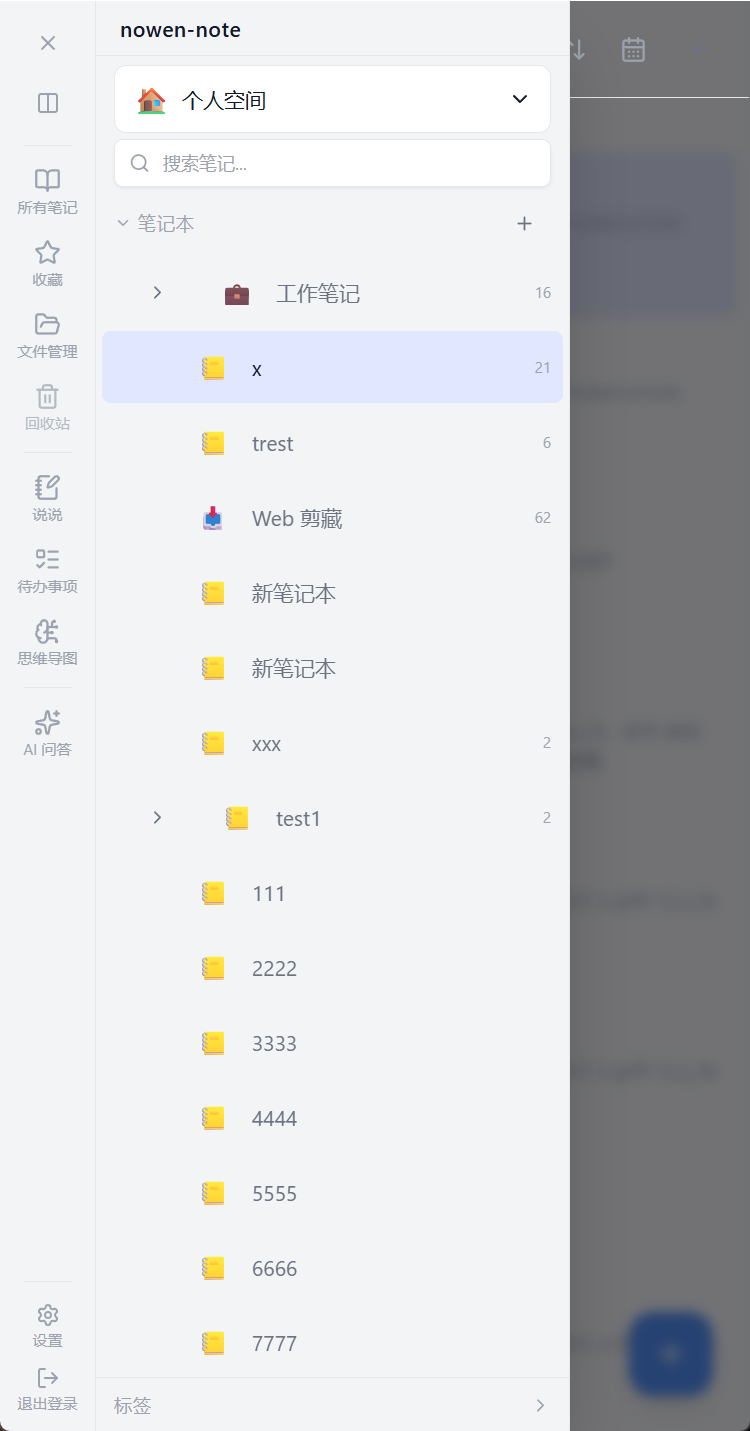
| **Cross-platform access** | Web, Electron for Windows/macOS/Linux, Android, iOS project, HarmonyOS project, and Docker/NAS deployment. Mobile includes Markdown import, recent-first navigation, step-by-step browsing, tree mode, and an optional compact density setting. |
## Recent highlights
### v1.4.4 · 2026-07-30
- Convert individual notes between Markdown and rich text from the knowledge-tree node menu, with format restoration during export and re-import.
- Added “Expand all” and “Collapse all” to desktop and mobile browsing views, plus clearer knowledge-tree loading errors and optional details.
- Added a mobile knowledge-tree compact mode that reduces row height without forcing the denser layout on every user.
- Public-share comments now ask anonymous visitors for a nickname and display that identity for both existing and newly submitted comments.
- Restored rich-text interaction after format conversion by isolating editor mode per note.
- Improved windowed-editor outline navigation, viewport-aware submenu positioning, Chinese IME slash-command handling, and Markdown cursor stability.
- Fixed permission management returning `Not Found` in a legacy backend entry and corrected child creation beneath root documents.
Version 1.4.3 previously added folder password protection, reusable attachment-library insertion, encrypted WebDAV backups, root-level documents, mobile Markdown import, and the redesigned notebook permission system.
See [CHANGELOG.md](./CHANGELOG.md) and [GitHub Releases](https://github.com/cropflre/nowen-note/releases) for complete release history.
## Screenshots
### Desktop
| AI writing assistant | AI provider settings |
| :---: | :---: |
|  |  |
### Mobile
| Sidebar | Note list | Editor |
| :---: | :---: | :---: |
|  |  | 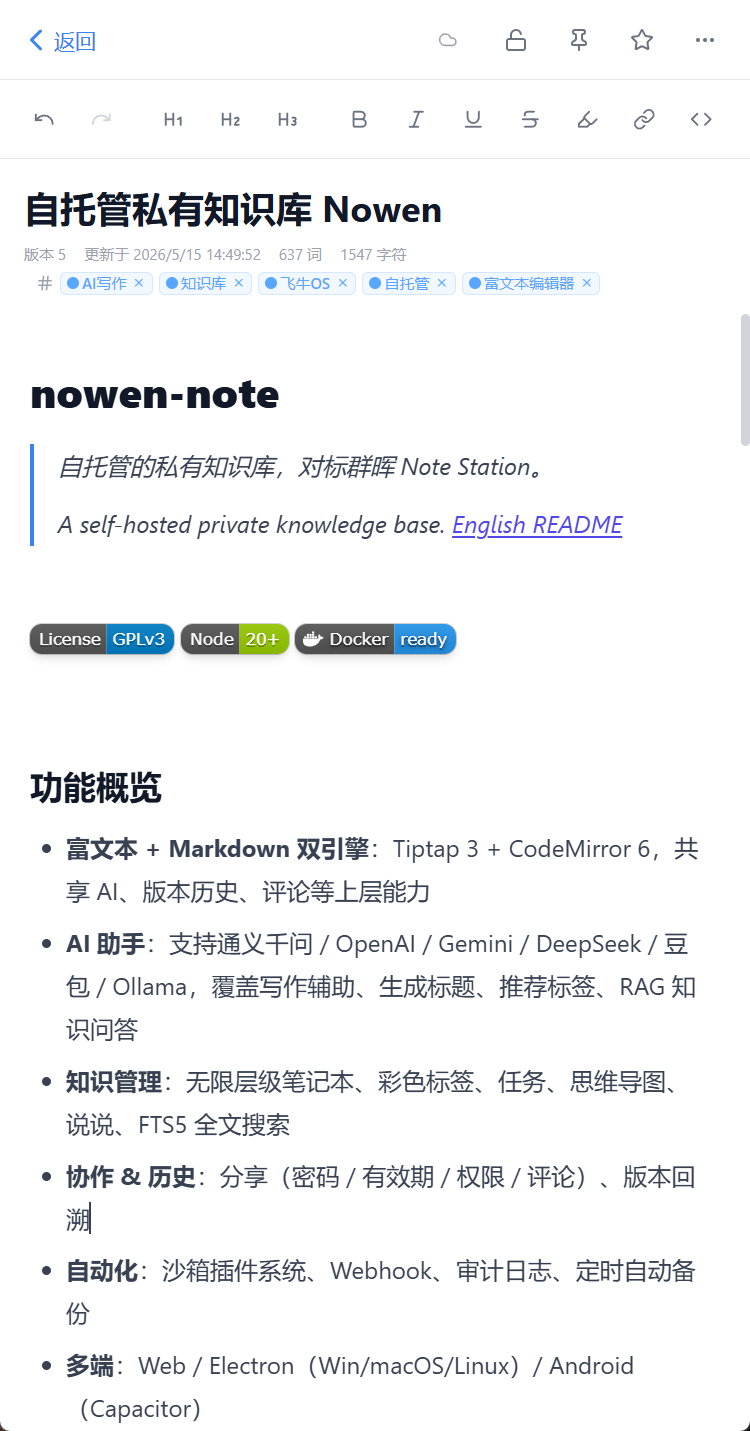 |
## Website and demo
- Website:
- Demo:
- Username: `demo`
- Password: `demo123456`
> The demo is reset periodically. Do not store private or important data in it.
## Quick deployment
### Docker Compose (recommended)
Docker Engine and Docker Compose v2 are required.
```bash
git clone https://github.com/cropflre/nowen-note.git
cd nowen-note
docker compose up -d
```
Open `http://:3001`.
Default administrator account:
```text
Username: admin
Password: admin123
```
> Change the default password immediately. Public deployments should also use HTTPS, backups, a correct public origin, and restricted CORS settings.
Check status and logs:
```bash
docker compose ps
docker compose logs -f --tail=200 nowen-note
```
Update manually:
```bash
docker compose pull
docker compose up -d
```
### Managed Docker updates (optional)
Managed updates only support the official [`docker-compose.yml`](./docker-compose.yml) and are disabled by default. The main application container does not mount the Docker socket; a separate restricted updater container performs the update.
```bash
cp .env.example .env
printf '\nNOWEN_UPDATER_TOKEN=%s\n' "$(openssl rand -hex 32)" >> .env
# Replace vX.Y.Z with a stable release tag
NOWEN_IMAGE_TAG=vX.Y.Z docker compose --profile updater up -d
```
Administrators can then run preflight checks, create a full backup, update, verify health, and roll back the image from Settings → About → Version.
> Rolling back an image does not roll back the database. Keep independent production backups.
See [Docker online update and recovery](./docs/docker-online-update.md).
### Run only the main container
```bash
docker run -d \
--name nowen-note \
--restart unless-stopped \
-p 3001:3001 \
-e TZ=Asia/Shanghai \
-v /opt/nowen-note/data:/app/data \
cropflre/nowen-note:latest
```
## Data, backups, and configuration
### Persistent directory
The persistent directory inside the container is **`/app/data`**, not `/data`. The default Compose file uses the `nowen-note-data` Docker volume.
```text
/app/data/
├── nowen-note.db
├── attachments/
├── backups/
├── fonts/
└── .jwt_secret
```
- SQLite is the default production database at `/app/data/nowen-note.db`.
- Attachments are stored under `/app/data/attachments` and organized by `YYYY/MM`.
- Automatic backups are stored under `/app/data/backups` by default.
- Map `BACKUP_DIR` to an independent physical disk and follow a 3-2-1 backup strategy for production.
- Third-party image-host uploads are retired. New images use the attachment system; historical remote images can be migrated.
- PostgreSQL adaptation and migration are still under validation. Production deployment and recovery remain based on SQLite.
### Common environment variables
See [`.env.example`](./.env.example) for the complete template.
| Variable | Default | Purpose |
| --- | --- | --- |
| `NOWEN_PORT` | `3001` | Exposed Compose port |
| `TZ` | `Asia/Shanghai` | Container timezone |
| `PUBLIC_WEB_ORIGIN` | empty | Public or reverse-proxy origin used to generate share links |
| `JWT_SECRET` | generated and persisted | Session signing and fallback encryption; must match across instances |
| `BACKUP_DIR` | `/app/data/backups` | Automatic backup directory |
| `BACKUP_WEBDAV_ENCRYPTION_KEY` | falls back to `JWT_SECRET` | Encrypts stored WebDAV credentials; use a dedicated production key |
| `CORS_ORIGINS` | native client origins | Additional comma-separated web origins |
| `MAX_ATTACHMENT_SIZE_MB` | `100` | Maximum attachment size |
| `ATTACHMENT_STORAGE` | `local` | Set to `s3` for S3/R2/MinIO |
| `CALENDAR_EXPORT_ENCRYPTION_KEY` | empty | Encrypts calendar S3 export credentials |
| `NOWEN_UPDATER_TOKEN` | empty | Enables the managed Docker updater |
- [Object storage](./docs/object-storage.md)
- [WebDAV backup](./docs/webdav-backup.md)
- [Email backup](./docs/backup-email-smtp.md)
## Client and platform status
| Platform | Distribution / build | Status |
| --- | --- | --- |
| **Web / Docker** | Docker Hub or source build | Recommended deployment; supports `amd64`, `arm64`, or multi-architecture images |
| **Windows / macOS / Linux** | [GitHub Releases](https://github.com/cropflre/nowen-note/releases) or `npm run electron:build` | Electron client can connect to a remote service or use the local backend |
| **Android** | Release APK or Capacitor build under `frontend/` | Actively maintained; system share import, Markdown file import, immersive editing, and mobile knowledge tree |
| **iOS** | Capacitor project and GitHub Actions/TestFlight flow | Requires Apple signing and a developer account; see [iOS release guide](./docs/iOS-Release.md) |
| **HarmonyOS** | Open [`nowen-harmony/`](./nowen-harmony/) in DevEco Studio | ArkTS + ArkWeb MVP; some native capabilities are still being completed |
| **fnOS** | `.fpk` in Releases | Current package primarily targets x86_64 |
| **UGREEN UGOS** | `.upk` in Releases or build scripts | Depends on device architecture and application installation support |
| **Other NAS** | Docker Compose | Synology, QNAP, ZSpace, and similar devices can use the Docker deployment |
> Available packages vary by release. Check [GitHub Releases](https://github.com/cropflre/nowen-note/releases).
## Local development
Requires Node.js 20+, npm, and Git. Electron and native builds also require platform toolchains.
```bash
git clone https://github.com/cropflre/nowen-note.git
cd nowen-note
npm install
npm run install:all
```
Start two terminals:
```bash
npm run dev:backend
```
```bash
npm run dev:frontend
```
Open `http://localhost:5173`.
Common commands:
```bash
npm run build:all
npm run electron:dev
npm run electron:build
(cd backend && npm test)
(cd frontend && npm run test:run)
```
Android:
```bash
cd frontend
npm run cap:build
npx cap open android
```
iOS:
```bash
npm run cap:sync:ios
npm run cap:open:ios
```
## Technology stack
| Layer | Main technologies |
| --- | --- |
| **Frontend** | React 18, TypeScript, Vite 5, Tailwind CSS, Tiptap 3, CodeMirror 6, Yjs, IndexedDB |
| **Backend** | Node.js 20, Hono 4, WebSocket, better-sqlite3, FTS5, sqlite-vec, sharp |
| **Desktop** | Electron 33, electron-builder, electron-updater |
| **Mobile** | Capacitor 8 for Android/iOS, ArkTS + ArkWeb for HarmonyOS |
| **Storage and backup** | SQLite, local attachments, S3/Cloudflare R2/MinIO, email and WebDAV backups; PostgreSQL is under validation |
| **Developer APIs** | OpenAPI 3.0, TypeScript SDK, CLI, MCP Server, Webhook |
## Repository layout
```text
nowen-note/
├── frontend/ # React web app and Capacitor clients
├── backend/ # Hono APIs, database, sync, and background tasks
├── electron/ # Electron main process and packaging
├── packages/ # SDK, CLI, MCP, and developer packages
├── nowen-harmony/ # HarmonyOS ArkTS / ArkWeb client
├── docs/ # Deployment, tutorials, and design documents
└── scripts/ # Build, migration, packaging, and release scripts
```
## Documentation
- [MCP Server installation and usage](./docs/tutorials/mcp.en.md)
- [MCP Server 中文安装教程](./docs/tutorials/mcp.md)
- [Tutorial center](./docs/tutorials/README.md)
- [Feature documentation](http://nowen.cn/docs/nowen-note-features)
- [Installation and troubleshooting](http://nowen.cn/docs/nowen-note-help)
- [API documentation](http://nowen.cn/docs/nowen-note-api)
- [Deployment guide](./docs/deployment.md)
- [Docker update and recovery](./docs/docker-online-update.md)
- [WebDAV backup](./docs/webdav-backup.md)
- [Object storage](./docs/object-storage.md)
- [Email backup](./docs/backup-email-smtp.md)
- [ARM64 deployment](./docs/deploy-arm64.md)
- [iOS release guide](./docs/iOS-Release.md)
- [Privacy policy](./docs/PRIVACY.md)
- [Browser clipper](https://chromewebstore.google.com/detail/nowen-note-web-clipper/nglkodhfdbnfielchjpkjhenfaecafpg)
- OpenAPI is available at `/api/openapi.json` after startup.
## Current boundaries
- **Database:** SQLite is the fully supported production default. PostgreSQL adapters, schemas, and partial dual-database tests exist, but production switching is not yet enabled.
- **Format conversion:** Rich-text/Markdown conversion preserves major structures where possible. Highly customized HTML, complex extension nodes, or third-party syntax may still require manual review.
- **WebDAV:** Used for completed backup files, not real-time sync, live database storage, or attachment hosting. Remote retention must be managed separately.
- **Managed Docker updates:** Only support the official managed Compose deployment.
- **Third-party image hosting:** Upload integration is retired; only historical configuration cleanup and image migration remain.
- **macOS:** Unsigned or unnotarized packages may require removing quarantine attributes; see the desktop tutorial.
- **Mobile:** Android has the most complete maintenance coverage. iOS and HarmonyOS distribution, signing, and some native bridges remain platform-dependent.
## Releases
The README documents stable capabilities, recent highlights, and deployment. Complete commit-level history remains in the changelog.
- [Latest release](https://github.com/cropflre/nowen-note/releases)
- [Full changelog](./CHANGELOG.md)
- [Issues and roadmap](https://github.com/cropflre/nowen-note/issues)
## Contributing
Issues, feature suggestions, and pull requests are welcome. Before submitting code, run at least:
```bash
npm run build:all
(cd backend && npm test)
(cd frontend && npm run test:run)
```
Feedback channels:
- [GitHub Issues](https://github.com/cropflre/nowen-note/issues)
- QQ group: `1093473044`
## Support the project
If Nowen Note helps you, sponsorship supports continued maintenance and development.
| WeChat |
Alipay |
 |
 |
Read the [author's note](./AUTHOR_STORY.md).
## License
Nowen Note is licensed under the [GNU General Public License v3.0](./LICENSE).