---
title: Content Validator
description: Find workbook reports and scheduled tasks that reference data model fields or views that no longer exist, and fix or remove them before a model change breaks live dashboards.
---
The Content Validator finds workbook reports whose queries reference data model
members — individual fields or whole views — that no longer exist in your
current data model. It also finds [scheduled tasks][ref-scheduled-tasks] whose
conditions reference such members. Use it to catch and fix broken content
while you are changing the model, before the change ships and breaks live
[dashboards][ref-dashboards] or scheduled tasks.
## Opening the Content Validator
In Cube Cloud, navigate to the **Data model** module and select the
**Content Validator** tab.
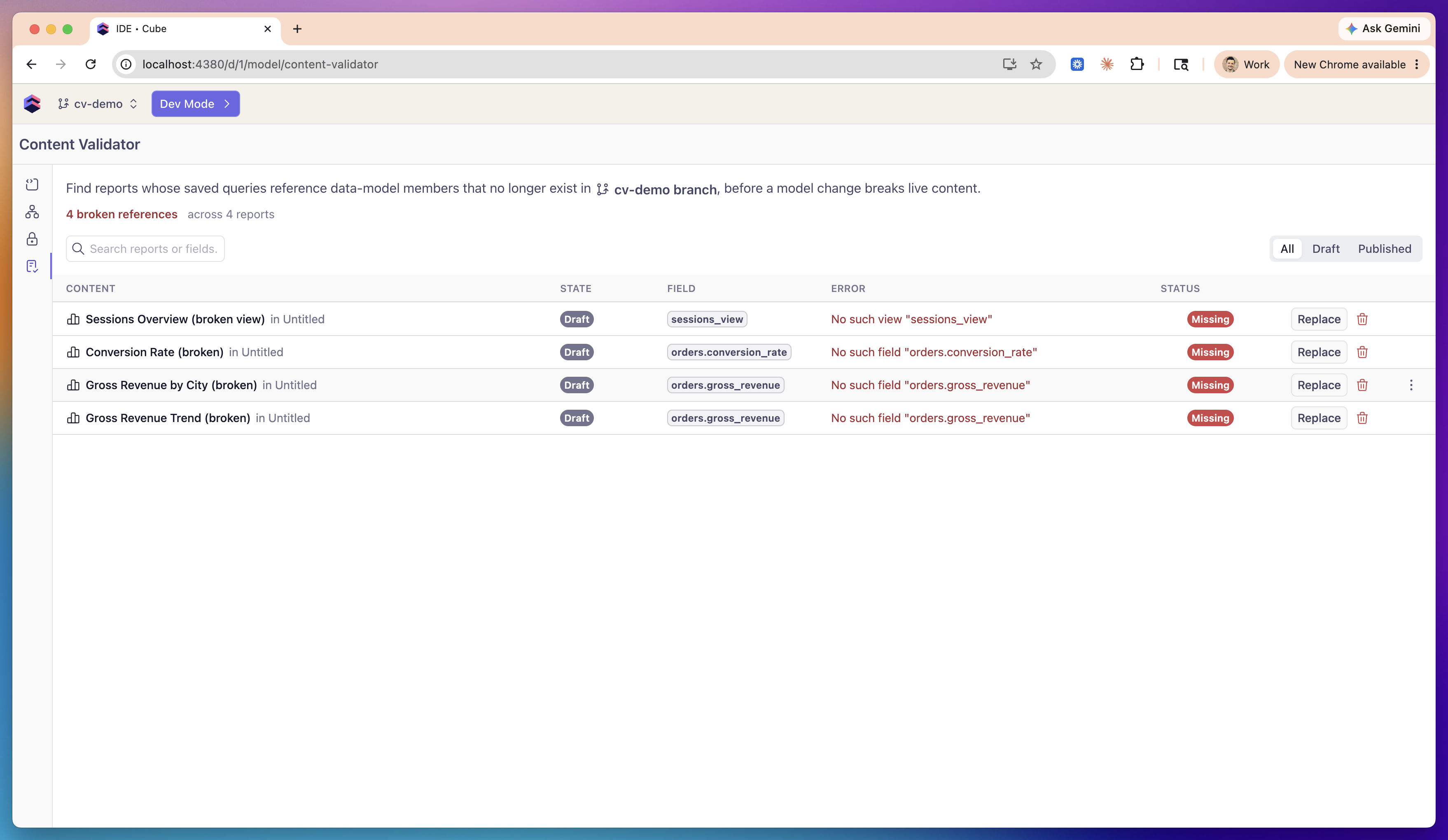 Validation runs in real time, right when you open the tab — there is no
background job to schedule or wait for.
## How validation works
The Content Validator checks every [workbook][ref-workbooks] in the
deployment. For each workbook, it validates the workbook's draft reports as
well as the report snapshots of its published [dashboard][ref-dashboards].
Each report's query is checked with the same query parser the report editor
uses, so a reference flagged here is exactly the broken reference a viewer
would hit when opening that report.
The Content Validator also checks the
[conditions][ref-conditional-tasks] of scheduled tasks. A task is flagged when
its condition's **Measure** or **Time dimension** is no longer a measure or a
dimension of its view in the data model. Scheduled tasks are checked only when
AI is available in your session, and only the tasks you can see (see
[Managing tasks][ref-managing-tasks]). If the tasks can't be loaded, the page
says so, and the tasks aren't checked.
Validation is branch-aware: reports and scheduled tasks are checked against
the data model of whatever context you are currently in — your
[development mode][ref-dev-mode], a shared branch, or production. The page
header names the context you are validating against, so you always know which
version of the model the findings apply to.
The Content Validator uses the full data model, ignoring visibility settings
and access policies. A report referencing a member that is hidden with
[`public: false`][ref-cube-public] or restricted by an
[access policy][ref-access-policies] is **not** flagged — the member still
exists in the model. Only references to members that are truly gone are
reported.
## Reviewing findings
Each finding is one row in the findings table:
| Column | What it shows |
| --- | --- |
| **Content** | The report name and the workbook it belongs to, or the name of the scheduled task. |
| **State** | Whether the finding is in a **Draft** report, a **Published** dashboard snapshot, or a **Scheduled task**. |
| **Field** | The broken member reference, e.g., `orders.total`. |
| **Error** | The parser error, e.g., `No such field "orders.total"` or `No such view "sessions_view"`. |
| **Status** | The state of the reference — **Missing**, or **May be affected** for a scheduled task whose instructions mention a removed member (see [Dev Mode](#comparing-with-production-in-dev-mode)). |
There are three kinds of broken references:
- **Missing field** — the report references a member (a measure or a
dimension) that no longer exists in an otherwise valid view.
- **Missing view** — the report queries a view that no longer exists in the
data model.
- **Missing field in a scheduled task** — the condition of a scheduled task
references a measure or a time dimension that no longer exists. These rows
show a calendar icon and a **Scheduled task** badge.
Use the search box above the table to filter findings by report, workbook,
task, or member name, and the **All** / **Draft** / **Published** /
**Scheduled tasks** filter to focus on one kind of content.
The line above the table summarizes the findings: the number of broken
references, the number of reports they're in, and the number of scheduled
tasks they break.
If every reference resolves, the page shows *No broken references found*.
### Comparing with production in Dev Mode
In [development mode][ref-dev-mode], findings are compared with the production
data model:
- Findings that are broken on your branch but not in production show a **New**
badge, and the summary says how many were introduced on this branch. Use the
**All** / **Introduced here** / **Pre-existing** filter to focus on either.
- A scheduled task whose instructions mention, by name or title, a member that
your branch removed is listed as **May be affected**, with the error
*Instructions mention "…", removed on this branch*. Instructions are free
text, so this is a hint, not a proof: these rows aren't counted as broken
references, and the summary counts them separately.
## Fixing broken references
How you fix a finding depends on whether it is in a draft report, a
published dashboard snapshot, or a scheduled task:
- **Draft reports** are editable in place. Each draft finding offers
**Open**, **Replace**, and **Delete** actions.
- **Published dashboards** are immutable snapshots — they only change when
their dashboard is republished. Published findings offer only an **Open**
action; to fix one, update the draft report in its workbook and republish
the dashboard.
- **Scheduled tasks** offer only an **Open** action. To fix one, open the task
and pick an existing measure or time dimension in its condition, or, for a
**May be affected** row, update its instructions. Only the task's creator, an
admin, or a role granting **Manage all scheduled tasks** can edit it.
### Open
**Open** navigates to the content itself: the report in its workbook for a
draft finding, the live published dashboard for a published finding, or the
task's detail page for a scheduled task finding.
### Replace
**Replace** swaps the broken reference for an existing one across the
report's saved query. Clicking it opens a dialog with a searchable picker of
valid replacements — members of the same view for a missing field, or other
views for a missing view.
{/* TODO: screenshot — Replace dialog with the replacement picker */}
- If several draft reports share the same broken reference, the dialog offers
a **Replace in all affected reports** checkbox (enabled by default) so you
can fix them all in one action.
- If a published dashboard references the same member, the dialog notes that
it will keep its current snapshot until the dashboard is republished.
When you apply a replacement, Cube rewrites each affected report's saved
query, persists it, and re-runs validation, so fixed rows clear from the
table immediately. The rewrite is precise: only references to the broken
member are updated, while same-named members of other views are left
untouched.
### Delete
**Delete** permanently removes the report from its workbook — use it for
reports that are no longer worth fixing. A confirmation dialog is shown
before anything is deleted, and validation re-runs afterwards.
## Scope and limitations
- The Content Validator validates reports whose queries are stored as
semantic SQL. Some reports use [advanced semantic queries][ref-advanced-queries]
that the parser cannot fully read, e.g., a `WITH` clause, a join, or a
subquery. For such a report, the Content Validator still checks the views it
reads from: every `FROM` and `JOIN` target that is neither a view nor a CTE
of the query is flagged as a missing view. Field-level checks do not run for
these reports.
- A report is counted as *not checked* when the parser cannot fully read its
query and no missing view is found in it — it is neither flagged as broken nor
asserted to be clean. When this happens, the summary shows a
*N reports could not be checked* note.
- Validation covers each workbook's draft reports and its published dashboard
snapshots.
- **Replace** and **Delete** act on draft reports only. Fixing published
content is a two-step process: fix the draft, then republish the dashboard.
- For scheduled tasks, only conditions are checked against the data model.
Instructions are free text and are checked only in Dev Mode, and only for
members removed on the branch.
[ref-workbooks]: /docs/explore-analyze/workbooks
[ref-dashboards]: /docs/explore-analyze/dashboards
[ref-dev-mode]: /docs/data-modeling/dev-mode
[ref-cube-public]: /reference/data-modeling/cube#public
[ref-access-policies]: /docs/data-modeling/data-access-policies
[ref-scheduled-tasks]: /docs/explore-analyze/scheduled-tasks
[ref-conditional-tasks]: /docs/explore-analyze/scheduled-tasks#conditional-tasks
[ref-managing-tasks]: /docs/explore-analyze/scheduled-tasks#managing-tasks
[ref-advanced-queries]: /docs/explore-analyze/workbooks/querying-data#advanced-semantic-queries