---
title: Evals
description: Benchmark your agent's answers against a known-correct ground truth and track accuracy across data-model and agent changes.
---
Evals let you benchmark your agent's answers against a known-correct ground
truth, on any branch. You author a set of questions, each with the SQL or
[certified query](/admin/ai/certified-queries) that represents the right
answer, run your agent against them, and get a per-question pass/fail plus an
accuracy score for the run — so you can see, objectively, whether a data-model
or agent change made the agent better or worse.
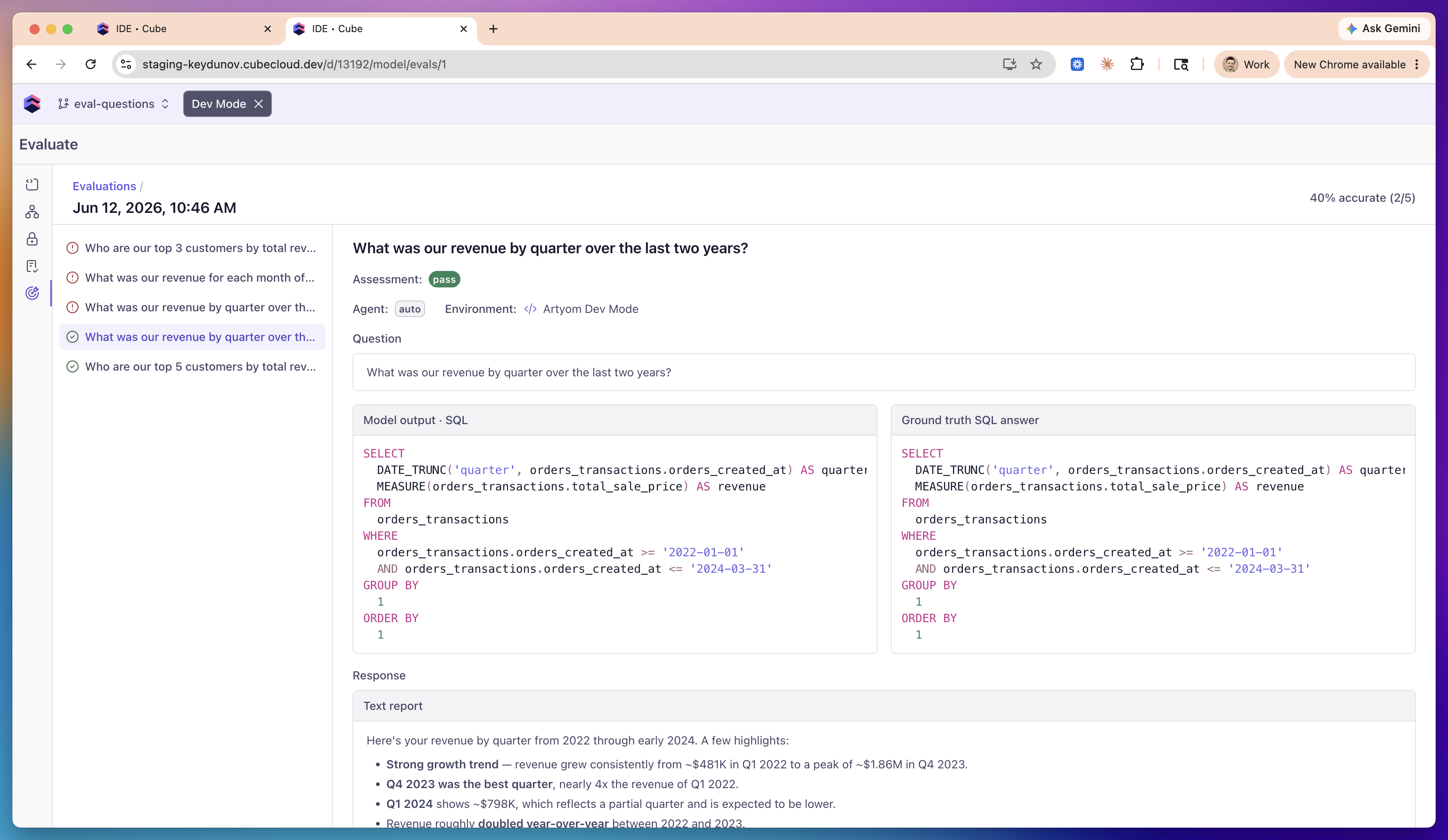
You'll find evals in the model IDE under the **Evals** tab, with two
sub-tabs: **Evals** (runs) and **Questions** (the benchmark set).
 ## Concepts
| Term | What it is |
|------|------------|
| **Question** | A natural-language question plus its **ground truth** (the correct answer, as SQL or a certified-query reference). Authored as code in your data model. |
| **Eval (run)** | One execution of the agent against the question set — the whole set, or a single question file — on a specific branch and agent. |
| **Result** | The agent's answer to a single question in a run, graded against that question's ground truth. |
| **Accuracy** | `passed / total` for a run, shown as `NN% (passed/total)`. |
## Authoring benchmark questions
Questions live in your [data model repository](/admin/ai#agent-configuration),
versioned and branched like the rest of it. You can keep them in a single
top-level `agents/eval_questions.yml` file — the simplest place to start — or
split them across any number of `agents/eval_questions/*.yml` files as your set
grows. The parser picks up both and merges every file's `eval_questions` list
into one set, so you can move from one file to many at any time without changing
anything else. A run can also be scoped to a single file (see
[Running an eval](#running-an-eval)).
Each file has a top-level `eval_questions` list. A question needs a unique
`name`, a `question`, and exactly one ground truth: a `certifiedQuery`
reference **or** inline `sql`.
```yaml
# agents/eval_questions.yml
eval_questions:
- name: revenue_by_quarter
question: What was our revenue by quarter over the last two years?
certifiedQuery: revenue_by_quarter # reference an existing certified query by name
- name: arr_last_4_years
question: What was our ARR over the last 4 years?
sql: | # ...or inline SQL ground truth
SELECT date_trunc('year', created_at) AS year, SUM(arr) AS arr
FROM subscriptions GROUP BY 1 ORDER BY 1
```
- `certifiedQuery` references a [certified query](/admin/ai/certified-queries)
by name. Define it under `agents/certified_queries/` (or via **Certify this
query** in chat). A reference that doesn't resolve to an existing certified
query is flagged as a validation error.
- `sql` is inline ground-truth SQL, run through the same Cube SQL API the agent
uses (so `MEASURE(...)` and friends work).
- Omitting both — or setting both — is a validation error.
- `check` picks how the question is graded: `exact` (the default) or `ai`. See
[Choosing a grader](#choosing-a-grader).
- An optional top-level `space` key scopes a file's questions to a named space
(defaults to `auto`). Question names are unique per space.
The **Questions** tab is a read-only view of these files — its **File**
column shows which file defined each question. To add or edit questions, edit
the YAML in the IDE — there's no in-product question editor yet.
## Running an eval
On the **Evals** tab, click **Run eval** and choose:
- **Branch** — which branch's data model and agent configuration to run
against. Defaults to the active branch.
- **Questions** — **All questions** (the default) or a single question file,
to run only that file's questions. The selector appears only when the
selected branch's questions come from more than one file, and each file
option shows how many questions it holds. Switching branches resets it to
**All questions**.
- **Agent** — `auto` (the implicit auto-agent) or a configured agent name.
The run starts immediately and you can close the dialog — it executes in the
background. The run list shows live progress and then the outcome:
| Column | Meaning |
|--------|---------|
| **Eval run** | When the run was created. |
| **Environment** | Where it ran — **dev** (your personal dev-mode branch, shown as "*Name* Dev Mode"), **staging**, or **prod** (the deploy branch, e.g. `master` or `main`). |
| **Agent** | The agent used. |
| **Execution status** | Running, Completed, or Failed. |
| **Questions** | The file the run was scoped to, or **All questions**. |
| **Accuracy** | `NN% (passed/total)`. |
| **Created by** | Who triggered the run. |
| **Last updated** | When it finished. |
### Run evals from CI
You can gate a pull request with either the Cube CLI or the public Platform
API. In both cases, store the tenant URL and deployment ID as repository
variables, store the API key as a secret, and pass the branch under review.
The API key needs `SchemaUpdate` access to start a run and either `SchemaRead`
or `SchemaUpdate` access to list runs, poll a run, and read its results.
This capability is currently in preview. Contact Cube support to activate it
for your account.
To evaluate under a specific [security context](/docs/data-modeling/access-control/context),
pass it with the CLI's `--security-context` or the API's `securityContext`. It
is merged over your own security context and applies to the ground-truth
queries and, for agents defined in [`agents/config.yml`](/admin/ai/multi-agent),
to the agent's queries; the default `auto` agent keeps your own context.
Passing it requires `DeploymentUpdate` or `DeploymentsManage` access or the
admin role, and only an admin can set its `cubeCloud` key; otherwise the request
returns `403`. Under `cubeCloud`, only `groups` and `userAttributes` take effect.
#### With the Cube CLI
Set `CUBE_CLI_VERSION` to the Cube CLI release you have tested, then install
that exact version in the job:
```yaml
env:
CUBE_API_URL: ${{ vars.CUBE_API_URL }}
CUBE_API_KEY: ${{ secrets.CUBE_API_KEY }}
DEPLOYMENT_ID: ${{ vars.CUBE_DEPLOYMENT_ID }}
CUBE_BRANCH: ${{ github.head_ref || github.ref_name }}
steps:
- name: Install Cube CLI
env:
CUBE_VERSION: ${{ vars.CUBE_CLI_VERSION }}
shell: bash
run: |
set -euo pipefail
test -n "$CUBE_VERSION"
curl -fsSL https://raw.githubusercontent.com/cube-js/cube/master/install-cli.sh | sh
- name: Run Cube agent evals
shell: bash
timeout-minutes: 35
run: |
set -euo pipefail
trap 'if [[ -f eval.json && ! -s eval.json ]]; then rm -f eval.json; fi' EXIT
cube evals run "$DEPLOYMENT_ID" \
--branch "$CUBE_BRANCH" \
--wait \
--timeout 30m \
--json > eval.json
- name: Upload eval result
if: always()
uses: actions/upload-artifact@v4
with:
name: cube-eval
path: eval.json
if-no-files-found: ignore
```
The command waits for completion and exits non-zero when the eval run fails,
when it produces no graded questions, or when any question has a verdict other
than `pass`. It also fails closed if the API does not confirm a complete result
set. When a complete result set is returned, the command writes `eval.json`
before exiting, including on a failed verdict. If results cannot be verified,
the step log explains why and the empty output file is removed, so no empty
artifact is uploaded. Add `--agent NAME` to test a configured agent or
`--file eval_questions/revenue.yml` to limit the run to one question file. Pass
`--json` for a machine-readable document containing both the terminal run and
its per-question results when the result set is complete.
To inspect an earlier run, find its id with `cube evals list "$DEPLOYMENT_ID"`,
then pass it to `cube evals status` or `cube evals results`.
#### With the Platform API
If you do not want to install the CLI, call the same public endpoints directly.
This example does not retry the `POST`, because repeating a non-idempotent start
request after an ambiguous network failure could create another run. It bounds
every `GET`, retries transient read failures, and applies the same fail-closed
checks as the CLI. Because reads are idempotent, it retries connection resets
too; a permanent read error such as `401` will also be retried four times before
the job fails. Each read writes to a file so curl can discard a partial response
before retrying.
```yaml
env:
CUBE_API_URL: ${{ vars.CUBE_API_URL }}
CUBE_API_KEY: ${{ secrets.CUBE_API_KEY }}
DEPLOYMENT_ID: ${{ vars.CUBE_DEPLOYMENT_ID }}
CUBE_BRANCH: ${{ github.head_ref || github.ref_name }}
steps:
- name: Run Cube agent evals through the Platform API
shell: bash
timeout-minutes: 35
run: |
set -euo pipefail
api="${CUBE_API_URL%/}/api/v1/deployments/$DEPLOYMENT_ID/evaluations"
auth=(-H "Authorization: Api-Key $CUBE_API_KEY")
reads=(
curl --fail --silent --show-error
--connect-timeout 10 --max-time 30
--retry 4 --retry-delay 2 --retry-all-errors
"${auth[@]}"
)
started=$(
jq -cn --arg branch "$CUBE_BRANCH" '{branchName: $branch}' |
curl --fail-with-body --silent --show-error \
--connect-timeout 10 --max-time 30 \
"${auth[@]}" -H 'Content-Type: application/json' \
--data-binary @- "$api"
)
evaluation_id=$(jq -er '.id | select(type == "number")' <<<"$started")
deadline=$((SECONDS + 1800))
last_status=
while :; do
if (( SECONDS >= deadline )); then
echo "Timed out waiting for eval run $evaluation_id" >&2
exit 1
fi
"${reads[@]}" --output run.json "$api/$evaluation_id"
status=$(jq -r '.status | if type == "string" then ascii_downcase else "" end' run.json)
if [[ "$status" != "$last_status" ]]; then
echo "Eval run $evaluation_id: $status"
last_status=$status
fi
case "$status" in
completed|failed) break ;;
*) sleep 5 ;;
esac
done
"${reads[@]}" --output results.json "$api/$evaluation_id/results"
jq -n --slurpfile evalRun run.json --slurpfile results results.json \
'{evalRun: $evalRun[0], results: $results[0]}' > eval.json
jq . eval.json
if ! jq -e '
(.evalRun.status | ascii_downcase) == "completed" and
(.results.items | type) == "array" and
(.results.items | length) > 0 and
.results.pageInfo.hasNextPage == false and
all(.results.items[]; (.verdict // "" | ascii_downcase) == "pass")
' eval.json > /dev/null; then
echo "The eval run failed, was incomplete, or did not pass every question" >&2
exit 1
fi
- name: Upload eval result
if: always()
uses: actions/upload-artifact@v4
with:
name: cube-eval
path: eval.json
if-no-files-found: ignore
```
The `POST` body also accepts `agentName`, `questionFile`, and
`securityContext`. Omitting the pagination parameters on the results request
returns the complete result set; if `pageInfo.hasNextPage` is anything other
than `false`, do not use that page as a CI verdict.
To find an earlier run's id, send a `GET` to the same `evaluations` path. It
lists the deployment's runs newest first, 100 per page by default (`first` goes
up to 200); pass `pageInfo.endCursor` as `after` for the next page.
Both recipes require every selected question to return `pass`. A `review`
verdict, including one caused by missing ground truth, fails the CI gate. Keep
questions intended for manual review in a separate file, then use CLI `--file`
or API `questionFile` to run an automatically gradable file in CI.
`eval.json` also records why each question didn't pass; see
[Reading the results](#reading-the-results) for the fields.
## Reading the results
Open a run to see per-question results: the question list on the left, with a
pass/fail icon for each, and the selected question's detail on the right. The
run's scope is repeated in the header, next to **Questions**.
- **Assessment** (`verdict`) — `pass`, `fail`, `review`, or `error`.
- **Score reason** (`scoreReasons`) — when a question doesn't pass, one or more
tags categorizing why: **Row count mismatch**, **Missing columns**,
**Value mismatch**, **Unexpected rows**, **Query error**,
**Ground truth query failed**, **Ground truth not found**, or **Agent error**.
A question graded by the [`ai` grader](#choosing-a-grader) carries tags the
judge chose instead, which aren't limited to this list.
- **Failure analysis** (`analysis`) — a plain-English explanation, e.g. *"The
agent returned 3 rows, but the ground truth has 5 rows."*
- **Model output · SQL** (`agentSql`) vs. **Ground truth SQL answer**
(`groundTruthSql`) — the agent's query side-by-side with the ground truth, so
you can spot the difference.
- **Response** (`agentResponse`) — the agent's text answer, rendered as
Markdown. Long answers are truncated.
- **Response time** — how long the agent took to answer, from the start of its
run to its final answer. The time spent grading the answer isn't included.
- **Tokens** — the total number of LLM tokens the agent spent on the answer,
across all of its LLM calls.
A question has no response time or tokens when its agent errored, and no tokens
when its agent made no LLM call. Results of older runs, made before Cube
started recording these values, have neither.
When a run finishes, its header shows two run-level metrics next to the
accuracy:
- **Median response time** — the median over the questions that recorded a
response time.
- **Total tokens** — the sum over all questions. It's shown only when every
question recorded its tokens, so it's hidden when any question has none.
The results endpoint and the CLI's `--json` output return the details for each
question in the fields shown in parentheses; they don't return the response
time or tokens. `scoreReasons` holds the labels exactly as the UI shows them,
such as `"Row count mismatch"`. They are display text, not stable codes, and
new labels can appear, so gate CI on `verdict` and print the reasons rather
than match on them. A field with nothing to show is `null`, or an empty array
for `scoreReasons`.
## How grading works
Grading is execution-based, not text-based — the same approach used by
industry text-to-SQL benchmarks such as BIRD and Spider 2.0. The agent's SQL
and the ground-truth SQL are both executed, and their result sets are
compared. So an answer that's worded or written differently but produces the
same data still passes.
The comparison is:
- **Sort-invariant** — row order never matters.
- **Numeric-tolerant** — values are compared to 4 significant figures, so
float/representation noise (`6646` vs. `6646.0`) doesn't fail.
- **Column-name-agnostic and lenient on extra columns** — each ground-truth
column must be reproduced by some agent column, matched by its values, so
`revenue` vs. `total` aliases don't matter. Extra columns the agent adds are
ignored.
- **No standalone row-count gate** — row count falls out of the comparison: a
"top 5" question is enforced because the golden result has exactly 5 rows.
This is the `exact` grader, which every question uses unless it opts into the
`ai` grader — see [Choosing a grader](#choosing-a-grader).
Verdicts:
| Verdict | When |
|---------|------|
| **pass** | The agent's result set matches the ground truth. |
| **fail** | It ran but the result set doesn't match (see the score reason). |
| **review** | Nothing to compare automatically — the question has no ground truth, or the agent didn't run a query. Compare manually. |
| **error** | The agent run failed, the ground-truth query failed, or a referenced certified query wasn't found. |
## Choosing a grader
The comparison above is strict on purpose: it fails a result set whose rows
don't line up, even when the question never asked for those particular rows.
That's right for a question that pins its own output ("our top 5 products by
revenue, highest first") and wrong for one that doesn't ("which products sell
best?"), where a different `LIMIT` or a different-but-equivalent set of columns
is a difference the question never asked about.
The optional `check` key picks the grader, per question:
```yaml
eval_questions:
- name: top_products # pins count and ordering, so `exact` is right
question: What are our top 5 products by revenue, highest first?
certifiedQuery: top_products
- name: best_selling_products # under-specified, so grade it leniently
question: Which products sell best?
certifiedQuery: top_products
check: ai
```
| Value | Grading |
|-------|---------|
| `exact` | The deterministic comparison described above. The default when `check` is omitted. |
| `ai` | Runs that same deterministic comparison first, then hands a **rejection** to an LLM judge that reads the question alongside both result sets. |
Because `ai` only ever reconsiders a deterministic failure, it can turn a fail
into a pass but never a pass into a fail. A result set that already matches is
passed straight through without spending a model call.
### What the judge ignores
The judge is prompted to be lenient exactly where the question is silent:
- **Row count** — if the question doesn't say how many rows to return, a
different number of rows isn't a failure on its own.
- **Ordering** — if the question doesn't state an order, neither row nor column
order is checked at all.
- **Selected members** — extra columns, an omitted id or descriptive column, a
different alias, and an equivalent label for the same entity (a country name
where the ground truth has a country code) are all accepted.
- **Formatting** — numeric differences beyond about 4 significant figures,
integer vs. decimal rendering, date and time formats, casing, and how nulls
are written don't matter.
It stays strict everywhere else: values that disagree, a wrong grain, a wrong
filter or time range, a breakdown where the question asked for a total (or the
reverse), and any question that *did* state a count, an ordering, or the exact
members to return.
The judge grades the data only. It never reads the agent's prose answer. It
sees both SQL queries for context, but it doesn't grade SQL style.
### Notes
- `check` requires Cube **v1.7.37** or newer. An older runtime ignores the key
silently and grades the question as `exact`.
- The judge runs on the same model provider as the agent being evaluated, so it
works on [bring-your-own-model](/admin/ai/bring-your-own-model) deployments
without configuring a second provider.
- When the judge fails a question, the score reason carries the tags the judge
itself chose (for example **Wrong grain** or **Wrong time range**) rather than
the fixed tags the `exact` grader uses.
- If the judge can't run at all, the deterministic verdict stands and the result
is tagged **AI check unavailable** — so an outage reads as an outage rather
than as the agent regressing.
- A result set with more than 50 rows is sampled before it reaches the judge:
the judge gets the first 25 rows in query order, plus a sample of up to 50
rows. Each block of rows is capped at 20,000 characters. The true row counts
are given to the judge separately, so a row-count decision is always made on
the real numbers.
## Limitations
- Questions are authored as code only; the **Questions** tab is read-only.
- Very large question sets can be slow to run in full. To iterate faster, split
them across `agents/eval_questions/*.yml` files and scope the run to one file.
- Grading is execution-based on the result set; it does not semantically judge
prose answers.