[中文](README.md) · [**English**](README.en.md)
[](LICENSE)
[](https://github.com/deepseek-ai/deepseek-harness)
[](#models)
[](#testing)
[](https://github.com/cv-superding/dsh-deepseek-web-login/actions/workflows/ci.yml)
[](https://github.com/cv-superding/dsh-deepseek-web-login/releases)
[](#disclaimer)
[](#contributing)
**Unofficial DSH plugin: use the chat.deepseek.com web models as a DSH LLM provider — browser-login capture, PoW solving, SSE streaming, prompting-based tool calls, and image input. No API key.**
---
## What it is
DSH (DeepSeek Harness) reaches models through **provider adapters** on `ctx.llm`. This project implements the
`deepseek-web` provider — it does not call the official API. It reuses your **already logged-in web session**:
proof-of-work challenges, chat sessions, SSE streaming and file upload all go through the web client's
private endpoints.
So you can pick `DeepSeek 网页 · 快速模式` (web fast mode) in the model picker and run DSH agents on the
free web quota.
 ### Diagnostics: transport layer (`net.fetch` / TLS fingerprint)
Web requests currently go out through Node's `fetch` (undici), whose TLS/HTTP2 fingerprint differs
**structurally** from a real browser (measured: JA4 `h1` vs `h2`, no GREASE at all, 3x more ciphers).
To check whether switching to Chromium's network stack is viable, run the probe — **zero quota by
default** (no generation, no messages):
```bash
# The host process HTTP endpoint is only reachable from DSH's own same-origin page,
# so this path goes through a file instead:
echo '{"mode":"probe"}' > "$HOME/.dsh/web-login/probe-request.json"
# Restart DSH; the log will contain deepseek-web: [net-fetch 探测] {...}
```
| Step | Fields | Pass condition |
|---|---|---|
| ① fingerprint | `ja4` / `http_version` / `http2_hash` | becomes `t13d…h2…` with GREASE = matches Chrome |
| ② streaming | `hasBody` / `chunks` / `abortedEarly` | all true, otherwise SSE is impossible |
| ③ auth | `status` / `body` | 200 with the account readable = headers/cookies pass through |
Use `"mode":"stream"` instead to also verify DeepSeek's SSE end-to-end (**consumes a little quota**).
The file is renamed to `probe-request.json.done-
### Diagnostics: transport layer (`net.fetch` / TLS fingerprint)
Web requests currently go out through Node's `fetch` (undici), whose TLS/HTTP2 fingerprint differs
**structurally** from a real browser (measured: JA4 `h1` vs `h2`, no GREASE at all, 3x more ciphers).
To check whether switching to Chromium's network stack is viable, run the probe — **zero quota by
default** (no generation, no messages):
```bash
# The host process HTTP endpoint is only reachable from DSH's own same-origin page,
# so this path goes through a file instead:
echo '{"mode":"probe"}' > "$HOME/.dsh/web-login/probe-request.json"
# Restart DSH; the log will contain deepseek-web: [net-fetch 探测] {...}
```
| Step | Fields | Pass condition |
|---|---|---|
| ① fingerprint | `ja4` / `http_version` / `http2_hash` | becomes `t13d…h2…` with GREASE = matches Chrome |
| ② streaming | `hasBody` / `chunks` / `abortedEarly` | all true, otherwise SSE is impossible |
| ③ auth | `status` / `body` | 200 with the account readable = headers/cookies pass through |
Use `"mode":"stream"` instead to also verify DeepSeek's SSE end-to-end (**consumes a little quota**).
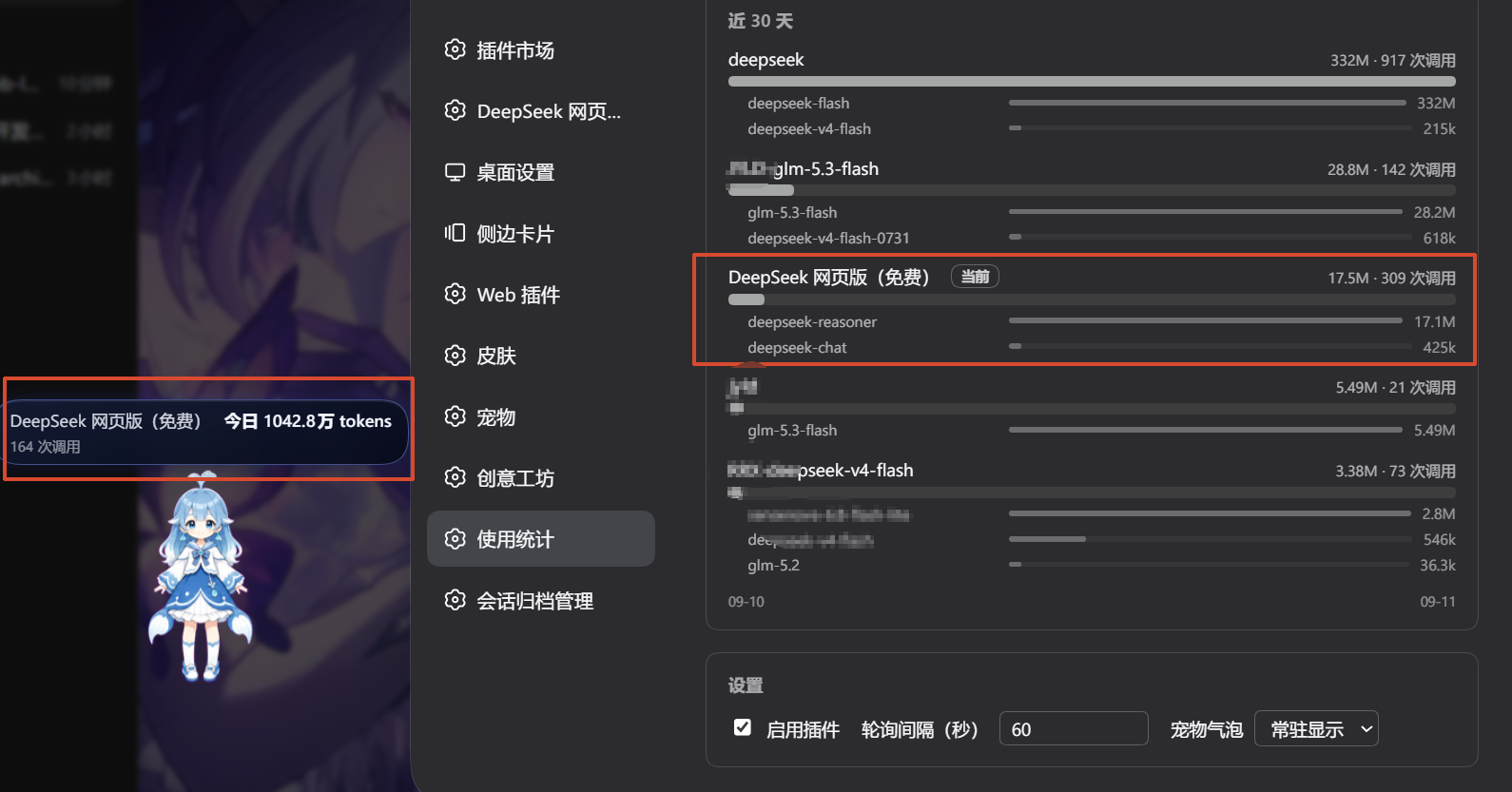
The file is renamed to `probe-request.json.done-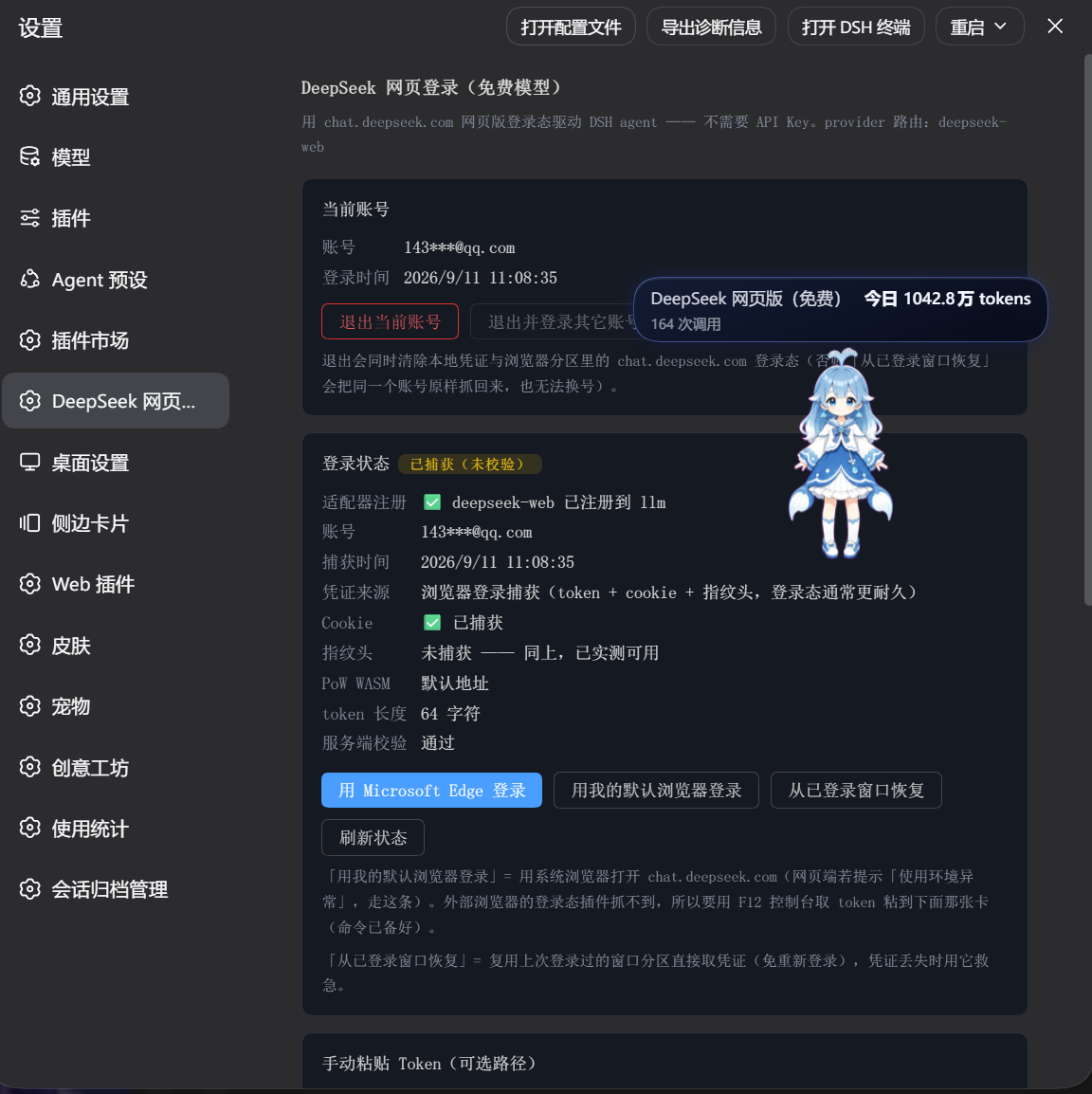 DSH's usage-stats page on the free web channel — 10.4M tokens / 164 calls in a single day:
 ## Features
| | |
|---|---|
| 🔐 **Web login, no API key** | Log in normally inside an Electron window on its own persistent partition; the plugin captures the real `Authorization`, cookies, `x-hif-*` fingerprint headers and client version headers on the side (it never touches your password) |
| 🧩 **PoW solving** | `create_pow_challenge` + DeepSeek's own `sha3_wasm_bg.*.wasm` `wasm_solve`, with automatic WASM URL discovery (the hash changes between deployments) |
| 🌊 **Streaming** | Handles both the `response/fragments` format (THINK/RESPONSE) and the direct `thinking_content`/`content` paths, including `{o:"APPEND"}` and bare `{v}` continuations; logical-stream dedup so snapshots never double-emit |
| 🛠 **Tool calling** | The web endpoint has no native function calling → a prompting JSON protocol plus a streaming filter (cross-chunk markers, fenced blocks, multiple calls, false-positive fallback) that synthesizes `tool-call` blocks and `finish: tool-calls`; tool definitions are emitted under a 56k-character budget, and when that is exceeded the **names of the omitted tools are listed** with an instruction not to guess their parameters |
| 🛡 **Drift covered twice** | The instructions explicitly forbid XML/DSML markup (the model then refuses that format by itself), and the parser accepts both the JSON and XML/DSML families (`\|DSML\|` prefix, hyphenated `dsml-` tags, bare `
## Features
| | |
|---|---|
| 🔐 **Web login, no API key** | Log in normally inside an Electron window on its own persistent partition; the plugin captures the real `Authorization`, cookies, `x-hif-*` fingerprint headers and client version headers on the side (it never touches your password) |
| 🧩 **PoW solving** | `create_pow_challenge` + DeepSeek's own `sha3_wasm_bg.*.wasm` `wasm_solve`, with automatic WASM URL discovery (the hash changes between deployments) |
| 🌊 **Streaming** | Handles both the `response/fragments` format (THINK/RESPONSE) and the direct `thinking_content`/`content` paths, including `{o:"APPEND"}` and bare `{v}` continuations; logical-stream dedup so snapshots never double-emit |
| 🛠 **Tool calling** | The web endpoint has no native function calling → a prompting JSON protocol plus a streaming filter (cross-chunk markers, fenced blocks, multiple calls, false-positive fallback) that synthesizes `tool-call` blocks and `finish: tool-calls`; tool definitions are emitted under a 56k-character budget, and when that is exceeded the **names of the omitted tools are listed** with an instruction not to guess their parameters |
| 🛡 **Drift covered twice** | The instructions explicitly forbid XML/DSML markup (the model then refuses that format by itself), and the parser accepts both the JSON and XML/DSML families (`\|DSML\|` prefix, hyphenated `dsml-` tags, bare ` ## Quick start
```bash
# A: from the release tarball (recommended, no build step)
dsh plugin --profile desktop add ./dsh-deepseek-web-login-0.1.3.tgz
# B: git install (requires github.com reachability)
dsh plugin --profile desktop add github:cv-superding/dsh-deepseek-web-login
```
`--profile desktop` is the profile used by DSH Desktop (the Electron app); use `--profile web` for a web profile.
Restart DSH — the plugin is assembled as a bundle and loads automatically.
Then: **Settings → DeepSeek 网页登录 → 浏览器窗口登录**, log in normally in the window that opens
(phone / email / verification code all work). The window closes itself once the credentials are captured.
Finally pick provider **`DeepSeek 网页版(免费)`** → `DeepSeek 网页 · 快速模式` in the model picker.
> ⚠️ **One chat window per account**: running several windows against the same account triggers a temporary web-side ban (1 day). Use one account per window, or move the extra windows to another provider — see [Known limitations](#known-limitations).
Credentials live only on your machine (`~/.dsh/web-login/deepseek-auth.json`), never in this repository. The panel's **current account → log out** removes them (and the partition storage) in one click.
In manual-token mode the panel shows "cookie / fingerprint headers not captured" — that is expected for this
path (it only has the Bearer token), and it is verified working end to end: validation, PoW solving and a real
completion all succeed. Switch to browser login if you ever hit frequent `AUTH` / `40003` errors.
> 💡 **The browser-login button clears the previous login state first** — it drives a dedicated
> profile (`~/.dsh/web-login/browser-profile`, which never reads or writes your everyday Edge cookies
> or history), so the window always opens on a clean sign-in page. If you would rather reuse a session
> that is still valid, use **Re-login** on the account row instead — that path deliberately keeps it.
If they are lost, **Recover from the logged-in window** reuses the persistent partition — no re-login needed.
## Models
Taken from the account's own server config (`GET /api/v0/client/settings?scope=model` → `model_configs`,
configVersion 81 at the time of writing): only `default` (fast mode) is enabled and switchable; `expert` and
`vision` are **disabled server-side and merged into fast mode**.
The plugin therefore exposes two entries — which are **not two models** but two presets of the same
`thinking_enabled` switch:
| model id | thinking | Best for |
|---|---|---|
| `deepseek-chat` | off | tool calls, rewriting, retrieval — fastest, cheapest |
| `deepseek-reasoner` | on | math, multi-step debugging, planning — reasons first (streamed as thinking blocks) |
Context (verified field by field on 2026-09-11 via `GET /api/v0/client/settings?scope=model`, configVersion 81):
- Hard per-request input cap: `input_character_limit = 2621440` characters (≈2.5 MiB)
- Attachment (`file_feature`) token budget: `token_limit = 890880` — **this is not the context window**.
It was once mistaken for one (890880 = 870×1024, so a ÷1024 display reads "870K"). The server exposes no
total-context field, so `contextWindow` is set to the advertised 1M (`1048576`).
## Configuration
| Field | Default | Meaning |
|---|---|---|
| `maxPromptChars` | `400000` | Prompt character budget (excess is middle-truncated, keeping the system prompt, the tool protocol and the most recent turns). ⚠️ **Raising it clearly increases the risk of being rate-limited**; range `[120000, 1500000]`, and the default is deliberately **not** at the ceiling |
| `maxRefImages` | `24` | How many images one request may carry (`ref_file_ids` length). The web endpoint caps that batch (measured: 40 pass, 52 rejected); going over rejects the **whole turn**, and then **every later turn in that conversation fails** because the images stay in the history. So only the most recent N are sent; skipped ones are marked `[earlier image omitted]` in the prompt. `0` = unlimited (**not recommended**) |
| `idleTimeoutMs` | `120000` | SSE idle timeout |
| `deleteWebSessions` | `true` | Delete the temporary web chat session after each call |
| `autoContinue` | `true` | Auto-continue when an answer is cut mid-sentence (seamlessly appended to the same answer). The tail character decides: `,` `、` `;` `:` (and their ASCII forms) mean "clearly unfinished" and trigger a continuation; sentence-ending punctuation (`。` `!` `?` `)` …) counts as complete — including `…`, since an ellipsis may be a deliberate ending. It also gates the corrective round used when the model writes a tool program into the visible text instead of emitting a tool call |
| `maxContinuations` | `2` | Max auto-continuation rounds (each round is a new web request, so it spends more of the free quota) |
| `minRequestIntervalMs` | **`2000`** | Lower bound of the gap between two web calls, measured from when the previous one **finished** |
| `maxRequestIntervalMs` | **`4000`** | Upper bound; the actual wait is picked **randomly** inside the range (equal bounds = fixed interval) |
| `allowConcurrent` | **`false`** | Allow concurrent requests on one account. Off by default: calls queue (FIFO) |
| `sessionCleanup` | **`deferred`** | Temp-session cleanup: `immediate` (delete 1.5s after each call) / `deferred` (batched, default) / `keep` (never delete) |
| `sessionCleanupDelayMs` | `90000` | deferred: max wait before flushing the queue (scalar fallback when no range is set) |
| `sessionCleanupBatchSize` | `8` | deferred: flush as soon as this many sessions are queued (scalar fallback) |
| `cleanupBatch` | `6~10` (random) | deferred: **range** for the queue threshold. How many this cycle = re-rolled at each flush |
| `cleanupDelayMs` | `60000~120000` (random) | deferred: **range** for the max wait (ms). Re-rolled at each flush |
| `cleanupGapMs` | `800~2500` (random) | deferred: **range** for the gap between two adjacent delete requests (ms). Re-rolled per delete |
| `transport` | **`chromium`** | Transport: `chromium` = Electron `net.fetch` (browser-identical fingerprint) / `node` = Node fetch |
| `contextMode` | **`full`** | Context feeding: `full` = resend the whole prompt every turn / `chained` = send only the delta and hang it off the previous answer (see below) |
| `probeIntervalMs` | `1800000` | Read-only login-state probe interval (ms); `0` disables. Uses `users/current`, zero quota |
> ⚠️ **`maxPromptChars` is a throttling valve, not a "bigger is better" knob.**
> The web API is **stateless**: every turn resends the **entire transcript**, so this ceiling directly sets the
> size of each request. Measured within a single conversation, one request grew from 9.7k to **293k tokens**;
> leaving the default at 1.5 M characters (≈1 M tokens of Chinese) means the default itself permits
> "fill the whole 1 M context in one shot". Four of our own accounts were rate-limited within two days,
> with request size the prime suspect. **So from 0.1.76 the default is 400 000** (≈270k tokens — plenty for
> long tasks). You can still raise it (the ceiling stays at 1.5 M), but read that as **trading account
> stability for longer memory**: if you genuinely need long context, switch "Context feeding" to `chained`
> (send only the delta and let the server keep the history) instead of raising this ceiling — the ceiling
> costs you on *every single turn*.
### Context feeding: full resend vs chained incremental
Every completion request carries the **entire transcript** (system prompt + tool catalogue + full history) as
`prompt`. Why resend it all? Because the plugin has always sent `parent_message_id: null` — meaning every message
is a **root** of the web conversation with no parent chain, so the server walks the message tree up to nothing.
That behaviour was measured on 2026-09-12 (send "remember the code ZC-7391-KX" in one session, then ask for the
code → "don't know").
A browser does it differently: `nextParentMessageId = history?.parentMessageId ?? finalAssistantMessageId` and
`isFirstMessage = parent_message_id === null` — **only the first message of a session has a null parent**;
after that each turn sends the previous message id as its parent and the server keeps the history.
The **Context** tab in the settings panel can switch to **chained feeding**: later turns send only the delta and
set `parent_message_id` to the previous answer's `message_id` (read from the first SSE frame,
`event: ready` → `response_message_id`). Requests get much smaller and look like a real continuous chat. The cost:
the tool protocol only exists in the first message of the chain, so if the server ever drops that early context the
model may stop emitting tool calls in the agreed format.
So `full` stays the default (identical to 0.1.61 and earlier), while `chained` follows a "save when safe, fall back
on any doubt" policy — any of these restarts the chain (full prompt + `parent=null`; it only costs a few tokens):
| Falls back to full when | Why |
| --- | --- |
| New session / session rotated / account switched | a chain belongs to one specific session |
| The fixed head (system prompt + tool catalogue) changed | the chain head is stale |
| History is not a **strict append** (compacted, rewritten, rolled back) | the delta cannot be computed |
| Nothing new this turn / the delta itself exceeds budget | nothing worth saving, or the risk outweighs it |
| Previous stream failed, was cancelled, or no `message_id` arrived | the parent may not exist any more |
The decision logic is a pure function (`src/context-feed.ts`), covered by `tests/check-context-feed.mjs`
(the rules) and `tests/check-context-chain.mjs` (wiring and lifecycle, fake transport + fake SSE).
### Why throttling is on by default, and which values to use
The web client allows only one generation per account at a time; concurrent generations are rejected, and the
real cost is worse — two windows generating at once triggered a **1-day account-level restriction** in under
6 minutes (the login stays valid, but every request from that account is refused).
DSH itself does call the same account concurrently. Reconstructing the start/end of 272 calls from the plugin
log showed **16 real overlaps**: one side is the main answer, the other is only 8–17 characters taking 1–3
seconds — that is DSH's **session-title generation** (`options.purpose === 'session-title'`). In other words,
while you are still waiting for the answer, another request has already gone out to the same account.
So the plugin now serialises calls (including title/compaction) and enforces a minimum gap between them.
| Situation | `minRequestIntervalMs` | `allowConcurrent` |
|---|---|---|
| **Recommended (default)** | `3000` | `false` |
| Speed over safety, short tasks only | `1500` | `false` |
| Already throttled once / dense multi-step automation | `8000` | `false` |
| No throttling at all (**not recommended**) | `0` | `false` |
| Experimental: restore native concurrency | any | `true` ⚠️ |
> The gap is measured from when the previous call **finished**, so a long answer is never followed by an
> extra pointless wait — it only affects genuinely dense back-to-back calls.
>
> **Two ways to change it**: ① the "Request throttling" card at the bottom of the settings page
> (switch + slider + three presets) — takes effect immediately and is persisted;
> ② the plugin entry config — needs a DSH restart.
> Precedence: **settings page > entry config > built-in default** (the settings page is an explicit
> user action, so a stale config value never overrides it). Stored at
> `${DSH_HOME:-~/.dsh}/web-login/gate.json`.
### Transport layer: Chromium network stack by default
Measured on the same machine, same day:
| | JA4 | cipher list hash | ALPN |
|---|---|---|---|
| Node fetch (undici) | `t13d5212h1_…` | — | **h1** |
| Chrome (local, 152) | `t13d1517h2_8daaf6152771_cb7bf5808d99` | `8daaf6152771` | h2 |
| **default: net.fetch (Electron 43)** | `t13d1516h2_8daaf6152771_806a8c22fdea` | **`8daaf6152771`** | h2 |
Node's fingerprint gives you away at the TLS layer (no HTTP/2, 3x more ciphers, no GREASE) and
none of that is fixable by tuning. Going through Electron's `net.fetch` uses Chromium's built-in
network stack — the cipher list hash matches Chrome byte for byte — with **zero new dependencies**
(no uTLS, no curl-impersonate). The only residual gap is 16 vs 17 extensions (bundled Chromium 150
vs local Chrome 152, a normal version difference).
### Session cleanup: three ranges instead of hard-coded values
One model call issues 4 requests (create session → PoW → completion → delete session), and
"create one temp session, delete it right away, every single turn" is one of the strongest script
signals. So the delete side is batched: flush once the queue reaches **6–10** sessions, or after at
most **60–120 s**, whichever comes first — with **one batched delete request** whenever the server
accepts it.
The three numbers used to be dead constants, and a constant has a variance of ~0 — itself the
clearest statistical tell (no human is that precise). Each is now a **range** and the actual value is
drawn randomly: the threshold and the max wait are re-rolled **every flush**, and the gap between two
adjacent delete requests is re-rolled **per delete**. That last one exists so that when the server
rejects batched delete (the code then falls back to deleting one by one, permanently) you do not fire
dozens of delete requests back to back. Set the upper bound to 0 to disable the gap. Both batched and
one-by-one deletion are **serialised** — a flush that is still running makes the next one queue up
instead of interleaving.
Switchable in Settings, with a **zero-quota one-click test** (echoes fingerprint / streaming / auth).
⚠️ The Chromium stack **follows the system proxy** (Node ignores it entirely). If your proxy still
points at `127.0.0.1:7897` while the VPN is off, requests will fail — switch back to `node`.
### Account library, call ledger, login probe
**When credentials die, the panel tells you what to do.** An account that fails the probe is
flagged **"needs re-login"** and gets a **"re-login this account"** button on its own row. Unlike
"add new account", re-login by default **does not clear the browser session**: adding must
clear it (otherwise the window opens already logged in as the old account and you capture that one
again), whereas repairing the *same* account is the opposite — keeping it means the window may reuse
it immediately with no password at all.
⚠️ The exception is an account that is **already flagged as failed**: there the browser session is
cleared first, because that session is exactly what went bad — reusing it would capture the same
dead credential over and over (you would click re-login any number of times and it would never work).
The record is updated **in place**, so whichever account you
are currently using does not change.
**Cookie expiry composition is recorded at capture time** — per cookie, whether it is session-scoped
or persistent, and when the latest one expires; shown as
`5 items · 1 session · 4 persistent · smidV2 399 days left`.
⚠️ This is **not** the lifetime of your login. Measured: the real credential is the `token`
(token alone works; token-less requests are rejected with `40002 Missing Token`), so cookie expiry is
only an **upper bound on the browser side**. Older records and manually pasted tokens have no such
info and the panel says "not recorded (will be filled in on your next login)".
- **Account library** (`~/.dsh/web-login/accounts/`): keep several DeepSeek web accounts, switch with
one click, add a **note** (the per-account label), remove, export/import backups (both open a **native OS dialog** so you pick the location and file yourself). Switching takes effect on the **next** request.
- **Groups**: create / rename / delete groups, assign an account with the per-row dropdown, sections
collapse (state is local only), and the group holding the **current account is pinned to the top** so the
account you are using never sinks. Inside a group the order is still newest-captured-first.
Group definitions live in `~/.dsh/web-login/groups.json` and an account only stores a pointer, so
**deleting a group never deletes accounts** — orphans fall back into "Ungrouped".
Groups affect **display only**: switching, session reuse and cleanup ignore them.
- **Verify all**: one read-only `users/current` probe per account (**zero quota**, run serially) to refresh
login state, fill in account names and clear recovered failure marks. Not the same as the per-account
"refresh" button, which re-reads `/status`.
**Switching accounts does not lose your conversation** — the transcript lives locally in DSH and
every request re-sends the whole history; the account is just a pass and a quota owner.
- **Call ledger**: per-day JSONL (metadata only, no conversation content or credentials) showing the
**gap distribution between chat calls** (p50/p90/min — the minimum is what reveals bursts) and the
**failure breakdown** (throttled / account muted / auth / network).
- **Login probe**: a read-only `users/current` check 20s after startup and every 30 minutes
(`probeIntervalMs`, zero quota, can be disabled) so an expired login is discovered *before* a long
task fails midway.
- **Mute countdown**: when the account is temporarily limited, the panel shows the remaining time.
This state can only be learned from a **rejected generation** — read-only endpoints still return
200 while muted, so the probe cannot detect it.
> ⚠️ **There is deliberately no auto-rotation between accounts.** Switching is manual only.
> A real person does not swap accounts and keep sending within minutes — that is a very strong
> machine-behaviour signal, and it directly conflicts with the transport-fingerprint / randomized
> pacing / session-cleanup work this plugin does to look less like a script. Providers also link
> accounts (same device, same IP, same fingerprint, similar behaviour), and a "same person, many
> accounts" verdict is usually treated more harshly than single-account overuse.
> Exported backups contain fully usable credentials — never share them or commit them.
**"Sign in a new account" vs "Sign out" — the difference matters:**
- **Sign in a new account (add)** clears the browser-side login state only, then **adds the new
account to the library without switching to it**. The account you are using is untouched; click
*Switch* in the list to start using the new one. This is how you keep several accounts side by side.
- **Sign out** **removes that account from the library** — both the local credentials and the browser
login state are cleared. It is not "just log out". Export a backup first if you want to keep it.
The **Account** tab is also split into two sub-pages (**Login status** / **Account library**) so you
never have to scroll through both halves at once.
**How export/import pick files.** *Export backup…* opens the native **Save As** dialog, so the
location and file name are yours to choose; *Import backup…* opens the native **Open** dialog, so
there is no path to type (and none to look up first). Both fall back gracefully when the environment
cannot show a native dialog: export then writes into the plugin directory and echoes the **full
path**, and import reads the file in the UI instead — the feature never silently stops working.
Import prefers passing only the **file path** to the host (which reads the file itself), so
credential plaintext normally does not travel over HTTP.
## Known limitations
- **One chat window per account**: the web client limits generation per account. Running two or more windows against the same account triggers a server-side **temporary ban (1 day)** — the login stays valid, but every request from that account is rejected until it lifts. Use one account per window, or move the extra windows to another provider
- **Account display names are the server's masked values**: the web API only returns forms like `192******27` or `lidi*********+mn1@gmail.com`, so the raw email / phone number never reaches the plugin — showing the full identifier is **not possible**. Since 0.1.69 that value is no longer masked a **second** time: before, two Gmail accounts both rendered as `lid***@gmail.com` and looked like the same account
- **The account library refreshes itself**: the settings panel re-reads it every **3 seconds** while a login flow is in progress (so a captured account shows up on its own — before 0.1.67 you had to close and reopen the panel) and every **30 seconds** when idle (so the account name / limit / failure mark that the probe fills in appear by themselves). The list is only rebuilt when its content actually changed, so it will not steal a click from you.
- **No native tools**: tool calling is prompting-based. Drift is covered by both the instructions and the parser, but it remains model behaviour
- **The tool catalog has a budget**: the plugin tries to emit every tool definition DSH sends (before 0.1.33 the budget was 24k characters, which silently dropped 26 of 61 real tools). If the catalog still does not fit, the **names of the undescribed tools are listed** so the model asks the user for their parameters instead of guessing
- **60s per-request cap** (`completion_request_timeout_ms`): the web client resumes streams via `sse_auto_resume`; this plugin does not implement resumption and reports `max-tokens` when a stream ends without a `FINISHED` marker instead of pretending it completed
- **Images**: uploaded through the web file channel (`/api/v0/file/upload_file` → `ref_file_ids`). If an upload fails the plugin degrades to the `[image attached]` text marker **and says so at the top of the answer** ("N image(s) could not be sent to the model, ...") — before 0.1.66 the image was dropped silently and the log was the only trace. The same image appearing several times in history (user message plus an embedded `read_image` tool result) is deduplicated, because the server rejects duplicate ids (`biz_code 9 / invalid ref file id`) and a rejected session keeps failing on every later turn. **The upload filename must carry a supported image suffix** (png / jpg / jpeg / webp / gif): the server decides the type from the filename suffix, not from the multipart `content-type` — and the host gives `read_image`-style tool results a `name` that is **a bare sha256 with no suffix**. Since 0.1.68 `imageUploadName()` normalises it to `image.
## Quick start
```bash
# A: from the release tarball (recommended, no build step)
dsh plugin --profile desktop add ./dsh-deepseek-web-login-0.1.3.tgz
# B: git install (requires github.com reachability)
dsh plugin --profile desktop add github:cv-superding/dsh-deepseek-web-login
```
`--profile desktop` is the profile used by DSH Desktop (the Electron app); use `--profile web` for a web profile.
Restart DSH — the plugin is assembled as a bundle and loads automatically.
Then: **Settings → DeepSeek 网页登录 → 浏览器窗口登录**, log in normally in the window that opens
(phone / email / verification code all work). The window closes itself once the credentials are captured.
Finally pick provider **`DeepSeek 网页版(免费)`** → `DeepSeek 网页 · 快速模式` in the model picker.
> ⚠️ **One chat window per account**: running several windows against the same account triggers a temporary web-side ban (1 day). Use one account per window, or move the extra windows to another provider — see [Known limitations](#known-limitations).
Credentials live only on your machine (`~/.dsh/web-login/deepseek-auth.json`), never in this repository. The panel's **current account → log out** removes them (and the partition storage) in one click.
In manual-token mode the panel shows "cookie / fingerprint headers not captured" — that is expected for this
path (it only has the Bearer token), and it is verified working end to end: validation, PoW solving and a real
completion all succeed. Switch to browser login if you ever hit frequent `AUTH` / `40003` errors.
> 💡 **The browser-login button clears the previous login state first** — it drives a dedicated
> profile (`~/.dsh/web-login/browser-profile`, which never reads or writes your everyday Edge cookies
> or history), so the window always opens on a clean sign-in page. If you would rather reuse a session
> that is still valid, use **Re-login** on the account row instead — that path deliberately keeps it.
If they are lost, **Recover from the logged-in window** reuses the persistent partition — no re-login needed.
## Models
Taken from the account's own server config (`GET /api/v0/client/settings?scope=model` → `model_configs`,
configVersion 81 at the time of writing): only `default` (fast mode) is enabled and switchable; `expert` and
`vision` are **disabled server-side and merged into fast mode**.
The plugin therefore exposes two entries — which are **not two models** but two presets of the same
`thinking_enabled` switch:
| model id | thinking | Best for |
|---|---|---|
| `deepseek-chat` | off | tool calls, rewriting, retrieval — fastest, cheapest |
| `deepseek-reasoner` | on | math, multi-step debugging, planning — reasons first (streamed as thinking blocks) |
Context (verified field by field on 2026-09-11 via `GET /api/v0/client/settings?scope=model`, configVersion 81):
- Hard per-request input cap: `input_character_limit = 2621440` characters (≈2.5 MiB)
- Attachment (`file_feature`) token budget: `token_limit = 890880` — **this is not the context window**.
It was once mistaken for one (890880 = 870×1024, so a ÷1024 display reads "870K"). The server exposes no
total-context field, so `contextWindow` is set to the advertised 1M (`1048576`).
## Configuration
| Field | Default | Meaning |
|---|---|---|
| `maxPromptChars` | `400000` | Prompt character budget (excess is middle-truncated, keeping the system prompt, the tool protocol and the most recent turns). ⚠️ **Raising it clearly increases the risk of being rate-limited**; range `[120000, 1500000]`, and the default is deliberately **not** at the ceiling |
| `maxRefImages` | `24` | How many images one request may carry (`ref_file_ids` length). The web endpoint caps that batch (measured: 40 pass, 52 rejected); going over rejects the **whole turn**, and then **every later turn in that conversation fails** because the images stay in the history. So only the most recent N are sent; skipped ones are marked `[earlier image omitted]` in the prompt. `0` = unlimited (**not recommended**) |
| `idleTimeoutMs` | `120000` | SSE idle timeout |
| `deleteWebSessions` | `true` | Delete the temporary web chat session after each call |
| `autoContinue` | `true` | Auto-continue when an answer is cut mid-sentence (seamlessly appended to the same answer). The tail character decides: `,` `、` `;` `:` (and their ASCII forms) mean "clearly unfinished" and trigger a continuation; sentence-ending punctuation (`。` `!` `?` `)` …) counts as complete — including `…`, since an ellipsis may be a deliberate ending. It also gates the corrective round used when the model writes a tool program into the visible text instead of emitting a tool call |
| `maxContinuations` | `2` | Max auto-continuation rounds (each round is a new web request, so it spends more of the free quota) |
| `minRequestIntervalMs` | **`2000`** | Lower bound of the gap between two web calls, measured from when the previous one **finished** |
| `maxRequestIntervalMs` | **`4000`** | Upper bound; the actual wait is picked **randomly** inside the range (equal bounds = fixed interval) |
| `allowConcurrent` | **`false`** | Allow concurrent requests on one account. Off by default: calls queue (FIFO) |
| `sessionCleanup` | **`deferred`** | Temp-session cleanup: `immediate` (delete 1.5s after each call) / `deferred` (batched, default) / `keep` (never delete) |
| `sessionCleanupDelayMs` | `90000` | deferred: max wait before flushing the queue (scalar fallback when no range is set) |
| `sessionCleanupBatchSize` | `8` | deferred: flush as soon as this many sessions are queued (scalar fallback) |
| `cleanupBatch` | `6~10` (random) | deferred: **range** for the queue threshold. How many this cycle = re-rolled at each flush |
| `cleanupDelayMs` | `60000~120000` (random) | deferred: **range** for the max wait (ms). Re-rolled at each flush |
| `cleanupGapMs` | `800~2500` (random) | deferred: **range** for the gap between two adjacent delete requests (ms). Re-rolled per delete |
| `transport` | **`chromium`** | Transport: `chromium` = Electron `net.fetch` (browser-identical fingerprint) / `node` = Node fetch |
| `contextMode` | **`full`** | Context feeding: `full` = resend the whole prompt every turn / `chained` = send only the delta and hang it off the previous answer (see below) |
| `probeIntervalMs` | `1800000` | Read-only login-state probe interval (ms); `0` disables. Uses `users/current`, zero quota |
> ⚠️ **`maxPromptChars` is a throttling valve, not a "bigger is better" knob.**
> The web API is **stateless**: every turn resends the **entire transcript**, so this ceiling directly sets the
> size of each request. Measured within a single conversation, one request grew from 9.7k to **293k tokens**;
> leaving the default at 1.5 M characters (≈1 M tokens of Chinese) means the default itself permits
> "fill the whole 1 M context in one shot". Four of our own accounts were rate-limited within two days,
> with request size the prime suspect. **So from 0.1.76 the default is 400 000** (≈270k tokens — plenty for
> long tasks). You can still raise it (the ceiling stays at 1.5 M), but read that as **trading account
> stability for longer memory**: if you genuinely need long context, switch "Context feeding" to `chained`
> (send only the delta and let the server keep the history) instead of raising this ceiling — the ceiling
> costs you on *every single turn*.
### Context feeding: full resend vs chained incremental
Every completion request carries the **entire transcript** (system prompt + tool catalogue + full history) as
`prompt`. Why resend it all? Because the plugin has always sent `parent_message_id: null` — meaning every message
is a **root** of the web conversation with no parent chain, so the server walks the message tree up to nothing.
That behaviour was measured on 2026-09-12 (send "remember the code ZC-7391-KX" in one session, then ask for the
code → "don't know").
A browser does it differently: `nextParentMessageId = history?.parentMessageId ?? finalAssistantMessageId` and
`isFirstMessage = parent_message_id === null` — **only the first message of a session has a null parent**;
after that each turn sends the previous message id as its parent and the server keeps the history.
The **Context** tab in the settings panel can switch to **chained feeding**: later turns send only the delta and
set `parent_message_id` to the previous answer's `message_id` (read from the first SSE frame,
`event: ready` → `response_message_id`). Requests get much smaller and look like a real continuous chat. The cost:
the tool protocol only exists in the first message of the chain, so if the server ever drops that early context the
model may stop emitting tool calls in the agreed format.
So `full` stays the default (identical to 0.1.61 and earlier), while `chained` follows a "save when safe, fall back
on any doubt" policy — any of these restarts the chain (full prompt + `parent=null`; it only costs a few tokens):
| Falls back to full when | Why |
| --- | --- |
| New session / session rotated / account switched | a chain belongs to one specific session |
| The fixed head (system prompt + tool catalogue) changed | the chain head is stale |
| History is not a **strict append** (compacted, rewritten, rolled back) | the delta cannot be computed |
| Nothing new this turn / the delta itself exceeds budget | nothing worth saving, or the risk outweighs it |
| Previous stream failed, was cancelled, or no `message_id` arrived | the parent may not exist any more |
The decision logic is a pure function (`src/context-feed.ts`), covered by `tests/check-context-feed.mjs`
(the rules) and `tests/check-context-chain.mjs` (wiring and lifecycle, fake transport + fake SSE).
### Why throttling is on by default, and which values to use
The web client allows only one generation per account at a time; concurrent generations are rejected, and the
real cost is worse — two windows generating at once triggered a **1-day account-level restriction** in under
6 minutes (the login stays valid, but every request from that account is refused).
DSH itself does call the same account concurrently. Reconstructing the start/end of 272 calls from the plugin
log showed **16 real overlaps**: one side is the main answer, the other is only 8–17 characters taking 1–3
seconds — that is DSH's **session-title generation** (`options.purpose === 'session-title'`). In other words,
while you are still waiting for the answer, another request has already gone out to the same account.
So the plugin now serialises calls (including title/compaction) and enforces a minimum gap between them.
| Situation | `minRequestIntervalMs` | `allowConcurrent` |
|---|---|---|
| **Recommended (default)** | `3000` | `false` |
| Speed over safety, short tasks only | `1500` | `false` |
| Already throttled once / dense multi-step automation | `8000` | `false` |
| No throttling at all (**not recommended**) | `0` | `false` |
| Experimental: restore native concurrency | any | `true` ⚠️ |
> The gap is measured from when the previous call **finished**, so a long answer is never followed by an
> extra pointless wait — it only affects genuinely dense back-to-back calls.
>
> **Two ways to change it**: ① the "Request throttling" card at the bottom of the settings page
> (switch + slider + three presets) — takes effect immediately and is persisted;
> ② the plugin entry config — needs a DSH restart.
> Precedence: **settings page > entry config > built-in default** (the settings page is an explicit
> user action, so a stale config value never overrides it). Stored at
> `${DSH_HOME:-~/.dsh}/web-login/gate.json`.
### Transport layer: Chromium network stack by default
Measured on the same machine, same day:
| | JA4 | cipher list hash | ALPN |
|---|---|---|---|
| Node fetch (undici) | `t13d5212h1_…` | — | **h1** |
| Chrome (local, 152) | `t13d1517h2_8daaf6152771_cb7bf5808d99` | `8daaf6152771` | h2 |
| **default: net.fetch (Electron 43)** | `t13d1516h2_8daaf6152771_806a8c22fdea` | **`8daaf6152771`** | h2 |
Node's fingerprint gives you away at the TLS layer (no HTTP/2, 3x more ciphers, no GREASE) and
none of that is fixable by tuning. Going through Electron's `net.fetch` uses Chromium's built-in
network stack — the cipher list hash matches Chrome byte for byte — with **zero new dependencies**
(no uTLS, no curl-impersonate). The only residual gap is 16 vs 17 extensions (bundled Chromium 150
vs local Chrome 152, a normal version difference).
### Session cleanup: three ranges instead of hard-coded values
One model call issues 4 requests (create session → PoW → completion → delete session), and
"create one temp session, delete it right away, every single turn" is one of the strongest script
signals. So the delete side is batched: flush once the queue reaches **6–10** sessions, or after at
most **60–120 s**, whichever comes first — with **one batched delete request** whenever the server
accepts it.
The three numbers used to be dead constants, and a constant has a variance of ~0 — itself the
clearest statistical tell (no human is that precise). Each is now a **range** and the actual value is
drawn randomly: the threshold and the max wait are re-rolled **every flush**, and the gap between two
adjacent delete requests is re-rolled **per delete**. That last one exists so that when the server
rejects batched delete (the code then falls back to deleting one by one, permanently) you do not fire
dozens of delete requests back to back. Set the upper bound to 0 to disable the gap. Both batched and
one-by-one deletion are **serialised** — a flush that is still running makes the next one queue up
instead of interleaving.
Switchable in Settings, with a **zero-quota one-click test** (echoes fingerprint / streaming / auth).
⚠️ The Chromium stack **follows the system proxy** (Node ignores it entirely). If your proxy still
points at `127.0.0.1:7897` while the VPN is off, requests will fail — switch back to `node`.
### Account library, call ledger, login probe
**When credentials die, the panel tells you what to do.** An account that fails the probe is
flagged **"needs re-login"** and gets a **"re-login this account"** button on its own row. Unlike
"add new account", re-login by default **does not clear the browser session**: adding must
clear it (otherwise the window opens already logged in as the old account and you capture that one
again), whereas repairing the *same* account is the opposite — keeping it means the window may reuse
it immediately with no password at all.
⚠️ The exception is an account that is **already flagged as failed**: there the browser session is
cleared first, because that session is exactly what went bad — reusing it would capture the same
dead credential over and over (you would click re-login any number of times and it would never work).
The record is updated **in place**, so whichever account you
are currently using does not change.
**Cookie expiry composition is recorded at capture time** — per cookie, whether it is session-scoped
or persistent, and when the latest one expires; shown as
`5 items · 1 session · 4 persistent · smidV2 399 days left`.
⚠️ This is **not** the lifetime of your login. Measured: the real credential is the `token`
(token alone works; token-less requests are rejected with `40002 Missing Token`), so cookie expiry is
only an **upper bound on the browser side**. Older records and manually pasted tokens have no such
info and the panel says "not recorded (will be filled in on your next login)".
- **Account library** (`~/.dsh/web-login/accounts/`): keep several DeepSeek web accounts, switch with
one click, add a **note** (the per-account label), remove, export/import backups (both open a **native OS dialog** so you pick the location and file yourself). Switching takes effect on the **next** request.
- **Groups**: create / rename / delete groups, assign an account with the per-row dropdown, sections
collapse (state is local only), and the group holding the **current account is pinned to the top** so the
account you are using never sinks. Inside a group the order is still newest-captured-first.
Group definitions live in `~/.dsh/web-login/groups.json` and an account only stores a pointer, so
**deleting a group never deletes accounts** — orphans fall back into "Ungrouped".
Groups affect **display only**: switching, session reuse and cleanup ignore them.
- **Verify all**: one read-only `users/current` probe per account (**zero quota**, run serially) to refresh
login state, fill in account names and clear recovered failure marks. Not the same as the per-account
"refresh" button, which re-reads `/status`.
**Switching accounts does not lose your conversation** — the transcript lives locally in DSH and
every request re-sends the whole history; the account is just a pass and a quota owner.
- **Call ledger**: per-day JSONL (metadata only, no conversation content or credentials) showing the
**gap distribution between chat calls** (p50/p90/min — the minimum is what reveals bursts) and the
**failure breakdown** (throttled / account muted / auth / network).
- **Login probe**: a read-only `users/current` check 20s after startup and every 30 minutes
(`probeIntervalMs`, zero quota, can be disabled) so an expired login is discovered *before* a long
task fails midway.
- **Mute countdown**: when the account is temporarily limited, the panel shows the remaining time.
This state can only be learned from a **rejected generation** — read-only endpoints still return
200 while muted, so the probe cannot detect it.
> ⚠️ **There is deliberately no auto-rotation between accounts.** Switching is manual only.
> A real person does not swap accounts and keep sending within minutes — that is a very strong
> machine-behaviour signal, and it directly conflicts with the transport-fingerprint / randomized
> pacing / session-cleanup work this plugin does to look less like a script. Providers also link
> accounts (same device, same IP, same fingerprint, similar behaviour), and a "same person, many
> accounts" verdict is usually treated more harshly than single-account overuse.
> Exported backups contain fully usable credentials — never share them or commit them.
**"Sign in a new account" vs "Sign out" — the difference matters:**
- **Sign in a new account (add)** clears the browser-side login state only, then **adds the new
account to the library without switching to it**. The account you are using is untouched; click
*Switch* in the list to start using the new one. This is how you keep several accounts side by side.
- **Sign out** **removes that account from the library** — both the local credentials and the browser
login state are cleared. It is not "just log out". Export a backup first if you want to keep it.
The **Account** tab is also split into two sub-pages (**Login status** / **Account library**) so you
never have to scroll through both halves at once.
**How export/import pick files.** *Export backup…* opens the native **Save As** dialog, so the
location and file name are yours to choose; *Import backup…* opens the native **Open** dialog, so
there is no path to type (and none to look up first). Both fall back gracefully when the environment
cannot show a native dialog: export then writes into the plugin directory and echoes the **full
path**, and import reads the file in the UI instead — the feature never silently stops working.
Import prefers passing only the **file path** to the host (which reads the file itself), so
credential plaintext normally does not travel over HTTP.
## Known limitations
- **One chat window per account**: the web client limits generation per account. Running two or more windows against the same account triggers a server-side **temporary ban (1 day)** — the login stays valid, but every request from that account is rejected until it lifts. Use one account per window, or move the extra windows to another provider
- **Account display names are the server's masked values**: the web API only returns forms like `192******27` or `lidi*********+mn1@gmail.com`, so the raw email / phone number never reaches the plugin — showing the full identifier is **not possible**. Since 0.1.69 that value is no longer masked a **second** time: before, two Gmail accounts both rendered as `lid***@gmail.com` and looked like the same account
- **The account library refreshes itself**: the settings panel re-reads it every **3 seconds** while a login flow is in progress (so a captured account shows up on its own — before 0.1.67 you had to close and reopen the panel) and every **30 seconds** when idle (so the account name / limit / failure mark that the probe fills in appear by themselves). The list is only rebuilt when its content actually changed, so it will not steal a click from you.
- **No native tools**: tool calling is prompting-based. Drift is covered by both the instructions and the parser, but it remains model behaviour
- **The tool catalog has a budget**: the plugin tries to emit every tool definition DSH sends (before 0.1.33 the budget was 24k characters, which silently dropped 26 of 61 real tools). If the catalog still does not fit, the **names of the undescribed tools are listed** so the model asks the user for their parameters instead of guessing
- **60s per-request cap** (`completion_request_timeout_ms`): the web client resumes streams via `sse_auto_resume`; this plugin does not implement resumption and reports `max-tokens` when a stream ends without a `FINISHED` marker instead of pretending it completed
- **Images**: uploaded through the web file channel (`/api/v0/file/upload_file` → `ref_file_ids`). If an upload fails the plugin degrades to the `[image attached]` text marker **and says so at the top of the answer** ("N image(s) could not be sent to the model, ...") — before 0.1.66 the image was dropped silently and the log was the only trace. The same image appearing several times in history (user message plus an embedded `read_image` tool result) is deduplicated, because the server rejects duplicate ids (`biz_code 9 / invalid ref file id`) and a rejected session keeps failing on every later turn. **The upload filename must carry a supported image suffix** (png / jpg / jpeg / webp / gif): the server decides the type from the filename suffix, not from the multipart `content-type` — and the host gives `read_image`-style tool results a `name` that is **a bare sha256 with no suffix**. Since 0.1.68 `imageUploadName()` normalises it to `image.