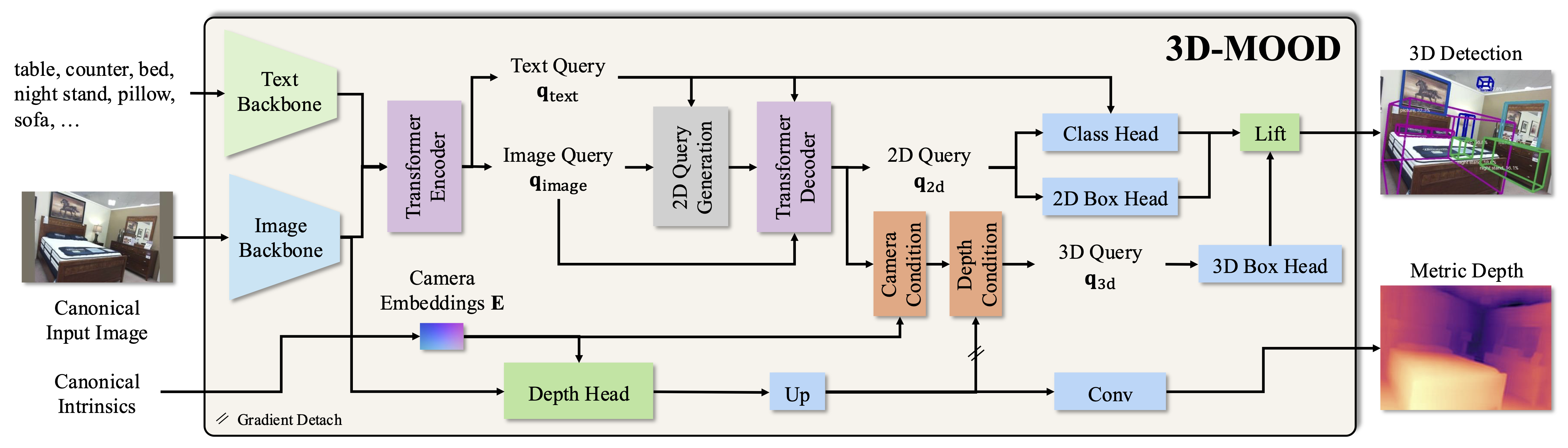
# 3D-MOOD: Lifting 2D to 3D for Monocular Open-Set Object Detection
\
> [**3D-MOOD: Lifting 2D to 3D for Monocular Open-Set Object Detection**](https://royyang0714.github.io/3D-MOOD) \
> Yung-Hsu Yang, Luigi Piccinelli, Mattia Segu, Siyuan Li, Rui Huang, Yuqian Fu, Marc Pollefeys, Hermann Blum, Zuria Bauer \
> ICCV 2025,
> *Paper at [arXiv 2507.23567](https://arxiv.org/pdf/2507.23567.pdf)*
## News and ToDo
- [x] `27.08.2025`: Add `scripts/demo.py` and [Huggingface Demo](https://huggingface.co/spaces/RoyYang0714/3D-MOOD)!
- [x] `25.08.2025`: Release code and models.
- [x] `25.06.2025`: 3D-MOOD is accepted at ICCV 2025!
## Getting Started
We use [Vis4D](https://github.com/SysCV/vis4d) as the framework to implement 3D-MOOD.
Please check the [document](https://vis4d.readthedocs.io) for more details.
### Installation
We support Python 3.11+ and PyTorch 2.4.0+.
Please install the correct PyTorch version according to your own hardware settings.
```bash
conda create -n opendet3d python=3.11 -y
conda activate opendet3d
# Install Vis4D
# It should also install the PyTorch with CUDA support. But please check.
pip install vis4d==1.0.0
# Install CUDA ops
pip install git+https://github.com/SysCV/vis4d_cuda_ops.git --no-build-isolation --no-cache-dir
# Install 3D-MOOD
pip install -v -e .
```
### Demo
We provide the [`demo.py`](./scripts/demo.py) to test whether the installation is complete.
```bash
python scripts/demo.py
```
It will save the prediction as follows to `assets/demo/output.png`.
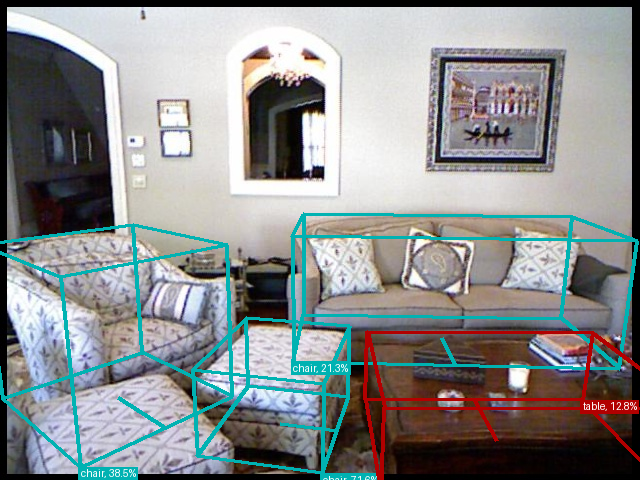
You can also try the live demo on [here](https://huggingface.co/spaces/RoyYang0714/3D-MOOD)!
### Data Preparation
We provide the HDF5 files and annotations [here](https://huggingface.co/datasets/RoyYang0714/3D-MOOD) for ScanNet v2, Argoverse 2, and the depth GT for Omni3D datasets.
For training and testing with [OmniD](https://github.com/facebookresearch/omni3d/blob/main/DATA.md), please refer to [DATA](./docs/DATA.md) to setup the Omni3D data.
We also illustrate the coordinate system we use [here](./docs/COORDINATE.md).
The final data folder should be like:
```bash
REPO_ROOT
├── data
│ ├── omni3d
│ │ └── annotations
│ ├── KITTI_object
│ ├── KITTI_object_depth
│ ├── nuscenes
│ ├── nuscenes_depth
│ ├── objectron
│ ├── objectron_depth
│ ├── SUNRGBD
│ ├── ARKitScenes
│ ├── ARKitScenes_depth
│ ├── hypersim
│ ├── hypersim_depth
│ ├── argoverse2
│ │ ├── annotations
│ │ └── val.hdf5
│ └── scannet
│ ├── annotations
│ └── val.hdf5
```
By default, we use `HDF5` as the data backend in our provided config.
You can convert each folder using the [script](https://github.com/SysCV/vis4d/blob/main/vis4d/data/io/to_hdf5.py) to generate them.
It is worth noting that if you download the provided `.hdf5` from [here](https://huggingface.co/datasets/RoyYang0714/3D-MOOD), you only need to convert each omni3d dataset to HDF5.
To be more specific:
```bash
cd data
python -m vis4d.data.io.to_hdf5 -p KITTI_object
python -m vis4d.data.io.to_hdf5 -p KITTI_object_depth # Only needed if you generate depth on your own
...
python -m vis4d.data.io.to_hdf5 -p hypersim
python -m vis4d.data.io.to_hdf5 -p hypersim_depth # Only needed if you generate depth on your own
```
Then you will have all datasets in `.hdf5`.
The other solution is to change the `data_backend` in the [configs](./opendet3d/zoo/gdino3d/gdino3d_swin_t_omni3d.py#50) to `FileBackend`.
### Model Zoo
Note that the score of Argoverse 2 and ScanNet is the proposed open detection score (**ODS**), and the score forthe Omni3D test set is AP.
| Backbone | Config | Omni3D | **Argoverse 2** | **ScanNet** |
|:--------:|:------:|:------:|:---------------:|:-----------:|
| [Swin-T](https://huggingface.co/RoyYang0714/3D-MOOD/resolve/main/gdino3d_swin-t_120e_omni3d_699f69.pt) | [config](./opendet3d/zoo/gdino3d/gdino3d_swin_t_omni3d.py) | 28.4 | 22.4 | 30.2 |
| [Swin-B](https://huggingface.co/RoyYang0714/3D-MOOD/resolve/main/gdino3d_swin-b_120e_omni3d_834c97.pt) | [config](./opendet3d/zoo/gdino3d/gdino3d_swin_b_omni3d.py) | 30.0 | 23.8 | 31.5 |
For per-dataset results for Omni3D, please refer to Table 3 of the paper.
### Testing
```bash
# Swin-T
vis4d test --config opendet3d/zoo/gdino3d/gdino3d_swin_t_omni3d.py --gpus 1 --ckpt https://huggingface.co/RoyYang0714/3D-MOOD/resolve/main/gdino3d_swin-t_120e_omni3d_699f69.pt
# Swin-B
vis4d test --config opendet3d/zoo/gdino3d/gdino3d_swin_b_omni3d.py --gpus 1 --ckpt https://huggingface.co/RoyYang0714/3D-MOOD/resolve/main/gdino3d_swin-b_120e_omni3d_834c97.pt
```
### Training
We use a batch size of `128` to train our models.
The setting is assumed to be running on the cluster using RTX 4090.
```bash
# Swin-T
vis4d fit --config opendet3d/zoo/gdino3d/gdino3d_swin_t_omni3d.py --gpus 8 --nodes 4 --config.params.samples_per_gpu=4
# Swin-B
vis4d fit --config opendet3d/zoo/gdino3d/gdino3d_swin_b_omni3d.py --gpus 8 --nodes 8
```
### ScanNet200
We also provide the code to reproduce our ScanNet200 results in the supplementary.
Note that it will take a longer time since we need to chunk the classes.
```bash
vis4d test --config opendet3d/zoo/gdino3d/gdino3d_swin_b_scannet200.py --gpus 1 --ckpt https://huggingface.co/RoyYang0714/3D-MOOD/resolve/main/gdino3d_swin-b_120e_omni3d_834c97.pt
```
### Visualization
It will dump all the visualization results under `vis4d-workspace/gdino3d_swin-b_omni3d/${VERSION}/vis/test/`.
```bash
vis4d test --config opendet3d/zoo/gdino3d/gdino3d_swin_b_omni3d.py --gpus 1 --ckpt https://huggingface.co/RoyYang0714/3D-MOOD/resolve/main/gdino3d_swin-b_120e_omni3d_834c97.pt --vis --config.params.nms=True --config.params.score_threshold=0.1
```
## Citation
If you find our work useful in your research, please consider citing our publications:
```bibtex
@InProceedings{Yang_2025_ICCV,
author = {Yang, Yung-Hsu and Piccinelli, Luigi and Segu, Mattia and Li, Siyuan and Huang, Rui and Fu, Yuqian and Pollefeys, Marc and Blum, Hermann and Bauer, Zuria},
title = {3D-MOOD: Lifting 2D to 3D for Monocular Open-Set Object Detection},
booktitle = {Proceedings of the IEEE/CVF International Conference on Computer Vision (ICCV)},
month = {October},
year = {2025},
pages = {7429-7439}
}
```


 \
\