# Qu1cksc0pe






All-in-One malware analysis tool for analyze many file types, from Windows binaries to E-Mail files.
*You can get*:
- What DLL files are used.
- Functions and APIs.
- Sections and segments.
- URLs, IP addresses and emails.
- Android permissions (Dangerous/Special/Info).
- MITRE ATT&CK mappings (Windows + Linux static analysis).
- File extensions and their names.
- Embedded executables/exploits.
And so on...
Qu1cksc0pe aims to get even more information about suspicious files and helps user realize what that file is capable of.
# Qu1cksc0pe Can Analyze Currently
| Files | Analysis Type |
| :--- | :--- |
| Windows Executables (.exe, .dll, .msi, .bin) | Static, Dynamic |
| Linux Executables (.elf, .bin) | Static, Dynamic |
| MacOS Executables (mach-o) | Static |
| Android Files (.apk, .jar, .dex) | Static, Dynamic(for now .apk only) |
| Golang Binaries (Linux) | Static |
| Document Files | Static; sandboxed VBA behavior emulation when macros are present |
| VBScript/VBA Family (.vbs, .vbe, .vba, .vb, .bas, .cls, .frm) | Static + sandboxed behavior emulation (`--docs`) |
| AppleScript Source (.applescript, including content detected under misleading VB-family extensions) | Static (`--analyze`) |
| HTML Documents (.html, .htm) | Static + isolated inline JavaScript behavior emulation (`--analyze`) |
| JavaScript (.js) | Static + isolated behavior emulation (`--analyze`) |
| HTA / HTML Application (.hta) | Static + isolated JScript behavior emulation (`--analyze`) |
| Windows Batch Scripts (.bat, .cmd, including content detected under misleading VB-family extensions) | Static (`--analyze`) |
| Windows Shortcut (.lnk) | Static (`--analyze`) |
| Archive Files (.zip, .rar, .ace) | Static |
| PCAP Files (.pcap) | Static |
| PowerShell Scripts (.ps1, .PS1) | Static + bounded in-memory behavior emulation (`--analyze`) |
| E-Mail Files (.eml) | Static |
# MCP Server
Qu1cksc0pe ships an [MCP](https://modelcontextprotocol.io) server (`Modules/mcp_server.py`) that exposes its static-analysis features as tools for MCP-aware clients (Claude Code, Claude Desktop, etc.). It shells out to `qu1cksc0pe.py` the same way the Web UI does, so it needs no code changes to stay in sync with the CLI, and it only imports the `mcp` package itself at startup (the individual analyzers' own dependencies are only needed once a tool actually runs).
Install the extra dependency (already included in `requirements.txt`):
```bash
pip install "mcp>=2.0.0"
```
Launch it through the `--mcp` flag, same as every other Qu1cksc0pe command:
```bash
python3 qu1cksc0pe.py --mcp
```
**Transport defaults to `streamable-http`** (binds `127.0.0.1:8765/mcp`), so the server is a persistent process any number of clients can attach to and detach from independently -- run it once in its own terminal, point clients at `http://127.0.0.1:8765/mcp`. Override with:
```bash
SC0PE_MCP_TRANSPORT=stdio python3 qu1cksc0pe.py --mcp # traditional one-client-per-process model
```
| Env var | Default | |
| :--- | :--- | :--- |
| `SC0PE_MCP_TRANSPORT` | `streamable-http` | `streamable-http`, `stdio`, or `sse`. |
| `SC0PE_MCP_HOST` | `127.0.0.1` | Bind address for `streamable-http`/`sse`. |
| `SC0PE_MCP_PORT` | `8765` | Bind port for `streamable-http`/`sse`. |
| `SC0PE_MCP_HTTP_PATH` | `/mcp` | URL path for `streamable-http`. |
A project-level `.mcp.json` is included so Claude Code picks the server up automatically for this repo. It pins `stdio` explicitly (via `env`), since Claude Code spawns and owns a fresh process per session rather than attaching to one you started yourself:
```json
{
"mcpServers": {
"qu1cksc0pe": {
"command": "python3",
"args": ["qu1cksc0pe.py", "--mcp"],
"env": { "SC0PE_MCP_TRANSPORT": "stdio" }
}
}
}
```
If `python3` on your `PATH` isn't the interpreter with Qu1cksc0pe's dependencies installed (common on Windows, or with multiple Python installs), change `command` to the full path of the right `python`/`python.exe`, or run `python3 -c "import mcp"` first to check.
**Tools:** `analyze_file`, `analyze_document`, `analyze_archive`, `detect_packer`, `detect_language`, `extract_iocs`, `check_resources`, `check_signatures`, `scan_hash`, `scan_virustotal`, `configure_virustotal_api_key`, `configure_ai_api_key`, `update_hash_database`, `list_supported_file_types`. Each tool validates its input file/folder locally (rejecting files >= 50MB, since the CLI would otherwise prompt interactively) before invoking the CLI, and returns the resulting JSON report(s) plus captured console output. Interactive-only features (`--watch` dynamic analysis, `--ui`, `--install`) are intentionally not exposed as tools.
The five analysis tools that support `ai=True` also take an `ai_provider` argument (`"auto"`/`"ollama"` (default, local), `"claude"`, `"openai"`, `"deepseek"`, `"kimi"`, or `"glm"`) -- see [AI Analysis Providers](#ai-analysis-providers) below. Configure a cloud key first with `configure_ai_api_key(provider="claude", api_key="...")` (or whichever provider).
**Logs:** every tool call and CLI dispatch (command, duration, exit code, reports collected) is logged to stderr and to `sc0pe_reports/mcp/mcp_server.log`. Set `SC0PE_MCP_LOG_LEVEL=DEBUG` for full stderr output too, or `SC0PE_MCP_LOG_FILE=0` to disable the file sink.
# AI Analysis Providers
`--ai` (and the MCP tools' `ai=True`) summarizes a generated report with an LLM. Ollama (local) is the default; five cloud backends are also supported.
| Provider | Flag/value | Env var |
| :--- | :--- | :--- |
| Ollama (default) | `auto` or `ollama` | `OLLAMA_HOST` |
| Claude (Anthropic) | `claude` | `ANTHROPIC_API_KEY` |
| OpenAI | `openai` | `OPENAI_API_KEY` |
| DeepSeek | `deepseek` | `DEEPSEEK_API_KEY` |
| Kimi (Moonshot AI) | `kimi` | `MOONSHOT_API_KEY` |
| GLM (Zhipu AI) | `glm` | `ZHIPUAI_API_KEY` |
Ollama needs no key -- install Ollama and select the model via `[Ollama] model` in `Systems/Multiple/multiple.conf`. For a cloud provider, either set its env var above, or save a key through the interactive key manager:
```bash
python qu1cksc0pe.py --key_init
# >>> Qu1cksc0pe API Key Manager
# 1) VirusTotal
# 2) Claude (Anthropic)
# 3) OpenAI
# 4) DeepSeek
# 5) Kimi (Moonshot AI)
# 6) GLM (Zhipu AI)
# 0) Exit
```
`--key_init --key_provider ` (e.g. `--key_provider claude`) skips the menu and prompts for just that one key -- useful for scripts (this is what the MCP server's `configure_ai_api_key`/`configure_virustotal_api_key` tools do under the hood).
```bash
# Explicit provider selection (auto/ollama is the default -- no flag needed for local analysis)
python qu1cksc0pe.py --file suspicious_file --analyze --ai --ai_provider claude
```
The default (`auto`/unset) is unchanged from prior versions: Ollama, falling back to a heuristic summary if it's unavailable. Cloud providers are strictly opt-in -- report data is only sent off-machine if you explicitly pass `--ai_provider ` or set `SC0PE_AI_PROVIDER`. See the [Environment Variables](#environment-variables) table for model/base-URL/timeout/token tuning per provider.
# Usage
```bash
python qu1cksc0pe.py --file suspicious_file --analyze
```
```bash
# Launch Web UI
python3 qu1cksc0pe.py --ui
```
# Screenshot

# Updates
18/09/2026
- [X] Windows dynamic analysis: improved x86/x64 API tracing, process-tree monitoring, PID reuse handling, and debugger cleanup. Live-memory YARA/IOC scanning, bounded memory exports, and process injection/hollowing checks are enabled by default. Correlated API sequences and image anomalies are reported as candidates, not confirmed malicious execution.
- [X] Linux dynamic analysis: `--watch` now supports process-tree monitoring with `strace`/`ltrace`, network connections, open files, live-memory YARA/IOC scanning, and structured behavior observations. Reports record collection errors and incomplete coverage.
- [X] Android dynamic analysis: added explicit ADB device selection, APK installation or installed-package monitoring, native/Java Frida hooks, process tracking, logcat, file changes, and sampled memory analysis. Fixed stale Frida detach events affecting replacement sessions; APK/device ABI compatibility and installation failures are now reported.
- [X] Android static analysis: improved manifest, permissions, component, and network-security checks; bounded archive/member scanning; and isolated JADX output. Limited `aapt` recovery preserves package identity and observed permissions when the manifest parser fails. Partial decompilation is reported explicitly, and generic component names no longer establish a malware-family candidate.
- [X] YARA updates: expanded the bundled rules and added Koodous metadata compatibility for Android. Missing metadata remains unknown; compilation failures and partial scans are visible in reports. Fixed lost matches from rules without string instances and overly broad conditions that caused false positives. Added `tools/audit_yara_rules.py` to check compilation and empty-input matches.
14/09/2026
- [X] New feature: PowerShell analysis (`--analyze`) now includes Qu1cksc0pe's bounded, in-memory abstract emulator. It models supported PowerShell operations and selected .NET APIs to report dynamic code, network requests, process attempts, and filesystem activity without invoking a real PowerShell runtime or fetching network responses. Unsupported operations, unresolved inputs, and resource limits can leave the analysis incomplete; speculative behavior does not establish runtime reachability.
01/09/2026
- [X] New feature: malicious JavaScript can now be emulated automatically during HTML/JS/HTA analysis by a native, bounded abstract interpreter. Browser, WSH, ActiveX, Node.js network/process/filesystem/registry APIs and decoded `eval` layers are modeled entirely in memory; sample code, commands, files, and network requests are never executed on the host.
25/08/2026
- [X] New feature: Office VBA projects and plaintext VBScript/VBA-family files are now emulated automatically in a native, in-memory sandbox during `--docs` analysis. The normal static scan still runs, and JSON reports include the emulation findings, IOC event trace, network requests, process attempts, persistence activity, and virtual files.
- [X] New feature: added AppleScript source analysis to `Modules/apple_analyzer.py`, including execution, network, credential-access, collection, persistence, defense-evasion, filesystem, shell-command, URL, and YARA indicators. Use `--analyze`; AppleScript is never executed through `osascript`.
- [X] New feature: added dedicated Windows Batch analysis for `.bat`/`.cmd` files, with execution, persistence, defense-evasion, download/network, obfuscation, IOC, and YARA detection.
12/08/2026
- [X] New feature: added an MCP server (`--mcp`, `Modules/mcp_server.py`, `.mcp.json`) exposing Qu1cksc0pe as tools for MCP clients like Claude Code, defaulting to `streamable-http` (persistent, multi-client; `stdio`/`sse` also available) with logging to stderr and `sc0pe_reports/mcp/mcp_server.log` (`SC0PE_MCP_LOG_LEVEL`/`SC0PE_MCP_LOG_FILE`). See the "MCP Server" section above.
- [X] New feature: `--ai` now supports Claude, OpenAI, DeepSeek, Kimi, and GLM as alternative backends to Ollama via `--ai_provider`/`SC0PE_AI_PROVIDER` (or the MCP tools' `ai_provider` argument). Ollama stays the local-only default unless a cloud provider is explicitly selected; see "AI Analysis Providers" above.
- [X] New feature: `--key_init` is now an interactive menu covering VirusTotal + all five AI providers instead of a single VirusTotal-only prompt. `--key_init --key_provider ` skips the menu for scripted use.
- [X] Bug fix: `--key_init` saved (and could silently overwrite) an empty API key if you pressed Enter without typing anything. Empty input is now rejected.
- [X] Bug fix: `execute_module()`'s `os.system()` call mis-quoted its command on Windows, silently breaking every analysis whenever the interpreter or project path contained a space.
# Available On


 # Recommended Systems
- [X] Parrot OS
- [X] Kali Linux
- [X] Windows 10 or 11
# Recommended Systems
- [X] Parrot OS
- [X] Kali Linux
- [X] Windows 10 or 11
And also another Linux distributions like as Kali/Parrot
# Setup and Installation
> [!NOTE]
> If you encounter issues with the Python modules, creating a Python virtual environment (python_venv) should resolve them.
> For detailed setup and troubleshooting (dependencies, Docker usage, Windows notes), see the project overview documentation.
> AI model selection is manual: set `[Ollama] model` in `Systems/Multiple/multiple.conf` to the exact model you want to use.
```bash
# First you need to clone Qu1cksc0pe with this command
git clone --depth 1 https://github.com/CYB3RMX/Qu1cksc0pe
# After cloning the repository YOU MUST create a python virtual environment (for handling python modules)
virtualenv -p python3 sc0pe_venv
source sc0pe_venv/bin/activate
# You can simply execute the following command it will do everything for you!
bash setup.sh
#
# setup.sh also installs required system tools (e.g. adb, strings, unzip, 7z) and sets up JADX.
# If you want to install Qu1cksc0pe on your system just execute the following commands.
python qu1cksc0pe.py --install # Optional
# To prevent interpreter errors after installation, use dos2unix.
dos2unix /usr/bin/qu1cksc0pe
# Or you can use Qu1cksc0pe from Docker!
docker build -t qu1cksc0pe .
docker run -it --rm -v $(pwd):/data qu1cksc0pe:latest --file /data/suspicious_file --analyze
# For Windows systems you need to execute the following command (Powershell)
# PS C:\Users\user\Desktop\Qu1cksc0pe> .\setup.ps1
#
# setup.ps1 handles winget dependency fallback, Python + 7-Zip setup,
# Sysinternals strings EULA acceptance, and resilient Ollama installation.
# If cloud model auth is needed, run:
# ollama signin
# ollama pull kimi-k2.5:cloud
```
# Environment Variables
You can change some analyzer behaviors via environment variables (useful for CI, reproducibility, or controlling report size/timeouts).
**Linux/macOS (bash/zsh) example**
```bash
SC0PE_ANDROID_REPORT_DETAILED=1 python qu1cksc0pe.py --file app.apk --analyze --report
```
**Windows (PowerShell) example**
```powershell
$env:SC0PE_ANDROID_REPORT_DETAILED="1"
python .\\qu1cksc0pe.py --file app.apk --analyze --report
```
| Variable | Default | What It Does |
| :--- | :--- | :--- |
| `SC0PE_ANDROID_REPORT_DETAILED` | `0` | Android analyzer JSON becomes more verbose (keeps larger fields and higher limits). Includes more details under `resource_scan`, and keeps large duplicate fields like `code_patterns` more often. |
| `SC0PE_WINDOWS_REPORT_DETAILED` | `0` | Windows analyzer stores per-category API lists in more detail (instead of unique API names only). |
| `SC0PE_AUTO_DECRYPT_CHAIN` | `0` | Document analyzer: when an Office document decryption succeeds, automatically re-runs analysis on the decrypted output (best-effort). |
| `SC0PE_AI_INTERESTING_PATTERNS_MAX_KEYS` | `25` | AI analyzer: limit how many keys from `interesting_string_patterns` are included in the LLM prompt. |
| `SC0PE_AI_INTERESTING_PATTERNS_MAX_VALUES` | `30` | AI analyzer: limit list size per `interesting_string_patterns` key in the LLM prompt. |
| `SC0PE_AI_INCLUDE_TEMP_EXCERPT` | `0` | AI analyzer: include raw `temp.txt` excerpt in prompt when set to `1` (default is parsed/summarized mode without raw excerpt). |
| `SC0PE_AI_TEMP_TXT_EXCERPT_CHARS` | `800` | AI analyzer: character limit for raw `temp.txt` excerpt (used when `SC0PE_AI_INCLUDE_TEMP_EXCERPT=1`). |
| `SC0PE_AI_TEMP_TXT_MAX_STRINGS` | `50` | AI analyzer: limit number of meaningful strings selected from parsed `temp.txt`. |
| `SC0PE_AI_TEMP_TXT_MIN_LEN` | `6` | AI analyzer: minimum length for a meaningful string extracted from `temp.txt`. |
| `SC0PE_AI_TEMP_TXT_MAX_LEN` | `180` | AI analyzer: maximum length for a meaningful string extracted from `temp.txt`. |
| `SC0PE_AI_TEMP_PARSE_MAX_BYTES` | `2097152` | AI analyzer: max bytes to parse from `temp.txt` while building compact evidence. |
| `SC0PE_AI_TEMP_PARSE_MAX_LINES` | `12000` | AI analyzer: max lines to parse from `temp.txt`. |
| `SC0PE_AI_TEMP_SAMPLE_LINES` | `2500` | AI analyzer: sample size used for meaningful-string scoring. |
| `SC0PE_AI_TEMP_IOC_CAP` | `40` | AI analyzer: cap for IoC candidates parsed from `temp.txt`. |
| `SC0PE_AI_TEMP_IOC_PROMPT_MAX` | `20` | AI analyzer: max parsed IoC values per kind sent to LLM prompt. |
| `SC0PE_AI_MAX_REPORT_CHARS` | `180000` | AI analyzer: threshold for full-report prompt mode; larger reports are compacted automatically. |
| `SC0PE_AI_COMPACT_MAX_LIST_ITEMS` | `40` | AI analyzer: list sampling limit in compact report mode. |
| `SC0PE_AI_COMPACT_MAX_STR` | `220` | AI analyzer: max string length per field in compact report mode. |
| `SC0PE_AI_COMPACT_MAX_DEPTH` | `4` | AI analyzer: nested depth limit in compact report mode. |
| `SC0PE_AI_OLLAMA_HTTP_TIMEOUT` | `60` | AI analyzer: Ollama HTTP call timeout (seconds). |
| `SC0PE_AI_HTTP_PROBE_TIMEOUT` | `20` | AI analyzer: short probe timeout before full HTTP generation call (seconds). |
| `SC0PE_AI_OLLAMA_CLI_TIMEOUT` | `90` | AI analyzer: Ollama CLI call timeout (seconds). |
| `SC0PE_AI_TOTAL_BUDGET` | `120` | AI analyzer: total generation budget across retries/fallback attempts (seconds). |
| `SC0PE_AI_OLLAMA_NUM_PREDICT` | `700` | AI analyzer: default generation token budget per Ollama call. |
| `SC0PE_AI_OLLAMA_RETRY_NUM_PREDICT` | `1400` | AI analyzer: generation token budget for retry when output looks truncated. |
| `SC0PE_AI_OLLAMA_NUM_CTX` | `8192` | AI analyzer: Ollama context window setting. |
| `SC0PE_AI_DISABLE_THINK` | `1` | AI analyzer: sends `think=false` (if supported) and removes thinking artifacts from displayed/saved output. |
| `SC0PE_AI_ALLOW_MODEL_FALLBACK` | `1` | AI analyzer: when `1`, can try locally available Ollama models if configured model fails/unavailable. |
| `SC0PE_AI_SKIP_CLOUD_WHEN_LOCAL` | `1` | AI analyzer: prefer local models over cloud-tagged models when local options exist. |
| `SC0PE_AI_SKIP_CLOUD_CLI` | `1` | AI analyzer: skip cloud-tagged models for CLI fallback attempts. |
| `SC0PE_AI_MAX_MODEL_CANDIDATES` | `4` | AI analyzer: maximum number of candidate models to try in fallback chain. |
| `SC0PE_AI_PROVIDER` | `auto` | AI analyzer backend: `auto`/`ollama` (default, local, nothing below applies), `claude`, `openai`, `deepseek`, `kimi`, or `glm`. Same as `--ai_provider`; the flag wins if both are set. |
| `SC0PE_AI_CLAUDE_MODEL` | `claude-haiku-4-5-20251001` | AI analyzer: model used when `SC0PE_AI_PROVIDER=claude`. |
| `SC0PE_AI__MODEL` | see below | AI analyzer: model for `openai`/`deepseek`/`kimi`/`glm` (e.g. `SC0PE_AI_DEEPSEEK_MODEL`). Defaults: `openai`=`gpt-4o-mini`, `deepseek`=`deepseek-chat`, `kimi`=`moonshot-v1-8k`, `glm`=`glm-4-flash`. Cloud model names drift; override if stale. |
| `SC0PE_AI__BASE_URL` | provider default | AI analyzer: chat-completions endpoint for `openai`/`deepseek`/`kimi`/`glm`, in case a provider changes its API URL. |
| `SC0PE_AI_CLAUDE_MAX_TOKENS` / `SC0PE_AI__MAX_TOKENS` | `1200` | AI analyzer: response token cap for the respective cloud provider. |
| `SC0PE_AI_CLOUD_HTTP_TIMEOUT` | `90` | AI analyzer: HTTP timeout (seconds) for any cloud provider call. |
| `ANTHROPIC_API_KEY` / `OPENAI_API_KEY` / `DEEPSEEK_API_KEY` / `MOONSHOT_API_KEY` / `ZHIPUAI_API_KEY` | unset | AI analyzer: cloud provider API keys. Take precedence over keys saved via `--key_init`. |
| `SC0PE_AI_FILTER_WHITELIST_DOMAINS` | `1` | AI IoC sanitizer: filter legit/whitelisted domains using `Systems/Multiple/whitelist_domains.txt`. |
| `SC0PE_AI_ALLOW_SHORT_DOMAINS` | `0` | IoC sanitizer: allow very short SLD domains (disabled by default to reduce false positives). |
| `SC0PE_AI_MIN_SLD_LEN` | `4` | IoC sanitizer: minimum registrable-label length for domain validation. |
| `SC0PE_AI_ALLOW_FILELIKE_TLDS` | `0` | IoC sanitizer: when `0`, filters file-like pseudo-domains such as `sheet1.xml`. |
| `SC0PE_AI_KEEP_LOCAL_PATHS` | `0` | IoC sanitizer: when `0`, removes local analysis machine paths from `file_paths`. |
| `SC0PE_DOC_AUTO_EXTRACT_MACROS` | `1` | Document analyzer: automatically extract detected VBA/XLM macros into report output (`0` disables). |
| `SC0PE_REPORT_MAX_MACRO_CHARS` | `50000` | Document analyzer: per-macro text cap used while saving extracted macro content into JSON report. |
| `SC0PE_EMAIL_DNSBL_FILTER_NOISY` | `1` | Email analyzer: filter noisy DNSBL providers to reduce false positives. |
| `SC0PE_EMAIL_DNSBL_ALLOW_UNKNOWN` | `0` | Email analyzer: include/exclude DNSBL hits with unknown category. |
| `SC0PE_EMAIL_DNSBL_NOISY_PROVIDERS` | unset | Email analyzer: comma-separated extra DNSBL providers to treat as noisy. |
| `SC0PE_AUTO_CLEANUP_ATTACHMENTS` | unset | Email analyzer: set `1` for auto-delete, `0` for never-delete, unset for interactive prompt. |
| `OLLAMA_HOST` | `http://127.0.0.1:11434` | AI report analysis backend (Ollama). Set this if Ollama is remote or on a different host/port. |
| `JAVA_HOME` | unset | Android analyzer: helps locate Java runtime for JADX. Set this if Java is installed but not detected. |
# Static Analysis
## Normal analysis
Description: You can perform basic analysis and triage against your samples.
Usage: ```python qu1cksc0pe.py --file suspicious_file --analyze```

## Resource analysis
Description: With this feature you can analyze assets of given file. Also you can detect and extract embedded payloads from malware samples such as AgentTesla, Formbook etc.
Effective Against:
- .NET Executables
Usage: ```python qu1cksc0pe.py --file suspicious_file --resource```
> [!NOTE]
> Android APK resource scanning was moved into the Android analyzer. Use:
> `python qu1cksc0pe.py --file app.apk --analyze --report`
> The JSON report includes `resource_scan`. Set `SC0PE_ANDROID_REPORT_DETAILED=1` to keep more details in the report.

## Hash scan
Description: You can check if hash value of the given file is in built-in malware hash database. Also you can scan your directories with this feature.
Usage: ```python qu1cksc0pe.py --file suspicious_file --hashscan```

## Folder scan
Supported Arguments:
- ```--hashscan```
- ```--packer```
Usage: ```python qu1cksc0pe.py --folder FOLDER --hashscan```

## VirusTotal
Report Contents:
- ```Threat Categories```
- ```Detections```
- ```CrowdSourced IDS Reports```
Usage for --vtFile: ```python qu1cksc0pe.py --file suspicious_file --vtFile```
> [!NOTE]
> In Web UI flow, `Standart Analysis`, `Document`, and `Archive` presets also execute VirusTotal file lookup in background and show the result in the report page.

## Document scan
Description: This feature performs deep inspection of document files and VBScript/VBA-family source. It detects and extracts possible malicious links, embedded exploits/payloads, and macro code. When plaintext VBA/VBScript is available, Qu1cksc0pe also runs it automatically through its in-memory behavior-emulation sandbox after the normal static analysis.
Effective Against:
- Word Documents (.doc, .docm, .docx)
- Excel Documents (.xls, .xlsm, .xlsx)
- Portable Document Format (.pdf)
- OneNote Documents (.one)
- Rich Text Format Documents (.rtf)
- VBScript/VBA Family (.vbs, .vbe, .vba, .vb, .bas, .cls, .frm)
Usage: ```python qu1cksc0pe.py --file suspicious_document --docs```
### Automatic VBA/VBScript behavior emulation
The emulator models common VBA/VBScript behavior such as `CreateObject`,
filesystem and registry access, HTTP/COM calls, process creation, WMI,
Office object access, scheduled tasks, decoding, and dynamic execution. All
filesystem, registry, process, and network effects are virtual: analyzed code
does not execute commands or contact remote systems on the host.
- Runs automatically in addition to the static document/script scan.
- Combines all extracted modules into one VBA project namespace so cross-module calls can be observed.
- Invokes conventional Office auto-entry points and recovered Ribbon/shape callbacks where available.
- Uses a fixed 15-second safety budget for each script or VBA project.
- Adds a step-by-step IOC trace and an `emulation` section to JSON reports.
- Skips encoded `.vbe` bodies when plaintext cannot be recovered; their static indicators are still analyzed.
```bash
# Macro-enabled Office document
python qu1cksc0pe.py --file suspicious.xlsm --docs --report
# Plain VBScript/VBA-family source
python qu1cksc0pe.py --file suspicious.vbs --docs --report
```

### Embedded File/Exploit Extraction

## Archive File Scan
Description: With this feature you can perform checks for suspicious files against archive files.
Effective Against:
- ZIP
- RAR
- ACE
Usage: ```python qu1cksc0pe.py --file suspicious_archive_file --archive```
With report: ```python qu1cksc0pe.py --file suspicious_archive_file --archive --report```
With AI support: ```python qu1cksc0pe.py --file suspicious_archive_file --archive --ai```
> [!NOTE]
> ACE archive support requires `7z`/`7zz` to be installed (setup scripts install it on supported systems).

## File signature analyzer
Description: With this feature you can detect and extract embedded executable files(.exe, .elf) from given file. Also you can analyze large files (even 1gb or higher) and extract actual malware samples from them (pumped-file analysis).
Usage: ```python qu1cksc0pe.py --file suspicious_file --sigcheck```

### File Carving

## MITRE ATT&CK Technique Extraction
Description: MITRE ATT&CK mapping is generated automatically during static analysis based on detected APIs/functions/patterns.
Effective Against:
- Windows Executables
- Linux Executables
Usage: ```python qu1cksc0pe.py --file suspicious_file --analyze```

## Android Permission Risk Classification
Description: Android permission analysis now classifies permissions as `Dangerous`, `Special`, or `Info` and writes an aggregate `permission_summary` into JSON reports.
Usage: ```python qu1cksc0pe.py --file suspicious_app.apk --analyze --report```
> [!NOTE]
> In Web UI report page, Android permissions are shown in a dedicated section with counters and per-permission state badges.
## Programming language detection
Description: You can get programming language information from given file.
Usage: ```python qu1cksc0pe.py --file suspicious_executable --lang```

## Interactive shell
Description: You can use Qu1cksc0pe in command line mode.
Usage: ```python qu1cksc0pe.py --console```

# Dynamic Analysis
## Android Application Analysis
> [!NOTE]
> You must connect a virtual device or physical device to your computer.
Usage: ```python qu1cksc0pe.py --watch```
https://github.com/user-attachments/assets/7b27abb9-f18e-4611-8bdd-cd65106b5cf0
## Linux Dynamic Analysis
Description: Linux dynamic flow is menu-driven and lets you choose emulation or live process monitoring.
Usage: ```python qu1cksc0pe.py --watch```
After selecting Linux:
- Option `1`: Binary Emulation (isolated environment).
- Option `2`: PID Monitoring.
Notes:
- PID monitoring accepts both numeric PID and process name.
- Interactive Linux prompts support TAB autocomplete (selection, path, PID/name).
- Emulation fallback order: Docker SDK -> Docker CLI -> host `qemu` (if Docker is unavailable).
## Windows Process Analysis
Usage: ```python qu1cksc0pe.py --watch```
https://github.com/CYB3RMX/Qu1cksc0pe/assets/42123683/a2c84b8f-c12c-47ac-96e9-c345aeda1f54
# References
- The Cyber Security Hub
- Kitploit - Top 20 Most Popular Hacking Tools in 2021
- CSIRT.MAI
- Vulners
- RedPacket Security
- Bournemouth University - CERT
- Hacking Articles - Digital Forensics Tools Mindmap
- HackGit - Twitter Post
- Daily Dark Web - Twitter Post
- SANS ISC - Blog Post
- Korben - Blog Post
- heise online - Blog Post
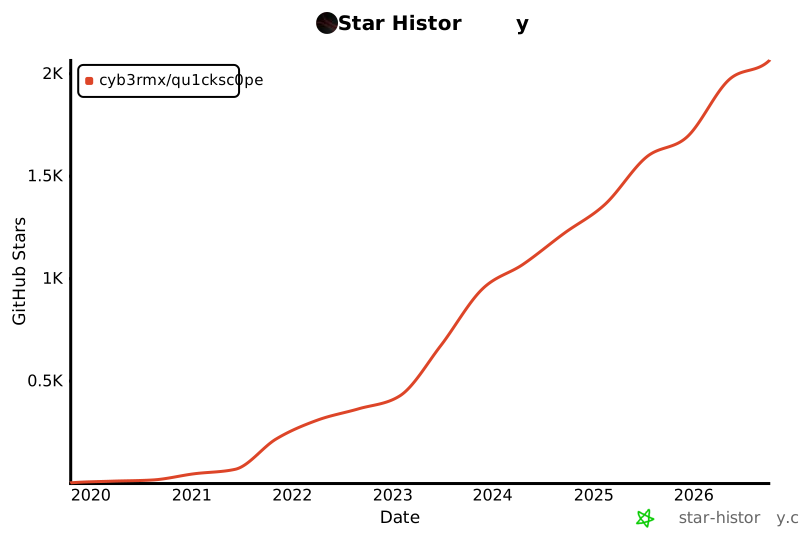
## Star History
[](https://www.star-history.com/#CYB3RMX/Qu1cksc0pe&type=date&legend=top-left)
