# CyberArk Conjur Secret Fetcher
GitHub Action for secure secrets delivery to your workflow test environment using CyberArk Conjur.
Supports authenticating with CyberArk Conjur using host identity and JWT authentication.
## Certification level
[](https://github.com/cyberark/community/blob/master/Conjur/conventions/certification-levels.md)
This repository is a **Certified** level project. It's a community contributed project **reviewed and tested by CyberArk
and trusted to use with Conjur Open Source**. For more detailed information on our certification levels, see [our community guidelines](https://github.com/cyberark/community/blob/master/Conjur/conventions/certification-levels.md#certified).
## Requirements
* Docker and access to DockerHub.
* Github
* Github self hosted Runner
* Conjur Secrets Manager Enterprise v10+
* Conjur Secrets Manager Open Source v1.1+
## Setup
### Prerequisite for running github runner on VM.
1. Install docker (Docker must be install as not root user) --- for Linux OS
* Modify Sudoers File (vi /etc/sudoers)
```yaml
runner ALL=(ALL) ALL
```
* Run command to create group and add user.
```yaml
sudo adduser newuser
sudo groupadd newgroup_name
sudo usermod -aG docker ${USER}
su - ${USER}
id -nG
```
* Step to install docker
```yaml
sudo apt update
sudo apt install apt-transport-https ca-certificates curl software-properties-common
curl -fsSL https://download.docker.com/linux/ubuntu/gpg | sudo apt-key add –
sudo add-apt-repository "deb [arch=amd64] https://download.docker.com/linux/ubuntu bionic stable"
sudo apt update
apt-cache policy docker-ce
sudo apt install docker-ce
sudo systemctl status docker
```
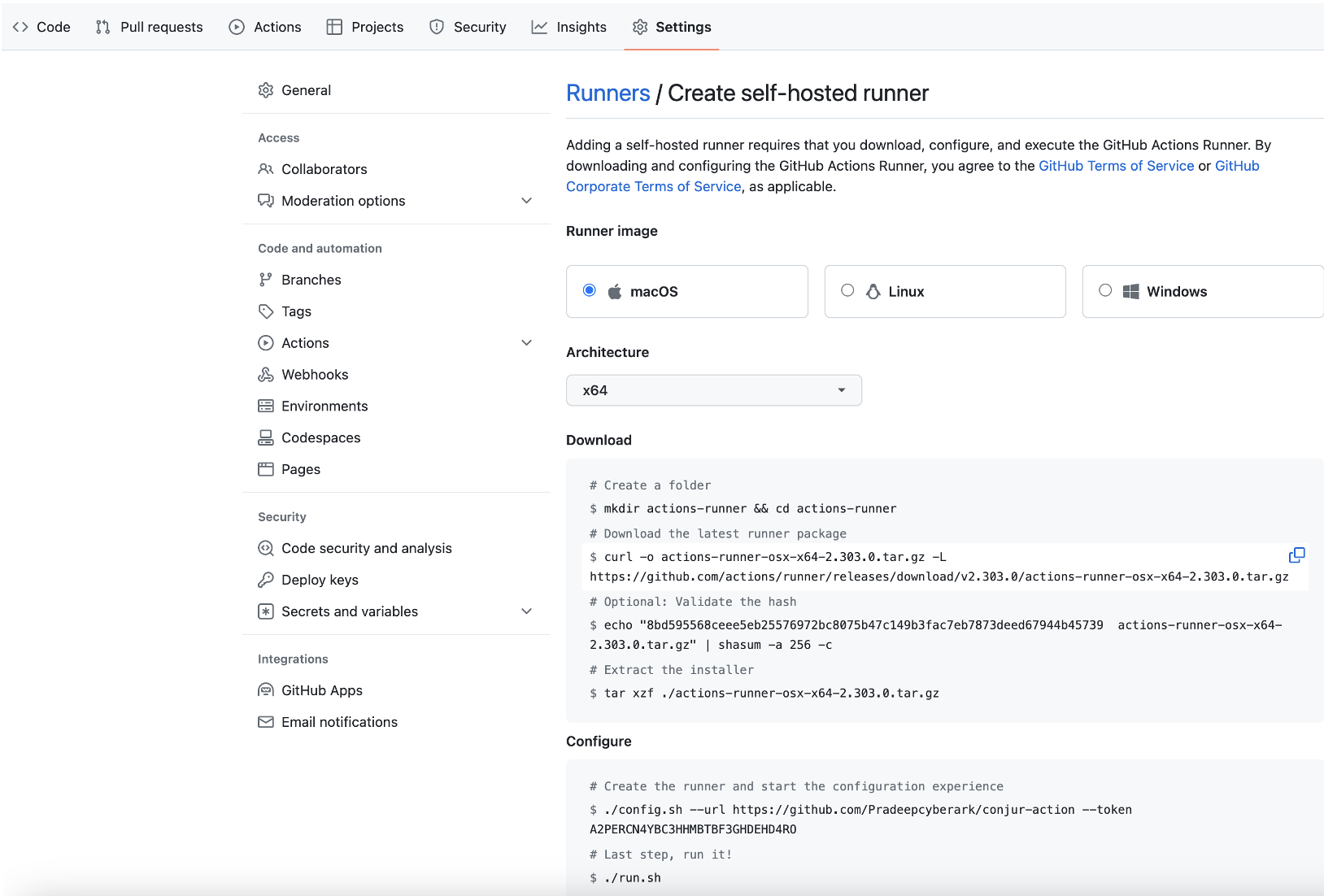
2. Configration of Github action runner in your system.
* Project Github repo and follow the steps below.
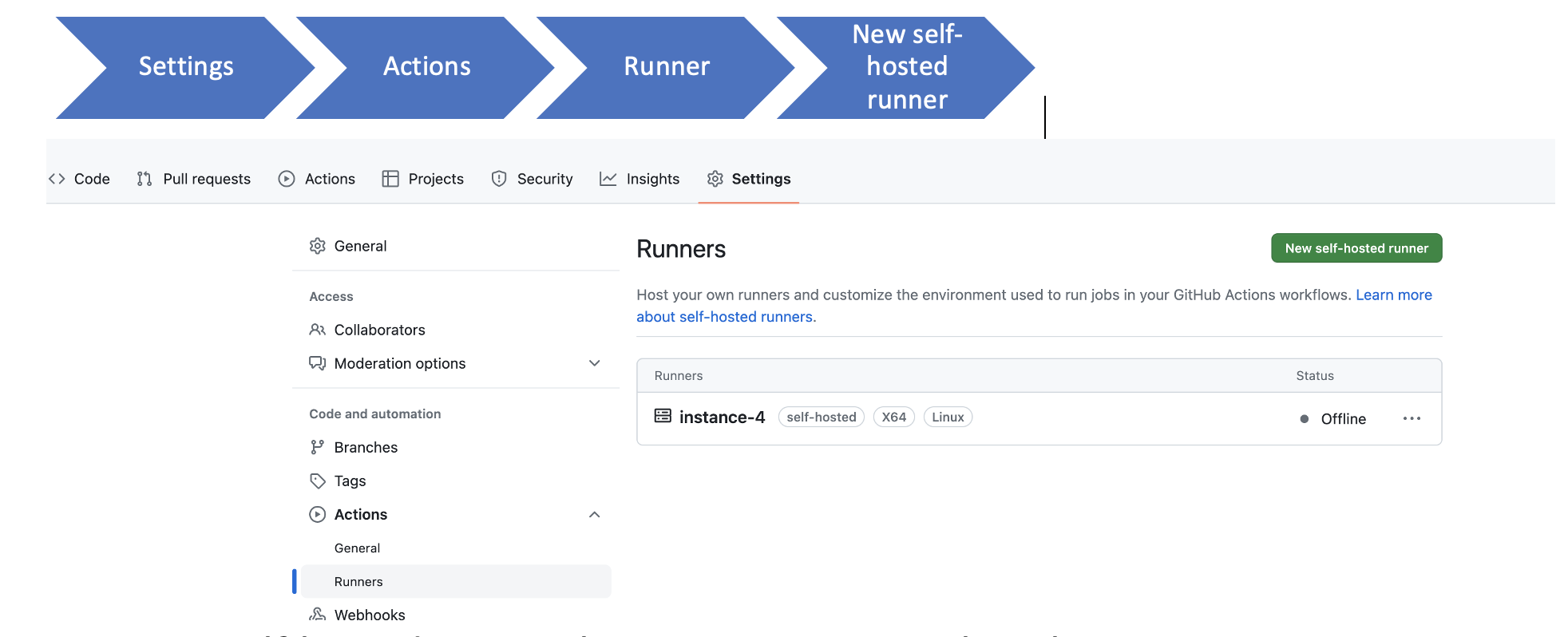 * To create self-hosted runner there are 3 images. Select the image as per your requirement and follow step to download and configure the runner.
 3. Conjur Setup
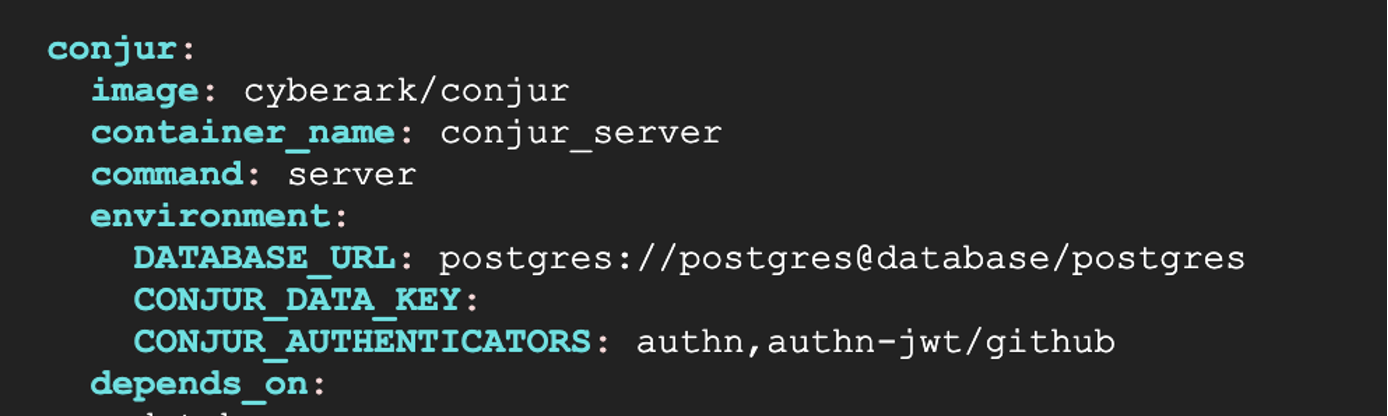
* Need conujr up and running state.
* Need to Enable the authenticators for JWT authentication.
 ## Host Identity
### API Key Based Authentication configuration for .github/workflows .yml file
### Example
```yaml
on: [push]
jobs:
test:
# ...
steps:
# ...
- name: Import Secrets using CyberArk Conjur Secret Fetcher Action
uses: cyberark/conjur-action@v3
with:
url: ${{ secrets.CONJUR_URL }}
account: cyberarkdemo
host_id: ${{ secrets.CONJUR_USERNAME }}
api_key: ${{ secrets.CONJUR_API_KEY }}
secrets: db/sqlusername|sql_username;db/sql_password
allow_insecure_connections: false
# ...
```
### Arguments
#### Required
* `url` - this is the path to your Conjur instance endpoint. e.g. `https://conjur.cyberark.com:8443`
* `account` - this is the account configured for the Conjur instance during deployment.
* `host_id` - this is the Host ID granted to your application by Conjur when created via policy. e.g. `host/db/github_action`
* `api_key` - this is the API key associated with your Host ID declared previously.
* `secrets` - a semi-colon delimited list of secrets to fetch. Refer to [Secrets Syntax](#secrets-syntax) in the README below for more details.
#### Optional
* `allow_insecure_connections` - allows connecting to Conjur instance endpoint over plain HTTP.
* `certificate` - if using a self-signed certificate, provide the contents for validated SSL.
* `authn_token_file` - this is the file path for the Conjur auth token.
#### Not required
* `authn_id` - this is the ID of Authn-JWT at Conjur
* `audience` - does not apply here
### JWT Authentication configuration for .github/workflows .yml file
### Example
```yaml
on: [push]
jobs:
test:
# ...
permissions:
id-token: 'write'
contents: 'read'
steps:
# ...
- name: Import Secrets using CyberArk Conjur Secret Fetcher Action
uses: cyberark/conjur-action@v3
with:
url: ${{ secrets.CONJUR_URL }}
account: cyberarkdemo
authn_id: ${{ secrets.CONJUR_AUTHN_ID }}
secrets: db/sqlusername|sql_username;db/sql_password
allow_insecure_connections: false
# ...
```
### Arguments
#### Required
* `url` - this is the path to your Conjur instance endpoint. e.g. `https://conjur.cyberark.com:8443`
* `account` - this is the account configured for the Conjur instance during deployment.
* `authn_id` - this is the ID of Authn-JWT at Conjur
* `secrets` - a semi-colon delimited list of secrets to fetch. Refer to [Secrets Syntax](#secrets-syntax) in the README below for more details.
#### Optional
* `allow_insecure_connections` - allows connecting to Conjur instance endpoint over plain HTTP.
* `certificate` - if using a self-signed certificate, provide the contents for validated SSL.
#### Not required
* `host_id` - this is the Host ID granted to your application by Conjur when created via policy. e.g. `host/db/github_action`. Use this input if you configured the JWT authenticator without the `token-app-property` variable.
* `api_key` - this is the API key associated with your Host ID declared previously.
* `authn_token_file` - this is the file path for the Conjur auth token.
* `audience` - add a custom `aud` claim value to the JWT.
### Conjur OSS or Enterprise Setup
JWT Authenticator is required at Conjur server. You may wish to refer to [official doc](https://docs.cyberark.com/Product-Doc/OnlineHelp/AAM-DAP/Latest/en/Content/Operations/Services/cjr-authn-jwt.htm?tocpath=Integrations%7CJWT%20Authenticator%7C_____0)
The sample policy below validates GitHub repository & workflow
1. [Sample authenticator policy](github-authn-jwt.yml)
2. [Sample app id policy](github-app-id.yml)
* Create a Conjur policy for the JWT Authenticator
```yaml
- !policy
id: conjur/authn-jwt/github
body:
- !webservice
#Mandatory variable: The JWT provider URI
#Uncomment either 'provider-uri' OR 'jwks-uri'
#- !variable
# id: provider-uri
# jwks-uri for GitHub Actions: https://token.actions.githubusercontent.com/.well-known/jwks
- !variable
id: jwks-uri
#Optional variables
#Uncomment one or all of the following optional variables.
#Note: If you uncomment 'token-app-property' you must also uncomment 'identity-path',
#and vice versa;
#In this example, "token-app-property" is set to "workflow"
#Please refer to README.md for detailed policy and commands
- !variable
id: token-app-property
#In this example, "identity-path" is set to "/github-apps"
#Please refer to README.md for detailed policy and commands
- !variable
id: identity-path
#"issuer" for GitHub Actions: https://token.actions.githubusercontent.com
- !variable
id: issuer
#In this example, "enforced-claims" is set to "workflow,repository"
#Please refer to README.md for detailed policy and commands
- !variable
id: enforced-claims
#- !variable
# id: mapping-claims
#- !variable
# id: audience
#Group of applications that can authenticate using this JWT Authenticator
- !group apps
- !permit
role: !group apps
privilege: [read, authenticate]
resource: !webservice
- !webservice
id: status
#Group of users who can check the status of the JWT Authenticator
- !group
id: operators
- !permit
role: !group operators
privilege: [read]
resource: !webservice status
```
- Load the policy into root:
```
conjur policy load -f /path/to/file/github-authn-jwt.yml -b root
```
* Populate the policy variables
```
conjur variable set -i conjur/authn-jwt/github/issuer -v "https://token.actions.githubusercontent.com"
conjur variable set -i conjur/authn-jwt/github/jwks-uri -v "https://token.actions.githubusercontent.com/.well-known/jwks"
conjur variable set -i conjur/authn-jwt/github/token-app-property -v "workflow"
conjur variable set -i conjur/authn-jwt/github/enforced-claims -v "workflow,repository"
conjur variable set -i conjur/authn-jwt/github/identity-path -v "/github-apps"
```
* Define an app ID (host)
```yaml
- !policy
id: github-apps
body:
- !group
- &hosts
- !host
id: release
annotations:
authn-jwt/github/repository: my-repo/conjur-action
authn-jwt/github/workflow: release
- !grant
role: !group
members: *hosts
- !grant
role: !group conjur/authn-jwt/github/apps
member: !group github-apps
```
- Load the policy into root:
```
conjur policy load -f /path/to/file/github-app-id.yml -b root
```
* Secret Variables and Permissions:
```yaml
- &devvariables
- !variable Dev-Team-credential1
- !variable Dev-Team-credential2
- !variable Dev-Team-credential3
- !variable Dev-Team-credential4
- !permit
resource: *devvariables
privileges: [ read, execute ]
roles: !group github-apps
```
- Load the policy into root:
```
conjur policy load -f /path/to/file/authn-jwt-secret-variables.yml -b root
```
* Set the secret variable
a. Generate a secret
Generate a value for your application’s secret:
```
secretVal=$(openssl rand -hex 12 | tr -d '\r\n')
```
This generates a 12-hex-character value.
b. Store the secret
Store the generated value in Conjur:
```
conjur variable set -i Dev-Team-credential1 -v ${secretVal}
```
### Conjur Cloud Setup
Pre-requisite:
- Conjur cloud
- Pcloud
- Conjur cloud cli
Refer the tutorial for Conjur Cloud Setup
1. Manage Conjur Cloud users
2. Set up the Conjur Cloud CLI
3. Log in to Conjur Cloud
4. Sync Privilege Cloud Safe to Conjur
To create a simple host that authenticates using an API key:
Create a policy for the host:
```yaml
- !host
id:
annotations:
authn/api-key: true
```
Save the policy as myapp-host.yaml.
Load the policy file into the data policy branch:
```
conjur policy load -b data -f myapp-host.yaml
```
To grant permissions on secrets:
```yaml
- !grant
role: !group delegation/consumers
member: !host /data/myapp
```
Save the file as grant_permissions.yml.
Load the policy to data/vault/secrets-safe:
```
conjur policy load -b data/vault/secrets-safe -f grant_permissions.yml
```
## Secrets Syntax for .github/workflows .yml file
`conjurVariable1|envVarName1;conjurVariable2`
The `secrets` argument is a semi-colon (`;`) delimited list of secrets. Spaces are NOT SUPPORTED. The list can optionally contain the name to set for the environment variable.
### Example
`db/sqlusername|sql_username;db/sql_password`
In the above example, the first secret section is `db/sqlusername|sql_username`. The `|` separates the Conjur Variable ID from the environment variable that will contain the value of the Conjur Variable's value.
The second secret section is `db/sql_password`. When no name is given for the environment variable, the Conjur Variable Name will be used. In this example, the value would be set to `SQL_PASSWORD` as the environment variable name.
## Security
### Protecting Arguments
It is recommended to set the URL, Host ID, and API Key values for the Action to function as secrets by going to Settings > Secrets in your GitHub repository and adding them there. These can then be called in your workflows' YAML file as a variable: `${{ secrets.SECRETNAME }}`
### Masking
The CyberArk Conjur Secret Fetcher GitHub Action utilizes masking prior to setting secret values to the environment. This prevents output to the console and to logs.
### HTTP/HTPS
Unless `allow_insecure_connections` is set to true, HTTP connections will fail.
## License
[MIT](LICENSE)