# dsh-float-chat
**Pops the DSH side chat out into a free-floating, always-on-top desktop window that sits over any other application.**
A host half, a browser half, and one WinForms / WebView2 native window process — three pieces doing one job.





[简体中文](./README.md) · [Install](#install) · [Usage](#usage) · [Settings](#settings) · [FAQ](#faq)
---
## What it is
DSH's side chat can only live inside the DSH main window. The moment you switch to another app — a browser, an editor, a terminal — it gets buried. And once the DSH main window is minimized, it is gone entirely.
`dsh-float-chat` pulls that conversation out into a **frameless, always-on-top floating window that can cover any other application**:
- Click **浮窗** (float) to the right of the composer and the window comes up, **inheriting the current session's context**;
- The window has its own title bar and controls (new thread / pin / clear cache / minimize / close);
- The window has its own full set of settings (Settings → **悬浮窗**), applied immediately with no restart;
- Position, size, and appearance are all remembered.
> [!NOTE]
> This is **v0.4.x** — per SemVer, an **early pre-1.0 version**. Interfaces and behavior may still change without a major bump. See [CHANGELOG.md](./CHANGELOG.md).
> [!IMPORTANT]
> **This plugin is Windows-only.** The floating window is a WinForms + WebView2 `.exe` spawned by the host half. On macOS / Linux no window will appear — see [Compatibility](#compatibility).
## Screenshots
**The entry point** — the **浮窗** (float) button to the right of the DSH main window's composer
(slot `conversation.input.right`, `order: 40`). It sits to the left of the model selector and follows
DSH's theme: `borderRadius: 8px`, 26 px tall, a `1px solid var(--dsw-alias-border-l1)` border, 12 px text.
It has distinct hover and pressed backgrounds, and turns red on error (`--dsw-alias-state-error-primary`):

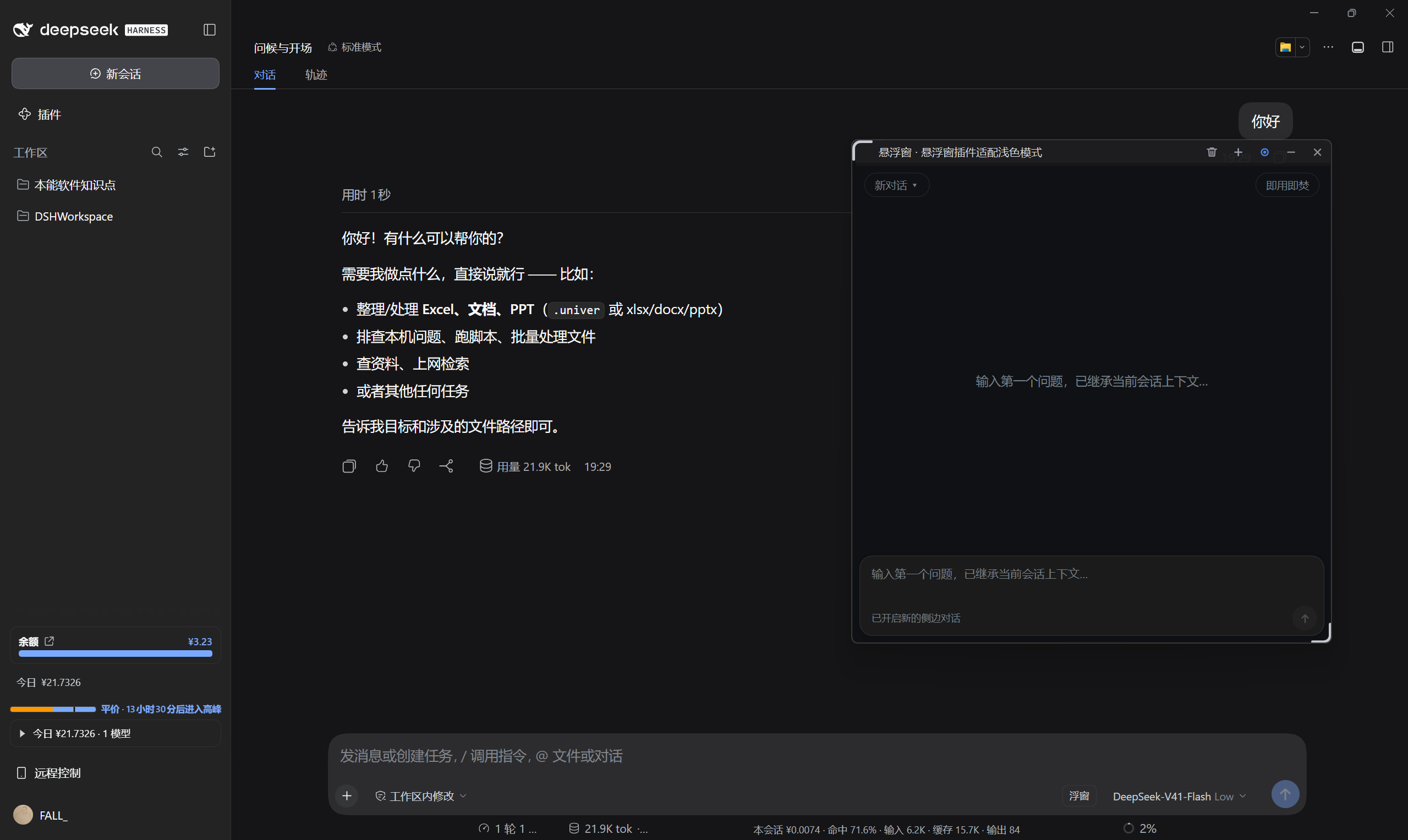
**The floating window over other applications** — the DSH main window's conversation on the left, the float sitting independently to its right. The title bar carries five hand-drawn buttons (clear cache / new thread / pin / minimize / close), and the composer at the bottom has inherited the current session's context:
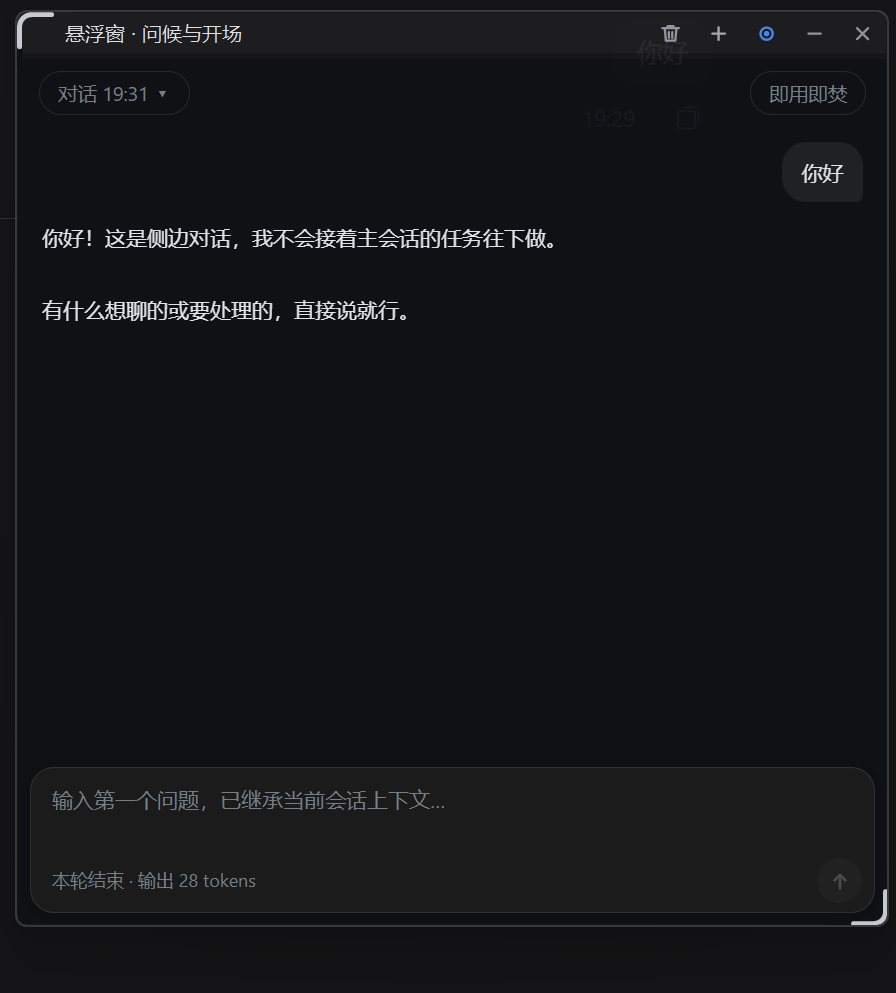
**Close-up** (dark appearance) — frameless and rounded. The top row holds the `对话 19:31` dropdown (switch / rename past conversations) and the "ephemeral" toggle; the title bar shows the current session name `悬浮窗 · 问候与开场`. Each turn reports its output token count below the composer, and the native resize grip is visible in the bottom-right corner:
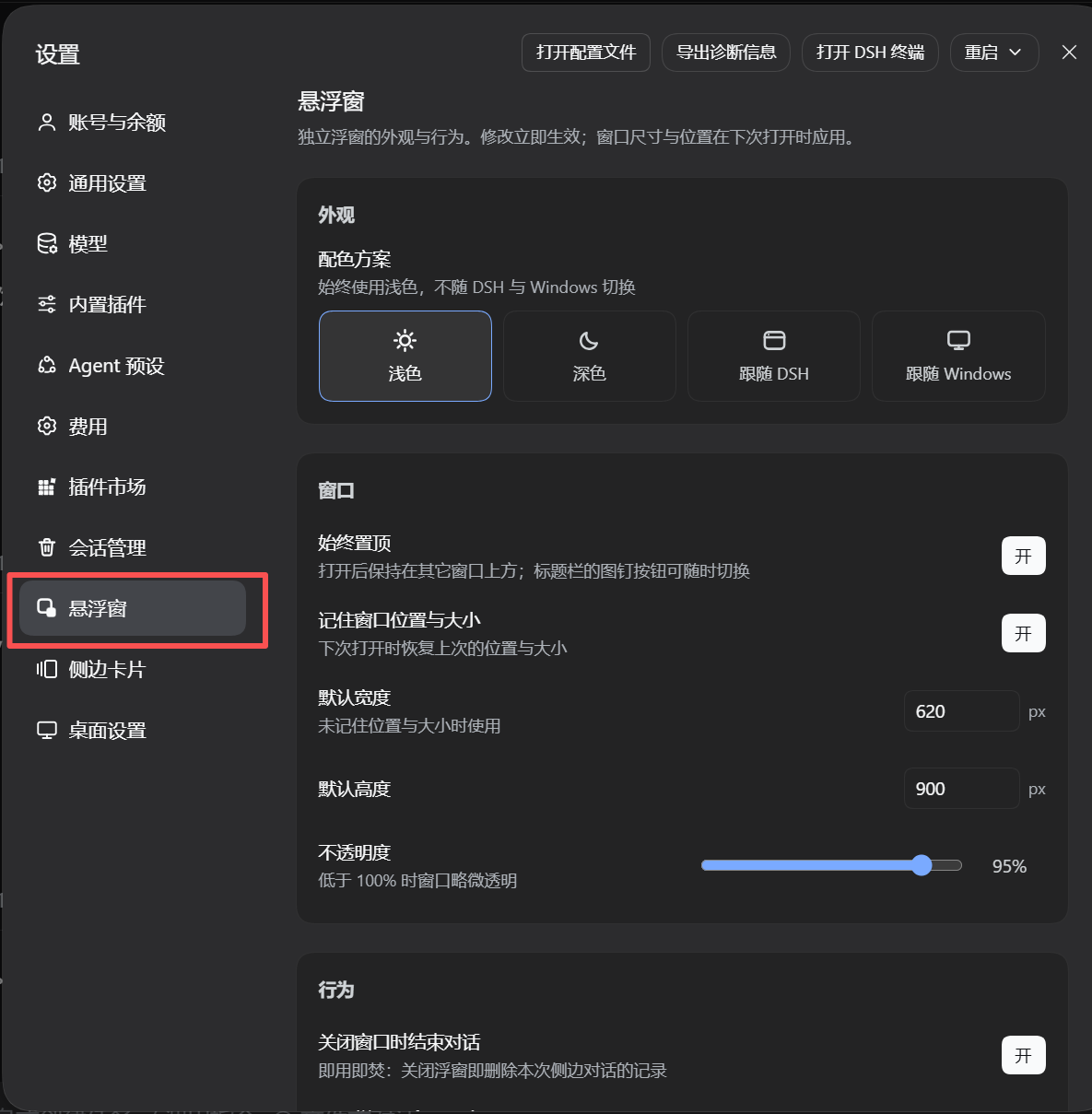
**Settings page** (Settings → **悬浮窗**) — it gets its own row in the left nav, not tucked under someone else's section. The top half is the four-state appearance tiles (light / dark / follow DSH / follow Windows) plus the "Window" card: always-on-top, remember geometry, default width 620 px, default height 900 px, and an opacity slider (95% in this shot):
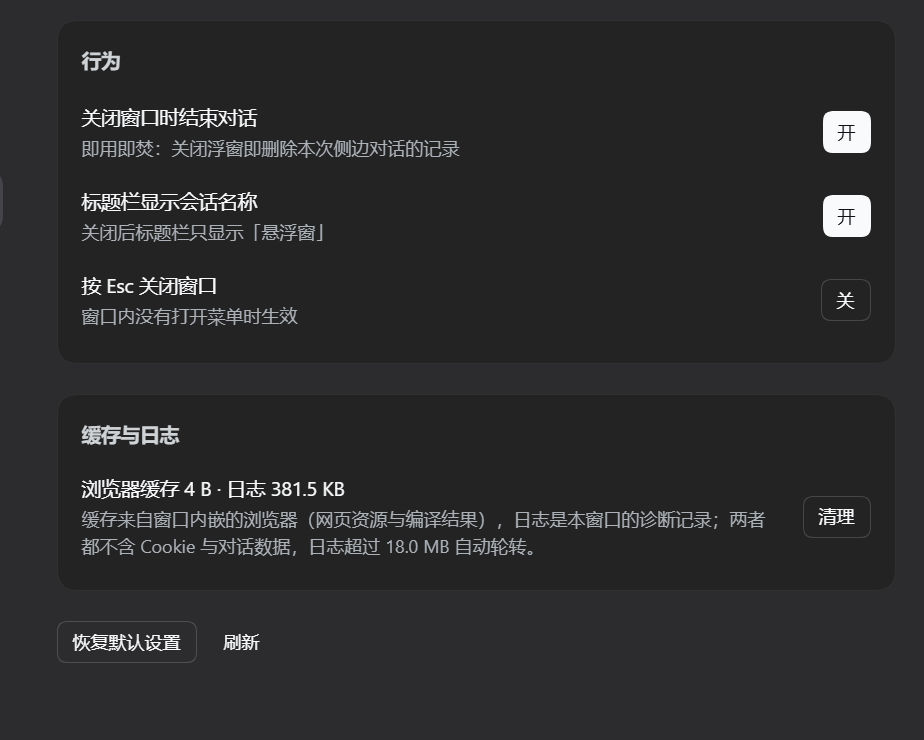
**Settings page, lower half** — the three "Behavior" toggles (close window ends the thread / show session title in the title bar / Esc closes the window) and the "Cache & logs" card. Note that the cache line is a **live reading** (browser cache 4 B · log 381.5 KB at capture time); the numbers come from the host's `GET /dsh-float-chat/stats`, and the **清理** button here does exactly the same thing as the one in the title bar. At the bottom sit **恢复默认设置** (restore defaults) and **刷新** (refresh):
### Demo
A recording made on a real desktop: opening the float from the DSH main window, switching to another app to confirm it stays on top, continuing the conversation inside the float, then changing appearance and opacity from the settings page.
> If the player above does not render, download it directly:
> [**dsh-float-chat-demo.mp4**](https://github.com/cyh3436332528/dsh-float-chat/releases/download/v0.4.0/dsh-float-chat-demo.mp4) (~19 MB)
## Features
### The window itself
- **A genuinely separate window** — not an overlay painted into the DSH page, but an independent native process. That is why it **can sit above other applications** and keeps existing even when the DSH main window is minimized or hidden.
- **Frameless + rounded + corner-resize** — the whole title bar drags; there are native resize grips at bottom-left and bottom-right. During a resize the corners temporarily go square (otherwise the newly exposed area would be clipped away by the old rounded region), then the rounding returns on mouse-up.
- **Five title-bar buttons**:
| Button | Action |
| --- | --- |
| `+` (plus) | Open a new side thread (inherits the current session's context) |
| `◉` / `○` (pin) | Toggle always-on-top; the icon itself reflects state (filled = pinned) |
| `⌫` (bin) | Clear browser cache and logs; it blinks red on click because it is the only button that deletes anything |
| `—` | Minimize |
| `✕` | Close (if "ephemeral" is on, this also deletes this thread's record) |
All icons are drawn by hand with GDI+ rather than using font glyphs — that is the only way to control the shape, stroke weight, and spacing.
### The side conversation
- **Inherits the current session context** — the conversation in the float and DSH's built-in side bar are **the same engine, the same side threads**, just displayed elsewhere. Opening the window carries over a snapshot of the main session's context and inserts a boundary notice (anything before the boundary is reference material only, not a task to execute).
- **Multi-thread management** — the title-bar dropdown switches between past threads, **renames** them (inline editing, since WebView2 does not support `window.prompt`), deletes a single thread record, and starts a new one. The window index remembers up to 20 entries.
- **Ephemeral mode** — a toggle: once on, **closing the float deletes this side thread's record** (including the on-disk file). The default can be set on the settings page; a manual change inside the window wins.
- **Collapsible reasoning** — model reasoning folds into a one-line `思考` disclosure so it does not eat the layout.
- **Code blocks** — fenced ``` blocks and `` ` `` inline code render properly; everything else is treated as plain text (nodes are built entirely with DOM APIs, never by concatenating HTML strings).
- **Busy indicator and usage** — a dot in the title bar reflects run state; each turn reports its output token count at the bottom.
- **Composer behavior** — the input grows with content (then scrolls internally), Enter sends / Shift+Enter inserts a newline, there is a back-to-bottom button, and focus handling is tuned for CJK IMEs (so the candidate window does not fly to the top-left of the screen).
### Appearance
- **Four-state color scheme** — `浅色` / `深色` / `跟随 DSH` / `跟随 Windows`. Under "follow DSH", changing the appearance in DSH's settings **changes the float and its native title bar on the spot**, with no reopen.
- **Title bar matches the page** — the native title bar's palette maps one-to-one onto the page's CSS variables, so there is no two-tone seam.
- **Four sources of theme, in order of trust**: the window's own settings → the DSH ui-theme setting the page reads from the host → the window process reading the profile's `cordis.patch.yml` directly → URL parameters / system media query as fallback. **The `appearance` chosen on the settings page has the highest priority.**
### Cache and logs
- **Visible footprint** — the "Cache & logs" card on the settings page shows live browser-cache and log sizes.
- **Two clearing entry points** — the title-bar `⌫` button, or **清理** on the settings page.
- **Thorough clearing** — while the browser is running, `Cache` / `Code Cache` are locked and cannot be deleted; when that happens a pending-clean marker is left and the cleanup is retried **on window close** and **on next launch**.
- **No private data** — all seven directories it clears are pure cache (deleting them only makes the next launch slower). **Cookies and Local Storage are not among them**, so clearing **will not log you out and will not lose thread associations**.
- **Automatic log rotation** — `window-log.txt` rotates at window startup once it exceeds 18 MB, keeping at most three files, ~54 MB total.
### Engineering
- **The hot-reload asymmetry between the two halves is handled explicitly** — the host half requires a DSH restart after changes; the browser half hot-reloads on file change. See [Development](#development).
- **No third-party runtime dependencies** — `package.json` declares no `dependencies` / `peerDependencies`.
- **`.exe` and DLLs are committed** — you do **not** need `csc.exe` or the WebView2 SDK to run it; to build it yourself, see [Development](#development).
## Compatibility
| Item | Value |
| --- | --- |
| Package name | `dsh-float-chat` |
| Current version | `0.4.0` |
| Plugin type | Plugin (host + browser halves, plus a native window process) |
| Client platform | `web` |
| `dsh.client` | `{ platform: "web", immediately: true, inject: ["@deepseek-ai/dsh-client-ui-conversation"] }` |
| Host-side `inject` | `webServer` (built-in host service) |
| DSH capabilities used | `webServer` (host), `slots` + `theme` (client), plus `dsh-client-ui-conversation` as a **hard dependency** |
| Runtime dependencies | **None** (`package.json` declares no `dependencies` / `peerDependencies`) |
| License | MIT |
> [!IMPORTANT]
> **`@deepseek-ai/dsh-client-ui-conversation` inside `dsh.client.inject` is a hard dependency.**
> It provides the `conversation.input.right` slot; without it the **浮窗** button to the right of the composer will not appear
> (the settings page still works, and you can use it to verify the plugin installed).
**Tested environment** (all development and verification happened here):
| Item | Value |
| --- | --- |
| Host application | **DSH Desktop 2.0.15** |
| Active profile | `desktop` |
| OS | **Windows 11 (build 26100)** |
| Display scaling | 150% (the window declares Per-Monitor V2 DPI awareness) |
| Install method | `link:` local link |
| Browser engine | WebView2 Runtime `153.0.4234.48` |
> **Platform support (important)**:
>
> | Platform | Status |
> | --- | --- |
> | Windows 10 / 11 | ✅ Verified working |
> | macOS | ❌ **Unsupported** — the window is WinForms + WebView2; there is no macOS implementation |
> | Linux | ❌ **Unsupported** — same reason |
>
> Apart from the window process, everything else (host routes, settings storage, browser half) is pure Node / pure browser code —
> but **no window means no plugin**, so it is offered as Windows-only overall.
>
> **On declaring compatibility**: `package.json` **cannot** declare a DSH version range —
> not an oversight here, but because DSH's plugin manifest has **no such field at all**.
> Measured against DSH Desktop 2.0.15, only two `dsh.*` fields are ever consumed: `dsh.bundle` and `dsh.profile`.
> There is no machine-readable version-constraint mechanism on the plugin side. The table above is therefore a **manual test result**,
> valid for DSH Desktop 2.0.15 only; see [CONTRIBUTING.md](./CONTRIBUTING.md#about-dshcompatibility) (in Chinese).
## Install
### Prerequisites
- **Windows 10 / 11**
- **DSH Desktop** installed and working (this plugin relies on the Desktop shell's renderer capability header — see the note below)
- **WebView2 Runtime** (bundled with Windows 11; install it from Microsoft if missing on Windows 10)
- Git (only for the "from source" method)
> [!WARNING]
> **This plugin does not work fully under DSH Web.** The open-window route forwards the Desktop shell's
> **generational renderer capability header** (`x-dsh-desktop-renderer`), and DSH Desktop only accepts requests carrying it.
> The Web build has no such header, so the window opens but shows blank because it was rejected. Please use DSH Desktop.
### From source
```bash
# 1. Clone
git clone https://github.com/cyh3436332528/dsh-float-chat.git
cd dsh-float-chat
# 2. Install into a target profile (desktop used here)
dsh plugin --profile desktop add ./plugin
# 3. Restart DSH Desktop
```
You can also let DSH install straight from GitHub (no clone):
```bash
dsh plugin --profile desktop add github:cyh3436332528/dsh-float-chat
```
> **This plugin is not published to npm yet**, so there is no
> `dsh plugin --profile desktop add dsh-float-chat` by-package-name form.
>
> The `plugin/` directory is **plain JavaScript with no build step** (no TypeScript, no `prepare` script),
> so installing from git source does **not** require pnpm's `allowBuilds` authorization.
### About the two `package.json` files
This repository has **two** manifests with different jobs — don't confuse them:
| Manifest | Role |
| --- | --- |
| **Root `package.json`** | The **distribution package**. The `add github:…` command above installs this one: its `exports` point at `plugin/host.js`, and its `files` pulls in both `plugin/` and `window/` |
| `plugin/package.json` | The **inner plugin package**, used by local development via `dsh plugin --profile desktop add ./plugin` |
The root manifest has to exist because `host.js` locates the window program at
`../window/dsh-float-window.exe` (see `host.js:33`) — **`window/` must be a sibling of `plugin/`**.
Only shipping both together makes that relative path resolve after installation. Without the root
manifest, `dsh plugin add github:…` finds no manifest at the repository root and cannot install at all.
> [!IMPORTANT]
> **`window/` must ship with the package, or the window will not start.**
> `host.js` looks for `dsh-float-window.exe` in this order: first `../window/` beside the package,
> then walking up to 8 levels from the module directory for `window/dsh-float-window.exe` (to stay
> compatible with `node_modules` junction loading inside a profile).
>
> - **Using either install command above**: nothing to do — `files` already packs `plugin/` and `window/`
> together (verified with `npm pack`: 15 files, 6 of them under `window/`).
> - **Copying the `plugin/` directory somewhere on its own**: copy the sibling `window/` too —
> otherwise clicking 浮窗 reports `浮窗打开失败`.
### Uninstall
```bash
dsh plugin --profile desktop remove dsh-float-chat
```
Then **restart DSH Desktop** (same reason as below).
### ⚠️ You must restart DSH Desktop once after installing
The host half runs inside DSH's Node process. DSH's host plugin ESM modules are **cached by path**, so reinstalling a plugin at the same path does not reload it — **you must restart DSH Desktop** for host code to take effect.
> This is also exactly why v0.4.0 **renamed** the host entry from `index.js` to `host.js`:
> renaming (or moving directories) is the **only** way to invalidate the ESM path cache and activate
> host changes without a restart. It is a piece of historical baggage worth knowing about — see [CHANGELOG.md](./CHANGELOG.md).
## Enabling
After the restart the entry points appear automatically, with no extra configuration:
- **Right of the composer**: a button labelled **浮窗** (slot `conversation.input.right`, `order: 40`).
- **Settings nav**: a section called **悬浮窗** (slot `settings.section`, `order: 95`), with its own float icon.
> About that icon: the `settings.section` slot **projects only `id` / `order` / `label` — there is no icon field**.
> So third-party sections wear the shell's gear by default. Once the settings overlay mounts, this plugin claims
> its own row by visible text and swaps in its window mark using `mask-image` + `currentColor` — the same trick
> `dshmarket` and `dsh-better-sidebar` use.
## Usage
### Opening the float
1. Click **浮窗** to the right of the composer in the DSH main window.
2. The window appears (fading in from 0.35 to the target opacity), already holding the current session's context, with `已继承当前会话上下文` shown under the title bar.
3. Ask away in the composer at the bottom of the window. Enter sends, Shift+Enter inserts a newline.
> **One plugin has only one float process.** If one is already open, clicking 浮窗 again does not start a second
> (the route returns `started: false`) and the existing window stays.
### Managing conversations
- **Start a new one**: the `+` in the title bar, or "新对话(继承当前会话上下文)" in the top-left dropdown.
- **Switch threads**: the top-left dropdown, click any row. Each row has a `✎` for **renaming**
(the row becomes an inline input; Enter saves, Esc cancels), and hovering or keyboard-focusing shows the full title and timestamp.
- **Delete a thread record**: **删除这段对话记录** (red) at the bottom of the dropdown. This deletes the on-disk session file.
- **Ephemeral**: the toggle at top-right. Once on, the button turns red and **closing the window deletes this thread's record**.
- **Rename not taking effect?** Renaming only changes the window's own index (kept in the window's `localStorage`), not the DSH-side session title.
### Pinning and the window
- **Always-on-top**: the pin button in the title bar, or the toggle on the settings page. A filled icon means pinned.
- **Resize**: drag the bottom-left / bottom-right grips. Size and position are remembered (can be disabled on the settings page).
- **Minimize / close**: the `—` / `✕` in the title bar. With "Esc closes the window" enabled, Esc inside the window also closes it
(while a menu is open, Esc still closes the menu).
## Settings
Plugin settings live in **`window/float-settings.json`** (a sibling of the plugin package).
The host half writes it atomically (tmp + rename), and the window process watches it with a `FileSystemWatcher`,
so **the window follows within ≈ 50 ms** of a change (plus a 1-second polling fallback).
| Setting | Type / values | Default | Notes | Applies |
| --- | --- | --- | --- | --- |
| `appearance` | `light` \| `dark` \| `dsh` \| `system` | `dsh` | Color scheme. `dsh` = follow DSH's appearance preference, `system` = follow Windows | ✅ Immediately |
| `alwaysOnTop` | boolean | `true` | Whether to pin the window when opening it | ✅ Immediately |
| `rememberGeometry` | boolean | `true` | Whether to remember and restore window size and position | ❌ Next open |
| `opacity` | number `0.6`–`1` | `1` | Window opacity | ✅ Immediately (tracks live while dragging) |
| `defaultWidth` | number `320`–`1600` | `620` | Width used when geometry is not remembered (or not yet saved), px | ❌ Next open |
| `defaultHeight` | number `260`–`1600` | `900` | Same, for height | ❌ Next open |
| `ephemeralByDefault` | boolean | `false` | Whether a new window starts in "ephemeral" mode | ✅ Immediately |
| `showSessionTitle` | boolean | `true` | Whether the title bar shows the side / main session title | ✅ Immediately |
| `closeOnEscape` | boolean | `false` | Whether Esc inside the window closes it | ✅ Immediately |
**About the defaults**: `SETTINGS_DEFAULTS` in `host.js` and `WindowSettings` in `FloatWindow.cs`
each hold a copy. **Change both when changing a default.**
> [!NOTE]
> **Write validation.** The settings endpoint only accepts keys present in `SETTINGS_DEFAULTS`; anything else
> is dropped. Out-of-range numbers are clamped (e.g. `opacity` is pinned to `0.6`–`1`).
> So **hand-editing `float-settings.json` badly will not crash the window** — worst case it falls back to defaults.
**There is no separate config-file entry point** — settings are changed only via Settings → 悬浮窗.
## Risks
> [!CAUTION]
> **Please read this section carefully, especially items 1 and 3.**
1. **Clearing the cache deletes browser cache directories** — a **fixed set of seven directories** (relative to `window/webview-data/`):
```
EBWebView\Default\Cache
EBWebView\Default\Code Cache
EBWebView\Default\GPUCache
EBWebView\Default\DawnGraphiteCache
EBWebView\Default\DawnWebGPUCache
EBWebView\GrShaderCache
EBWebView\ShaderCache
```
These are **pure cache**; deleting them only makes the next launch slower. **Cookies and Local Storage are not among them**,
so clearing **will not log you out and will not lose thread associations**. Anything locked is retried after the window closes / on next launch.
2. **"Ephemeral" is unrecoverable.** Once on, closing the window deletes this side thread's record (including the on-disk file) —
**no recycle bin, no undo**. It is a conspicuous red button inside the window; think twice before changing its default.
3. **`window/webview-data/` holds your DSH auth cookies and thread-association data.**
```
window/webview-data/EBWebView/Default/Network/ ← auth cookies
window/webview-data/EBWebView/Default/Local Storage/ ← side-thread ids
```
This directory is excluded by this repo's `.gitignore`. **But if you are a developer yourself**:
- do not commit it to any repository;
- **do not delete it wholesale either** (you would lose your login state and thread associations);
- before sharing logs or screenshots, check for cookies or tokens.
4. **`window/window-log.txt` may contain local paths.** The log records command-line arguments at every window start,
and those **do include a token-bearing URL** (of the form `--dsh-auth-url=http://127.0.0.1:/?token=…`)
plus renderer capability header values. **Strip those values before reporting an issue.**
The log file is excluded by `.gitignore` as well.
5. **`window/webview-data/` keeps growing.** Measured at roughly **165 MB** on its own (`Cache` ~133 MB,
`Code Cache` ~21 MB). Reclaim it with the title-bar `⌫` or **清理** on the settings page.
6. **The window process inherits the host's environment variables.** The only one explicitly removed is `ELECTRON_RUN_AS_NODE`
(without that removal the child process would be treated as Node rather than a window).
### What clearing does and does not touch
| Cleared | Not cleared |
| --- | --- |
| `EBWebView\Default\Cache` | ✅ Cookies (`EBWebView\Default\Network`) |
| `EBWebView\Default\Code Cache` | ✅ Local Storage (thread associations) |
| `EBWebView\Default\GPUCache` | ✅ `float-settings.json` (your settings) |
| `EBWebView\Default\DawnGraphiteCache` | ✅ `window-state.txt` (window geometry) |
| `EBWebView\Default\DawnWebGPUCache` | ✅ Side-thread on-disk records |
| `EBWebView\GrShaderCache` | ✅ Plugin files other than the log |
| `EBWebView\ShaderCache` | |
| `window-log.txt` (**only** when ≥ 18 MB, rotated) | |
## FAQ
**Q: I clicked 浮窗 and nothing happened / it says `浮窗打开失败`. What now?**
Check in this order:
1. **Are you on DSH Web?** The Web build has no renderer capability header and the window is rejected. Use Desktop.
2. **Is the `window/` directory beside the plugin package?** See the IMPORTANT note under [Install](#install).
When `host.js` cannot find the `.exe`, `spawn` fails, and this gets written to DSH's host log (keyword `dsh-float-chat: window spawn failed`).
3. **Did you restart DSH Desktop after installing?** The host half does not hot-reload.
**Q: The window opened but is white / shows `forbidden`?**
That means the window came up but was not accepted by DSH. Common causes:
- You are on the Web build (see above);
- You started `dsh-float-window.exe` by hand for testing — a window launched that way has **no** host-minted auth URL,
so the old token expires and `forbidden` is expected. **To verify the window, use the 浮窗 button inside DSH.**
**Q: Why can't I open it after installing, or why does the settings page say "需要重启 DSH Desktop"?**
The host half **does not hot-reload**. After installing (or editing `host.js`) you must restart DSH Desktop once
for the settings endpoint and the open-window route to register. When the settings page cannot reach the endpoint it
shows a notice card with a **重试** (retry) button.
**Q: Are the float and DSH's built-in side bar two separate conversations?**
No. They **read and write the same side threads** — same engine, same data. The float is just "another window."
A thread you start in the float is there in DSH's side bar too.
**Q: I changed a setting but the window did not move. Why?**
- `appearance` / `alwaysOnTop` / `opacity` / `ephemeralByDefault` / `showSessionTitle` / `closeOnEscape`
take effect **immediately** (`opacity` tracks live while dragging).
- `defaultWidth` / `defaultHeight` / `rememberGeometry` apply **on next open**.
**Q: Why does the opacity slider feel "sticky"?**
Because writes are throttled (~110 ms, leading + trailing) rather than one file write per pixel moved —
otherwise the log would be spammed. The window-side file watch is millisecond-level, so it still feels responsive.
**Q: Will clearing the cache log me out?**
No. The seven directories are pure cache, and **neither Cookies nor Local Storage is among them**.
(If you manually delete all of `webview-data/`, however, it will.)
**Q: Will the log file grow forever?**
No. Once `window-log.txt` exceeds 18 MB it is rotated to `window-log.1.txt` at window startup,
the old `.1` becomes `.2`, and `.2` is discarded — **three files, ~54 MB total.**
**Q: Is macOS / Linux supported?**
No — see [Compatibility](#compatibility). The window is a Windows-only WinForms + WebView2 program with no other implementation.
**Q: Why depend on `@deepseek-ai/dsh-client-ui-conversation`?**
Because it provides the `conversation.input.right` slot, which is where the 浮窗 button hangs.
It is a **hard dependency** declared in `dsh.client.inject`. Without it the button will not appear, though the settings page still works.
**Q: Why is the host entry called `host.js` and not `index.js`?**
It was `index.js` before v0.4.0 and was renamed. The reason: DSH's host plugin ESM is **cached by path**, so editing a file's
contents has no effect; **the only** way to make changes take effect without a restart is to change the filename or directory.
The name is intentional — do not change it back. See [CHANGELOG.md](./CHANGELOG.md).
## Known limitations
- **Windows only.** See [Compatibility](#compatibility).
- **The host half does not hot-reload.** Editing `host.js` requires a DSH Desktop restart (or a rename/move followed by reinstall).
- **One float process per plugin.** Clicking 浮窗 again does not open a second window.
- **The window's thread index lives in its own `localStorage`**, remembers at most 20 entries, and is not the same as DSH's session list;
clearing `webview-data/` loses that index (the conversations themselves remain on the DSH side).
- **No machine-readable DSH version constraint.** DSH's plugin manifest only recognizes `dsh.bundle` and `dsh.profile`;
there is no field for a version range, so compatibility is maintained by manual testing (see [Compatibility](#compatibility)).
- **No automated tests.** Every conclusion here comes from manual verification.
- **`dsh.client.inject` depends on `@deepseek-ai/dsh-client-ui-conversation`**; a version change in that package may affect button mounting.
- **The log records token-bearing URLs and renderer capability header values** (see [Risks](#risks) item 4).
## Repository layout
```
dsh-float-chat/
├── package.json # ⭐ distribution manifest: exports → plugin/host.js, files pulls in plugin/ + window/
├── plugin/ ← the plugin package
│ ├── package.json # inner manifest (for local dev via add ./plugin)
│ ├── cordis.patch.yml # bundle layer: inserts a host record into the profile (must be kept)
│ ├── host.js # host half: 5 routes + spawns the window process (was index.js before v0.4.0)
│ ├── client.js # browser half: 浮窗 button + 悬浮窗 settings page + nav icon
│ └── page/
│ └── float.html # window page: side-chat UI + bridge to the window process
├── window/ ← the native window (WinForms + WebView2); must be a sibling of plugin/
│ ├── src/FloatWindow.cs # window source (~2041 lines, csc C# 5)
│ ├── dsh-float-window.exe # ⚠️ prebuilt artifact, committed
│ ├── lib/*.dll # ⚠️ three WebView2 DLLs, committed
│ ├── app.manifest # Per-Monitor V2 DPI awareness declaration
│ └── (none of the following are committed — see .gitignore)
│ ├── webview-data/ # ⛔ auth cookies and thread ids; never commit, and do not delete wholesale
│ ├── window-log.txt # diagnostic log (may contain tokens)
│ ├── window-state.txt # window geometry
│ ├── clean-pending.txt # pending-clean marker
│ └── float-settings.json# local settings
├── screenshots.json # storefront screenshot list (paths relative to this file)
├── docs/
│ ├── assets/ # screenshots (1 entry point + 2 of the float + 2 of the settings page)
│ └── plugin-blurb.md # blurb / keywords / topics / badge material
├── release/
│ ├── v0.4.0-release-notes.md # release notes, tag plan, submission copy
│ └── awesome-dsh-plugin-entry.yml # marketplace entry file
├── README.md # Chinese readme
├── README.en.md # English readme (this file)
└── .github/ # issue / PR templates
```
> **Note the structural difference from the previous plugin (`dsh-plugin-session-purge`)**:
> its package uses a **two-level `plugin/lib/{index.js,client.js}`** layout,
> while this one is **flat** (`plugin/host.js` and `plugin/client.js` sit at the package root)
> and additionally has a sibling `window/` native-window directory.
For the responsibilities of the two halves, route conventions, and development notes, see [CONTRIBUTING.md](./CONTRIBUTING.md) (in Chinese).
## Development
### Local development (`link:` install)
```bash
git clone https://github.com/cyh3436332528/dsh-float-chat.git
cd dsh-float-chat
dsh plugin --profile desktop add "$(pwd)/plugin"
```
Hot-reload behavior **differs across all three parts**:
| Part | File | Hot reload |
| --- | --- | --- |
| Browser half | `plugin/client.js` | ✅ Reloads on file change |
| Window page | `plugin/page/float.html` | ✅ Takes effect on reopen (page is `no-store`) |
| Host half | `plugin/host.js` | ❌ **Does not hot-reload** (ESM cached by path); requires a DSH restart |
| Window process | `window/src/FloatWindow.cs` | ❌ Requires recompiling the `.exe` |
### Rebuilding the window
**You must kill any running `dsh-float-window.exe` first**, and **build elsewhere before overwriting** (the file may be locked).
```cmd
C:\Windows\Microsoft.NET\Framework64\v4.0.30319\csc.exe ^
/nologo /target:winexe /platform:x64 /out:work\dsh-float-window.exe ^
/win32manifest:app.manifest ^
/r:Microsoft.Web.WebView2.Core.dll ^
/r:Microsoft.Web.WebView2.WinForms.dll ^
/r:System.dll /r:System.Drawing.dll /r:System.Windows.Forms.dll /r:System.Core.dll ^
src\FloatWindow.cs
```
Run this from inside `window/`. When it finishes, copy `work\dsh-float-window.exe` over the one at the root of `window/`.
> **Language version**: the source targets .NET Framework's `csc` (**C# 5**) —
> no string interpolation, no null-conditional operator (`?.`), no expression-bodied members.
> This is not conservatism; it is a constraint of the target compiler. Please respect it.
### Testing the window by hand (bypassing DSH)
You can start the window process yourself and read conclusions from the log (a `theme -> light|dark (startup)` line at startup means the appearance was read successfully).
But note: **a window started this way has no host-minted auth URL**, so the page shows `forbidden` — that is expected.
**The correct way to verify the page is still to click the 浮窗 button inside DSH.**
### Faking a "DSH changed its appearance" scenario
Drop a temporary fake profile directory containing a `- id: ui-theme` section under `~/.dsh/profiles/`,
and make it the newest by mtime. **Delete it when you are done — do not touch your real preferences.**
## Contributing
See [CONTRIBUTING.md](./CONTRIBUTING.md) (in Chinese). Please read [CODE_OF_CONDUCT.md](./CODE_OF_CONDUCT.md) before contributing.
## Acknowledgements
- Thanks to the DSH team for making "everything is a plugin" real.
- The window page's visual language drew on the side-chat panel of the community plugin `dsh-better-sidebar`.
- The "claim your own nav row" icon trick follows the approach of `dshmarket` and `dsh-better-sidebar`.
- The deletion capability behind "ephemeral" reuses the same author's [`dsh-plugin-session-purge`](https://github.com/cyh3436332528/dsh-plugin-session-purge).
## License
[MIT](./LICENSE) © dsh-float-chat contributors