**Druks is a self-hosted or cloud platform where AI agents such as Claude Code and Codex do a company's recurring engineering work, and a person approves each change.**
- **It finds the work.** A schedule, an alert or a button starts it. Nobody writes a prompt.
- **It does the work with your tools.** Claude Code or Codex, with your own Claude or OpenAI account, in a sandbox, on your real repositories. You see the cost after every step.
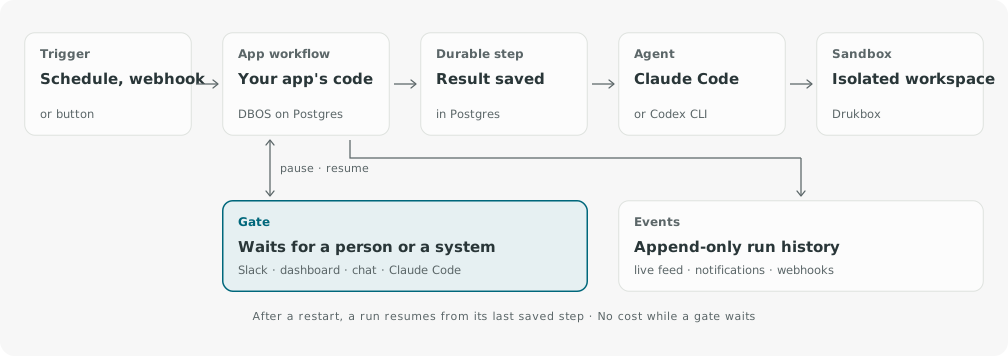
- **You make the call.** The run stops and asks you: Approve, Change or Stop. You answer in Slack, the dashboard, the Druks chat or Claude Code. It waits up to 14 days and costs nothing while it waits.
## Why Druks
| If you use… | It helps when… | Druks adds… |
| --- | --- | --- |
| A coding assistant (Claude Code, Codex, Copilot) | A developer sits down and asks | Work that starts by itself, every week, with nobody at the keyboard |
| An agent board | You write a ticket and assign it to an agent | Processes that find the work themselves, like a weekly security sweep |
| A workflow builder | You design each step of the flow | Apps that already work. Build your own only when you want to |
Druks does not replace your coding agent. It puts the agent on a schedule, runs it in a sandbox, and brings you its result as one decision.
## What a run looks like
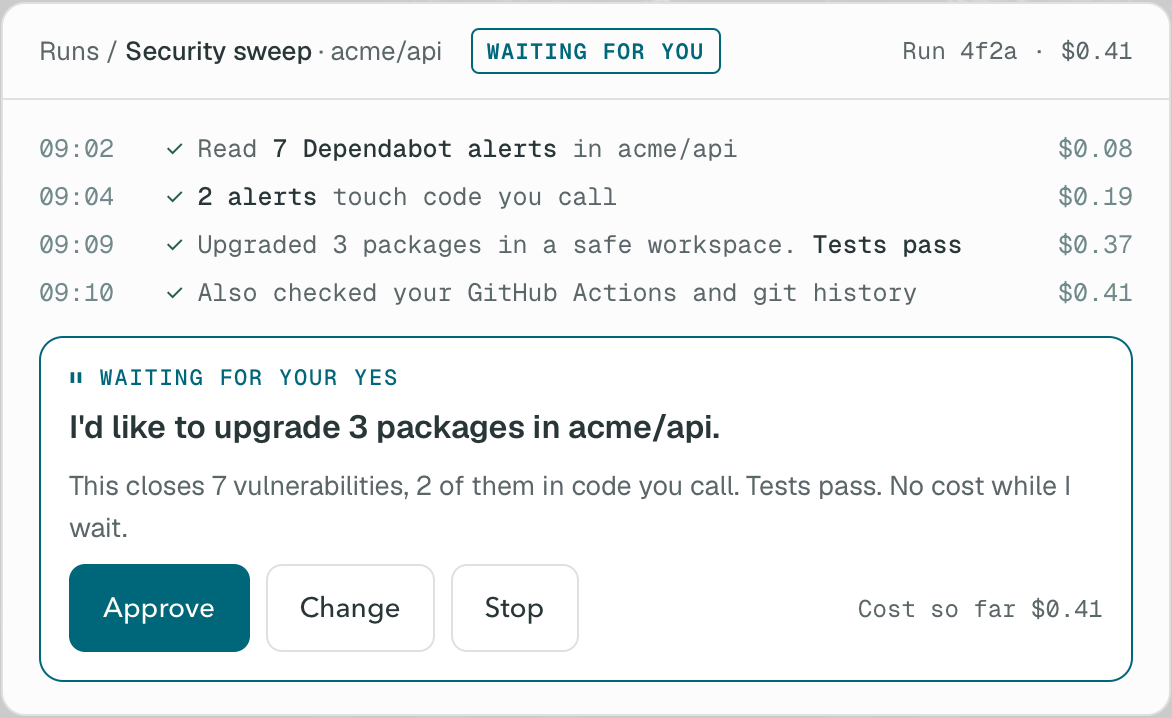
The **security sweep** checks one repository every Monday:
1. It reads the open Dependabot alerts and checks which ones touch code you actually call.
2. It upgrades the packages in a sandbox and runs your tests.
3. It asks you: *"Upgrade 3 packages. Closes 7 vulnerabilities, 2 in code you call. Approve?"* After your yes, it opens a pull request.
4. You get a summary: the pull request, what was fixed, how long it took and what it cost.
The included **Ticket to pull request** app (`software_factory`) takes a ticket, writes and checks the change, and opens a pull request for review.
## Get started
Druks Cloud and self-hosted Druks work the same way. You get the same apps and approve in the same places. The only difference is where Druks runs.
**Druks Cloud.** Druks runs on our servers. Nothing to install. [Try it now](https://app.druks.ai/sign-in?utm_source=github&utm_medium=readme).
**Self-hosted.** Druks runs on your laptop or your own server. You need Docker with Compose. Paste this into Claude Code, Codex or any coding agent on the machine:
```text
Install Druks on this machine with https://druks.ai/install.sh. Read the script, then run it. Then run the steps it prints: build the sandbox images and run druks doctor. If a step fails, stop. Show me the failed step and its output. Do not improvise a fix. When druks doctor passes, open http://127.0.0.1:8001 in my browser.
```
Or run the installer yourself:
```bash
curl -fsSL https://druks.ai/install.sh | bash
```
Then build the sandbox images, check the install and open the dashboard:
```bash
cd ~/druks
docker compose exec web druks sandboxes build
docker compose exec web druks doctor
open http://127.0.0.1:8001 # on Linux: xdg-open
```
In the dashboard, connect your AI account under **Settings → Providers** and the GitHub App under **Settings → Connections → Services**.
Remote installs (exe.dev and other providers)
Name the provider. The installer lists the values only you know, then exits. Set them in `~/druks/druks.toml` and `~/druks/.env`, and run the same command again.
```bash
curl -fsSL https://druks.ai/install.sh | DRUKS_PROVIDER=exe bash
```
The [deployment guide](https://docs.druks.ai/deployment) covers access control, upgrades and rollback.
## What runs where
When you self-host, this is what happens with your code and your keys:
- **Druks runs on your machine.** The dashboard, Postgres, Redis and the sandbox service run in Docker on your host.
- **By default, each agent call runs in its own Drukbox sandbox,** with the tools and credentials of that step.
- **Your code goes to the AI provider you choose,** through your own Claude or OpenAI account, and back to GitHub as pull requests.
- **Connection secrets are encrypted** in your own database.
- **GitHub access goes through your own GitHub App,** on the repositories you pick.
- **No telemetry.** Druks does not send usage data to us.
- **Apps ask before they act.** The security sweep opens a pull request only after your yes. Every proposal, decision and cost stays in the run history.
Found a security problem? Follow the [security policy](SECURITY.md). Do not open a public issue.
## How it works
Each process is an **app**. After a restart or deploy, Druks picks up where it left off and does not repeat finished work. [Concepts and guarantees](https://docs.druks.ai/concepts) explains the details.
## Documentation
| I want to… | Start here |
| --- | --- |
| Install Druks on my machine | [Quickstart](https://docs.druks.ai/quickstart) |
| Run Druks for my team | [Deployment](https://docs.druks.ai/deployment) and [configuration](https://docs.druks.ai/configuration) |
| Automate my own process | [Writing an app](https://docs.druks.ai/writing-an-app), then `uvx --from druks druks create app my-app` |
| Understand restarts and approvals | [Concepts](https://docs.druks.ai/concepts) |
| Fix a problem | [Troubleshooting](https://docs.druks.ai/troubleshooting) |
## Status
Druks is **pre-1.0**. Breaking changes can happen. `main` and `latest` are edge builds, not stable releases. Run the installer again to upgrade. For a fixed version, see [installing an immutable version](https://docs.druks.ai/releasing#install-an-immutable-version).
## Community
- **Bugs, questions and ideas:** [open an issue](https://github.com/czpython/druks/issues)
- **Contributing:** [contribution guide](CONTRIBUTING.md)
## License
Druks is available under the [Functional Source License](LICENSE) (FSL-1.1-ALv2):
- You can read, run and change all of the code.
- You can self-host Druks for your company's work and build apps on it.
- You cannot sell it as a competing hosted service.
- Each release becomes Apache 2.0 two years after it ships.
The [licensing page](https://docs.druks.ai/licensing) explains the details.
## Contributors
Thanks goes to these wonderful people: