# clipboard-history-mcp
> Your clipboard, but Claude can read it. Type-classified, secret-encrypted, macOS-native.
```mermaid
flowchart LR
U[You ⌘C something] --> D[Rust daemon
launchd-managed]
D -->|classify + encrypt| DB[(SQLite + FTS5)]
D -. non-secret clips .-> O[Obsidian vault
optional]
C[Claude] -->|MCP stdio| M[15 tools]
M --> DB
M -->|Touch ID| V[Vault
AES-256-GCM]
```
**One Rust binary.** No Node.js, no Swift toolchain, no other apps to install. Drag a `.mcpb` into Claude Desktop, done.
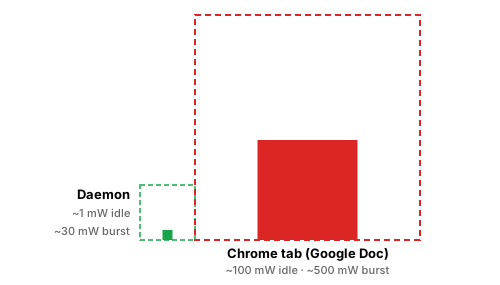
**One process · ~1 mW idle · ~24 MB RAM.** Replaces the clipboard-manager + secret-scanner + Obsidian-export stack a typical setup needs three or four background apps to assemble.
---
## What this gets you
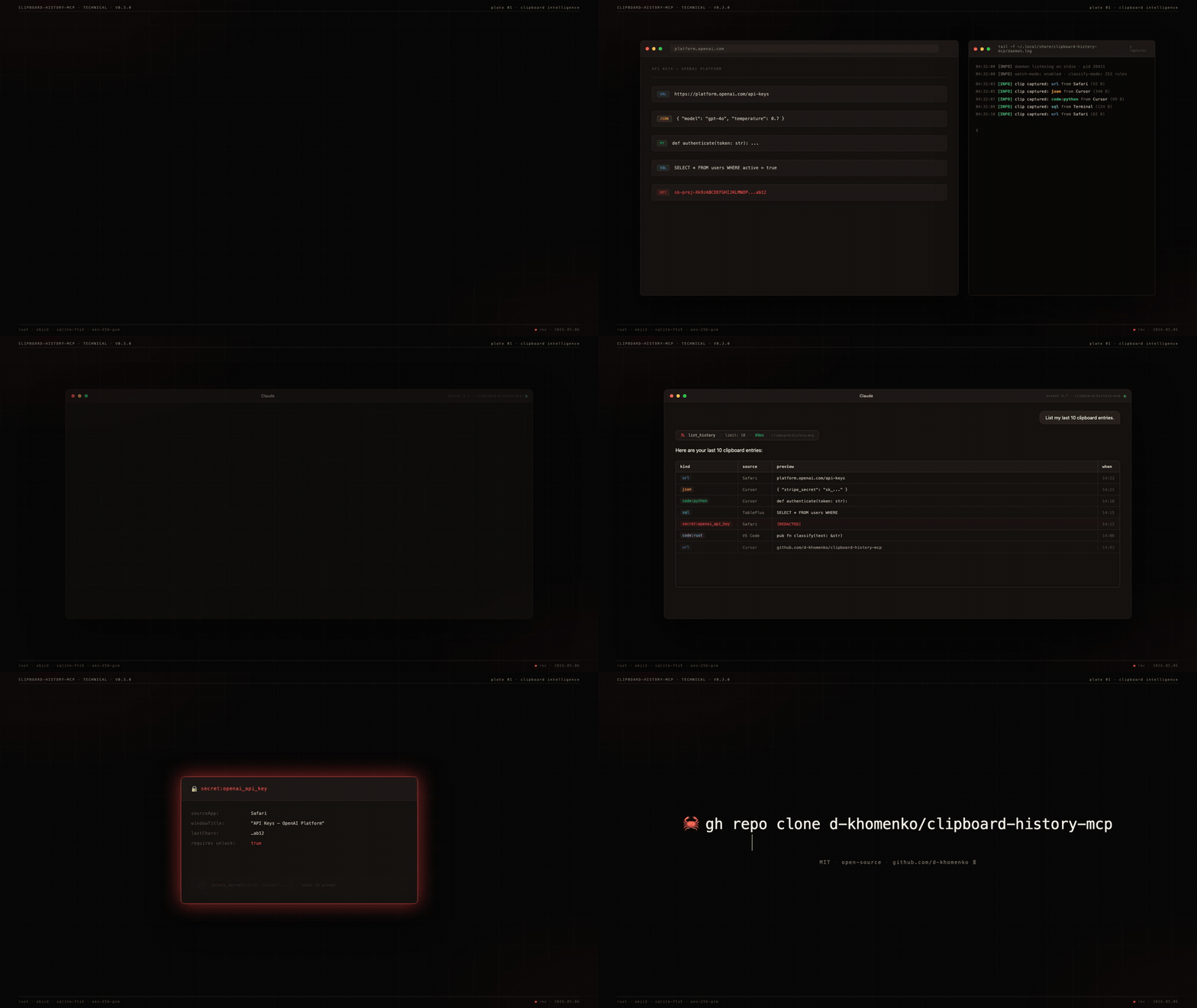
You're working in Claude. You've copied **47 things today** — URLs, JSON snippets, an OpenAI key from a dashboard, a SQL query from your DB tool, half a Stripe webhook payload. Now Claude can use any of them:
```
You: "Find that API key I copied from the OpenAI dashboard yesterday"
Claude: Found 1 secret matching "OpenAI" — kind: openai_api_key,
source: Safari, copied 14h ago. Last 4 chars: ab12.
To reveal, call unlock_secret(id=23, reason="...").
You: "Give me all the GitHub URLs I copied"
Claude: Returns 12 unique GitHub URLs deduplicated by repo,
ranked by how often you pasted them back.
You: "There was a Stripe JSON config in the buffer — restore it to my clipboard"
Claude: Found, restoring. ✓ ready to ⌘V.
You: "What code did I copy from ChatGPT over the last 2 hours?"
Claude: 3 Python snippets, 1 SQL query, 1 shell command.
You: "Show me the screenshot I just copied"
Claude: Returns a 142×120 PNG, mime image/png, captured from Preview 2 minutes ago.
```
Search uses SQLite **FTS5** + window-title indexing — you find clips by *where* you copied them, not just by content.
---
## Why nothing else does this
| | [Maccy](https://maccy.app) | [maccy-clipboard-mcp](https://github.com/vlad-ds/maccy-clipboard-mcp) | clipboard-history-mcp |
|---|---|---|---|
| Captures clipboard | ✓ | (reads Maccy's DB) | ✓ |
| Classifies clip type (URL/JSON/code/SQL/secret) | ✗ | ✗ | ✓ |
| Indexes window titles for context-search | ✗ | ✗ | ✓ |
| Detects secrets at capture (252 gitleaks rules) | ✗ | ✗ | ✓ |
| Encrypts secrets at rest with Touch ID gate | ✗ | ✗ | ✓ |
| Standalone binary (no runtime needed) | n/a | ✗ | ✓ macOS + Linux |
| `.mcpb` one-click install | n/a | ✗ | ✓ |
The other ~20 `clipboard-mcp` repos on GitHub only read the *current* clipboard. None capture history.
---
## Install
### One-click — Claude Desktop
1. Download `clipboard-history-mcp.mcpb` from the [latest release](https://github.com/d-khomenko/clipboard-history-mcp/releases/latest).
2. Claude Desktop → Settings → Extensions → "Install from file" → pick the `.mcpb`.
3. Restart Claude Desktop. Ask: *"List my recent clipboard URLs."*
### Manual — Claude Code / CLI
```bash
curl -L https://github.com/d-khomenko/clipboard-history-mcp/releases/latest/download/clipboard-history-mcp.mcpb \
-o clipboard-history-mcp.mcpb
unzip clipboard-history-mcp.mcpb -d ext
# register MCP
claude mcp add -s user clipboard-history -- ./ext/server/clipboard-history-mcp serve
# install background daemon (captures even when Claude is closed)
./ext/server/clipboard-history-mcp install
```
### Quick install — `cargo install`
If you have a Rust toolchain (Rust 1.95+) and use Claude Code:
```bash
cargo install clipboard-history-mcp
clipboard-history-mcp install # start daemon
claude mcp add -s user clipboard-history -- clipboard-history-mcp serve
```
This pulls a release crate from crates.io and compiles locally. Slightly slower than the `.mcpb` drag-and-drop above (compile takes ~2 min on Apple Silicon), but it's the cleanest path for Claude Code users — three commands and you're capturing.
### From source (macOS)
Requirements: Rust 1.95+, macOS 13+.
```bash
git clone https://github.com/d-khomenko/clipboard-history-mcp
cd clipboard-history-mcp
cargo build --release
./target/release/clipboard-history-mcp install # start daemon
claude mcp add -s user clipboard-history -- "$(pwd)/target/release/clipboard-history-mcp" serve
```
### Linux (X11; Wayland partial)
Requirements: a working Secret Service implementation (GNOME Keyring or KWallet — comes with most desktop installs), `xvfb` not required for normal use (only for headless CI).
```bash
git clone https://github.com/d-khomenko/clipboard-history-mcp
cd clipboard-history-mcp
cargo build --release
# Set a master password (used to wrap your AES master key)
./target/release/clipboard-history-mcp migrate-v2
# Install systemd user service
./target/release/clipboard-history-mcp install
# Optional: keep daemon running after logout
./target/release/clipboard-history-mcp install --linger
# Register with Claude Code
claude mcp add -s user clipboard-history -- "$(pwd)/target/release/clipboard-history-mcp" serve
```
**Wayland note:** clipboard read/write works on Wayland via `arboard`'s portal handling. Window-title capture (opt-in via `CLIPBOARD_CAPTURE_WINDOW_TITLE=1`) currently only works on X11; Wayland support is deferred to v0.4.x once `xdg-desktop-portal` window-title APIs are widely shipped.
**1Password / Bitwarden:** add app names to `CLIPBOARD_IGNORE_APPS` so password-manager paste events are skipped:
```bash
CLIPBOARD_IGNORE_APPS="1Password,Bitwarden,KeePassXC" \
./target/release/clipboard-history-mcp install
```
### Auto-mirror to Obsidian vault (optional)
If you also use Obsidian, the daemon can write a sidecar `.md` for every captured clip plus a daily-note timeline entry. Configure at install time:
```bash
clipboard-history-mcp install --vault ~/Documents/Obsidian/MyVault
```
Result: every non-secret clip lands as `/clipboard/YYYY-MM/--.md` with frontmatter (kind, source, captured-at), and a bullet appended to `/daily/YYYY-MM-DD.md` linking back to the sidecar. Secrets are **never** mirrored — they stay encrypted in the SQLite vault.
The daemon owns the `## Clipboard captures` H2 section in your daily notes — append-only, idempotent. You can write anything else above or below it.
---
## Try asking Claude
Copy any of these prompts into Claude after install:
```
List my last 20 clipboard entries.
Show me only the URLs I've copied today.
Search my clipboard history for "anthropic".
Find any code snippets in Python from the last 3 hours.
How many secrets are in my clipboard vault, by kind?
Pin the JSON I just copied — I'll need it again.
Show me only my pinned clips.
What apps did I copy from most this week?
Restore that GitHub PR link to my clipboard.
```
Claude picks the right tool from 15 available and answers directly.
---
## Configuration
Set env vars in the launchd plist (`install` writes them) or via `claude mcp add --env KEY=val`:
| Variable | Default | What it does |
|---|---|---|
| `CLIPBOARD_POLL_MS` | `1500` | Watcher poll interval (ms) |
| `CLIPBOARD_HISTORY_MAX` | `1000` | Ring-buffer size (unpinned clips only — pinned items sit outside the ring buffer) |
| `CLIPBOARD_CAPTURE_WINDOW_TITLE` | `0` | Capture window titles (needs Accessibility permission) |
| `CLIPBOARD_IGNORE_APPS` | *(empty)* | Comma-separated app display names to skip |
| `CLIPBOARD_NEVER_STORE_SECRETS` | `0` | Paranoid mode — metadata only, no ciphertext |
| `CLIPBOARD_DATA_DIR` | `~/Library/Application Support/clipboard-history-mcp` | Override data dir |
| `CLIPBOARD_VAULT_PATH` | *(empty)* | Auto-mirror non-secret clips to this Obsidian vault directory (sidecar `.md` per clip + bullet in `daily/YYYY-MM-DD.md`). Set via `--vault PATH` at install time. |
| `CLIPBOARD_MAX_BLOB_BYTES` | `26214400` (25 MB) | Skip image / file pasteboards larger than this. Logs a `WARN` line with the source app + size. |
---
## Tools (15)
### Read
| | |
|---|---|
| `list_history(limit?, kind?, source_app?, since?, pinned_only?)` | Paginated history, newest first. `pinned_only=true` returns only pinned clips. |
| `get_item(id)` | Single clip by id |
| `search_history(query, limit?)` | FTS5 BM25 across preview + window title |
| `get_urls(limit?)` | URL clips, deduped by hostname |
| `get_code(language?, limit?)` | Code clips, optional language filter |
| `get_json(limit?)` | JSON clips with parsed structure |
| `get_secrets_index(kind?)` | Secret metadata — **no values** |
| `unlock_secret(id, reason)` | Decrypt one secret — **gated by Touch ID** |
| `get_stats` | Counts by kind, oldest/newest, db size |
| `daemon_status` | PID, running state |
### Write
| | |
|---|---|
| `copy_item(id)` | Restore a clip back to system clipboard |
| `pin_item(id, pinned)` | Pin so it survives `clear_history` |
| `tag_item(id, tag, remove?)` | Free-form tagging |
| `delete_item(id)` | Hard delete |
| `clear_history(scope)` | `'all' \| 'older_than_days:N' \| 'kind:K'` |
---
## CLI
```
clipboard-history-mcp daemon # run watcher (managed by launchd)
clipboard-history-mcp serve # MCP stdio server (Claude spawns this)
clipboard-history-mcp install [--window-titles]
clipboard-history-mcp uninstall [--keep-data]
clipboard-history-mcp status # JSON: daemon pid, db size, etc.
clipboard-history-mcp vault list # secret metadata
clipboard-history-mcp vault unlock N # decrypt secret #N (Touch ID)
clipboard-history-mcp doctor # diagnose perms/Keychain/pasteboard
clipboard-history-mcp migrate-v2 # validate v0.2.x SQLite (no-op import)
clipboard-history-mcp clean-legacy [-y] # remove the v0.3.x macOS data dir (~/Library/Application Support/clipboard-history-mcp/)
```
---
## Security model
- **Secrets detected at capture** — 252+ gitleaks regex patterns + RFC 7519 JWT + Luhn-validated cards.
- **Encryption at rest** — AES-256-GCM with a 32-byte master key in macOS Keychain.
- **Touch ID gate** — `unlock_secret` calls `LAContext.evaluatePolicy(.deviceOwnerAuthenticationWithBiometrics)`. 5-minute auth cache per session.
- **LLM-blind by default** — `list_history` and `search_history` return secret rows with `text: null` and `preview: "[REDACTED:kind]"`. The only path that returns plaintext is `unlock_secret(id, reason)`, and the `reason` argument is mandatory and audit-logged.
- **Paranoid mode** — `CLIPBOARD_NEVER_STORE_SECRETS=1` keeps metadata only; ciphertext never written.
- **Transient-type respect** — clips marked by password managers (1Password, Bitwarden) with `org.nspasteboard.ConcealedType` are never captured.
---
## Architecture
```
src/
├── main.rs # binary entry; clap subcommand dispatch
├── core/
│ ├── db.rs # SQLite WAL + migrations + FTS5
│ ├── store.rs # add/list/search/delete clips
│ ├── crypto.rs # AES-256-GCM + Keychain
│ ├── types.rs # classifier (url/json/sql/shell/code:lang)
│ ├── secrets.rs # gitleaks rules + JWT + Luhn
│ ├── pasteboard.rs # NSPasteboard via objc2
│ └── biometry.rs # LAContext Touch ID gate
├── daemon/{watcher,context}.rs # poll loop on pinned thread
├── mcp/tools.rs # 15 MCP tools via rmcp
└── cli/{install,uninstall,status,vault,doctor,migrate_v2}.rs
```
**Tech stack:** Rust 1.95 · `rmcp` 1.6 · `tokio` · `objc2` · `rusqlite` (bundled FTS5) · `aes-gcm` · `security-framework` · `objc2-local-authentication` · `clap` 4
---
## Performance
Daemon idle footprint, measured on Apple Silicon with default `CLIPBOARD_POLL_MS=1500` and vault-mirror enabled:
| Metric | Value | How measured |
|---|---|---|
| **CPU steady-state** | **0.05 %** | `ps` cumulative CPU-time delta over 60 s (0.03 s / 60 s) |
| **Memory (RSS)** | **~24 MB** | `ps -o rss` |
| **Power draw (avg)** | **~1 mW** | 0.05 % of an E-core (~1 W full tilt) running continuously |
| **Battery impact** | **~1 % per 3 weeks** | 1 mW × 504 h = 0.5 Wh on a 52 Wh MacBook Air battery, assuming 24/7 continuous run |
See the [two-squares comparison at the top of this README](#clipboard-history-mcp) for a visual on how this compares to a single Chrome tab.
Burst cost on each `⌘C`: ~30 ms tick at 1–3 % CPU (secret-classifier regexes + FTS5 index + AES-GCM + optional vault file write), then back to idle. Activity Monitor's _Energy Impact_ column reports ~0 — below its detection threshold.
Linux numbers untested but expected similar order of magnitude (`arboard` polling + SQLite is portable).
---
## FAQ
**Does this run on Linux/Windows?**
Linux: **yes** since v0.4 (X11 + Wayland clipboard via `arboard`; window-title capture is X11-only for now). See the [Linux install section](#linux-x11-wayland-partial) above. Windows: not yet — `arboard` works there, but the launchd/systemd-style installer hasn't been ported. PRs welcome.
**What if I copy a 50MB blob?**
Currently captured. A `CLIPBOARD_MAX_BYTES` guard is on the roadmap.
**Can Claude leak my secrets?**
Not without you (a) installing this tool, (b) approving Touch ID, (c) the LLM choosing to call `unlock_secret` with a `reason` that gets logged. The `text` field for secret rows is always `null` in `list_history`/`search_history`.
**Does it sync across Macs?**
No native cross-device sync — the SQLite vault stays local. If you set `--vault PATH` to point inside a synced Obsidian vault (iCloud, git, Syncthing, etc.), the per-clip sidecar markdown files follow your sync — but **secrets are never mirrored** to the vault, so password-protected items remain on the originating machine.
**Can I use this with Maccy already running?**
Yes. They don't conflict — Maccy provides UI, this provides the MCP layer. Both poll `NSPasteboard.changeCount` independently.
**What about [other clipboard manager]?**
Same answer — there's no exclusive lock. Worst case, both store the same clip; storage cost is trivial.
---
## Changelog
See [CHANGELOG.md](CHANGELOG.md). Latest: [v0.3.0-alpha.0](https://github.com/d-khomenko/clipboard-history-mcp/releases/tag/v0.3.0-alpha.0).
## Contributing
See [CONTRIBUTING.md](CONTRIBUTING.md). PRs welcome — issues with macOS 13/14 reproductions especially.
## Sponsor
Pre-1.0 alpha. Built solo, in bursts. If `clipboard-history-mcp` finds you a
leaked key, saves you from typing the same JSON twice, or just makes Claude
slightly more useful at your terminal — consider [becoming a backer or
Founding Sponsor on Patreon](https://www.patreon.com/c/DmytroKhomenko).
- **$3 / month — backer ☕** — name in [`SUPPORTERS.md`](./SUPPORTERS.md), Discord role
- **$10 / month — founding sponsor 🥇** — name + avatar in this README, **permanently** listed if you join before v1.0
Sponsorship is gratitude, not a support contract. It does not buy priority
issue triage, custom features, or response-time SLA — solo OSS doesn't scale
that way. What it buys: visibility, the occasional roadmap vote, and proof
that this kind of tool is worth maintaining past `0.x`.
GitHub Sponsors works too — see the **Sponsor** button at the top of the repo.
## License
MIT. `vendor/gitleaks.toml` is the gitleaks rule catalog (also MIT) — see `vendor/README.md`.