🌐 中文 · English
# dsh-hide-empty-workspace
> *"The moment you archive its last session, the empty workspace removes itself from the sidebar."*

[](LICENSE)

**Automatic sidebar housekeeping. It acts on exactly one rule: a workspace's unarchived session count drops from `1+` to `0`. It never archives, deletes or rewrites workspaces — the only thing it writes is a hidden-set in your browser.**
[The problem](#the-problem) · [What it looks like](#what-it-looks-like) · [Install](#install) · [When it fires](#when-it-fires) · [Safety](#safety) · [Layout](#layout)
---
## The problem
Archiving is a manual action in DSH, and nobody tells you that a workspace has gone empty.
So the sidebar rots: you open one or two sessions in a project, archive them when you are done, and the workspace itself stays — no sessions, no purpose, one more row. After a dozen of those, the workspaces you actually use have been pushed below the fold.
This plugin turns "it is empty now" into a passive signal: the moment a workspace's unarchived session count falls from `1+` to `0`, its sidebar row hides itself.
**That moment is the only moment it acts on its own.** Manual hiding lives in each workspace row's own "..." menu, and the restore entry sits at the bottom of the sidebar. The plugin owns no state.
## What it looks like
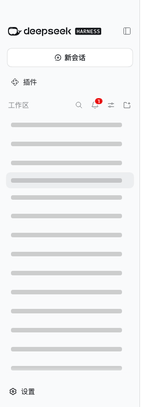
The frame above is clipped to the sidebar column, with workspace names redacted. Hiding two workspaces in a row leaves exactly one at `display:none` — the other is the workspace currently in use, which stays visible by design.
## Install
```sh
# from npm (shortest)
dsh plugin --profile web add dsh-hide-empty-workspace
# or straight from GitHub (no npm account, no mirror sync wait)
dsh plugin --profile web add https://codeload.github.com/d0ublecl1ck/dsh-hide-empty-workspace/tar.gz/refs/heads/main
# while editing the source, link the working copy instead
dsh plugin --profile web add /absolute/path/dsh-hide-empty-workspace
```
`dsh plugin add` writes both `dependencies` and `dsh.profile.bundles` in the profile, so a page refresh is enough.
## When it fires
- **Automatic**: you archive a workspace's last unarchived session → its row hides.
- **Manual**: hover any workspace row and pick "隐藏工作区" from its "..." menu.
- **Restore**: click the "已隐藏 N" entry at the bottom of the sidebar, then the shipped dialog opens and each "恢复" button restores one workspace; the dialog closes itself when none are left.
- **Automatic restore**: a hidden workspace gains an unarchived session again → it reappears.
It will not fire for:
- **A freshly added workspace.** A new workspace has no sessions, but it is genuinely new to the plugin, so it is only recorded, never hidden. This is exactly why the plugin does not implement "hide when empty".
- **The workspace in use**, which stays visible even when it matches the rule.
- **The "ungrouped" bucket**, which is never hidden.
## Safety
- **Never archives, unarchives or deletes** any session or workspace.
- **Never rewrites the workspace registry**: it does not touch the `workspaces` service or `settings.yaml`.
- **Never talks to the network.**
- **The only write** is a hidden-set in browser `localStorage` (`dsh-hide-empty-workspace.hidden.v1`). Clear it and everything is back.
- **Never replaces the official UI**: it only toggles `display` on rows the shell already rendered, appends one entry to the row's own "..." menu, and opens the shipped `Modal` for restores; it does not take over or redraw any shipped component. If a DSH upgrade removes those rows it will not fail silently — the sidebar footer shows `⚠ 工作区行标记失配,插件未生效`. When the sidebar is collapsed into its rail (auto-collapse in a narrow window) or switched to the single-list grouping, no workspace row is rendered by design, so the self-check stays quiet.
## Layout
```text
index.js host half (this plugin needs no host capability; a placeholder apply)
client.js browser half: the rule, the row-menu entry, the shipped-Modal restore dialog, the self-check
cordis.patch.yml the bundle layer that inserts this plugin
tests/hidden-workspaces.test.mjs 28 pure-function unit tests
scripts/verify-browser.mjs live-browser verification + showcase recording
scripts/check-release.mjs offline release gate
assets/showcase/ screenshots and GIF produced by verify-browser
screenshots.json storefront screenshot manifest
AGENTS.md boundaries and commands for the next session
.freak open leads: competitor watch + unverified list
```