# 🧩 dsh-skills-manager Β· Skills Manager **Visual Skills Management for DeepSeek Harness: Inspect, Create, Edit Online, and Fine-Tune Invocation Policies with Native UI** [![Release](https://img.shields.io/github/v/release/daha1216/dsh-skills-manager?color=4d6bfe.svg?style=flat-square)](https://github.com/daha1216/dsh-skills-manager/releases) [![License: MIT](https://img.shields.io/badge/license-MIT-green.svg?style=flat-square)](./LICENSE) [![DSH plugin](https://img.shields.io/badge/DSH-plugin-4A90D9.svg?style=flat-square)](https://github.com/topics/dsh-plugin) [![Tests Passing](https://img.shields.io/badge/tests-21%20passed-brightgreen.svg?style=flat-square)](https://github.com/daha1216/dsh-skills-manager) [δΈ­ζ–‡](./README.md) Β· **English**

--- In DeepSeek Harness (DSH), **Skills** are vital assets that provide agents with specialized domain knowledge, operational guidelines, and tool workflows. However, managing them has traditionally involved several friction points: - Struggling to navigate nested folders in your OS terminal or file manager just to check installed skills? - Needing to manually tweak YAML frontmatter indentation (`disable-model-invocation: true`) to prevent an agent from invoking a token-heavy skill autonomously? - Wishing you could set specific skills to "Manual User Invocation Only" via an intuitive switch? - Wanting to inspect a skill's full prompt instructions or quickly copy its markdown without opening an external text editor? **dsh-skills-manager** introduces a **first-class, native "Skills" management panel** directly into DSH Settings. It empowers you to inspect, organize, configure, and edit your local AI skills through an elegant, reliable visual interface. --- ## πŸ“Έ Real-World Experience
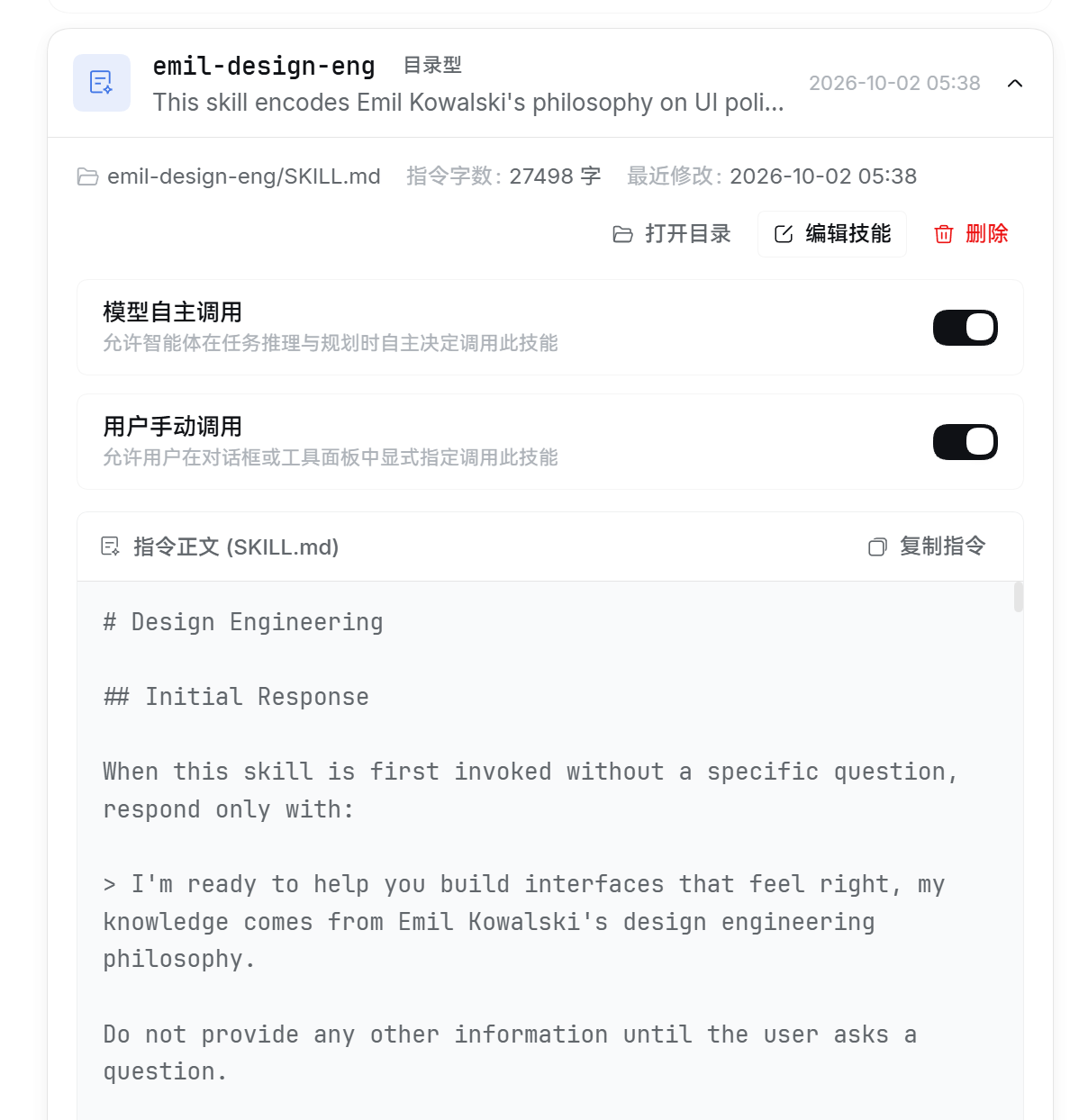
| Settings Overview & List | Skill Card Detail & Policy Controls | | :---: | :---: | | Skills manager list inside DSH Settings | Expanded skill card: policy switches & markdown preview | | *Native "Skills" section in Settings: overview of all local skills, character counts, layouts, and modification times* | *Independent switches for "Model Invocation" and "User Invocation", instant prompt preview, and one-click copy* |
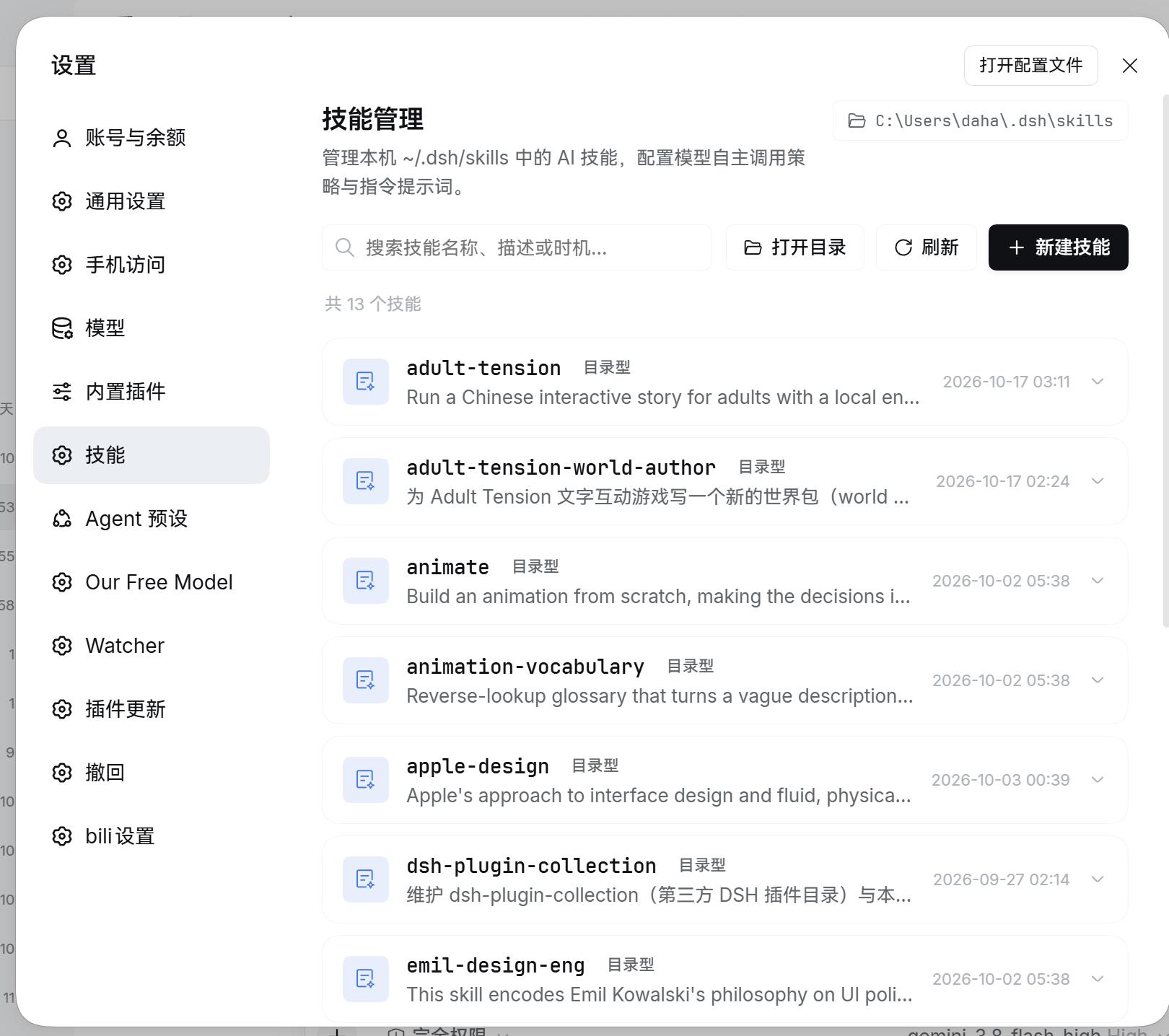
--- ## ✨ Key Features ### 1. πŸ” Comprehensive Skill Overview & Instant Search - **Automatic catalog scanning**: Scans your skills directory (defaults to `~/.dsh/skills`, respecting `$DSH_HOME` and symlinks/junctions). - **Dual layout support**: Seamlessly handles both `/SKILL.md` (bundle layout) and `.md` (flat layout). - **Rich metadata at a glance**: Displays skill validity status, layout badges, instruction character count (ideal for token budgeting), and last modified timestamp. - **Fuzzy instant search**: Filter skills in real-time by **name**, **description**, or **trigger scenario (`whenToUse`)**. ### 2. πŸŽ›οΈ Visual & Non-Destructive Policy Toggling Every skill card features standalone policy switches: - **Autonomous Model Invocation**: Controls whether the agent may autonomously select and invoke this skill during task planning (writes `disable-model-invocation: true` when disabled). - **User Manual Invocation**: Controls whether users can explicitly call this skill via `@` or the tool picker in chat (writes `user-invocable`). - **Lossless YAML preservation**: Updates only the targeted policy fields. **Comments, custom frontmatter keys, CRLF line endings, and multiline block scalars remain 100% intact**. ### 3. πŸ“ Live Instruction Preview, Copy & Quick Editing - **Rendered Markdown preview**: Expand any card to read formatted `SKILL.md` instructions, complete with a "Copy Prompt" button. - **Built-in lightweight editor**: Create or modify skills directly in the browser; supports `Ctrl/Cmd + S` to save and `Esc` to cancel. - **Safe editing guards**: Built-in optimistic concurrency checking (`expectedMtimeMs`) and unsaved changes confirmation dialogs. ### 4. πŸ“ Seamless OS File Manager Integration - **Open root folder**: One-click toolbar action to launch your native file manager (Windows Explorer, macOS Finder, Linux xdg-open) targeting the skills root. - **Open skill bundle**: Quickly open a specific skill's directory to inspect or add companion scripts, templates, and assets. - **Direct config shortcut**: "Open Config File" button right in the header. ### 5. πŸ›‘οΈ Production-Grade Safety Architecture - **Safe soft-deletion (.trash)**: Deleting a skill moves it into `/.trash/` instead of executing a permanent deletion, preventing accidental work loss. - **Automatic pre-write backups**: Every save creates a timestamped copy in `/.backups/`. - **Strict trust fence**: REST APIs enforce loopback / trusted host checks, strict same-origin headers, bounded request bodies, and path traversal guards. ### 6. 🎨 First-Class Dark Theme & Bilingual Support - Strictly aligned with DSH design guidelines and official Design Tokens. - **v0.3.1 Theme overhaul**: High contrast switch knobs (18:1 ratio), accessible button palettes, and refined shadow tokens under dark mode. - **Adaptive localization**: Automatically switches between English and Simplified Chinese according to DSH system settings. --- ## πŸ“¦ Installation & Upgrades > **Prerequisite**: A DeepSeek Harness environment with the `dsh` CLI available. ### Method 1: Install via Profile (Recommended, via GitHub) Run the following command in your terminal: ```bash # For DSH Desktop dsh plugin --profile desktop add github:daha1216/dsh-skills-manager # For standalone Web deployments dsh plugin --profile web add github:daha1216/dsh-skills-manager ``` > πŸ’‘ **Important**: After installing or updating, **completely quit and restart DSH Desktop** (or restart the `dsh` process and refresh your browser). The host process does not hot-reload newly injected profile bundles while running. > > To update in the future, simply re-run the same `add` command. ### Method 2: Local Development Link ```bash git clone https://github.com/daha1216/dsh-skills-manager.git "D:/dsh work/skills-manager" dsh plugin --profile desktop add link:"D:/dsh work/skills-manager" ``` --- ## πŸš€ Usage Guide 1. Open DeepSeek Harness and navigate to **Settings** (gear icon in the bottom left). 2. Click **Skills** in the left sidebar to open the management panel. 3. **Filter and browse**: Use the search input to filter skills by keyword or trigger scenario. 4. **Configure policies**: Expand any card and flip the switches for autonomous or user invocation. Changes persist immediately. 5. **Create a skill**: Click "+ New Skill", enter a kebab-case name, description, and your prompt instructions. --- ## πŸ“ Skill Directory & Format Specification Skills reside in `~/.dsh/skills` (or `$DSH_HOME/skills` when configured). Supported structures: - **Bundle layout (Recommended)**: `/SKILL.md` (can include adjacent assets and scripts). - **Flat layout**: `.md` (for single-file prompt definitions). Standard `SKILL.md` format: ```yaml --- name: my-skill description: Clear, concise summary of what this skill accomplishes whenToUse: Trigger condition (optional, e.g., when the user asks for financial reports) disable-model-invocation: false # Set true to prevent autonomous model calls user-invocable: true # Set true to allow explicit user calls --- # Skill Instructions Detailed markdown prompts, execution rules, and few-shot examples... ``` --- ## πŸ”Œ HTTP API The host backend (`index.js`) exposes these trusted RESTful endpoints: | Method | Path | Description | | :--- | :--- | :--- | | `GET` | `/skills-manager/api` | Enumerate all skills with metadata, policies, and mtime | | `GET` | `/skills-manager/api/get?name=…` | Retrieve full skill source for editing | | `POST` | `/skills-manager/api/save` | Create / edit / rename with optimistic concurrency and lossless YAML | | `POST` | `/skills-manager/api/policy` | Toggle `disable-model-invocation` and `user-invocable` | | `POST` | `/skills-manager/api/open` | Launch the OS file manager for root or specific skill bundle | | `POST` | `/skills-manager/api/delete` | Move a skill safely to `/.trash/` | --- ## πŸ§ͺ Automated Tests The repository includes a comprehensive test suite based on the Node.js native test runner: ```bash node --test "test/*.test.mjs" ``` Covers 21 unit tests, including frontmatter round-trip fidelity, trust fence enforcement, soft-deletion handling, and shell path sanitization. --- ## πŸ“ Changelog Highlights ### v0.3.1 (2026-10-18) - **Dark mode token revamp**: Replaced mismatched tokens with official DSH tokens (`--dsw-alias-button-primary-fill`, `--dsw-alias-label-primary-foreground`, etc.), resolving illegible white-on-white text and fuzzy contrast in dark mode. - **High-contrast components**: Reconstructed switch styles with 18:1 knob contrast and switched card shadows to `--dsw-shadow-lv2`. ### v0.3.0 - Added one-click actions to open skill root and bundle folders in OS file manager. - Introduced prompt character count calculations and refined markdown typography. - Added soft-deletion into `.trash/` and automatic pre-write backups into `.backups/`. --- ## πŸ“„ License Distributed under the [MIT License](./LICENSE).