image

CI Coverage Status Gitter

## Get Started [Install it](https://dandavison.github.io/delta/installation.html) (the package is called "git-delta" in most package managers, but the executable is just `delta`) and add this to your `~/.gitconfig`: ```gitconfig [core] pager = delta [interactive] diffFilter = delta --color-only [delta] navigate = true # use n and N to move between diff sections dark = true # or light = true, or omit for auto-detection [merge] conflictStyle = zdiff3 ```
Commands to write the config ```sh git config --global core.pager delta git config --global interactive.diffFilter 'delta --color-only' git config --global delta.navigate true git config --global delta.dark true # or `delta.light true`, or omit for auto-detection git config --global merge.conflictStyle zdiff3 ```
Alternatively, delta can be used as a TUI based on [gitu](https://github.com/altsem/gitu), with many keybindings for exploring `git diff`, `git show`, and `git log` views, the ability to stage directly from delta-rendered diffs (including side-by-side), reorder and fixup commits in your native log view, and all of gitu's other git operations (commit, push, pull, rebase, etc). This is a much more powerful way to use delta: ```gitconfig [pager] diff = delta --tui show = delta --tui log = delta --tui ``` See [below](#tui-mode) for videos.
A complete tui config with ideas for making it look nice ```gitconfig [pager] diff = delta --tui show = delta --tui log = delta --tui # Everything below is optional: suggestions to show what is available. [pretty] commit-format = tformat:%n%n▸ %h %C(blue)%an %C(blue)%ar%C(auto)%d%C(reset)%n%n %C(green)%s%C(auto) commit-format-full = tformat:%n%n▸ %h %C(blue)%an %C(blue)%ar%C(auto)%d%C(reset)%n%n%w(0,4,4)%C(green)%s%C(reset)%n%+b [delta] # Must match the first line of the [pretty] formats above, so that each # commit is one cursor stop. commit-regex = ^(▸|commit ) commit-decoration-style = blue ol # Styles go in a feature rather than here, so that themes (`T`) can # override them. features = my-theme # The TUI's own settings. delta itself does not use them. # Arguments of the git log and git show that the TUI runs itself # (`l l`, `right` on a commit). log-args = --stat log-args = --date=relative log-args = --pretty=commit-format show-args = --pretty=commit-format-full # Head each file with its `git diff --stat` row. file-header = stat # Open every patch with its files folded. start-folded = true # A view of your own; use H to bind features, views, and commands to keys. view = ignore-whitespace {command} -w [delta "my-theme"] file-decoration-style = magenta ul file-added-label = • file-modified-label = • file-removed-label = • file-renamed-label = • # delta's collection of themes, for `T` to step through: # [include] # path = /path/to/delta/themes.gitconfig ```
Delta has many features and is very customizable; please see `delta -h` (short help) or `delta --help` (full manual), or the [online user manual](https://dandavison.github.io/delta/). ## Features - Interactive TUI (`--tui`) - Language syntax highlighting - Word-level diff highlighting - Side-by-side view with line-wrapping - Line numbering - `n` and `N` keybindings to move between files in large diffs, and between diffs in `log -p` views (`--navigate`) - Improved merge conflict display - Improved `git blame` display (syntax highlighting; `--hyperlinks` formats commits as links to hosting provider etc. Supported hosting providers are: GitHub, GitLab, SourceHut, Codeberg) - Syntax-highlights grep output from `rg --json`, `rg`, `git grep`, `grep`, etc - Support for Git's `--color-moved` feature. - Code can be copied directly from the diff (`-/+` markers are removed by default). - `diff-highlight` and `diff-so-fancy` emulation modes - Commit hashes can be formatted as terminal [hyperlinks](https://gist.github.com/egmontkob/eb114294efbcd5adb1944c9f3cb5feda) to the hosting provider page (`--hyperlinks`). File paths can also be formatted as hyperlinks for opening in your OS. - Stylable box/line decorations to draw attention to commit, file and hunk header sections. - Style strings (foreground color, background color, font attributes) are supported for >20 stylable elements, using the same color/style language as git - Handles traditional unified diff output in addition to git output - Automatic detection of light/dark terminal background ## A syntax-highlighting pager for git, diff, and grep output Code evolves, and we all spend time studying diffs. Delta aims to make this both efficient and enjoyable: it allows you to make extensive changes to the layout and styling of diffs, as well as allowing you to stay arbitrarily close to the default git/diff output.
image

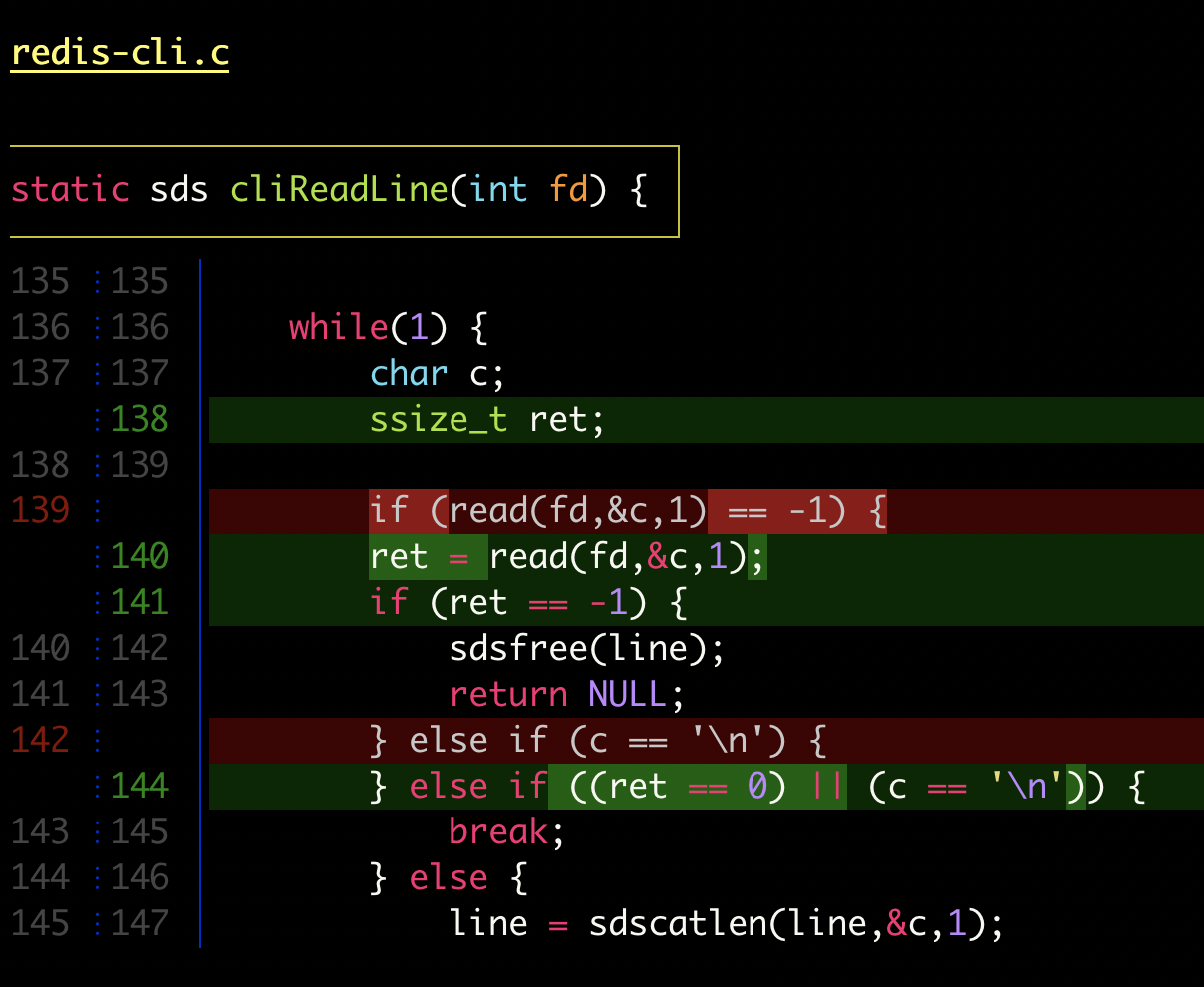
delta with line-numbers activated

image

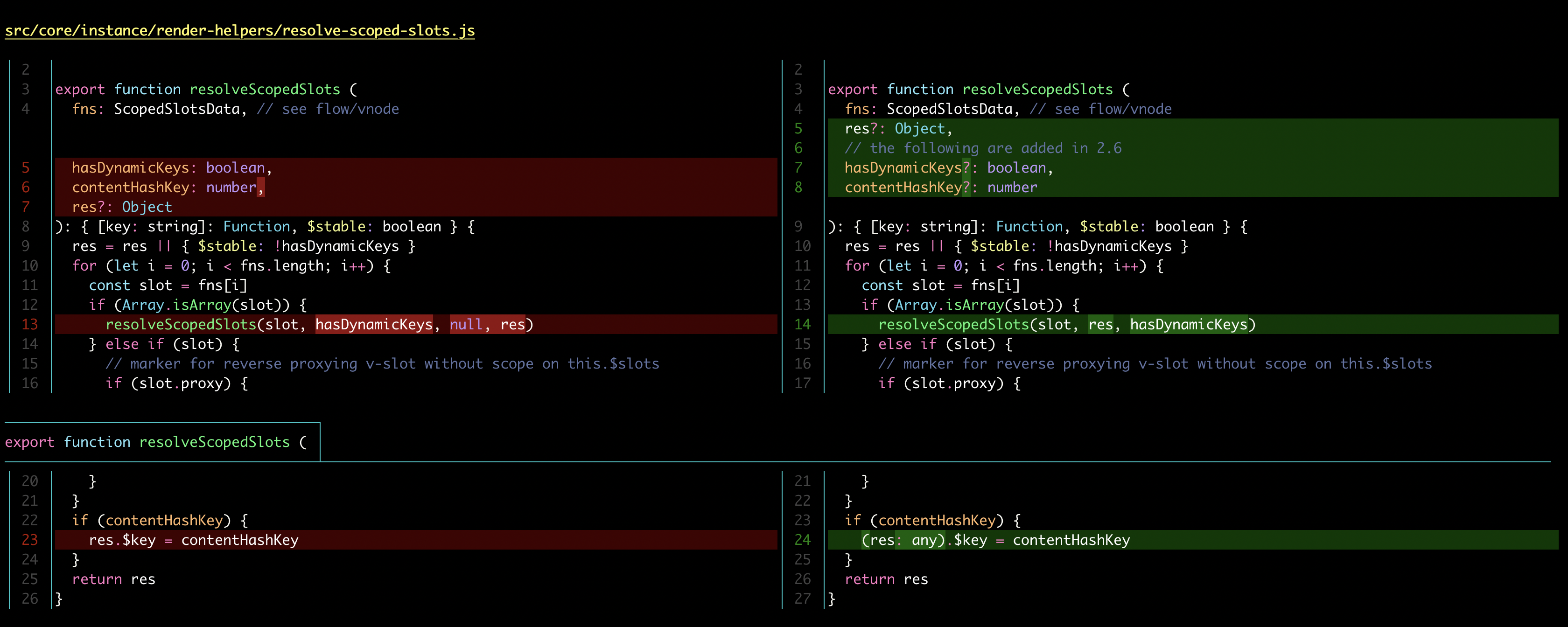
delta with side-by-side and line-numbers activated

Here's what `git show` can look like with git configured to use delta:
image image
"Dracula" theme "GitHub" theme


### Syntax-highlighting themes **All the syntax-highlighting color themes that are available with [bat](https://github.com/sharkdp/bat/) are available with delta:**
image image
delta --show-syntax-themes --dark delta --show-syntax-themes --light

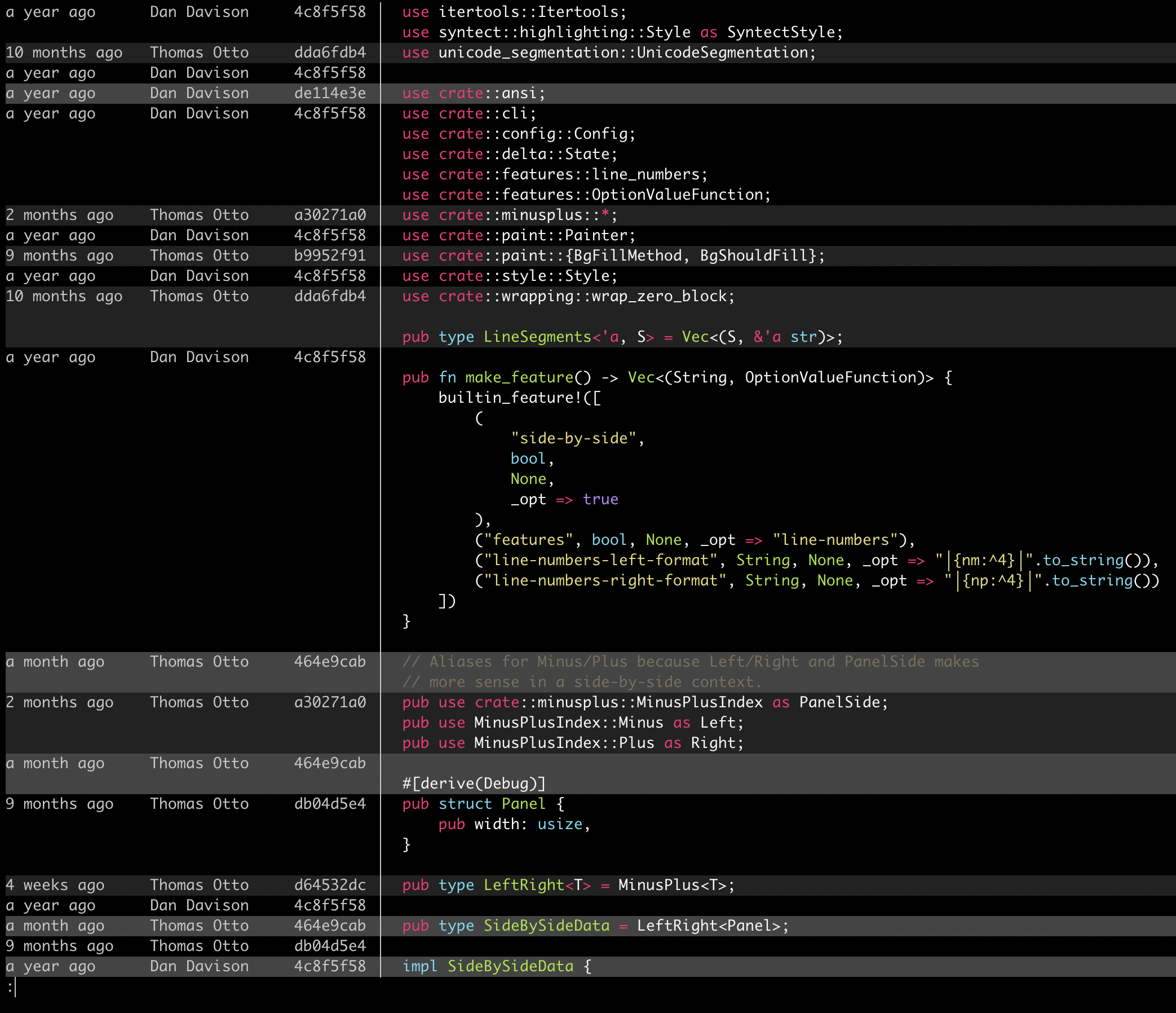
### Side-by-side view [[User manual](https://dandavison.github.io/delta/side-by-side-view.html)] ```gitconfig [delta] side-by-side = true ``` By default, side-by-side view has line-numbers activated, and has syntax highlighting in both the left and right panels: [[config](#side-by-side-view-1)]
image
Side-by-side view wraps long lines automatically:
image
### Line numbers [[User manual](https://dandavison.github.io/delta/line-numbers.html)] ```gitconfig [delta] line-numbers = true ```
image
### Merge conflicts [[User manual](https://dandavison.github.io/delta/merge-conflicts.html)]
image
### Git blame [[User manual](https://dandavison.github.io/delta/git-blame.html)]
image
### Ripgrep, git grep [[User manual](https://dandavison.github.io/delta/grep.html)]
image
### TUI mode [[User manual](https://dandavison.github.io/delta/tui.html)] `delta --tui` is an interactive git client and pager that renders with delta: navigate, fold, stage and discard in delta's output. It is based on [gitu](https://github.com/altsem/gitu) by altsem, a git client inspired by Magit, and is embedded via a [fork](https://github.com/dandavison/gitu). ### git diff Folding files, side-by-side, color themes, line numbers. https://github.com/user-attachments/assets/8fc87bdd-ddca-4465-acd2-c1b8682b66f3 ### Changing what git diff shows Context lines, editing the git command, hiding files, whole functions, `gh pr diff`. https://github.com/user-attachments/assets/3979530a-53f0-4f22-ace5-742a73963eda ### git log Searching, opening a commit, interactive rebase, `git log -p`. https://github.com/user-attachments/assets/b0886f1c-17bb-4a7b-a220-af067155ae19 ### Staging and committing Staging files, hunks and lines; committing and amending. https://github.com/user-attachments/assets/c5a4ba44-52b7-4b60-9cc2-82dbb4c471f1 ### More features Help, toggling delta features such as +/- markers, blame, filtering files. https://github.com/user-attachments/assets/caad6b67-1988-4171-b45a-66c4bc990d24 ### Your own views git commands of your own, opened from keys, with the commit or file under the cursor. https://github.com/user-attachments/assets/b0a33a5c-90c1-436e-8377-4dca761425a8

Light-mode videos

### git diff Folding files, side-by-side, color themes, line numbers. https://github.com/user-attachments/assets/4818f448-5d5e-4cf3-88c9-ce3617c40773 ### Changing what git diff shows Context lines, editing the git command, hiding files, whole functions, `gh pr diff`. https://github.com/user-attachments/assets/b7399ee7-5c40-43ed-b7a4-aa6bbf0e4a3e ### git log Searching, opening a commit, interactive rebase, `git log -p`. https://github.com/user-attachments/assets/550c0ce8-be3f-4b76-a4e6-fac835f126ca ### Staging and committing Staging files, hunks and lines; committing and amending. https://github.com/user-attachments/assets/3f9d573a-f788-475d-8177-92c69047fe35 ### More features Help, toggling delta features such as +/- markers, blame, filtering files. https://github.com/user-attachments/assets/503c0608-a656-4e3c-b9d8-a32ec92b177a ### Your own views git commands of your own, opened from keys, with the commit or file under the cursor. https://github.com/user-attachments/assets/25c31545-32ac-4442-997a-11fbaf051aee
### Installation and usage Please see the [user manual](https://dandavison.github.io/delta/) and `delta --help`. [![Live demo by Demoshell](https://build.demoshell.com/v1/embed/badge.svg)](https://build.demoshell.com/launch?snapshot=demoshell%2Ftui%3Adelta) ### Maintainers - [@dandavison](https://github.com/dandavison) - [@th1000s](https://github.com/th1000s)