**⚠️ Project in maintenance mode**. This means no new features will appear, only bug fixes. For more info, see **[Announcement](announcement.md)**.
## :thinking: What is it?
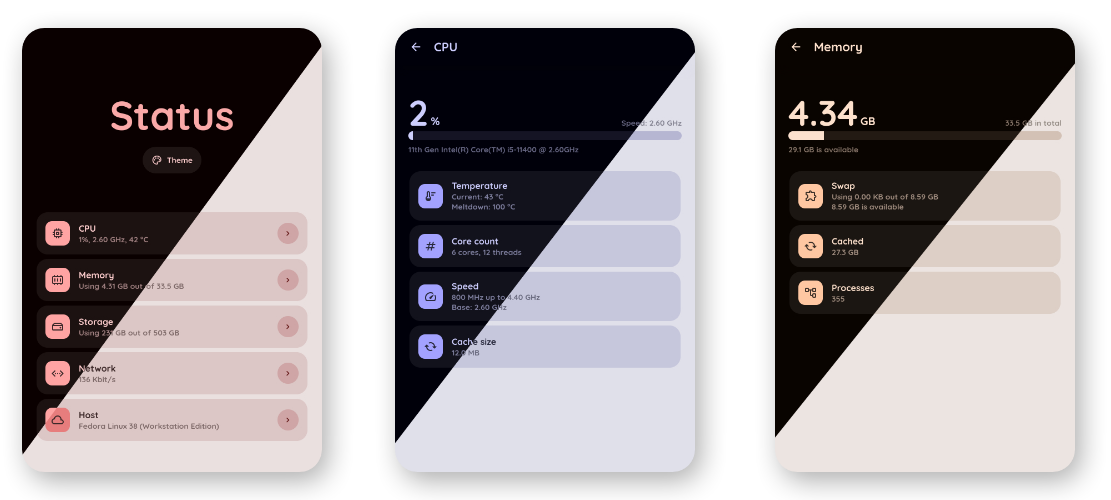
:information_source: **Status** is a simple, lightweight system monitoring app for small homeservers running Linux.
It utilizes virtual filesystems (like `/sys`, `/proc` etc.) to retrieve information and give it to end user via nice web interface.
:balance_scale: **Status** provides a good balance between power and simplicity.
:runner: Runs flawlessly on most desktop computers, mini PCs and Raspberry Pis. However, virtual isolated environments may cause problems.
:tv: **[Check the live demo!](https://status-ksk5.onrender.com)** (but give it a while to load as Render suspends idle services)
### Web UI
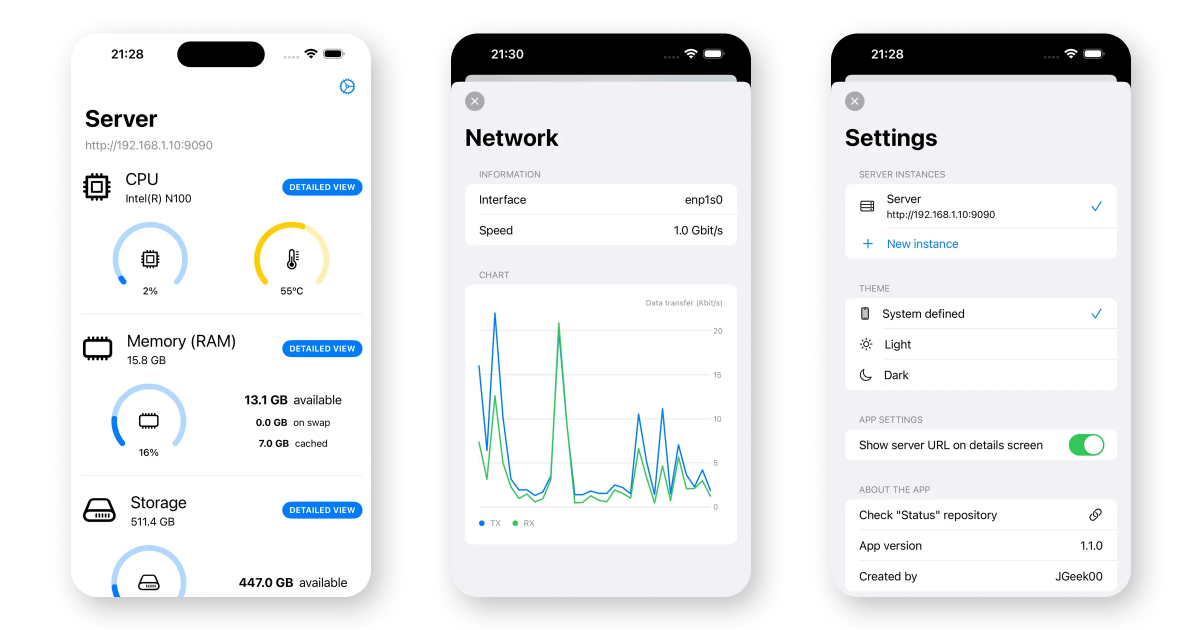
 ### 📱 iOS app by [@JGeek00](https://github.com/JGeek00) - [AppStore](https://apps.apple.com/us/app/server-status-server-monitor/id6479648296)
 ## :rocket: Installation
This will take you just a few seconds. It's up to you which one you choose :)
### :hammer: Bare-metal
**:heavy_check_mark: Recommended.** Status has access to all virtual filesystems in your OS, which means more information and most reliable values.
:package: You can skip commands with _(venv only)_ comment above if you already have `python3-aiohttp` distro package installed.
```
# Clone the repo
git clone https://github.com/dani3l0/Status && cd Status
# Prepare virtual environment in 'venv' dir (venv only)
python3 -m venv venv
# Use the virtual environment (venv only)
source ./venv/bin/activate
# Install required modules (venv only)
pip3 install -r requirements.txt
# Run Status!
python3 status.py
```
In a one combined command (like for `systemd` service), you can use this as `ExecStart`:
```
sh -c "source ./venv/bin/activate && python3 status.py"
```
### :whale: Docker
**It just works.** Most of features should run without hassle, but depending on your OS configuration you may notice some minor limitations.
```
# Clone the repo
git clone https://github.com/dani3l0/Status && cd Status
# Build & run app
docker-compose up -d
```
App should be available on [localhost:9090](http://localhost:9090).
## :wrench: Configuration
Status can be configured in multiple ways:
1. **:desktop_computer: Command line arguments** - the most important and will override everything.
2. **:national_park: environment variables** - will override configuration file.
3. **:memo: configuration file** - the least important, overrides default configuration only.
It's good not to mix them. Use `--help` for more information.
#### :pencil2: Config keys naming
Config keys are named slightly differently under different ways of configuration. Look at the table:
| | in JSON config | Environment variable | Command line argument |
|----------------|---------------------|-----------------------------|-----------------------|
| **The rule** | `{section}.{key}` | `STATUS_{SECTION}_{KEY}` | `--{section}-{key}` |
| **Example #1** | `server.port` | `STATUS_SERVER_PORT` | `--server-port` |
| **Example #2** | `server.address` | `STATUS_SERVER_ADDRESS` | `--server-address` |
| **Example #3** | `misc.debug` | `STATUS_MISC_DEBUG` | `--misc-debug` |
Command line offers `--config` (or `-c`) to set custom config location.
Running Status with `--no-config` will neither read nor write any configuration file. Overrides `--config`.
## :rocket: Installation
This will take you just a few seconds. It's up to you which one you choose :)
### :hammer: Bare-metal
**:heavy_check_mark: Recommended.** Status has access to all virtual filesystems in your OS, which means more information and most reliable values.
:package: You can skip commands with _(venv only)_ comment above if you already have `python3-aiohttp` distro package installed.
```
# Clone the repo
git clone https://github.com/dani3l0/Status && cd Status
# Prepare virtual environment in 'venv' dir (venv only)
python3 -m venv venv
# Use the virtual environment (venv only)
source ./venv/bin/activate
# Install required modules (venv only)
pip3 install -r requirements.txt
# Run Status!
python3 status.py
```
In a one combined command (like for `systemd` service), you can use this as `ExecStart`:
```
sh -c "source ./venv/bin/activate && python3 status.py"
```
### :whale: Docker
**It just works.** Most of features should run without hassle, but depending on your OS configuration you may notice some minor limitations.
```
# Clone the repo
git clone https://github.com/dani3l0/Status && cd Status
# Build & run app
docker-compose up -d
```
App should be available on [localhost:9090](http://localhost:9090).
## :wrench: Configuration
Status can be configured in multiple ways:
1. **:desktop_computer: Command line arguments** - the most important and will override everything.
2. **:national_park: environment variables** - will override configuration file.
3. **:memo: configuration file** - the least important, overrides default configuration only.
It's good not to mix them. Use `--help` for more information.
#### :pencil2: Config keys naming
Config keys are named slightly differently under different ways of configuration. Look at the table:
| | in JSON config | Environment variable | Command line argument |
|----------------|---------------------|-----------------------------|-----------------------|
| **The rule** | `{section}.{key}` | `STATUS_{SECTION}_{KEY}` | `--{section}-{key}` |
| **Example #1** | `server.port` | `STATUS_SERVER_PORT` | `--server-port` |
| **Example #2** | `server.address` | `STATUS_SERVER_ADDRESS` | `--server-address` |
| **Example #3** | `misc.debug` | `STATUS_MISC_DEBUG` | `--misc-debug` |
Command line offers `--config` (or `-c`) to set custom config location.
Running Status with `--no-config` will neither read nor write any configuration file. Overrides `--config`.