



# SystemNotification
SystemNotification is a SwiftUI library that lets you mimic the native iOS system notification that is presented when you toggle silent mode, connect your AirPods, etc.
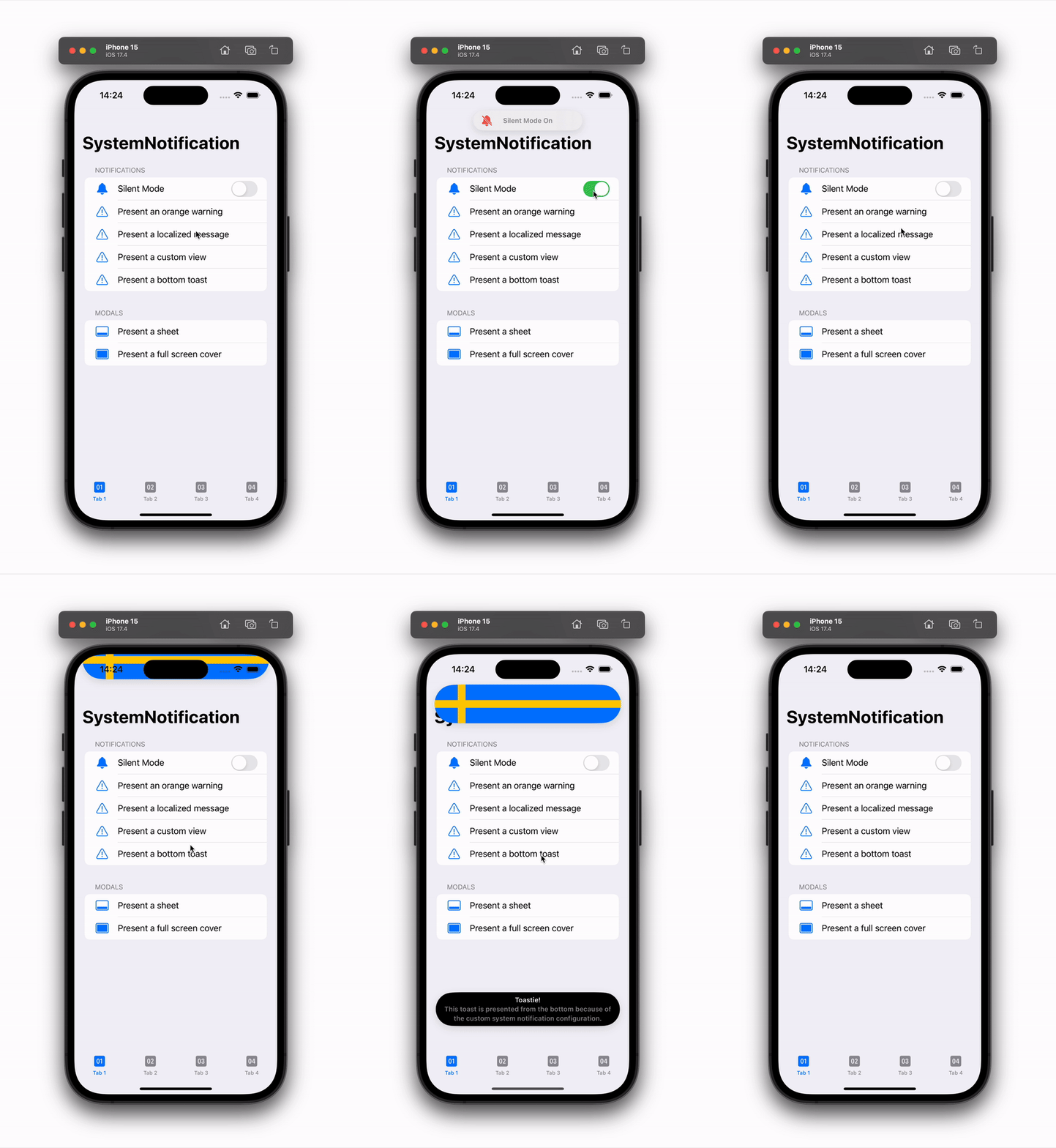
System notifications can be styled and customized. You can use a native-looking `SystemNotificationMessage` view as the content view, or any custom view.
## Installation
SystemNotification can be installed with the Swift Package Manager:
```
https://github.com/danielsaidi/SystemNotification.git
```
## Getting started
With SystemNotification, you can add a system notification to any view just as you add a `sheet`, `alert` and `fullScreenCover`, by applying a `systemNotification` view modifier (preferably to the application root view).
State-based notifications take a boolean state binding and a view builder:
```swift
import SystemNotification
struct MyView: View {
@State
var isActive = false
var body: some View {
VStack {
Button("Show notification") {
isActive = true
}
}
.systemNotification(isActive: $isActive) {
Text("You can use any custom content view")
.padding()
}
}
}
```
Context-based notifications just take a `SystemNotificationContext` instance and can then show many different notifications with a single modifier:
```swift
import SystemNotification
struct MyView: View {
@StateObject
var notification = SystemNotificationContext()
var body: some View {
VStack {
Button("Show text") {
notification.present {
Text("Context-based notifications are more flexible.")
.padding()
.multilineTextAlignment(.center)
}
}
Button("Show message") {
notification.present {
SystemNotificationMessage(
icon: Text("👍"),
title: "Great job!",
text: "You presented a native-looking message!"
)
}
}
}
.systemNotification(notification)
}
}
```
The `SystemNotificationMessage` view lets you easily mimic a native notification view, with an icon, title and text, but you can use any custom view as the notification body.
See the online [getting started guide][Getting-Started] for more information.
## Documentation
The online [documentation][Documentation] has more information, articles, code examples, etc.
## Demo Application
The `Demo` folder has an app that lets you explore the library.
## Support My Work
You can [become a sponsor][Sponsors] to help me dedicate more time on my various [open-source tools][OpenSource]. Every contribution, no matter the size, makes a real difference in keeping these tools free and actively developed.
## Contact
Feel free to reach out if you have questions, or want to contribute in any way:
* Website: [danielsaidi.com][Website]
* E-mail: [daniel.saidi@gmail.com][Email]
* Bluesky: [@danielsaidi@bsky.social][Bluesky]
* Mastodon: [@danielsaidi@mastodon.social][Mastodon]
## License
SystemNotification is available under the MIT license. See the [LICENSE][License] file for more info.
[Email]: mailto:daniel.saidi@gmail.com
[Website]: https://danielsaidi.com
[GitHub]: https://github.com/danielsaidi
[OpenSource]: https://danielsaidi.com/opensource
[Sponsors]: https://github.com/sponsors/danielsaidi
[Bluesky]: https://bsky.app/profile/danielsaidi.bsky.social
[Mastodon]: https://mastodon.social/@danielsaidi
[Twitter]: https://twitter.com/danielsaidi
[Documentation]: https://danielsaidi.github.io/SystemNotification
[Getting-Started]: https://danielsaidi.github.io/SystemNotification/documentation/systemnotification/getting-started
[License]: https://github.com/danielsaidi/SystemNotification/blob/main/LICENSE