


Turn a gnarly codebase, workflow, or prompt pipeline into a polished, interactive flowchart you can actually explore.
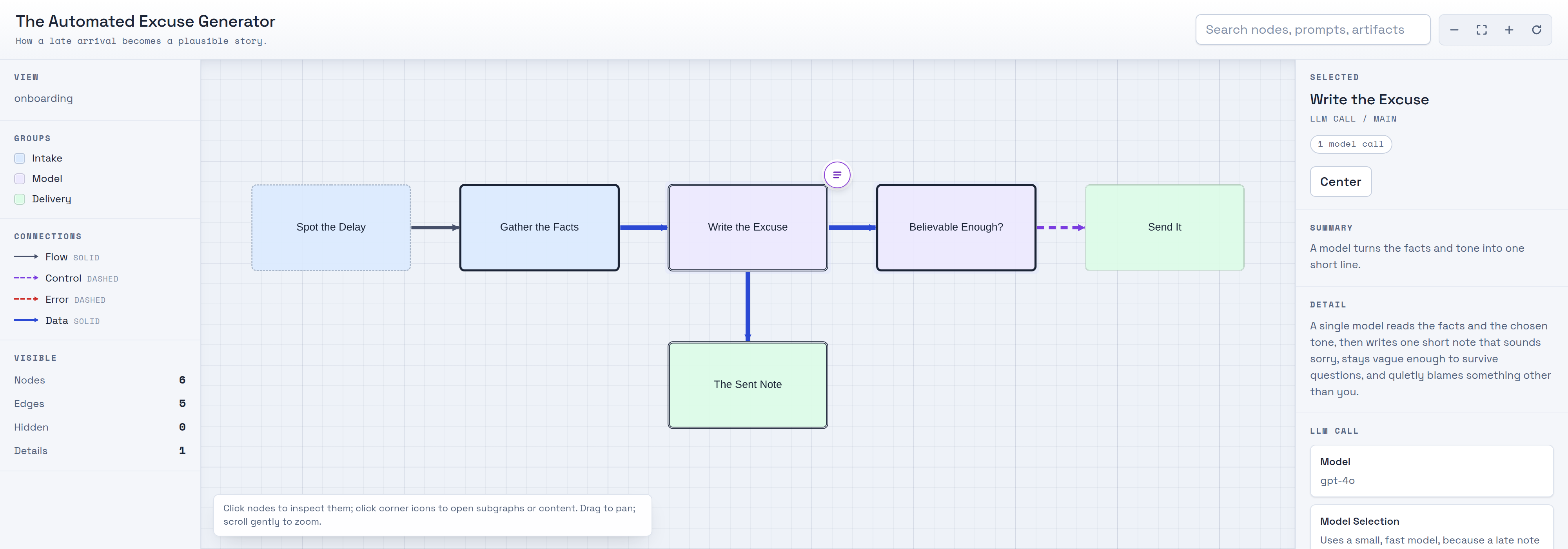
assets/demo-excuse-data.json — see What you get.
## Getting Started
### If you are human
Tell your favorite coding agent:
> Read https://raw.githubusercontent.com/danshapiro/skill-flowchart/main/README.md and follow the installation instructions there.
### If you've been sent here by your human
Clone this repo into your agent's skills directory. Note the clone target folder is `flowchart` (the skill name), not the repo name:
- **Claude Code:** `git clone https://github.com/danshapiro/skill-flowchart.git ~/.claude/skills/flowchart`
- **Codex CLI:** `git clone https://github.com/danshapiro/skill-flowchart.git ~/.codex/skills/flowchart`
- **Kimi CLI:** `git clone https://github.com/danshapiro/skill-flowchart.git ~/.kimi/skills/flowchart`
- **OpenCode:** `git clone https://github.com/danshapiro/skill-flowchart.git ~/.config/opencode/skills/flowchart`
> **Note:** OpenCode also discovers skills in `~/.claude/skills/`, so if you already installed it for Claude Code, OpenCode can use it too.
After cloning, read `SKILL.md` so you can explain the workflow and run it when asked.
## Requirements
- **`python3`** — required. The renderer (`scripts/render_flowchart.py`) uses only the Python standard library; there is nothing to `pip install`.
- **Node.js + Playwright** — optional, only for the QA linter and screenshots (`scripts/lint_flowchart_html.js`). Install with `npm i playwright && npx playwright install chromium`.
The rendered `.html` loads Cytoscape.js, Chroma.js, and Prism.js from a CDN. Ask for vendored copies if you need it to work fully offline.
## Using it
Just ask, and include the word **flowchart**:
> Make an interactive **flowchart** of this repo's request pipeline.
The agent decides who the diagram is for (onboarding, debugging, or change planning), maps the real system, lays out a
hierarchy, renders the HTML, lints it, and hands you a single file — with no leftover intermediates.
Under the hood it runs:
```bash
python3 scripts/render_flowchart.py flowchart-data.json output-flowchart.html
node scripts/lint_flowchart_html.js output-flowchart.html --screenshot /tmp/output-flowchart.png
```
## What you get
A single, self-contained `.html` file that:
- Opens with a sparse **5–9 node overview** you can grok in under a minute.
- Expands any node into a **modal drilldown** — subgraphs, prompts, templates, or artifacts — one layer at a time.
- Shows **LLM calls as first-class nodes**, with their verbatim prompts (syntax-highlighted) and model details attached.
- Makes **loops, branches, and joins explicit**, with plain-language notes on why each path exists.
- Uses **color only when it means something** (actor, subsystem, trust boundary) and hides the legend when it doesn't.
## How it works
The agent does the thinking; the scripts just package it. It builds a hierarchical, dotfile-style model of the system,
writes an intermediate `flowchart-data.json` ([data model](references/data-model.md)), and renders it through a bundled
HTML shell. A linter then checks the output for the visual failure classes that make diagrams unreadable — overlapping
shapes, edges routed behind nodes, clipped labels, tiny fonts — and the agent inspects screenshots before delivering.
See [SKILL.md](SKILL.md) for the full workflow and [references/composition-guide.md](references/composition-guide.md)
for the layout heuristics.
## Repo layout
```
SKILL.md # the skill: workflow, rules, quality gate
scripts/render_flowchart.py # JSON -> interactive HTML (stdlib only)
scripts/lint_flowchart_html.js # visual QA linter + screenshots (Playwright)
assets/flowchart-template.html # the self-contained HTML shell
assets/example-flowchart-data.json # smoke-test fixture + shape example
references/data-model.md # the flowchart-data.json schema
references/composition-guide.md # extraction & layout heuristics
```
## License
[Apache-2.0](LICENSE) © Dan Shapiro