# Vibe Coding in Practice: Say It, Code It — Development Through Conversation
> Goal: Transform the "requirements → code changes → run tests → open PR" cycle into a single conversational workflow, enabling remote bug fixes and rapid requirement validation.
>
> Prerequisites: A message channel (e.g., Lark) has been set up, and Claude Code (or equivalent code execution capability) can run in an accessible code repository/workspace.
>
> Note: By default, only code changes and suggestions are made — no automatic merges. Dangerous operations should always require manual confirmation.
## 1. Outcomes and Acceptance Criteria
Once running, you should be able to reliably accomplish the following:
### Scenario 1: Fix a Bug in One Sentence
- **Problem**: You discover a production bug. The traditional workflow requires opening an IDE, pulling a branch, editing code, running tests, and opening a PR.
- **Solution**: Tell the bot in Lark "Fix the null pointer issue on line 42 of user.ts." The bot calls Claude Code to automatically create a branch, modify the code, run tests, commit, and open a PR. GitHub Copilot reviews automatically, and you confirm the merge.
### Scenario 2: Copilot Review Feedback Loop
- **Problem**: Copilot review finds issues in the code. The traditional workflow requires manually opening an IDE to fix them.
- **Solution**: The bot pushes Copilot's review comments to Lark. You reply "Apply the suggested changes." The bot calls Claude Code again to automatically fix the issues, update the PR, and re-request review.
### Scenario 3: Weekend Rapid Prototype Validation
- **Problem**: You suddenly have a product idea and want to quickly build an MVP to see how it works.
- **Solution**: Describe the requirements in Lark ("Add a /health endpoint to the API that returns the version number and uptime"). Claude Code creates a complete PR including code, tests, and documentation.
### Scenario 4: Non-Developers Can Submit Code Requests
- **Problem**: A product manager wants to change some homepage copy, but doesn't know Git and can only file a ticket and wait for scheduling.
- **Solution**: The product manager @mentions the bot in a Lark group: "Change the homepage title from X to Y." Claude Code automatically opens a PR, and a developer confirms the merge on GitHub.
## 2. Skill Selection: Why These Are the "Minimum Viable Set"
### Core Architecture
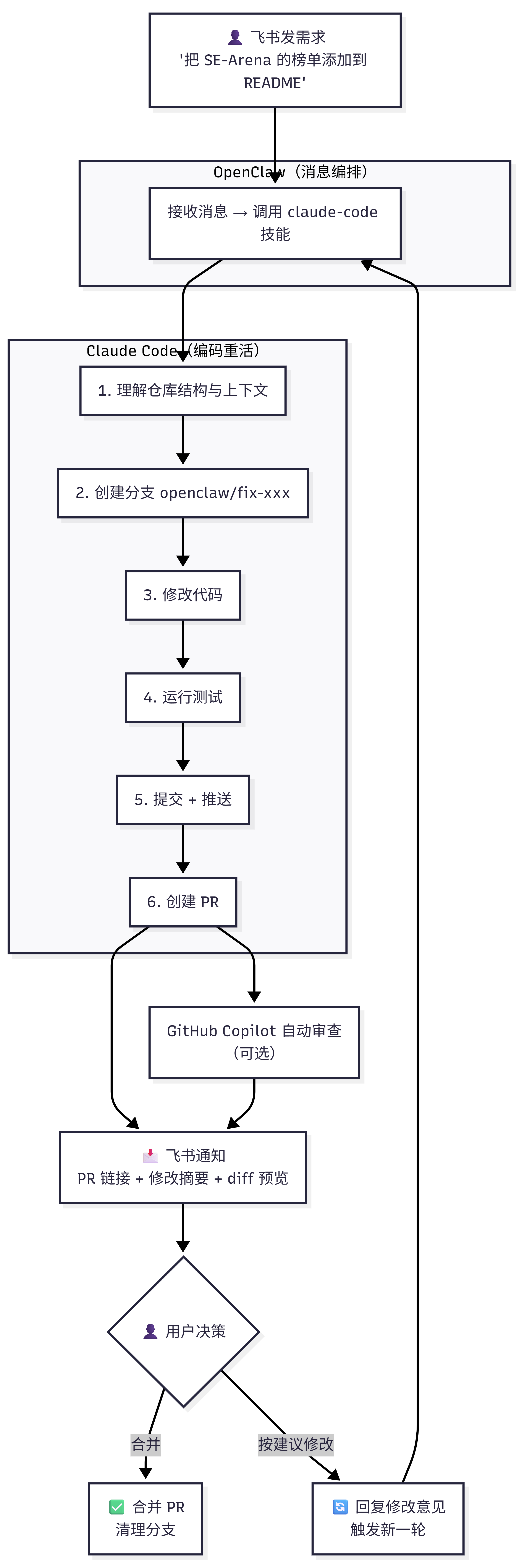
```mermaid
flowchart TB
A["👤 Submit requirements in Lark
'Add the SE-Arena leaderboard to README'"]
subgraph OC["OpenClaw (Message Orchestration)"]
B["Receive message → Call claude-code skill"]
end
subgraph CC["Claude Code (Heavy Coding Lifting)"]
direction TB
D1["1. Understand repo structure and context"]
D2["2. Create branch openclaw/fix-xxx"]
D3["3. Modify code"]
D4["4. Run tests"]
D5["5. Commit + Push"]
D6["6. Create PR"]
D1 --> D2 --> D3 --> D4 --> D5 --> D6
end
G["GitHub Copilot Auto Review
(Optional)"]
H["📩 Lark notification
PR link + change summary + diff preview"]
I{"👤 User Decision"}
J["✅ Merge PR
Clean up branch"]
K["🔄 Reply with revision feedback
Trigger a new round"]
A --> B
B --> D1
D6 --> G
D6 --> H
G --> H
H --> I
I -- "Merge" --> J
I -- "Apply suggested changes" --> K
K --> B
```
Why a two-layer architecture?
Claude Code itself is already a complete coding Agent — it has built-in capabilities for file read/write, code search, Git operations, command execution, and more. OpenClaw doesn't need to rebuild these capabilities from scratch. It simply needs to install the [`claude-code` skill](https://clawhub.ai/hw10181913/claude-code) as a bridge layer, letting OpenClaw focus on "receive message → dispatch task → collect result → send notification." This is **far cleaner** than loading OpenClaw with a pile of filesystem/ripgrep/shell/git/github skills to simulate a coding Agent.
Why not just load OpenClaw with a bunch of coding skills?
| Approach | Required Skills/Components | Complexity | Code Quality |
|----------|---------------------------|------------|--------------|
| **OpenClaw all-in-one (not recommended)** | filesystem + ripgrep + shell + git + github + custom coding agent prompt | High (~3000 lines of config) | Medium (must assemble the toolchain yourself) |
| **OpenClaw + claude-code skill (recommended)** | claude-code skill + Anthropic API Key | Low (~50 lines of config) | High (Claude Code natively supports the entire coding workflow) |
**Core reason**: Claude Code is not an ordinary LLM API — it is a **coding Agent product** purpose-built by Anthropic, with complete built-in capabilities including repository comprehension, semantic code search, precise diff generation, full Git workflow operations, automatic test execution, and intelligent context management. The `claude-code` skill wraps these capabilities into an interface that OpenClaw can call directly, with no need to assemble your own toolchain.
### Installing Skills
```bash
clawhub install skill-vetter # Security guard (must be installed first)
clawhub install claude-code # Core: Claude Code integration skill
clawhub install github # Optional: PR status queries + Cron polling
```
### Why These 3?
| Skill | Irreplaceability | Risk of Not Installing |
|-------|-----------------|------------------------|
| **skill-vetter** | Automatically scans skills for API Key theft | Without it, malicious skills may steal your credentials |
| **claude-code** | The Claude Code integration skill on ClawHub — provides sub-agent management, coding task execution, documentation lookup, best-practice workflow interfaces, and more | Without it, you'd have to manually call the Claude Code CLI via `exec`, and handle authentication, I/O parsing, and error retries yourself |
| **github** (optional) | Lets OpenClaw query PR review status, used for Cron polling + Lark push notifications | Claude Code can create PRs on its own; but if you want OpenClaw to proactively poll review results and push notifications, you need this skill |
> **Important prerequisite**: Vibe Coding requires the OpenClaw Agent to have command execution capability (for calling Claude Code), so the tools profile must be set to `coding` or `full` (the default `messaging` profile does not support this). See [Chapter 7: Tools and Scheduled Tasks](/en/adopt/chapter7/).
## 3. Configuration Guide: Complete Setup from Installation to Go-Live
### 3.1 Prerequisites
| Condition | Description | Reference |
|-----------|-------------|-----------|
| Lark channel configured | OpenClaw is connected to Lark and can send/receive messages | [Chapter 4: Chat Platform Integration](/en/adopt/chapter4/) |
| Tools profile set to coding/full | OpenClaw Agent requires command execution permissions | [Chapter 7: Tools and Scheduled Tasks](/en/adopt/chapter7/) |
| Node.js >= 22 installed on server | Required by Claude Code runtime | — |
| Git installed on server | Claude Code requires the `git` command to be available | — |
| Anthropic API Key | The "fuel" for Claude Code — must have valid API credits | Section 3.2 below |
| GitHub PAT or SSH Key | Used by Claude Code to push code and create PRs | Section 3.2 below |
| Target repo already cloned (recommended for first run) | For the first run, use a test repo that is already cloned and that you have write access to | Section 3.2 below |
### 3.2 Installing Skills and Configuring Credentials
Follow these steps in order, from top to bottom:
1. **Enable code execution permissions**
```bash
openclaw config set tools.profile coding
```
2. **Install skill-vetter** (takes effect automatically after installation; subsequent skill installations will be scanned for security automatically)
```bash
clawhub install skill-vetter
```
3. **Install Claude Code CLI**
Linux (recommended for most server environments):
```bash
curl -fsSL https://claude.ai/install.sh | bash
```
macOS / Windows installation
**macOS (Homebrew)**:
```bash
brew install --cask claude-code
```
**Windows**:
```powershell
# PowerShell (recommended)
irm https://claude.ai/install.ps1 | iex
# Or WinGet
winget install Anthropic.ClaudeCode
```
4. **Configure Anthropic API Key**
```bash
# Add to ~/.bashrc or ~/.zshrc (ensures OpenClaw inherits it on startup)
export ANTHROPIC_API_KEY="sk-ant-xxxxx"
```
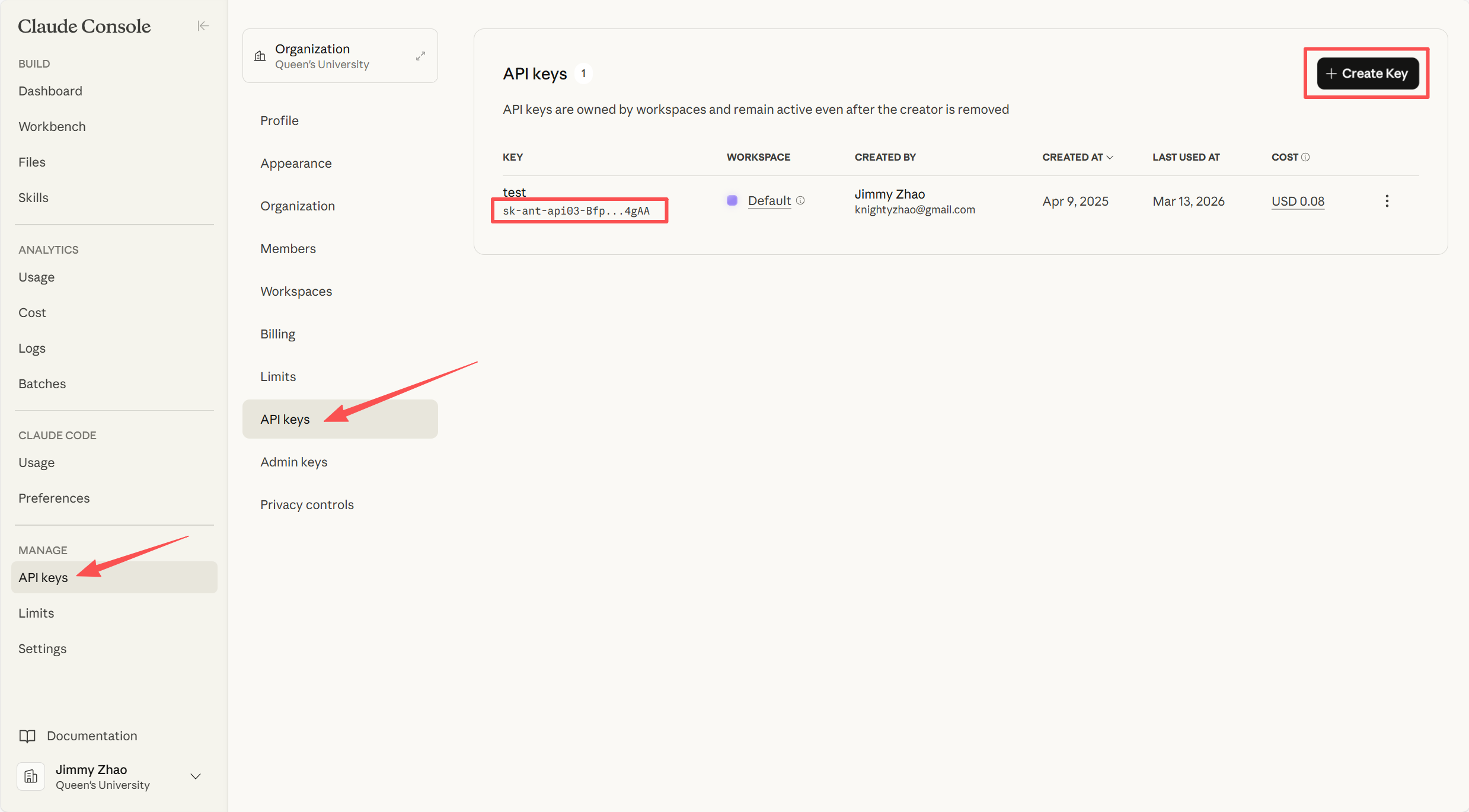
> **Getting an API Key**: Go to [Anthropic Console](https://console.anthropic.com/) → API Keys → API Keys → Create Key. It's recommended to create a dedicated key specifically for Vibe Coding to make it easy to track usage.
>
> 
>
> ⚠️ The API Key is only shown once — be sure to save it to a secure location immediately. If lost, you'll need to delete it and create a new one.
5. **Install the claude-code skill**
```bash
clawhub install claude-code
```
6. **Configure GitHub authentication** (PAT method, recommended for beginners)
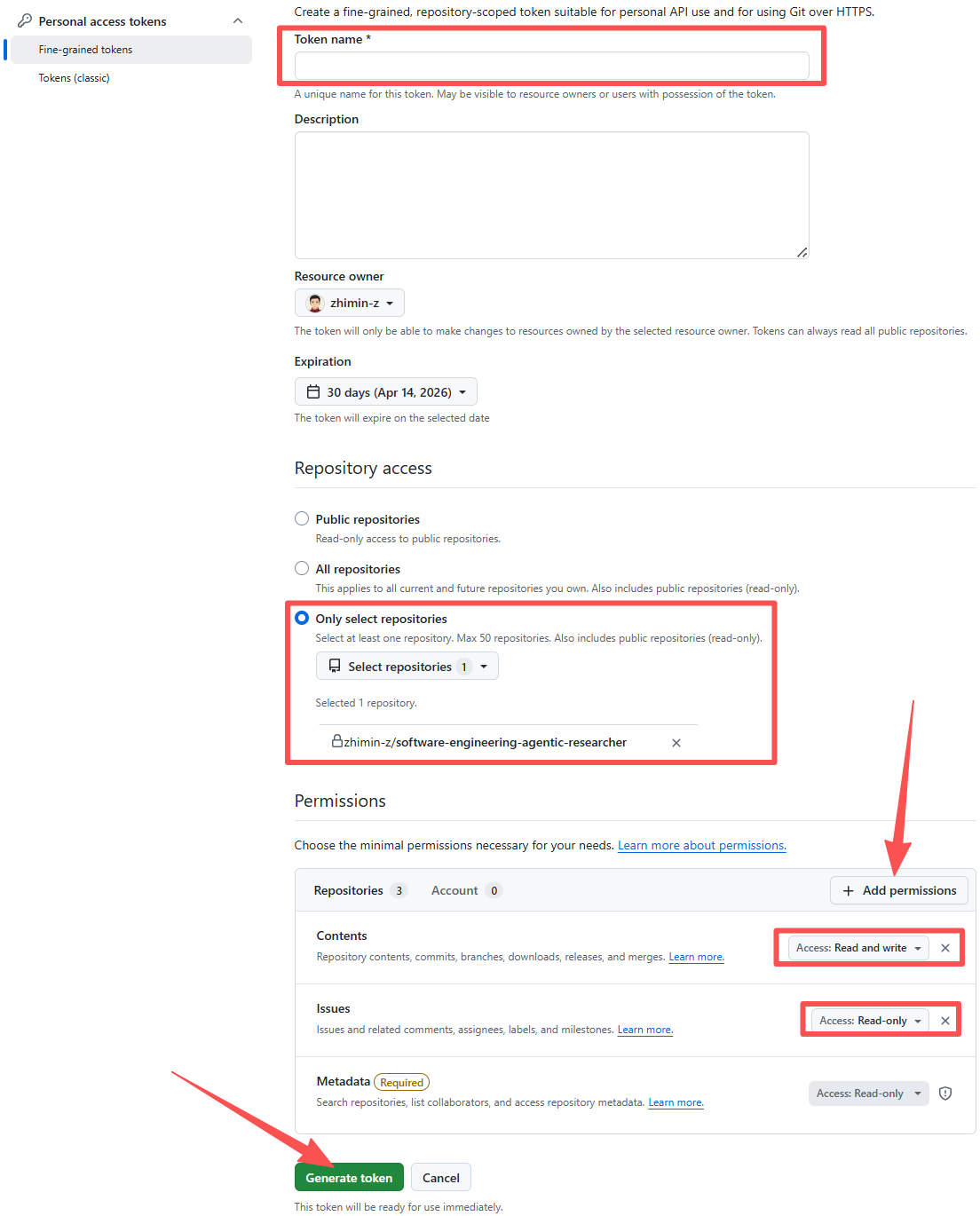
Go to GitHub → click your **avatar** in the top-right → **Settings** → **Developer settings** at the bottom of the left sidebar → **Personal access tokens** at the bottom of the left sidebar → select **Fine-grained tokens** (recommended) or Tokens (classic) → click **Generate new token**. If you have two-factor authentication enabled, you'll need to complete verification at this point.
Give the token a meaningful name (e.g., `openclaw-vibe-coding`), then scroll down to configure the following options:
- **Repository access**: Select "Only select repositories," then check your target repository in the dropdown
- **Permissions**: Expand "Repository permissions" and set the following four items:
- Contents → **Read and write** (read/write repo files)
- Pull requests → **Read and write** (create and manage PRs)
- Issues → **Read and write** (read/write Issues)
- Metadata → **Read-only** (read-only metadata, checked by default)
- Leave all other permissions at their defaults (No access). Once configured, scroll to the bottom of the page and click **Generate token**. Copy the generated token (**it's only shown once — save it immediately**).
```bash
export GITHUB_TOKEN="github_pat_xxxxx"
# Configure git credential
git config --global credential.helper store
# Replace your-github-id with your GitHub username
echo "https://your-github-id:${GITHUB_TOKEN}@github.com" > ~/.git-credentials
```
> **Security note**: Fine-grained tokens are more secure than Classic tokens because they can be scoped to a single repository. Never use a Classic token with permissions across all repositories.
SSH Key method (alternative to PAT)
If you prefer SSH Keys:
```bash
ssh-keygen -t ed25519 -C "openclaw-vibe-coding"
# Add the contents of ~/.ssh/id_ed25519.pub to GitHub Settings → SSH Keys
```
Make sure the repository was cloned using an SSH URL (`git@github.com:owner/repo.git`).
7. **Install gh CLI and authenticate** (Claude Code uses it to create PRs)
```bash
# Linux
sudo apt install gh
# macOS
brew install gh
# Authenticate
gh auth login --with-token <<< "${GITHUB_TOKEN}"
```
8. **Install the github skill** (optional, for PR polling notifications)
```bash
clawhub install github
```
> **First-run recommendation**: Don't install it for the first run. First get the "modify code → open PR" main pipeline working with the `claude-code` skill, then add this once the loop is confirmed.
9. **Prepare a test repository**
For the first run, prepare a repository on the server that is already cloned and that you have write access to. Once the minimal loop is working, you can upgrade to automatic clone/fork.
### 3.3 Writing Workspace Rules (IDENTITY.md)
Write the following content to `~/.openclaw/workspace/IDENTITY.md` so OpenClaw knows how to coordinate the `claude-code` skill when it receives a coding task:
```markdown
## Scenario Handling — Code and PR Requests
When the user submits a task involving code changes, commits, or PRs:
1. Confirm the target repository (extract from the message, or ask the user)
2. Call Claude Code to execute the task (permission checks, clone/fork, branch creation, code changes, testing, commit/push, PR creation, and other details are handled automatically by Claude Code)
3. After creating the PR, request review from `@copilot` by default
4. Report on completion: PR link + list of modified files + code change summary
5. When the user confirms a merge: perform a squash merge and clean up the remote branch
### Error Handling
When a failure occurs, **first diagnose and fix it yourself — only report the error if it can't be fixed**. When reporting to the user, include: the specific error message + the fix steps already attempted.
```
> **Why is IDENTITY.md needed?** The `claude-code` skill provides the interface for calling Claude Code, but OpenClaw also needs to know "when to call it" and "how to handle the results." IDENTITY.md tells OpenClaw's orchestration Agent this decision logic.
AGENTS.md vs IDENTITY.md: When should you split them?
Only split part of the content from `IDENTITY.md` into `AGENTS.md` when your workspace rules have grown so large that the "identity settings / orchestration strategy / automation operation details" are all mixed together and becoming hard to maintain. For the target audience of this tutorial, **it's easiest to write everything in `IDENTITY.md` to start**.
## 4. First Run: From Manual Verification to Automation
### 4.1 Server Self-Check (30 seconds)
Quickly confirm three things in the server terminal:
```bash
claude --version # Claude Code CLI is installed
gh auth status # GitHub authentication is working
openclaw doctor # OpenClaw overall health
```
If all three commands pass, you're ready to send your first task. If any one fails, jump to Section 6 for troubleshooting.
### 4.2 Sending the First Task
> **Check before running**: Any of the following items not being met will cause failure —
> - Your GitHub account is registered and the target repository actually exists (a typo = 404)
> - The Issues, file paths, etc. mentioned in the target repository actually exist (not existing = error)
> - `ANTHROPIC_API_KEY` is valid and has credits (expired/insufficient = Claude Code refuses to execute)
> - `GITHUB_TOKEN` is valid and has been authorized for the target repository (expired/repo not selected = Permission denied)
Send a real coding request in Lark:
```text
Please perform the following operations on the repository SAILResearch/awesome-foundation-model-leaderboards:
1) Please add all the leaderboards under the https://github.com/Software-Engineering-Arena organization to the appropriate places in README.md
2) After making the changes, commit, push, and create a PR
3) When done, send me the PR link and a summary of the changes
```
The actual Lark conversation flow — the complete loop takes just four steps:
**① Submit the request**: Describe the task in natural language in Lark. The bot automatically checks the history state and begins execution.
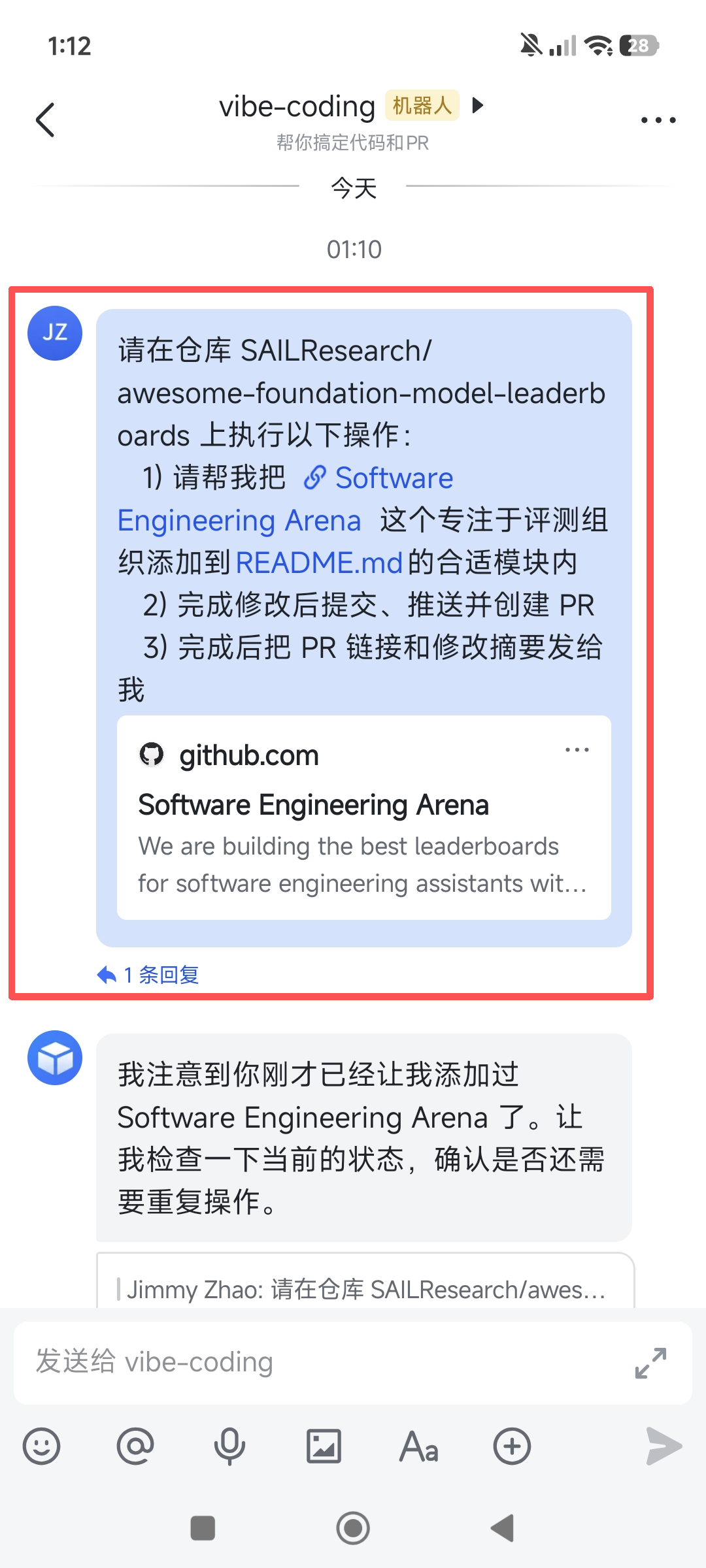
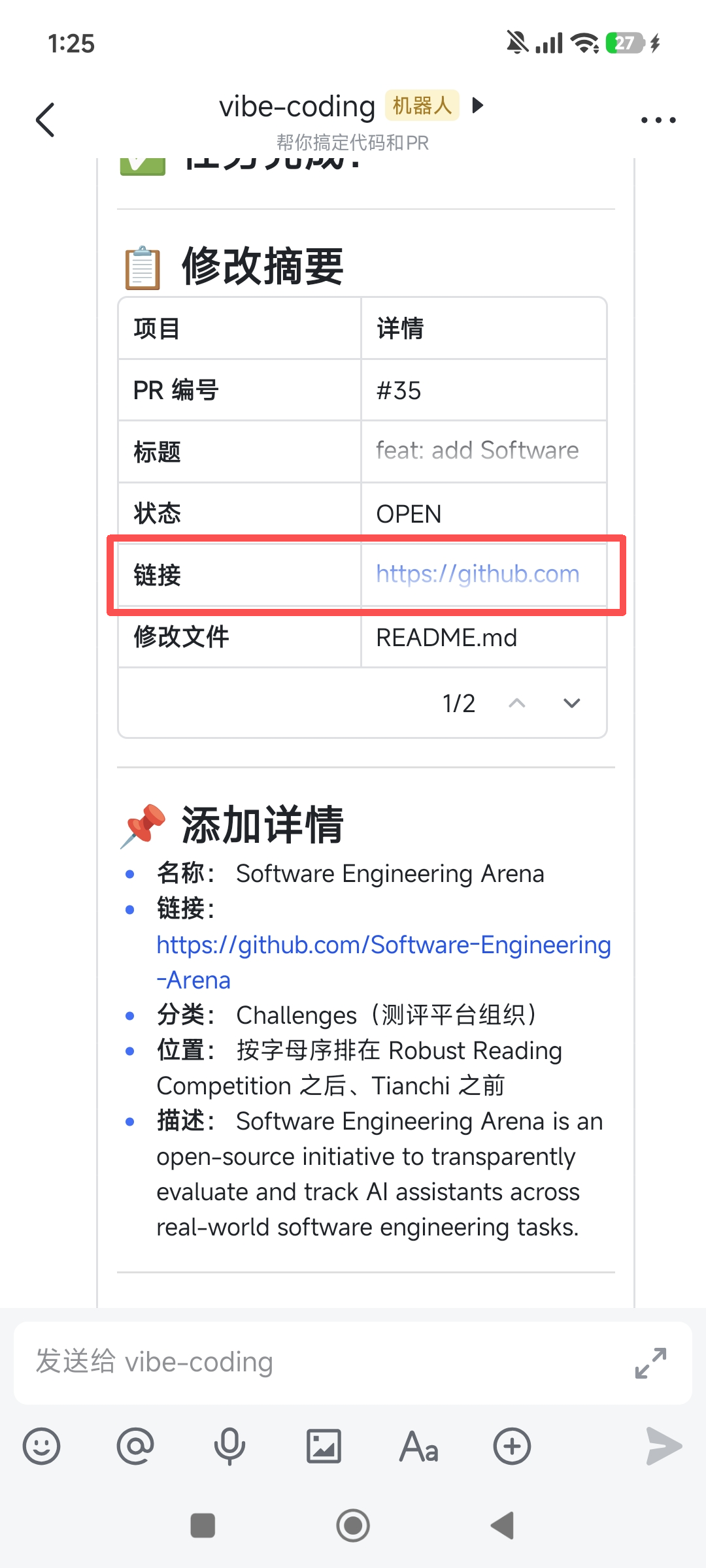
**② Receive the PR summary**: After the bot finishes, it sends back the PR number, status, modified files, and addition details. The PR link in Lark can be clicked to jump directly to GitHub.
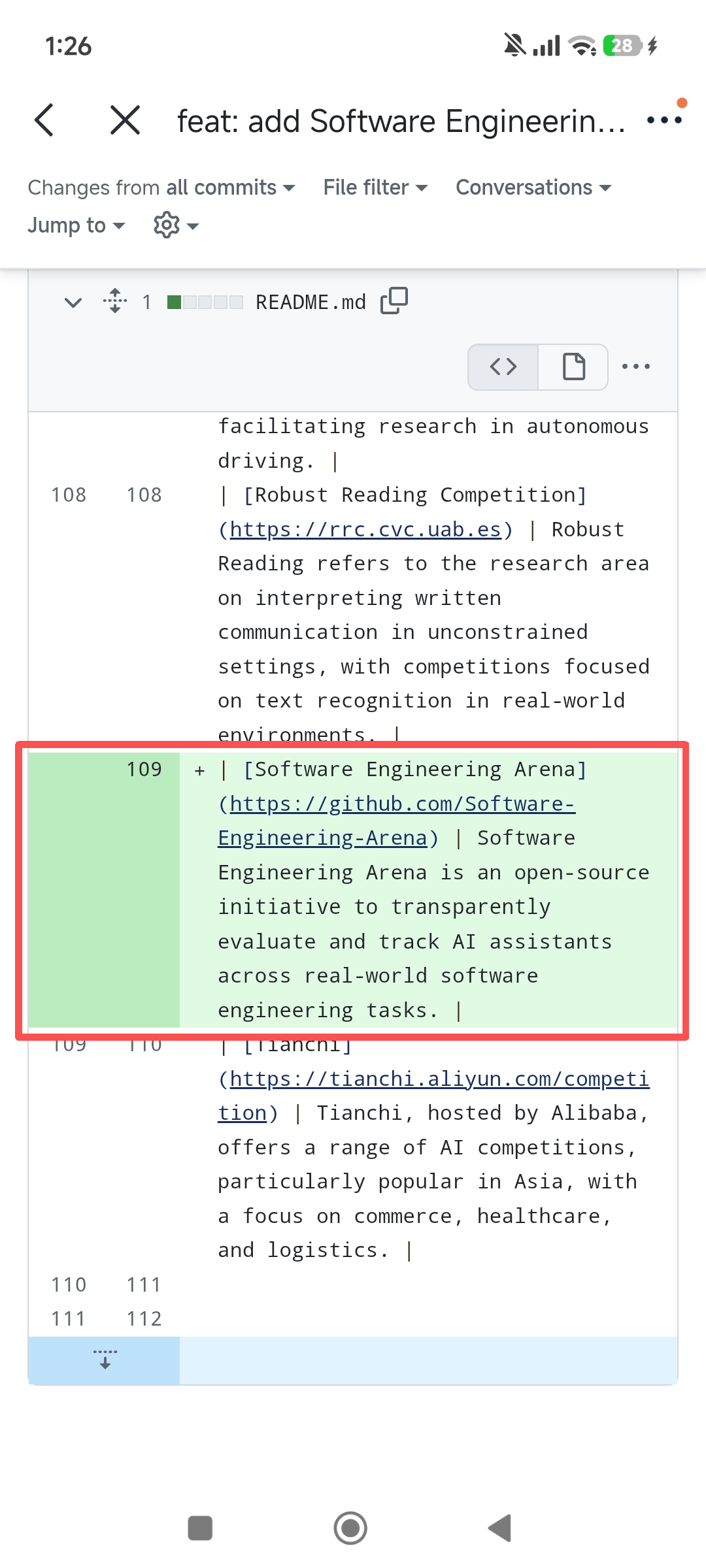
**③ Review the diff**: Click the PR link to view the code changes in your mobile browser and confirm whether the modifications match expectations.
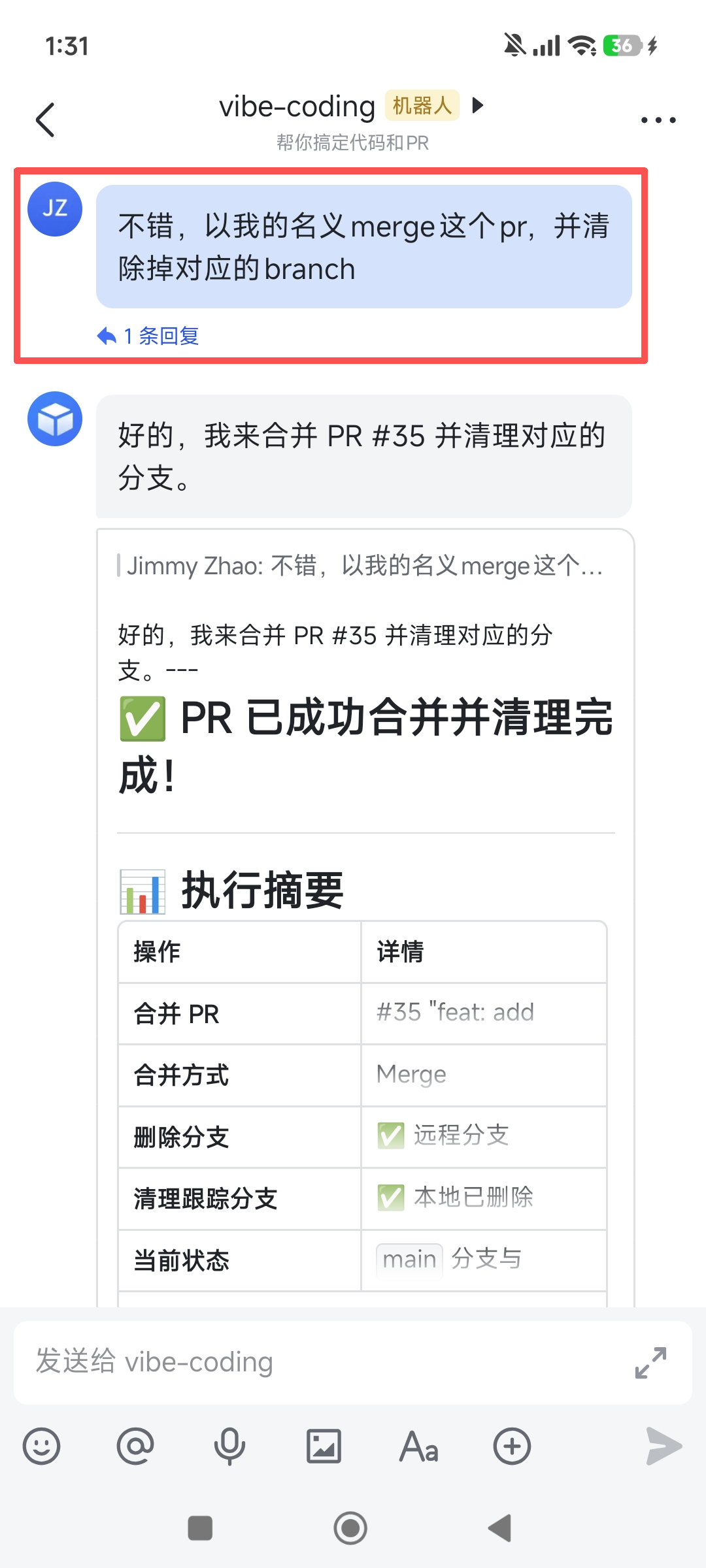
**④ Confirm the merge**: Go back to Lark and say "Merge and clean up the branch." The bot executes the merge + branch deletion, and the entire process is complete.
At this point, the branch prefix, Copilot review, and result reporting format should all be automatically handled by `IDENTITY.md`. The following examples use this same ruleset by default, unless I explicitly write "override the default behavior this time."
### 4.3 Next Steps
Once this pipeline is working, you can incrementally upgrade it:
- Install the `github` skill, configure Cron to poll PR review status, and push Lark notifications
- Add auto clone/fork rules to `IDENTITY.md` to eliminate the need to manually prepare repositories
- Configure a fully automated review loop: Copilot reviews → auto fix → re-request review (see Section 5)
## 5. Advanced Scenarios: From "Works" to "Works Well"
### Scenario 1: Copilot Review Feedback Automatic Loop
**Problem**: After a PR is submitted, you have to repeatedly open GitHub to check whether Copilot has finished reviewing — not very "mobile-friendly."
**Solution A — Human in the loop (recommended)**:
Configure a Cron job to automatically poll PR review status and push results to Lark:
```bash
openclaw cron add --name "PR Review Status Check" --every 5m --message "Check the review status of all open PRs on branches with an openclaw/ prefix. If there are new review results: 1) List the review status of each PR (approved / changes_requested / pending) 2) If changes_requested, extract the specific change suggestions (list them one by one) 3) Push the results to Lark. If there are no new review results, don't push a message."
```
After receiving the Lark push, you have three options:
- Reply **"Apply the suggested changes"**: The bot calls Claude Code again, fixes Copilot's suggestions one by one, and updates the PR
- Reply **"Ignore the suggestions and merge directly"**: The bot merges the PR (for false-positive scenarios)
- Reply **"Let me take a look"**: The bot takes no action; you handle it manually later
**Solution B — Fully automatic (advanced, use with caution)**:
```
Please enable Vibe Coding fully automatic mode:
- Copilot review passes (approved) → automatically merge the PR
- Copilot requests changes (changes_requested) → call Claude Code to auto-fix → update PR → re-request review
- Still not passing after 3 rounds → stop auto-fixing, push to Lark to request human intervention
- Notify me of the current status in Lark for every operation
```
> **Warning**: Fully automatic mode is suitable for low-risk repositories (e.g., documentation, personal projects). For production repositories, always use "human in the loop" mode to avoid auto-merging problems.
### Scenario 2: Multi-File Refactoring
Describe complex requirements in natural language and Claude Code will automatically analyze dependencies and execute step by step:
```
Please help me refactor the src/api/ directory:
1) Split handleUser and handleOrder from src/api/handlers.ts into their own files
- src/api/user-handler.ts
- src/api/order-handler.ts
2) Update the exports in src/api/index.ts
3) Make sure all files that reference these two functions also have their import paths updated
4) Run tests to ensure existing functionality is not broken
5) Create a PR with the title "refactor: split API handlers into separate modules"
6) In the PR description, list all the modified files and the reason for the changes
```
> **Tip**: For complex refactoring, it's recommended to first have the bot list the modification plan ("Please tell me which files you plan to change first, don't make changes yet") and confirm before executing. Claude Code excels at understanding dependencies between code — multi-file refactoring is one of its strengths.
### Scenario 3: From Issue to PR Fully Automated
```
Please look at Issue #42 in the your-repo repository,
implement the feature based on the Issue description, create a PR, and link it to that Issue.
Include "Closes #42" in the PR description so the Issue is automatically closed when merged.
```
### Scenario 4: Batch Copy Changes (Non-Developer Friendly)
In a Lark group chat, a product manager can @mention the bot directly:
```
@bot Please update the following copy:
- In src/pages/home.tsx, change the title from "Welcome" to "Get Started"
- In src/pages/about.tsx, change the description from "We are a company..." to "We are dedicated to..."
- Create a PR with the title "docs: update homepage and about page copy"
```
> **Group chat security note**: Before using Vibe Coding in a group chat, ensure all group members are trusted. Malicious users might inject dangerous operations by @mentioning the bot. See [Chapter 10: Security and Threat Model](/en/adopt/chapter10/).
## 6. Common Issues and Troubleshooting
### Issue 1: Claude Code call fails
**Diagnostic steps**:
1. Check whether the `claude-code` skill is installed:
```bash
clawhub list | grep claude-code
```
2. Check whether the Claude Code CLI is available:
```bash
claude --version
```
3. Check whether the API Key is valid:
```bash
echo "say hi" | claude --print
```
4. Check OpenClaw's environment variables:
```bash
openclaw logs --limit 50 | grep -i "claude\|anthropic\|api"
```
**Common causes**:
- `claude-code` skill not installed — run `clawhub install claude-code`
- `ANTHROPIC_API_KEY` not set or expired — when OpenClaw is started via systemd/Docker, environment variables may not be inherited from `.bashrc`; they need to be explicitly set in the systemd unit file or Docker Compose file
- Claude Code CLI not in PATH — use `which claude` to confirm the path; if necessary, write the full path in the OpenClaw configuration (e.g., `/usr/local/bin/claude`)
- Insufficient API credits — go to [Anthropic Console](https://console.anthropic.com/) to check usage
### Issue 2: PR creation fails (Permission denied)
**Diagnostic steps**:
1. Manually test Git push on the server:
```bash
cd /workspace/repos/your-repo
git checkout -b test-push
git commit --allow-empty -m "test push"
git push origin test-push
```
2. If using the `gh` CLI, check authentication:
```bash
gh auth status
```
**Common causes**:
- Fine-grained Token did not select the target repository (missed it in "Only select repositories")
- Token expired (default validity is 30 days; it's recommended to set it to 90 days)
- Organization repositories require additional SSO authorization (click the "Authorize" button on the Token settings page)
- SSH Key not added to GitHub or insufficient permissions
### Issue 3: Copilot review stuck on pending
**Diagnostic steps**:
1. Open the PR on the GitHub web page and manually click "Request review from @copilot"
2. Check repository settings: Settings → Copilot → Code review
**Common causes**:
- Copilot code review not enabled for the repository (needs to be turned on in Settings → Copilot → Code review)
- Copilot not enabled at the organization level (requires admin to enable)
- PR has too many changed files (>300 files); Copilot may time out
- PR contains binary files or very large files that Copilot cannot review
### Issue 4: Code changes don't match expectations
**Diagnostic steps**:
1. Add a `CLAUDE.md` file to the repository root with project conventions (see Section 7 "Tip 1")
2. Provide more specific context in your Lark message
**Common causes**:
- Repository lacks context files like `CLAUDE.md`, so Claude Code doesn't know the project conventions
- Requirement description is too vague ("optimize the performance" vs "change the getUserList database query from N+1 to a JOIN")
- Repository codebase is too large — it's recommended to specify exact file paths in the requirement
## 7. Advanced Tips: Building Your Vibe Coding System
### Tip 1: Use CLAUDE.md to Improve Code Quality
Create a `CLAUDE.md` file in the target repository's root directory. Claude Code automatically reads this file every time it starts, treating it as the coding conventions:
```markdown
# Project Conventions
## Code Style
- Use TypeScript strict mode
- Function naming: camelCase
- File naming: kebab-case
- Every function must have JSDoc comments
- The `any` type is forbidden
## Git Conventions
- Commit messages follow Conventional Commits
- Branch naming: openclaw/feat-xxx, openclaw/fix-xxx
- PRs must include a description of changes and a test plan
## Testing Requirements
- New features must come with unit tests
- Test coverage must be at least 80%
- Use Vitest as the testing framework
```
> **`CLAUDE.md` vs `IDENTITY.md`**: `CLAUDE.md` is a project conventions file natively supported by Claude Code (placed in the repository root, travels with the code). `IDENTITY.md` is an OpenClaw workspace file (placed in `~/.openclaw/workspace/`, travels with the Agent). The two can be used together: `CLAUDE.md` for project-level conventions, `IDENTITY.md` for Agent-level orchestration instructions.
### Tip 2: Multi-Repository Management
If you maintain multiple repositories, you can specify the repository name in chat:
```
Please fix the Header component styling issue in the frontend-app repository:
The navigation bar is being cut off on mobile — needs overflow-x: auto added
At the same time, add the corresponding /api/layout-config endpoint in the backend-api repository,
returning mobile-specific navigation configuration
```
OpenClaw will locate the corresponding directory under `/workspace/repos/` based on the repository name and call Claude Code separately for each.
### Tip 3: Scheduled Code Inspection
Configure a scheduled task to automatically scan code quality every week:
```bash
openclaw cron add --name "Weekly Code Inspection" --cron "0 9 * * 1" --message "Please perform the following inspection on the your-repo repository: 1) Search for all TODO and FIXME comments 2) Check for outdated dependencies (npm outdated) 3) Count newly created unclosed Issues from the past week 4) Push the inspection report to Lark. If high-priority issues are found (security vulnerabilities, deprecated APIs), automatically create an Issue."
```
## 8. Performance Optimization Tips
### Optimization 1: Specify File Scope in Requirements
```
Please only modify src/api/user-handler.ts and the corresponding test files,
do not scan the entire repository (unless necessary)
```
**How it works**: Claude Code will intelligently select the files it needs to read by default, but specifying the scope explicitly can reduce token consumption and speed up response time.
### Optimization 2: Confirm You're Using the `coding` Rather Than `full` Profile
If you selected `coding` during configuration in Section 3, this step is already done. If you set `full` at the time, it's recommended to downgrade to `coding` — it includes file read/write and command execution, but not browser and messaging tools, loading about 30% fewer tool descriptions than `full`, making OpenClaw's decisions faster and more accurate.
### Optimization 3: PR Templates to Reduce Review Round-Trips
Create `.github/pull_request_template.md` in the repository root:
```markdown
## Change Description
## Change Checklist
## Test Plan
- [ ] Unit tests pass
- [ ] Manually verified functionality works
## Checklist
- [ ] Code style matches project conventions
- [ ] No new TypeScript type errors
- [ ] No hardcoded secrets or sensitive information
```
**How it works**: A standardized PR template guides Copilot to do more focused reviews, reducing the back-and-forth caused by "code works but doesn't follow conventions." Claude Code will automatically fill in this template when creating a PR.
### Optimization 4: Repo Workspace Caching
Avoid doing a `git clone` every time by using an existing local repository:
```bash
# Regularly pull the latest code (OpenClaw Cron)
openclaw cron add --name "Hourly repo sync" --every 1h --message "Please run git fetch --all && git pull origin main on all repositories under /workspace/repos/"
```
## 9. Security and Compliance Reminders
### Reminder 1: Minimize API Key and Token Permissions
| Credential | Minimum Permissions | Storage Location |
|------------|--------------------|--------------------|
| Anthropic API Key | No special permission restrictions, but recommended to create independently (for easier tracking and revocation) | Environment variable `ANTHROPIC_API_KEY` |
| GitHub PAT | Fine-grained, target repo only, Contents + PRs + Issues | Environment variable `GITHUB_TOKEN` |
| GitHub SSH Key | Scoped to specific repo (Deploy Key) or user-level | `~/.ssh/id_ed25519` |
**Forbidden**: Using tokens with dangerous permissions like `admin:org`, `delete_repo`, etc.
### Reminder 2: Branch Protection Rules Must Be Enabled
In GitHub repository Settings → Branches → Branch protection rules, configure:
- Require a pull request before merging (prohibit direct push to main)
- Require approvals (at least 1 approval)
- Require status checks to pass (CI must pass)
- Optional: Require review from Code Owners
**How it works**: Even if Claude Code's code is perfect, branch protection rules are the last line of defense. They ensure any code change goes through review and CI verification.
### Reminder 3: Copilot Review is a Supplement, Not a Replacement for Human Review
**Important note**: GitHub Copilot's code review capabilities continue to improve, but it may still:
- Miss business logic errors (it doesn't understand your business)
- Misjudge code style (different projects have different standards)
- Fail to detect architecture-level issues (e.g., circular dependencies, excessive coupling)
**Recommendation**: For critical modules (authentication, payments, data processing), human review should be done even if Copilot's review passes.
### Reminder 4: Sensitive File Protection
Ensure `.gitignore` contains the following entries:
```
.env
.env.*
*.key
*.pem
credentials.json
secrets/
```
In the target repository's `CLAUDE.md`, explicitly prohibit operations on sensitive files:
```markdown
## Security Rules
- Forbidden to read or modify sensitive files like .env, *.key, *.pem, credentials.json
- Forbidden to hardcode any secrets, tokens, or passwords in code
- Check git diff before committing to ensure no sensitive information is included
```
### Reminder 5: Claude Code's Sandbox Limitations
Claude Code has built-in security policies when executing commands:
- By default, only operates on files within the specified directory
- Dangerous commands (`rm -rf /`, `sudo`, etc.) are intercepted
- Network access is restricted (it won't proactively connect to unnecessary external services)
However, these cannot replace server-level security measures. It's recommended to run OpenClaw and Claude Code under a dedicated low-privilege user, avoiding the use of root.
## 10. Summary: From "Ceremonial" to "Executable"
The core value of Vibe Coding is **freeing developers from tedious tool operations** — you only need to clearly express "what needs to be done" in natural language, and everything else is left to the Agent:
- **Anytime, anywhere**: Send a request in Lark, and Claude Code creates a branch, writes code, runs tests, and opens a PR
- **Review loop**: See Copilot's review results pushed to Lark, reply "apply the suggested changes" or "merge"
- **Complete loop**: From requirement to merge, no need to open an IDE or terminal at any point
- **Team collaboration**: Non-developers can also submit code requests through Lark group chats
**Architectural philosophy**: Let each component do what it does best — OpenClaw handles message orchestration, Claude Code handles coding execution, GitHub Copilot handles code review, and Lark handles human-machine interaction. Don't make OpenClaw use a pile of skills to simulate what Claude Code already does well.
**Remember**: Vibe Coding is not laziness — it's returning coding to its essence: **think clearly about what needs to be done, and leave the rest to the tools**. You're not "writing code yourself"; you're **directing a professional coding Agent team** to turn your ideas into reviewable PRs.
### More Possibilities: How Else Can This Be Extended?
This tutorial only shows one basic form of Vibe Coding. Based on the same architecture, you can extend it in many more ways, for example:
1. **Open source contribution accelerator**: While browsing GitHub Trending, when you see an interesting project, say in Lark "Translate this project's README into Chinese and open a PR"
2. **Team Code Review assistant**: Configure a Cron job to regularly scan all open PRs across the team, automatically generate review summaries and push them to group chats, @mentioning relevant teammates
3. **Technical debt cleanup bot**: Automatically scan `TODO`/`FIXME`/`HACK` comments every week, create Issues by priority, and link them to code locations
4. **Dependency update patrol**: Regularly check `npm outdated` / `pip list --outdated`, automatically create upgrade PRs and run CI
5. **Documentation sync guard**: Monitor code changes, and when an API interface signature changes, automatically update the corresponding API documentation and open a PR
## References
### Claude Code
- [claude-code ClawHub skill (OpenClaw integration)](https://clawhub.ai/hw10181913/claude-code)
- [Claude Code Official Documentation](https://docs.anthropic.com/en/docs/claude-code)
- [Anthropic Console (API Key management)](https://console.anthropic.com/)
- [Claude Code Agent SDK (programmatic integration)](https://www.npmjs.com/package/@anthropic-ai/claude-code)
### GitHub Configuration
- [Create a Fine-grained Personal Access Token](https://github.com/settings/tokens?type=beta)
- [GitHub CLI (gh) Installation Guide](https://cli.github.com/)
- [GitHub Copilot Code Review Documentation](https://docs.github.com/en/copilot/using-github-copilot/code-review/using-copilot-code-review)
- [Branch Protection Rules Configuration](https://docs.github.com/en/repositories/configuring-branches-and-merges-in-your-repository/managing-a-branch-protection-rule)
### PR Template References
- [Conventional Commits Specification](https://www.conventionalcommits.org/)
- [GitHub PR Template Guide](https://docs.github.com/en/communities/using-templates-to-encourage-useful-issues-and-pull-requests)