# Verikan ### The verified Data Concierge **Ask a question about public data in plain English. Get a citation-backed answer — and the reproducible notebook that derives it.** [![Python](https://img.shields.io/badge/python-3.11%2B-3776AB?logo=python&logoColor=white)](https://www.python.org/) [![License: MIT](https://img.shields.io/badge/license-MIT-green.svg)](LICENSE) [![FastAPI](https://img.shields.io/badge/FastAPI-009688?logo=fastapi&logoColor=white)](https://fastapi.tiangolo.com/) [![LangGraph](https://img.shields.io/badge/LangGraph-1C3C3C)](https://langchain-ai.github.io/langgraph/) [![Claude](https://img.shields.io/badge/Claude-D97757?logo=anthropic&logoColor=white)](https://www.anthropic.com/)

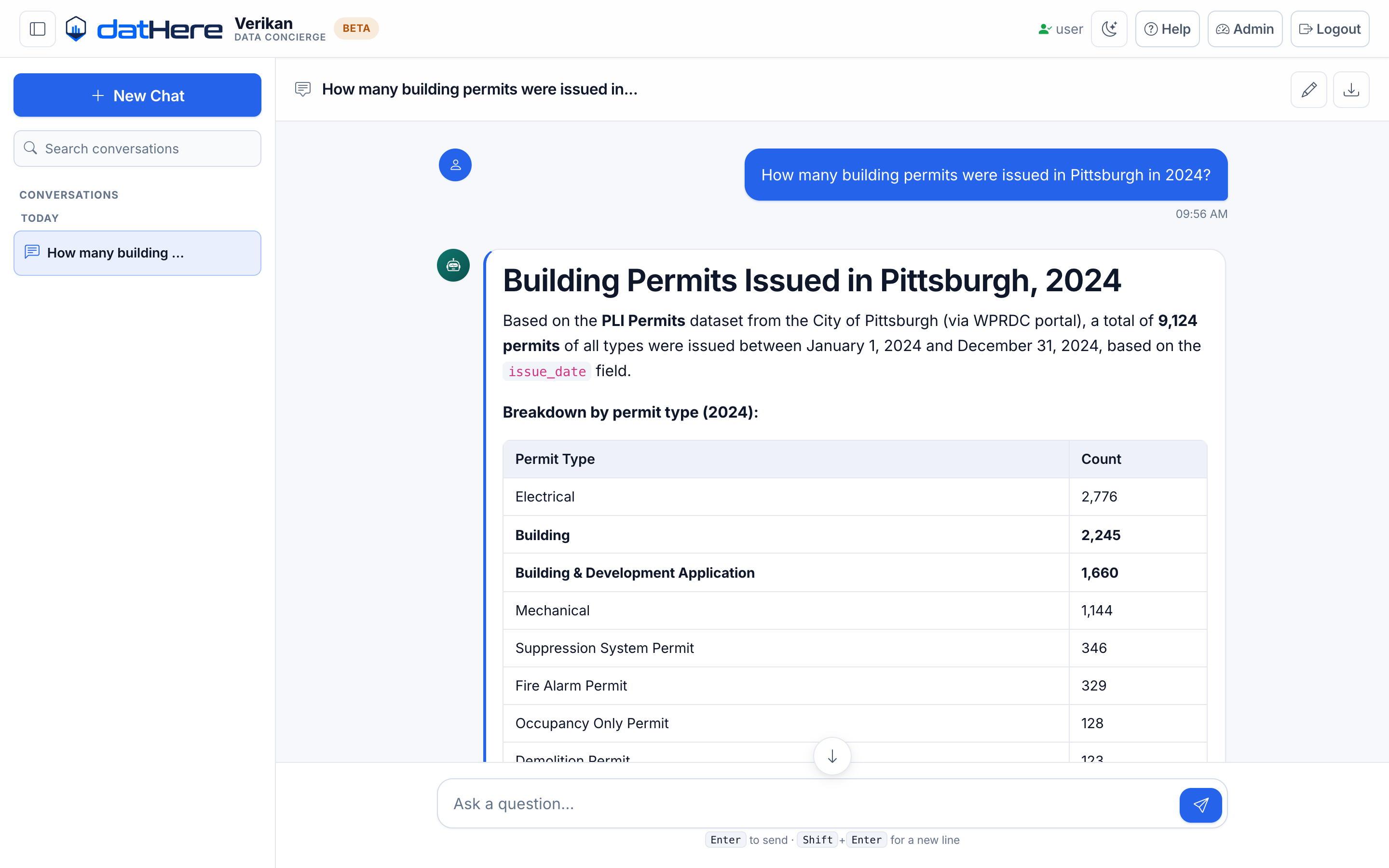
Verikan answering a question about Pittsburgh building permits, with a breakdown table and the source dataset named

--- ## Why this exists Most AI data tools hand you a number and ask you to trust it. Verikan hands you the number, the notebook that computed it, and an honest account of how much it checked its own work. Every answer generates a self-contained Colab-ready notebook. That notebook is then **executed**, its output **reconciled** against the answer's numeric claims, and its method **adversarially reviewed** — before you're shown a confidence score. ``` "How many building permits were issued in Pittsburgh in 2024?" │ ├─ finds the dataset on the open data portal, loads it, runs the query ├─ writes the answer with citations ├─ generates a runnable .ipynb └─ executes + reviews that notebook, then scores its own confidence ```
### 📓 The notebook is the evidence Not a description of the analysis — the analysis itself. Open it in Colab and re-run it. ### 🔍 It checks its own work The notebook is executed and its numbers must match the answer's. Claims that can't be re-derived don't get credit. ### 🙅 It admits what it doesn't know A check that couldn't run is reported as *unavailable, with a reason* — never quietly scored as zero.
--- ## How the verification works Three independent signals merge into one confidence factor: | Signal | What it asks | Why it matters | |---|---|---| | **Execution** | Does the notebook actually run? | A notebook that errors is a measured failure, not a footnote | | **Reconciliation** | Do the answer's numbers appear in the notebook's *own* output? | Re-deriving a figure from published code beats finding it in the transcript the model already had | | **Adversarial review** | Is the *method* sound? | Catches what execution can't: a hardcoded number runs perfectly and reconciles perfectly | Every factor is shown in the UI, including any that could not be measured — and why. --- ## Every answer ships with its notebook

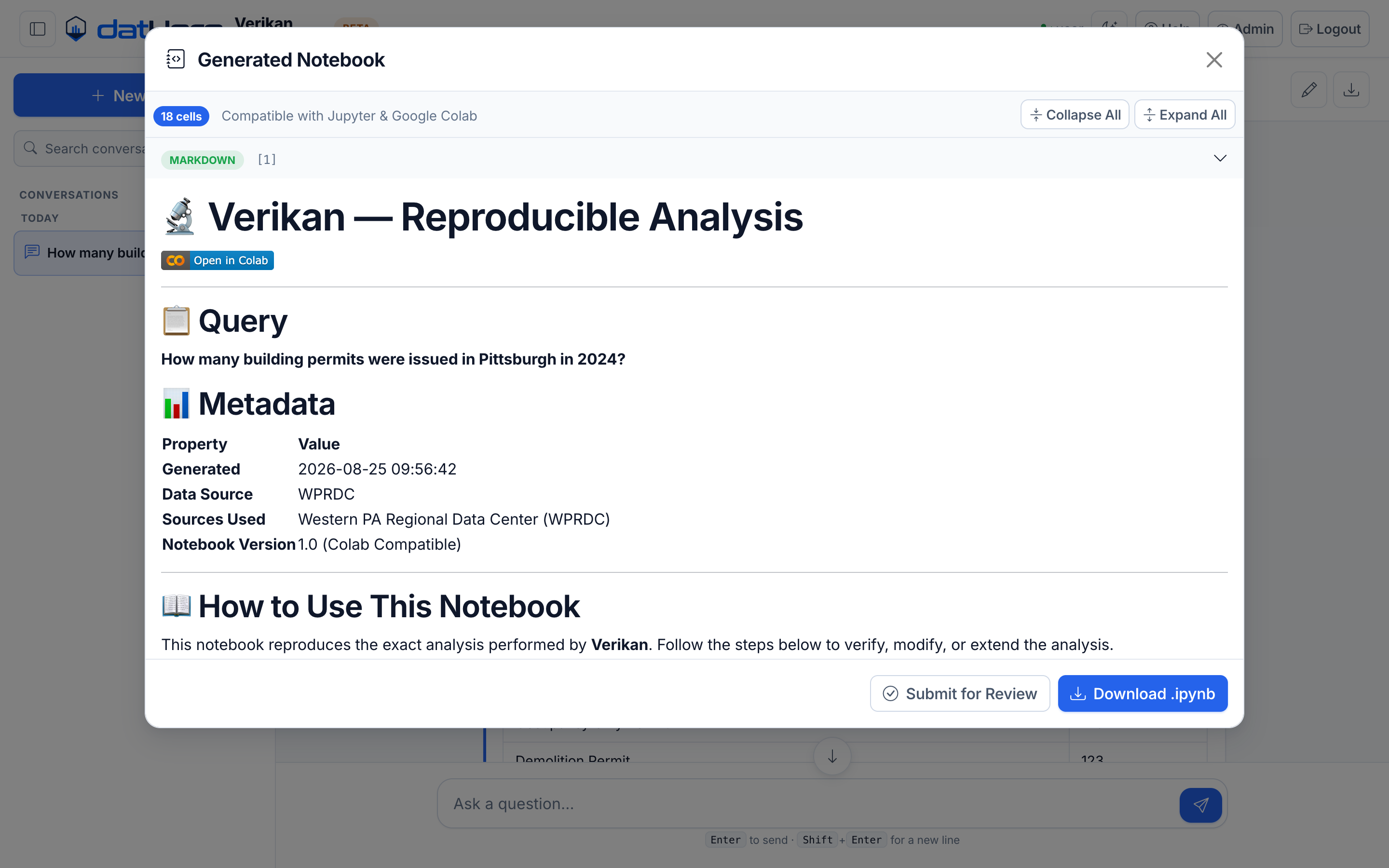
The generated notebook viewer showing a Colab badge, the original query, metadata, and a download button

The notebook is built from the pipeline's own execution trace, so it reproduces the analysis rather than narrating it. Download the `.ipynb`, or open it straight in Google Colab. **Follow-ups edit the notebook.** Ask for a change — *"use a different dataset"*, *"that number looks wrong"* — and Verikan edits the existing notebook cell by cell instead of starting over, then puts the revision through the same execution and review pass. --- ## Quick start ### Prerequisites - **Python 3.11+** - An **Anthropic API key** ([console.anthropic.com](https://console.anthropic.com/)) No other credential is required. The default data source — [WPRDC](https://data.wprdc.org) Pittsburgh open data — needs no API key at all. ### Install and run ```bash git clone https://github.com/dathere/Verikan.git cd Verikan python3 -m venv .venv source .venv/bin/activate # Windows: .venv\Scripts\activate pip install -e ".[dev]" cp .env.example .env # then add your ANTHROPIC_API_KEY ./run_web.sh ``` Open ****.

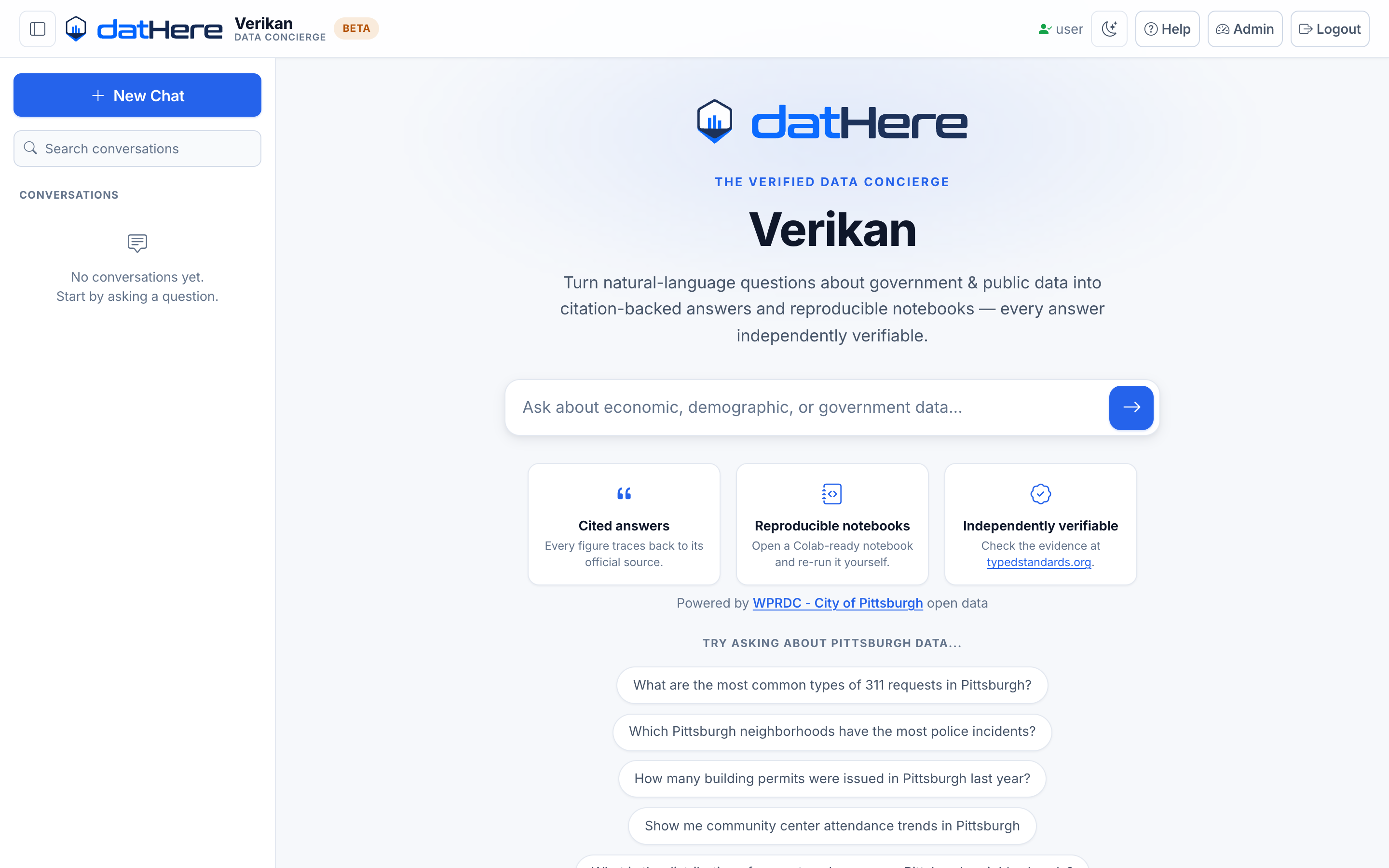
The Verikan landing page with a search box and suggested questions

### Sign in Click **Login** (top right). A fresh install seeds one local account: | | | |---|---| | **Username** | `user` | | **Password** | `datHere@123`, or whatever you set as `USER_PASSWORD` before first start | > [!WARNING] > That seeded password is a local-development convenience. Set `USER_PASSWORD` in `.env` > before exposing the app to anyone else. To get **admin** access (review queue, notebook reviews, settings), name your account in `.env` *before the first run*: ```env ADMIN_USERS=user USER_PASSWORD=choose-your-own ``` `ADMIN_USERS` seeds only on first run; after that, roles live in `roles.json` and are managed from the admin panel. ### Where things live | URL | | |---|---| | `/` | Chat interface | | `/admin` | Admin panel — submissions, query logs, notebook reviews, settings | | `/library` | Verified notebook library | | `/docs` | User guide | | `/api/docs` | FastAPI Swagger UI | --- ## The admin panel

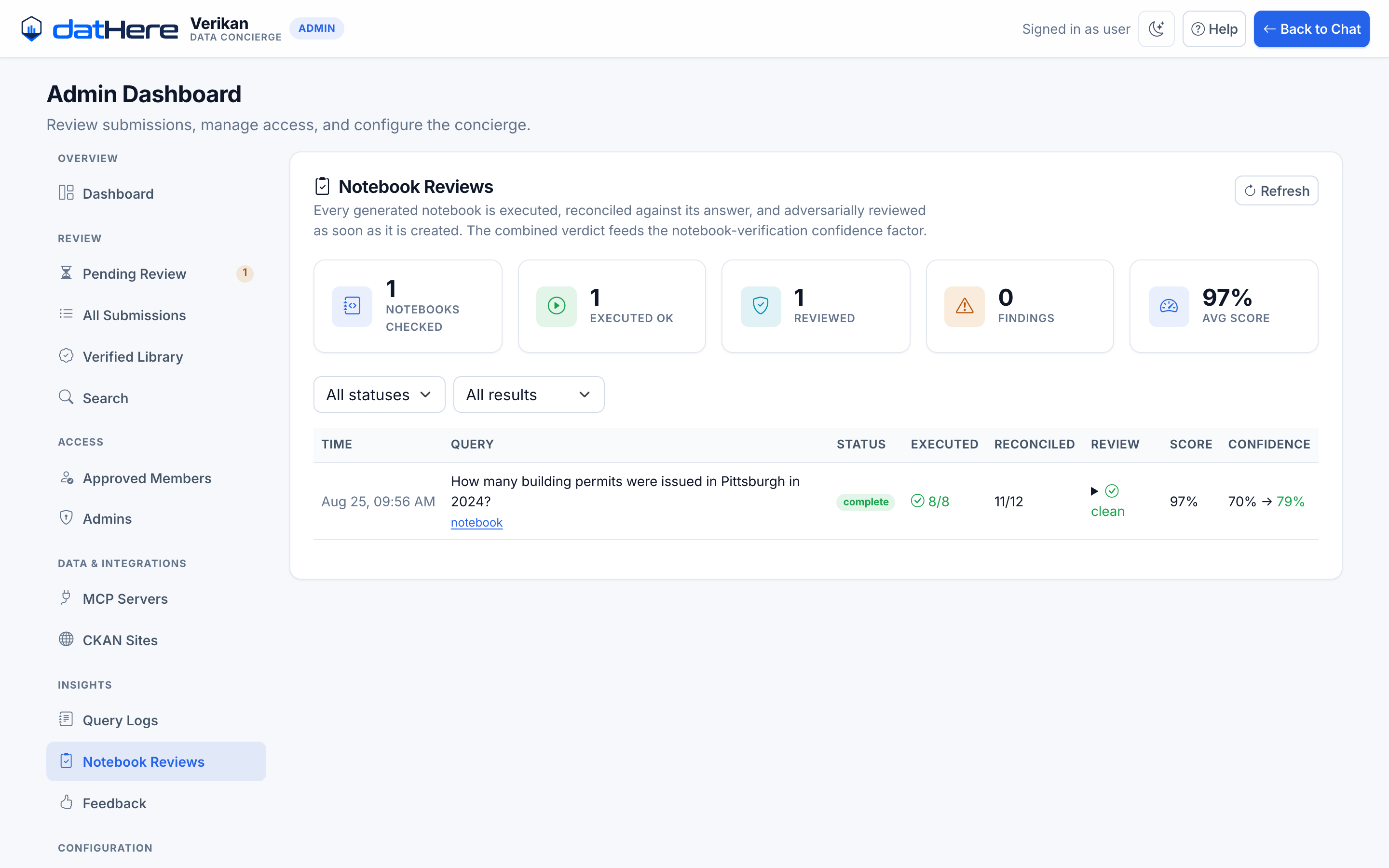
Admin notebook reviews pane showing execution status, reconciliation counts, review findings and the resulting confidence change

Every verification lands here: whether the notebook executed, how many of the answer's claims were reconciled, what the adversarial review found, and how the combined verdict moved the confidence score. --- ## Configuration All settings come from `.env` (see [`.env.example`](.env.example)). **Only `ANTHROPIC_API_KEY` is needed to get started** — every other integration degrades gracefully.
Data sources
| Variable | Enables | Without it | |---|---|---| | `ANTHROPIC_API_KEY` | All analysis | UI loads; queries can't run | | *(none needed)* | **WPRDC / CKAN open data portals** | works out of the box | | `BLS_API_KEY` | Bureau of Labor Statistics | 25 requests/day instead of 500 | | `CENSUS_API_KEY` | Census Bureau | Census queries unavailable | | `BEA_API_KEY` | Bureau of Economic Analysis (GDP) | BEA queries unavailable | | `FRED_API_KEY` | Federal Reserve Economic Data | FRED queries unavailable | | `DATA_COMMONS_API_KEY` | Google Data Commons | Data Commons queries unavailable | | `PINECONE_API_KEY` | Semantic search over dataset metadata | Falls back to keyword search |
Optional services
| Variable | Purpose | Without it | |---|---|---| | `REDIS_HOST` | Response caching | Runs uncached; connection errors logged and ignored | | `AUTH0_*` | Social login | Username/password login only | | `GITHUB_TOKEN`, `GITHUB_REPO` | Publish verified notebooks to a repo | Publishing disabled | | `SMTP_*` | Admin email notifications | Notifications disabled |
Behaviour flags
| Variable | Default | Effect | |---|---|---| | `NOTEBOOK_VERIFICATION_ENABLED` | `true` | Execute each notebook and reconcile its output | | `NOTEBOOK_REVIEW_ENABLED` | `true` | Adversarial method review | | `FOLLOWUP_LLM_ENABLED` | `true` | Understand chat follow-ups / revision requests | | `LLM_MODEL` | `claude-sonnet-5` | Main analysis model | Notebook verification executes generated code. It's contained: a subprocess with a hard timeout, a minimal environment allowlist that withholds every credential, shell-escape cells skipped, and an egress guard blocking loopback, private, link-local and cloud-metadata addresses from inside the kernel. Set `NOTEBOOK_VERIFICATION_ENABLED=false` to turn it off.
--- ## Docker ```bash cp .env.example .env # add your ANTHROPIC_API_KEY docker compose up --build ``` Served on ****.
Optional: a local CKAN portal
A full CKAN stack for developing against a local open data portal ships behind a profile: ```bash docker compose --profile fairstore up ``` This starts CKAN, PostgreSQL and Solr alongside the app. Not needed for normal development — the public WPRDC portal works without it.
--- ## Architecture Two LangGraph graphs, selected by data source: - **LLM-driven graph** (CKAN / WPRDC / MCP sources) — Claude drives retrieval with tool calling: search datasets, inspect them, load rows, run SQL, then write the answer. - **Deterministic graph** (Data Commons) — parse entities → route → retrieve → compute → visualise → cite → generate notebook. Both end at notebook generation, confidence scoring, and the async verification + review pass. Every agent action appends to an `execution_trace`, and that trace is what the notebook generator turns into runnable cells.
Project layout
``` src/data_concierge/ ui/web.py # Primary entrypoint — FastAPI + Jinja2 web app api/main.py # Secondary REST-only app gateway/ router.py # All /api/v1 endpoints intent_classifier.py # Regex intent + complexity classification notebook_verification.py # Schedules execution + review, merges into confidence followup.py # Chat follow-up classifier (new question vs revision) verified_notebooks.py # Verified notebook library evidence.py # Typed Standards evidence packages session.py, chats.py # Session and chat storage agents/ supervisor.py # Builds both graphs; routes by data source llm_agent.py # LLM-driven agent for CKAN / MCP sources query_parser.py # Entity extraction for the deterministic graph data_finder.py # Data Commons retrieval stats_computer.py # Statistical computation viz_builder.py # Vega-Lite visualisation specs citation_builder.py # Citation formatting notebook_generator.py # .ipynb generation from the execution trace notebook_verifier.py # Executes a notebook, reconciles output vs answer notebook_reviewer.py # Adversarial method review notebook_editor.py # Edits a notebook per a chat follow-up data_layer/connectors/ # Data Commons, BLS, Census, BEA, FRED, CKAN, Pinecone mcp/ # Model Context Protocol client, registry, connector core/ config.py # All settings confidence.py # Multi-factor confidence scoring models.py # Pydantic models configs/ # Data source registry, MCP server definitions tests/unit, tests/integration examples/ # Sample generated notebooks ```
--- ## Development ```bash pytest # test suite ruff check src/ tests/ scripts/ # lint — currently clean ruff format src/ tests/ scripts/ # format mypy src/ # type check — see note ``` Tests are plain pytest with `asyncio_mode = "auto"`. The suite uses real classifiers and state objects rather than mocks, and notebook-verification tests genuinely execute notebooks, so a full run takes a little longer than a typical unit suite. A session-scoped fixture points storage at a temp directory, so a test run never writes into your checkout. > [!NOTE] > `ruff check` passes. `ruff format` and `mypy src/` both report a backlog inherited from > pre-open-source development, and neither is a CI gate yet. If you're sending a patch, keep > `ruff check` clean and match the surrounding style rather than reformatting whole files — a > repo-wide reformat would bury real changes in noise.
Notes for contributors
- `GraphState` (`agents/state.py`) is a `TypedDict`, not a Pydantic model — LangGraph requires this. Read keys with `.get()`. - Any agent action that retrieves, computes, visualises or cites **must** append to `state["execution_trace"]`, or the generated notebook is silently incomplete. - Route order in `gateway/router.py` is load-bearing: specific paths before wildcards like `/{query_id}`. - `/query` never surfaces a raw exception — every failure path returns a friendly answer plus suggested follow-up questions. - A confidence factor that can't be computed is `None` with a reason, never `0.0`. - The UI is token-based with light and dark themes; JavaScript in `ui/static/js/` binds to element ids in the Jinja templates — change both sides together.
--- ## Troubleshooting
ModuleNotFoundError: No module named 'data_concierge'
Run `pip install -e ".[dev]"` inside the activated virtual environment, or set `PYTHONPATH="$(pwd)/src"`.
Queries fail but the UI loads
Expected without `ANTHROPIC_API_KEY`. Set it in `.env` and restart.
Redis connection errors on startup
Redis is optional and `REDIS_HOST` defaults to `localhost`, so the app keeps trying to reach one. Either start a local instance (`docker run -p 6379:6379 redis`) or ignore the log lines — caching is skipped and everything else works.
Notebook verification never completes
It runs as a background task after the answer is returned, and takes seconds to minutes depending on the notebook. Set `NOTEBOOK_VERIFICATION_ENABLED=false` to skip it during development.
--- ---
**MIT licensed** — see [LICENSE](LICENSE) Built by [datHere](https://dathere.com) · Evidence format by [Typed Standards](https://typedstandards.org)