# JavaScript "Salsa" Language Service
Visual Studio "15" Preview includes a preview of the new JavaScript language service,
internally codenamed "Salsa". This may be switched on or off via a registry key.
Salsa also powers the JavaScript language service in VS Code, and most of the below
info applies there also. See [VSCode release notes](https://github.com/Microsoft/vscode-docs/blob/vnext/release-notes/latest.md#languages---javascript)
for more info.
## Goals
In the last few releases of Visual Studio, the JavaScript language service has been
provided via an "execution based" model. A JavaScript engine runs your code as you write it and
examines the execution environment at the current editing location to
provide information such as completion lists, signature help, and other language tooling features.
The new language service is based on the TypeScript language service, which is powered by static analysis.
This change opens up several opportunities, such as:
- The new language service is written in TypeScript, so it is inherently cross platform and can be
executed outside of Visual Studio (as has been done by the VS Code team).
- The team can focus on **one** codebase to provide parsing, checking, intellisense,
and other tooling for both JavaScript and TypeScript, resulting in reduced cost, faster iteration, and
a common experience across the languages.
- TypeScript and JavaScript files in the same project can benefit from cross-language integration,
with JavaScript files being aware of and understanding code from TypeScript files, and vice-versa.
- JavaScript written using the latest language features (ES6+) can utilize TypeScript's "transpiler"
to be converted to JavaScript that runs on all of today's engines.
## Enabling Salsa
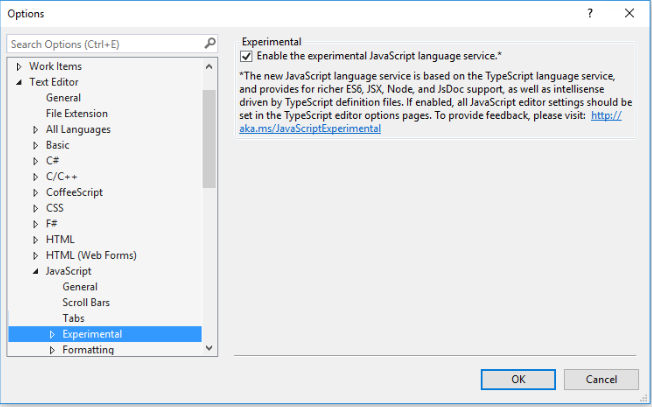
To enable the new "Salsa" language service experience in Visual Studio "15" Preview 3:
1. Open the `Tools > Options` dialog.
2. Navigate to "Text Editor" > "JavaScript" > "Experimental".
3. Enable the option titled "Enable the experimental JavaScript language service."
 ## Overview
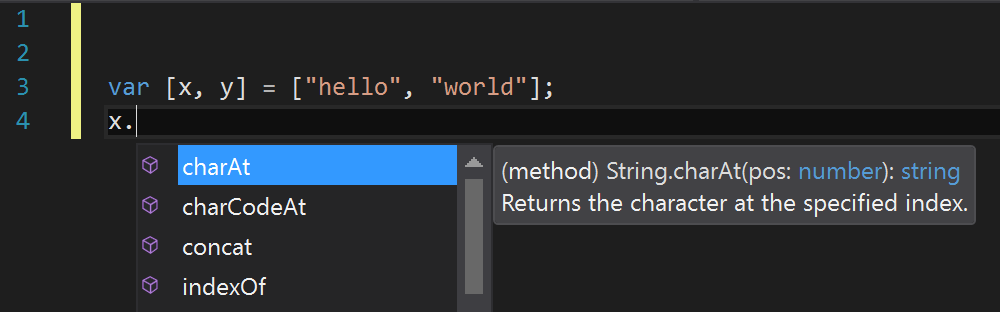
Once Salsa is enabled, when you open a JavaScript file in Visual Studio, you should notice that
the editing experience is similar to that of TypeScript; namely richer types
flowing through constructs (as shown in the `Array.map` example below), and support
for more recent language features (as shown in the destructuring example below).
_**Richer intellisense**_
## Overview
Once Salsa is enabled, when you open a JavaScript file in Visual Studio, you should notice that
the editing experience is similar to that of TypeScript; namely richer types
flowing through constructs (as shown in the `Array.map` example below), and support
for more recent language features (as shown in the destructuring example below).
_**Richer intellisense**_
 _**Latest language features**_
 ## Features
### Intellisense based on type inference
The Salsa language service mostly uses the same inference as TypeScript to determine
the type of a value. For a variable or property, this is typically the type
of the value used to initialize it. For a function, the return type is inferred
from the return statements, whereas the parameters are not inferred (but may
be explicitly specified, as will be outlined later).
One common area where this can be limiting is in *expando* objects. These are
objects that have properties added after initialization. For example:
```js
var x = {a: true};
x.b = false;
x. // <- "x" is shown as only having the property "a" that it was initialized with
```
The type of `x` can be specified explicitly to give it the desired type, as will
be outlined below.
For JavaScript files, some additional inference is done, specifically the below
are also recognized:
- "ES3-style" classes, specified using a constructor function and assignments to
the prototype property.
- CommonJS-style module patterns, specified as property assignments on the `exports`
object, or assignments to the `module.exports` property.
```js
function Foo(param1) {
this.prop = param1;
}
Foo.prototype.getIt = function () { return this.prop; };
// Foo will appear as a class, and instances will have a 'prop' property and a 'getIt' method.
exports.Foo = Foo;
// This file will appear as an external module with a 'Foo' export.
// Note that assigning a value to "module.exports" is also supported.
```
### Intellisense based on JsDoc annotations
Where type inference does not provide the desired type information, (or just for
documentation purposes), type information may be provided explicitly via JsDoc
annotations. For example, to give the variable `x` the desired type in the example
above, it may be written as:
```js
/**
* @type {{a: boolean, b: boolean, c: number}}
*/
var x = {a: true};
x.b = false;
x. // <- "x" is shown as having properties a, b, and c of the types specified
```
As mentioned, function parameters are also never inferred. Thus if it is desired
that they have a specific type, then JsDoc may be used for this purpose also:
```js
/**
* @param {string} param1 - The first argument to this function
*/
function Foo(param1) {
this.prop = param1; // "param1" (and thus "this.prop") are now of type "string".
}
```
See [this doc](https://github.com/Microsoft/TypeScript/wiki/JsDoc-support-in-JavaScript)
for the JsDoc annotations currently supported.
### Intellisense based on TypeScript definitions
With JavaScript and TypeScript now being based on the same language service, they
are able to interact in a richer way. For example, JavaScript intellisense can be
provided for values declared in a `.d.ts` file ([more info](https://github.com/Microsoft/TypeScript-Handbook/blob/master/pages/Writing%20Definition%20Files.md)), and types such as interfaces and
classes declared in TypeScript are available for use as types in JsDoc comments.
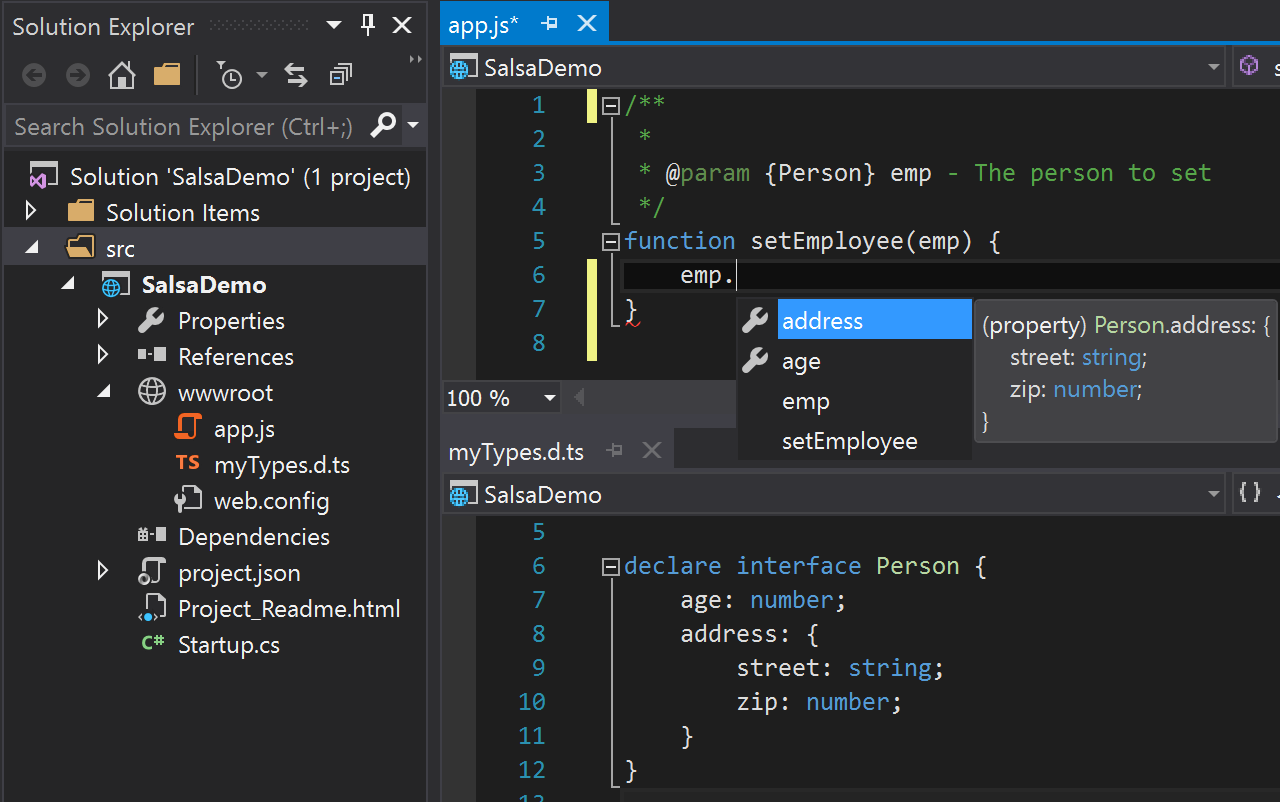
Below shows a simple example of a TypeScript definition file providing such type
information (via an interface) to a JavaScript file in the same project (via a
JsDoc tag).
_**TypeScript declarations used in JavaScript**_
## Features
### Intellisense based on type inference
The Salsa language service mostly uses the same inference as TypeScript to determine
the type of a value. For a variable or property, this is typically the type
of the value used to initialize it. For a function, the return type is inferred
from the return statements, whereas the parameters are not inferred (but may
be explicitly specified, as will be outlined later).
One common area where this can be limiting is in *expando* objects. These are
objects that have properties added after initialization. For example:
```js
var x = {a: true};
x.b = false;
x. // <- "x" is shown as only having the property "a" that it was initialized with
```
The type of `x` can be specified explicitly to give it the desired type, as will
be outlined below.
For JavaScript files, some additional inference is done, specifically the below
are also recognized:
- "ES3-style" classes, specified using a constructor function and assignments to
the prototype property.
- CommonJS-style module patterns, specified as property assignments on the `exports`
object, or assignments to the `module.exports` property.
```js
function Foo(param1) {
this.prop = param1;
}
Foo.prototype.getIt = function () { return this.prop; };
// Foo will appear as a class, and instances will have a 'prop' property and a 'getIt' method.
exports.Foo = Foo;
// This file will appear as an external module with a 'Foo' export.
// Note that assigning a value to "module.exports" is also supported.
```
### Intellisense based on JsDoc annotations
Where type inference does not provide the desired type information, (or just for
documentation purposes), type information may be provided explicitly via JsDoc
annotations. For example, to give the variable `x` the desired type in the example
above, it may be written as:
```js
/**
* @type {{a: boolean, b: boolean, c: number}}
*/
var x = {a: true};
x.b = false;
x. // <- "x" is shown as having properties a, b, and c of the types specified
```
As mentioned, function parameters are also never inferred. Thus if it is desired
that they have a specific type, then JsDoc may be used for this purpose also:
```js
/**
* @param {string} param1 - The first argument to this function
*/
function Foo(param1) {
this.prop = param1; // "param1" (and thus "this.prop") are now of type "string".
}
```
See [this doc](https://github.com/Microsoft/TypeScript/wiki/JsDoc-support-in-JavaScript)
for the JsDoc annotations currently supported.
### Intellisense based on TypeScript definitions
With JavaScript and TypeScript now being based on the same language service, they
are able to interact in a richer way. For example, JavaScript intellisense can be
provided for values declared in a `.d.ts` file ([more info](https://github.com/Microsoft/TypeScript-Handbook/blob/master/pages/Writing%20Definition%20Files.md)), and types such as interfaces and
classes declared in TypeScript are available for use as types in JsDoc comments.
Below shows a simple example of a TypeScript definition file providing such type
information (via an interface) to a JavaScript file in the same project (via a
JsDoc tag).
_**TypeScript declarations used in JavaScript**_
 ### Automatic acquisition of type definitions
In the TypeScript world, most popular JavaScript libraries have their APIs
described by `.d.ts` files, and the most common repository for such definitions
is on [DefinitelyTyped](https://github.com/DefinitelyTyped/DefinitelyTyped).
By default, the Salsa language service will try to detect which
JavaScript libraries are in use and automatically download and reference the
corresponding `.d.ts` file that describes the library in order to provide rich
intellisense. The files are downloaded to a cache located under the user folder
at `%LOCALAPPDATA%\Microsoft\TypeScript`. (Note: This feature is **disabled** by
default if using a `tsconfig.json` configuration file, but may be set to enabled,
as outlined further below).
Currently auto-detection works for dependencies downloaded from NPM (via reading
the `package.json` file) or Bower (via reading the `bower.json` file). These files
are used by their respective package managers to specify which packages to install for a
project. (See https://docs.npmjs.com/files/package.json for more info).
If you do not wish to use auto-acquisition, disable it by adding a configuration
file as outlined below. You can still place definition files for use directly
within your project (either manually downloaded, or via a tool such as
[TSD](http://definitelytyped.org/tsd/) or [typings](https://github.com/typings/typings)).
Note: The auto-acquisition feature currently only works in Salsa running within
Visual Studio "15" and is not available in VS Code yet.
### Compiling JavaScript down-level
One of the key features TypeScript provides is the ability to use the latest JavaScript
language features, and emit code that can execute in JavaScript runtimes that don't
yet understand those newer features. With JavaScript using the same language service,
it too can now take advantage of this same feature.
Before this can be set up, some understanding of the configuration options is
required. TypeScript is configured via a `tsconfig.json` file. In the absence of such
a file, some default values are used. For compatibility reasons, these defaults are
different in a context where only JavaScript files (and optionally `.d.ts` files)
are present. To compile JavaScript files, a `tsconfig.json` file must be added,
and some of these defaults must then be set explicitly. The required settings are outlined below:
- `allowJs`: This value must be set to `true` for JavaScript files to be recognized.
By default this is `false`, as TypeScript compiles to JavaScript, and this is necessary to avoid
the compiler including files it just compiled.
- `outDir`: This should be set to a location not included in the project, in order
that the emitted JavaScript files are not detected and then included in the project (see `exclude` below).
- `module`: If using modules, this setting tells the compiler which module format
the emitted code should use (e.g. `commonjs` for Node or bundlers such as Browserify).
- `exclude`: This setting states which folders not to include in the project. The
output location, as well as non-project folders such as `node_modules` or `temp`, should
be added to this setting.
- `enableAutoDiscovery`: This setting enables the automatic detection and download of
definition files as outlined above.
- `compileOnSave`: This setting tells the compiler if it should recompile any time
a source file is saved in Visual Studio.
In order to convert JavaScript files to CommonJS modules in an `./out` folder, settings
similar to the below might be included in a `tsconfig.json` file.
```json
{
"compilerOptions": {
"module": "commonjs",
"allowJs": true,
"outDir": "out"
},
"exclude": [
"node_modules",
"wwwroot",
"out"
],
"compileOnSave": true,
"typingOptions": {
"enableAutoDiscovery": true
}
}
```
With the above settings in place, if a source file (`./app.js`) existed which
contains several ECMAScript 2015 language features as shown below:
```js
import {Subscription} from 'rxjs/Subscription';
class Foo {
sayHi(name) {
return `Hi ${name}, welcome to Salsa!`;
}
}
export let sqr = x => x * x;
export default Subscription;
```
Then a file would be emitted to `./out/app.js` targeting ECMAScript 5 (the default)
that looks something like the below:
```js
"use strict";
var Subscription_1 = require('rxjs/Subscription');
var Foo = (function () {
function Foo() {
}
Foo.prototype.sayHi = function (name) {
return "Hi " + name + ", welcome to Salsa!";
};
return Foo;
}());
exports.sqr = function (x) { return x * x; };
Object.defineProperty(exports, "__esModule", { value: true });
exports.default = Subscription_1.Subscription;
//# sourceMappingURL=app.js.map
```
### Mixing JavaScript and TypeScript source
With the above configuration file in place, TypeScript and JavaScript files may
be used in the same compilation. For example, existing JavaScript code using the
CommonJS module format, may be imported and consumed by TypeScript code using the
ECMAScript 2015 module syntax. Conversely, TypeScript code written to provide a
well-defined API contract for a service, may be referenced by JavaScript code
that is written to call that service, thus providing rich intellisense at design time.
### JSX and React support
The new JavaScript language service adds rich support for the JSX syntax and
also for converting the syntax to React API calls - as it does for TSX files.
Note: To convert the JSX syntax to React calls, the setting `"jsx": "react"` must
be added to the `compilerOptions` in the `tsconfig.json` file outlined above.
Again, with the ability to mix and match, it is possible to define React components
with a well-defined type in a TypeScript file (.tsx), and then use those components
from a .jsx file. (Note: Mixing languages is not required here, you could write
entirely in JavaScript or TypeScript, the example is to highlight the flexibility
provided).
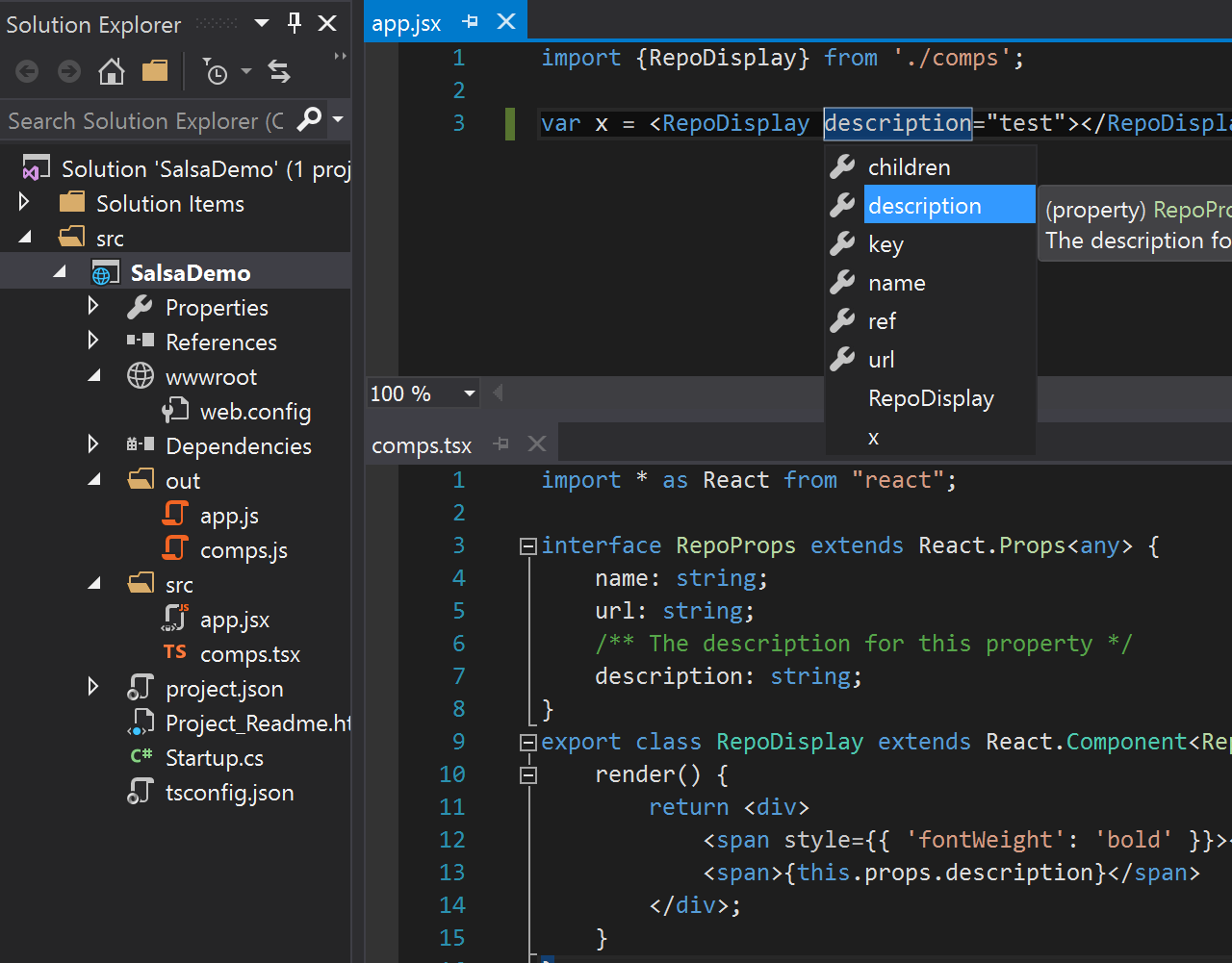
The below screen-shot shows a React component defined in the `comps.tsx` TypeScript
file, and then this component being used from the `app.jsx` file, complete with
intellisense for completions and documentation within the JSX expressions.
### Automatic acquisition of type definitions
In the TypeScript world, most popular JavaScript libraries have their APIs
described by `.d.ts` files, and the most common repository for such definitions
is on [DefinitelyTyped](https://github.com/DefinitelyTyped/DefinitelyTyped).
By default, the Salsa language service will try to detect which
JavaScript libraries are in use and automatically download and reference the
corresponding `.d.ts` file that describes the library in order to provide rich
intellisense. The files are downloaded to a cache located under the user folder
at `%LOCALAPPDATA%\Microsoft\TypeScript`. (Note: This feature is **disabled** by
default if using a `tsconfig.json` configuration file, but may be set to enabled,
as outlined further below).
Currently auto-detection works for dependencies downloaded from NPM (via reading
the `package.json` file) or Bower (via reading the `bower.json` file). These files
are used by their respective package managers to specify which packages to install for a
project. (See https://docs.npmjs.com/files/package.json for more info).
If you do not wish to use auto-acquisition, disable it by adding a configuration
file as outlined below. You can still place definition files for use directly
within your project (either manually downloaded, or via a tool such as
[TSD](http://definitelytyped.org/tsd/) or [typings](https://github.com/typings/typings)).
Note: The auto-acquisition feature currently only works in Salsa running within
Visual Studio "15" and is not available in VS Code yet.
### Compiling JavaScript down-level
One of the key features TypeScript provides is the ability to use the latest JavaScript
language features, and emit code that can execute in JavaScript runtimes that don't
yet understand those newer features. With JavaScript using the same language service,
it too can now take advantage of this same feature.
Before this can be set up, some understanding of the configuration options is
required. TypeScript is configured via a `tsconfig.json` file. In the absence of such
a file, some default values are used. For compatibility reasons, these defaults are
different in a context where only JavaScript files (and optionally `.d.ts` files)
are present. To compile JavaScript files, a `tsconfig.json` file must be added,
and some of these defaults must then be set explicitly. The required settings are outlined below:
- `allowJs`: This value must be set to `true` for JavaScript files to be recognized.
By default this is `false`, as TypeScript compiles to JavaScript, and this is necessary to avoid
the compiler including files it just compiled.
- `outDir`: This should be set to a location not included in the project, in order
that the emitted JavaScript files are not detected and then included in the project (see `exclude` below).
- `module`: If using modules, this setting tells the compiler which module format
the emitted code should use (e.g. `commonjs` for Node or bundlers such as Browserify).
- `exclude`: This setting states which folders not to include in the project. The
output location, as well as non-project folders such as `node_modules` or `temp`, should
be added to this setting.
- `enableAutoDiscovery`: This setting enables the automatic detection and download of
definition files as outlined above.
- `compileOnSave`: This setting tells the compiler if it should recompile any time
a source file is saved in Visual Studio.
In order to convert JavaScript files to CommonJS modules in an `./out` folder, settings
similar to the below might be included in a `tsconfig.json` file.
```json
{
"compilerOptions": {
"module": "commonjs",
"allowJs": true,
"outDir": "out"
},
"exclude": [
"node_modules",
"wwwroot",
"out"
],
"compileOnSave": true,
"typingOptions": {
"enableAutoDiscovery": true
}
}
```
With the above settings in place, if a source file (`./app.js`) existed which
contains several ECMAScript 2015 language features as shown below:
```js
import {Subscription} from 'rxjs/Subscription';
class Foo {
sayHi(name) {
return `Hi ${name}, welcome to Salsa!`;
}
}
export let sqr = x => x * x;
export default Subscription;
```
Then a file would be emitted to `./out/app.js` targeting ECMAScript 5 (the default)
that looks something like the below:
```js
"use strict";
var Subscription_1 = require('rxjs/Subscription');
var Foo = (function () {
function Foo() {
}
Foo.prototype.sayHi = function (name) {
return "Hi " + name + ", welcome to Salsa!";
};
return Foo;
}());
exports.sqr = function (x) { return x * x; };
Object.defineProperty(exports, "__esModule", { value: true });
exports.default = Subscription_1.Subscription;
//# sourceMappingURL=app.js.map
```
### Mixing JavaScript and TypeScript source
With the above configuration file in place, TypeScript and JavaScript files may
be used in the same compilation. For example, existing JavaScript code using the
CommonJS module format, may be imported and consumed by TypeScript code using the
ECMAScript 2015 module syntax. Conversely, TypeScript code written to provide a
well-defined API contract for a service, may be referenced by JavaScript code
that is written to call that service, thus providing rich intellisense at design time.
### JSX and React support
The new JavaScript language service adds rich support for the JSX syntax and
also for converting the syntax to React API calls - as it does for TSX files.
Note: To convert the JSX syntax to React calls, the setting `"jsx": "react"` must
be added to the `compilerOptions` in the `tsconfig.json` file outlined above.
Again, with the ability to mix and match, it is possible to define React components
with a well-defined type in a TypeScript file (.tsx), and then use those components
from a .jsx file. (Note: Mixing languages is not required here, you could write
entirely in JavaScript or TypeScript, the example is to highlight the flexibility
provided).
The below screen-shot shows a React component defined in the `comps.tsx` TypeScript
file, and then this component being used from the `app.jsx` file, complete with
intellisense for completions and documentation within the JSX expressions.
 The JavaScript file created at `./out/app.js' upon build would contain the code:
```js
"use strict";
var comps_1 = require('./comps');
var x = React.createElement(comps_1.RepoDisplay, {description: "test"});
```
## Known issues
- If compiling only JavaScript files, then MSBuild does not detect that there is
input source for the TypeScript compiler. To work around this problem, add one
TypeScript file to the project.
- Sometime changes to configuration, such as adding or editing a `tsconfig.json`
file, are not picked up correctly. Reloading the project (or restarting Visual
Studio) should reload the file and pick up the changes.
## Still to come...
The new language service is a work in progress, including plans to:
- Improve [JsDoc support](https://github.com/Microsoft/TypeScript/issues?q=is%3Aissue+salsa+jsdoc+label%3ASuggestion)
- Improve [the acquisition and use of type definitions](https://github.com/Microsoft/TypeScript/issues?q=is%3Aissue+label%3ATypings+)
- ... and [much more!](https://github.com/Microsoft/TypeScript/issues?q=is%3Aissue+salsa)
The goal is to provide a JavaScript language service developers love using. Please
do provide feedback, suggestions, and issues at https://github.com/Microsoft/TypeScript/issues
The JavaScript file created at `./out/app.js' upon build would contain the code:
```js
"use strict";
var comps_1 = require('./comps');
var x = React.createElement(comps_1.RepoDisplay, {description: "test"});
```
## Known issues
- If compiling only JavaScript files, then MSBuild does not detect that there is
input source for the TypeScript compiler. To work around this problem, add one
TypeScript file to the project.
- Sometime changes to configuration, such as adding or editing a `tsconfig.json`
file, are not picked up correctly. Reloading the project (or restarting Visual
Studio) should reload the file and pick up the changes.
## Still to come...
The new language service is a work in progress, including plans to:
- Improve [JsDoc support](https://github.com/Microsoft/TypeScript/issues?q=is%3Aissue+salsa+jsdoc+label%3ASuggestion)
- Improve [the acquisition and use of type definitions](https://github.com/Microsoft/TypeScript/issues?q=is%3Aissue+label%3ATypings+)
- ... and [much more!](https://github.com/Microsoft/TypeScript/issues?q=is%3Aissue+salsa)
The goal is to provide a JavaScript language service developers love using. Please
do provide feedback, suggestions, and issues at https://github.com/Microsoft/TypeScript/issues