# Raspberry Pi 3 Emulation (BCM2837 / ARM Cortex-A53)
> Status: **Functional** · Backend QEMU process · WebSocket communication
> Engine: **QEMU 10.0.x** (`qemu-system-aarch64 -M raspi3b`)
> Platform: **BCM2837 ARM Cortex-A53 @ 1.2 GHz** — 64-bit ARMv8, quad-core
> Runs: **Real Raspberry Pi OS (Trixie armhf) + Python scripts** — no Arduino compilation needed
> Available on: all platforms (Windows, macOS, Linux, Docker)
> Boot files: **lazy-fetched from the licence-gated download endpoint** at first
> run, then cached in a named docker volume — see Section 12 and
> [BOOT_IMAGES.md](BOOT_IMAGES.md).
---
## Table of Contents
1. [Overview](#1-overview)
2. [Supported Boards](#2-supported-boards)
3. [Emulator Architecture](#3-emulator-architecture)
4. [System Components](#4-system-components)
5. [Boot Sequence — Step by Step](#5-boot-sequence--step-by-step)
6. [GPIO Shim — How Python Controls GPIO](#6-gpio-shim--how-python-controls-gpio)
7. [WebSocket Protocol](#7-websocket-protocol)
8. [Serial Communication (UART)](#8-serial-communication-uart)
9. [Pin Mapping — Physical to BCM GPIO](#9-pin-mapping--physical-to-bcm-gpio)
10. [Virtual File System (VFS)](#10-virtual-file-system-vfs)
11. [Multi-Board Integration — Pi + Arduino](#11-multi-board-integration--pi--arduino)
12. [Boot Images](#12-boot-images)
13. [QEMU Launch Command](#13-qemu-launch-command)
14. [Known Limitations](#14-known-limitations)
15. [Differences vs Other Emulators](#15-differences-vs-other-emulators)
16. [Key Files](#16-key-files)
---
## 1. Overview
The **Raspberry Pi 3B** is a full Linux single-board computer based on the **Broadcom BCM2837** SoC (4× ARM Cortex-A53, ARMv8 64-bit). Unlike the other boards in Velxio — which compile and run Arduino C++ code — the Raspberry Pi 3 emulation **boots a real Raspberry Pi OS** (Trixie) inside QEMU and lets you run Python scripts that interact with GPIO.
There is **no compilation step** for the Raspberry Pi: you write a Python script in the editor, the backend uploads it to the emulated filesystem, and the Pi OS executes it directly.
### Emulation Engine Comparison
| Board | Engine | Location | Language |
| ----- | ------ | -------- | -------- |
| Arduino Uno / Nano / Mega | avr8js | Browser | C++ (Arduino) |
| Raspberry Pi Pico | rp2040js | Browser | C++ (Arduino) |
| ESP32-C3 / XIAO-C3 | RiscVCore.ts | Browser | C++ (Arduino) |
| ESP32 / ESP32-S3 | QEMU lcgamboa (Xtensa) | Backend WebSocket | C++ (Arduino) |
| **Raspberry Pi 3B** | **QEMU 8.1.3 (raspi3b)** | **Backend WebSocket** | **Python** |
### Key Differences from Arduino-based Boards
- **No FQBN** — no arduino-cli compilation; the board kind has `FQBN = null`
- **Boots a real OS** — Raspberry Pi OS Trixie runs inside QEMU; **30–60 s wall** for kernel + systemd to reach the autologin prompt (no Pi bootloader to short-circuit early steps; full systemd graph runs)
- **Autologin to root** — the SD image is pre-baked with a `serial-getty@ttyAMA0.service.d/autologin.conf` drop-in (`agetty --autologin root`), so the user drops into a root shell without typing credentials. The browser canvas IS the authentication boundary.
- **Python runtime** — scripts use `RPi.GPIO` (or a compatible shim) to interact with GPIO
- **Persistent storage** — the OS image is a real disk image; a qcow2 overlay is used per session so the base image is never modified
- **Multi-board serial** — the Pi can communicate with co-simulated Arduino boards via virtual serial lines
---
## 2. Supported Boards
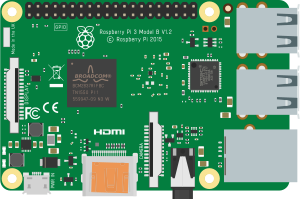
Raspberry Pi 3B |
| Board | QEMU Machine | CPU | Notes |
| ----- | ------------ | --- | ----- |
| Raspberry Pi 3B | `raspi3b` | BCM2837, 4× Cortex-A53 | Full Raspberry Pi OS support |
> **Raspberry Pi 3B+** and **Pi 4** are not currently supported. The `raspi3b` machine type in QEMU closely matches the standard 3B hardware.
---
## 3. Emulator Architecture
```text
Python Script (user writes in editor)
│
▼ (uploaded via WebSocket / VFS)
/home/pi/script.py (inside Raspberry Pi OS)
│
▼ python3 /home/pi/script.py
RPi.GPIO (shim) ← intercepted by gpio_shim.py
│
├── GPIO.output(17, HIGH) → "GPIO 17 1\n" → ttyAMA1 → Backend
│ │
│ ▼
│ gpio_change event
│ WebSocket → Frontend
│ PinManager → LED visual
│
└── Serial.print() → ttyAMA0 → Backend → serial_output → Serial Monitor
```
### Communication Channels
The Raspberry Pi uses **two independent TCP serial ports** exposed through QEMU:
| Channel | QEMU Serial | TCP Port | Purpose |
| ------- | ----------- | -------- | ------- |
| User Serial | `-serial tcp:...:N` | dynamic | User `print()` output and `input()` — visible in Serial Monitor |
| GPIO Protocol | `-serial tcp:...:M` | dynamic | GPIO shim protocol (`GPIO \n`) |
Both ports are allocated dynamically at startup to avoid conflicts on the host machine.
---
## 4. System Components
### Backend
| Component | File | Responsibility |
| --------- | ---- | -------------- |
| `QemuManager` | `backend/app/services/qemu_manager.py` | Singleton that manages all Pi instances (one per WebSocket client) |
| `PiInstance` | `backend/app/services/qemu_manager.py` | Runtime state for one running Pi: QEMU process, TCP ports, overlay path |
| `gpio_shim` | `backend/app/services/gpio_shim.py` | `RPi.GPIO` drop-in replacement; speaks the GPIO text protocol over ttyAMA1 |
| WebSocket route | `backend/app/api/routes/simulation.py` | `GET /api/simulation/ws/{client_id}` — bidirectional JSON message bus |
### Frontend
| Component | File | Responsibility |
| --------- | ---- | -------------- |
| `RaspberryPi3Bridge` | `frontend/src/simulation/RaspberryPi3Bridge.ts` | WebSocket connection manager; sends/receives JSON messages |
| `useSimulatorStore` | `frontend/src/store/useSimulatorStore.ts` | Zustand store; wires bridge events to board state and pin manager |
| `useVfsStore` | `frontend/src/store/useVfsStore.ts` | Virtual filesystem tree per board; Python script editing |
| `RaspberryPi3.tsx` | `frontend/src/components/components-wokwi/RaspberryPi3.tsx` | React board component (SVG image, 40-pin header) |
| `boardPinMapping.ts` | `frontend/src/utils/boardPinMapping.ts` | Physical pin → BCM GPIO number translation |
---
## 5. Boot Sequence — Step by Step
```text
1. User clicks "Start" (or "Run")
│
▼
2. SimulatorCanvas detects board kind 'raspberry-pi-3'
→ calls startBoard(boardId)
3. useSimulatorStore calls RaspberryPi3Bridge.connect()
4. Bridge opens WebSocket:
ws://localhost:8001/api/simulation/ws/
→ sends { type: 'start_pi', data: { board: 'raspberry-pi-3' } }
5. Backend (simulation.py) routes to:
QemuManager.start_instance(client_id, 'raspberry-pi-3', callback)
6. QemuManager._boot(inst):
a. Ask the BootImageProvider for the Pi 3 image set
(kernel8.img + bcm2710-rpi-3-b.dtb + raspios-trixie-armhf.img).
First call downloads + verifies SHA256 + decompresses .zst —
~30 s cold; subsequent calls hit the cache instantly.
See Section 12 and docs/BOOT_IMAGES.md for the architecture.
b. Allocate two free TCP ports (serial_port, gpio_port)
c. Create qcow2 overlay over the SD image returned by the provider:
qemu-img create -f qcow2 -b raspios-trixie-armhf.img overlay_.qcow2
qemu-img resize overlay_.qcow2 8G (raspi3b requires SD size = power of 2)
d. Launch qemu-system-aarch64 (see Section 13 for full command)
e. Emit { type: 'system', event: 'booting' }
7. Wait ~2 seconds for QEMU to initialize TCP servers
8. QemuManager._connect_serial(inst):
→ Connect to ttyAMA0 TCP socket
→ Start async reader loop (forwards bytes as serial_output events)
→ Emit { type: 'system', event: 'booted' }
9. QemuManager._connect_gpio(inst):
→ Connect to ttyAMA1 TCP socket
→ Start async reader loop (parses "GPIO \n" lines)
10. Frontend receives 'booted' event
→ Board UI updates to "running" state
→ Serial Monitor shows first Linux kernel output
11. systemd reaches `multi-user.target` and starts
`serial-getty@ttyAMA0.service`, which auto-logs in as root via the
drop-in in `/etc/systemd/system/serial-getty@ttyAMA0.service.d/
autologin.conf` (baked into the SD image by
`scripts/configure-pi3-autologin.sh`).
→ User sees a `root@raspberrypi:~#` prompt on the Serial Monitor.
12. From the prompt, the user runs the uploaded Python script:
→ python3 /home/pi/script.py
(script upload happens via the VFS bridge in step 4-8.)
```
---
## 6. GPIO Shim — How Python Controls GPIO
The `gpio_shim.py` module is injected into the Raspberry Pi OS at the standard `RPi.GPIO` installation path:
```text
/usr/local/lib/python3.11/dist-packages/RPi/GPIO.py
```
When a Python script does `import RPi.GPIO as GPIO`, it gets this shim instead of the real hardware driver. The shim communicates over `/dev/ttyAMA1` (the second QEMU serial port) using a simple text protocol.
### GPIO Text Protocol
```text
Pi → Backend (output state change):
"GPIO <0|1>\n"
Example: "GPIO 17 1\n" ← GPIO 17 driven HIGH
Backend → Pi (external input, e.g. button press from canvas):
"SET <0|1>\n"
Example: "SET 22 1\n" ← button wired to GPIO 22 pressed
```
### Supported RPi.GPIO API
```python
import RPi.GPIO as GPIO
# Numbering mode
GPIO.setmode(GPIO.BCM) # use BCM numbers (GPIO17, GPIO22, ...)
GPIO.setmode(GPIO.BOARD) # use physical pin numbers (11, 15, ...)
# Pin direction
GPIO.setup(17, GPIO.OUT)
GPIO.setup(22, GPIO.IN, pull_up_down=GPIO.PUD_UP)
# Digital output
GPIO.output(17, GPIO.HIGH) # → sends "GPIO 17 1\n" to backend
GPIO.output(17, GPIO.LOW) # → sends "GPIO 17 0\n" to backend
GPIO.output(17, True) # equivalent to GPIO.HIGH
# Digital input
state = GPIO.input(22) # reads last known state (updated by "SET" messages)
# Event detection
GPIO.add_event_detect(22, GPIO.RISING, callback=my_callback)
GPIO.add_event_detect(22, GPIO.FALLING, callback=my_callback)
GPIO.add_event_detect(22, GPIO.BOTH, callback=my_callback)
# PWM (simplified — simulated as digital output)
pwm = GPIO.PWM(18, 1000) # pin 18, 1000 Hz
pwm.start(75) # 75% duty cycle → HIGH (duty > 50% → HIGH, else LOW)
pwm.ChangeDutyCycle(25) # 25% duty cycle → LOW
pwm.stop()
# Cleanup
GPIO.cleanup()
GPIO.cleanup(17) # clean specific pin
```
> **PWM limitation:** The shim does not implement real PWM waveforms. It converts duty cycle to a binary state: `duty > 50` → HIGH, `duty ≤ 50` → LOW. Visual LED dimming is not supported for Pi GPIO PWM.
### Example Python Script (Blink LED)
```python
#!/usr/bin/env python3
import time
import RPi.GPIO as GPIO
GPIO.setmode(GPIO.BCM)
GPIO.setup(17, GPIO.OUT)
try:
while True:
GPIO.output(17, GPIO.HIGH)
print("LED ON")
time.sleep(1)
GPIO.output(17, GPIO.LOW)
print("LED OFF")
time.sleep(1)
finally:
GPIO.cleanup()
```
---
## 7. WebSocket Protocol
All communication between the frontend and backend passes through a single WebSocket connection per board instance.
**Endpoint:** `GET /api/simulation/ws/{client_id}`
### Frontend → Backend Messages
| Message Type | Payload | Description |
| ------------ | ------- | ----------- |
| `start_pi` | `{ board: "raspberry-pi-3" }` | Launch QEMU, start the Pi |
| `stop_pi` | _(empty)_ | Stop QEMU, clean up overlay |
| `serial_input` | `{ bytes: number[] }` | Send bytes to ttyAMA0 (Serial Monitor → Pi) |
| `gpio_in` | `{ pin: number, state: 0\|1 }` | Inject external GPIO state (button press from canvas) |
### Backend → Frontend Messages
| Message Type | Payload | Description |
| ------------ | ------- | ----------- |
| `serial_output` | `{ data: string }` | String data from ttyAMA0 (Pi print output) |
| `gpio_change` | `{ pin: number, state: 0\|1 }` | A GPIO pin changed state (driven by Python script) |
| `system` | `{ event: "booting"\|"booted"\|"exited" }` | Boot lifecycle events |
| `error` | `{ message: string }` | Error from QEMU or backend |
---
## 8. Serial Communication (UART)
The Raspberry Pi 3 exposes two UART ports through QEMU:
| Port | Device | Physical Pins | Role |
| ---- | ------ | ------------- | ---- |
| UART0 (ttyAMA0) | `/dev/ttyAMA0` | GPIO14 (TX), GPIO15 (RX) | User serial — `print()` output, `input()`, `serial.Serial()` |
| UART1 (ttyAMA1) | `/dev/ttyAMA1` | — (internal) | GPIO shim protocol — reserved, not accessible to user scripts |
### Serial Monitor Integration
Anything the Python script writes to stdout or to `/dev/ttyAMA0` appears in the Serial Monitor panel:
```python
# stdout (print) — captured automatically
print("Hello from Pi!")
# Direct ttyAMA0 (explicit serial)
import serial
port = serial.Serial('/dev/ttyAMA0', baudrate=9600, timeout=1)
port.write(b"Hello Arduino!\n")
```
### Sending Text to the Pi
Text typed in the Serial Monitor input box is sent to ttyAMA0 as a `serial_input` message, which the Pi receives via `input()` or by reading `/dev/ttyAMA0`.
---
## 9. Pin Mapping — Physical to BCM GPIO
The Raspberry Pi 3B has a standard **40-pin GPIO header** (2 rows × 20 columns). The table below shows the mapping from physical pin number to BCM GPIO number:
| Physical | BCM | Function | Physical | BCM | Function |
| -------- | --- | -------- | -------- | --- | -------- |
| 1 | — | 3.3 V | 2 | — | 5 V |
| 3 | **2** | I2C1 SDA | 4 | — | 5 V |
| 5 | **3** | I2C1 SCL | 6 | — | GND |
| 7 | **4** | GPIO | 8 | **14** | UART TX |
| 9 | — | GND | 10 | **15** | UART RX |
| 11 | **17** | GPIO | 12 | **18** | PWM0 |
| 13 | **27** | GPIO | 14 | — | GND |
| 15 | **22** | GPIO | 16 | **23** | GPIO |
| 17 | — | 3.3 V | 18 | **24** | GPIO |
| 19 | **10** | SPI MOSI | 20 | — | GND |
| 21 | **9** | SPI MISO | 22 | **25** | GPIO |
| 23 | **11** | SPI SCLK | 24 | **8** | SPI CE0 |
| 25 | — | GND | 26 | **7** | SPI CE1 |
| 27 | — | ID_SD | 28 | — | ID_SC |
| 29 | **5** | GPIO | 30 | — | GND |
| 31 | **6** | GPIO | 32 | **12** | PWM0 |
| 33 | **13** | PWM1 | 34 | — | GND |
| 35 | **19** | SPI1 MISO | 36 | **16** | SPI1 CE2 |
| 37 | **26** | GPIO | 38 | **20** | SPI1 MOSI |
| 39 | — | GND | 40 | **21** | SPI1 SCLK |
> Pins 27 and 28 are reserved for ID EEPROM. Power and GND pins have BCM = —.
### Pin Resolution in Frontend
```typescript
// Wire connects physical pin "8" on the Pi board
boardPinToNumber('raspberry-pi-3', '8') // → 14 (BCM GPIO14, UART TX)
boardPinToNumber('raspberry-pi-3', 'GPIO17') // → 17
boardPinToNumber('raspberry-pi-3', 'GND') // → null (not a GPIO)
```
---
## 10. Virtual File System (VFS)
Each Raspberry Pi 3 board instance has its own **virtual filesystem tree** stored in the `useVfsStore` Zustand store. This lets you create and edit Python scripts directly in the Velxio editor before they are uploaded to the Pi.
### Default VFS Tree
```text
/
└── home/
└── pi/
├── script.py ← main Python script (editable)
└── hello.sh ← example shell script
```
### Default `script.py`
```python
#!/usr/bin/env python3
import time
import RPi.GPIO as GPIO
GPIO.setmode(GPIO.BCM)
GPIO.setup(17, GPIO.OUT)
while True:
GPIO.output(17, GPIO.HIGH)
print("LED on")
time.sleep(1)
GPIO.output(17, GPIO.LOW)
print("LED off")
time.sleep(1)
```
### VFS API
```typescript
const vfs = useVfsStore.getState();
vfs.initBoardVfs(boardId) // create default tree
vfs.createNode(boardId, parentId, 'app.py', 'file') // add new file
vfs.setContent(boardId, nodeId, pythonCode) // update file content
vfs.serializeForUpload(boardId) // returns [{ path, content }, ...]
```
Files in the VFS are uploaded to the Pi OS at boot via the WebSocket connection before the script is executed.
---
## 11. Multi-Board Integration — Pi + Arduino
The Raspberry Pi 3 can be placed on the same canvas as Arduino or other boards. When wires connect a Pi GPIO pin to an Arduino pin, the stores route data between them automatically.
### Pi → Arduino (Serial TX)
```text
Pi Python script:
port.write(b"LED_ON\n")
│
▼ ttyAMA0 byte output
serial_output WebSocket message
│
▼ useSimulatorStore (serial callback)
AVRSimulator.serialWrite("L") ← feeds byte into Arduino RX FIFO
│
▼ Arduino sketch:
String cmd = Serial.readStringUntil('\n');
if (cmd == "LED_ON") digitalWrite(8, HIGH);
```
### Arduino → Pi (Serial RX)
```text
Arduino sketch:
Serial.println("SENSOR:1023");
│
▼ USART byte emitted
useSimulatorStore serial callback
│
▼ bridge.sendSerialBytes([charCode, ...])
serial_input WebSocket message → Backend
│
▼ qemu_manager.send_serial_bytes(client_id, bytes)
ttyAMA0 receives bytes → Pi reads with:
line = port.readline() # "SENSOR:1023\n"
```
### Example Project: Pi + Arduino LED Control
This example (included in the gallery as `pi-to-arduino-led-control`) demonstrates bidirectional serial communication:
**Pi Script:**
```python
import serial, time
port = serial.Serial('/dev/ttyAMA0', baudrate=9600, timeout=1)
for _ in range(3):
port.write(b"LED1_ON\n")
time.sleep(0.5)
port.write(b"LED1_OFF\n")
time.sleep(0.5)
port.write(b"LED2_ON\n")
time.sleep(2)
port.write(b"LED2_OFF\n")
```
**Arduino Sketch:**
```cpp
const int LED1 = 8, LED2 = 9;
void setup() {
Serial.begin(9600);
pinMode(LED1, OUTPUT);
pinMode(LED2, OUTPUT);
}
void loop() {
if (Serial.available()) {
String cmd = Serial.readStringUntil('\n');
if (cmd == "LED1_ON") digitalWrite(LED1, HIGH);
else if (cmd == "LED1_OFF") digitalWrite(LED1, LOW);
else if (cmd == "LED2_ON") digitalWrite(LED2, HIGH);
else if (cmd == "LED2_OFF") digitalWrite(LED2, LOW);
}
}
```
---
## 12. Boot Images
The Pi 3 simulator needs three files that QEMU reads at launch. None of
them are committed to the repo or baked into the Docker image — they're
fetched lazily on first boot by the
[`BootImageProvider`](BOOT_IMAGES.md) and cached in a docker named
volume.
| File (cache slot) | Size | Source | Purpose |
| ---- | ---- | ------ | ------- |
| `kernel8.img` | 24 MB | decompressed PE-COFF ARM64 Image from Pi OS Trixie armhf boot partition | The Linux kernel QEMU jumps to. **Must be decompressed** — the original `kernel8.img` on Pi OS is gzipped and QEMU's `-kernel` does NOT auto-decompress. |
| `bcm2710-rpi-3-b.dtb` | 34 KB | unmodified from Pi OS boot partition | Device tree blob describing the BCM2837 SoC (Cortex-A53 cluster, PL011 UART at 0x3f201000, BCM2835 SDHCI at 0x3f300000, etc.). The Pi 3 Model B `*-b.dtb` matches the QEMU `raspi3b` machine exactly. |
| `raspios-trixie-armhf.img` | 5.4 GB raw / 1.4 GB on the wire (zstd -19) | Raspberry Pi OS Trixie 2026-04-21 armhf, **patched** by `scripts/configure-pi3-autologin.sh` (see below) | Root filesystem. Patched in-place via loop-mount + sed before re-compression. |
> The base SD image is **never modified at runtime**. Each session
> creates a **qcow2 copy-on-write overlay** that records only the
> changes made during that session; the overlay is deleted on stop.
### SD image patches (baked once into the cached asset)
The pristine Pi OS Trixie image won't give a usable shell experience
inside QEMU on its own (no default user, half a dozen network-wait
services that timeout slowly, etc.). Before upload, every SD image
goes through `scripts/configure-pi3-autologin.sh`:
| Patch | Why |
| ----- | --- |
| Drop-in `serial-getty@ttyAMA0.service.d/autologin.conf` → `agetty --autologin root` | Pi OS Trixie ships without a default `pi/raspberry` user. The drop-in skips the credential prompt entirely. |
| `sed -i 's\|^root:[^:]*:\|root::\|' /etc/shadow` (passwordless root) | Defence-in-depth in case a future PAM policy rejects passwordless `login -f`. |
| Mask `systemd-networkd-wait-online`, `NetworkManager-wait-online`, `wpa_supplicant`, `dhcpcd5`, `raspi-config`, `firstboot`, `userconfig` | These wait for network / first-boot resize that never happens in QEMU. Masking saves ~60-90 s of boot. |
The script is idempotent — re-run it whenever you bump Pi OS to a
newer Trixie build. It also prints the new `sha256` + `size_bytes` for
both the compressed and decompressed forms; paste those into
`backend/app/services/boot_images/manifest.json`.
### Provider config flow
```
┌──────────────────────────────────────────────────────┐
│ velxio-prod container starts │
└───────────────────────┬──────────────────────────────┘
│
▼
lifespan hook in qemu_manager.py → provider.warmup_all()
│
▼
┌──────────────────────────────────────────────────────────────────────┐
│ for image in manifest['raspberry-pi-3'].images: │
│ target = /var/cache/velxio/boot-images/raspberry-pi-3/ │
│ if target.exists() and target.sha256_sidecar == manifest.sha256: │
│ continue # cache hit │
│ else: │
│ downloader.fetch(image.asset_id, staging) │
│ verify SHA256 (wire format) │
│ if image.compressed: zstd-decompress staging → tmp │
│ verify SHA256 (decompressed) │
│ rename atomically → target │
│ write sidecar .sha256 │
└──────────────────────────────────────────────────────────────────────┘
│
▼
User clicks "Pi 3 → Run" → instant qemu launch
```
The provider is described in detail in [BOOT_IMAGES.md](BOOT_IMAGES.md);
its public API is `app.services.boot_images.get_default_provider()`.
### Where the assets live
Three places hold copies, each serving a different role:
| Location | Role |
| -------- | ---- |
| `/var/velxio-pro/binaries/{kernel8-pi3,dtb-bcm2710-rpi-3-b,raspios-trixie-armhf-zst}/` | **Asset store** — bind-mounted from the host. Populated by `scripts/upload-binary.sh`. Served by the licence module at `/api/pro/license/downloads/{asset}` for OSS users with a key. |
| `/var/cache/velxio/boot-images/raspberry-pi-3/` (named docker volume `boot-images`) | **Runtime cache** — what QEMU actually reads. Materialised on first request, content-verified via the sidecar SHA file, kept across `docker compose down/up`. |
| `backend/app/services/boot_images/manifest.json` | **Source of truth** — declared SHA256 + size for each file. A SHA bump here invalidates the cache and forces a re-fetch on next container start. |
### Refreshing the SD image (e.g. new Pi OS build)
```bash
# 1. Download the new Pi OS Trixie armhf release from raspberrypi.com
curl -fO https://downloads.raspberrypi.com/raspios_armhf/images/raspios_armhf-/-raspios-trixie-armhf.img.xz
unxz -raspios-trixie-armhf.img.xz
# 2. Bake autologin + service masks
./scripts/configure-pi3-autologin.sh \
--src -raspios-trixie-armhf.img \
--out raspios-trixie-armhf-autologin.img.zst
# script prints the new sha256/size values — copy them.
# 3. Upload to the licence-module asset store
PRO_BINARIES_DIR=$PWD/binaries ./scripts/upload-binary.sh \
--asset raspios-trixie-armhf-zst \
--version +autologin \
--file raspios-trixie-armhf-autologin.img.zst
# 4. Update upstream manifest with the printed SHA + sizes, commit, push,
# bump the velxio submodule pointer in velxio-prod, push, deploy.
./scripts/deploy.sh
```
On the next container start, the BootImageProvider sees a sidecar SHA
mismatch and re-fetches the new SD image. The kernel + DTB stay
cached.
### Creating the qcow2 overlay at runtime
```bash
# Backend does this automatically for each session:
qemu-img create -f qcow2 \
-b /var/cache/velxio/boot-images/raspberry-pi-3/raspios-trixie-armhf.img \
-F raw \
/tmp/overlay_.qcow2
qemu-img resize /tmp/overlay_.qcow2 8G
```
> **8 GiB resize** — `raspi3b` requires the SD image size to be a power
> of 2. The raw 5.4 GiB image fails QEMU's check; the overlay pads up
> to 8 GiB with zero-cost qcow2 sparse blocks.
---
## 13. QEMU Launch Command
```bash
qemu-system-aarch64 \
-M raspi3b \
-kernel /var/cache/velxio/boot-images/raspberry-pi-3/kernel8.img \
-dtb /var/cache/velxio/boot-images/raspberry-pi-3/bcm2710-rpi-3-b.dtb \
-drive file=/tmp/overlay_.qcow2,if=sd,format=qcow2 \
-m 1G \
-smp 4 \
-nographic \
-serial tcp:127.0.0.1:,server,nowait \
-serial tcp:127.0.0.1:,server,nowait \
-append 'earlycon=pl011,mmio32,0x3f201000 \
console=ttyAMA0,115200 \
root=/dev/mmcblk0p2 rootwait rw \
dwc_otg.lpm_enable=0'
```
### Key Flags
| Flag | Value | Meaning |
| ---- | ----- | ------- |
| `-M raspi3b` | machine type | Emulate the Raspberry Pi 3B hardware |
| `-m 1G` | RAM | 1 GB RAM (matches real Pi 3B) |
| `-smp 4` | CPU cores | 4 ARM Cortex-A53 cores |
| `-nographic` | no display | No HDMI/video output — serial only |
| `-serial tcp:...:N,server,nowait` | first serial | ttyAMA0 (user serial) served on TCP port N |
| `-serial tcp:...:M,server,nowait` | second serial | ttyAMA1 (GPIO shim protocol) served on TCP port M |
| `-drive ...,format=qcow2` | disk | qcow2 overlay over the base SD image (resized to 8 GiB per raspi3b's power-of-2 SD requirement) |
| `-kernel kernel8.img` | kernel | Pre-decompressed PE-COFF ARM64 Linux Image. **Must NOT be gzipped** — QEMU's `-kernel` does not auto-decompress; a gzipped kernel results in a silent boot. |
### Kernel command-line flags
| Flag | Why |
| ---- | --- |
| `earlycon=pl011,mmio32,0x3f201000` | **Critical.** Without the explicit MMIO address, the kernel can't initialise the BCM2837 PL011 UART early enough for `printk` to reach the serial console (real Pi 3 relies on the Pi firmware to set up the UART before kernel handover; QEMU skips that step). Address = BCM2837 peripheral base `0x3f000000` + PL011 offset `0x201000`. |
| `console=ttyAMA0,115200` | Main console output to the first serial port at 115200 baud. Matches the baud rate the autologin drop-in passes to `agetty`. |
| `root=/dev/mmcblk0p2` | Root filesystem on the second SD partition (`p1` is `/boot/firmware/`). |
| `rootwait rw` | Wait for the SD card to appear before mounting root, then mount writable so the qcow2 overlay can record changes. |
| `dwc_otg.lpm_enable=0` | Standard Pi cmdline option — disables USB Low Power Mode (no functional effect inside QEMU but kept for parity with real hardware). |
> **No `init=/bin/sh`, no `quiet`.** Earlier versions used these but the
> combination produced a silent boot followed by a non-interactive shell
> (no PS1, no echo). Letting systemd boot normally + the
> serial-getty autologin drop-in is the correct approach.
---
## 14. Known Limitations
| Limitation | Detail |
| ---------- | ------ |
| Cold boot time | First QEMU launch after a fresh container goes through a full Pi OS systemd boot in emulation: kernel ~15 s + systemd graph ~30-60 s (varies with the masked-services set in `configure-pi3-autologin.sh`). The frontend shows a "booting" state during this time. Cached boot images keep the QEMU launch itself ~1 s; the delay is all guest-side. |
| Boot file size | The decompressed SD image is 5.4 GiB and lives in the `boot-images` docker volume after first use. Initial download via the licence-gated endpoint is 1.4 GiB (zstd -19). Allocate ~7 GiB of free disk for the named volume. |
| No real PWM | `GPIO.PWM` simulates duty cycle as binary state (>50% = HIGH, ≤50% = LOW); no analog dimming |
| No I2C emulation | `smbus`, `smbus2`, `i2c_msg` — I2C bus transactions are not forwarded to virtual devices |
| No SPI emulation | Hardware SPI registers not forwarded; `spidev` library will fail |
| Single UART for GPIO | ttyAMA1 is reserved for the GPIO shim; scripts cannot use it for other serial devices |
| No GUI / display | HDMI output is disabled (`-nographic`); GUI Python libraries (Tkinter, pygame, etc.) will not work |
| No networking | QEMU does not expose a network interface; `requests`, `socket`, `urllib` will fail |
| No persistent state | The qcow2 overlay is deleted after shutdown; files written to the Pi OS do not survive a restart |
| Reset is reconnect | `resetBoard()` is not implemented; to restart the Pi, stop it and start it again |
| Session isolation | Each board instance creates an independent QEMU process; two Pi boards do not share any state |
| Resource usage | Each Pi instance launches a full QEMU process (~200 MB RAM); hosting many simultaneous sessions is resource-intensive |
---
## 15. Differences vs Other Emulators
| Aspect | Raspberry Pi 3B | Raspberry Pi Pico | ESP32 (Xtensa) | Arduino AVR |
| ------ | --------------- | ----------------- | -------------- | ----------- |
| Engine | QEMU raspi3b | rp2040js (browser) | QEMU lcgamboa (backend) | avr8js (browser) |
| Backend required | **Yes** (QEMU process) | No | Yes (QEMU process) | No |
| Language | **Python** | C++ (Arduino) | C++ (Arduino) | C++ (Arduino) |
| Compilation step | **No** | Yes (arduino-cli) | Yes (arduino-cli) | Yes (arduino-cli) |
| OS | **Raspberry Pi OS (Linux)** | None (bare metal) | None (ESP-IDF) | None (bare metal) |
| Boot time | ~2–5 s | Instant | ~1–2 s | Instant |
| GPIO protocol | Text over ttyAMA1 | MMIO direct | QEMU callbacks + WebSocket | Port listeners |
| Serial | ttyAMA0 (real UART) | UART0/1 (rp2040js) | UART0 (QEMU) | USART0 (avr8js) |
| I2C | Not forwarded to frontend | 2 buses + virtual devices | Emulated | Not emulated |
| PWM | Binary (no waveform) | Hardware PWM | LEDC (mapped) | Timer-based |
| Multi-board comms | Yes (serial bridge) | No | No | No |
| Oscilloscope | No | Yes (8 ns resolution) | No | Yes |
| CI tests | No | Yes (Vitest) | No | Yes (Vitest) |
| Disk image required | **Yes** (~5.67 GB) | No | No | No |
---
## 16. Key Files
| File | Description |
| ---- | ----------- |
| `backend/app/services/qemu_manager.py` | `QemuManager` — manages QEMU process lifecycle, TCP sockets, qcow2 overlays |
| `backend/app/services/gpio_shim.py` | `RPi.GPIO` drop-in replacement; speaks text protocol over ttyAMA1 |
| `backend/app/api/routes/simulation.py` | WebSocket endpoint `/api/simulation/ws/{client_id}` |
| `frontend/src/simulation/RaspberryPi3Bridge.ts` | WebSocket client; routes `serial_output`, `gpio_change`, `system` events |
| `frontend/src/store/useSimulatorStore.ts` | Board lifecycle, serial bridge to co-simulated AVR/Pico boards |
| `frontend/src/store/useVfsStore.ts` | Per-board virtual filesystem (Python script editor) |
| `frontend/src/utils/boardPinMapping.ts` | Physical pin → BCM GPIO number mapping table |
| `frontend/src/components/components-wokwi/RaspberryPi3.tsx` | Board React component (SVG, 40-pin header coordinates) |
| `frontend/src/components/components-wokwi/RaspberryPi3Element.ts` | Web Component for canvas rendering and wire endpoints |
| `frontend/src/types/board.ts` | `BoardKind` type, `FQBN = null` for Raspberry Pi 3 |
| `backend/app/services/boot_images/` | Module that fetches + caches + verifies the kernel/DTB/SD image. See [BOOT_IMAGES.md](BOOT_IMAGES.md). |
| `backend/app/services/boot_images/manifest.json` | Versioned source-of-truth for which SHA256 the cached boot files must match. Bumping a SHA here forces a re-fetch on next container start. |
| `velxio-prod:scripts/configure-pi3-autologin.sh` | The one-shot tool that bakes an `agetty --autologin root` systemd drop-in into the SD image + masks 9 boot-blocking services. Run when bumping to a newer Pi OS build. Prints the new SHA256 + size values to paste into manifest.json. |
| `velxio-prod:scripts/upload-binary.sh` | Drops a built asset into `/var/velxio-pro/binaries//` with a generated manifest. The licence module then serves it at `/api/pro/license/downloads/{asset}?key=...`. |
| `velxio-prod:binaries/{kernel8-pi3,dtb-bcm2710-rpi-3-b,raspios-trixie-armhf-zst}/` | The host directory bind-mounted to `/var/velxio-pro/binaries` inside the container. Gitignored (the files are licence-gated assets, not source). |
| `velxio-prod:docker-compose.yml` (`boot-images` volume) | Named docker volume for the runtime cache. Survives `compose down/up`. |