# `INSTALL.md`
The `motion-ai` solution is composed of multiple components
+ [Home Assistant](http://home-assistant.io) - open-source home automation system
+ [Open Horizon](http://github.com/dcmartin/open-horizon) - open-source edge AI platform
Home Assistant _add-ons_:
+ `MQTT` - messaging broker for all components
+ [`motion`](https://github.com/dcmartin/hassio-addons/tree/master/motion-video0) _add-on_ for Home Assistant - captures images and video of motion (n.b. [motion-project.github.io](http://motion-project.github.io))
Open Horizon AI _services_:
+ `yolo4motion` - [YOLO](https://pjreddie.com/darknet/yolo/) object detection and classification
+ `face4motion` - [FACE](http://github.com/dcmartin/openface) detection
+ `alpr4motion` - [ALPR](http://github.com/dcmartin/openface) license plate detection and classification
+ `pose4motion` - [POSE](http://github.com/dcmartin/openpose) human pose estimation
## Installation
Installation is performed in five (5) steps:
1. Install `motion-ai` software from [this](http://github.com/dcmartin/motion-ai) repository
2. Configure system messaging
2. Install _add-ons_
2. Configure cameras
3. Start selected AI _services_ (e.g. `yolo4motion`)
# ➊ Install `motion-ai`
To get started flash a supported LINUX distribution image to a micro-SD card, enable `ssh` and configure WiFi; insert into device, boot, update and upgrade (n.b. see [here](DEBIAN.md) for additional information).
Access via `ssh` or console; the following commands will complete the configuration and installation of `motion-ai`
```
# 1. enable appropriate permissions for the account
for g in $(groups pi | awk -F: '{ print $2 }'); do sudo addgroup ${USER} ${g}; done
```
```
# 2. install the minimum required software (n.b. `git` and `jq`)
sudo apt install -qq -y git jq
```
```
# 3. clone the repository into location with sufficient space
mkdir motion-ai
cd motion-ai
git clone http://github.com/dcmartin/motion-ai.git .
```
```
# 4. download and install Home Assistant, Docker, NetData, and supporting components
./sh/get.motion-ai.sh
```
```
# 5. add current user to docker group
sudo addgroup ${USER} docker
```
```
# 6. reboot
sudo reboot
```
When the system has restarted, access via `ssh` and continue with the next step.
# ➋ Install _add-on(s)_
Install the requiste _add-ons_ for Home Assistant, including the `MQTT` broker and the appropriate version of `motion`. Browse to the Home Assistant Web interface (n.b. don't forget `port` if not `80`) and visit the **Supervisor** via the icon in the lower left panel (see below).
 Select the `Add-on Store` and type in the address of this repository, for example:

 When the system reloads, select the **Motion Classic** _add-on_ from those available; for example:
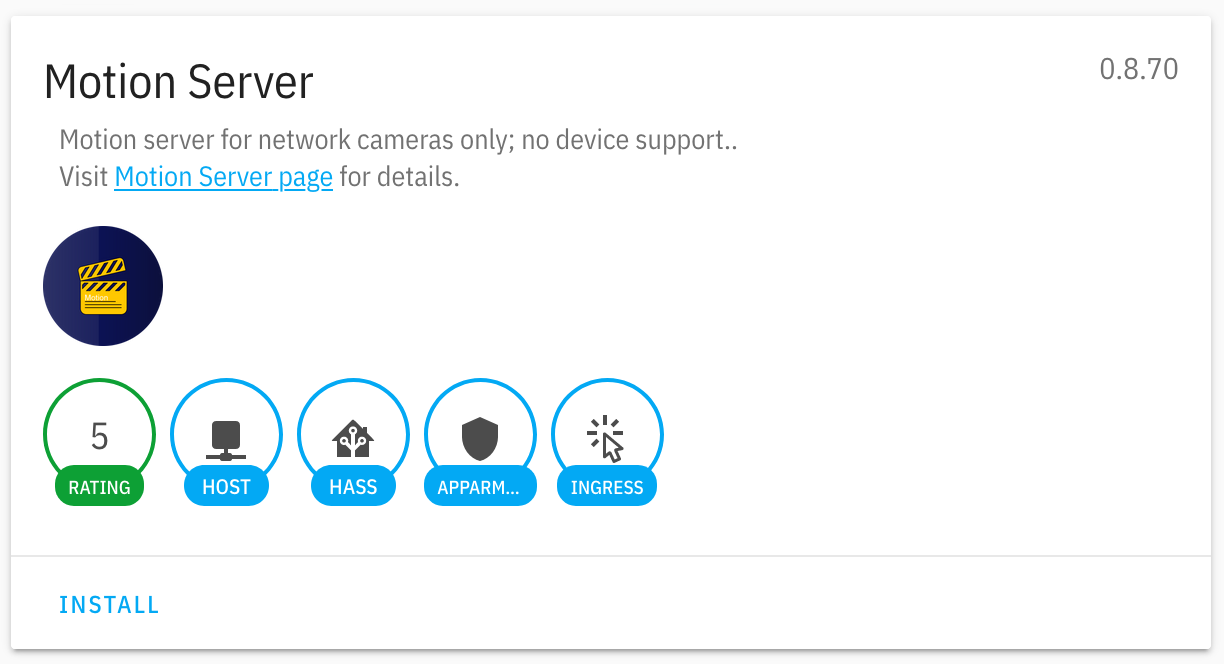
 After selecting the appropriate _add-on_, install by clicking on the `INSTALL` button, for example:
 Configure the add-on using the following options:
+ `group` - the identifier for the group of cameras; default: `motion`
+ `device` - the identifier for the host of the camera; typically the _hostname_
+ `client` - the identifier for the client (single) or all `+`; default: `+`
+ `mqtt` - `host`, `port`, `username`, and `password` for MQTT server
+ `cameras` - an array of `dict` structure for each camera
For more information on configuring, please refer to the [`motion`](http://github.com/dcmartin/hassio-addons/tree/master/motion/DOCS.md) documentation.
## ➌ Configure `motion-ai`
Once the MQTT and Motion Classic add-on's have started, the Home Assistant UX can be reached on default port 8123; the Web UI for Motion Classic may be reached on port `7999`.
From the `motion-ai/` directory you may specify options for Motion-AI as well as the AI _services_, as appropriate. Relevant variables include:
### `motion`
+ `MOTION_GROUP` - id for a group of devices; default: `motion`
+ `MOTION_DEVICE` - id for this device; default: _hostname_ without `-` and other special characters
+ `MOTION_CLIENT` - id for device to listen; default: `MOTION_DEVICE`; use `+` for all devices in _group_
+ `MQTT_HOST` - IPv4 address of MQTT broker; default: `127.0.0.1`
+ `MQTT_PORT` - Port number; default: `1883`
+ `MQTT_USERNAME` - credential identifier; default: `username`
+ `MQTT_PASSWORD` - credential password; default: `password`
+ `MOTIONCAM_USERNAME` - credential identifier; default: `username`
+ `MOTIONCAM_PASSWORD` - credential password; default: `password`
+ `NETCAM_USERNAME` - credential identifier; default: `username`
+ `NETCAM_PASSWORD`- credential password; default: `password`
### `yolo4motion`
+ `YOLO_CONFIG` - may be `tiny`, `tiny-v2`, `tiny-v3`, `v2`, or `v3`; default: `tiny` _(pre-loaded)_
+ `YOLO_ENTITY` - entity to detect; default: `all`
+ `YOLO_SCALE` - size for image scaling prior to detect; default: `none`
+ `YOLO_THRESHOLD` - threshold for entity detection; default: `0.25`
+ `LOG_LEVEL` - logging level; default: `info`
+ `LOG_TO` - logging output; default: `/dev/stderr`
These variables' values may be specified by environment variables or persistently through files of the same name; for example in the `motion-ai` installation directory:
```
# 1. specify a MQTT save device identifier
echo 'pi31' > MOTION_DEVICE
echo '+' > MOTION_CLIENT
```
```
# 2. specify credentials to access motion-ai cameras
echo 'username' > MOTIONCAM_USERNAME
echo 'password' > MOTIONCAM_PASSWORD
```
```
# 3. specify credential to access third-party network cameras
echo 'username' > NETCAM_USERNAME
echo 'password' > NETCAM_PASSWORD
```
```
# 4. specify MQTT options
echo '192.168.1.50' > MQTT_HOST
echo 'username' > MQTT_USERNAME
echo 'password' > MQTT_PASSWORD
```
There is a sample script, [`config.sh`](https://github.com/dcmartin/motion-ai/blob/master/config.sh), which may be used to set variables.
Changes may be made for a variety of [options](OPTIONS.md); when changes are made (e.g. to the `MQTT_HOST`) the following command **must** be run for those changes to take effect:
```
make restart
```
# ➍ Start AI _services_
Specify options for the AI _services_, i.e. `yolo4motion`, `face4motion`, etc.. as appropriate. Relevant variables include:
### _service logging_
In addition to those above, the level of logging and desired output location are shared across all _services_.
+ `LOG_LEVEL` - logging level; default: `info`
+ `LOG_TO` - logging output; default: `/dev/stderr`
## `yolo4motion`
+ `YOLO_CONFIG` - may be `tiny`, `tiny-v2`, `tiny-v3`, `v2`, or `v3`; default: `tiny` _(pre-loaded)_
+ `YOLO_ENTITY` - entity to detect; default: `all`
+ `YOLO_SCALE` - size for image scaling prior to detect; default: `none`
+ `YOLO_THRESHOLD` - threshold for entity detection; default: `0.25`
The `tiny` model (aka `tiny-v2`) only detects [these](https://github.com/dcmartin/openyolo/blob/master/darknet/data/voc.names) entities; the remaining models detect [these](https://github.com/dcmartin/openyolo/blob/master/darknet/data/coco.names) entities.
**Note:** The Docker container and the model's weights must be downloaded from the Internet; there may be a considerable delay given the device Internet connection bandwidth. The container is only downloaded one time, but the model's weights are downloaded each time the container is started.
For example:
```
echo debug > LOG_LEVEL
echo tiny-v3 > YOLO_CONFIG
./sh/yolo4motion.sh
... deleted ...
{
"name": "yolo4motion",
"id": "6d1765902d260f5b6e276f26391eb135eedef5388bf15ce77fa976adcf7a13c6",
"service": {
"label": "yolo4motion",
"id": "com.github.dcmartin.open-horizon.yolo4motion",
"tag": "0.1.2",
"arch": "amd64",
"ports": {
"service": 80,
"host": 4662
}
},
"motion": {
"group": "motion",
"client": "+",
"camera": "+"
},
"yolo": {
"config": "tiny",
"entity": "all",
"scale": "none",
"threshold": 0.25
},
"mqtt": {
"host": "192.168.1.50",
"port": 1883,
"username": "username",
"password": "password"
},
"debug": {
"debug": false,
"level": "info",
"logto": "/dev/stderr"
}
}
```
## `face4motion.sh`
+ `FACE_THRESHOLD` - floating point value between `0.0` and `0.99`; default: `0.5`
## `alpr4motion.sh`
+ `ALPR_COUNTRY` - designation for country specific license plates, may be `us` or `eu`; default: `us`
+ `ALPR_PATTERN` - pattern for plate recognition, may be regular expression; default: `none`
+ `ALPR_TOPN` - integer value between `1` and `20` limiting number `tag` predictions per `plate`
# ✅ - COMPLETE
## Watch `MQTT` traffic (_optional_)
To monitor the `MQTT` traffic from one or more `motion` devices use the `./sh/watch.sh` script which runs a `MQTT` client to listen for various _topics_, including motion detection events, annotations, detections, and a specified detected entity (n.b. currently limited per device). The script outputs information to `/dev/stderr` and runs in the background. The shell script will utilize existing values for the `MQTT` host, etc.. as well as the `MOTION_CLIENT`, but those may be specified as well; for example:
```
echo motion > MOTION_GROUP
echo + > MOTION_CLIENT
./sh/watch.sh
```
Configure the add-on using the following options:
+ `group` - the identifier for the group of cameras; default: `motion`
+ `device` - the identifier for the host of the camera; typically the _hostname_
+ `client` - the identifier for the client (single) or all `+`; default: `+`
+ `mqtt` - `host`, `port`, `username`, and `password` for MQTT server
+ `cameras` - an array of `dict` structure for each camera
For more information on configuring, please refer to the [`motion`](http://github.com/dcmartin/hassio-addons/tree/master/motion/DOCS.md) documentation.
## ➌ Configure `motion-ai`
Once the MQTT and Motion Classic add-on's have started, the Home Assistant UX can be reached on default port 8123; the Web UI for Motion Classic may be reached on port `7999`.
From the `motion-ai/` directory you may specify options for Motion-AI as well as the AI _services_, as appropriate. Relevant variables include:
### `motion`
+ `MOTION_GROUP` - id for a group of devices; default: `motion`
+ `MOTION_DEVICE` - id for this device; default: _hostname_ without `-` and other special characters
+ `MOTION_CLIENT` - id for device to listen; default: `MOTION_DEVICE`; use `+` for all devices in _group_
+ `MQTT_HOST` - IPv4 address of MQTT broker; default: `127.0.0.1`
+ `MQTT_PORT` - Port number; default: `1883`
+ `MQTT_USERNAME` - credential identifier; default: `username`
+ `MQTT_PASSWORD` - credential password; default: `password`
+ `MOTIONCAM_USERNAME` - credential identifier; default: `username`
+ `MOTIONCAM_PASSWORD` - credential password; default: `password`
+ `NETCAM_USERNAME` - credential identifier; default: `username`
+ `NETCAM_PASSWORD`- credential password; default: `password`
### `yolo4motion`
+ `YOLO_CONFIG` - may be `tiny`, `tiny-v2`, `tiny-v3`, `v2`, or `v3`; default: `tiny` _(pre-loaded)_
+ `YOLO_ENTITY` - entity to detect; default: `all`
+ `YOLO_SCALE` - size for image scaling prior to detect; default: `none`
+ `YOLO_THRESHOLD` - threshold for entity detection; default: `0.25`
+ `LOG_LEVEL` - logging level; default: `info`
+ `LOG_TO` - logging output; default: `/dev/stderr`
These variables' values may be specified by environment variables or persistently through files of the same name; for example in the `motion-ai` installation directory:
```
# 1. specify a MQTT save device identifier
echo 'pi31' > MOTION_DEVICE
echo '+' > MOTION_CLIENT
```
```
# 2. specify credentials to access motion-ai cameras
echo 'username' > MOTIONCAM_USERNAME
echo 'password' > MOTIONCAM_PASSWORD
```
```
# 3. specify credential to access third-party network cameras
echo 'username' > NETCAM_USERNAME
echo 'password' > NETCAM_PASSWORD
```
```
# 4. specify MQTT options
echo '192.168.1.50' > MQTT_HOST
echo 'username' > MQTT_USERNAME
echo 'password' > MQTT_PASSWORD
```
There is a sample script, [`config.sh`](https://github.com/dcmartin/motion-ai/blob/master/config.sh), which may be used to set variables.
Changes may be made for a variety of [options](OPTIONS.md); when changes are made (e.g. to the `MQTT_HOST`) the following command **must** be run for those changes to take effect:
```
make restart
```
# ➍ Start AI _services_
Specify options for the AI _services_, i.e. `yolo4motion`, `face4motion`, etc.. as appropriate. Relevant variables include:
### _service logging_
In addition to those above, the level of logging and desired output location are shared across all _services_.
+ `LOG_LEVEL` - logging level; default: `info`
+ `LOG_TO` - logging output; default: `/dev/stderr`
## `yolo4motion`
+ `YOLO_CONFIG` - may be `tiny`, `tiny-v2`, `tiny-v3`, `v2`, or `v3`; default: `tiny` _(pre-loaded)_
+ `YOLO_ENTITY` - entity to detect; default: `all`
+ `YOLO_SCALE` - size for image scaling prior to detect; default: `none`
+ `YOLO_THRESHOLD` - threshold for entity detection; default: `0.25`
The `tiny` model (aka `tiny-v2`) only detects [these](https://github.com/dcmartin/openyolo/blob/master/darknet/data/voc.names) entities; the remaining models detect [these](https://github.com/dcmartin/openyolo/blob/master/darknet/data/coco.names) entities.
**Note:** The Docker container and the model's weights must be downloaded from the Internet; there may be a considerable delay given the device Internet connection bandwidth. The container is only downloaded one time, but the model's weights are downloaded each time the container is started.
For example:
```
echo debug > LOG_LEVEL
echo tiny-v3 > YOLO_CONFIG
./sh/yolo4motion.sh
... deleted ...
{
"name": "yolo4motion",
"id": "6d1765902d260f5b6e276f26391eb135eedef5388bf15ce77fa976adcf7a13c6",
"service": {
"label": "yolo4motion",
"id": "com.github.dcmartin.open-horizon.yolo4motion",
"tag": "0.1.2",
"arch": "amd64",
"ports": {
"service": 80,
"host": 4662
}
},
"motion": {
"group": "motion",
"client": "+",
"camera": "+"
},
"yolo": {
"config": "tiny",
"entity": "all",
"scale": "none",
"threshold": 0.25
},
"mqtt": {
"host": "192.168.1.50",
"port": 1883,
"username": "username",
"password": "password"
},
"debug": {
"debug": false,
"level": "info",
"logto": "/dev/stderr"
}
}
```
## `face4motion.sh`
+ `FACE_THRESHOLD` - floating point value between `0.0` and `0.99`; default: `0.5`
## `alpr4motion.sh`
+ `ALPR_COUNTRY` - designation for country specific license plates, may be `us` or `eu`; default: `us`
+ `ALPR_PATTERN` - pattern for plate recognition, may be regular expression; default: `none`
+ `ALPR_TOPN` - integer value between `1` and `20` limiting number `tag` predictions per `plate`
# ✅ - COMPLETE
## Watch `MQTT` traffic (_optional_)
To monitor the `MQTT` traffic from one or more `motion` devices use the `./sh/watch.sh` script which runs a `MQTT` client to listen for various _topics_, including motion detection events, annotations, detections, and a specified detected entity (n.b. currently limited per device). The script outputs information to `/dev/stderr` and runs in the background. The shell script will utilize existing values for the `MQTT` host, etc.. as well as the `MOTION_CLIENT`, but those may be specified as well; for example:
```
echo motion > MOTION_GROUP
echo + > MOTION_CLIENT
./sh/watch.sh
```