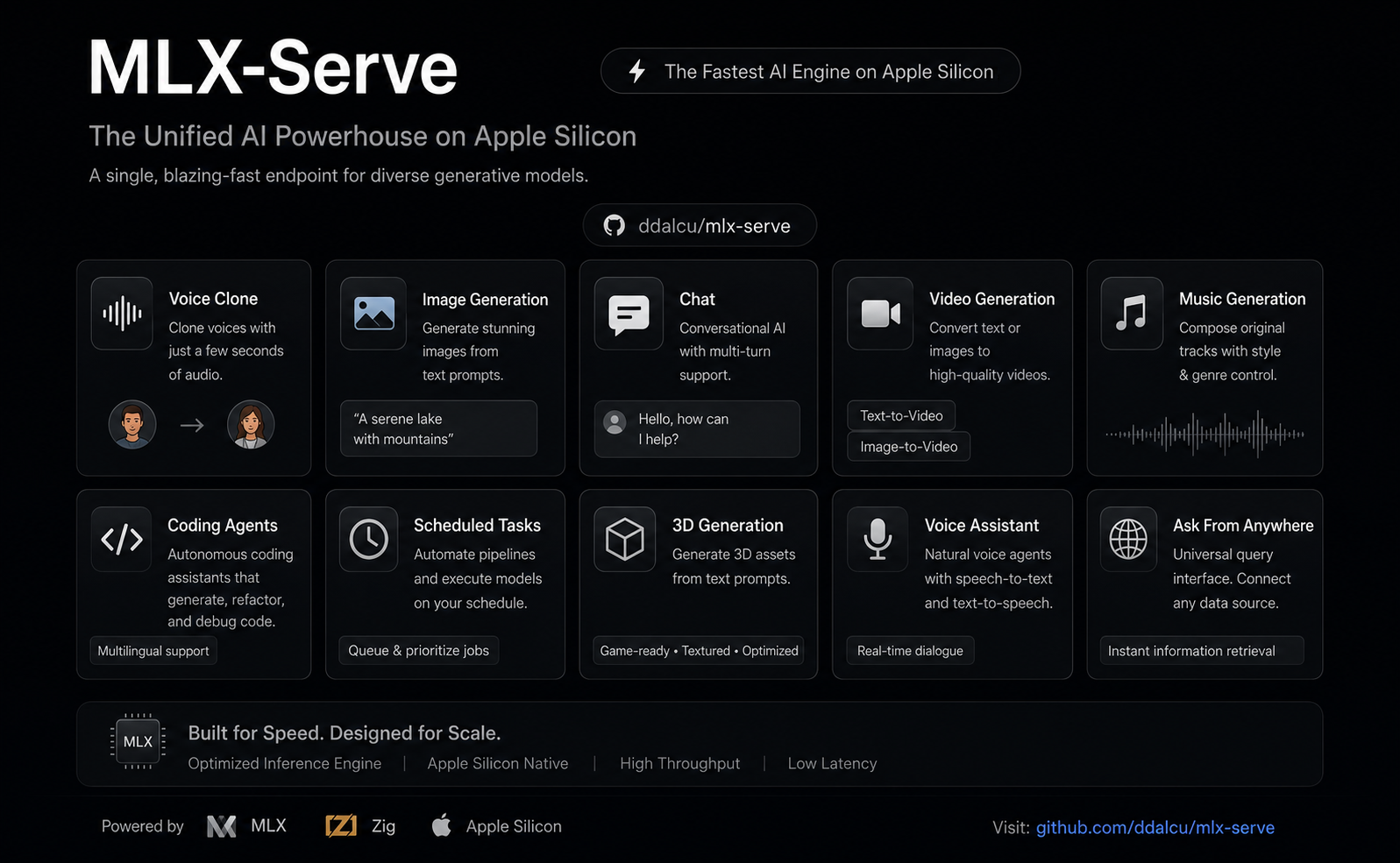
# mlx-serve — run any LLM on your Mac
**OpenAI- and Anthropic-compatible local inference for Apple Silicon — MLX *and* GGUF — faster than LM Studio on identical MLX weights. No Python. No cloud. No Electron.**
[](https://github.com/ddalcu/mlx-serve/releases/latest)
[](https://github.com/ddalcu/mlx-serve/stargazers)
[](https://github.com/ddalcu/mlx-serve/releases)
[](https://github.com/ddalcu/mlx-serve/commits/main)
[](LICENSE)
[](https://github.com/ddalcu/mlx-serve/releases/latest)
[](https://ziglang.org)
[](https://trendshift.io/repositories/43025)
**[mlxserve.com](https://mlxserve.com/)** · [Download MLX Core.app](https://github.com/ddalcu/mlx-serve/releases/latest) · [Docs](#docs) · [Changelog](CHANGELOG.md)
mlx-serve is a native Zig server that runs **any LLM on Apple Silicon** — MLX-format models *and* every GGUF on HuggingFace (Qwen, Llama, Mistral, Gemma, DeepSeek V4 Flash, thousands more). It exposes **OpenAI-compatible** *and* **Anthropic-compatible** HTTP APIs out of the box, so the same `http://localhost:11234` works with Claude Code, the OpenAI SDK, Continue, Cursor, Open WebUI, and anything else that speaks one of those wires. Beyond text, the same server generates **images, video, music, speech (with voice cloning), and 3D models** — all natively on MLX. Ships with **MLX Core**, a macOS menu-bar app with chat, agent mode, MCP tool calling, and model management.
## Get started
Needs macOS 26.2+ on Apple Silicon.
### Use the app (recommended)
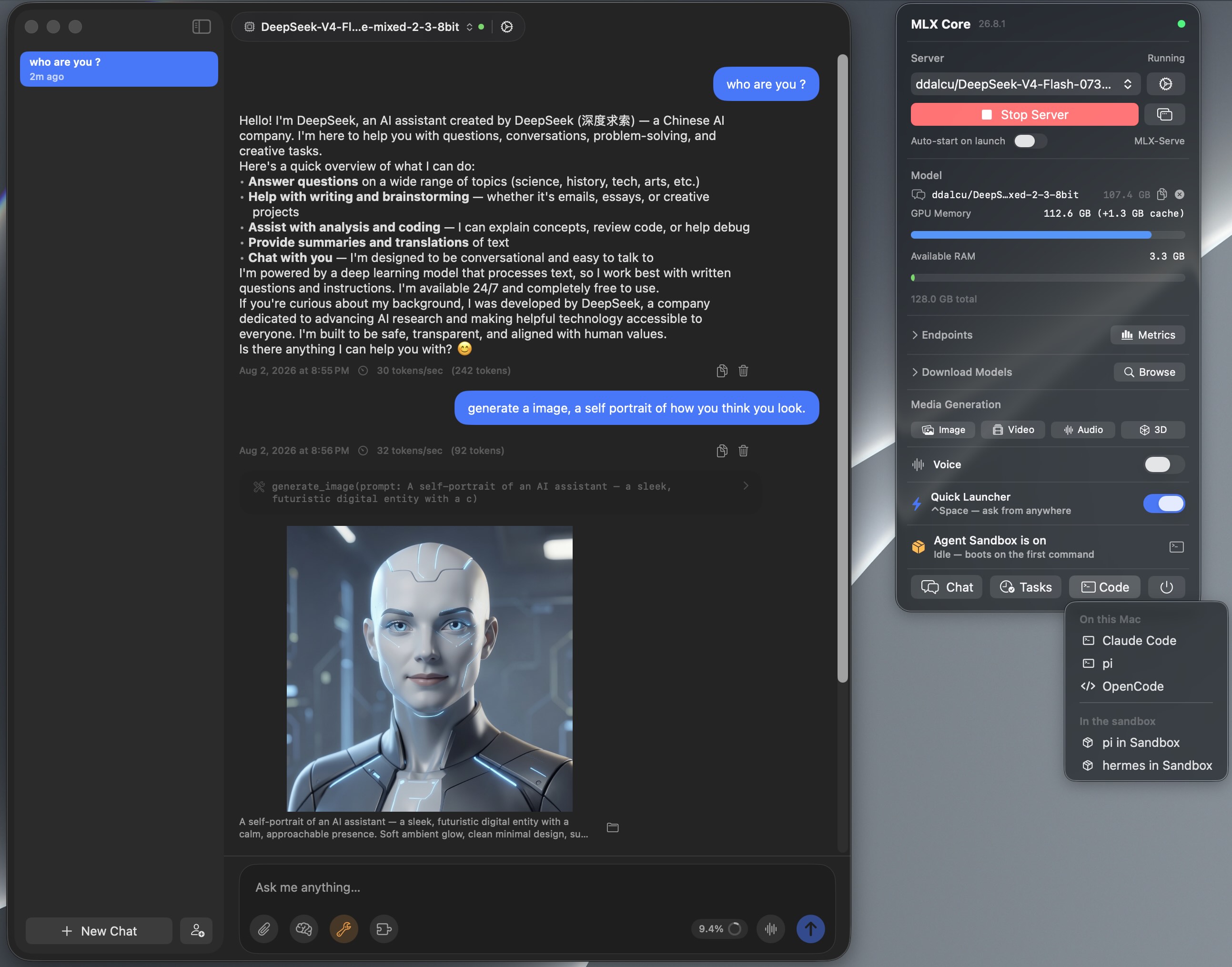
**MLX Core** is a signed, notarized macOS menu-bar app that bundles the server. Browse and download models with a progress UI, chat, run agent mode with MCP tools, generate images / video / music / speech / 3D, and tune every server flag from a Settings window. No terminal, nothing to configure. The server underneath is the same binary the CLI runs, on the same `http://localhost:11234`, so Claude Code and any OpenAI or Anthropic client can point at it while the app is running.
[](https://github.com/ddalcu/mlx-serve/releases/latest) **[Download MLX Core.app](https://github.com/ddalcu/mlx-serve/releases/latest)** — latest release for macOS (Apple Silicon)
### Install via Homebrew
```bash
brew tap ddalcu/mlx-serve https://github.com/ddalcu/mlx-serve
brew install --cask mlx-core # the app (recommended)
brew install mlx-serve # CLI + server only, no GUI
```
### Prefer the terminal?
Ollama-style, if that's your habit:
```bash
mlx-serve run gemma4 # downloads Gemma 4 E4B (4-bit), serves it, chats right in your terminal
mlx-serve pull qwen3.6:27b # just download (resumable, straight from Hugging Face)
mlx-serve list # what's on disk
mlx-serve serve # serve everything you've pulled — models load on demand by name
```
Short names, `org/repo` HuggingFace ids, and `name:tag` all work. Direct `--model`/`--model-dir` invocations for scripts and headless Macs, plus every server flag, are in [docs/cli.md](docs/cli.md).
And because mlx-serve **speaks the Ollama API** (`/api/chat`, `/api/generate`, `/api/tags`, `/api/embed`, `/api/pull`, …) alongside OpenAI and Anthropic, your existing Ollama-connected tools — Raycast, Obsidian, Enchanted, Open WebUI, `ollama-python`/`js` — work unchanged: point them at `http://localhost:11234` and keep your workflow, on a faster engine.
### Build from source
Needs Xcode 26.2+ with the Metal Toolchain component (if `xcrun -sdk macosx metal --version` fails, run `xcodebuild -downloadComponent MetalToolchain`):
```bash
git clone --recurse-submodules https://github.com/ddalcu/mlx-serve && cd mlx-serve
brew bundle install --file=Brewfile # cmake + webp
./app/build.sh # app + server, ad-hoc signed
```
That's the whole list. Zig, mlx and llama.cpp are pinned and fetched or built by the script, and there's no Python anywhere in the build. Server-only builds are in [docs/building.md](docs/building.md).
## Why mlx-serve
If you're already on LM Studio, Ollama, or `mlx-lm` and wondering whether to switch — here's the short version, head-to-head:
| | mlx-serve | LM Studio | Ollama | mlx-lm |
|---|:---:|:---:|:---:|:---:|
| MLX models (native Apple) | ✅ | ✅ | 🟡 | ✅ |
| GGUF models (llama.cpp) | ✅ **embedded** | ✅ | ✅ | ❌ |
| OpenAI-compatible API | ✅ | ✅ | partial | ❌ |
| Anthropic Messages API | ✅ | 🟡 partial² | ❌ | ❌ |
| Ollama API (drop-in for Ollama clients) | ✅ | ❌ | ✅ native | ❌ |
| `run ` CLI with auto-download + REPL | ✅ | ❌ | ✅ | ❌ |
| OpenAI Responses API + WebSockets | ✅ | 🟡 partial² | ❌ | ❌ |
| DeepSeek V4 Flash (284B) | ✅ via ds4 | ❌ | ❌ | ❌ |
| Speculative decoding (PLD + drafter + native MTP) | ✅ | ❌ | partial | drafter only |
| Decode speed (geomean vs LM Studio, identical weights) | **+26%** (MLX, shipping defaults) | baseline | ~−15% (GGUF, est.¹) | +11% (MLX) |
| KV-cache quantization (4/8-bit + TurboQuant) | ✅ | ❌ | partial | ✅ |
| Continuous batching | ✅ | ❌ | ✅ | ❌ |
| Built-in agent loop + MCP client | ✅ 10 tools | ❌ | ❌ | ❌ |
| Sandboxed agent shell (isolated Linux VM) | ✅ | ❌ | ❌ | ❌ |
| LAN model sharing (use another Mac's models) | ✅ | ❌ | ❌ | ❌ |
| One-click launchers (Claude Code, OpenCode, Pi) | ✅ | ❌ | ❌ | ❌ |
| Python required at runtime | ❌ | ❌ | ❌ | ✅ |
| Native menu-bar app (no Electron) | ✅ | ❌ Electron | ❌ | ❌ |
| **Image generation + photo editing** | ✅ | ❌ | ❌ | ❌ |
| **Video generation** (text / image / audio → video) | ✅ | ❌ | ❌ | ❌ |
| **Speech + voice cloning** | ✅ | ❌ | ❌ | ❌ |
| **Music generation** | ✅ | ❌ | ❌ | ❌ |
| **3D generation** (image → textured 3D model) | ✅ | ❌ | ❌ | ❌ |
| License | MIT | proprietary | MIT | MIT |
¹ Ollama can't run MLX except a handful of NVFP4 conversions, so the comparison is GGUF-vs-GGUF.
² Recent LM Studio builds ship Anthropic `/v1/messages` and OpenAI `/v1/responses` compatibility endpoints, with partial coverage of each surface — mlx-serve additionally implements e.g. the Responses WebSocket transport and `/v1/responses/compact`.
Numbers and charts in [Performance](#performance).
## Highlights
- **Any model:** every supported MLX architecture plus the entire GGUF universe via embedded llama.cpp; DeepSeek V4 Flash through the dedicated [antirez/ds4](https://github.com/antirez/ds4) engine.
- **Four API surfaces on one port:** OpenAI chat/completions and Responses (with a WebSocket transport), Anthropic Messages, and the Ollama API. Full reference in [docs/api.md](docs/api.md).
- **The whole modern serving surface:** streaming, tools with schema-driven auto-repair, JSON-schema constrained decoding, logprobs, vision, thinking as `reasoning_content`.
- **Works with your coding agent:** Claude Code, pi, oh-my-pi, OpenCode, Codex, hermes, aider, and editors like Zed. One-click from the app or `mlx-serve launch ` in the terminal, both preconfigured with the server's real context window. Setup for every tool in [docs/integrations.md](docs/integrations.md).
- **Fast:** speculative decoding four ways (PLD, model-shipped draft companions, the Gemma 4 drafter, native Qwen MTP), custom Metal kernels, continuous batching, KV-cache quantization, prefix and tokenize caches. Numbers in [docs/performance.md](docs/performance.md).
- **Built-in web console:** open `http://localhost:11234` in a browser for a chat playground, live monitor, image and audio tools, and the API reference.
- **LAN model sharing:** use another Mac's models over Bonjour with zero config; even Claude Code pointed at `localhost` can run on the Studio's 27B.
- **Media generation:** image, video, music, speech with voice cloning, and 3D, natively on MLX, from the same server.
- **No Python:** a single ~7 MB Zig binary. The app ships everything signed and notarized.
## Images, video, music, speech, 3D
One server, five modalities. In the app they are tray panels (click, download, generate); over HTTP they are the `/v1/images`, `/v1/audio`, `/v1/video` and `/v1/3d` endpoints. You can also ask for media straight in chat: request an image, a spoken line, a track or a clip and it renders inline in the conversation.
| Feature | Default | Other options | Approx. RAM |
|---|---|---|---|
| Image | FLUX.2-klein 4B 4-bit (mflux, ~5 GB pre-quantized) | FLUX.2-klein 9B (10 GB), Krea-2-Turbo, Mage-Flow Turbo / Edit 8-bit (8.5 / 9.1 GB) | 8 / 12 / 16 GB |
| Video | LTX-Video 2.5 4-bit (36 GB, bundled text encoder) | LTX-Video 2.5 8-bit (59 GB, sharper + diffusion decoder), LTX-Video 2.3, MiniMax-H3 (Hailuo 3.0) 4-bit / 8-bit, video **and** matching soundtrack in one pass | LTX 24 GB RAM; H3 26 GB (40 GB) or 44 GB (69 GB) |
| Speech | Qwen3-TTS 1.7b (voice cloning) | Qwen3-TTS 0.6b, Kokoro-82M (54 voices, ~345 MB) | 8 GB RAM, ~3.5 GB first-run download |
| Music | ACE-Step 1.5 XL Turbo 8-bit (fast, 8 steps) | MiniMax Music 3 8-bit (sings your lyrics, songs up to 6 min) | ACE 8 GB RAM, ~6.2 GB download; Music 3 ~20 GB RAM, 13.6 GB download |
| 3D | Hunyuan3D-2.1 8-bit (shape + PBR texture) | — | 16 GB RAM |
It goes well beyond text-to-X: photo editing by instruction, image-to-image, animating your photos, talking characters synced to real audio, voice cloning from seconds of audio, full music tracks, photo-to-GLB 3D models, and stacked style LoRAs. The full tour is in [docs/app.md](docs/app.md).
## MLX Core (macOS app)
Menu-bar app that wraps the server with a full UI:
- **Chat + agent mode:** multi-session chat, PDFs and images, 10 built-in tools with per-tool approvals, an MCP marketplace, prompt-based skills, persistent memory, folder RAG.
- **Agents:** named assistants with their own personality, voice, model, tools, workspace and wake phrase.
- **Agent Sandbox:** one toggle and every agent shell command runs in an isolated Linux VM that boots in under a second. Your Mac stays untouched.
- **Model browser:** resumable multi-connection downloads, finds your existing LM Studio models so nothing re-downloads.
- **Hands-free Voice Mode:** say "Hey Loki" and talk; replies in 54 Kokoro voices or a clone of your own.
- **Reach it from anywhere:** ⌃Space Quick Launcher over any app, a Telegram bridge to your phone, scheduled tasks in plain English, LAN sharing between your Macs.
- **Server management:** every launch flag in an engine-aware Settings window, live logs, start/stop.
The full feature list is in [docs/app.md](docs/app.md).
## Supported models
Native MLX dispatch for Gemma 3/4, DiffusionGemma, Qwen 3 / 3.5 / 3.6 / 3.8 / 3-Next, Meta's Muse-Glimmer-30B, inclusionAI Ling 3.0, DeepSeek V4 Flash (284B), Tencent Hunyuan 3 (295B), Thinking Machines Inkling Small (276B), poolside Laguna, Llama 3.x, Mistral, Nemotron-H, LFM2/2.5 (including the VL vision builds), plus embedding models (BERT, EmbeddingGemma, Qwen3-Embedding). Anything else runs as GGUF through the embedded llama.cpp, auto-routed by format. The full table with `model_type`s, chat formats and vision support is in [docs/models.md](docs/models.md).
## Performance
Apple M4 Max, identical weights per engine, every engine on its shipping defaults. [benchmarks.md](benchmarks.md) tracks decode tok/s release by release; methodology, speculative decoding details and the tuning guide are in [docs/performance.md](docs/performance.md).
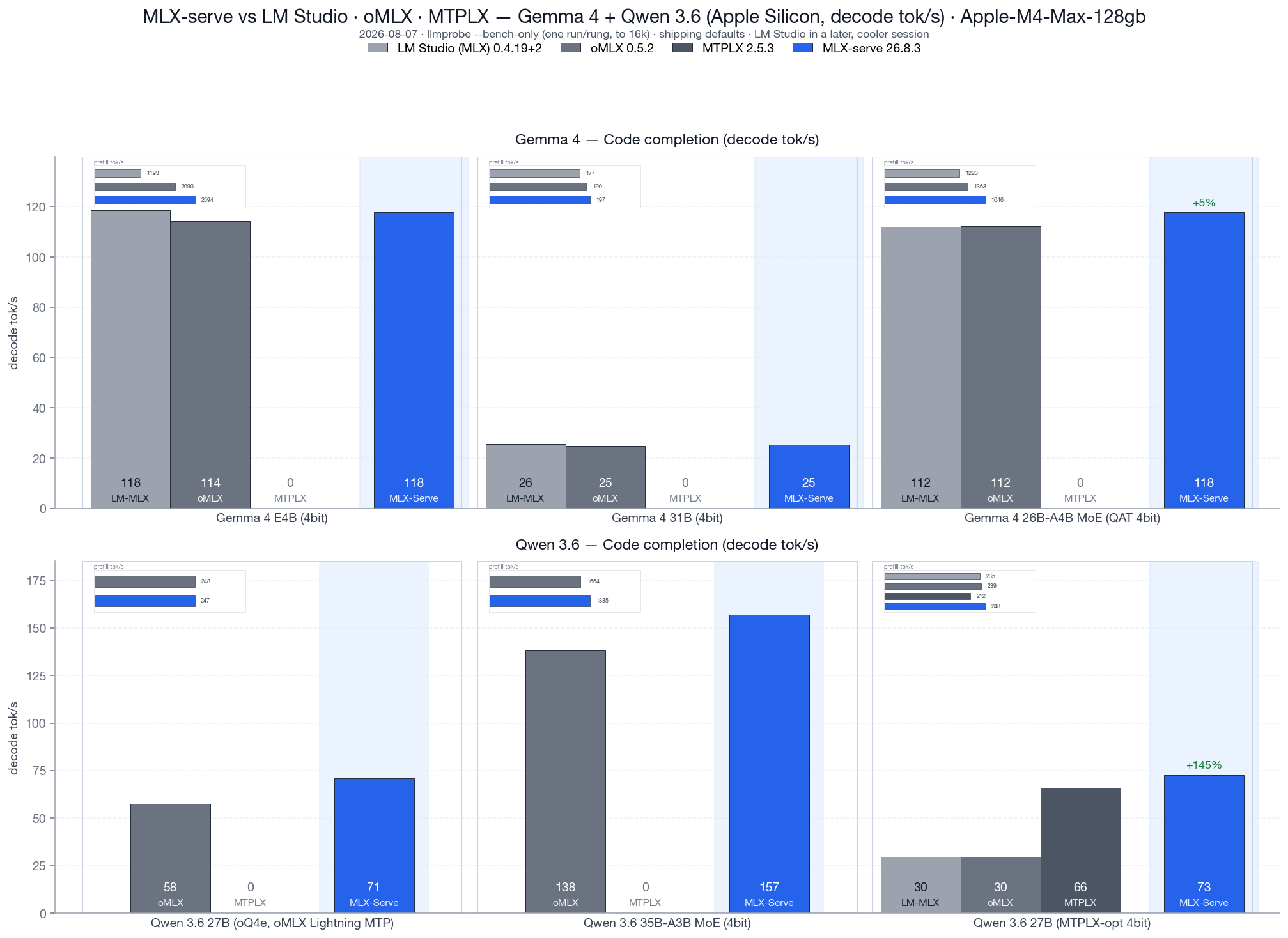
*Code completion decode tok/s, v26.8.3, vs LM Studio 0.4.19+2, oMLX 0.5.2 and MTPLX 2.5.3, all four engines loading the identical MLX weight files. Geomean decode: **+26% over LM Studio** and **+25% over oMLX**, with prefill +36% and +10%. On the competitors' own checkpoints: **+23% decode over oMLX** on its oQ4e build, **+10% decode / +17% prefill over MTPLX** on its MTPLX-Optimized build.*
Speculative decoding comes in four flavors (PLD, model-shipped draft companions, the Gemma 4 drafter, native Qwen MTP), all greedy-equivalent, with adaptive gates that keep novel-content workloads at parity. Details in [docs/performance.md](docs/performance.md).
## Docs
- [docs/cli.md](docs/cli.md) — CLI commands and every server flag
- [docs/api.md](docs/api.md) — full HTTP API reference: OpenAI, Anthropic, Ollama, media endpoints
- [docs/integrations.md](docs/integrations.md) — connect coding agents and editors: Claude Code, pi, oh-my-pi, OpenCode, Codex, hermes, aider, Zed, OpenClaw
- [docs/models.md](docs/models.md) — supported model architectures
- [docs/app.md](docs/app.md) — everything the MLX Core app does, including the media generation tour
- [docs/performance.md](docs/performance.md) — benchmarks, speculative decoding, tuning knobs
- [docs/building.md](docs/building.md) — build from source
- [docs/faq.md](docs/faq.md) — frequently asked questions
## FAQ
The short answers live in [docs/faq.md](docs/faq.md). Most asked:
- [Is mlx-serve faster than LM Studio?](docs/faq.md#is-mlx-serve-faster-than-lm-studio)
- [Does mlx-serve replace Ollama?](docs/faq.md#does-mlx-serve-replace-ollama)
- [Does mlx-serve work with Claude Code?](docs/faq.md#does-mlx-serve-work-with-claude-code)
- [Can my Macs share models over the network?](docs/faq.md#can-my-macs-share-models-over-the-network)
- [Can mlx-serve run DeepSeek V4 Flash locally?](docs/faq.md#can-mlx-serve-run-deepseek-v4-flash-locally)
- [Where does my data go?](docs/faq.md#where-does-my-data-go)
## Acknowledgements
mlx-serve stands on a lot of open-source shoulders: [MLX](https://github.com/ml-explore/mlx) · [mlx-c](https://github.com/ml-explore/mlx-c) · [mlx-lm](https://github.com/ml-explore/mlx-lm) · [llama.cpp](https://github.com/ggerganov/llama.cpp) · [antirez/ds4](https://github.com/antirez/ds4) · [jinja.cpp](https://github.com/wangzhaode/jinja.cpp) · [nlohmann/json](https://github.com/nlohmann/json) · [stb_image](https://github.com/nothings/stb) · [libwebp](https://chromium.googlesource.com/webm/libwebp) · [HuggingFace tokenizers](https://github.com/huggingface/tokenizers) · [Zig](https://ziglang.org) · [Homebrew](https://brew.sh/), plus the model and media architectures from Google, Qwen, Meta, Mistral AI, NVIDIA, Liquid, DeepSeek, Tencent, poolside, Thinking Machines, Black Forest Labs and Lightricks, and the [Anthropic](https://github.com/anthropics/swift-sdk) and [MCP](https://github.com/modelcontextprotocol/swift-sdk) Swift SDKs in the app.
Some of the fastest Metal paths in the engine started as someone else's work, and the source says so at every one of them:
- [MTPLX](https://github.com/youssofal/mtplx) by Youssof Altoukhi (Apache-2.0), the verify-width split-K quantized matmul family and the M5 NAX tensor-ops tile. Their own preferred credit line: *Powered by MTPLX by Youssof Altoukhi.*
- [dflash-mlx](https://github.com/bstnxbt/dflash-mlx) (Apache-2.0), the matmul2d convention the NAX tile is built on, reached through MTPLX.
- oMLX by jundot (Apache-2.0), the GatedDeltaNet blocked-sequence prefill kernel and the chunked-dispatch budget that keeps long-context prefill off the macOS preemption cliff.
- [mlxfast-challenge](https://github.com/Layr-Labs/mlxfast-challenge) by Layr Labs (MIT), the certified lm_head prune.
Full licenses and the required attributions are in [NOTICE](NOTICE). If we missed you, please open a PR — happy to add anyone who landed code, fixtures, or a fix here.
## Star history
## Mac Studio fund
mlx-serve is built on a 16 GB M4 Mac mini and a 128 GB M4 Max, and lately the machines are the bottleneck rather than the code:
- **Calibrated quants.** Building an imatrix-calibrated mirror of a 284B model means holding the source weights and the output at the same time. They don't fit, so the converter downloads, converts and deletes one shard group at a time, and a single run takes most of a day. On a 512 GB box it's one pass.
- **The big architectures.** Inkling, Laguna, Hunyuan 3 and DeepSeek V4 Flash all load on 128 GB, but only leave room for a ~3K context beside the weights, so agent workloads on them can't really be tested here.
- **Benchmarks.** The release matrix is hours of wall clock, and thermal drift means it has to run alone with cooldowns between arms. A second machine means benchmarking stops blocking development.
So there's a fund for a Mac Studio Ultra. If mlx-serve replaced an API bill for you and you feel like chipping in, the button is [here](https://github.com/sponsors/ddalcu) (or [Buy Me a Coffee](https://buymeacoffee.com/ddalcu)). Nothing gets paywalled either way: MIT now, MIT after.
**Progress:** ▱▱▱▱▱▱▱▱▱▱ 1%
### Thanks to
@jcprichard
@skudinov
@davidfekke
Everyone who chips in gets a line here, with a link if they want one, or stays anonymous. (msg me) Thank you in advance.
## Follow along
Builds, benchmarks and teardowns of what's under the hood:
- **YouTube** — [@DavidDalcu](https://www.youtube.com/@DavidDalcu)
- **X** — [@ddalcu](https://x.com/ddalcu)
Subscribing, following, and starring the repo cost nothing and genuinely help the project reach people. It's the cheapest way to support it.
## License
MIT, see [LICENSE](LICENSE).
mlx-serve bundles third-party code that stays under its own license, including some Apache-2.0 Metal kernels and the Jinja engine that renders chat templates. [NOTICE](NOTICE) lists all of it with the required attributions, and [LICENSE-APACHE-2.0](LICENSE-APACHE-2.0) is the Apache License text.
---
★ **Found this useful? [Star the repo](https://github.com/ddalcu/mlx-serve/stargazers), [subscribe on YouTube](https://www.youtube.com/@DavidDalcu), [follow on X](https://x.com/ddalcu). It really does help others discover it.**
 ](https://github.com/ddalcu/mlx-serve/releases/latest) **[Download MLX Core.app](https://github.com/ddalcu/mlx-serve/releases/latest)** — latest release for macOS (Apple Silicon)
### Install via Homebrew
```bash
brew tap ddalcu/mlx-serve https://github.com/ddalcu/mlx-serve
brew install --cask mlx-core # the app (recommended)
brew install mlx-serve # CLI + server only, no GUI
```
### Prefer the terminal?
Ollama-style, if that's your habit:
```bash
mlx-serve run gemma4 # downloads Gemma 4 E4B (4-bit), serves it, chats right in your terminal
mlx-serve pull qwen3.6:27b # just download (resumable, straight from Hugging Face)
mlx-serve list # what's on disk
mlx-serve serve # serve everything you've pulled — models load on demand by name
```
Short names, `org/repo` HuggingFace ids, and `name:tag` all work. Direct `--model`/`--model-dir` invocations for scripts and headless Macs, plus every server flag, are in [docs/cli.md](docs/cli.md).
And because mlx-serve **speaks the Ollama API** (`/api/chat`, `/api/generate`, `/api/tags`, `/api/embed`, `/api/pull`, …) alongside OpenAI and Anthropic, your existing Ollama-connected tools — Raycast, Obsidian, Enchanted, Open WebUI, `ollama-python`/`js` — work unchanged: point them at `http://localhost:11234` and keep your workflow, on a faster engine.
### Build from source
Needs Xcode 26.2+ with the Metal Toolchain component (if `xcrun -sdk macosx metal --version` fails, run `xcodebuild -downloadComponent MetalToolchain`):
```bash
git clone --recurse-submodules https://github.com/ddalcu/mlx-serve && cd mlx-serve
brew bundle install --file=Brewfile # cmake + webp
./app/build.sh # app + server, ad-hoc signed
```
That's the whole list. Zig, mlx and llama.cpp are pinned and fetched or built by the script, and there's no Python anywhere in the build. Server-only builds are in [docs/building.md](docs/building.md).
## Why mlx-serve

If you're already on LM Studio, Ollama, or `mlx-lm` and wondering whether to switch — here's the short version, head-to-head:
| | mlx-serve | LM Studio | Ollama | mlx-lm |
|---|:---:|:---:|:---:|:---:|
| MLX models (native Apple) | ✅ | ✅ | 🟡 | ✅ |
| GGUF models (llama.cpp) | ✅ **embedded** | ✅ | ✅ | ❌ |
| OpenAI-compatible API | ✅ | ✅ | partial | ❌ |
| Anthropic Messages API | ✅ | 🟡 partial² | ❌ | ❌ |
| Ollama API (drop-in for Ollama clients) | ✅ | ❌ | ✅ native | ❌ |
| `run
](https://github.com/ddalcu/mlx-serve/releases/latest) **[Download MLX Core.app](https://github.com/ddalcu/mlx-serve/releases/latest)** — latest release for macOS (Apple Silicon)
### Install via Homebrew
```bash
brew tap ddalcu/mlx-serve https://github.com/ddalcu/mlx-serve
brew install --cask mlx-core # the app (recommended)
brew install mlx-serve # CLI + server only, no GUI
```
### Prefer the terminal?
Ollama-style, if that's your habit:
```bash
mlx-serve run gemma4 # downloads Gemma 4 E4B (4-bit), serves it, chats right in your terminal
mlx-serve pull qwen3.6:27b # just download (resumable, straight from Hugging Face)
mlx-serve list # what's on disk
mlx-serve serve # serve everything you've pulled — models load on demand by name
```
Short names, `org/repo` HuggingFace ids, and `name:tag` all work. Direct `--model`/`--model-dir` invocations for scripts and headless Macs, plus every server flag, are in [docs/cli.md](docs/cli.md).
And because mlx-serve **speaks the Ollama API** (`/api/chat`, `/api/generate`, `/api/tags`, `/api/embed`, `/api/pull`, …) alongside OpenAI and Anthropic, your existing Ollama-connected tools — Raycast, Obsidian, Enchanted, Open WebUI, `ollama-python`/`js` — work unchanged: point them at `http://localhost:11234` and keep your workflow, on a faster engine.
### Build from source
Needs Xcode 26.2+ with the Metal Toolchain component (if `xcrun -sdk macosx metal --version` fails, run `xcodebuild -downloadComponent MetalToolchain`):
```bash
git clone --recurse-submodules https://github.com/ddalcu/mlx-serve && cd mlx-serve
brew bundle install --file=Brewfile # cmake + webp
./app/build.sh # app + server, ad-hoc signed
```
That's the whole list. Zig, mlx and llama.cpp are pinned and fetched or built by the script, and there's no Python anywhere in the build. Server-only builds are in [docs/building.md](docs/building.md).
## Why mlx-serve

If you're already on LM Studio, Ollama, or `mlx-lm` and wondering whether to switch — here's the short version, head-to-head:
| | mlx-serve | LM Studio | Ollama | mlx-lm |
|---|:---:|:---:|:---:|:---:|
| MLX models (native Apple) | ✅ | ✅ | 🟡 | ✅ |
| GGUF models (llama.cpp) | ✅ **embedded** | ✅ | ✅ | ❌ |
| OpenAI-compatible API | ✅ | ✅ | partial | ❌ |
| Anthropic Messages API | ✅ | 🟡 partial² | ❌ | ❌ |
| Ollama API (drop-in for Ollama clients) | ✅ | ❌ | ✅ native | ❌ |
| `run