# Packémon
[](https://github.com/caesar0301/awesome-pcaptools?tab=readme-ov-file#traffic-analysisinspection) [](https://github.com/ddddddO/packemon/releases) [](https://deepwiki.com/ddddddO/packemon)
Packet monster, or `Packémon` for short! (っ‘-’)╮=͟͟͞͞◒ ヽ( '-'ヽ)
https://github.com/user-attachments/assets/08f96575-7aca-47e7-bdeb-6705ce2bbaba
TUI tool for generating packets of arbitrary input and monitoring packets on any network interfaces (default: `eth0`). The list of interfaces to be specified is output when `packemon interfaces` is run.
**This tool works on Windows, macOS, and Linux.**
This TUI tool is now available on macOS because of **[cluster2600](https://github.com/cluster2600)** support. Thanks🎉!
I intend to develop it patiently🌴
The images of Packemon on REDME should be used as reference only, as they may look different from the actual Packemon.
> [!WARNING]
> This tool is implemented with protocol stacks from scratch and utilizes raw socket.
> There may be many bugs. If you find a bug, I would be glad if you raise an issue or give me a pull request!
## Feature
This TUI tool has two major functions: packet generation and packet monitoring.
|Generated DNS query
and Recieved response| Displayed DNS response detail|Filtered packets|
|--|--|--|
|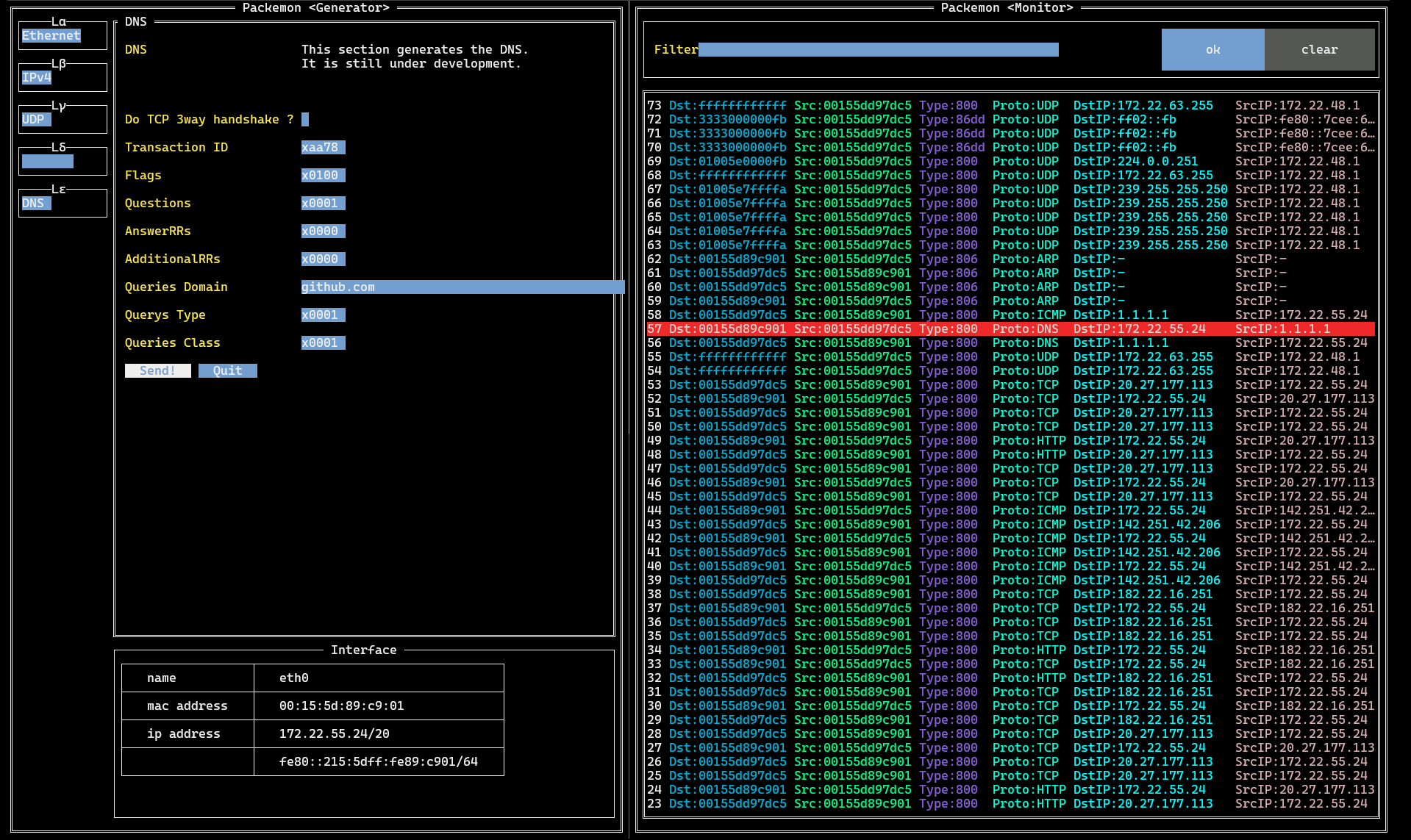|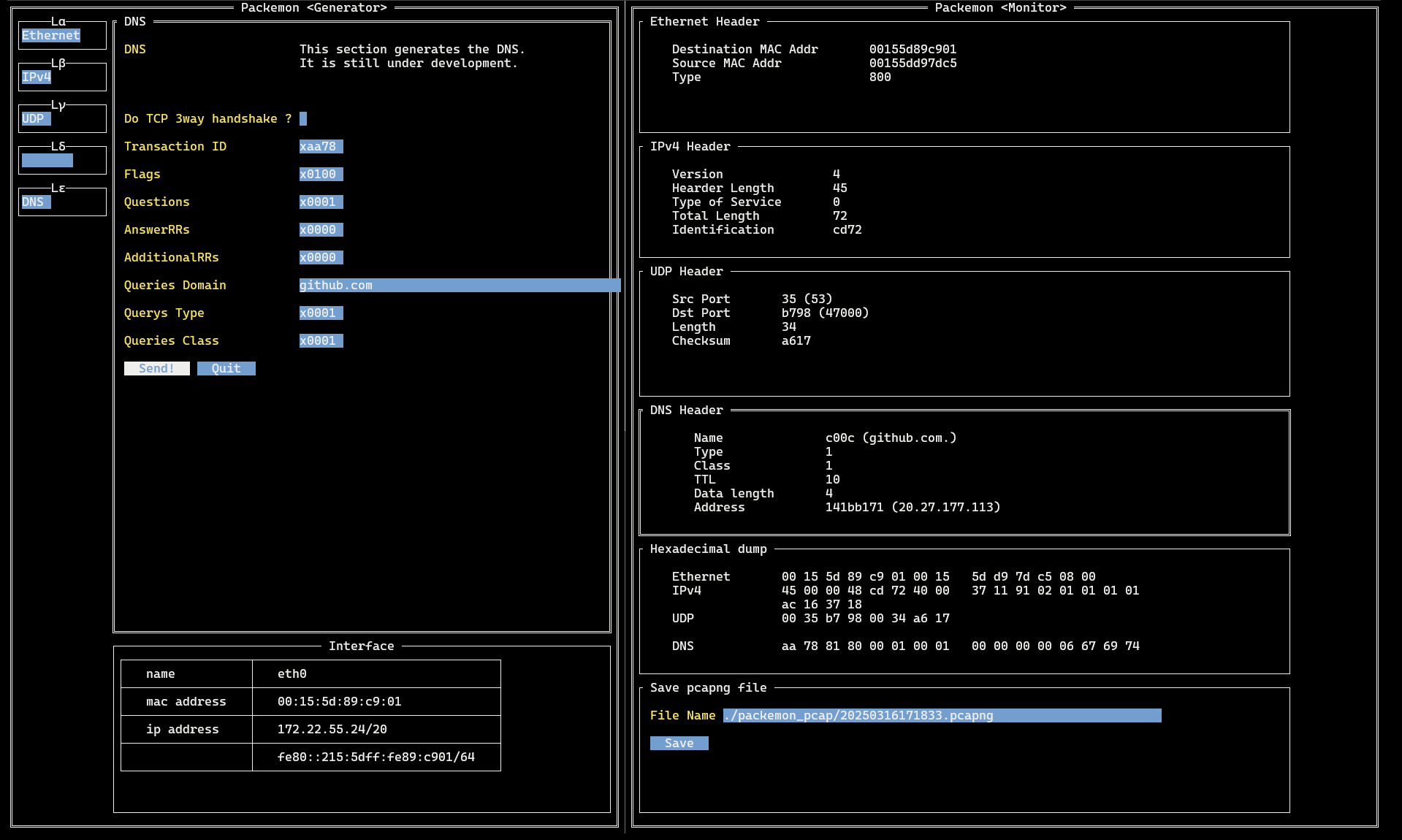||
This image shows packemon running in Generator / Monitor mode.
DNS query packet generated by Generator on the left is shown in **56** line of the Monitor. DNS query response packet is shown as **57** line, and a more detailed view of it is shown in the middle image.
See **[here](https://github.com/ddddddO/packemon#sending-dns-query-and-monitoring-dns-response)** for detailed instructions.
Packemon's Monitor allows user to select each packet by pressing `Enter` key. Then, select any line and press `Enter` key to see the details of the desired packet. Pressing `Esc` key in the packet detail screen will return you to the original packet list screen.
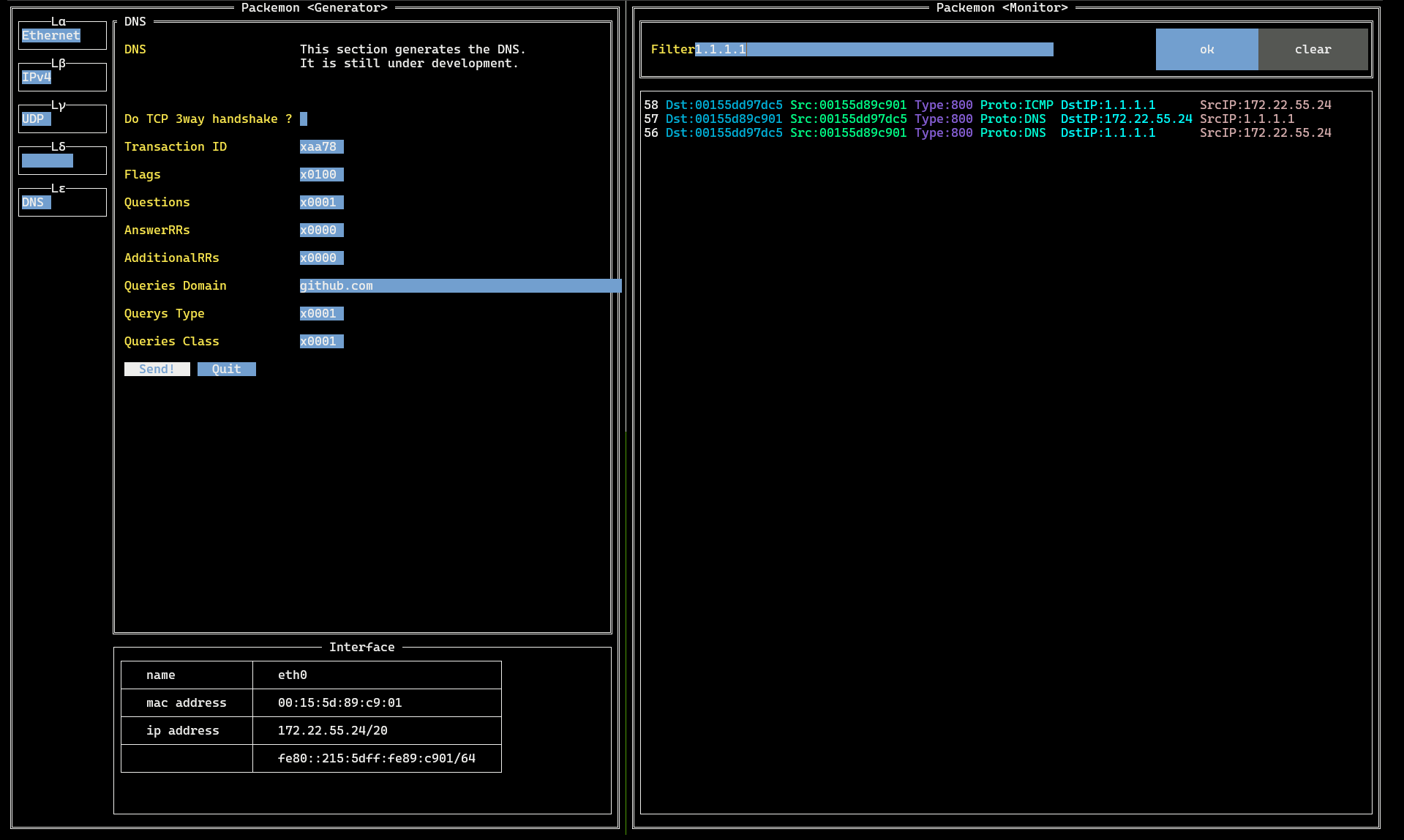
The rightmost image shows how the packet list is filtered.
### Generator
- Send generated packets to any network interfaces.
- You can specify network interface with `--interface` flag. Default is `eth0`.
- Packets of various protocols are supported.
details
- [x] Ethernet
- [x] ARP (WIP)
- [x] IPv4 (WIP)
- [x] IPv6 (WIP)
- [x] ICMPv4 (WIP)
- [ ] ICMPv6
- [x] TCP (WIP)
- [x] UDP (WIP)
- [x] TLSv1.2 (WIP)
- This tool is not very useful because the number of cipher suites it supports is still small, but an environment where you can try it out can be found [here](./cmd/debugging/https-server/README.md).
- TCP 3way handshake ~ TLS handshake ~ TLS Application data (encrypted HTTP)
- Supported cipher suites include
- `TLS_RSA_WITH_AES_128_GCM_SHA256`
- You can check the server for available cipher suites with the following command
- `nmap --script ssl-enum-ciphers -p 443 `
- [x] TLSv1.3 (WIP)
- This tool is not very useful because the number of cipher suites it supports is still small, but an environment where you can try it out can be found [here](./cmd/debugging/https-server/README.md).
- TCP 3way handshake ~ TLS handshake ~ TLS Application data (encrypted HTTP)
- Supported cipher suites include
- `TLS_CHACHA20_POLY1305_SHA256`
- [x] DNS (WIP)
- [x] HTTP (WIP)
- [ ] xxxxx....
- [ ] Routing Protocols
- IGP (Interior Gateway Protocol)
- [ ] OSPF (Open Shortest Path First)
- [ ] EIGRP (Enhanced Interior Gateway Routing Protocol)
- [ ] RIP (Routing Information Protocol)
- EGP (Exterior Gateway Protocol)
- [ ] BGP (Border Gateway Protocol)
- [Currently there is only debug mode](./cmd/debugging/bgp/README.md)
- TCP 3way handshake ~ Open ~ Keepalive ~ Update ~ Notification
> $ **sudo mount -t debugfs none /sys/kernel/debug** (only once)
> $ **sudo cat /sys/kernel/debug/tracing/trace_pipe**
### Monitor
- Monitor any network interfaces.
- You can specify network interface with `--interface` flag. Default is `eth0`.
- Can filter packets to be displayed.
- You can filter the values for each item (e.g. `Dst`, `Proto`, `SrcIP`...etc.) displayed in the listed packets.
- Specified packets can be saved to pcapng file.
- Packets of various protocols are supported.
details
- [x] Ethernet
- [x] ARP
- [x] IPv4 (WIP)
- [x] IPv6 (WIP)
- [x] ICMPv4 (WIP)
- [ ] ICMPv6
- [x] TCP (WIP)
- [x] UDP
- [x] TLSv1.2 (WIP)
- [ ] TLSv1.3
- [ ] DNS (WIP)
- [x] DNS query
- [x] DNS query response
- [ ] xxxxx....
- [ ] HTTP (WIP)
- [x] HTTP GET request
- [x] HTTP GET response
- [ ] xxxxx....
- [ ] xxxxx....
- [ ] Routing Protocols
- IGP (Interior Gateway Protocol)
- [ ] OSPF (Open Shortest Path First)
- [ ] EIGRP (Enhanced Interior Gateway Routing Protocol)
- [ ] RIP (Routing Information Protocol)
- EGP (Exterior Gateway Protocol)
- [ ] BGP (Border Gateway Protocol)
$ git clone git@github.com:ddddddO/packemon.git
$ cd packemon
(For Linux)
$ cd tc_program/ && go generate && cd -
(For Linux or macOS)
$ go build -o packemon cmd/packemon/*.go
$ ls | grep packemon
$ mv packemon /usr/local/bin/
(For Windows)
$ go build -o packemon.exe .\cmd\packemon\
### Package manager
> [!IMPORTANT]
> It might be that the generation of the executable file is failing. At that time, install it in another way!
For arm64, convert “amd64” to “arm64” in the following commands and execute them.
deb
$ export PACKEMON_VERSION=X.X.X
$ curl -o packemon.deb -L https://github.com/ddddddO/packemon/releases/download/v$PACKEMON_VERSION/packemon_$PACKEMON_VERSION-1_amd64.deb
$ dpkg -i packemon.deb

rpm
$ export PACKEMON_VERSION=X.X.X
$ (Ubuntu) yum install https://github.com/ddddddO/packemon/releases/download/v$PACKEMON_VERSION/packemon_$PACKEMON_VERSION-1_amd64.rpm
or
$ (Fedora) dnf install https://github.com/ddddddO/packemon/releases/download/v$PACKEMON_VERSION/packemon_$PACKEMON_VERSION-1_amd64.rpm

apk
$ export PACKEMON_VERSION=X.X.X
$ curl -o packemon.apk -L https://github.com/ddddddO/packemon/releases/download/v$PACKEMON_VERSION/packemon_$PACKEMON_VERSION-1_amd64.apk
$ apk add --allow-untrusted packemon.apk

Homebrew
$ brew install ddddddO/tap/packemon
#### Confirmed executable in the following environments
- OS: Debian GNU/Linux 12 (bookworm) on WSL2
- Kernel: 5.15.167.4-microsoft-standard-WSL2
- Architecture: x86_64
- OS: Ubuntu 22.04.3 LTS on WSL2
- Kernel: 5.15.167.4-microsoft-standard-WSL2
- Architecture: x86_64
- OS: Fedora Linux 42 on WSL2
- Kernel: 5.15.167.4-microsoft-standard-WSL2
- Architecture: x86_64
- OS: Debian GNU/Linux 12 (bookworm) on Google Pixel 7a
- Kernel: 6.1.0-34-arm64
- Architecture: aarch64
- OS: macOS
- OS: Windows 11 Pro
- Confirm MAC address of default gateway (via PowerShell)
```console
PS > $defaultGateway = (Get-NetRoute -DestinationPrefix "0.0.0.0/0" | Sort-Object -Property InterfaceMetric | Select-Object -First 1).NextHop
PS > echo $defaultGateway
192.168.10.1
PS > Get-NetNeighbor -IPAddress $defaultGateway | Select-Object -ExpandProperty LinkLayerAddress
```
cmd
- OS: `cat /etc/os-release`
- Kernel: `uname -r`
- Architecture: `uname -m`
$ go install github.com/ddddddO/packemon/cmd/packemon@latest
## Usage
```console
$ packemon --help
NAME:
packemon - Packet monster (っ‘-’)╮=͟͟͞͞◒ ヽ( '-'ヽ) TUI tool for sending packets of arbitrary input and monitoring packets on any network interfaces (default: eth0). Windows/macOS/Linux
⌒丶、_ノ⌒丶、_ノ⌒丶、_ノ⌒丶、_ノ⌒丶、_ノ⌒丶、_ノ
○
о
。
,、-、_ __
,、-―、_,、'´  ̄ `ヽ,
/ ・ . l、
l, ヾニニつ `ヽ、
| `ヽ,
ノ ノ
/:::: /
/::::::: ..::l、
/::::::::::::::::::......:::::::. ............::::::::::`l,
l::::::::::::::::::::::::::::::::::::...... ....:::::::::::::::::::::::::::::`l,
ヽ,:::::::::::::::::::::::::::::::::::::::::::::::::::::::::::::::::::::::::::::::::::ノ
 ̄ ̄``ヽ、_:::::::::::::::::::::::,、-―´ ̄`ヽ、,、-'
`ヽ―-―'´
USAGE:
packemon [global options] [command [command options]]
VERSION:
1.8.0 / revision cb61da2
COMMANDS:
monitor, m, mon Monitor mode. You can monitor packets received and sent on the specified interface. Default is 'eth0' interface.
generator, g, gen Generator mode. Arbitrary packets can be generated and sent.
interfaces, i, intfs Check the list of interfaces.
debugging, d, debug Debugging mode.
version, v Prints the version.
help, h Shows a list of commands or help for one command
GLOBAL OPTIONS:
--help, -h show help
--version, -v print the version
$
```
### Generator
```console
$ sudo setcap cap_net_raw,cap_bpf,cap_sys_admin,cap_net_admin+ep /path/to/packemon
$ packemon generator
```
or
```console
$ sudo packemon generator
```
### Monitor
```console
$ sudo setcap cap_net_raw+ep /path/to/packemon
$ packemon monitor
```
or
```console
$ sudo packemon monitor
```
## Usecase
### Sending DNS query and Monitoring DNS response
1. setup
```sh
# Generator
$ sudo packemon generator
```
```sh
# Monitor
$ sudo packemon monitor
```
← Generator | Monitor →

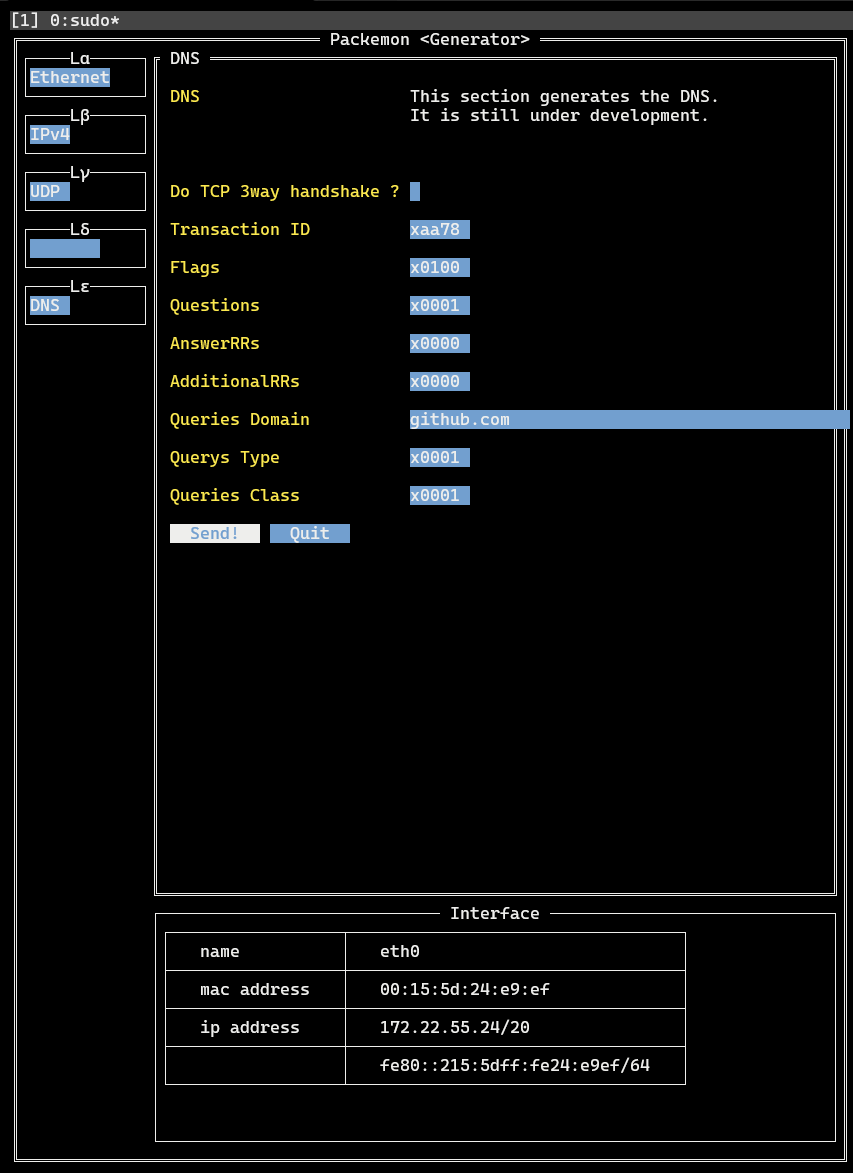
2. Generator
- `Lα` > `Ethernet` > `Ether Type` > **IPv4**
- `Lβ` > `IPv4` > `Protocol` > **UDP**
- `Lβ` > `IPv4` > `Destination IP Addr` > **1.1.1.1**
- Enter the address of DNS resolver here. Above is the address of Cloudflare resolver.
- `Lγ` > `UDP` > `Destination Port` > **53**
- `Lγ` > `UDP` > `Automatically calculate length ?` > **(Check!)**
- `Lε` > `DNS` > `Queries Domain` > **go.dev**
- Enter here the domain for which you want to name resolution.
- `Lε` > `DNS` > Click on **Send!**
- At this time, DNS query is sent with the contents set so far.
3. Monitor
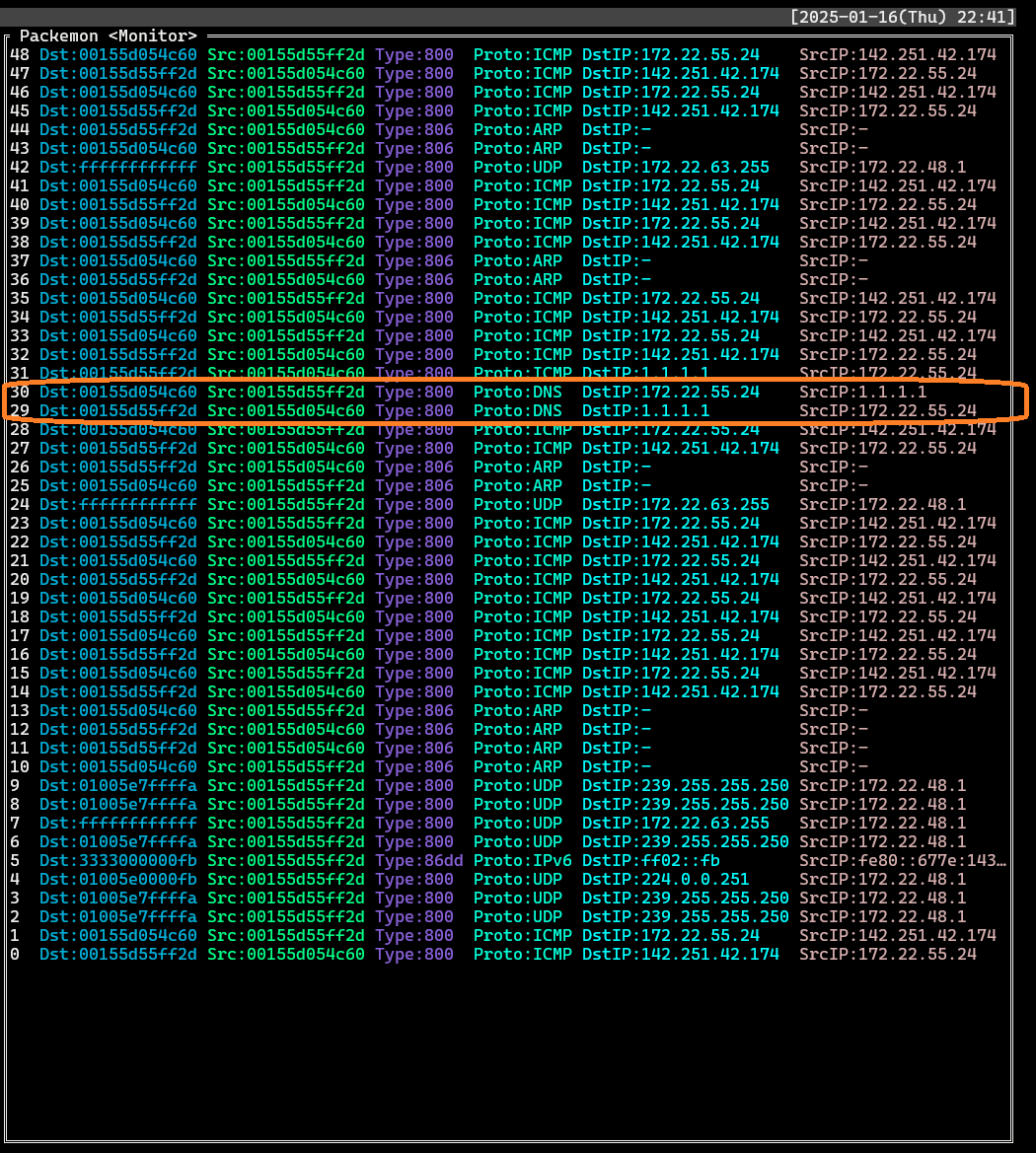
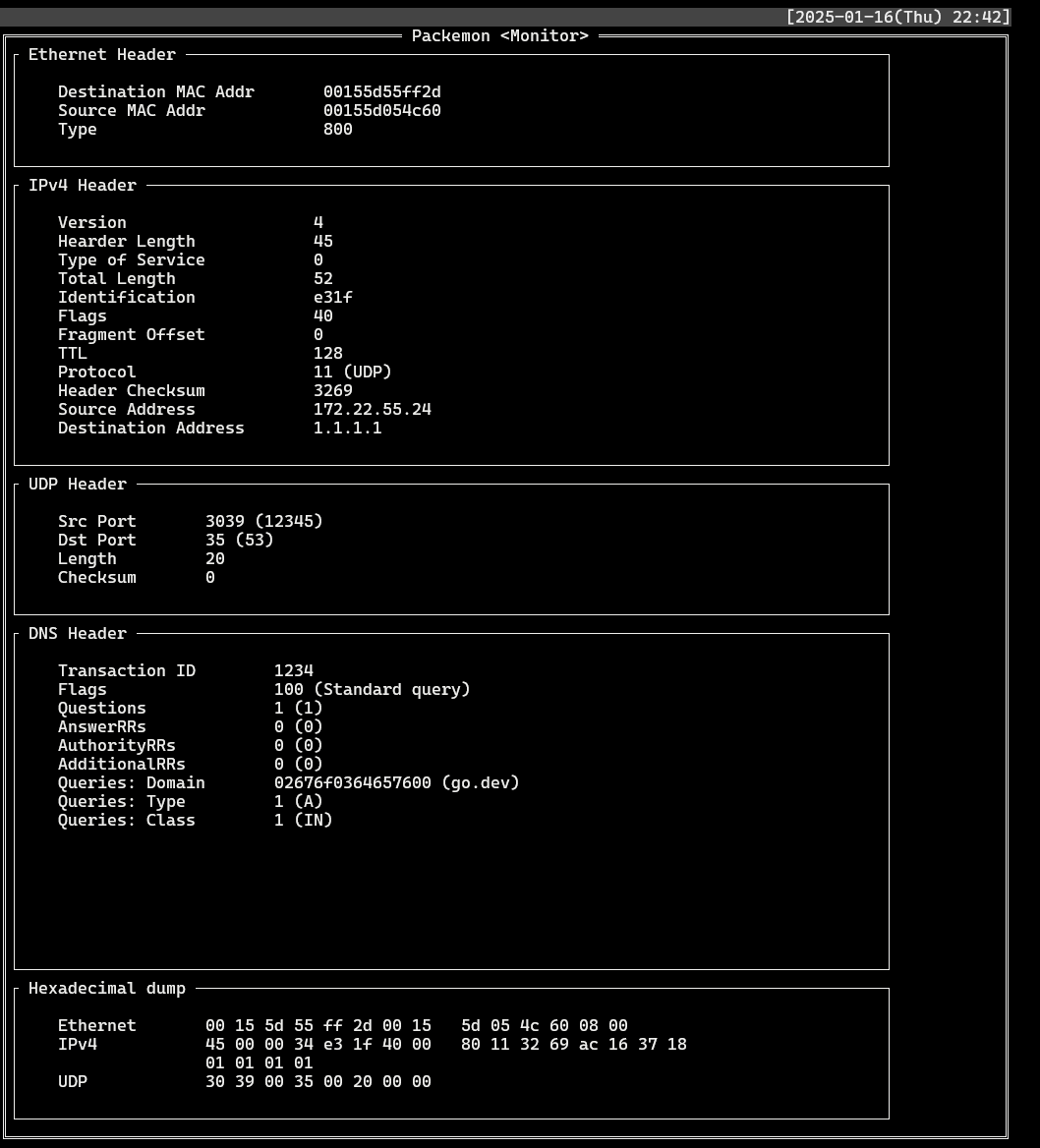
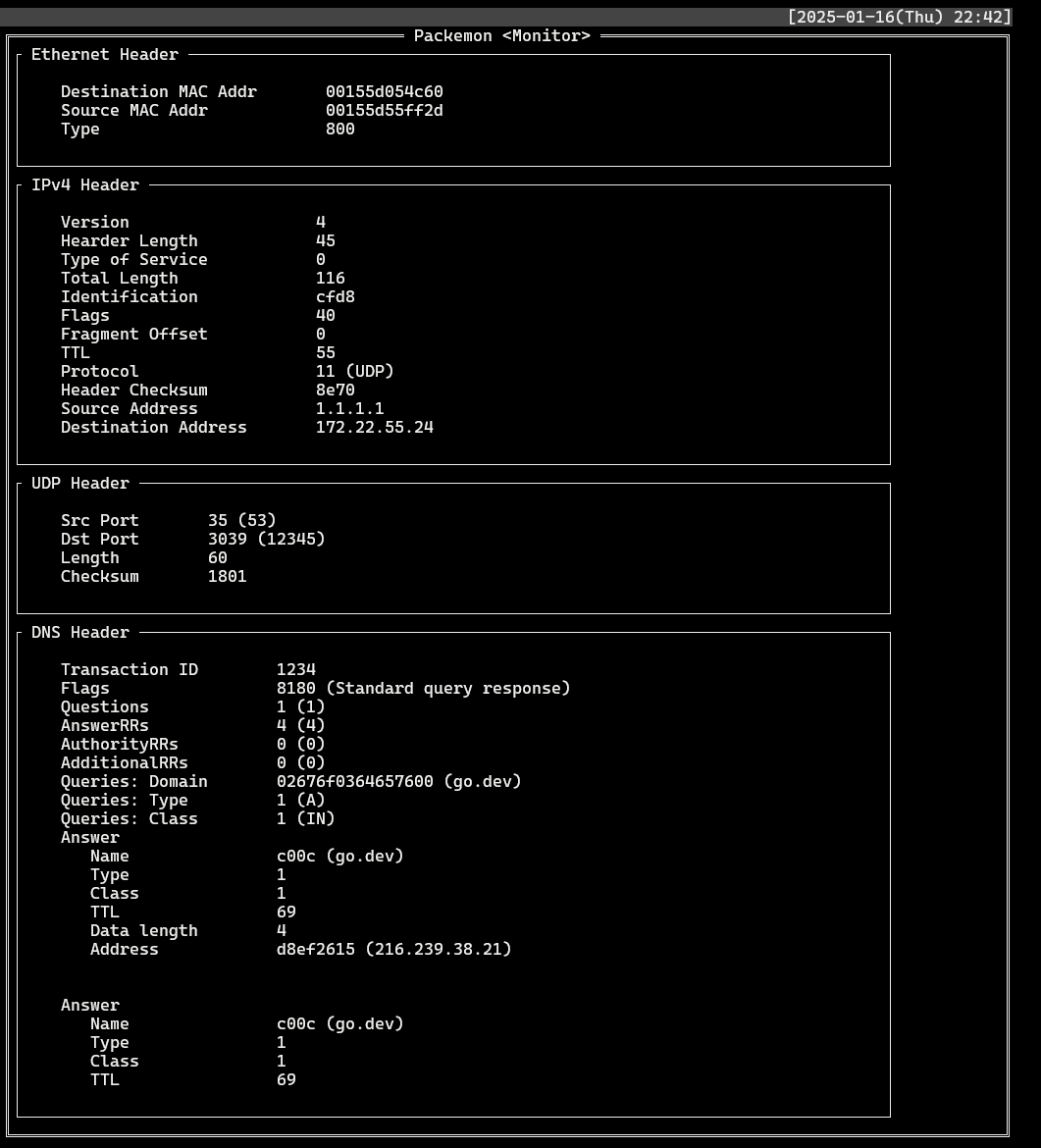
- Find records where `Proto`: **DNS** and `DstIP` or `SrcIP` is **1.1.1.1**. Select each record to see the packet structure of the DNS query and the packet structure of the DNS response.
- List
- DNS query (`DstIP: 1.1.1.1`)
- DNS response (`SrcIP: 1.1.1.1`)
## Related tools
- [Wireshark](https://www.wireshark.org/)
- [tcpdump](https://www.tcpdump.org/)
- netcat(nc)
- [Nmap](https://nmap.org/)
- [Scapy](https://github.com/secdev/scapy)
- [google/gopacket](https://github.com/google/gopacket) / [gopacket/gopacket](https://github.com/gopacket/gopacket) (maintained)
## Acknowledgments
- [rivo/tview](https://github.com/rivo/tview)
- Packemon is using this TUI library.
- [Golangで作るソフトウェアルータ](https://booth.pm/ja/items/5290391)
- The way Go handles syscalls, packet checksum logic, etc. was helpful. Packemon was inspired by this book and began its development. This is a book in Japanese.
## Document
- [ネットワークを知りたくて](https://zenn.dev/openlogi/articles/195d07bd9bc5b4)
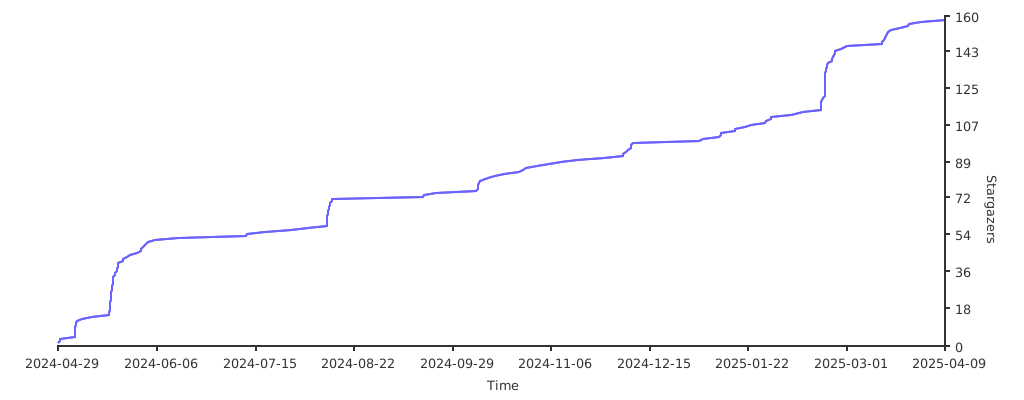
## Stargazers over time
[](https://starchart.cc/ddddddO/packemon)
## Log (japanese)
xxx
## Links
- 「Golangで作るソフトウェアルータ」
- その実装コード: https://github.com/sat0ken/go-curo
- https://terassyi.net/posts/2020/03/29/ethernet.html
- 動作確認用コマンドの参考
- https://zenn.dev/takai404/articles/76d47e944d8e18
- [Scrapboxメモ書き](https://scrapbox.io/ddddddo/%E3%83%8D%E3%83%83%E3%83%88%E3%83%AF%E3%83%BC%E3%82%AF%E7%B3%BB%E8%AA%AD%E3%81%BF%E7%89%A9)
- WSL2のDebianで動作した。
- 任意の Ethernet ヘッダ / IPv4 ヘッダ / ARP / ICMP を楽に作れてフレームを送信できる
- 以下はtmuxで3分割した画面に各種ヘッダのフォーム画面を表示している。そして ICMP echo request を送信し、 echo reply が返ってきていることを Wireshark で確認した様子


- フレームを受信して詳細表示(ARPとIPv4)

少し前のUI(`5062561` のコミット)


xxx
- Ethernetフレームのみ作って送信(`77c9149` でコミットしたファイルにて)

- ARPリクエストを作って送信(`390f266` でコミットしたファイルにて。中身はめちゃくちゃと思うけど)

- ARPリクエストを受信してパース(`b6a025a` でコミット)

