# Omni-Captioner: Data Pipeline, Models, and Benchmark for Omni Detailed Perception
[**📖 Tech Report**](https://arxiv.org/abs/2510.12720) | [**🤗 Qwen3-Omni-Captioner Live Demo**](https://huggingface.co/spaces/Qwen/Qwen3-Omni-Captioner-Demo) | [**🤗 Qwen3.5-Omni Offline Mode Live Demo**](https://huggingface.co/spaces/Qwen/Qwen3.5-Omni-Offline-Demo) | [**🕵️ Omni-Detective Pipeline**](Omni-Detective/main.py) | [**🧑🏫 Omni-Cloze Benchmark**](https://huggingface.co/datasets/BoJack/Omni-Cloze)
# News
- [2026.03.30] 🔥 Qwen3.5-Omni has been released. Check out the [**Demo Page**](https://qwen.ai/blog?id=qwen3.5-omni) for the detailed audio-visual captioning, and try [**HuggingFace Offline Demo**](https://huggingface.co/spaces/Qwen/Qwen3.5-Omni-Offline-Demo) and [**ModelScope Offline Demo**](https://modelscope.cn/studios/Qwen/Qwen3.5-Omni-Offline-Demo) for live demo.
- [2026.03.18] The manually verified [**Omni-Cloze Benchmark**](https://huggingface.co/datasets/BoJack/Omni-Cloze) has been released.
- [2025.10.17] [**A minimal, extensible implementation**](Omni-Detective/main.py) of the Omni‑Detective agentic data pipeline has been released.
- [2025.10.14] Omni-Captioner techinical report has been release on [**arXiv**](https://arxiv.org/abs/2510.12720).
- [2025.09.22] Qwen3-Omni-Captioner has been released. Check out [**HuggingFace Demo**](https://huggingface.co/spaces/Qwen/Qwen3-Omni-Captioner-Demo) and [**ModelScope Demo**](https://modelscope.cn/studios/Qwen/Qwen3-Omni-Captioner-Demo), and refer to the [**cookbook**](https://github.com/QwenLM/Qwen3-Omni/blob/main/cookbooks/omni_captioner.ipynb) for usage.
# Contents
- [Overview](#overview)
- [Agentic Data Generation: Omni-Detective](#agentic-data-generation-omni-detective)
- [Guides](#guides)
- [Quick Start](#quick-start)
- [Omni Detailed Captioning Model: Omni-Captioner](#agentic-data-generation-omni-detective)
- [Guides](#guides)
- [Quick Start](#quick-start)
- [Qwen3-Omni-Captioner (Audio Version)](#qwen3-omni-captioner-audio-version)
- [Qwen3.5-Omni Offline Mode (Audio–Video Version)](#qwen35-omni-offline-mode-audio–video-version)
- [Omni Detailed Captioning Benchmark: Omni-Cloze](#omni-detailed-captioning-benchmark-omni-cloze)
- [Guides](#guides)
- [Quick Start](#quick-start)
- [Citation](#citation)
# Overview
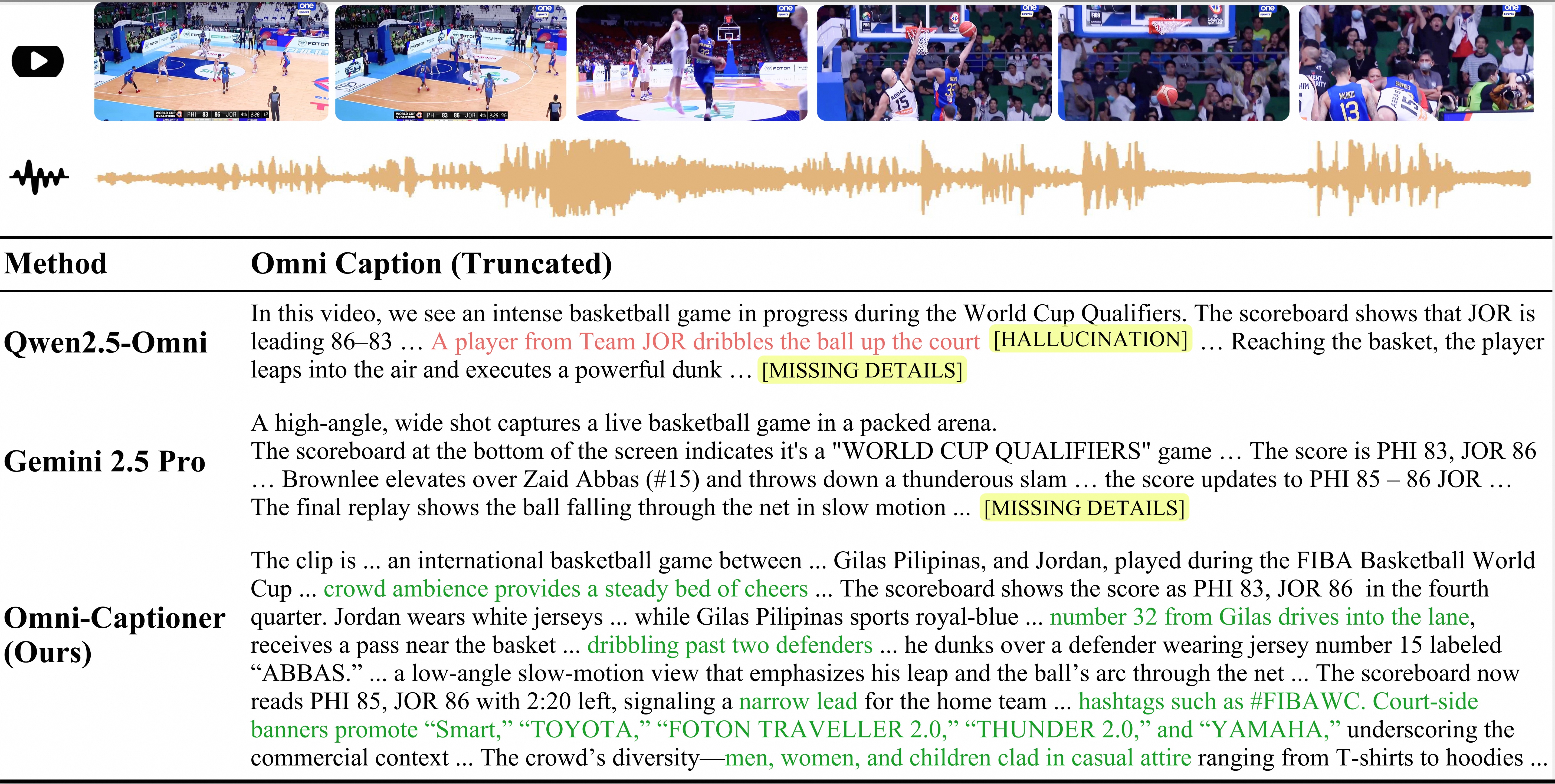
Fine-grained perception of multimodal information is critical for advancing human–AI interaction. **Omni‑Captioner** is a multimodal large language model capable of producing highly detailed, low-hallucination audio‑visual captions. We have released the audio version, Qwen3‑Omni‑Captioner, and the audio‑video version will follow. We also propose **Omni-Detective** for data generation and **Omni-Cloze** for evaluation omni detailed captioning.
# Agentic Data Generation: Omni-Detective
## Guides
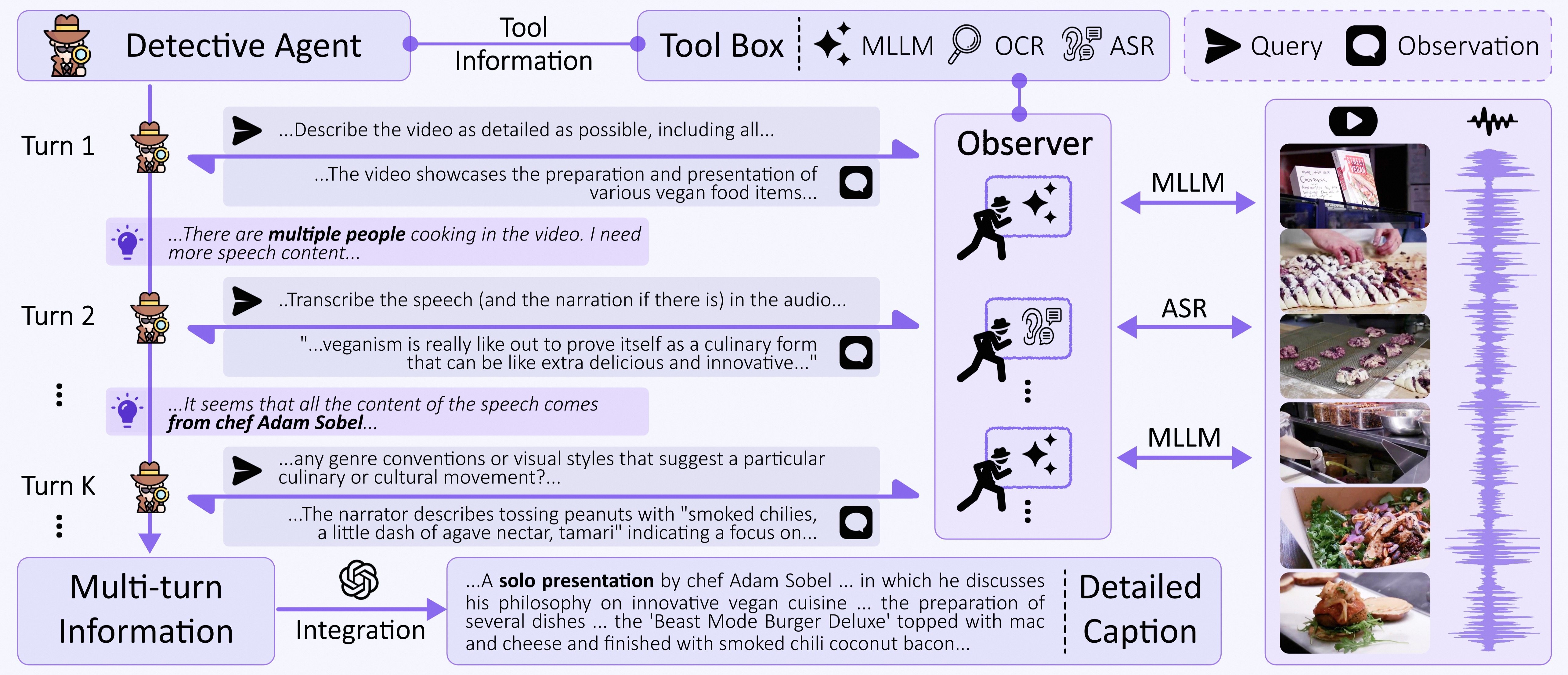
**Omni‑Detective** is an agentic data generation framework that leverages iterative **Query-Observation** cycles to autonomously extract and synthesize richly detailed, and minimally hallucinatory audio–visual annotations. Omni-Detective is composed of three key components:
1. A **Detective Agent** that spontaneously orchestrates the perception process;
2. A **Tool Box** containing multiple tools for extracting information from multimodal data;
3. Independent **Observers** that interact with raw audio-video streams to probe targeted aspects.
## Quick Start
We provide a minimal, extensible implementation only contains an audio language model (Qwen3-Omni-flash) in the tool box. You can extend it with additional tools and designs.
```bash
cd Omni-Detective
python main.py \
--input_path ./data/input.jsonl \
--output_path ./data/output.jsonl \
--num_workers 3
```
# Omni Detailed Captioning Model: Omni-Captioner
## Guides
Leveraging the high-fidelity multimodal detailed captioning data produced by Omni-Detective, we train Audio-Captioner and Omni-Captioner with a two-stage curriculum over the audio and audio–visual modalities. We have released the audio version, Qwen3‑Omni‑Captioner, and the audio‑video version inside Qwen3.5‑Omni.
## Quick Start
### Qwen3-Omni-Captioner (Audio Version)
Refer to the [**cookbook**](https://github.com/QwenLM/Qwen3-Omni/blob/main/cookbooks/omni_captioner.ipynb) for usage. Check out [**HuggingFace Demo**](https://huggingface.co/spaces/Qwen/Qwen3-Omni-Captioner-Demo) and [**ModelScope Demo**](https://modelscope.cn/studios/Qwen/Qwen3-Omni-Captioner-Demo) for Live Demo.
Note: **Qwen3-Omni-30B-A3B-Captioner** is a single-turn model that accepts only one audio input per inference. It does not accept any text prompts and supports **audio input only**, with **text output only**. As Qwen3-Omni-30B-A3B-Captioner is designed for generating fine‑grained descriptions of audio, excessively long audio clips may diminish detail perception. We recommend, as a best practice, limiting audio length to no more than 30 seconds.
### Qwen3.5-Omni Offline Mode (Audio–Video Version)
#### Prompt Design
To make Qwen3.5-Omni produce more stable, structured, and reliable detailed captioning, we recommend using the following structured-description prompt template.
Recommended Audio-Video Structured-Description Prompt
```text
Provide a detailed description of the video.
It should explicitly include three sections:
1. A structured chronological storyline of **every noticeable audio and visual details**
2. A structured list of all visible text. For each text element, include start timestamp, end timestamp, the exact text content, the appearance characteristics. If no text appears, explicitly state so.
3. A structured speech-to-text transcription, include speaker(Corresponding to the character or voice‑over in Section 1, including their accent and tone), exact spoken content, start timestamp, end timestamp, and speaking state (prosody, emotion, and style). If no speech appears, explicitly state so.
Aside from these three required sections, you are free to organize any additional content in any way you find helpful. This additional content can include global information about the entire video or localized information about specific moments. You may choose the topic of this extra content freely.
Output Format:
## Storyline
-
-
-
...
## Visible Text
-
“”:
“”:
-
“”:
“”:
“”:
-
“”:
...
## Speakers and Transcript
Speaker profiles:
-
-
-
...
-
Speaker:
State:
Content: “”
-
Speaker:
State:
Content: “”
-
Speaker:
State:
Content: “”
...
##
##
...
```
Recommended Audio Structured-Description Prompt
```text
Provide a detailed description of the audio.
It should explicitly include two sections:
1. A structured chronological storyline of **every noticeable audio details**
2. A structured speech-to-text transcription, include speaker(Corresponding to the character or voice‑over in Section 1, including their accent and tone), exact spoken content, start timestamp, end timestamp, and speaking state (prosody, emotion, and style). If no speech appears, explicitly state so.
Aside from these two required components, you are free to organize any additional content in any way you find helpful. This additional content can include global information about the entire audio or localized information about specific moments. You may choose the topic of this extra content freely.
Output Format:
## Storyline
-
-
-
...
...
## Speakers and Transcript
Speaker profiles:
-
-
-
...
-
Speaker:
State:
Content: “”
-
Speaker:
State:
Content: “”
-
Speaker:
State:
Content: “”
...
##
##
...
```
#### Performance
| Model | Omni-Cloze |
| --- | ---: |
| Gemini-3.1 Pro | 57.2 |
| Qwen3.5-Omni-Flash | 63.0 |
| Qwen3.5-Omni-Plus | 64.8 |
Qwen3.5-Omni demonstrates strong performance on Omni-Cloze, with the Flash achieving 63.0 and the Plus reaching 64.8. By comparison, Gemini-3.1 Pro scores 57.2, which highlights Qwen3.5-Omni’s improved ability to output fine-grained audio-visual caption that align with challenging cloze-style questions.
# Omni Detailed Captioning Benchmark: Omni-Cloze
## Guides
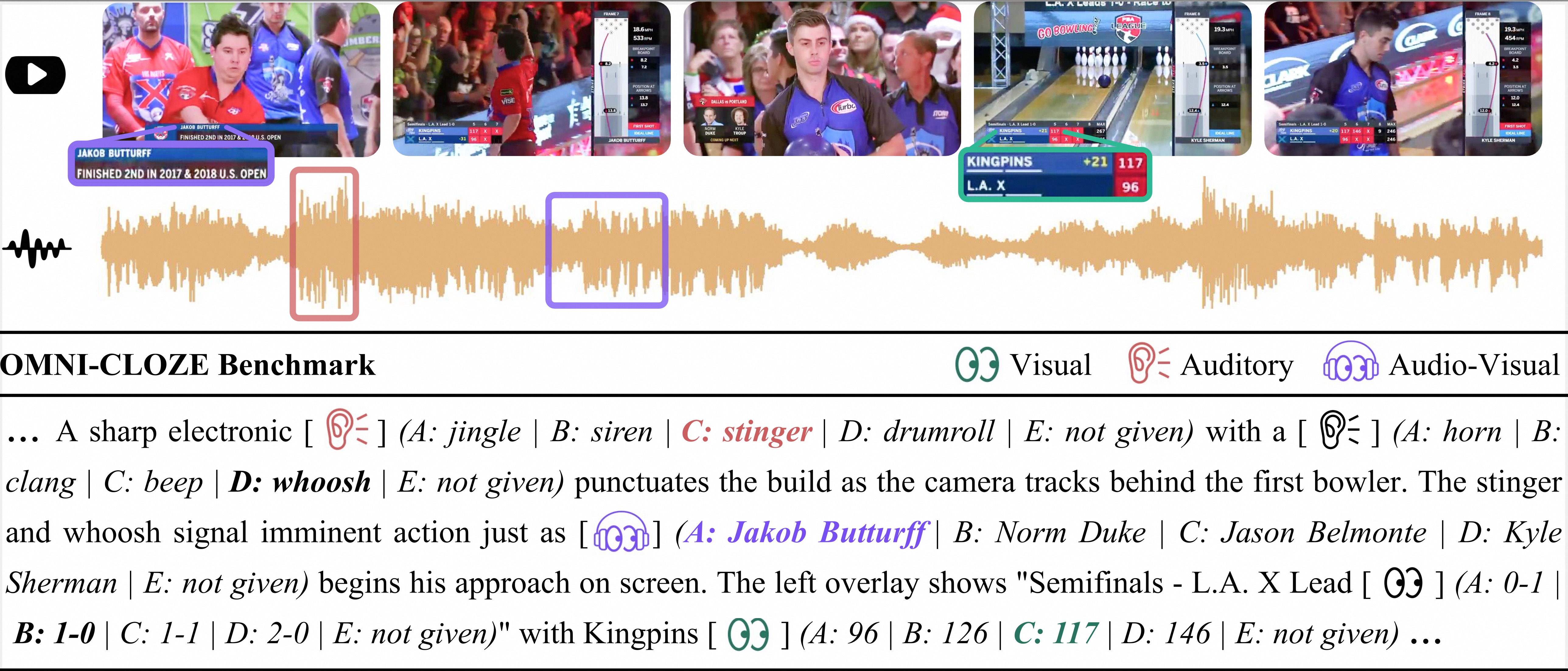
**Omni-Cloze** frames detailed captioning evaluation as a **cloze-style multiple-choice proxy task**. Omni-Cloze is a unified benchmark for evaluating detailed captioning across audio-only, visual-only, and audio–visual settings. The dataset spans 9 main domains and 47 sub-categories covering diverse topics such as education, entertainment, sports, news, science, and lifestyle, with a total of 2k video clips with 70k fine-grained cloze blanks.
## Quick Start
### 1. Prepare Video Data
The video dataset is split into several tarball parts. Concatenate and extract them to the `videos/` directory:
```bash
for f in videos.part*.tar; do tar -xvf "$f"; done
```
### 2. Prepare Inference Results
The core metadata file is `omni_cloze.jsonl`, which contains 2,320 audio-visual files and their corresponding cloze questions.
To evaluate your model, you must first run inference and save the generated descriptions into a new field named **`predicted_caption`** within the JSONL file. Each line in your input file should follow this structure:
```json
{
"uuid": 1,
"video_path": "./videos/0000001.mp4",
"predicted_caption": "Your model's detailed description of the audio and visual content goes here...",
"...": [...]
}
```
### 3. Run Evaluation
The evaluation process uses an LLM to map your detailed captions to the specific cloze blanks.
```bash
# 1. Set API environment variables
export OPENAI_API_KEY="your-api-key-here"
export OPENAI_BASE_URL="https://dashscope.aliyuncs.com/compatible-mode/v1"
# 2. Specify input and output data paths, and the model predicted caption field name is "predicted_caption" in the input file
input_file="your-input-file-here.jsonl"
output_file="your-output-file-here.jsonl"
# 3. Run the evaluation script
python generate_prediction.py --input $input_file --output $output_file --workers 100
# 4. Run the statistics script
python compute_acc.py --input $output_file --show-subcategory
```
# Citation
If you find our data pipeline, models, or the benchmark useful, please consider giving a star and a citation, thanks!
```
@article{omni-captioner,
title={Omni-Captioner: Data Pipeline, Models, and Benchmark for Omni Detailed Perception},
author={Ma, Ziyang and Xu, Ruiyang and Xing, Zhenghao and Chu, Yunfei and Wang, Yuxuan and He, Jinzheng and Xu, Jin and Heng, Pheng-Ann and Yu, Kai and Lin, Junyang and others},
journal={Proc. ICLR},
year={2026}
}
```