# openclaw-kasmvnc
One-click deployment for OpenClaw + KasmVNC (Windows / macOS / Linux).
> 🇨🇳 中文版 / Chinese version: [README-zh.md](README-zh.md)
## Key Advantages
### 🔧 Full Lifecycle Management Inside Container
**Solves the core limitation of official OpenClaw Docker deployment:**
In the official OpenClaw Docker setup, the Gateway runs on the host machine, and containers lack systemd, causing:
- ❌ Cannot run `openclaw gateway restart` inside container
- ❌ Cannot run `npm install -g openclaw@latest` for hot updates inside container
- ❌ Must manually restart container after config changes
**This project solves it with systemctl shim:**
- ✅ Supports `openclaw gateway restart` inside container
- ✅ Supports `upgrade` command for hot updates (no image rebuild needed)
- ✅ Complete `install / upgrade / restart / uninstall` lifecycle management
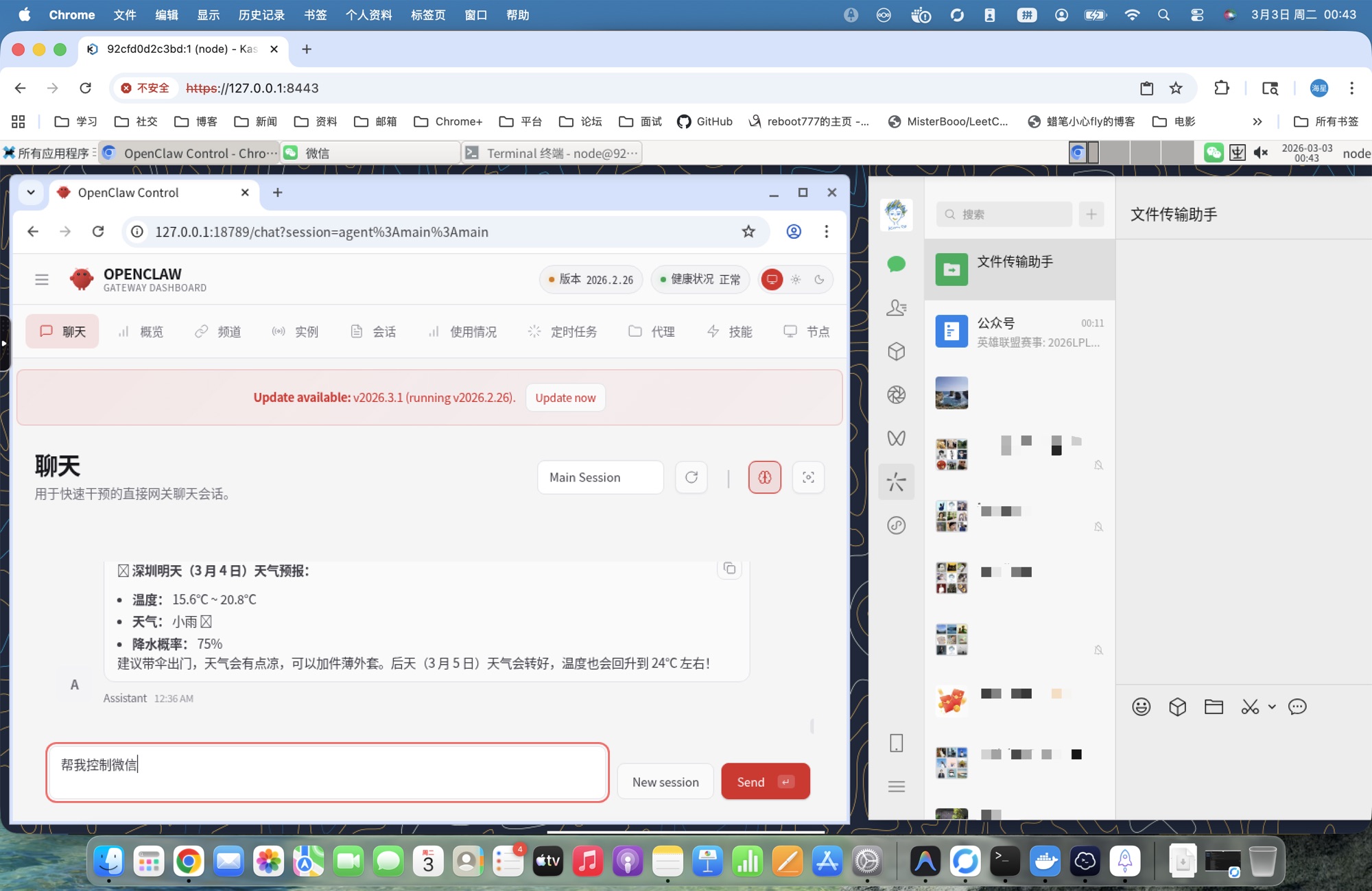
### 👁️ Visual Desktop Environment
**Solves the visibility problem of cloud vendor one-click deployments:**
Cloud vendor OpenClaw deployments typically only provide CLI, making it impossible to:
- ❌ Watch OpenClaw operate the browser in real-time
- ❌ Observe Agent task execution with visual feedback
- ❌ Debug desktop application issues
**This project provides a complete desktop environment:**
- ✅ Browser-based XFCE desktop (KasmVNC)
- ✅ Watch OpenClaw operate Chromium in real-time
- ✅ Full Linux desktop experience
## Quick Start
### Option 1: Docker Image (Recommended)
```bash
docker run -d \
--name openclaw-kasmvnc \
--privileged \
--shm-size=2g \
-p 18789:18789 \
-p 8443:8444 \
-e OPENCLAW_GATEWAY_TOKEN=your-token-here \
-e OPENCLAW_KASMVNC_PASSWORD=your-password-here \
-v ~/openclaw-data:/home/node \
ddong8/openclaw-kasmvnc:latest-intl
```
**Data Persistence:** Mounting `~/openclaw-data:/home/node` persists all user data including OpenClaw configs, VS Code settings, Git credentials, and desktop files.
> 📖 Full documentation: [DOCKER-en.md](DOCKER-en.md)
### Option 2: One-Click Script
Windows:
```powershell
irm https://raw.githubusercontent.com/ddong8/openclaw-kasmvnc/main/openclaw-kasmvnc.ps1 | iex
```
macOS / Linux:
```bash
curl -fsSL https://raw.githubusercontent.com/ddong8/openclaw-kasmvnc/main/openclaw-kasmvnc.sh | bash -s -- install
```
### Access Services
| Service | URL | Credentials |
|---------|-----|-------------|
| WebChat | `http://127.0.0.1:18789/chat?session=main` | `OPENCLAW_GATEWAY_TOKEN` |
| KasmVNC Desktop | `https://127.0.0.1:8443` | User `node`, password `OPENCLAW_KASMVNC_PASSWORD` |
> Token and password are auto-generated on first install. Save them somewhere safe.
## Other Features
- **Environment isolation** -- OpenClaw, desktop, and all dependencies live inside the container
- **One-click deploy** -- install, upgrade, and restart via a single script + Compose
- **Cross-platform** -- identical container behavior on Windows, macOS, and Linux
- **Docker-in-Docker** -- built-in dockerd lets OpenClaw create and manage child containers
- **GPU auto-detect** -- automatically enables `nvidia` runtime when a host GPU is present
- **Mass deployment** -- standardized container approach enables large-scale lobster deployments
## Prerequisites
- Docker (with Docker Compose v2)
- Windows: PowerShell 5+ / 7+
- macOS / Linux: Bash
## Common Commands
Windows (PowerShell)
```powershell
# Install
powershell -ExecutionPolicy Bypass -File .\openclaw-kasmvnc.ps1 -Command install
# Uninstall (stop services only)
powershell -ExecutionPolicy Bypass -File .\openclaw-kasmvnc.ps1 -Command uninstall
# Uninstall and remove install directory
powershell -ExecutionPolicy Bypass -File .\openclaw-kasmvnc.ps1 -Command uninstall -Purge
# Restart
powershell -ExecutionPolicy Bypass -File .\openclaw-kasmvnc.ps1 -Command restart
# Upgrade
powershell -ExecutionPolicy Bypass -File .\openclaw-kasmvnc.ps1 -Command upgrade
# Status / Logs
powershell -ExecutionPolicy Bypass -File .\openclaw-kasmvnc.ps1 -Command status
powershell -ExecutionPolicy Bypass -File .\openclaw-kasmvnc.ps1 -Command logs -Tail 200
```
macOS / Linux (Bash)
```bash
chmod +x ./openclaw-kasmvnc.sh
./openclaw-kasmvnc.sh install # Install
./openclaw-kasmvnc.sh uninstall # Uninstall (stop services only)
./openclaw-kasmvnc.sh uninstall --purge # Uninstall and remove install directory
./openclaw-kasmvnc.sh restart # Restart
./openclaw-kasmvnc.sh upgrade # Upgrade
./openclaw-kasmvnc.sh status # Status
./openclaw-kasmvnc.sh logs --tail 200 # Logs
```
## Optional Parameters
| Parameter | Windows (PS1) | macOS/Linux (sh) | Default |
|-----------|---------------|-------------------|---------|
| Install directory | `-InstallDir` | `--install-dir` | `$HOME/openclaw-kasmvnc` |
| Gateway port | `-GatewayPort` | `--gateway-port` | `18789` |
| VNC HTTPS port | `-HttpsPort` | `--https-port` | `8443` |
| Gateway token | `-GatewayToken` | `--gateway-token` | Auto-generated |
| VNC password | `-KasmPassword` | `--kasm-password` | Auto-generated |
| HTTP proxy | `-Proxy` | `--proxy` | None |
| Disable Docker-in-Docker | `-NoDinD` | `--no-dind` | No |
| Disable Docker build cache | `-NoCache` | `--no-cache` | No |
| Log lines | `-Tail` | `--tail` | `200` |
| Purge install dir | `-Purge` | `--purge` | No |
> The script fetches the `latest` OpenClaw version via npm. Run `upgrade` to update.
Custom install examples
```powershell
# Windows
powershell -ExecutionPolicy Bypass -File .\openclaw-kasmvnc.ps1 `
-Command install `
-InstallDir "D:\openclaw-deploy" `
-GatewayPort "18789" `
-HttpsPort "8443"
```
```bash
# macOS/Linux
./openclaw-kasmvnc.sh install \
--install-dir "$HOME/openclaw-deploy" \
--gateway-port 18789 \
--https-port 8443
```
Using a proxy
Pass `--proxy` at install time to route all container HTTP/HTTPS traffic through a proxy:
```bash
# Linux/macOS
./openclaw-kasmvnc.sh install --proxy http://192.168.1.131:10808
# Windows
powershell -ExecutionPolicy Bypass -File .\openclaw-kasmvnc.ps1 -Command install -Proxy "http://192.168.1.131:10808"
```
You can also edit `.env` after install and `restart` to apply:
```env
OPENCLAW_HTTP_PROXY=http://192.168.1.131:10808
```
Disable Docker-in-Docker (more secure)
By default, the container installs Docker CE and runs in privileged mode to support Docker-in-Docker. If you don't need OpenClaw to manage child containers, you can disable DinD for better security:
```bash
# Linux/macOS
./openclaw-kasmvnc.sh install --no-dind
# Windows
powershell -ExecutionPolicy Bypass -File .\openclaw-kasmvnc.ps1 -Command install -NoDinD
```
When `--no-dind` is enabled:
- Docker CE is not installed in the container
- Container runs without `privileged: true` (more secure)
- The generated `docker-compose.yml` adds `security_opt: [seccomp:unconfined]` automatically — required on Docker < 23.0 so XFCE/GLib's `close_range` syscall works (otherwise the desktop renders as a black screen). Docker 23.0+ allows it by default.
- OpenClaw cannot create or manage child containers
KasmVNC version selection
Default is KasmVNC **1.3.0**. Override via environment variable:
```bash
# Linux/macOS
OPENCLAW_KASMVNC_VERSION=1.4.0 ./openclaw-kasmvnc.sh install
# Windows
$env:OPENCLAW_KASMVNC_VERSION="1.4.0"
powershell -ExecutionPolicy Bypass -File .\openclaw-kasmvnc.ps1 -Command install
```
## Project Structure
- `openclaw-kasmvnc.sh` -- macOS/Linux script (international)
- `openclaw-kasmvnc.ps1` -- Windows script (international)
- `openclaw-kasmvnc-zh.sh` -- macOS/Linux script (Chinese, with China-optimized mirrors)
- `openclaw-kasmvnc-zh.ps1` -- Windows script (Chinese, with China-optimized mirrors)
After running, the install directory contains:
```
/
├── .env # Environment config (token, password, ports)
├── .openclaw/ # OpenClaw persistent config and workspace
├── docker-compose.yml # Compose service definition
├── Dockerfile.kasmvnc # Image build (node:22 + KasmVNC + XFCE)
└── scripts/docker/
├── kasmvnc-startup.sh # Container entrypoint (VNC → desktop → gateway)
└── systemctl-shim.sh # systemctl shim (translates systemd calls to signals)
```
## Built-in Features
- **UTC timezone, en_US locale** -- `TZ=UTC`, `LANG=en_US.UTF-8`, Noto fonts pre-installed
- **Gateway auto-restart** -- supervisor loop restarts the gateway on crash; VNC session stays connected
- **X11 cleanup** -- entrypoint clears stale X11 lock files and VNC processes to prevent black screens
- **systemctl shim** -- no systemd in the container; the shim makes `openclaw gateway restart/stop/start` work
- **Clipboard safety** -- removes the default `chromium/x-web-custom-data` MIME type so `pkill -f chromium` won't kill VNC
Managing the gateway inside the container
Open a terminal in the VNC desktop and use standard OpenClaw commands:
```bash
openclaw gateway restart # Restart (reload latest code)
openclaw gateway stop # Stop
openclaw gateway status --probe # Check status
```
> These commands work via the built-in systemctl shim -- no real systemd required.
## Pre-installed Tools
The desktop environment comes with these development tools pre-installed:
- **Chromium** - Web browser (desktop icon)
- **Visual Studio Code** - Code editor (desktop icon)
- **vim** - Terminal text editor
- **Git** - Version control system
- **Node.js 22** - JavaScript runtime
- **npm** - Package manager
- **Docker CE** - Container engine (DinD variants only)
Desktop icons are located in `/home/node/Desktop` and can be launched with a double-click.
## Configuration Changes
Config files: `/.env`, `/.openclaw/openclaw.json`
1. Edit the config file
2. Run `restart`
3. Verify with `status` and `logs --tail 200`
> If you changed image-level config (Dockerfile, system packages), run `upgrade` instead of `restart`.
## Known Issues
### VNC flicker during `openclaw update`
`npm install` causes high CPU/IO, which may trigger KasmVNC WebSocket heartbeat timeouts. This is temporary resource contention -- the session recovers automatically. Run `upgrade` when the host has spare resources.
## FAQ
### 1. Build fails with package installation errors?
If you encounter errors during the Docker build process (e.g., `apt-get` failures), try rebuilding without cache:
```bash
# Windows
.\openclaw-kasmvnc.ps1 install -NoCache
# macOS/Linux
./openclaw-kasmvnc.sh install --no-cache
```
This forces Docker to re-download all packages and can resolve transient network or repository issues.
### 2. Port conflict
Change ports at install time: Windows `-GatewayPort 28789 -HttpsPort 9443`, macOS/Linux `--gateway-port 28789 --https-port 9443`, then re-run `install`.
### 3. HTTPS certificate warning
KasmVNC uses a self-signed certificate by default. Click through the browser warning, or set up a reverse proxy (Nginx / Caddy) with a real cert.
### 4. Black screen after entering desktop
Try in order: `restart` → `status` → `logs --tail 200` → `upgrade`.
### 5. Container restart loop
Common causes: missing `.env` parameters, directory permission issues, port conflicts. Re-run `install` or change ports.
### 6. macOS `chown: Operation not permitted`
This warning may appear on Apple Silicon Macs for certain mount paths. If the container runs fine, it can be safely ignored.
### 7. Why Chromium instead of Chrome?
1. **Multi-arch** -- Google does not ship ARM64 Chrome; Chromium supports both x86_64 and arm64
2. **License** -- Chrome includes proprietary components (DRM, etc.) unsuitable for public images
3. **Clean dependencies** -- `apt install chromium` integrates cleanly with system libraries
### 8. Too many logs
Use `logs --tail 200` for recent output, `logs --tail 50` to quickly spot errors.
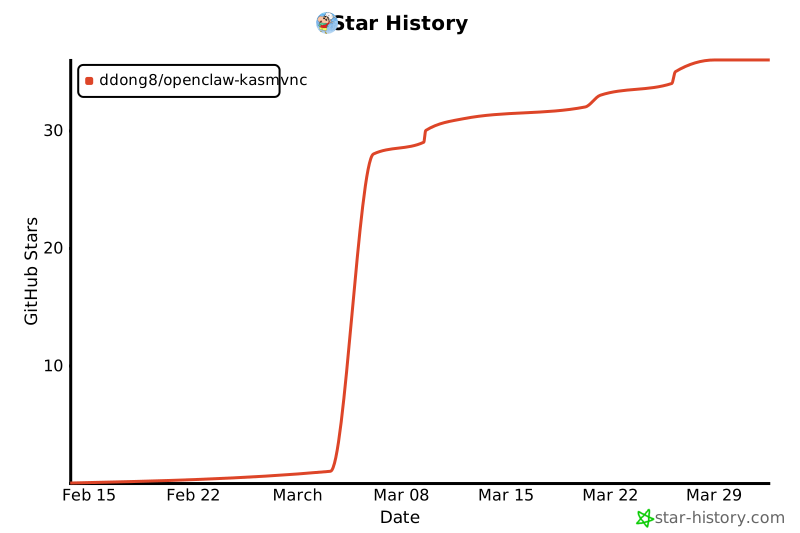
## Star History
[](https://star-history.com/#ddong8/openclaw-kasmvnc&Date)
## License
[MIT](LICENSE)