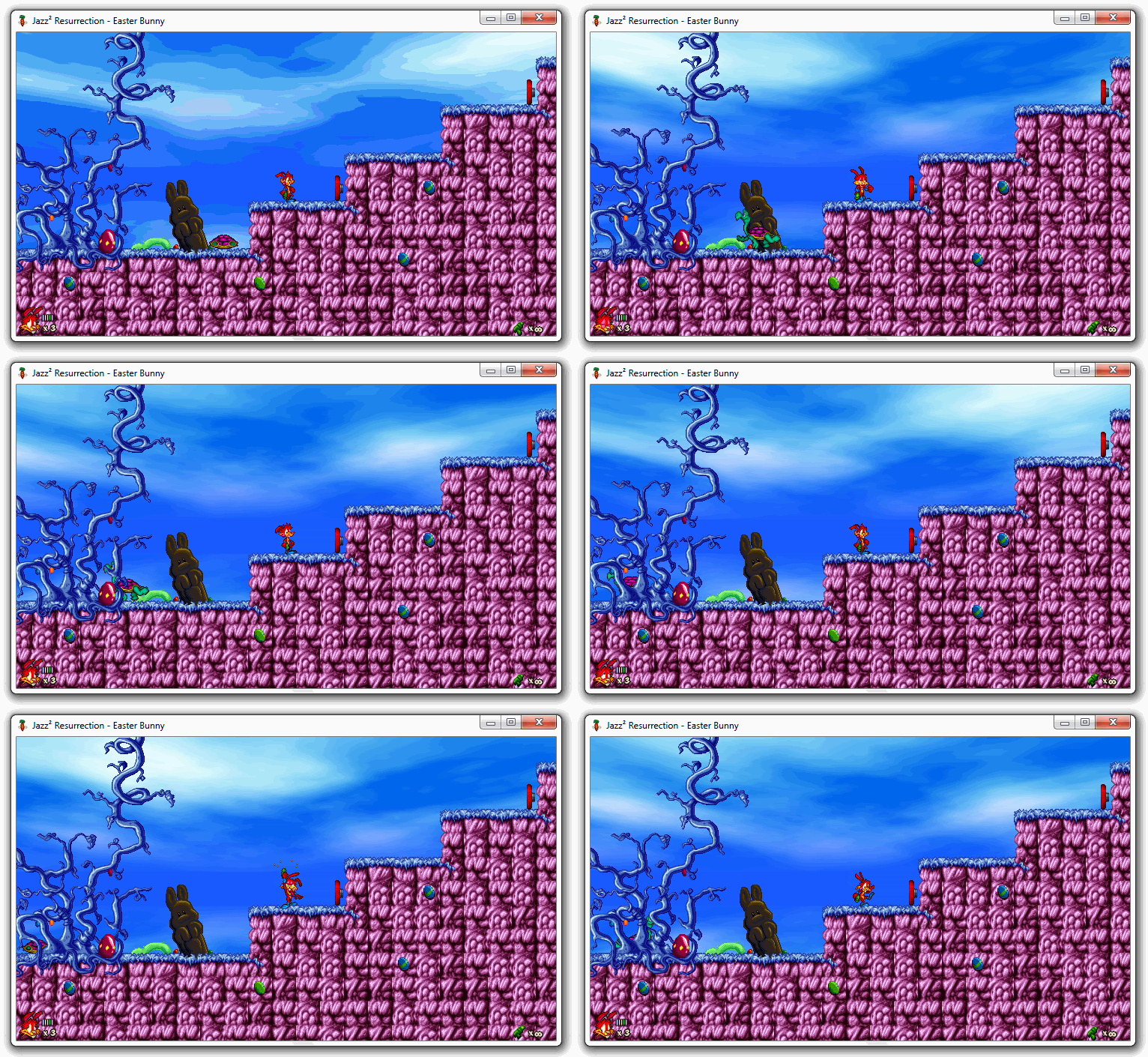
Open-source Jazz Jackrabbit 2 reimplementation
## Introduction
> 🚧 **The game was fully rewritten since version 1.0.0, please visit **[deathkiller/jazz2-native](https://github.com/deathkiller/jazz2-native)** to build it instead.** This repository will contain only new [Releases](https://github.com/deathkiller/jazz2/releases). For more information, visit [the official website](https://de4th.dev/jazz2/).
Jazz² Resurrection is reimplementation of the game **Jazz Jackrabbit 2** released in 1998. Supports various versions of the game (Shareware Demo, Holiday Hare '98, The Secret Files and Christmas Chronicles). Also, it partially supports some features of JJ2+ extension and MLLE. Further information can be found [here](https://de4th.dev/jazz2/).
[](https://github.com/deathkiller/jazz2-native/actions)
[](https://github.com/deathkiller/jazz2/releases/latest)
[](https://github.com/deathkiller/jazz2/releases)
[](https://app.codacy.com/gh/deathkiller/jazz2-native/dashboard)
[](https://github.com/deathkiller/jazz2-native/blob/master/LICENSE)
[](https://discord.gg/Y7SBvkD)
## Preview
## Running the application
### Windows
* Install [Microsoft Visual C++ Redistributable](https://learn.microsoft.com/en-us/cpp/windows/latest-supported-vc-redist)
* Download the game
* Copy contents of original *Jazz Jackrabbit 2* directory to `‹Game›\Source\`
* Run `‹Game›\Jazz2.exe`, `‹Game›\Jazz2_avx2.exe` or `‹Game›\Jazz2_sdl2.exe` application
`‹Game›` *denotes path to Jazz² Resurrection. The game requires **Windows 7** (or newer) and GPU with **OpenGL 3.3** support. Game files should **not** be copied to* `Program Files`*. Cache is recreated during the intro cinematics on the first startup, so it can't be skipped. Also, the sound effects in the intro cinematics require the cache, so they will be missing the first time the game is started up.*
### Linux
* Download the game
* Install dependencies: `sudo apt install libcurl4 libglew2.2 libglfw3 libsdl2-2.0-0 libopenal1 libvorbisfile3 libopenmpt0`
* Alternatively, install provided `.deb` or `.rpm` package and dependencies should be installed automatically
* Copy contents of original *Jazz Jackrabbit 2* directory to `‹Game›/Source/`
* If packages are used, the files must be copied to `~/.local/share/jazz2/Source/` or `/usr/share/jazz2/Source/` instead, please follow instructions of specific package
* Installations predating this layout keep using `~/.local/share/Jazz² Resurrection/Source/`, which is still detected
* Run `‹Game›/jazz2` or `‹Game›/jazz2_sdl2` application
* If packages are used, the game should be visible in application lists
`‹Game›` *denotes path to Jazz² Resurrection.* `~` *denotes user's home directory. The game requires GPU with **OpenGL 3.3** or **OpenGL ES 3.0** (ARM) support. Cache is recreated during the intro cinematics on the first startup, so it can't be skipped. Also, the sound effects in the intro cinematics require the cache, so they will be missing the first time the game is started up.*
Alternatively, you can use package repository for your Linux distribution:
[](https://aur.archlinux.org/packages/jazz2-bin)
[](https://tracker.debian.org/pkg/jazz2-native)
[](https://flathub.org/apps/dev.de4th.jazz2)
[](https://packages.gentoo.org/packages/games-arcade/jazz2)
[](https://search.nixos.org/packages?channel=unstable&show=jazz2&from=0&size=50&sort=relevance&type=packages&query=jazz2)
[](https://build.opensuse.org/package/show/games/jazz2)
[](https://launchpad.net/ubuntu/+source/jazz2-native)
[](https://xtradeb.net/play/jazz2/)
### macOS
* Download the game and install provided `.dmg` application bundle
* Copy contents of original *Jazz Jackrabbit 2* directory to `~/Library/Application Support/Jazz² Resurrection/Source/`
* Run the newly installed application
`~` *denotes user's home directory. Cache is recreated during the intro cinematics on the first startup, so it can't be skipped. Also, the sound effects in the intro cinematics require the cache, so they will be missing the first time the game is started up.*
Alternatively, you can install it using [](https://formulae.brew.sh/cask/jazz2-resurrection) `brew trust deathkiller/jazz2` and `brew install deathkiller/jazz2/jazz2`
### iOS
* The game is not on the App Store, build the application bundle from source (see [below](#ios-1)) and install it on the device from **Xcode**, or sideload the built `jazz2.app`
* Copy contents of original *Jazz Jackrabbit 2* directory to `Jazz² Resurrection/Source/` in the **Files** app (under *On My iPhone* / *On My iPad*), or through file sharing in *Finder* (or *iTunes*)
* Run the newly installed application
*The game requires **iOS 14** (or newer) and runs on iPhone and iPad, in landscape orientation, with on-screen touch controls and game controllers. Cache is recreated during the intro cinematics on the first startup, so it can't be skipped. The log file* `Jazz2.log` *is written next to the* `Source` *directory.*
### Android
* Download the game
* Install `Jazz2.apk` or `Jazz2_x64.apk` on the device
* Copy contents of original *Jazz Jackrabbit 2* directory to `‹Storage›/Android/data/jazz2.resurrection/files/Source/`
* On **Android 11** or newer, you can *Allow access to external storage* in main menu, then you can use these additional paths:
* `‹Storage›/Games/Jazz² Resurrection/Source/`
* `‹Storage›/Download/Jazz² Resurrection/Source/`
* Run the newly installed application
`‹Storage›` *usually denotes internal storage on your device.* `Content` *directory is included directly in APK file, no action is needed. The game requires **Android 5.0** (or newer) and GPU with **OpenGL ES 3.0** support. Cache is recreated during the intro cinematics on the first startup. Also, the sound effects in the intro cinematics require the cache, so they will be missing the first time the game is started up.*
### Nintendo Switch
* Download the game
* Install `Jazz2.nro` package (custom firmware is needed)
* Copy contents of original *Jazz Jackrabbit 2* directory to `/Games/Jazz2/Source/` on SD card
* Run the newly installed application with enabled full RAM access
*Cache is recreated during the intro cinematics on the first startup, so it can't be skipped. It may take more time, so white screen could be shown longer than expected. Also, the sound effects in the intro cinematics require the cache, so they will be missing the first time the game is started up.*
### Nintendo 64
* The game plays from a cartridge ROM, which has to carry the game content converted from an original *Jazz Jackrabbit 2* installation
* Use [Content Swapper](https://de4th.dev/jazz2/swap/) to create your customized ROM, otherwise ROM is empty and unplayable
* Copy the resulting `jazz2.z64` image onto an *EverDrive-64* or *SC64* flashcart
* The image also boots directly in *ares* or *simple64*
* Run the ROM – the console must have an **Expansion Pak** installed
### Sega Dreamcast
* The game plays from a disc, which has to carry the game content converted from an original *Jazz Jackrabbit 2* installation
* Use [Content Swapper](https://de4th.dev/jazz2/swap/) to create your customized disc, otherwise disc is empty and unplayable
* Burn the resulting `jazz2.cdi` image with a tool that understands the Dreamcast's multi-session layout, or serve it from an optical-drive emulator such as GDEMU/MODE
* The image also boots directly in *Flycast*, *lxdream* or *redream*
* Run the disc
### Nintendo Wii
* Download the game
* Copy contents of the provided `sd` directory to the root of an SD card or USB storage device
* Copy contents of original *Jazz Jackrabbit 2* directory to `sd:/apps/Jazz2/Source/` on the same device
* Alternatively, prepare the content in advance as described in [the developer documentation](https://de4th.dev/jazz2/docs/consoles.html#consoles-wii) to skip the conversion
* Run *Jazz² Resurrection* from the **Homebrew Channel**
### Nintendo GameCube
* The console can't convert the game data itself, so the content has to be prepared in advance from an original *Jazz Jackrabbit 2* installation and can't be distributed
* Use [Content Swapper](https://de4th.dev/jazz2/swap/) to create your customized disc, otherwise disc is empty and unplayable
* Start `Jazz2/Jazz2.dol` from **Swiss**
### Nintendo 3DS
* The console can't convert the game data itself in any reasonable time, so the content has to be prepared in advance from an original *Jazz Jackrabbit 2* installation and can't be distributed – see [the developer documentation](https://de4th.dev/jazz2/docs/consoles.html#consoles-3ds)
* Copy the resulting `sdmc` directory contents to the root of the SD card (custom firmware or another way to start homebrew is needed)
* For *Azahar*, copy them into the emulator's configured SD card directory instead
* Start `Jazz2` from the **Homebrew Launcher**
*Sound needs the DSP firmware that every console running homebrew has at `sdmc:/3ds/dspfirm.cdc` (dump it with **DSP1** once), without it the game runs silently. **New 3DS** runs the game at its full 804 MHz clock, on an **Old 3DS** the frame rate drops in busy scenes.*
### PlayStation Portable
* Download the game
* Copy the provided `PSP/GAME/Jazz2` directory to the memory stick at exactly that path (custom firmware is needed)
* For *PPSSPP*, copy it into the emulator's configured memory stick instead
* Copy contents of original *Jazz Jackrabbit 2* directory to `ms0:/PSP/GAME/Jazz2/Source/`
* Alternatively, prepare the content in advance as described in [the developer documentation](https://de4th.dev/jazz2/docs/consoles.html#consoles-psp) to skip the conversion
* Run the newly installed application
### PlayStation 2
* As on the Dreamcast, the game plays from a disc that has to carry the converted game content
* Use [Content Swapper](https://de4th.dev/jazz2/swap/) to create your customized disc, otherwise disc is empty and unplayable
* Burn the resulting image to a disc, or load it in *PCSX2*
* It can equally be run from an SD card in an **MX4SIO** adapter: copy the ELF and the content tree to `mass0:/Games/Jazz2/`, and the game reads *and saves* there (a card is shared storage, so the game keeps to a directory of its own – the same layout it uses on the Switch)
### PlayStation 3
* Download the game
* Install `Jazz2.pkg` package (custom firmware is needed)
* Alternatively, run the unsigned `Jazz2.self` on a CFW console or in *RPCS3*, which requires the PlayStation 3 firmware installed once
* Copy contents of original *Jazz Jackrabbit 2* directory to `Source/` next to `EBOOT.BIN` of the installed package (`/dev_hdd0/game/JAZZ20000/USRDIR/Source/`)
* Alternatively, prepare the content in advance as described in [the developer documentation](https://de4th.dev/jazz2/docs/consoles.html#consoles-ps3) to skip the conversion
* Run the newly installed application
### PlayStation Vita
* Download the game
* Install `Jazz2.vpk` package with **VitaShell** or over FTP (custom firmware is needed)
* Extract `libshacccg.suprx` from the console firmware to `ur0:/data/`, shaders are compiled on the console
* Copy contents of original *Jazz Jackrabbit 2* directory to `ux0:/data/jazz2/Source/`
* Run the newly installed application
### Amiga
* Download the game for the particular system – **AmigaOS 3.x**, **AmigaOS 4.1** or **MorphOS**
* Copy contents of the archive – the `Jazz2` executable next to `Content/` – onto the Amiga's hard disk, or mount the directory as a hard drive in an emulator
* Copy contents of original *Jazz Jackrabbit 2* directory to `Source/` next to the executable
* Alternatively, prepare the content in advance as described in [the developer documentation](https://de4th.dev/jazz2/docs/amiga.html#amiga-content) to skip the conversion, which takes far longer on these machines than on a desktop
* Run `Jazz2`
### Web (Emscripten)
* Go to https://de4th.dev/jazz2/wasm/
* Import episodes from original *Jazz Jackrabbit 2* directory in main menu to unlock additional content
*The game requires browser with **WebAssembly** and **WebGL 2.0** support – usually any modern web browser.*
### Libretro core (RetroArch)
* Copy `jazz2_libretro.so` (and `jazz2_libretro.info`, if provided) to the frontend's *cores* directory
* Copy the `Content/` directory next to the game files, then copy contents of original *Jazz Jackrabbit 2* directory to `Source/` beside it – `Cache/` is generated next to them
* Alternatively, place both in the frontend's *system* directory as `‹System›/jazz2/Content/` and `‹System›/jazz2/Source/`
* Load any file from `Source/` (for example `Anims.j2a`) as content, or start the core without content if `‹System›/jazz2/Content/` exists
### Xbox (Universal Windows Platform)
* Download the game
* Install `Jazz2.cer` certificate if needed (the application is self-signed)
* Install `Jazz2.msixbundle` package
* Run the newly installed application
* Copy contents of original *Jazz Jackrabbit 2* directory to destination shown in the main menu
* Alternatively, copy the files to `\Games\Jazz² Resurrection\Source\` on an external drive to preserve settings across installations, the application must be set to `Game` type and `NTFS` is the recommended filesystem
* On `NTFS`, the **ALL APPLICATION PACKAGES** group must be granted full access to that directory, otherwise the application can't read the game files or write its settings there – attach the drive to a Windows PC and run in *Command Prompt* or *PowerShell* as administrator:
```batch
icacls "D:\Games\Jazz² Resurrection" /grant "*S-1-15-2-1:(OI)(CI)(F)" /T
```
where `D:` is the external drive. `*S-1-15-2-1` is the SID of *ALL APPLICATION PACKAGES*, so the command works regardless of system language. Filesystems that have no permissions at all, such as `exFAT`, need no such step
* Run the application again
*Cache is recreated during the intro cinematics on the first startup, so it can't be skipped. It may take more time, so white screen could be shown longer than expected. Also, the sound effects in the intro cinematics require the cache, so they will be missing the first time the game is started up.*
### Dedicated server (Docker)
* Pull the image, which is available for `amd64` and `arm64`
```bash
docker pull ghcr.io/deathkiller/jazz2-server:latest
```
* Copy contents of original *Jazz Jackrabbit 2* directory to `./Source/`
* Copy [`ServerConfiguration.json`](./Docs/Snippets/ServerConfiguration.json) to `./Config/Jazz2.Server.config` and adjust it, at least the playlist
* The directory must be writable by uid 1000, the unprivileged user the server runs as
* Run the container
```bash
docker run -d -i --name jazz2-server --restart unless-stopped \
-p 7438:7438/udp -p 7438:7438/tcp \
-v "$PWD/Source:/app/Source:ro" \
-v "$PWD/Config:/app/Config" \
-v jazz2-cache:/app/Cache \
ghcr.io/deathkiller/jazz2-server:latest
```
*The image contains only the headless server, contents of original **Jazz Jackrabbit 2** directory are never part of it. Besides* `latest`*, every release is tagged also as* `X.Y` *and* `X.Y.Z` *to pin a particular version, and* `edge` *tracks the current state of the* `master` *branch. Game files are converted into the* `jazz2-cache` *volume on the first start, so the first startup takes longer.* `docker attach jazz2-server` *opens the server console,* `docker stop` *shuts the server down cleanly, disconnecting the peers and delisting the server from the online server list.* `ServerAddressOverride` *has to be set for a public server, because the container sees only its own address on the Docker network. The* `docker-compose.yml` *in this repository describes the same setup declaratively, including several servers running on one host, and* `docker build -t jazz2-server .` *builds the image from sources instead of pulling it. See [the developer documentation](https://de4th.dev/jazz2/docs/building.html#building-docker) for details.*
## Building the application
**The game was fully rewritten since version 1.0.0, please build [deathkiller/jazz2-native](https://github.com/deathkiller/jazz2-native) instead.** This repository will contain only new [Releases](https://github.com/deathkiller/jazz2/releases). For more information, visit [the official website](https://de4th.dev/jazz2/). There is also [the developer documentation](https://de4th.dev/jazz2/docs/), including [a guide for the console targets](https://de4th.dev/jazz2/docs/consoles.html) – **Nintendo 64**, **Nintendo GameCube**, **Nintendo Wii**, **Nintendo 3DS**, **Nintendo Switch**, **PlayStation 2**, **PlayStation 3**, **PlayStation Portable**, **PlayStation Vita** and **Sega Dreamcast**.
## License
This project is licensed under the terms of the [GNU General Public License v3.0](./LICENSE).