# 9Remote — Terminal in Your Pocket
**Want to code from bed? Fix bugs while having coffee? Deploy while on vacation?**
**Your Mac/Linux/Windows terminal, remote desktop, and file explorer — accessible from any phone or browser, anywhere, instantly.**
[](https://www.npmjs.com/package/9remote)
[](https://www.npmjs.com/package/9remote)
[](#-license)
[🚀 Quick Start](#-quick-start) • [📊 Comparison](#-9remote-vs-other-remote-solutions) • [💡 Features](#-key-features) • [🌐 Website](https://9remote.cc) • [📖 Docs](https://docs.9remote.cc) • [💬 Facebook](https://www.facebook.com/groups/9teamvn)
[🇺🇸 English](./README.md) • [🇻🇳 Tiếng Việt](./i18n/README.vi.md)
---
## 🚧 Development Status
> **9Remote is currently in active development.**
>
> The source code is **not open-source yet**. If this project gets enough ⭐ support from the community, we will **fully open-source it** so everyone can contribute and self-host.
>
> **⭐ Star this repo to help us reach the open-source milestone!**
---
## 🤔 Why 9Remote?
**Remote access today is painful:**
- ❌ **SSH is a hassle** — firewall rules, port forwarding, SSH keys, IP whitelisting
- ❌ **VPN is overkill** — complex setup just to check a terminal
- ❌ **ngrok / tunnels expire** — lose connection, restart everything
- ❌ **TeamViewer is slow** — high latency, desktop-only, paid for commercial use
- ❌ **Chrome Remote Desktop** — no terminal, no file explorer, no mobile
- ❌ **Termius** — SSH-only, no remote desktop, no browser access
**9Remote solves all of it:**
- ✅ **One command** — install, scan QR, done in 30 seconds
- ✅ **Auto tunnel** — Cloudflare tunnel starts automatically, no port forwarding
- ✅ **All-in-one** — terminal + remote desktop + file explorer + code editor in one app
- ✅ **Works on phone** — full workspace from your browser, under 50ms latency
- ✅ **Persistent sessions** — PTY daemon survives server restarts
- ✅ **Pair Device security** — only approved devices can connect, zero signup friction
---
## ⚡ Quick Start
**Install globally:**
```bash
npm install -g 9remote
9remote
```
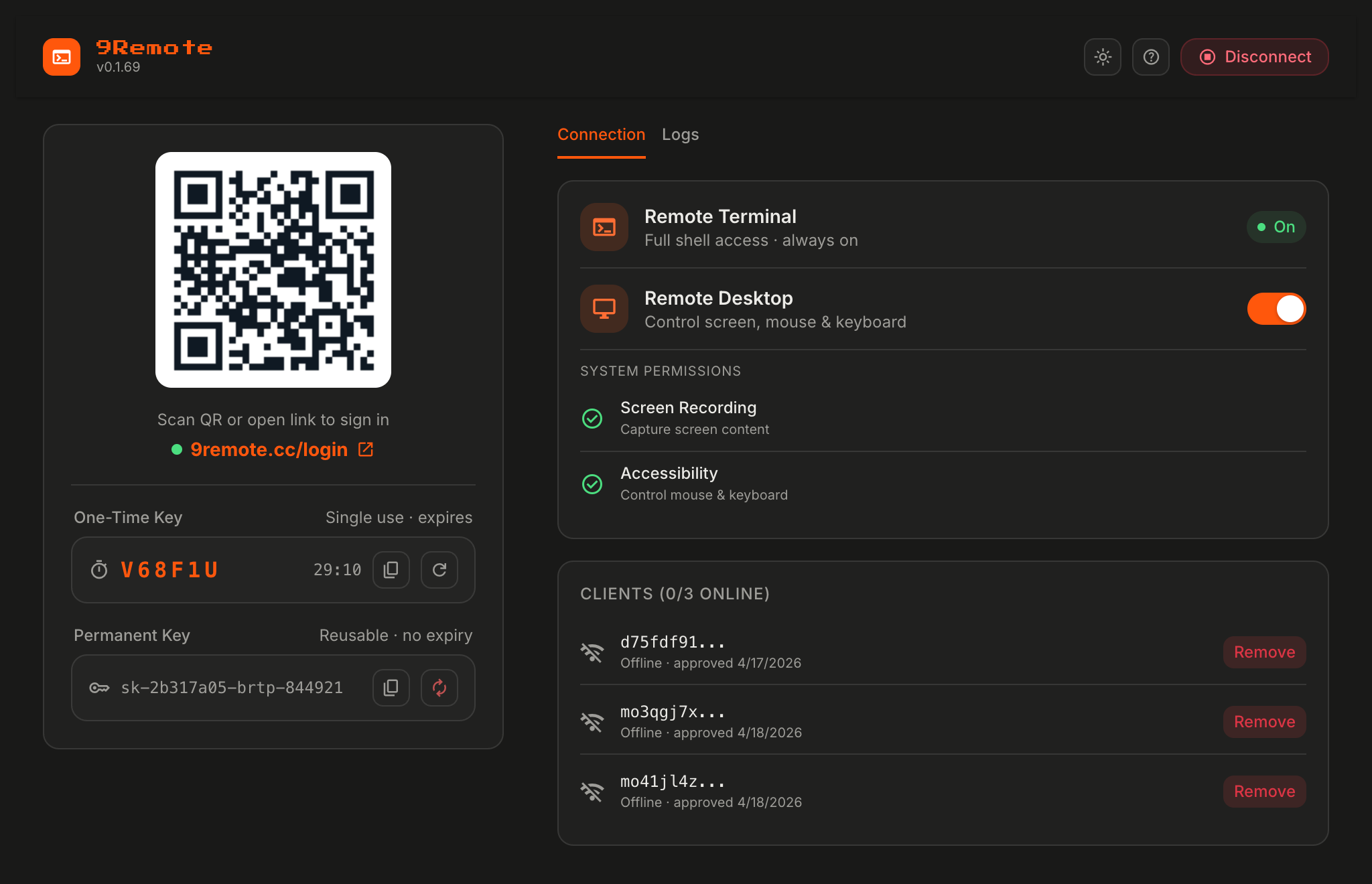
🎉 **Scan the QR code on your phone → pair your device → you're in.**
**That's it!** No config, no firewall rules, no signup.
> **Ready in 30 seconds.** Works on macOS, Linux, and Windows.
---
## 📊 9Remote vs Other Remote Solutions
| Feature | **9Remote** | Claude Remote | TeamViewer | Chrome Remote | Termius |
|---------|:-----------:|:-------------:|:----------:|:-------------:|:-------:|
| Zero Config | ✅ | ✅ | ✅ | ✅ | ❌ |
| Terminal Access | ✅ | ✅ | ❌ | ❌ | ✅ |
| Remote Desktop | ✅ | ❌ | ✅ | ✅ | ❌ |
| File Explorer | ✅ | ❌ | ✅ | ❌ | ✅ |
| Code Editor | ✅ | ❌ | ❌ | ❌ | ❌ |
| Git Integration | ✅ | ❌ | ❌ | ❌ | ❌ |
| Mobile Optimized | ✅ | ✅ | ❌ | ❌ | ✅ |
| Browser-Based | ✅ | ✅ | ❌ | ✅ | ❌ |
| QR Login | ✅ | ✅ | ❌ | ❌ | ❌ |
| Auto Tunnel | ✅ | ✅ | ✅ | ✅ | ❌ |
| Persistent Sessions | ✅ | ✅ | ❌ | ❌ | ✅ |
| Multi-Device Sync | ✅ | ✅ | ✅ | ❌ | ✅ |
| Push Notifications | ✅ | ✅ | ❌ | ❌ | ❌ |
| AI Integration | ✅ | ✅ | ❌ | ❌ | ❌ |
| No Port Forwarding | ✅ | ✅ | ✅ | ✅ | ❌ |
| No Account Required | ✅ | ❌ | ❌ | ❌ | ❌ |
| **TOTAL** | **16 / 16** | 11 / 16 | 7 / 16 | 5 / 16 | 7 / 16 |
> **🏆 9Remote: All-in-one solution with 16/16 features.**
---
## ✨ Key Features
| Feature | What It Does | Why It Matters |
|---------|--------------|----------------|
| 🖥️ **Remote Terminal** | Full PTY shell via WebSocket | Code like you're sitting at your Mac |
| 🖱️ **Remote Desktop** | Live screen streaming via WebRTC | View & control your machine from phone |
| 📁 **File Explorer** | Browse, upload, download files | Manage files without SSH/SFTP |
| 💻 **Code Editor** | Built-in editor with syntax highlighting | Quick edits without opening IDE |
| 🔗 **Git Integration** | Run git commands with visual status | Commit/push from your phone |
| 📱 **Mobile Optimized** | Touch-friendly UI, gesture controls | Full workspace on a 6" screen |
| 🔑 **QR Login** | One-time 30-min key, scan to connect | Zero-friction mobile access |
| 🔒 **Auto Tunnel** | Cloudflare tunnel, no port forwarding | Works behind any NAT/firewall |
| 🔄 **Persistent Sessions** | PTY daemon survives restarts | Long-running commands stay alive |
| 🌍 **Multi-Device Sync** | Same session across phone/tablet/laptop | Switch devices without losing context |
| 🔔 **Push Notifications** | Build finished? Get notified | Never miss a critical event |
| 🤖 **AI Integration** | Works with Claude Code, Codex, OpenClaw | Code with AI from anywhere |
| 🌐 **Local Sites Proxy** | Expose `localhost:3000` to phone | Test dev servers on mobile instantly |
| ⚡ **Low Latency** | <50ms typical, WebRTC for desktop | Feels like local |
| 🔐 **Pair Device** | Approve each device before it connects | No unauthorized access, full control |
| 🆓 **No Account Required** | Machine ID + QR key, zero signup | Privacy-first design |
---
## 📱 Available Platforms
💻 CLI
npm install -g 9remote
macOS • Linux • Windows
|
🖥️ Desktop App
Tauri native app
macOS • Windows • Linux
|
🌐 Web Client
9remote.cc
Any modern browser
|
📱 Mobile App
iOS • Android
React Native / Expo
|
---
## 🎯 Use Cases
### Case 1: "Code from bed"
**Problem:** It's 11 PM, you remember a bug but laptop is in another room.
**Solution:**
```
1. Open 9remote app on phone
2. Scan QR (or use saved session)
3. Open terminal → fix bug → git push
4. Sleep well 😴
```
### Case 2: "Fix bugs at a cafe"
**Problem:** Production is down. You only have your phone and a bad café Wi-Fi.
**Solution:**
```
1. Connect to your home/office Mac via 9remote
2. Tail logs in terminal
3. Edit config in built-in editor
4. Deploy → crisis averted
```
### Case 3: "Deploy while on vacation"
**Problem:** Client needs a hotfix. You're on the beach.
**Solution:**
```
1. Phone → 9remote → your dev machine
2. git pull → build → deploy
3. Back to the beach in 5 minutes 🏖️
```
### Case 4: "On-call engineer"
**Problem:** PagerDuty alert at 3 AM. Don't want to power on laptop.
**Solution:**
```
1. Push notification → tap → 9remote opens
2. Terminal + remote desktop ready
3. Diagnose + restart service from bed
4. Resolve incident without getting up
```
---
## 📖 Setup Guide
🚀 Installation Options
### Option 1 — NPM (recommended)
```bash
npm install -g 9remote
9remote
```
### Option 2 — Desktop App
Download from [9remote.cc/download](https://9remote.cc) — native app with system tray integration, auto-start on boot, and background mode.
### Option 3 — Mobile App
- **iOS:** App Store → "9Remote"
- **Android:** Google Play → "9Remote"
🔑 First Run & QR Login
On first run, 9Remote generates two keys:
- **Permanent Key** — stored locally, tied to your machine ID, used for trusted devices
- **One-Time Key** — 30-minute temporary key, used for the QR code shown in terminal
**Connect from phone:**
1. Run `9remote` on your Mac/Linux/Windows machine
2. A QR code appears in the terminal
3. Open 9Remote app (or [9remote.cc](https://9remote.cc)) on your phone
4. Scan the QR → connected instantly
> Keys are **never** stored on our servers after the session ends.
🖱️ Remote Desktop Setup (macOS)
Remote Desktop requires two system permissions on macOS:
1. **Screen Recording** — `System Settings → Privacy & Security → Screen Recording → enable Terminal (or 9Remote Desktop app)`
2. **Accessibility** — `System Settings → Privacy & Security → Accessibility → enable Terminal (or 9Remote Desktop app)`
Then enable in 9Remote:
```
TUI menu → Remote Desktop → Toggle ON
```
**Performance:**
- Adaptive framerate: 60ms active / 400ms idle
- Tile-based diff rendering (only changed regions sent)
- WebRTC DataChannel for minimal latency
🌐 Local Sites Proxy
Expose your local dev servers (e.g. `localhost:3000`, `localhost:5173`) to your phone automatically.
```
9Remote auto-detects running ports and proxies them:
http://localhost:3000 → https:///proxy/3000/
http://localhost:5173 → https:///proxy/5173/
```
Perfect for:
- Testing responsive design on real devices
- Sharing WIP builds with clients
- Mobile debugging without USB cable
⌨️ CLI Commands
| Command | Description |
|---------|-------------|
| `9remote` | TUI mode — interactive menu with QR code |
| `9remote ui` | Web UI mode — opens browser dashboard at `localhost:2208` |
---
## ❓ Frequently Asked Questions
🔒 Is 9Remote secure?
**Yes.** 9Remote uses a **Pair Device** approval system — every new device must be explicitly approved by you before it can access the host. Plus:
- No open ports on your machine (Cloudflare tunnel, outbound-only)
- Keys are never stored on our servers after the session ends
- No terminal output, files, or screen data is collected
- One-time QR keys expire in 30 minutes
- Pending/rejected devices can be managed anytime from the TUI menu
💰 Is it free?
**Yes, during the development phase.** 9Remote is free to use. No signup, no credit card.
Once we open-source, it will remain free forever (MIT license planned).
📦 When will it be open-source?
**When the project reaches enough ⭐ GitHub stars** to prove community interest.
We want to make sure there's a real community before committing to open-source maintenance. Star this repo to help us hit the milestone faster!
🌐 Do I need to open any ports?
**No.** 9Remote uses Cloudflare Quick Tunnel — outbound connection only. Works behind:
- Home NAT routers
- Corporate firewalls
- Mobile hotspots
- VPNs
📴 Does it work offline / on LAN only?
**Yes.** 9Remote includes a **LocalFirstAdapter** that races LAN vs tunnel connection and uses whichever is faster. If phone and host are on the same Wi-Fi, traffic stays local.
🤖 Can I use AI coding tools through 9Remote?
**Yes!** 9Remote works seamlessly with:
- Claude Code
- OpenAI Codex CLI
- Cursor
- OpenClaw
- Any CLI tool that runs in a terminal
Run them on your host machine, access them from your phone. Combined with [9Router](https://github.com/decolua/9router), you get free AI coding from anywhere.
🖥️ What platforms are supported?
**Host (where 9Remote agent runs):**
- ✅ macOS (Intel + Apple Silicon)
- ✅ Linux (x64, arm64)
- ✅ Windows (x64)
**Client (where you connect from):**
- ✅ Any modern browser (Chrome, Safari, Firefox, Edge)
- ✅ iOS 14+
- ✅ Android 8+
- ✅ Tauri desktop app (macOS, Windows, Linux)
---
## 🛠️ Tech Stack
- **Runtime:** Node.js 20+
- **Tunnel:** [Cloudflare Quick Tunnel](https://developers.cloudflare.com/cloudflare-one/connections/connect-networks/) — zero-config secure tunnel
- **Terminal:** [node-pty](https://github.com/microsoft/node-pty) — persistent PTY sessions
- **Remote Desktop:** [node-datachannel](https://github.com/murat-dogan/node-datachannel) (WebRTC) + [robotjs](https://github.com/octalmage/robotjs) (input control)
- **Real-time:** [Socket.IO](https://socket.io/) — terminal streaming + WebRTC signaling
- **Agent UI:** [Preact](https://preactjs.com/) — lightweight embedded dashboard
- **Web Client:** [Next.js 16](https://nextjs.org/) + React 19 + Tailwind CSS 4
- **Desktop App:** [Tauri 2](https://tauri.app/) — native shell with auto-updater
- **Mobile App:** [Expo](https://expo.dev/) — React Native with WebView shell
- **Edge API:** Cloudflare Workers — session management + TURN credentials
---
## 🐛 Troubleshooting
**"Port 2208 already in use"**
- Another 9Remote instance is running → `pkill -f 9remote` then retry
- Or run on a different port: `PORT=3308 9remote`
**"Cloudflare tunnel failed to start"**
- Check internet connection
- `cloudflared` auto-installed on first run — if it fails, install manually: [cloudflared docs](https://developers.cloudflare.com/cloudflare-one/connections/connect-networks/downloads/)
**"Screen Recording / Accessibility permission denied" (macOS)**
- Grant permissions in `System Settings → Privacy & Security`
- Restart 9Remote after granting
**"QR code expired"**
- One-time keys expire in 30 minutes → regenerate from TUI menu: `Key → Regenerate`
**"Can't connect from phone"**
- Check both devices have internet
- Try forcing tunnel mode (skip LAN): Settings → Connection → Tunnel only
**"Remote desktop laggy"**
- Reduce resolution in settings
- Switch to terminal-only if desktop not needed
- Use LAN mode if on same Wi-Fi for lowest latency
---
## ⭐ Show Your Support
**9Remote is in active development and we need your support to reach the open-source milestone!**
- ⭐ **Star this repo** — every star brings us closer to going open-source
- 🐦 **Share on Twitter / X** — tell other devs about 9Remote
- 💬 **Join our Facebook community** — [facebook.com/groups/9teamvn](https://www.facebook.com/groups/9teamvn)
- 🐛 **Report issues** — found a bug? Let us know!
- 💡 **Request features** — what would make your remote workflow better?
---
## 📧 Support & Links
- **Website:** [9remote.cc](https://9remote.cc)
- **Documentation:** [docs.9remote.cc](https://docs.9remote.cc)
- **NPM Package:** [npmjs.com/package/9remote](https://www.npmjs.com/package/9remote)
- **GitHub:** [github.com/decolua/9remote](https://github.com/decolua/9remote)
- **Issues:** [github.com/decolua/9remote/issues](https://github.com/decolua/9remote/issues)
- **Facebook Community:** [facebook.com/groups/9teamvn](https://www.facebook.com/groups/9teamvn)
---
## 📄 License
**Proprietary — All Rights Reserved.**
9Remote is currently in active development and is **not open-source yet**. The published npm package is free to use, but the source code is not publicly available.
> **🎯 Open-source milestone:** once this repo reaches enough ⭐ support, the full source code will be released under the **MIT license**.
---
Built with ❤️ for developers who code from anywhere — bed, beach, or bus.