---
title: Airtable
noIndex: false
noContent: false
---

Deepnote can query data from Airtable bases. Follow these docs to create your own notebook to connect to Airtable, query data, and visualize it.
### Connect to Airtable from Deepnote
#### Create your Airtable token
[Follow these instructions](https://support.airtable.com/docs/creating-personal-access-tokens) to find your token.
#### Update the token in your notebook
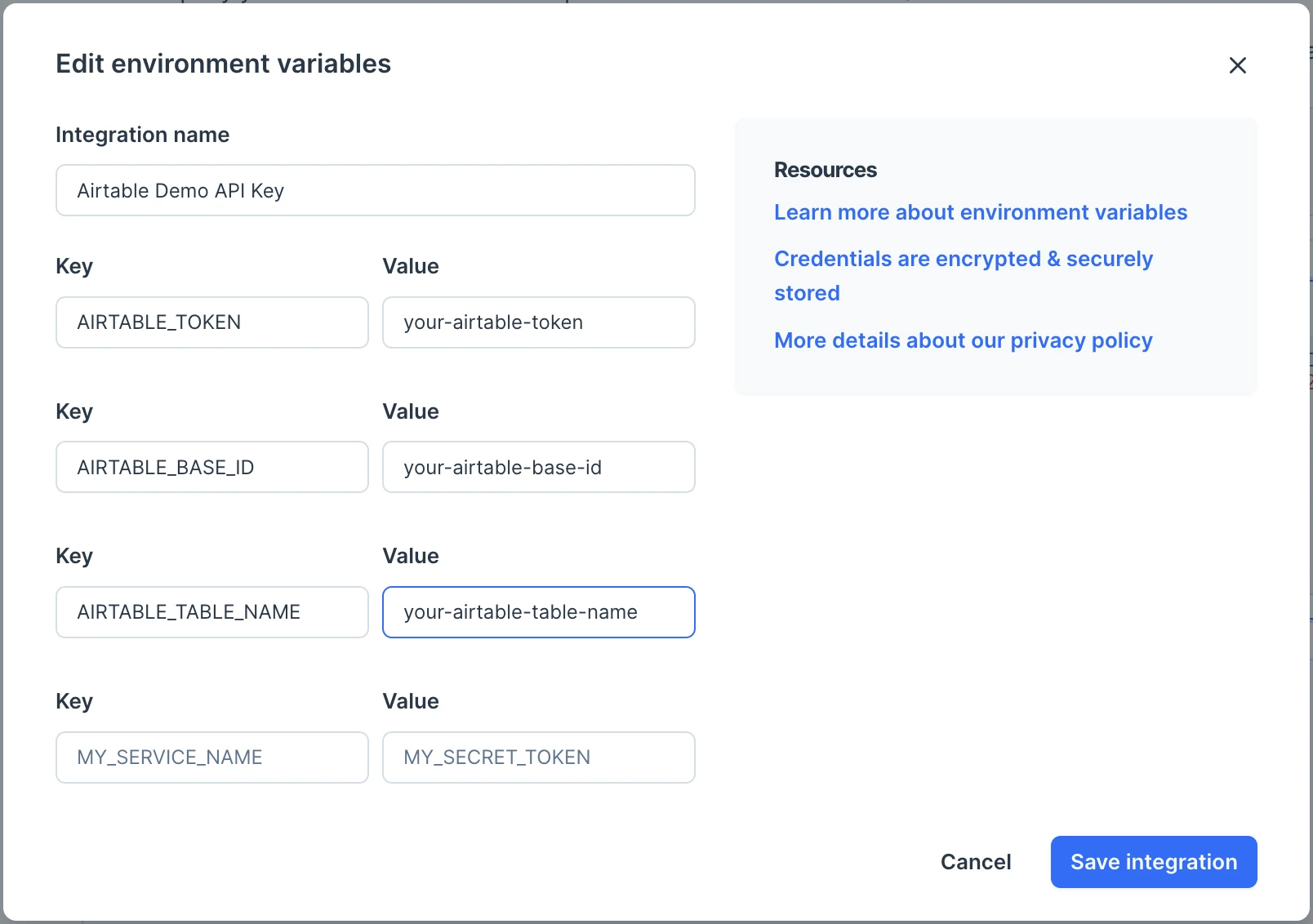
Change the variable `AIRTABLE_TOKEN` to match your token. If you'd like to keep your data secure, consider storing the token as an [environment variable](/docs/environment-variables). Environment variables in Deepnote are encrypted and provide a secure way of storing sensitive data.
#### Find your Airtable base ID
Find the ID of the Airtable base you want to fetch data from [by following these instructions](https://support.airtable.com/docs/finding-airtable-ids).
#### Update the base ID in your notebook
Change the variable `AIRTABLE_BASE_ID` to match the base ID you just found.
#### Update the table name in your notebook
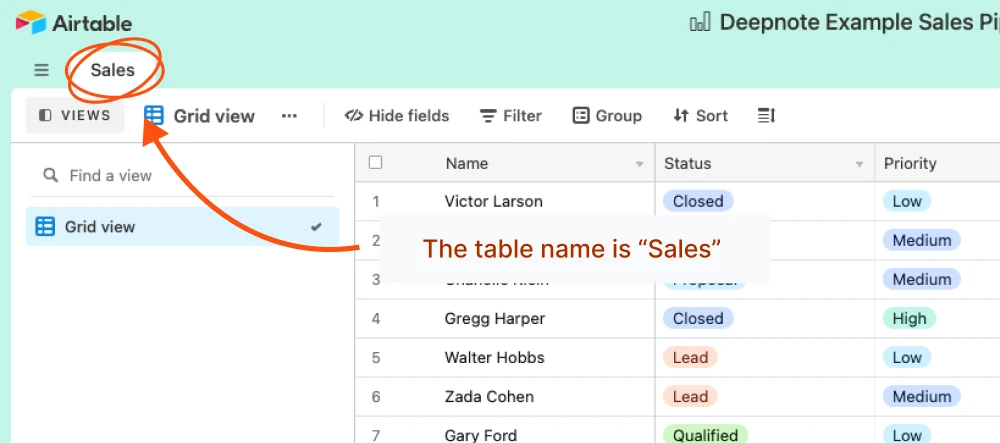
Change the variable `AIRTABLE_TABLE_NAME` to match the name of the table you want to fetch data from. This is the title of the tab in the Airtable UI.
#### Set your keys in the notebook
```python
AIRTABLE_TOKEN = 'your-airtable-token'
AIRTABLE_BASE_ID = 'you-base-id'
AIRTABLE_TABLE_NAME = 'your-table-name'
```
#### Use environment variables instead
For more security in your notebook, we strongly recommend to use [ environment variables](https://docs.deepnote.com/environment/environment-variables)
### Get your Airtable table from API
Since there was a change in Airtable API, the old way of using pyairtable will not work. But don't worry we got you covered. Use requests to fetch data from API.
**We will request the API with our base ID, table name, and token.**
```python
url = f'https://api.airtable.com/v0/{AIRTABLE_BASE_ID}/{AIRTABLE_TABLE_NAME}'
headers = {
'Authorization': f'Bearer {AIRTABLE_TOKEN}',
}
response = requests.get(url, headers=headers)
if response.status_code == 200:
records = response.json().get('records', [])
data = [record['fields'] for record in records]
df = pd.DataFrame(data)
print(df)
```
**One more function to fetch Airtable table and we are good to go.**
```python
def fetch_airtable_data(base_id, table_name, access_token):
url = f'https://api.airtable.com/v0/{base_id}/{table_name}'
headers = {'Authorization': f'Bearer {access_token}'}
all_records = []
offset = None
while True:
params = {'offset': offset} if offset else {}
response = requests.get(url, headers=headers, params=params)
if response.status_code != 200:
print(f"Failed to fetch data: {response.status_code}")
break
records = response.json().get('records', [])
all_records.extend(records)
offset = response.json().get('offset')
if not offset:
break
data = [record['fields'] for record in all_records]
return pd.DataFrame(data)
```
### Query Airtable data from Deepnote
The notebook will set up a `table` object that you can use to fetch any data from your table. For example, the code below fetches the data and converts it to a Pandas DataFrame.
```python
df = fetch_airtable_data(AIRTABLE_BASE_ID, AIRTABLE_TABLE_NAME, AIRTABLE_TOKEN)
df
```
### Analyze your data with SQL
You can run queries against our DataFrame using Deepnote's built-in SQL. [You can learn more about SQL blocks on our docs.](https://deepnote.com/docs/sql-cells)
```sql
SELECT
"Estimated Value",
"Priority",
"Status"
FROM
df
WHERE
NOT ("Status" = 'Closed' OR "Status" = 'Lost')
```
### Visualize data
Deepnote can visualize data frames out of the box. You can learn more about [chart blocks on our docs](https://deepnote.com/docs/chart-blocks).
If you want to do something more sophisticated, you can use visualization libraries like Altair or Plotly.
### Duplicate the Airtable template
If you don't want to do it yourself, here is [template notebook](https://deepnote.com/workspace/Deepnote-Templates-71742312-24f2-4c10-9bf7-786d17280b92/project/Visualize-and-analyze-Airtable-data-in-Deepnote-89226e1d-380f-447a-924e-79271fc232ae/notebook/Notebook%201-f0abc3c611164a2fbcb56b8cabaab7b5)

Click the **Duplicate** button on the top right corner to do this. Once you've got the template in your Deepnote workspace, you can connect it to your Airtable base, don't forget to replace your own token and base id.
### What's next?
Now that you're querying data, you can share it with your team. You can even turn your charts [into a shareable dashboard](/docs/publish-projects).