
# Hayhooks **Serve [Haystack](https://haystack.deepset.ai/) pipelines and agents as APIs.** REST APIs, OpenAI-compatible chat, MCP tools, and A2A agents, with durable execution and built-in tracing. [![PyPI - Version](https://img.shields.io/pypi/v/hayhooks.svg)](https://pypi.org/project/hayhooks) [![PyPI - Python Version](https://img.shields.io/pypi/pyversions/hayhooks.svg)](https://pypi.org/project/hayhooks) [![Docker image release](https://github.com/deepset-ai/hayhooks/actions/workflows/docker.yml/badge.svg)](https://github.com/deepset-ai/hayhooks/actions/workflows/docker.yml) [![Tests](https://github.com/deepset-ai/hayhooks/actions/workflows/tests.yml/badge.svg)](https://github.com/deepset-ai/hayhooks/actions/workflows/tests.yml) [**Documentation**](https://deepset-ai.github.io/hayhooks/) · [Quick start](#quick-start) · [Dashboard](#terminal-dashboard) · [Durable execution](#durable-execution)
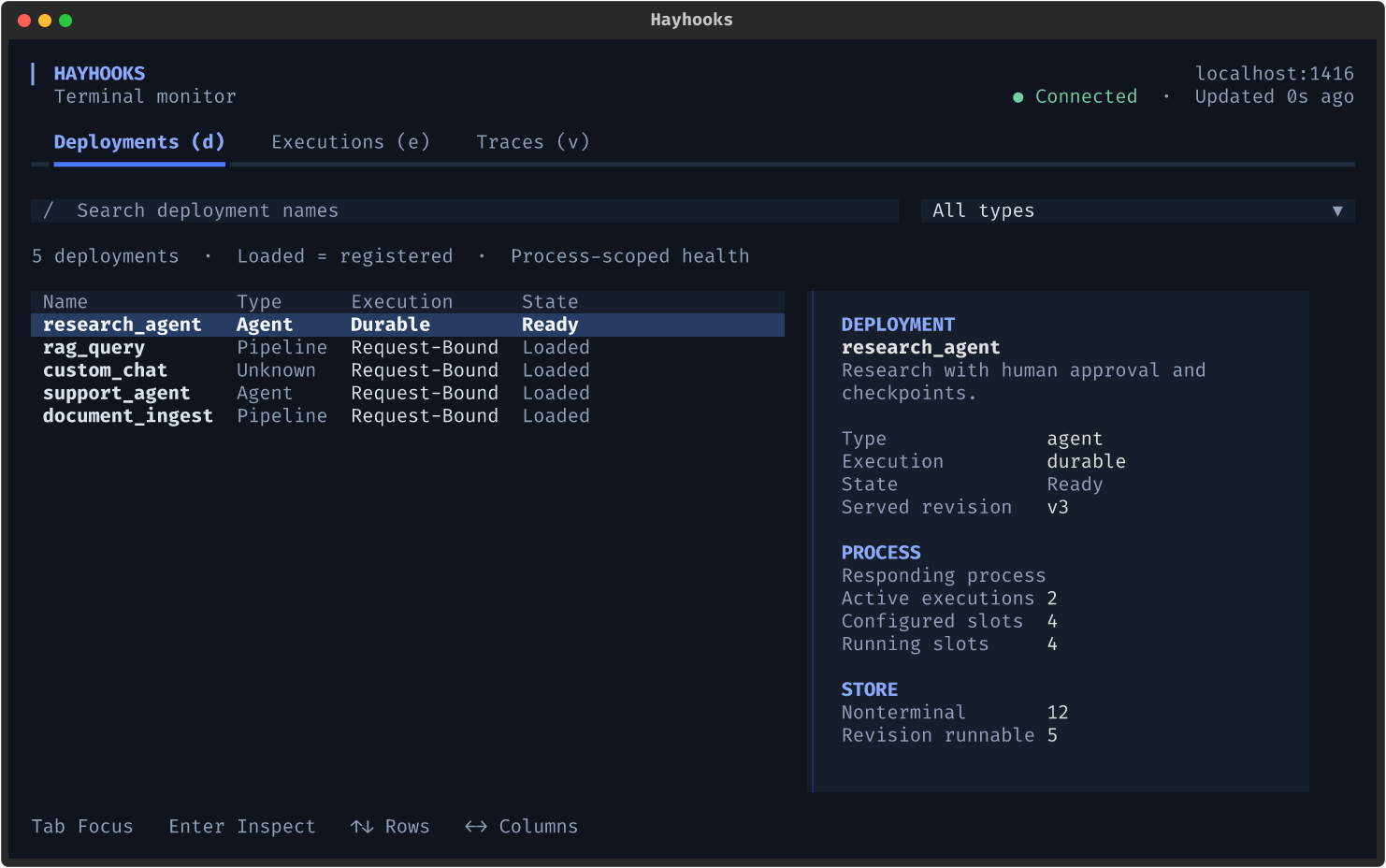
## Serve your pipelines and agents Write a Python wrapper around your pipeline or agent. Choose the interfaces and runtime features you need: - **REST APIs.** Deploy Python wrappers or YAML pipelines as typed, validated endpoints with OpenAPI docs, file uploads, and custom routes. - **[OpenAI-compatible APIs](docs/features/openai-compatibility.md).** Serve streaming Chat Completions and Responses endpoints. Connect [Open WebUI](docs/features/openwebui-integration.md) or use the embedded [Chainlit UI](docs/features/chainlit-integration.md). - **[MCP support](docs/features/mcp-support.md).** Run an MCP server that exposes pipelines and agents as tools for Cursor, Claude Desktop, and other Model Context Protocol clients. - **[A2A support](docs/features/a2a-support.md).** Expose chat-capable pipelines and agents through the Agent2Agent protocol, with generated agent cards for discovery and task delegation. - **[Durable execution](#durable-execution).** Checkpoint long-running work in Redis, wait for human approval, retry failures, and recover after restarts. - **[Tracing and observability](docs/reference/tracing.md).** Inspect executions and component traces in the terminal dashboard, or export spans to an OpenTelemetry backend with `hayhooks[tracing]`. ## Terminal dashboard Inspect deployments, follow executions, and find slow components in your terminal. [![Hayhooks terminal dashboard showing five deployments and a selected research agent's status](docs/assets/terminal-dashboard/overview-120x36.png)](docs/assets/terminal-dashboard/overview-120x36.png) *Actual terminal UI with demo data.* [Explore the dashboard](docs/features/terminal-dashboard.md). ## Quick start Serve a Haystack agent through a typed HTTP endpoint. You need Python 3.10 through 3.14 and an OpenAI API key. ### Install and start In your Python environment, install Hayhooks and set the API key before starting the server: ```bash pip install hayhooks export OPENAI_API_KEY="your-api-key" hayhooks run ``` Leave the server running. Use a second terminal for the following commands. ### Create an agent Create a directory named `my_agent_dir` and save this as `my_agent_dir/pipeline_wrapper.py`: ```python from haystack.components.agents import Agent from haystack.components.generators.chat import OpenAIResponsesChatGenerator from haystack.dataclasses import ChatMessage from haystack.tools import tool from hayhooks import BasePipelineWrapper @tool def search(query: str) -> str: """Search the knowledge base.""" return f"This is a demo tool." class PipelineWrapper(BasePipelineWrapper): def setup(self) -> None: self.pipeline = Agent( chat_generator=OpenAIResponsesChatGenerator(model="gpt-4o-mini"), tools=[search], ) async def run_api_async(self, question: str) -> str: result = await self.pipeline.run_async(messages=[ChatMessage.from_user(question)]) return result["last_message"].text ``` Hayhooks uses the method's type hints to validate requests and generate the API schema. ### Deploy and run ```bash hayhooks pipeline deploy-files -n my_agent ./my_agent_dir curl http://localhost:1416/my_agent/run \ -H 'Content-Type: application/json' \ -d '{"question": "What can you do?"}' ``` The response contains the agent's answer. Open [the API docs](http://localhost:1416/docs) to inspect and try the endpoint.
Add streaming chat Implement `run_chat_completion_async` to expose the agent through the [OpenAI-compatible Chat Completions API](docs/features/openai-compatibility.md#async-chat-completion-with-streaming). Add these imports at the top of `pipeline_wrapper.py`: ```python from collections.abc import AsyncGenerator from hayhooks import async_streaming_generator ``` Add this method inside `PipelineWrapper`: ```python async def run_chat_completion_async( self, model: str, messages: list[dict], body: dict ) -> AsyncGenerator[str, None]: return async_streaming_generator( pipeline=self.pipeline, pipeline_run_args={ "messages": [ChatMessage.from_openai_dict_format(m) for m in messages], }, ) ``` Redeploy the wrapper, then request a streamed response: ```bash hayhooks pipeline deploy-files -n my_agent ./my_agent_dir --overwrite curl -N http://localhost:1416/chat/completions \ -H 'Content-Type: application/json' \ -d '{ "model": "my_agent", "messages": [{"role": "user", "content": "What can you do?"}], "stream": true }' ``` The response arrives as server-sent events. Connect [Open WebUI](docs/features/openwebui-integration.md) or use the [embedded Chainlit UI](docs/features/chainlit-integration.md) to chat with the agent.
Inspect your run in the dashboard On macOS or Linux, open the dashboard in the second terminal under the same OS account as the server: ```bash pip install "hayhooks[tui]" hayhooks dashboard ``` Press `e` for executions or `v` for traces, then Enter for details. Local capture is enabled by default. Recent ordinary runs remain available until the server restarts or the buffer evicts them. For Windows or remote access, follow the [dashboard connection guide](docs/features/terminal-dashboard.md#connect-to-a-remote-server). To export spans to an external OpenTelemetry backend, see [tracing and OpenTelemetry](docs/reference/tracing.md).
## Durable execution Run work beyond the lifetime of a request. Hayhooks checkpoints pipelines and agents in Redis so another worker can resume after a restart. Suspend a run for human approval, retry failures, or reconnect to its output stream from any replica. ```mermaid stateDiagram-v2 direction LR [*] --> queued: submit (202) queued --> running: worker claims running --> waiting: suspend for a human waiting --> queued: resume running --> queued: retry or crash recovery running --> completed running --> failed running --> canceled ```
Run an agent with human approval This example waits for approval before calling a demo search tool. Save the wrapper as `pipelines/research_agent/pipeline_wrapper.py`. ```python from haystack.components.agents import Agent from haystack.components.generators.chat import OpenAIResponsesChatGenerator from haystack.dataclasses import ChatMessage from haystack.tools import tool from pydantic import BaseModel from hayhooks import BasePipelineWrapper, DurableContext @tool def search(query: str) -> str: """Search the knowledge base.""" return f"Hayhooks serves Haystack pipelines and agents; results for {query!r}." class Task(BaseModel): question: str class Approval(BaseModel): approved: bool class Report(BaseModel): answer: str class PipelineWrapper(BasePipelineWrapper): durable_revision = "research-agent-v1" # compatibility key for persisted inputs and checkpoints durable_resume_model = Approval # typed input for human-in-the-loop waits def setup(self) -> None: generator = OpenAIResponsesChatGenerator(model="gpt-4o-mini") self.pipeline = Agent(chat_generator=generator, tools=[search]) async def run_durable_async(self, context: DurableContext, task: Task) -> Report: # Persist the wait in Redis so a worker serving this revision can resume it. if not context.state.get("approved"): decision = context.resume_input # consumed on first read if decision is None: await context.suspend({"kind": "approval", "message": f"Research {task.question!r}?"}) if not Approval.model_validate(decision).approved: raise ValueError("research was rejected") context.state["approved"] = True # Agent state is checkpointed after tool calls: recovery continues the loop. result = await context.run_agent_async(messages=[ChatMessage.from_user(task.question)]) return Report(answer=result["last_message"].text) ``` Stop the quick-start server if it is still running. Install the extra, start Redis, and serve the pipelines directory in durable mode: ```bash pip install "hayhooks[durable]" docker run -d -p 6379:6379 redis export OPENAI_API_KEY="your-api-key" HAYHOOKS_DURABLE_MODE=true hayhooks run --pipelines-dir ./pipelines ``` In a second terminal, submit the run: ```bash curl -i http://localhost:1416/research_agent/run-durable \ -H 'Content-Type: application/json' -d '{"question": "What does Hayhooks do?"}' ``` The server returns `202 Accepted` with the execution ID and links. Replace `EXECUTION_ID` below with that ID and check the run's status: ```bash curl http://localhost:1416/research_agent/executions/EXECUTION_ID ``` When the status is `waiting`, you can test recovery: stop the server and start it again with the same command. The wait survives the restart. Recovery requires a worker serving the same revision. When deploying an incompatible change, keep the old revision running until its work finishes. See [revision compatibility](docs/features/durable-execution.md#revisions). Approve the run and follow its output: ```bash curl -X POST http://localhost:1416/research_agent/executions/EXECUTION_ID/resume \ -H 'Content-Type: application/json' -d '{"approved": true}' curl -N http://localhost:1416/research_agent/executions/EXECUTION_ID/stream ```
Read the [durable execution guide](docs/features/durable-execution.md) for checkpoint behavior and the [operations guide](docs/deployment/durable-operations.md) for deployment and recovery. The same engine also [embeds in any FastAPI app](docs/examples/durable-fastapi.md). ## Next steps - [Quick Start Guide](docs/getting-started/quick-start.md) - Get started with Hayhooks - [Installation](docs/getting-started/installation.md) - Install Hayhooks and dependencies - [Configuration](docs/getting-started/configuration.md) - Configure Hayhooks for your needs - [Terminal Dashboard](docs/features/terminal-dashboard.md) - Inspect deployments, executions, and component traces - [Durable Execution](docs/features/durable-execution.md) - Run Pipelines and Agents beyond the request - [Examples](docs/examples/overview.md) - Explore example implementations ## Community & Support - **GitHub**: [deepset-ai/hayhooks](https://github.com/deepset-ai/hayhooks) - **Issues**: [GitHub Issues](https://github.com/deepset-ai/hayhooks/issues) - **Documentation**: [Full Documentation](https://deepset-ai.github.io/hayhooks/) Hayhooks is actively maintained by the [deepset](https://deepset.ai/) team.