# Debugging with wireshark
If you are familiar with wireshark the following lua script could be handy.
It makes it possible to dissect OPC-UA over websocket.
```lua
local tcp_dissector_table = DissectorTable.get("tcp.port")
local opcua_dissector = tcp_dissector_table:get_dissector(4840)
local ws_proto_dissector_table = DissectorTable.get("ws.protocol")
ws_proto_dissector_table:add('opcua+uacp', opcua_dissector)
local ws_dissector_table = DissectorTable.get("ws.port")
ws_dissector_table:add(4444,opcua_dissector)
```
Change the Port `4444` to your used websocket port (in case you are not using the `opcua+uacp` sub-protocol).
You can evaluate the above lua script in Wireshark by pasting it in
`Tools > Lua > Evaluate`.
Alternatively you can put these view lines into a file with the `.lua` ending and paste
it into one of Wireshark's plugin folders
> You can find the Plugin-Folders in Wireshark in
> Help > About Wireshark > Folders
Hint
> Restart your Application in order to make Wireshark detect the WebSocket connection
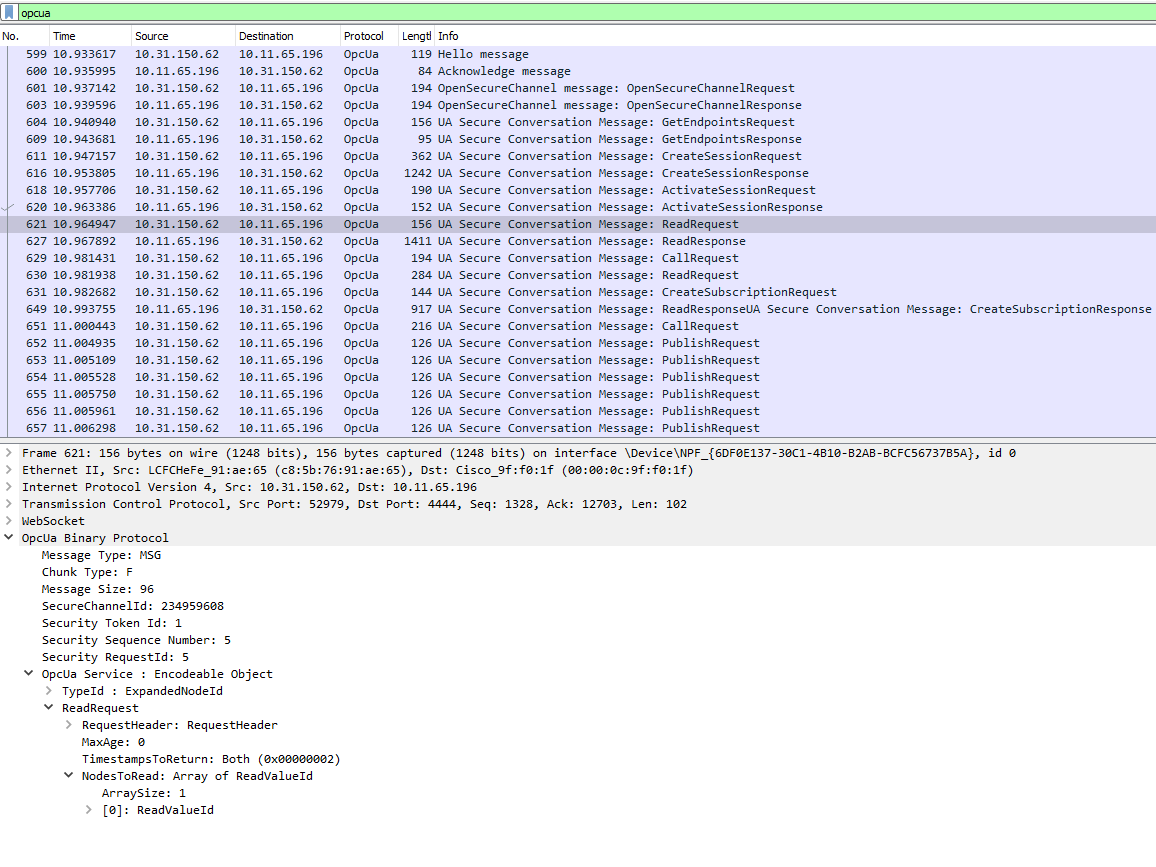
## Debugging With a secure connection
In order to inspect OPC-UA over WSS with wireshark you to decrypt the trafic first.
This can be done like described in [Using a pre-master secret key to decrypt SSL and TLS](https://www.comparitech.com/net-admin/decrypt-ssl-with-wireshark/#Using_a_pre-master_secret_key_to_decrypt_SSL_and_TLS)