# Annota — AI-Powered Paper Annotation Assistant
**Turn your PDF library into an intelligent research assistant.**
AI reads your papers, highlights key findings, explains formulas, and writes structured notes — all saved back to your reference manager.
[](LICENSE)
[](https://python.org)
[](https://modelcontextprotocol.io)
[]()
[Features](#-features) · [Quick Start](#-quick-start-3-minutes) · [Usage Examples](#-usage-examples) · [Screenshots](#-screenshots) · [Roadmap](#-roadmap)
---
## What Can It Do?
| You say... | AI does... |
|------------|------------|
| "高亮摘要中的发现结果" (Highlight findings in the abstract) | Reads the abstract, identifies findings, highlights them in green |
| "解释第3页的公式" (Explain the formulas on page 3) | Extracts the formula, adds an explanation as a note annotation |
| "写一份结构化阅读笔记" (Write a structured reading note) | Generates a note with contributions, methods, results, limitations — saved to your library |
| "以 MICRO 审稿人视角审阅" (Review as a MICRO reviewer) | Produces a structured review with scores and actionable feedback |
### AI reads the paper → understands content → creates precise annotations
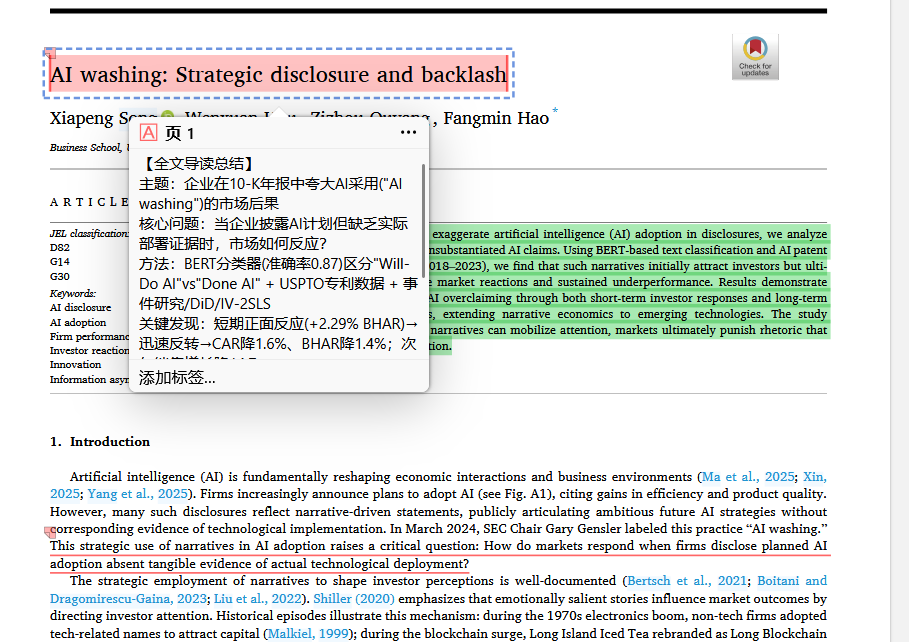
*AI generates a structured reading summary with key findings, methods, and conclusions*
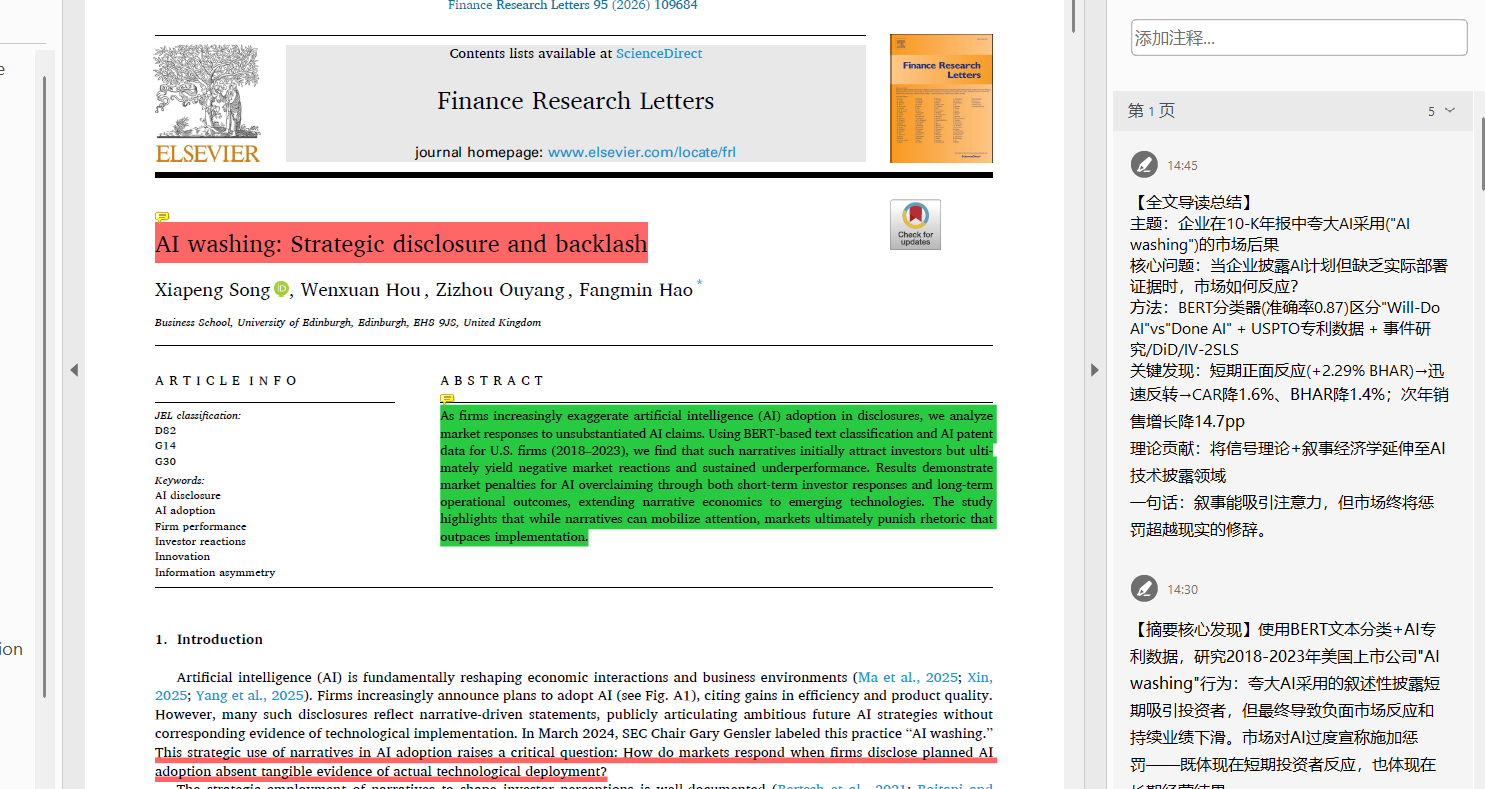 *AI identifies findings in the abstract and highlights them in green*
---
### Example 2: Annotate Hypotheses & Theories
**Input:**
```
标注论文中的假设(H1, H2),并用中文解释每个假设的理论基础
(Annotate the hypotheses (H1, H2) and explain the theoretical basis of each in Chinese)
```
**Result:**
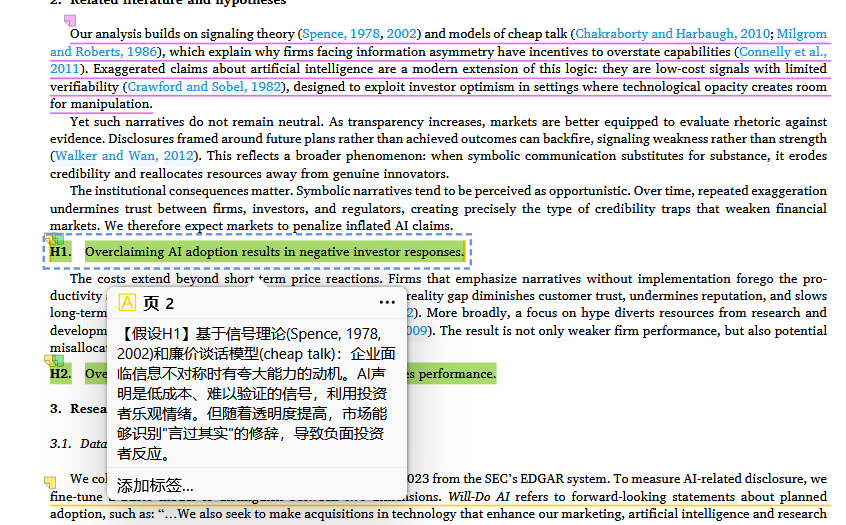 *Hypotheses highlighted in yellow, with Chinese explanation notes for the underlying theory*
---
### Example 3: Explain Formulas
**Input:**
```
解释论文中的核心公式,添加中文注释
(Explain the key formulas in this paper, add Chinese annotations)
```
**Result:**
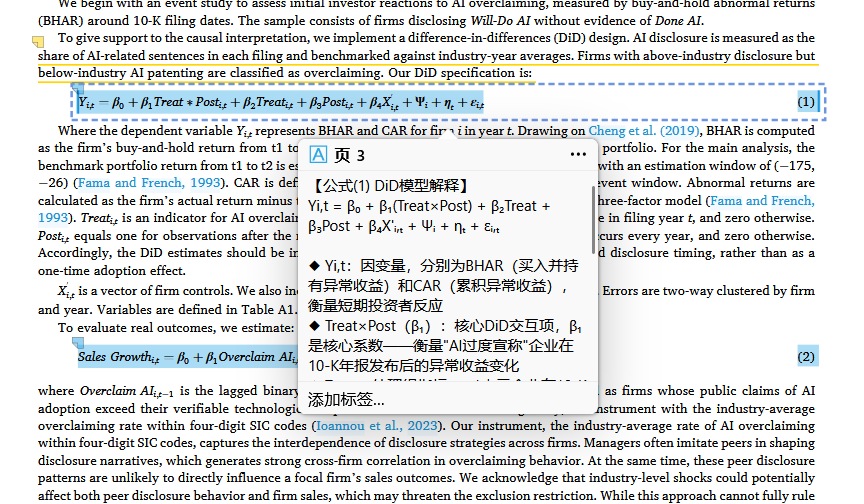 *DID model formula annotated with variable explanations in Chinese*
---
### Example 4: Policy Implications & Conclusion Notes
**Input:**
```
标注结论部分的政策启示,添加中文总结笔记
(Highlight policy implications in the conclusion, add a Chinese summary note)
```
**Result:**
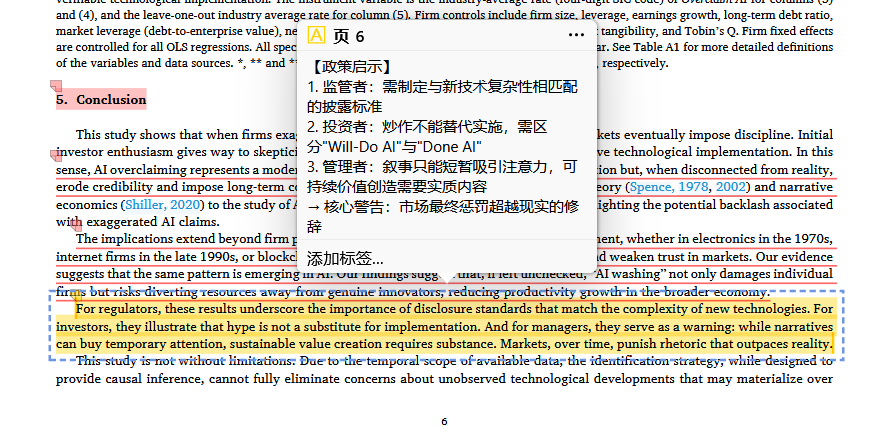 *Conclusion highlighted with a structured policy implications note*
---
### Example 5: Full Paper Reading Notes
**Input:**
```
/annota-summarize "path/to/paper.pdf"
```
**Result:**
*AI generates a complete reading summary: topic, research question, method, key findings, and implications*
---
### Example 6: Detailed Paragraph-by-Paragraph Notes
**Input:**
```
逐段阅读这篇论文,为每个重要段落添加中文批注
(Read this paper paragraph by paragraph, add Chinese annotations to each important section)
```
**Result:**
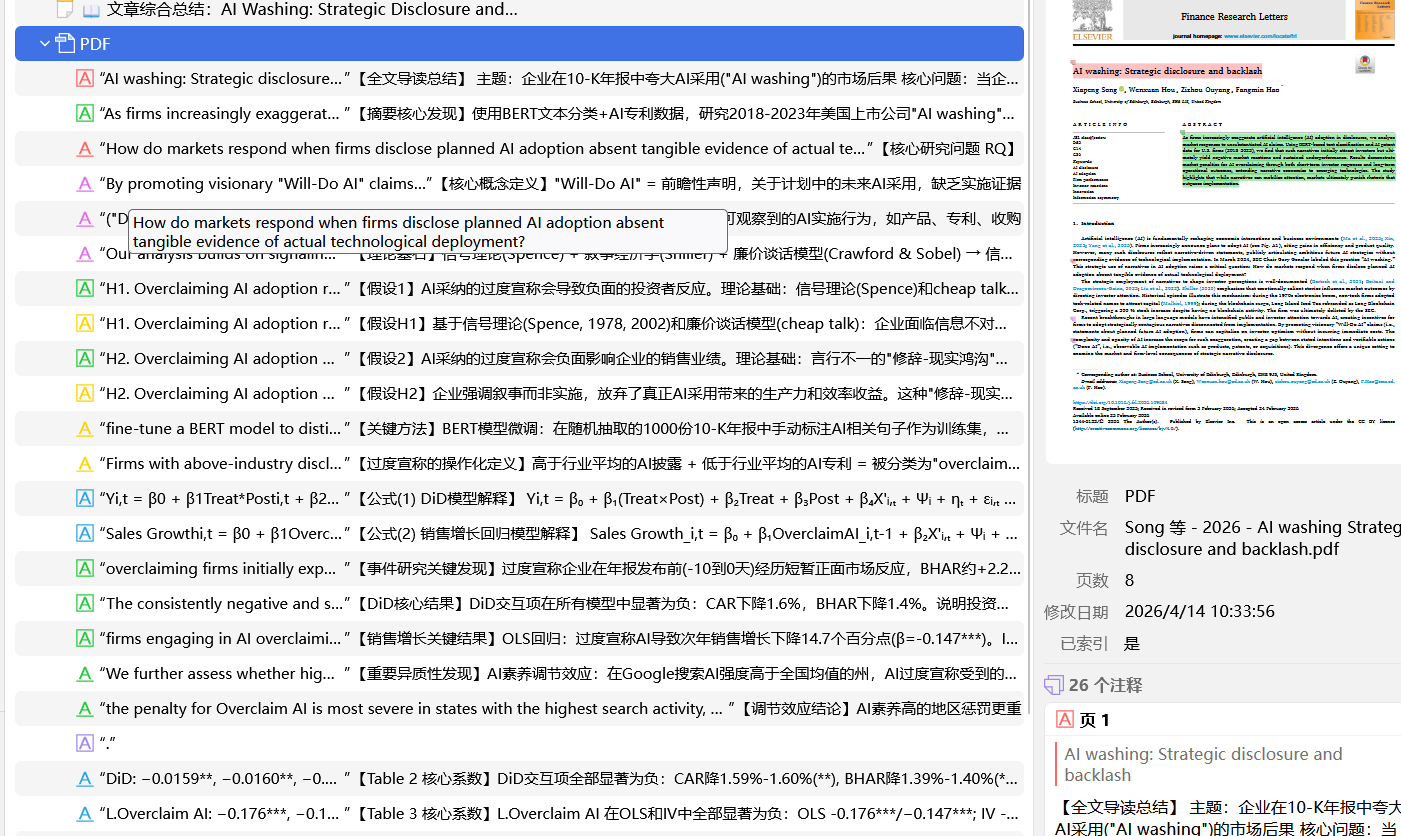 *Each important paragraph gets a Chinese annotation explaining the content*
---
### Example 7: The AI Workflow in Action
Here's what Claude Code looks like when processing a paper:
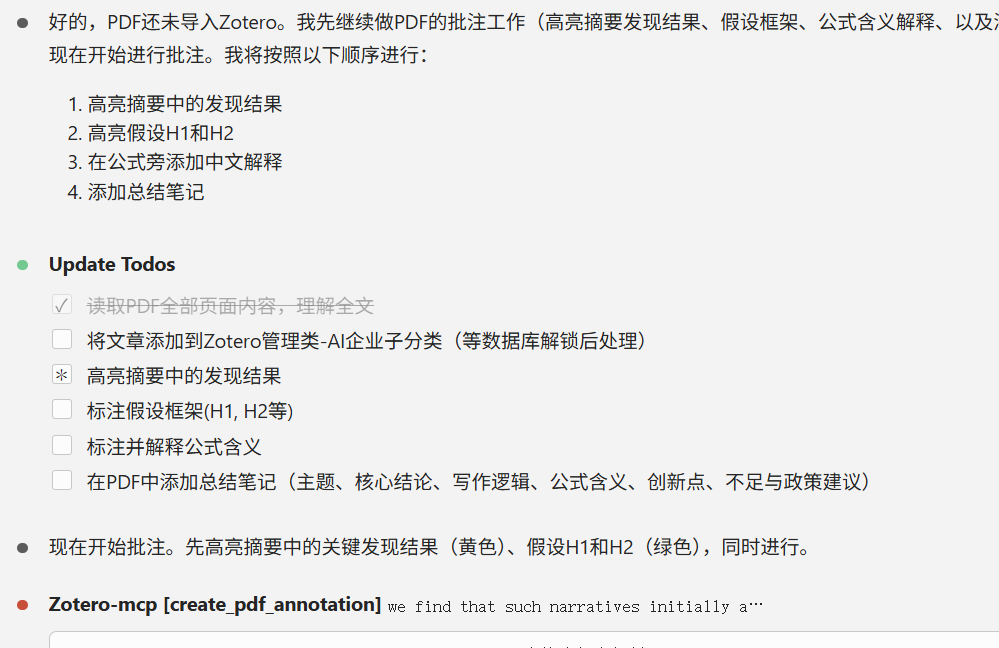 *Claude creates a task list, reads the PDF, and calls MCP tools to create annotations step by step*
---
## 🎨 Color Convention
| Color | Code | Use for |
|-------|------|---------|
| 🟡 Yellow | `#ffd400` | Default / general highlights |
| 🟢 Green | `#28CA42` | Results, findings, data |
| 🔵 Blue | `#2EA8E5` | Methods, definitions, algorithms |
| 🔴 Red | `#ff6666` | Limitations, issues, problems |
| 🟣 Purple | `#a28ae5` | Contributions, novelty |
---
## ⚡ How It Handles Large PDFs
For papers >10 pages, a **two-phase workflow** avoids context overflow:
```
Phase 1 — Understand (lightweight)
get_pdf_text_bulk(pdf, skip_refs=True)
→ Full text without coordinates
→ AI identifies which sentences to annotate
Phase 2 — Annotate (precise)
get_pdf_layout_text(pdf, target_page_only)
→ Coordinates for 1–2 target pages
batch_annotate(pdf, all_annotations)
→ Write everything in one call
```
**Real-world performance:**
| Paper | Pages | Old approach | New approach | Savings |
|-------|-------|-------------|-------------|---------|
| Conference paper | 2 pages | 41 KB coords | 15 KB text | **63%** |
| Journal article | 21 pages | 21 pages extracted | 13 pages (refs skipped at p.13) | **38%** |
| Survey paper | 19 pages | 19 pages extracted | 10 pages (refs skipped at p.10) | **47%** |
---
## 📁 Project Structure
```
annota/
├── annota/ # MCP Server (Python)
│ ├── server.py # 9 tool registrations
│ ├── zotero_db.py # SQLite read/write layer
│ ├── pdf_tools.py # PyMuPDF text extraction
│ └── config.py # Constants & configuration
├── .claude/skills/ # Claude Code Skills
│ ├── annota-annotate/SKILL.md # /annota-annotate
│ ├── annota-summarize/SKILL.md # /annota-summarize
│ └── annota-review/SKILL.md # /annota-review
├── docs/ # Design documents
│ ├── annota-guide.md # Usage guide (CN)
│ ├── large-pdf-design.md # Large PDF handling design
│ ├── dev-notes.md # Pitfalls & solutions
│ └── commercial-plan.md # Commercialization plan
├── assets/ # Screenshots
└── README.md
```
---
## ⚠️ Known Limitations & Disclaimer
> **Database Direct Access**: Annota writes annotations directly to the Zotero SQLite database, which [bypasses Zotero's internal consistency mechanisms](https://www.zotero.org/support/dev/client_coding/direct_sqlite_database_access). This is a design choice to enable **fully offline, local-first** annotation workflows without depending on external services. Users are responsible for their own database — **please back up your `zotero.sqlite` before use**. We plan to migrate to the official Zotero Web API / Local API in future versions.
| Limitation | Workaround | Planned Fix |
|-----------|------------|-------------|
| Direct SQLite write (not officially supported) | Back up your database before use | Migrate to Zotero Local API / Web API |
| Write ops need Zotero closed | Close Zotero before annotating | Local API bridge |
| References detection is heuristic | Pass `skip_refs=False` if needed | Improve heuristics |
| Tested primarily on Windows | Should work on macOS/Linux — paths auto-detected | Community testing welcome |
---
## 🗺 Roadmap
- [ ] **Zotero Local API / Web API** — Migrate from direct SQLite to official API for safer writes
- [ ] **More skills** — `/compare-papers`, `/extract-tables`, `/literature-map`
- [ ] **Prompt template marketplace** — Share and reuse annotation rules
- [ ] **Team features** — Shared annotation standards for lab groups
- [ ] **Multi-backend** — Support Adobe Acrobat, Endnote, and other PDF tools
---
## 🤝 Contributing
Issues and PRs are welcome! If you have ideas for new skills or tools, please open an issue.
## 📄 License
[MIT](LICENSE) — Use it freely for research and commercial projects.
---
**Built with [MCP](https://modelcontextprotocol.io) + [Claude Code](https://claude.ai/code)**
If this project helps your research, consider giving it a ⭐