 # QuoteWithMarker
**QuoteWithMarker** is a Sublime Text package that quotes the selected area and adds a custom marker to it.
| Repository | GitHub | Sublime Text |
| ------ | ------ | ------ |
|  |   |  |
|  |   |  |
|  |  |  |
|  |  |  |
| Status |
| ------ |
| [](https://github.com/dennykorsukewitz/Sublime-QuoteWithMarker/compare/1.0.2...dev)   |
## Feature
Sometimes you have to mark and comment code. Here is the QuoteWithMarker very helpful.
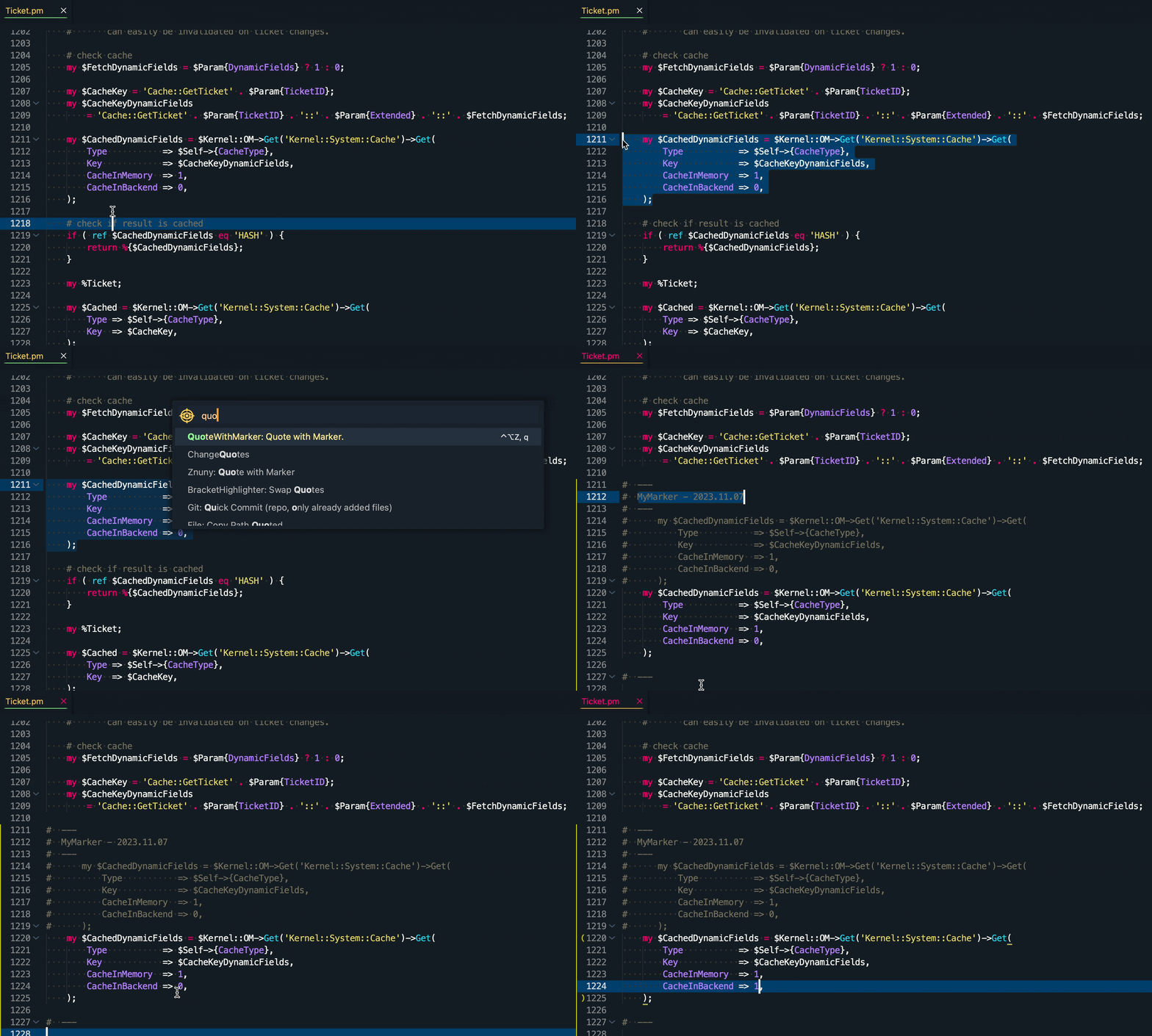
This function quotes the selected area and adds a custom marker to it.
This way you can still trace the original code.
There is also a start and end block for better display when merging.
`QuoteWithMarker` can be very useful especially for patch files.
**Shortcut:** ```strg + alt + k, q```
# QuoteWithMarker
**QuoteWithMarker** is a Sublime Text package that quotes the selected area and adds a custom marker to it.
| Repository | GitHub | Sublime Text |
| ------ | ------ | ------ |
|  |   |  |
|  |   |  |
|  |  |  |
|  |  |  |
| Status |
| ------ |
| [](https://github.com/dennykorsukewitz/Sublime-QuoteWithMarker/compare/1.0.2...dev)   |
## Feature
Sometimes you have to mark and comment code. Here is the QuoteWithMarker very helpful.
This function quotes the selected area and adds a custom marker to it.
This way you can still trace the original code.
There is also a start and end block for better display when merging.
`QuoteWithMarker` can be very useful especially for patch files.
**Shortcut:** ```strg + alt + k, q```
**Command:** ```QuoteWithMarker: Quote with Marker.```
### Settings
`Settings -> Package Settings -> Quote with Marker -> Settings`
| Name | Description | Default Value |
| - | - | - |
| code_marker | Code Marker used in QuoteWithMarker function. | `MyMarker - ${year}.${month}.${day}` |
---
## Installation
To install this package, you have **three** options:
### 1. Search Package via `Package Control`
Search and install online package via [Sublime Package Control](http://wbond.net/sublime_packages/package_control).
`Tools` -> `Command Palette` -> `Package Control: Install Package` -> simply search for `QuoteWithMarker` to install.
### 2. Install via sublime-package file
Download latest [sublime-package file](https://github.com/dennykorsukewitz/Sublime-QuoteWithMarker/releases) and move the package `QuoteWithMarker.sublime-package` to `Installed Packages` folder.
#### OSX
cd ~/Library/Application\ Support/Sublime\ Text\ 2/Installed Packages/
- or ST 3 -
cd ~/Library/Application\ Support/Sublime\ Text\ 3/Installed Packages/
#### Linux
cd ~/.config/sublime-text-2/Installed Packages
- or ST 3 -
cd ~/.config/sublime-text-3/Installed Packages
#### Windows
cd "%APPDATA%\Sublime Text 2\Installed Packages"
- or ST 3 -
cd "%APPDATA%\Sublime Text 3\Installed Packages"
### 3. Source code
Clone the latest [dev branch](https://github.com/dennykorsukewitz/Sublime-QuoteWithMarker) and unpack it to Sublime Package folder `Packages`.
#### OSX
cd ~/Library/Application\ Support/Sublime\ Text\ 2/Packages/
- or ST 3 -
cd ~/Library/Application\ Support/Sublime\ Text\ 3/Packages/
git clone git@github.com:dennykorsukewitz/Sublime-QuoteWithMarker.git QuoteWithMarker
#### Linux
cd ~/.config/sublime-text-2/Packages
- or ST 3 -
cd ~/.config/sublime-text-3/Packages
git clone git@github.com:dennykorsukewitz/Sublime-QuoteWithMarker.git QuoteWithMarker
#### Windows
cd "%APPDATA%\Sublime Text 2\Packages"
- or ST 3 -
cd "%APPDATA%\Sublime Text 3\Packages"
git clone git@github.com:dennykorsukewitz/Sublime-QuoteWithMarker.git QuoteWithMarker
---
## Download
For download see [Sublime-QuoteWithMarker](https://github.com/dennykorsukewitz/Sublime-QuoteWithMarker/releases)
---
Enjoy!
Your [Denny Korsukéwitz](https://github.com/dennykorsukewitz) 🚀