# xAPI Room Kit macro debugging template
[](./LICENSE) [](./CONTRIBUTING.md)
This repository contains a repository template that is helpful for developing and debugging your macros.
## Problem statement
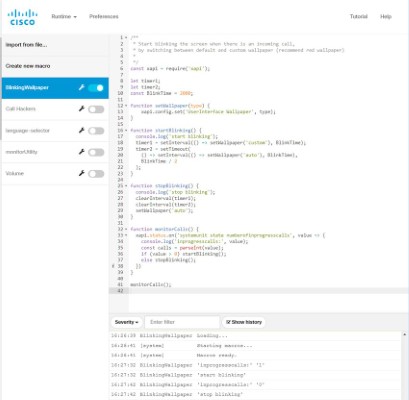
It's quite hard to write a good macro for a Cisco Room Kit CE device.
- You need to log in to the device and write your code in the browser.
- CE Macro Editor is too simple.
- It doesn't provide you any debugging capabilities.
- It's complaining about `async`/`await` and confusing you with errors.
- You need to copy-paste the code all the time to store it as a file and commit your macros to Git repository.
## Solution
**Just copy the contents of current repository.**
And you will be able to:
1. Keep your macros in files. It makes easy to commit your changes to GIT for change history.

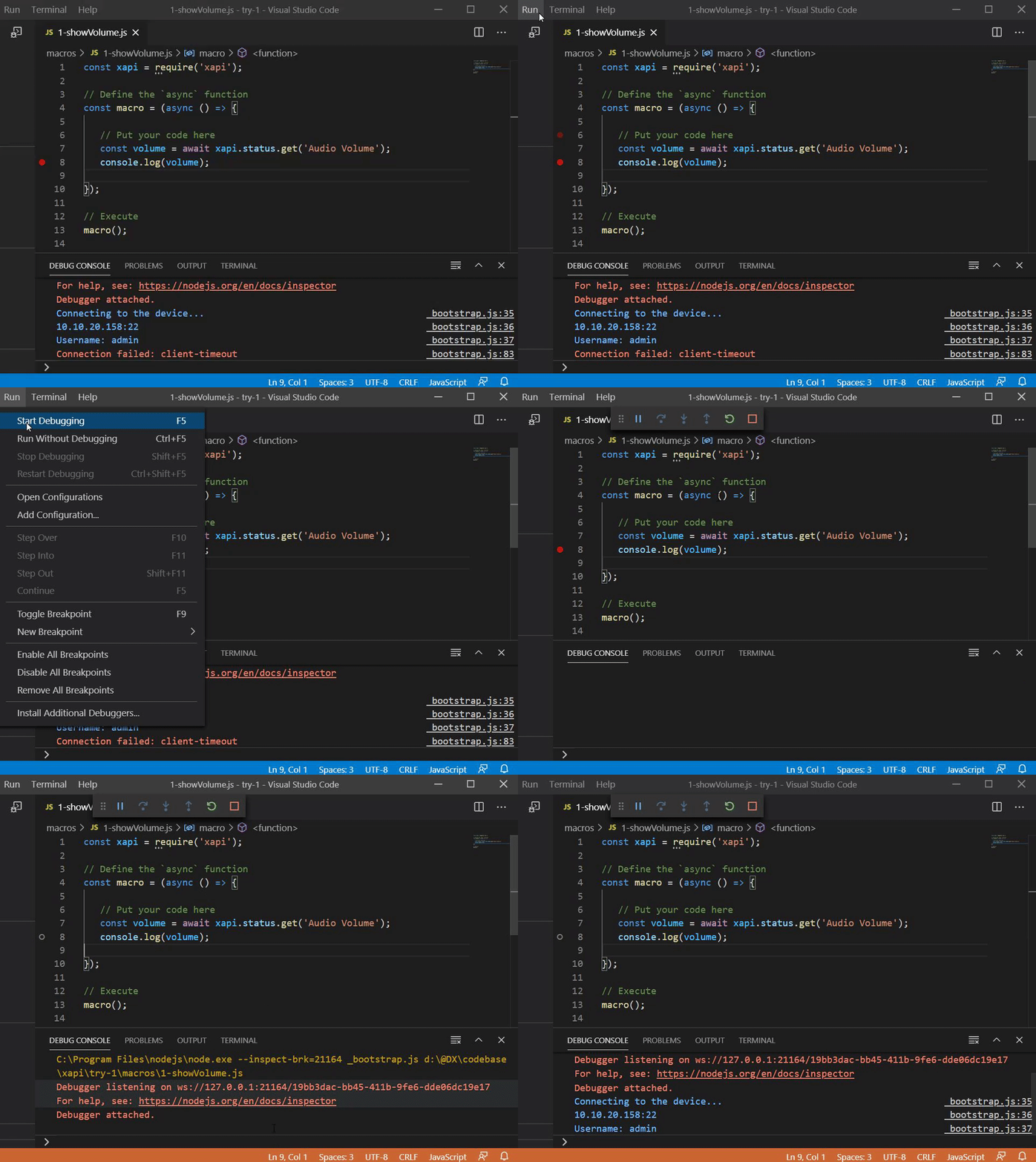
2. Run your macros from your local machine in Visual Studio Code.
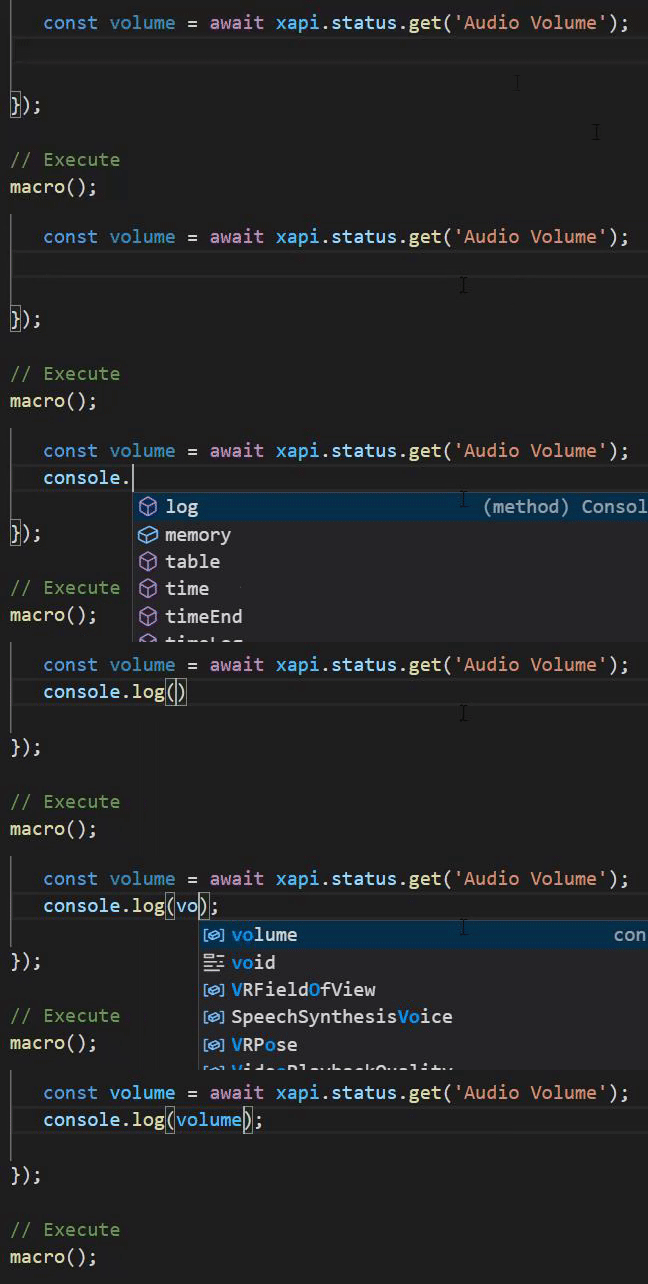
3. Use code completion for JavaScript in Visual Studio Code.
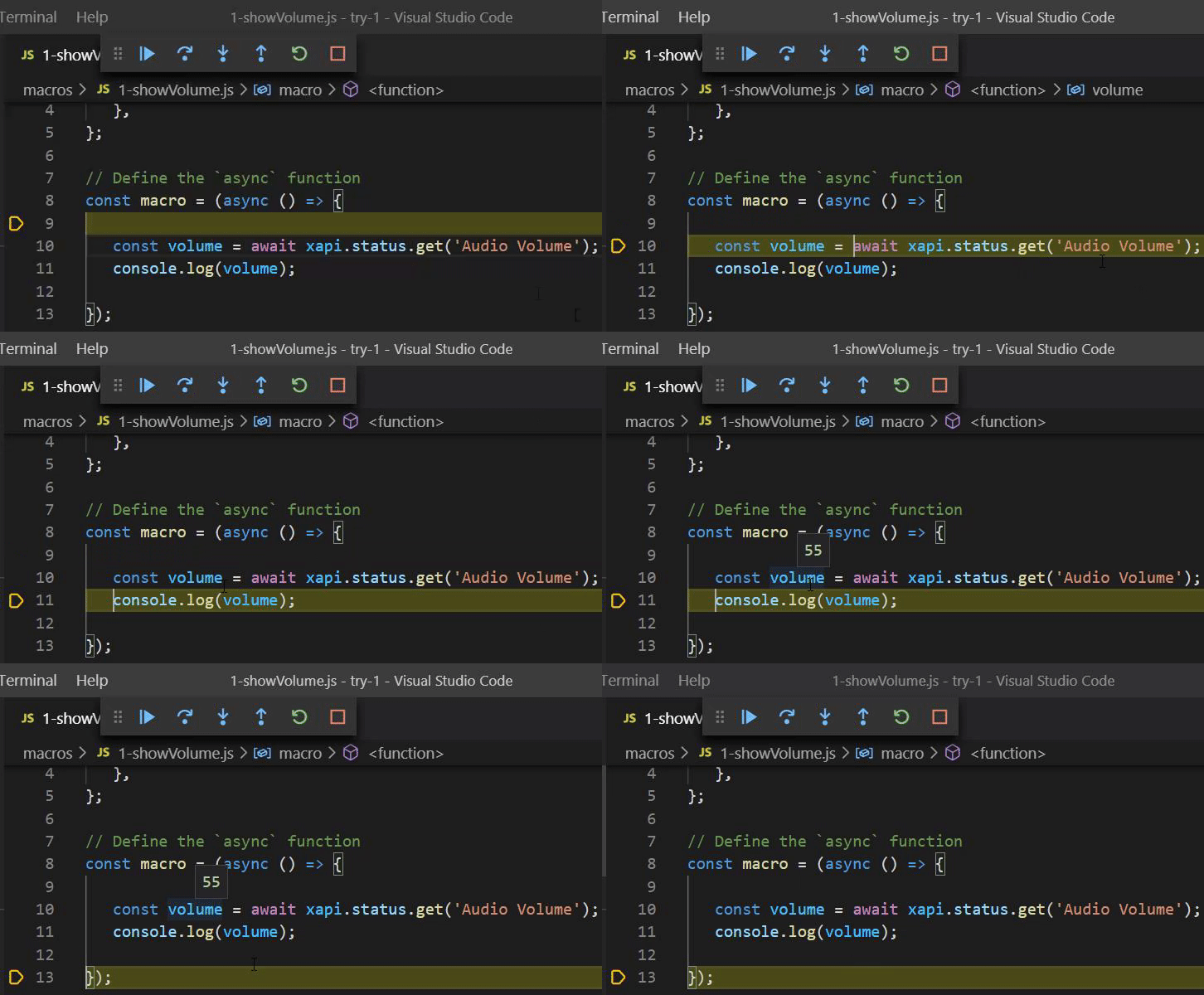
4. Debug your macros:
- Step-by-step execution.
- Observe current variable values.
- Put a breakpoint to stop the execution and to see what is going on.
5. Use `await` for promises to simplify your code.

## How to
### Prerequisites
1. Install Visual Studio Code with JavaScript support:
 Visual Studio Code
https://code.visualstudio.com/download
2. Install Node.js with NPM:
Visual Studio Code
https://code.visualstudio.com/download
2. Install Node.js with NPM:
 https://nodejs.org/en/download/
3. Prepare files (or **use Yeoman template, see below**):
- Create empty directory.
- Copy all the files from current repository there.
4. Run `npm install` in the directory (only once).
### Yeoman template
https://nodejs.org/en/download/
3. Prepare files (or **use Yeoman template, see below**):
- Create empty directory.
- Copy all the files from current repository there.
4. Run `npm install` in the directory (only once).
### Yeoman template
 If you don't want to copy files, you can use a Yeoman template:
**generator-xapi-roomkit-macro-debugging**
[](https://github.com/dev-experience/generator-xapi-roomkit-macro-debugging/blob/master/LICENSE) [](https://www.npmjs.com/package/generator-xapi-roomkit-macro-debugging)
https://github.com/dev-experience/generator-xapi-roomkit-macro-debugging
1. Install [Yeoman](https://yeoman.io) globally:
Run `npm install -g yo`.
2. Install the template globally:
Run `npm install -g generator-xapi-roomkit-macro-debugging`.
3. Create an empty directory.
4. Scaffold a template into that directory.
- Switch to the directory.
- Run `yo xapi-roomkit-macro-debugging`.
### Develop and debug
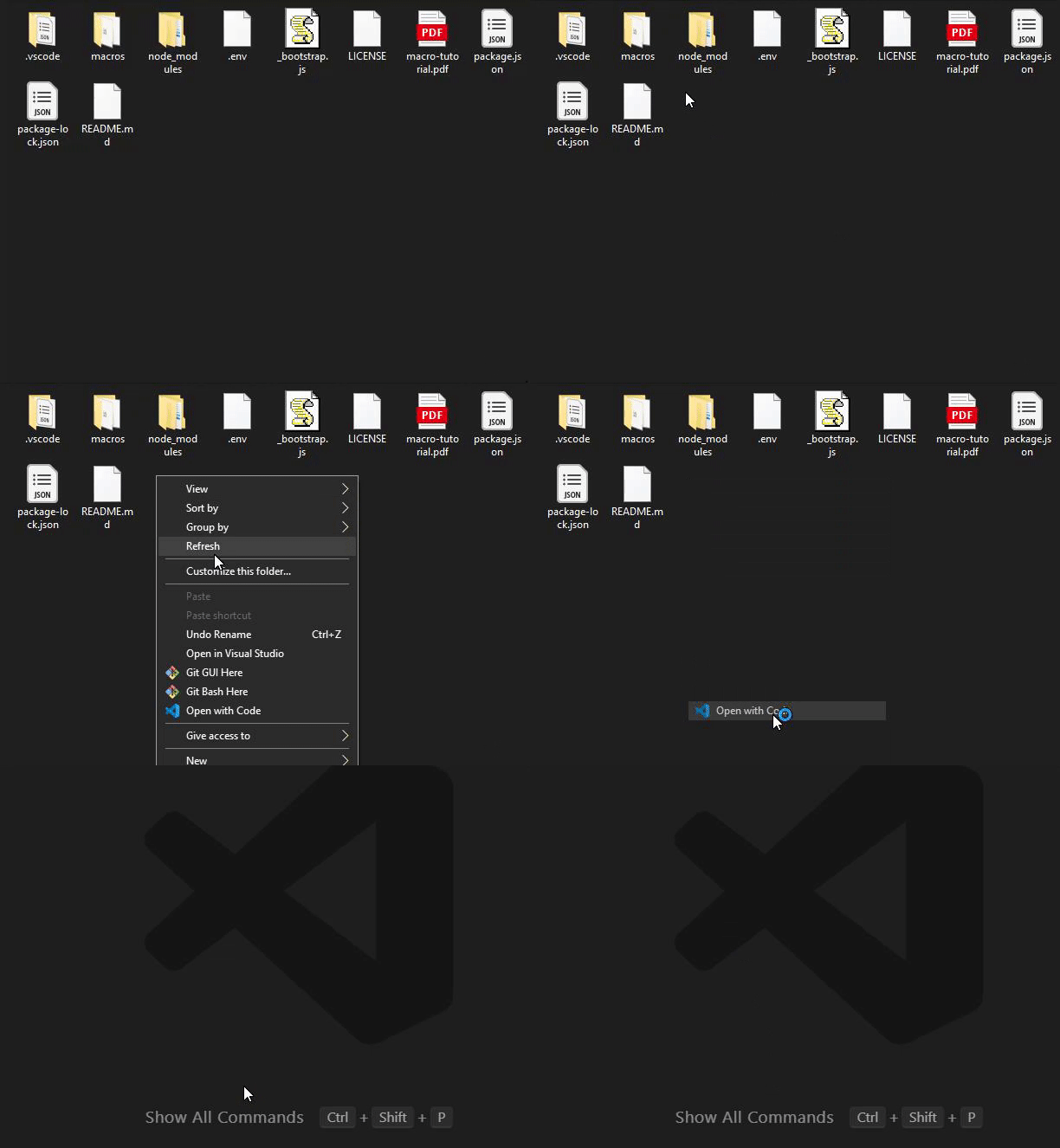
- Open the directory in Visual Studio Code.
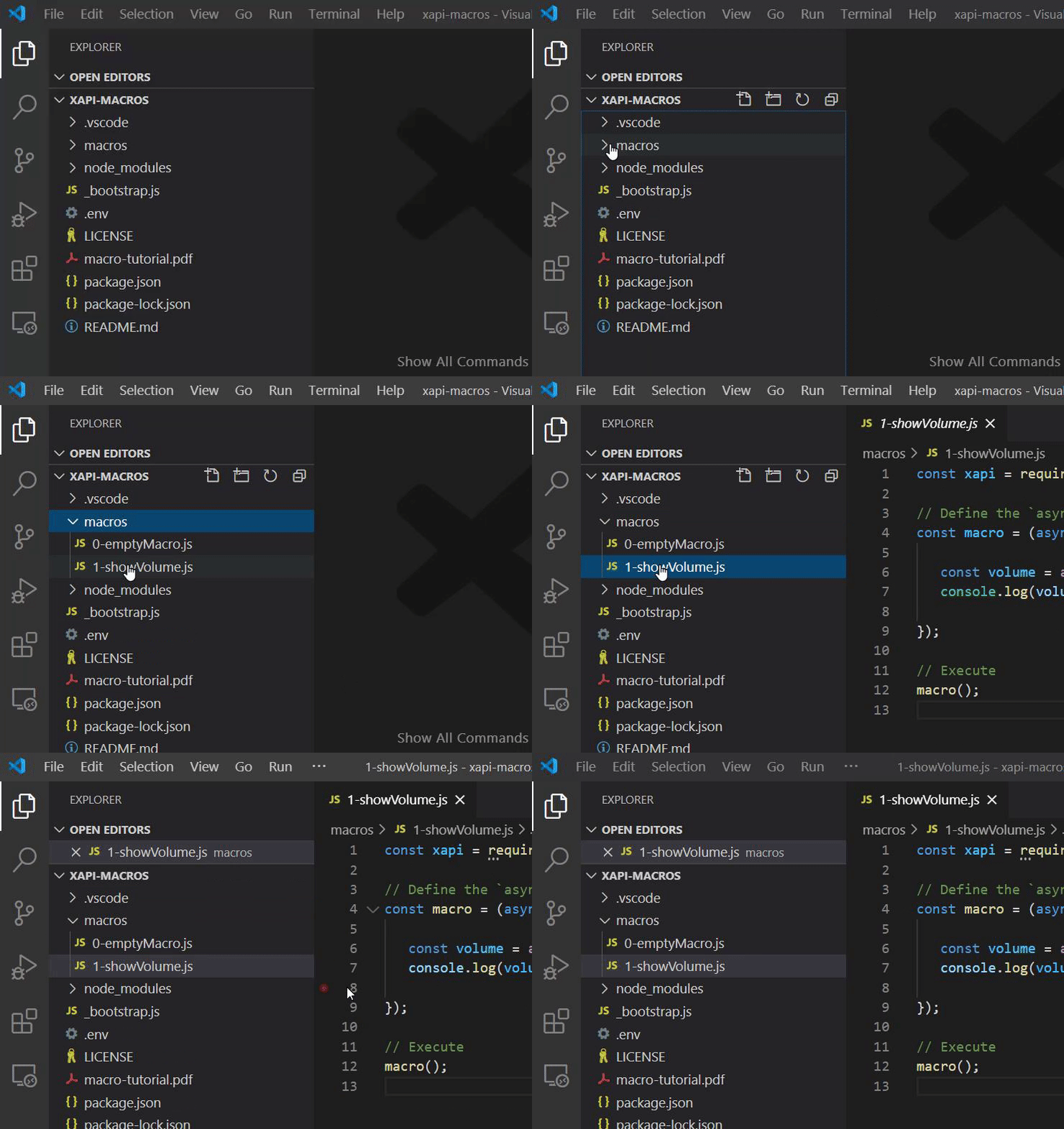
- Open sample macro './macros/1-showVolume.js'.
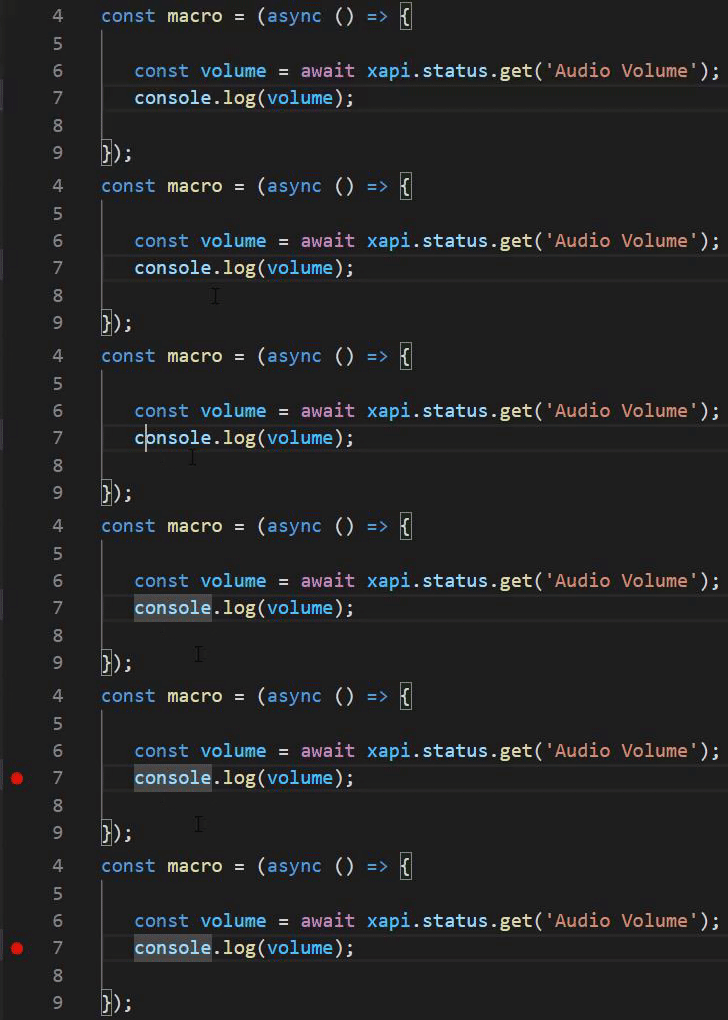
- Put a breakpoint on any `console.log(...)` statement by pressing 'F9'.
- Run debugging by pressing 'F5' while you are in the tab with a macro you want to debug
- Visual Studio Code will run special script '_bootstrap.js' by `node`.
- Script will load `xapi` and will check environment variables required to connect to the device to execute macro.
- Script will load you macro and run it.
- All output from the macro will be visible in Debug Console in Visual Studio Code.

- Enjoy the debugging with:
- Step-by-step execution (press 'F10' to advance), watching variable values (hover a variable by mouse).

- Simple promises handling with `await` and without `.then()`:
```javascript
const volume = await xapi.status.get('Audio Volume');
const nbActiveCalls = await xapi.status.get('SystemUnit State NumberOfActiveCalls');
const doNotDisturbStatus = await xapi.status.get('Conference DoNotDisturb');
const tandbyState = await xapi.status.get('Standby State');
const peopleCount = await xapi.status.get('RoomAnalytics PeopleCount Current');
```
instead of
```javascript
xapi.status.get('Audio Volume').then(volume => {
xapi.status.get('SystemUnit State NumberOfActiveCalls').then(nbActiveCalls => {
xapi.status.get('Conference DoNotDisturb').then(doNotDisturbStatus => {
xapi.status.get('Standby State').then(tandbyState => {
xapi.status.get('RoomAnalytics PeopleCount Current').then(peopleCount => {
// ...
});
});
});
});
});
```

## Learn
### "Writing xAPI Macros 101"
Check out a mini-course "Writing xAPI Macros 101" on YouTube:
[Playlist]
[Presentation]
### "JavaScript for xAPI Macros 101"
[Playlist]
## Files in current repo
- *README.md*
Current file
- *package.json*
Metadata and dependencies definition. Run `npm install` once to install `jsxapi`.
- *.gitignore*
Excludes particular files and directories from GIT commits. Help to make your repository clean and tidy.
- *.vscode/launch.json*
Launch configuration for Visual Studio Code. Enables debugging by 'F5'
- *_bootstrap.js*
Script which is being executed when you press 'F5'.
Helps to load `xapi`, check environment variables, connects to the device, loads the macro for debugging
- *.env*
Helps you to set device URL, username, and password to connect to the device.
File is added to `.gitignore`, so you will not accidentially commit the password to a GIT repository.
- *macros/*
**Put all your macros there**
- *macros/1-shouwVolume.js*
Sample macro to check out debugging capabilities
- *macros/0-emptyMacro.js*
**Copy this one to create your new macro**
- *docs/*
Documentation files
- *macro-tutorial.pdf*
Cisco Macro Scripting Tutorial
## Additional resources
1. Handy samples for xAPI Macros
[https://developer.cisco.com/codeexchange/github/repo/CiscoDevNet/xapi-samples](https://developer.cisco.com/codeexchange/github/repo/CiscoDevNet/xapi-samples)
[](https://developer.cisco.com/codeexchange/github/repo/CiscoDevNet/xapi-samples)
2. New to xAPI Macros?
- Check the [QuickStart Guide](./docs/QuickStart.md) to learn to load Controls and Macros to your device.
- Take a DevNet Tutorial from the xAPI track (intro to xAPI and creating custom UI Extensions).
3. Don't have a CE device at hand to mess up with?
- Reserve a [DevNet sandbox](https://github.com/CiscoDevNet/awesome-xapi/#sandboxes) equiped with CE latest.
4. Going further
Once you're done browsing the examples in this repo, here are a few suggestions
- Check the [official Macro Samples repository](https://github.com/CiscoDevNet/roomdevices-macros-samples).
- Load the [Postman collection for xAPI](https://github.com/CiscoDevNet/postman-xapi) to invoke the xAPI from code external to the Room Device.
- Read through the full [CE Customization PDF Guide](https://www.cisco.com/c/dam/en/us/td/docs/telepresence/endpoint/ce99/collaboration-endpoint-software-api-reference-guide-ce99.pdf).
- Check for the curated list of resources at [awesome-xapi](https://github.com/CiscoDevNet/awesome-xapi).
If you don't want to copy files, you can use a Yeoman template:
**generator-xapi-roomkit-macro-debugging**
[](https://github.com/dev-experience/generator-xapi-roomkit-macro-debugging/blob/master/LICENSE) [](https://www.npmjs.com/package/generator-xapi-roomkit-macro-debugging)
https://github.com/dev-experience/generator-xapi-roomkit-macro-debugging
1. Install [Yeoman](https://yeoman.io) globally:
Run `npm install -g yo`.
2. Install the template globally:
Run `npm install -g generator-xapi-roomkit-macro-debugging`.
3. Create an empty directory.
4. Scaffold a template into that directory.
- Switch to the directory.
- Run `yo xapi-roomkit-macro-debugging`.
### Develop and debug
- Open the directory in Visual Studio Code.

- Open sample macro './macros/1-showVolume.js'.

- Put a breakpoint on any `console.log(...)` statement by pressing 'F9'.

- Run debugging by pressing 'F5' while you are in the tab with a macro you want to debug
- Visual Studio Code will run special script '_bootstrap.js' by `node`.
- Script will load `xapi` and will check environment variables required to connect to the device to execute macro.
- Script will load you macro and run it.
- All output from the macro will be visible in Debug Console in Visual Studio Code.

- Enjoy the debugging with:
- Step-by-step execution (press 'F10' to advance), watching variable values (hover a variable by mouse).

- Simple promises handling with `await` and without `.then()`:
```javascript
const volume = await xapi.status.get('Audio Volume');
const nbActiveCalls = await xapi.status.get('SystemUnit State NumberOfActiveCalls');
const doNotDisturbStatus = await xapi.status.get('Conference DoNotDisturb');
const tandbyState = await xapi.status.get('Standby State');
const peopleCount = await xapi.status.get('RoomAnalytics PeopleCount Current');
```
instead of
```javascript
xapi.status.get('Audio Volume').then(volume => {
xapi.status.get('SystemUnit State NumberOfActiveCalls').then(nbActiveCalls => {
xapi.status.get('Conference DoNotDisturb').then(doNotDisturbStatus => {
xapi.status.get('Standby State').then(tandbyState => {
xapi.status.get('RoomAnalytics PeopleCount Current').then(peopleCount => {
// ...
});
});
});
});
});
```

## Learn
### "Writing xAPI Macros 101"
Check out a mini-course "Writing xAPI Macros 101" on YouTube:
[Playlist]
[Presentation]
### "JavaScript for xAPI Macros 101"
[Playlist]
## Files in current repo
- *README.md*
Current file
- *package.json*
Metadata and dependencies definition. Run `npm install` once to install `jsxapi`.
- *.gitignore*
Excludes particular files and directories from GIT commits. Help to make your repository clean and tidy.
- *.vscode/launch.json*
Launch configuration for Visual Studio Code. Enables debugging by 'F5'
- *_bootstrap.js*
Script which is being executed when you press 'F5'.
Helps to load `xapi`, check environment variables, connects to the device, loads the macro for debugging
- *.env*
Helps you to set device URL, username, and password to connect to the device.
File is added to `.gitignore`, so you will not accidentially commit the password to a GIT repository.
- *macros/*
**Put all your macros there**
- *macros/1-shouwVolume.js*
Sample macro to check out debugging capabilities
- *macros/0-emptyMacro.js*
**Copy this one to create your new macro**
- *docs/*
Documentation files
- *macro-tutorial.pdf*
Cisco Macro Scripting Tutorial
## Additional resources
1. Handy samples for xAPI Macros
[https://developer.cisco.com/codeexchange/github/repo/CiscoDevNet/xapi-samples](https://developer.cisco.com/codeexchange/github/repo/CiscoDevNet/xapi-samples)
[](https://developer.cisco.com/codeexchange/github/repo/CiscoDevNet/xapi-samples)
2. New to xAPI Macros?
- Check the [QuickStart Guide](./docs/QuickStart.md) to learn to load Controls and Macros to your device.
- Take a DevNet Tutorial from the xAPI track (intro to xAPI and creating custom UI Extensions).
3. Don't have a CE device at hand to mess up with?
- Reserve a [DevNet sandbox](https://github.com/CiscoDevNet/awesome-xapi/#sandboxes) equiped with CE latest.
4. Going further
Once you're done browsing the examples in this repo, here are a few suggestions
- Check the [official Macro Samples repository](https://github.com/CiscoDevNet/roomdevices-macros-samples).
- Load the [Postman collection for xAPI](https://github.com/CiscoDevNet/postman-xapi) to invoke the xAPI from code external to the Room Device.
- Read through the full [CE Customization PDF Guide](https://www.cisco.com/c/dam/en/us/td/docs/telepresence/endpoint/ce99/collaboration-endpoint-software-api-reference-guide-ce99.pdf).
- Check for the curated list of resources at [awesome-xapi](https://github.com/CiscoDevNet/awesome-xapi).