




Browse public **Agent Skills** (`SKILL.md` format) by theme in a collapsible terminal tree or a local web interface. Tick several and install them together through [`npx skills add`](https://github.com/vercel-labs/skills). Installed skills start ticked: untick one to uninstall it.
🤖 Visit [Website](https://skillsatlas.replit.app/).
- **Find**: about 75,000 skills from skills.sh, claude-plugins.dev and Smithery, in 20 themes, plus [★ Recommended](#recommended-skills) repositories, [🔥 Trending](#trending) skills and [📦 Packs](#packs) to install as a block.
- **Check before installing**: read any skill's `SKILL.md` with `p`, with a [risk check](#risk-check) that points at what it runs, reads or sends. A skill that would [replace another of the same name](#installed-skills) is flagged before anything runs.
- **Keep up to date**: installed skills are detected and ticked; untick to uninstall, press `u` to [update](#installed-skills) the outdated ones, and see [which agent has what](#usage).
- **Share**: `export` and `import` a selection, or commit a [`skills-atlas.json`](#a-projects-skills-skills-atlasjson) so that `skills-atlas sync` gives every teammate the same skills.
- **From your agent**: a skill, an MCP server and a Claude Code plugin let [Claude and other agents](#from-claude-and-other-agents) search, read and install skills for you.
- **Everywhere**: 79 agents, a terminal tree and a [web page](#web-interface), nine languages, [shell completion](#usage), and it works offline.
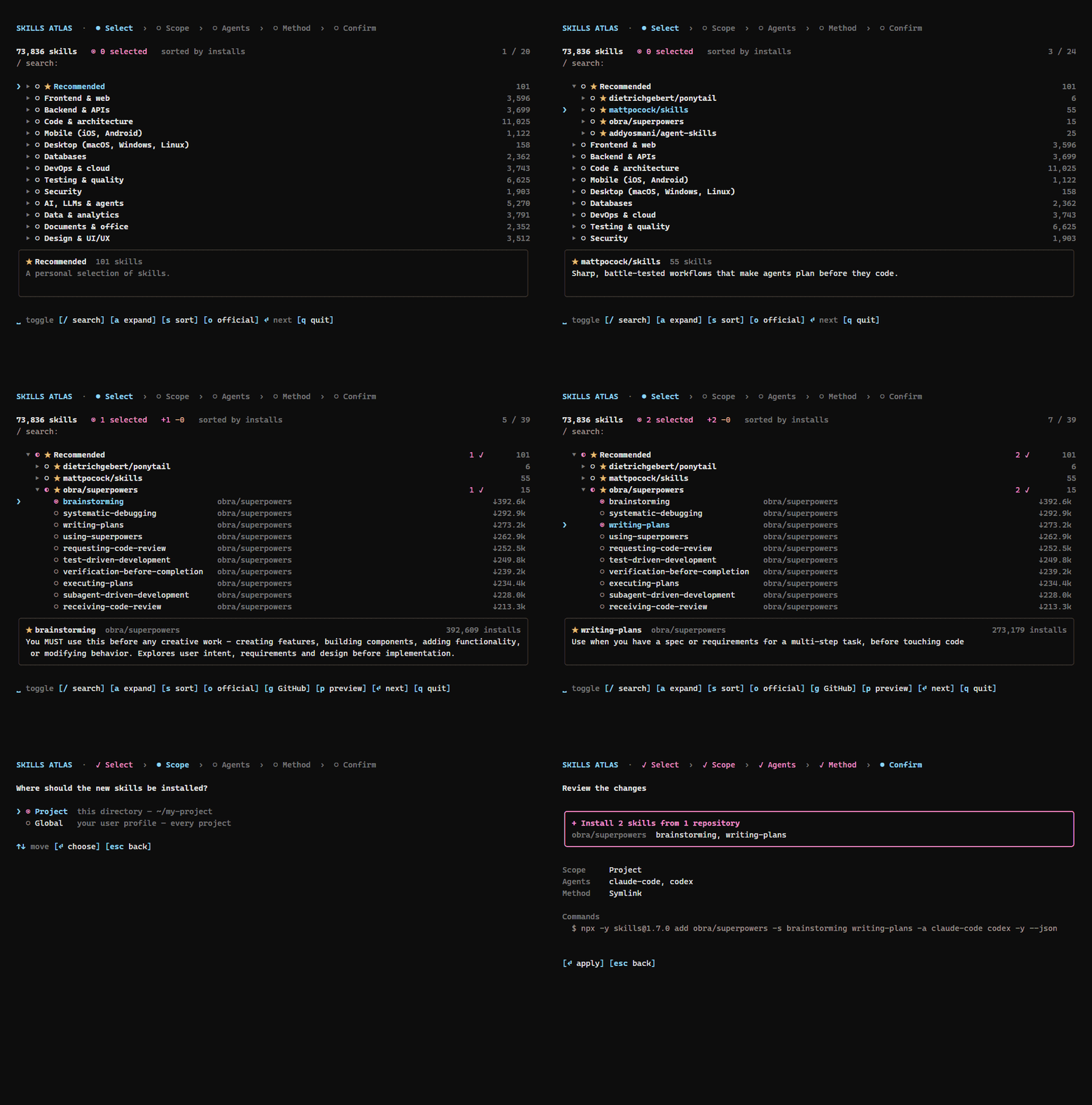
*A session: tick skills in ★ Recommended, read a `SKILL.md` with `p`, then review the `npx skills` command. [Try the web interface online](https://devohmycode.github.io/Skills-Atlas/demo/), nothing installs there.*
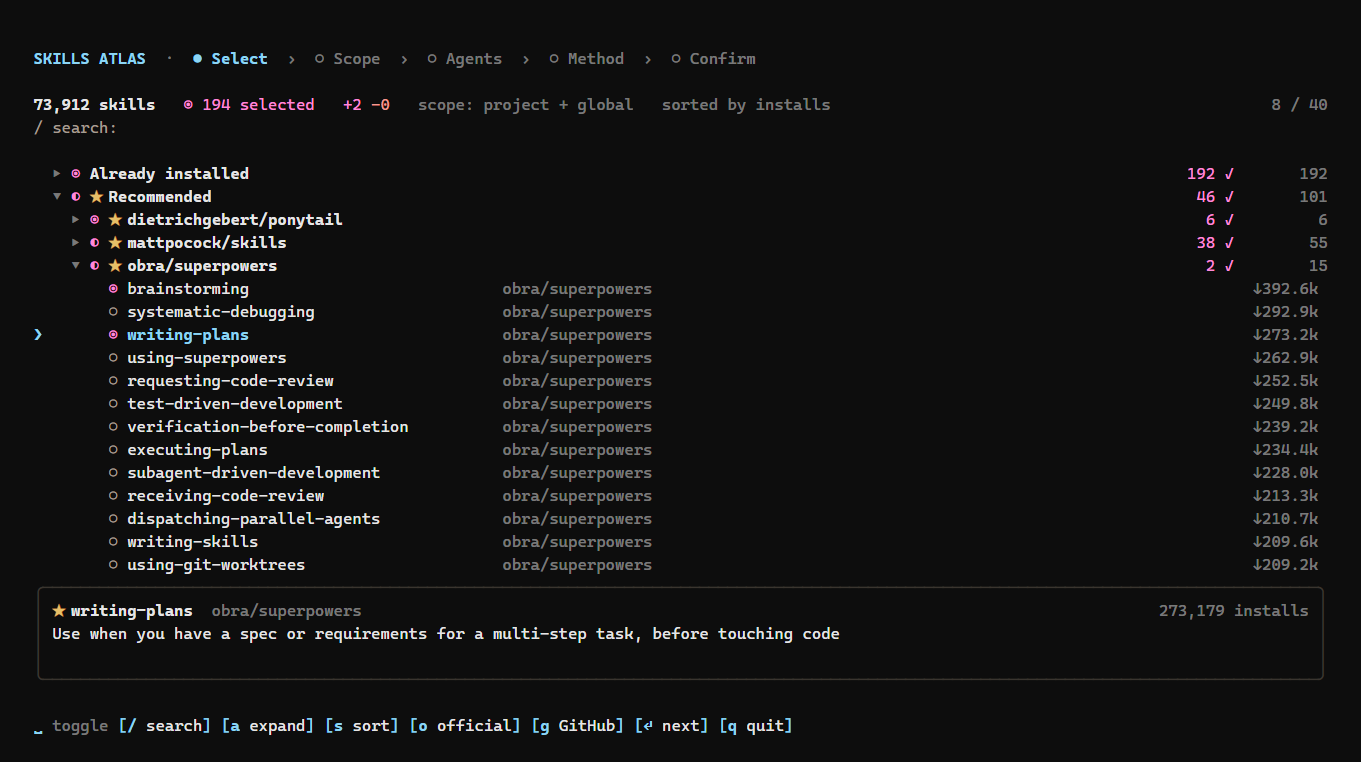
*Terminal: installed skills ticked, ★ Recommended opened by repository, candy-pink selections.*
## Installation
```bash
npx skills-atlas # or: npm i -g skills-atlas
```
Node ≥ 20. A catalog snapshot ships inside the package, so it works offline; online, the CLI fetches the latest snapshot, rebuilt every other day (see [The catalog](#the-catalog)).
### Updating
```bash
npm i -g skills-atlas@latest # global install
skills-atlas --version # check the installed version
npx skills-atlas@latest # with npx, which may otherwise run a cached older version
npx clear-npx-cache # if npx still runs the old version
```
The catalog updates on its own, without a new version: the CLI checks for a newer snapshot at most every 12 hours. `skills-atlas --refresh` checks now.
## Usage
```bash
skills-atlas # interactive: tree → scope → options → confirm, then back to the tree
skills-atlas browse -t security -q audit # tree pre-filtered by theme and text
skills-atlas browse -a claude-code cursor -g # options given as flags are not asked; -g/-p also limits the tree to that scope
skills-atlas themes # themes and their skill counts
skills-atlas list -t databases -n 10 # non-interactive listing (--json available)
skills-atlas agents # ids accepted by --agent (★ = detected here)
skills-atlas install anthropics/skills@pdf supabase/agent-skills@supabase -a claude-code -p -y
skills-atlas ui # the same in your browser, with the mouse
skills-atlas export > my-skills.json # installed skills as a selection file (-g / -p for one scope)
skills-atlas import my-skills.json -a claude-code -g # install the same skills on another machine or project
skills-atlas show obra/superpowers@brainstorming # a skill's SKILL.md, read from GitHub (--json available)
skills-atlas outdated # global skills with a newer version on GitHub (--json available)
skills-atlas update # update them all (or name some; --dry-run available)
skills-atlas rollback # reinstall the version it had before its last update (--list, --to )
skills-atlas mcp # MCP server on stdio, for Claude and other agents
skills-atlas installed -a claude-code codex # installed skills by agent: what each one sees (--json available)
skills-atlas packs # curated packs: frontend, security, quality, writing
skills-atlas install --pack security -a claude-code -g # install a whole pack
skills-atlas sync # install what this project's skills-atlas.json lists and is missing
skills-atlas completion bash # shell completion script (bash, zsh, fish, powershell)
```
**Shell completion** completes commands, options, skill ids, agents, themes and languages. Load it from your shell's startup file:
| Shell | Line to add |
|---|---|
| bash (`~/.bashrc`) | `eval "$(skills-atlas completion bash)"` |
| zsh (`~/.zshrc`) | `eval "$(skills-atlas completion zsh)"` |
| fish (`~/.config/fish/config.fish`) | `skills-atlas completion fish \| source` |
| PowerShell (`$PROFILE`) | `skills-atlas completion powershell \| Out-String \| Invoke-Expression` |
It needs `skills-atlas` installed (`npm i -g skills-atlas`), not run through npx. Skill ids come from the cached catalog, so Tab never waits for the network.
`export` writes the installed skills that have a GitHub source as `{ "skillsAtlas": 1, "skills": ["owner/repo@skill", …] }`; home-made skills are listed on stderr and left out. `import` takes the same options as `install` and asks for what they leave open. A selection file is checked before anything runs: a malformed id, or a name that could pass for a flag, stops the import.
When a newer skills-atlas is published, a dim line says so above the tree and under the `ui` address. npm is asked at most once a day, in the background, so it never slows the start; `--offline` skips it.
### Risk check
The `SKILL.md` preview (`p`), `skills-atlas show` and the MCP server's `show_skill` point at what a skill asks for beyond its description:
| Level | Warning sign |
|---|---|
| high | downloads and runs code (`curl … \| sh`, `base64 -d \| sh`), reads or sends credential files (`~/.ssh`, `~/.aws`…), deletes broadly (`rm -rf ~`), asks the agent to hide things from the user or ignore its instructions |
| medium | needs a program missing from this machine, runs commands as administrator, reads secrets from the environment, sends data to a server |
| info | installs or runs packages or bundled scripts, states its requirements |
The catalog already carries them for the 3,000 most installed skills, read at each crawl, with the day their folder last changed for the top 1,000: the tree's details show `needs gh, ✗ jq` (missing programs in red), the `compatibility` text and `updated 2026-09-30`; the web page shows the same as tags, and MCP's `search_skills` returns `requires` and `updated_at`. Prerequisites come from the frontmatter: the programs listed under `requires.bins` (OpenClaw metadata) are looked up on your `PATH`, and the spec's `compatibility` text (agent versions, tools, network) is shown as is. A missing program does not block the install, but the review screen and `install -y` name it before any command runs. Skills rarely declare either field, so no warning does not mean nothing is needed.
It is a pattern check on the text, tuned on the 150 most installed skills: it points at lines worth reading, it does not prove a skill safe. `show` prints the warning signs on stderr, so that stdout stays the `SKILL.md` alone; `show --json` adds them as `risks`.
**The security audit** runs this check before every install and update, on the `SKILL.md` and on the other text files of the skill folder (scripts, references, configs: up to 30 files of 64 KB, listed with one GitHub call per repository), since a script the skill runs can hold what its `SKILL.md` does not show. Each finding names its file (`scripts/setup.sh:12`); binaries, larger files and files that could not be read are listed as *not audited*, never as passed. `show` and the MCP server's `show_skill` report the same. A skill **fails** it with at least one high warning sign; medium ones are shown and do not block.
- **In the tree and with `install`'s questions**, the review screen lists the skills that fail, **unticked**: they are left out. Read one (`p` in the list, or `skills-atlas show `), then tick it with space to install it anyway.
- **Without a person at the keyboard** (`install -y`, `import`, `sync`, `update`), a failing skill is left out with its warning signs printed; `--no-audit` installs it anyway.
- **Through the MCP server**, `install_skills` refuses a failing skill and tells the agent why; it passes only with `ignore_audit: true`, which the agent is told to send only after the user's yes.
`skills-atlas audit off` turns the audit off for good, `skills-atlas audit on` turns it back on, and `--no-audit` skips it for one command. A `SKILL.md` that cannot be read is reported as not audited, not as failing.
### Packs
A pack is a set of skills meant to be installed together: **📦 Frontend dev**, **📦 Security review**, **📦 Code quality & testing** and **📦 Writing & docs**. Each one is a theme in the tree and on the web page, after Recommended and Trending: tick the theme to take the whole pack, or open it to pick. `skills-atlas packs` lists them and `install --pack ` installs one.
In the web interface, **Save as pack** saves the checked catalog skills, including installed ones that remain checked, as a personal pack. Enter a unique lowercase id (letters, digits and hyphens), a name and description; a pack contains 1–100 skills. Saving adds to your personal file, preserves bundled packs on the first save, and opens the new pack immediately without restarting. Duplicate ids and invalid existing files are rejected without overwriting them. The offline demo explicitly disables saving.
The packs ship in [`data/packs.json`](data/packs.json). As for Recommended, a personal `~/.config/skills-atlas/packs.json` replaces them, with the same shape: `[{ "id", "name", "description", "skills": ["owner/repo@skill", …] }]`; `[]` hides them.
### A project's skills: skills-atlas.json
A `skills-atlas.json` at the root of a repository lists the skills the project expects, versioned with its code:
```json
{ "skillsAtlas": 1, "agents": ["claude-code"], "skills": ["anthropics/skills@pdf", "obra/superpowers@writing-plans"] }
```
`skills-atlas export -p > skills-atlas.json` writes it from what the project has (add `agents` by hand if you want them fixed). Then anyone who clones the repository runs `skills-atlas sync`: it installs, in the project, the listed skills that are missing, for the file's agents unless `-a` says otherwise. `skills-atlas sync --check` installs nothing; it lists what is missing and exits with 1 if anything is, for a CI step.
With `agents` in the file (or `-a` on the command line), `sync` checks each target agent separately. A skill installed for Cursor alone does not satisfy a request for Claude Code. `sync --check` lists the missing skill/agent combinations, and `sync` installs only those combinations. `-a` overrides the file's agents; `-a '*'` checks every supported agent. Without explicit agents, the existing project-wide presence check is used.
The web interface and `skills-atlas packs` show how many pack members are present in the current catalog and list any missing ids. An absent catalog entry may still be installable; direct pack installation keeps the pack's original member list.
For reproducible project installs, resolve each repository's current HEAD to a full commit SHA:
```sh
skills-atlas lock --dry-run # review old/new commits and GitHub compare links; writes nothing
skills-atlas lock # write revisions only after every repository resolves
skills-atlas sync -y
skills-atlas sync --check # also detect pinned file drift; exit 1 on a mismatch
```
The version-1 manifest accepts an optional mapping:
```json
{"skillsAtlas":1,"agents":["codex"],"skills":["owner/repo@skill"],"revisions":{"owner/repo@skill":"0123456789abcdef0123456789abcdef01234567"}}
```
Each pin must be a full 40-character Git commit SHA and name a listed skill. Omit a pin to keep the existing latest-version workflow. Locking reuses one HEAD lookup per repository and preserves other manifest fields. It does not install anything or roll back an installation.
Pinned sync audits SKILL.md at the pinned revision, passes that same revision to `skills@1.7.0`, and checks installed file bytes against GitHub's tree at that revision. It checks canonical files and discovered agent copies, including supporting and extra files, before declaring success. The project's `skills-lock.json` must retain the installer's `ref` and `skillPath` fields; commit both manifests. Unreadable pinned audits block installation unless auditing was explicitly disabled with `--no-audit` or configuration.
Pinned verification requires network access to GitHub. Missing verification metadata, incomplete Git trees, symbolic links/submodules inside a skill, repository Git attributes or filters that transform checked-out bytes, and agent formats that rewrite skill content fail explicitly; they never fall back to HEAD. Pinned installs run with `core.autocrlf=false` and `core.eol=lf` for their checkout only; your Git configuration is not changed. Git file modes are not checked. Upstream excludes `metadata.json`, `.git`, `__pycache__`, and `__pypackages__` from installed content; these are excluded from the expected tree. Existing manifests without revisions keep presence-only sync behavior.
### Repository health
Each crawl asks GitHub, 50 repositories a query, for the license, archive state and last push of the 5,000 repositories with the most installed skills. Skills of an archived repository, or of one not pushed to for over a year, come after the others in every order, at equal relevance in a search; `--active` leaves them out. The tree's details and the web page show the license and `archived` or `no push since …`; MCP results carry `license`, `archived` and `last_push`.
### Trending
Each crawl records the installs every skill gained since the previous snapshot. The 50 that gained the most form **🔥 Trending**, right after Recommended, sorted by growth. The theme appears once two snapshots with install counts can be compared.
Copies do not count. A repository that shares at least three growing skill names (each up 1,000 installs or more) with at least two other repositories is taken for a clone network: its skills stay out of Trending, and their details say how many repositories grow the same skills together. In the 2026-10-19 snapshot this left out six copies of one `superpowers` bundle, which held nearly half of the theme; a single fork or a common name such as `code-review` does not reach the threshold.
### From Claude and other agents
Three ways to let an agent find and install skills for you, from the lightest:
- **The skill.** `npx skills add devohmycode/skills-atlas -s skills-atlas` teaches any agent the commands above (`list --json`, `show`, `install … -y`, `outdated --json`). Ask "find me a skill to draw diagrams": the agent searches, reads the candidates' `SKILL.md`, then installs the one you pick.
- **The MCP server.** `skills-atlas mcp` serves the same catalog as tools: `search_skills`, `list_themes`, `show_skill` (with its risk check), `list_packs`, `list_installed`, `outdated_skills` (`{ skills, unchecked }`), `install_skills` (with `dry_run`; it refuses to replace a skill of the same name unless `replace: true`) and `remove_skills`. Installs and removals run one at a time per server, each re-checking what is installed; reads and dry runs do not wait. In Claude Code:
```bash
claude mcp add skills-atlas -- npx -y skills-atlas@latest mcp
```
In Claude Desktop, under `mcpServers` in `claude_desktop_config.json`: `"skills-atlas": { "command": "npx", "args": ["-y", "skills-atlas@latest", "mcp"] }`. On Windows, use `"command": "cmd", "args": ["/c", "npx", "-y", "skills-atlas@latest", "mcp"]`.
- **The Claude Code plugin.** The skill, the MCP server and a `/skills-atlas ` command in one install:
```
/plugin install skills-atlas --marketplace devohmycode/skills-atlas
```
The tools only change your machine through `install_skills` and `remove_skills`, which your agent asks you to approve. Skill ids and names are checked first, as for `import`, and every `SKILL.md` is shown without its escape sequences; it remains untrusted text, which the tools tell the agent to report rather than follow.
### Web interface
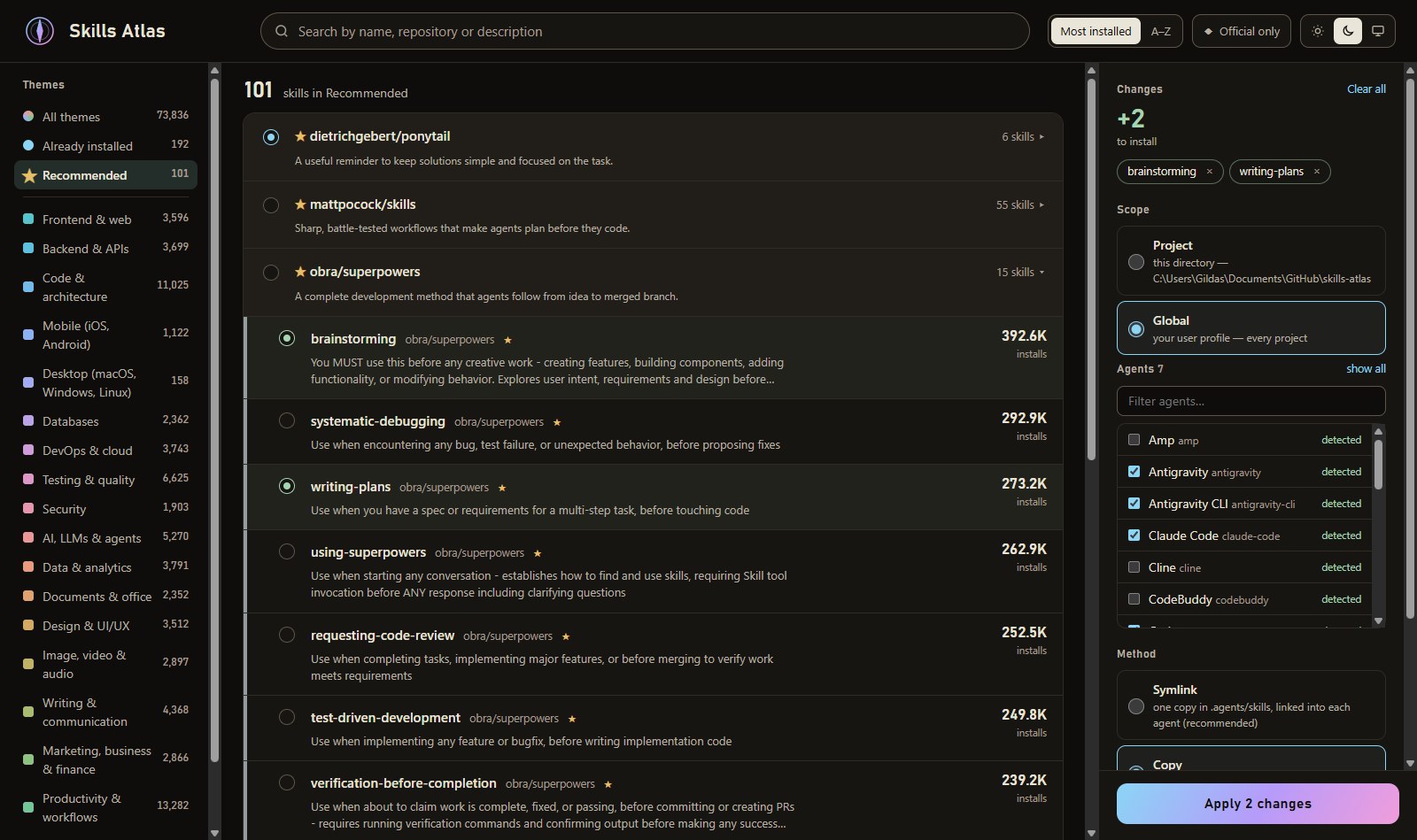
*Web: the same catalog and selection workflow, with light, dark and system appearance.*
`skills-atlas ui` opens a local page with themes and **★ Recommended**, catalog search and skills to tick. Installed skills start ticked; untick one to uninstall it. The changes panel shows scope, agents, method and the exact `npx skills` commands, with live progress when you apply. It shares the terminal's catalog, installation logic and remembered choices.
Search ignores case and accents and checks the skill id, description and source labels. Every word must match. Exact skill names appear first, followed by name prefixes, other name matches, then description or label matches; installs and stars break ties. This applies to the CLI, terminal, web interface, offline demo and MCP search. Searches use relevance until you explicitly choose name or installs order (`--sort`, terminal `s`, or the web sort buttons). With no search, the existing popularity order and Trending growth order remain.
Choose **Details** on a skill, or focus its row and press **`p`**, to read its `SKILL.md` as plain text with risk findings and replacement warnings for the selected scope. Escape closes the dialog and returns focus without changing the selection. The online demo explicitly reports that this preview is unavailable.
The changes panel audits new skills and warns about replacements before Apply. High-risk findings block installation until you explicitly tick **install anyway** for each affected skill; Apply audits again before running commands. Unreadable files are shown as **not audited**, rather than passed, and do not block installation. The saved `skills-atlas audit off` setting disables installation audits and their reads; explicit previews still load on request. These pattern checks are not a safety guarantee.
After a partial failure or lost connection, the page refreshes installed skills and keeps only changes that remain outstanding. Per-skill errors appear in the progress dialog. Close it and choose **Retry remaining changes** to run those changes explicitly; successful operations are left out. An install counts as done only once every selected agent has the skill in the chosen scope, and a retry installs it only for the agents still missing it. If installed state cannot be refreshed, your selection is retained and retry waits for a successful refresh.
The server listens on `127.0.0.1` only. The address carries a random token (after the `#`, so it never leaves your browser) that every request must present, and requests from any other host name are refused, so no other web page can drive installs. Stop it with Ctrl+C.
| Option | Effect |
|---|---|
| `--port ` | port to listen on (default: 4747, or a free one if taken; a stable port lets the page remember its light/dark choice) |
| `--no-open` | print the address without opening the browser |
| `--catalog`, `--offline`, `--refresh`, `--skills-version` | as for `browse` |
### Interface language
The interface speaks **English, French, German, Spanish, Brazilian Portuguese, Italian, Japanese, Korean and Simplified Chinese** (`en`, `fr`, `de`, `es`, `pt`, `it`, `ja`, `ko`, `zh`; `zh-CN` is also accepted). It follows your system language when it is one of these, and falls back to English:
```bash
skills-atlas -l fr # switch to French (or --lang fr): the choice is remembered
skills-atlas -l en # back to English
skills-atlas -l it # italiano
skills-atlas -l zh-CN # Simplified Chinese (saved as zh)
skills-atlas -l ja # 日本語 (es: español, pt: português, de: Deutsch, zh: 简体中文, ko: 한국어)
skills-atlas lang # current language
SKILLS_ATLAS_LANG=fr skills-atlas # force a language from the environment, without saving it
```
The choice made with `-l` is saved in `~/.config/skills-atlas/config.json`, so later runs keep it without the flag. Precedence: `-l`/`--lang`, then `SKILLS_ATLAS_LANG`, then the saved choice, then the system language (`LC_ALL`, `LC_MESSAGES`, `LANG`, or the OS locale on Windows), then English. Chinese, Japanese and Korean characters take two terminal columns; the tree measures them as such, so columns stay aligned. `--theme` accepts a theme id or its label in any language (`security`, `Sécurité`…).
Translations live in `src/i18n/`. Adding a language takes one file implementing the `Messages` type (TypeScript reports any missing key), one entry in `LANGUAGES` and its number locale in `LOCALES`; the tests check that every theme is translated. The Spanish, Portuguese, German, Italian, Chinese, Japanese and Korean translations have not been reviewed by native speakers yet: corrections are welcome.
### Recommended skills
**★ Recommended** appears just below **Already installed** in the terminal tree and web sidebar. It is a personal, curated selection, independent of install counts and official publisher status. It lists repositories: [Ponytail](https://github.com/DietrichGebert/ponytail), [mattpocock/skills](https://github.com/mattpocock/skills), [obra/superpowers](https://github.com/obra/superpowers) and [addyosmani/agent-skills](https://github.com/addyosmani/agent-skills), each with the reason for the pick. Open a repository (→ in the terminal, a click on the web) to see its skills and tick the ones you want, or tick the repository itself to take them all. They are the catalog's own skills: installed ones are detected and ticked, and each also appears in its usual theme, with the same checkbox.
Press **`g`** on a skill to open its GitHub repository in your default browser. In the web interface, focus a skill row first. The key remains ordinary text while searching; local skills without a repository have no GitHub action.
The shared selection is maintained in [`data/recommended.json`](data/recommended.json). To use your own selection without rebuilding or editing the package, create `~/.config/skills-atlas/recommended.json` (or `$XDG_CONFIG_HOME/skills-atlas/recommended.json`). On Windows the default is `%USERPROFILE%\.config\skills-atlas\recommended.json`. A personal file replaces the bundled selection; `[]` hides it. Restart Skills Atlas after editing it.
```json
[
{
"repository": "https://github.com/obra/superpowers",
"reason": "A complete development method that agents follow from idea to merged branch."
},
{
"name": "ponytail",
"repository": "https://github.com/DietrichGebert/ponytail",
"reason": "A useful reminder to keep solutions simple and focused on the task.",
"description": "Helps agents make smaller, maintainable changes with appropriate verification.",
"themes": ["code"],
"path": "skills/ponytail"
}
]
```
Only `repository` (a GitHub repository URL) and `reason` are required. Without `name`, the entry recommends every catalog skill of the repository; with `name` (the skill's frontmatter name), it recommends that single skill. `description`, `themes` (ids from `skills-atlas themes --all`) and the skill directory `path` are optional. Existing catalog metadata is preserved. Add a pick after reviewing its `SKILL.md`, installation source and usefulness; keep `reason` specific enough to explain your choice. The list ships in the built CLI and is merged after every catalog refresh, including offline use. Changes to the shared JSON take effect after `npm run build`; personal JSON needs no build.
### Installed skills
`skills-atlas` reads what is installed in **both scopes**, the current project and your user profile, and opens the tree. With `-p` or `-g` it reads only that scope.
- **Detection** reads what the skills CLI writes on disk: the canonical `.agents/skills` directory, every agent's skills directory, and the lock file for sources. It gives the same result as `npx skills list --json` in under a second instead of ~30 s.
- **Pre-ticked**: installed skills are ticked and marked with their scope, `● project`, `● global` or `● project + global`, under their theme and in an **Already installed** group at the top. That group also holds skills the catalog does not know, such as home-made ones.
- **Uninstall**: unticking an installed skill marks it `✗ will be uninstalled`. On confirmation it is removed from every agent of every scope it was found in, with one `npx skills remove -s … -y [-g]` per scope, then checked on disk.
- **Same name, one folder**: the skills CLI installs by name, so a skill from another repository replaces an installed one of the same name. The review screen lists such replacements before anything runs; `install` and `import` print them.
- **Updates**: globally installed skills with a newer version on GitHub read `↑ update available`, and the status line counts them. Press `u` to mark them: they are reinstalled at their latest version for the agents that already have them. The check runs in the background, one GitHub request per repository, with `GITHUB_TOKEN`, `GH_TOKEN` or the GitHub CLI's token when there is one (without a token GitHub allows 60 requests an hour). Project skills are not checked: their lock records a hash GitHub cannot be compared with. A repository GitHub does not answer for (rate limit, timeout, private or deleted), a truncated tree or a skill folder it no longer has makes the check incomplete, never "up to date": the tree shows a warning, and `outdated` and `update` name each one on stderr and exit with 1 (`outdated --json` keeps its array on stdout; `update` still runs the confirmed updates). Before you update, `p` on a skill marked for update shows what changes in its `SKILL.md` (added lines green, removed red) and only the warning signs the new version brings. `skills-atlas update` prints each skill's `+added −removed` lines and those new warning signs before running anything, `--dry-run` included; the MCP server's `outdated_skills` returns `{ skills, unchecked }`, each skill with `lines_added`, `lines_removed` and `new_risks`, and `unchecked` listing what could not be checked (`source`, `reason`). Before each update, skills-atlas records the commit each skill was installed from, in `~/.config/skills-atlas/history.json`, five per skill, but only a commit it can prove: one a rollback installed while the lock still records the same folder hash (kept in `revisions.json` next to it), the installer's own ref, or the last commit touching the folder before the lock's install date whose folder hash on GitHub matches the lock's. A version that cannot be proven (offline, a folder hash that matches no such commit) is not recorded, and `update` says that skill has no way back. `skills-atlas rollback ` reinstalls the latest of them for the skill's own agents, audited at that revision; `--list` shows them and `--to ` picks one. Skills updated before this version have no way back.
- **Install**: ticking a skill that is not installed installs it. The scope is asked after the tree, pre-filled with your last choice, unless `-p`/`-g` sets it.
- **Questions**: the status line shows the balance `+N −M`. Scope, agents and method are only asked when there is something to install.
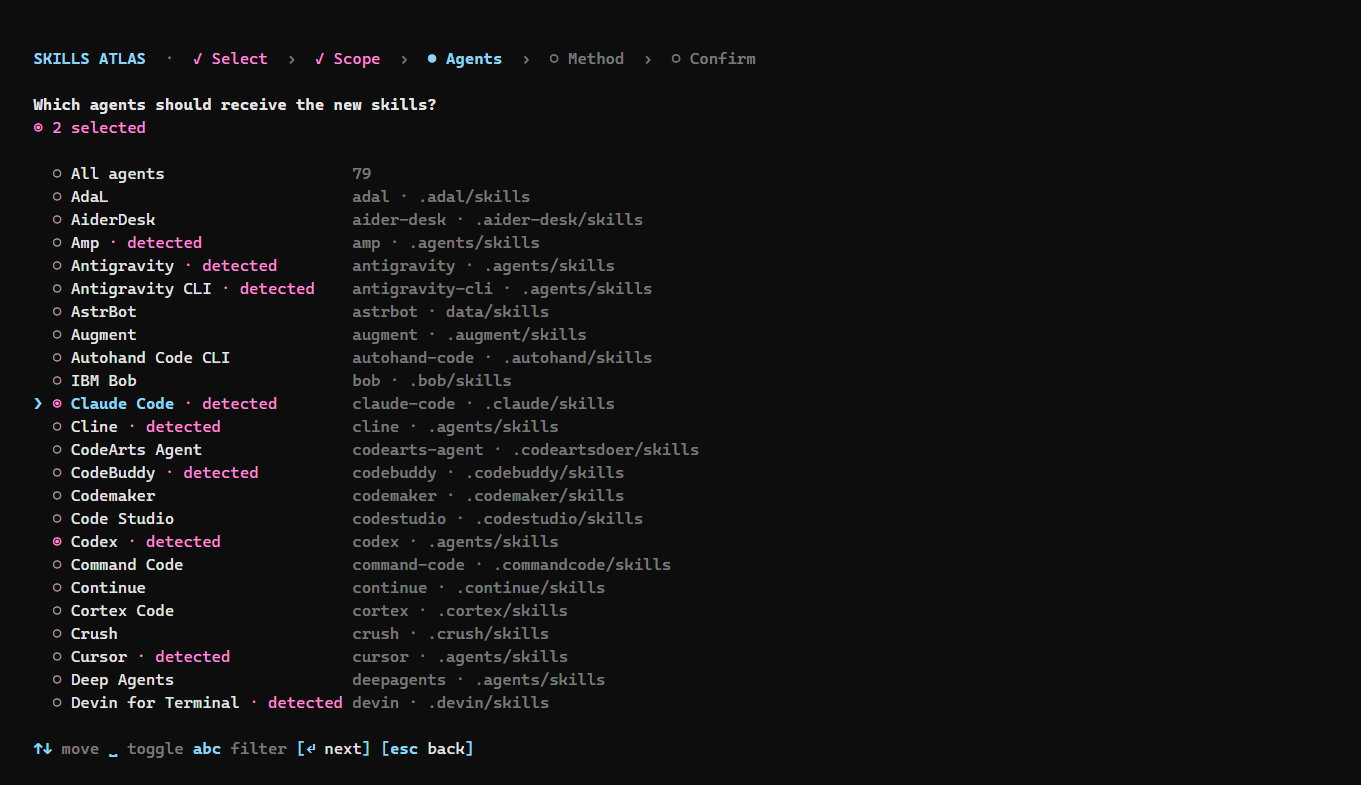
*Agents step: every agent the skills CLI supports, with those detected on this machine flagged `· detected`.*
### Installation diagnostics
`skills-atlas doctor` checks project and global installations without changing any files. Use `-p` or `-g` for one scope and `--json` for a machine-readable report. It reports broken links, missing or unreadable `SKILL.md` files, invalid lock files and lock entries without a readable installed skill. Missing ordinary agent directories and absent lock files are normal. It exits with 1 when it finds issues and 0 otherwise; it never repairs or removes anything automatically.
### Keys (tree)
| Key | Action |
|---|---|
| ↑ ↓ / PgUp PgDn | move |
| → / ← | expand / collapse a theme |
| space | tick a skill, or a whole theme (unticking an installed skill uninstalls it) |
| `/` | search (enter to keep, esc to clear) |
| `a` | expand / collapse all |
| `s` | sort: installs (default) ↔ name |
| `o` | only official skills (marked ◆) |
| `g` | open the focused skill's GitHub repository |
| `p` | preview the focused skill's `SKILL.md` before installing it, with its warning signs (↑↓ scroll, esc back) |
| `u` | mark the focused outdated skill, or the outdated skills of a group, for update |
| `U` | mark every outdated skill for update |
| enter | continue |
| `q` | quit |
The mouse works too: the wheel moves through the list, a click ticks a skill, opens a theme (or ticks the whole theme on its checkbox), and picks an answer in the next steps. The interface then runs on the terminal's alternate screen; hold Shift to select text, or start with `--no-mouse` to keep the normal screen.
### Install options
| Option | Effect |
|---|---|
| `-a, --agent ` | target agents (`claude-code`, `cursor`, `codex`, `github-copilot`…; `'*'` = all) |
| `-g, --global` / `-p, --project` | scope: your user profile or the current project |
| `--copy` / `--symlink` | one copy per agent, or a symlink to `.agents/skills` |
| `-y, --yes` | no questions; `--agent` becomes required |
| `--dry-run` | print the `npx skills` commands without running them |
| `--no-audit` | install without the [security audit](#risk-check) (`skills-atlas audit off` for good) |
| `--no-mouse` | keyboard only: normal screen, native text selection |
| `--skills-version ` | skills CLI version (default: 1.7.0, pinned) |
| `--catalog ` | alternative catalog |
| `--offline` | do not download the latest catalog (also `SKILLS_ATLAS_OFFLINE=1`) |
| `--refresh` | check GitHub for a newer catalog now instead of waiting up to 12 hours (an unchanged one is not downloaded again) |
| `--all`, `--min-installs ` | include skills with no installs or stars / minimum installs |
| `-s, --sort ` | `installs` (default) or `name`; also for `list` |
| `--official` | only official skills; also for `list` and `themes` |
| `--ready` | only skills whose stated programs are all on your `PATH` (skills that state none stay); also for `list` |
| `--active` | leave out skills of archived repositories and of those not pushed to for over a year; also for `list` |
| `-l, --lang ` | interface language, remembered |
Any option left out is asked after the selection, pre-filled with your last choices (`~/.config/skills-atlas/config.json`) and the agents detected on the machine.
The terminal uses a sky-blue, lavender and pink palette, including the ASCII logo gradient. Selected skills, completed steps and success summaries use candy pink (`#FF8AD8`); recommended skills keep their gold star. Piped output stays plain, and the logo respects `NO_COLOR`.
### What runs
Selected skills are grouped per repository, and each repository gets one call:
```
npx -y skills@1.7.0 add -s -a [-g] [--copy] -y --json
```
- **The source comes first**, because `-s` and `-a` take every argument that follows them.
- **`-a` is always passed.** With `-y` alone, the skills CLI would install to every detected agent.
- **Results are read from `--json`.** Outside that mode, the skills CLI exits 0 even when an install fails.
- **Calls run one after the other**, because they share the same lock file.
- **Uninstalls run first**, as a single `npx skills remove -s … -y [-g]` call.
In a terminal, progress is shown uv-style: one line per task (uninstall, then one per repository) with a spinner, a bar that follows the steps `skills add` reports (fetching the repository, installing, security audit) and the elapsed time, an overall bar, then a `+ installed` / `- uninstalled` / `× failed` summary. When the output is piped, or with `--verbose`, plain lines are printed instead.
## The catalog
`data/catalog.json.gz` is rebuilt every other day by GitHub Actions (`npm run crawl`). The CLI downloads that snapshot from GitHub, keeps it in `~/.cache/skills-atlas/` (or `$XDG_CACHE_HOME/skills-atlas/`) and checks for a new one at most every 12 hours, with an ETag, so an unchanged catalog is not downloaded again. It uses the snapshot bundled in the npm package when that one is newer, when GitHub cannot be reached (it then waits an hour before trying again), or with `--offline`. `--refresh` skips the 12-hour wait; failing that, deleting `~/.cache/skills-atlas/` has the same effect on older versions. Changes to the catalog format must stay readable by released versions, which download it too. A catalog is checked when it loads: a download with the wrong shape is rejected before it reaches the cache, and the cache or the bundled snapshot is used instead; entries `install` would refuse (a name starting with `-`, for one) are left out. A crawl that finds no skill fails without replacing the snapshot.
The snapshot is built from:
| Source | Access | Provides |
|---|---|---|
| [claude-plugins.dev](https://claude-plugins.dev) | `GET /api/skills?limit=100&offset=N`, full listing | ~47,000 skills, descriptions, stars, installs |
| [skills.sh](https://skills.sh) | sitemaps (the 20,000 most installed skills, in order); optionally `GET /api/search?owner=` | popularity rank; install counts for the top N owners (`--max-owners N`) |
| [Smithery](https://smithery.ai/skills) | `registry.smithery.ai/skills`, at most 500 results per query | categories (Coding, Design, Security…) |
| GitHub | Trees API + `raw.githubusercontent.com` | missing descriptions, read from `SKILL.md` |
| [officialskills.sh](https://officialskills.sh) | sitemap | official publishers: every skill whose GitHub owner is listed there is flagged `official` |
**Rate limits.** The skills.sh search API allows 30 requests per minute. The crawl queries it at that pace, about 2 s per owner. The scheduled workflow covers the top 600 owners; a local crawl covers none by default. With `VERCEL_OIDC_TOKEN`, the crawl uses the [official API](https://skills.sh/docs/api) instead, which returns the full leaderboard.
New snapshots retain collection status per source. If a source was unavailable during collection, the terminal and web interface warn that the catalog is partial. `packs --json` also includes `available`, `total` and `missing` fields. Older snapshots without source diagnostics remain readable; their source health is unknown. No extra source checks run while browsing.
**Processing:**
1. **Deduplication** on `owner/repo@name`, case-insensitive.
2. **Encoding repair**: claude-plugins.dev serves Chinese and Japanese text double-encoded in UTF-8.
3. **Missing descriptions** (the 5,000 most popular skills):
- with `GITHUB_TOKEN` or a `gh` session, one Trees call per repository locates each `SKILL.md`;
- otherwise the crawl tries the usual locations.
4. **Ordering**: skills ranked by skills.sh first, in rank order; then the others by installs and stars.
**Themes**: each skill gets one or two themes (see `src/catalog/taxonomy.ts`), from:
- keywords found in its name (weight 3) and description (weight 1), including Chinese and Japanese ones;
- the Smithery or SkillsMP categories it carries, mapped to these themes.
```bash
npm run crawl # full crawl, about 5 min
npm run crawl -- --max-owners 300 # + skills.sh installs of the top 300 owners (about 11 min more)
npm run reclassify -- --sample other # re-apply the taxonomy without crawling
npm run sync-agents -- --ref v1.7.0 # regenerate the agent list from vercel-labs/skills
```
## Development
```bash
npm install
npm test # vitest
npm run typecheck
npm run dev # run the CLI from sources
npm run build # dist/cli.js
npm run demo # docs/demo/index.html: the web interface with embedded data, for GitHub Pages
```
The CLI defaults to React's production runtime (also with `npm run dev`) with a maximum of 60 frames per second. It uses Ink's standard renderer because the incremental renderer in Ink 6.8 can duplicate lines. Set `NODE_ENV=development` explicitly when debugging React. The compiled `dist/cli.js` launcher and its sibling chunks must stay together.
## Related projects
The same tree, flags and review for the other kinds of agent extensions:
- [mcp-atlas](https://github.com/devohmycode/mcp-atlas): MCP servers, written into the config of Claude Code, Claude Desktop, Cursor, Codex and Grok.
- [plugins-atlas](https://github.com/devohmycode/plugins-atlas): agent plugins from marketplaces (skills, commands, subagents, hooks, MCP servers).